

Email Server Blacklist: How to Fix & Prevent It in 2026
You just ran your mail server through MxToolbox and saw red. Fabelsources, [UCEProtect Level 2](https://www.dnsbl.info/dnsbl-details.php?dnsbl=dnsbl-3.uceprotect.net, UCEProtect Level 3 - three hits on a server that sends maybe 500 emails a month to existing clients. Your stomach drops.
Here's the thing: most of those listings are noise. The blacklists that actually matter fit on one hand, and the ones that show up most often in panic-inducing MxToolbox scans are the ones you can safely ignore.
Triage First
Before you do anything else:
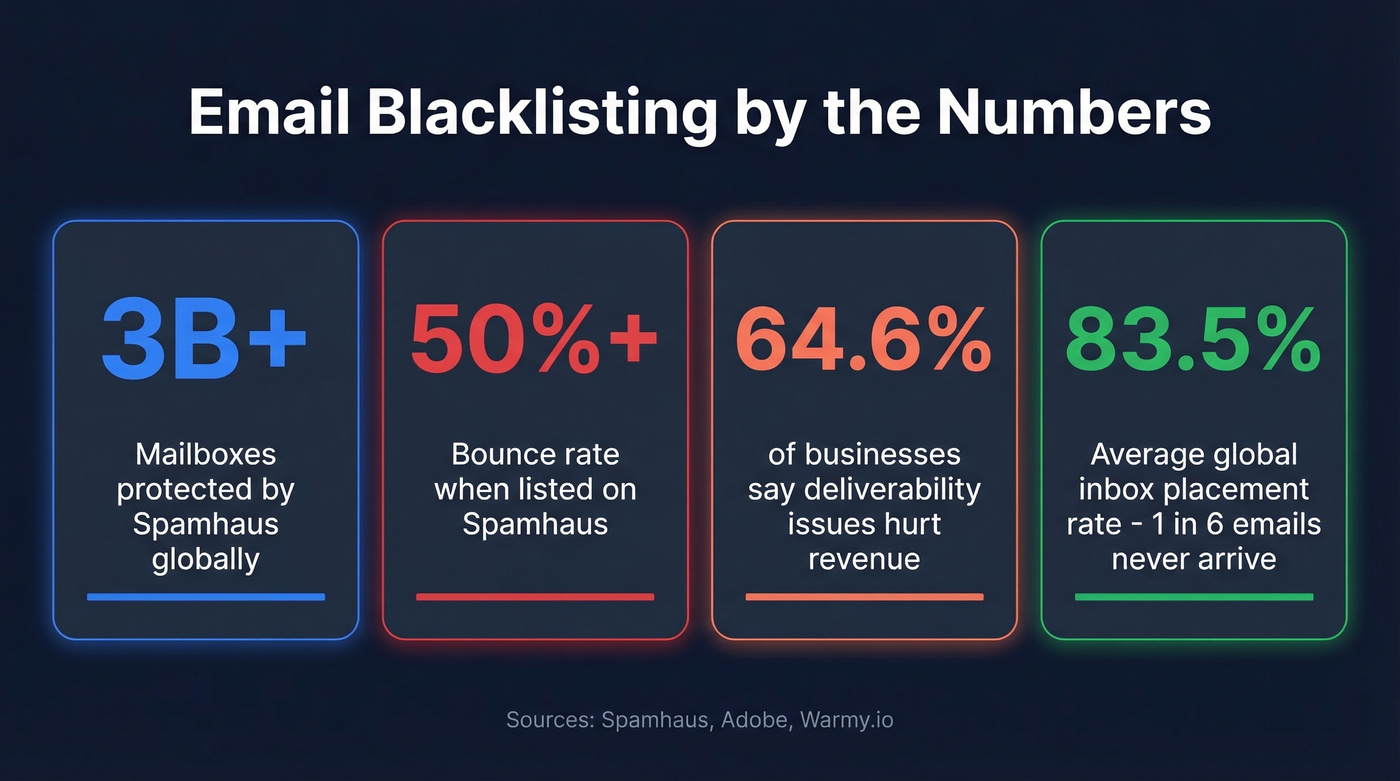
- Listed on Spamhaus? Drop everything and fix it. Spamhaus can tank your email overnight - bounce rates over 50%, deliverability down 60%+.
- Listed on UCEProtect L2/L3 or Fabelsources? Close the tab. These usually have near-zero impact on deliverability. Adobe's deliverability team ignores UCEProtect entirely.
- Not sure what caused it? Check three things: bad contact data (spam traps, high bounces), missing SPF/DKIM/DMARC authentication, or shared hosting where someone else's bad behavior got your IP listed.
What Is a DNSBL?
An email server blacklist is a real-time database that receiving mail servers query to decide whether to accept your email. The technical term is DNSBL - DNS-based Blackhole List. When your server tries to deliver a message, the recipient's mail server reverses your IP address and appends the blacklist's zone name. A query like 1.2.0.192.zen.spamhaus.org returns a 127.0.0.x response code if you're listed, and the receiving server either rejects or quarantines your message.
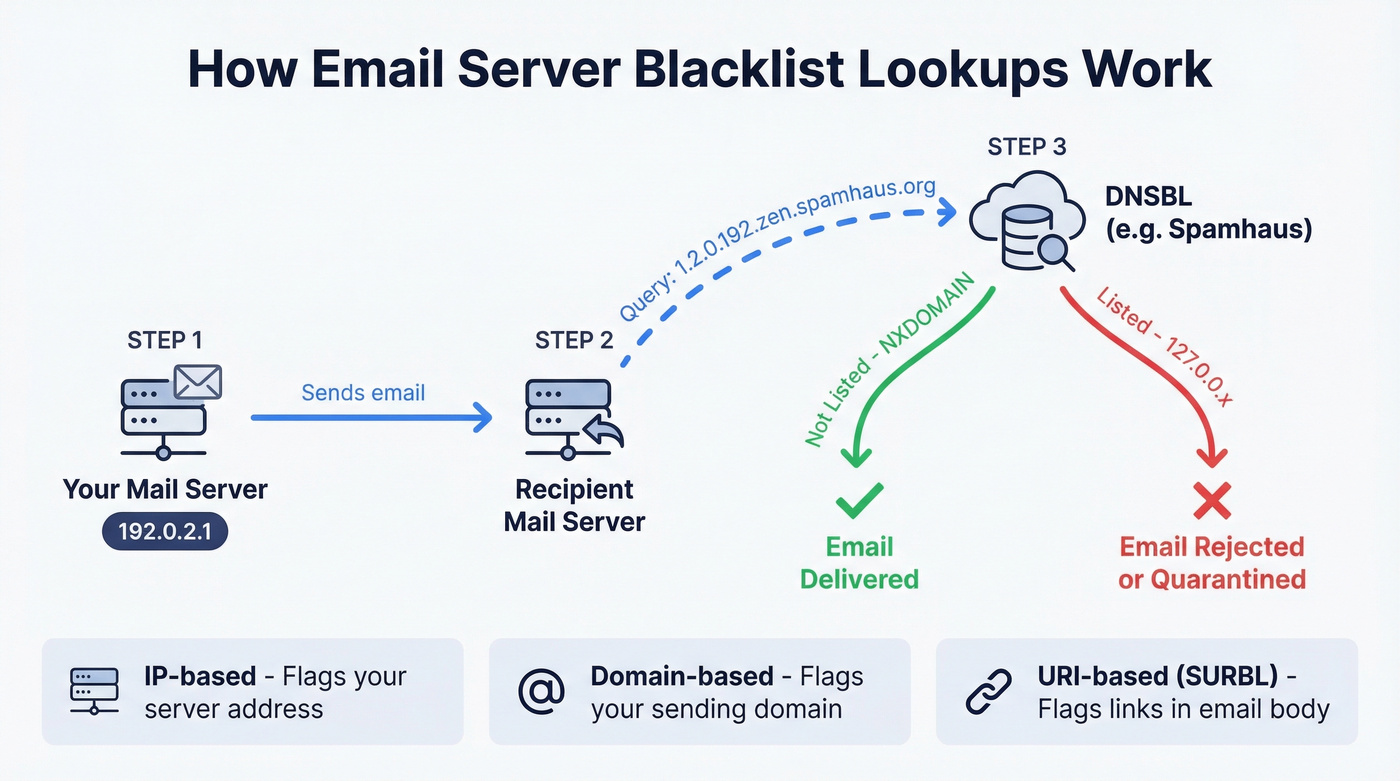
There are three types. IP-based blacklists flag your sending server's address. Domain-based blacklists flag your sending domain. URI-based blacklists like SURBL flag links inside your email body. Each implies a different root cause, and each requires a different fix.
Spamhaus alone protects 3+ billion mailboxes globally. When they list you, the impact is immediate and severe. When a list like Fabelsources flags you, almost nobody notices.
Which Blacklists Actually Matter
Most guides treat all blacklists equally. They're not. The gap between a Spamhaus listing and a UCEProtect listing is the gap between a house fire and a burnt piece of toast.
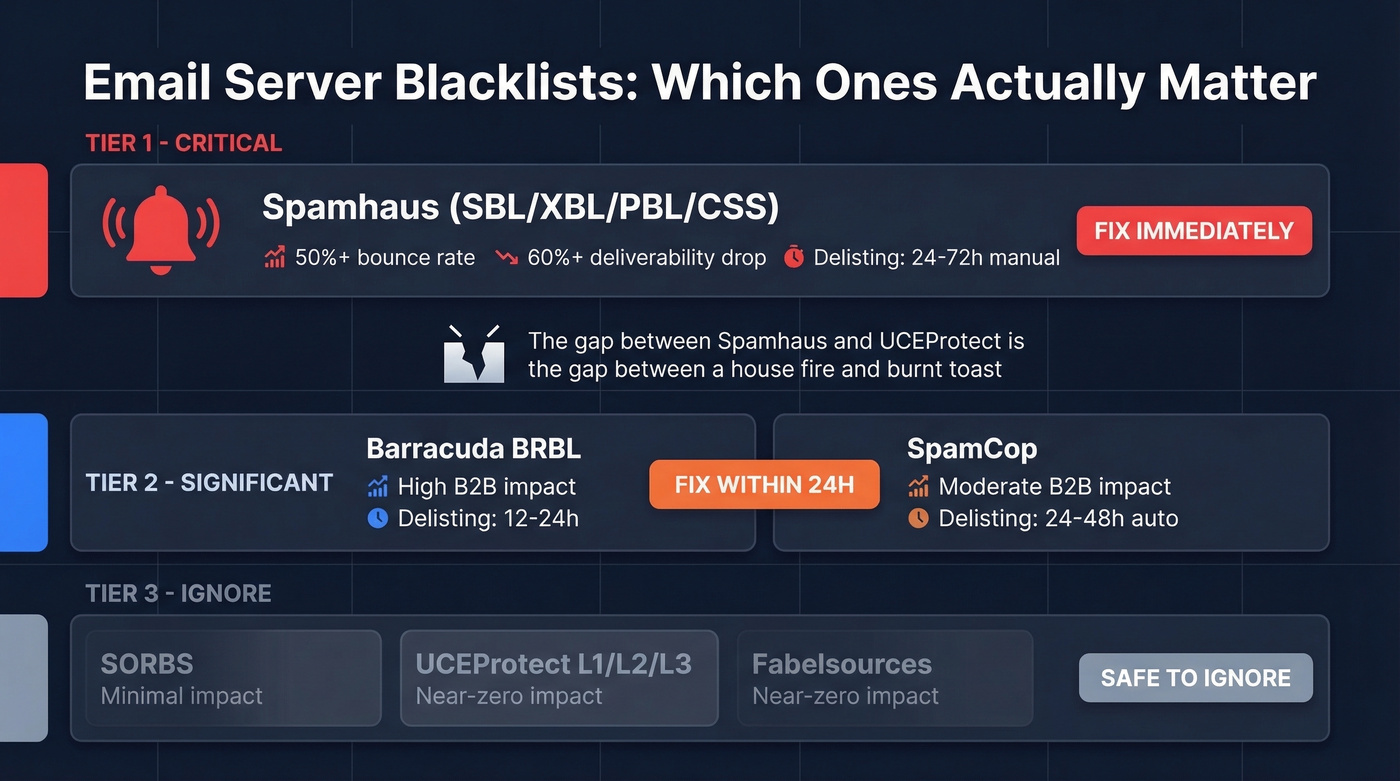
| Tier | Blacklist | Impact | Delisting Time | Action |
|---|---|---|---|---|
| 1 - Critical | Spamhaus (SBL/XBL/PBL/CSS) | 50%+ bounce, 60%+ drop | 24-72h (manual) | Fix immediately |
| 2 - Significant | Barracuda BRBL | High in B2B | 12-24h | Fix within 24h |
| 2 - Significant | SpamCop | Moderate; B2B impact | 24-48h (auto) | Monitor, fix cause |
| 2 - Moderate | Abusix, Invaluement, SURBL | Moderate | 24-48h | Fix if bouncing |
| 3 - Ignore | SORBS | Minimal | Weeks | Low priority |
| 3 - Ignore | UCEProtect (L1/L2/L3) | Near-zero | L1: 7d auto; paid "express" | Ignore entirely |
| 3 - Ignore | Fabelsources | Near-zero | Varies | Ignore entirely |
Spamhaus is the only Tier 1 blacklist. Per Adobe's deliverability documentation, a Spamhaus listing can cause bounce rates over 50%. Gmail, Outlook, Yahoo, and virtually every major mailbox provider consult it. If you're on Spamhaus, nothing else matters until you're off it.
Barracuda BRBL is significant because Barracuda appliances are everywhere in B2B environments. If your prospects work at companies running Barracuda email security, this listing blocks you.
SpamCop isn't used by major North American ISPs for hard blocking decisions, but it impacts B2B deliverability. Listings are dynamic and typically resolve within one business day once the spam reports stop.
UCEProtect deserves special mention - for the wrong reasons. They charge for "express" delisting and have minimal reach among major mailbox providers. A recent r/email thread captured this exact scenario: a HostGator user panicking over Fabelsources and UCEProtect L2/L3 listings on just 500 sends to existing clients. That's noise, not signal.
LashBack is a niche suppression-file-based blacklist with roughly 1 million entries. It specifically targets senders who email addresses from purchased suppression lists. If you're not buying suppression files, you'll never encounter it.
One more wrinkle: some of the most impactful reputation systems aren't public blacklists at all. Proofpoint Dynamic Reputation and Cloudmark CSI are private, non-queryable systems. You'll only know they're blocking you when you see it in a bounce message.
How to Read a Bounce Message
When a blacklist blocks your email, the bounce message tells you exactly which one:
550 5.7.514 Decision Engine rejected because of IP Block - is in an RBL: Blocked - see spamcop.net
550 means the receiving server permanently rejected the message. 5.7.x is the policy rejection category - the server decided your email violates its rules. The rest names the specific blacklist and often includes a lookup URL.
Microsoft uses its own error codes. A 550 5.7.511 means your IP is blocked by Microsoft's internal reputation system, which isn't a traditional DNSBL but produces identical symptoms.
Read the full bounce message before doing anything else. Private reputation systems like Proofpoint and Cloudmark only reveal themselves here - you won't find them on MxToolbox.
Why You Got Blacklisted
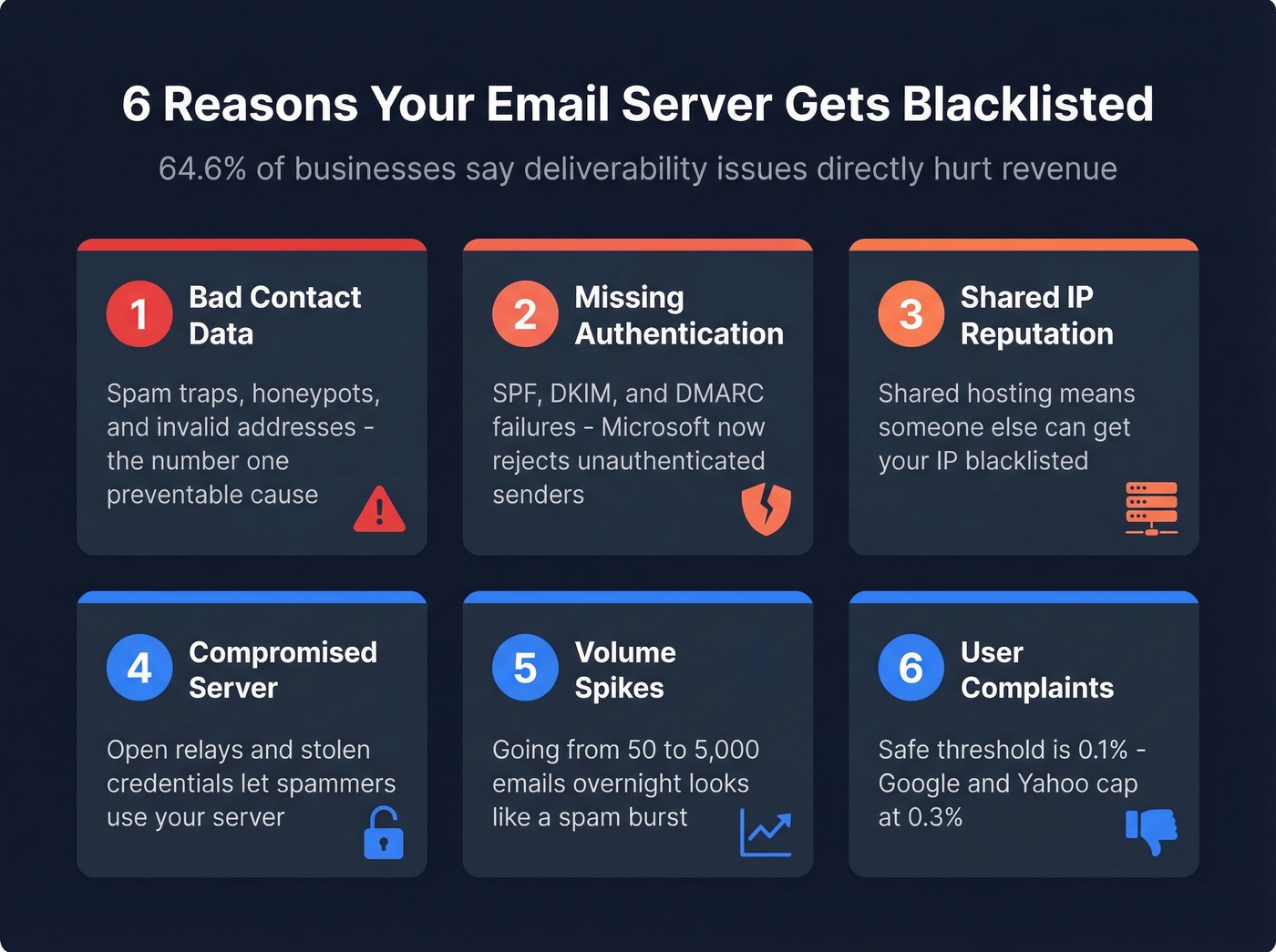
Blacklists don't list you randomly. Something triggered it. And the stakes are real: 64.6% of businesses report that deliverability issues directly hurt revenue, and blacklisting is the most severe form of deliverability failure. In our experience, these six causes account for nearly every listing we see.
Bad Contact Data
This is the number one preventable cause. Sending to unverified lists means you're hitting spam traps - email addresses that don't belong to real people, planted specifically to catch senders with poor data hygiene. Every bounce chips away at your sender reputation, and enough bounces trigger automatic blacklisting.
The fix is straightforward: verify every list before sending. Prospeo's 5-step verification catches spam traps, honeypots, and invalid addresses before they damage your domain, with 98% email accuracy at roughly $0.01 per email - cheaper than a single blacklist incident.

Missing or Failing Authentication
SPF, DKIM, and DMARC aren't optional anymore. Since May 2025, Microsoft enforces authentication requirements for senders exceeding 5,000 emails per day to Outlook.com. Google and Yahoo have similar requirements. Missing authentication doesn't just hurt deliverability - it's now grounds for outright rejection regardless of blacklist status.
Shared IP Reputation
If you're on shared hosting - HostGator, GoDaddy, or similar - you're gambling with someone else's reputation. Multiple domains share the same outbound IP, and one bad actor on your server gets the entire IP listed.
Compromised Server or Open Relay
An open relay accepts and forwards email from anyone. It's a spammer's dream. To test for this, open an SMTP session to your server on port 25 and attempt MAIL FROM and RCPT TO with an external address. If it accepts the relay without authentication, you've found your problem. Compromised credentials are equally dangerous - attackers use your server to send spam, and you eat the blacklist hit.
Volume Spikes
Sudden surges from new or untrusted IPs look like spam bursts to receiving servers. Going from 50 emails a day to 5,000 overnight will get you flagged. Gradual IP warming is the prevention.
User Complaints
Google and Yahoo cap complaint rates at 0.3%, but the safe threshold is 0.1%. The average global inbox placement rate is 83.5% - roughly 1 in 6 emails never reach the inbox, and complaints are a major reason why.

Bad contact data is the #1 preventable cause of blacklisting. Every spam trap hit and hard bounce pushes your IP closer to Spamhaus. Prospeo's 5-step verification eliminates spam traps, honeypots, and invalid addresses before they touch your mail server - 98% email accuracy at ~$0.01 per email.
Fix your data before Spamhaus fixes your deliverability for you.
How to Get Delisted
First Steps (Universal)
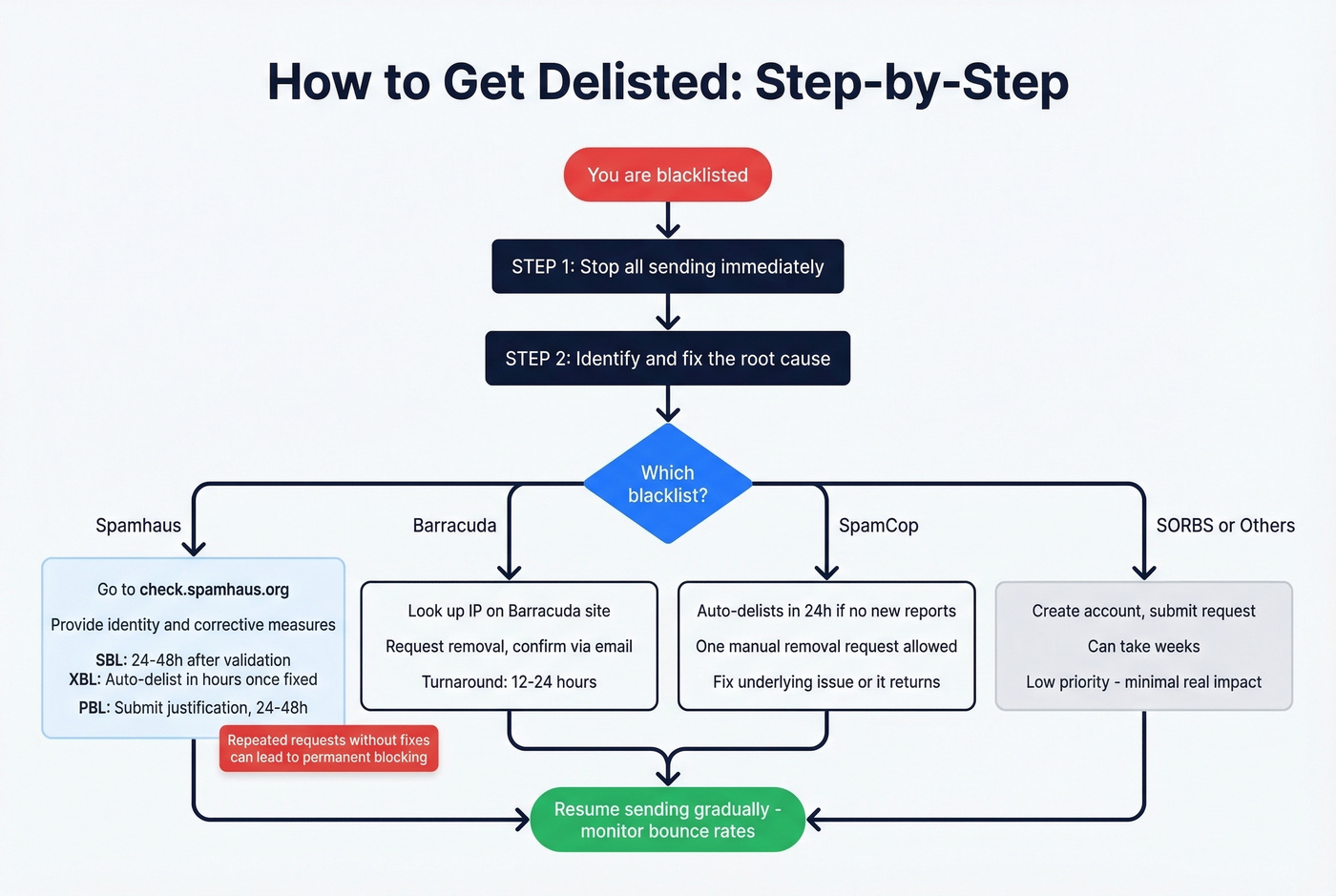
Stop all sending from the listed IP or domain immediately. Continuing to send while listed makes everything worse. Identify and fix the root cause before requesting removal - every blacklist operator asks what you've done to prevent recurrence. If you can't answer that, your request gets ignored.
Spamhaus Removal
This is the big one, so let's break it down by sub-list.
SBL (Spamhaus Block List): Go to check.spamhaus.org, look up your IP, and follow the removal link. You'll need to provide your identity, the cause of the listing, and the corrective measures you've taken. First offenses can be delisted instantly if the issue is clearly fixed. Expect 24-48 hours after validation for most cases.
XBL (Exploits Block List): This uses CBL data. Follow the CBL-specific instructions - delisting is typically automatic within hours to 24 hours once the exploit or compromised system is remediated.
PBL (Policy Block List): This isn't a spam accusation. It lists IPs that shouldn't be sending email directly - residential, dynamic IPs. If you're running a legitimate mail server, submit a justification. If you're on a residential connection, route through your ISP's relay or a third-party sending service. Resolution takes 24-48 hours.
A critical warning: repeated delisting requests without fixing the root cause can lead to permanent blocking. Spamhaus takes this seriously.
Barracuda BRBL
Look up your IP on Barracuda's site, request removal, and confirm via the verification email they send. Typical turnaround is 12-24 hours.
SpamCop
SpamCop listings are dynamic - they auto-delist within 24 hours if no new spam reports come in. You can request immediate removal once, but the listing returns if the underlying issue isn't resolved.
SORBS
Create an account, identify which specific SORBS list you're on, and submit a removal request. Timeframes stretch to weeks. SORBS has minimal real-world impact, so don't lose sleep over a slow resolution.
0spam (Auto-Removal)
The rbl.0spam.org list auto-removes within 24 hours once spam stops - manual removal isn't possible. Long-term listings require up to 60 days of clean sending. There's also a rate limit: one IP removal every three hours per account.
Provider-Specific Blocks
Not every block comes from a traditional DNSBL. Microsoft, Gmail, and Yahoo all maintain their own internal reputation systems that produce identical symptoms but require different escalation paths.
Microsoft/Outlook: Capture the full NDR including headers and error codes. A 550 5.7.511 error means Microsoft's internal system blocked you. Submit a request including the affected IP, the exact error, and your remediation steps. Expect a response within about 48 hours.
Gmail: Use Google Postmaster Tools for reputation monitoring. Gmail rarely tells you directly that you're blocked - you'll see declining inbox placement and increasing spam folder delivery instead.
Yahoo: Enroll in Yahoo's complaint feedback loop to get notified when recipients mark your email as spam. This gives you early warning before a full block.
Cisco Talos: Check your IP's reputation score on the Talos Intelligence portal and dispute via their support process if you believe the classification is wrong.
Writing a Delisting Request That Actually Works
Vague requests get ignored. We've seen teams submit "please remove us" with zero context and wait weeks for a response that never comes. Every effective delisting request includes these elements:
- The listed IP or domain - be specific, especially if you manage multiple
- When you discovered the listing - date and how you found it
- The identified root cause - "we found compromised credentials on our SMTP server" is good; "we're not sure what happened" is not
- Exact corrective steps taken - password resets, list cleanup, authentication fixes, with dates
- Prevention measures going forward - monitoring tools deployed, verification processes added, IP warming plan
- Your contact information - a real person the operator can reach
The more specific you are about what went wrong and what you've done about it, the faster you'll get delisted.
Post-Delisting Recovery
Getting delisted isn't the finish line. Receiving servers are watching your behavior closely in the days after removal.
Start at 10-20% of your normal volume. Send only to your most engaged recipients first - people who've opened or clicked recently. Ramp over 1-2 weeks, increasing gradually. Don't blast your full list on day one.
Set monitoring alerts: bounce rate above 2% or complaint rate above 0.1% means something's still wrong. Catch it before the blacklists do. Run your IP through MxToolbox and Spamhaus Lookup every morning for the first two weeks until you're confident the listing won't recur.
We've seen teams get delisted, immediately resume full-volume sending, and end up re-listed within 48 hours. The ramp matters.
How to Prevent Blacklisting
Look, if your average deal size is under five figures and you're sending fewer than 1,000 emails a day, you probably don't need to obsess over blacklist monitoring tools. You need clean data and proper authentication. Fix those two things and blacklists become a non-issue for 90% of senders.
Set Up SPF, DKIM, and DMARC
Non-negotiable in 2026. Microsoft enforces authentication for senders exceeding 5,000 emails per day, and Google and Yahoo have similar requirements. If your DNS records aren't configured correctly, you're getting rejected before blacklists even enter the picture.
Verify Your Email Lists
Every bounce chips away at sender reputation. Spam traps are invisible landmines planted across the internet. Verify every list before sending - at roughly $0.01 per email, verification is the cheapest insurance against a blacklist incident.
Use a Dedicated IP
Shared hosting means gambling with someone else's reputation. A dedicated sending IP costs more but gives you full control over your sender score. If you can't justify a dedicated IP, at minimum use a reputable transactional email service that manages IP reputation on your behalf.
Monitor Continuously
Don't wait for bounces to tell you something's wrong. Google Postmaster Tools and Microsoft SNDS give you ongoing visibility into how mailbox providers see your sending reputation. Schedule a weekly blacklist check using MxToolbox or MultiRBL so you catch new listings before they snowball.
Warm Up New IPs Gradually
Sudden volume spikes from untrusted IPs trigger blacklisting. Start with 10-20 emails per day and increase gradually over 4-6 weeks.
Keep Complaint Rates Below 0.1%
Google and Yahoo cap at 0.3%, but 0.1% is the safe threshold. If you're consistently above that, your content or targeting needs work - not just your infrastructure.
Delisting is damage control. Prevention is the move. Teams using Prospeo's verified contact data see bounce rates under 4% - well below the thresholds that trigger blacklisting. Data refreshed every 7 days means you're never sending to stale addresses that have turned into spam traps.
Stop chasing delistings. Start with data that never gets you listed.
Best Free Blacklist Checkers
We've tested every free checker on this list. MxToolbox gives you the fastest overview, but Spamhaus Lookup is the one that actually matters.
| Tool | Lists Checked | IP/Domain | Best For | Price |
|---|---|---|---|---|
| MxToolbox | 100+ | Both | Quick first check | Free (paid tiers) |
| Spamhaus Lookup | Spamhaus only | Both | Authoritative check | Free |
| MultiRBL (valli.org) | 100+ | Both | Granular categories | Free |
| DNSChecker | 50+ | Domain/IP | Domain-based lookup | Free |
| DNSBL.info | Multiple | IP only | Simple IP check | Free |
MxToolbox for a quick scan across 100+ lists. Spamhaus Lookup to confirm the one that actually matters. Google Postmaster Tools plus Microsoft SNDS for ongoing monitoring so you catch problems before they become listings.
MultiRBL deserves a mention for its granular status categories - it distinguishes between blacklisted, brownlisted, yellowlisted, and whitelisted, which gives you more context than a simple yes/no.
FAQ
How long does it take to get off a blacklist?
Spamhaus takes 24-72 hours with a manual request after you've fixed the root cause. Barracuda resolves in 12-24 hours. SpamCop auto-delists within 24-48 hours once spam reports stop. SORBS can take weeks. The fastest path is always fixing the underlying problem before requesting removal.
Can I get blacklisted on a shared hosting IP?
Yes. On shared hosting, one bad sender on your IP gets everyone listed. If this keeps happening, switch to a dedicated IP or a transactional email service like Postmark or SendGrid that manages IP reputation on your behalf.
Should I worry about UCEProtect listings?
No. Adobe's deliverability team ignores UCEProtect entirely. They charge for express delisting and have minimal reach among major mailbox providers. Focus on Spamhaus and Barracuda instead - those are the listings that actually affect whether your emails arrive.
How do spam traps cause blacklisting?
Spam traps are email addresses that don't belong to real people, planted by blacklist operators to catch senders with poor data hygiene. Sending to one proves you're using unverified lists. Running contacts through a verification service that filters spam traps and honeypots removes these landmines before they trigger a listing.
Does SPF/DKIM/DMARC prevent blacklisting?
Not directly - authentication proves you're a legitimate sender, but it won't stop a listing caused by spam complaints or bad data. Missing authentication is now grounds for rejection by Microsoft, Google, and Yahoo regardless of blacklist status. Think of it as table stakes, not a shield.