

Mail Server Blacklist Check: What Actually Matters in 2026
It's Monday morning. Your inbox is flooded with bounce notifications, your sales team can't reach prospects, and the CEO's transactional emails aren't landing. You run a mail server blacklist check and see red flags everywhere.
Before you panic: there are over 300 publicly available blacklists and nearly 45% of global email gets classified as spam, so the filtering ecosystem is massive. But most of those listings don't matter. The three that do are fixable - usually within 24-48 hours.
What You Need (Quick Version)
Check Spamhaus, Barracuda, and SpamCop. Those are the three blacklists that most consistently affect real-world delivery. If you're listed on Spamhaus, drop everything and follow the delisting steps below. If your scan comes back clean but mail still bounces, the problem is likely domain or URL reputation - skip to that section.
How DNS-Based Blocklists Work
A DNSBL lookup queries DNS-based blocklists to see if your sending IP or domain appears on any known spam lists. Here's the thing most people miss: a blacklist doesn't block your email directly. The mailbox provider consulting that blacklist does. Gmail, Outlook, and corporate mail servers each decide which lists to trust, and they don't all trust the same ones.
Three types worth knowing:
- IP-based DNSBLs like Spamhaus ZEN, Barracuda, and SpamCop track sending IP addresses flagged for spam.
- Domain and URI lists like Spamhaus DBL, SURBL, and URIBL flag domains found in spam message bodies - your website URL in an email signature can trigger these.
- Specialty lists track TOR exit nodes, open proxies, and backscatter sources. These rarely affect legitimate senders.
Which Blacklists Actually Matter
Stop checking 100+ blacklists. Check three.
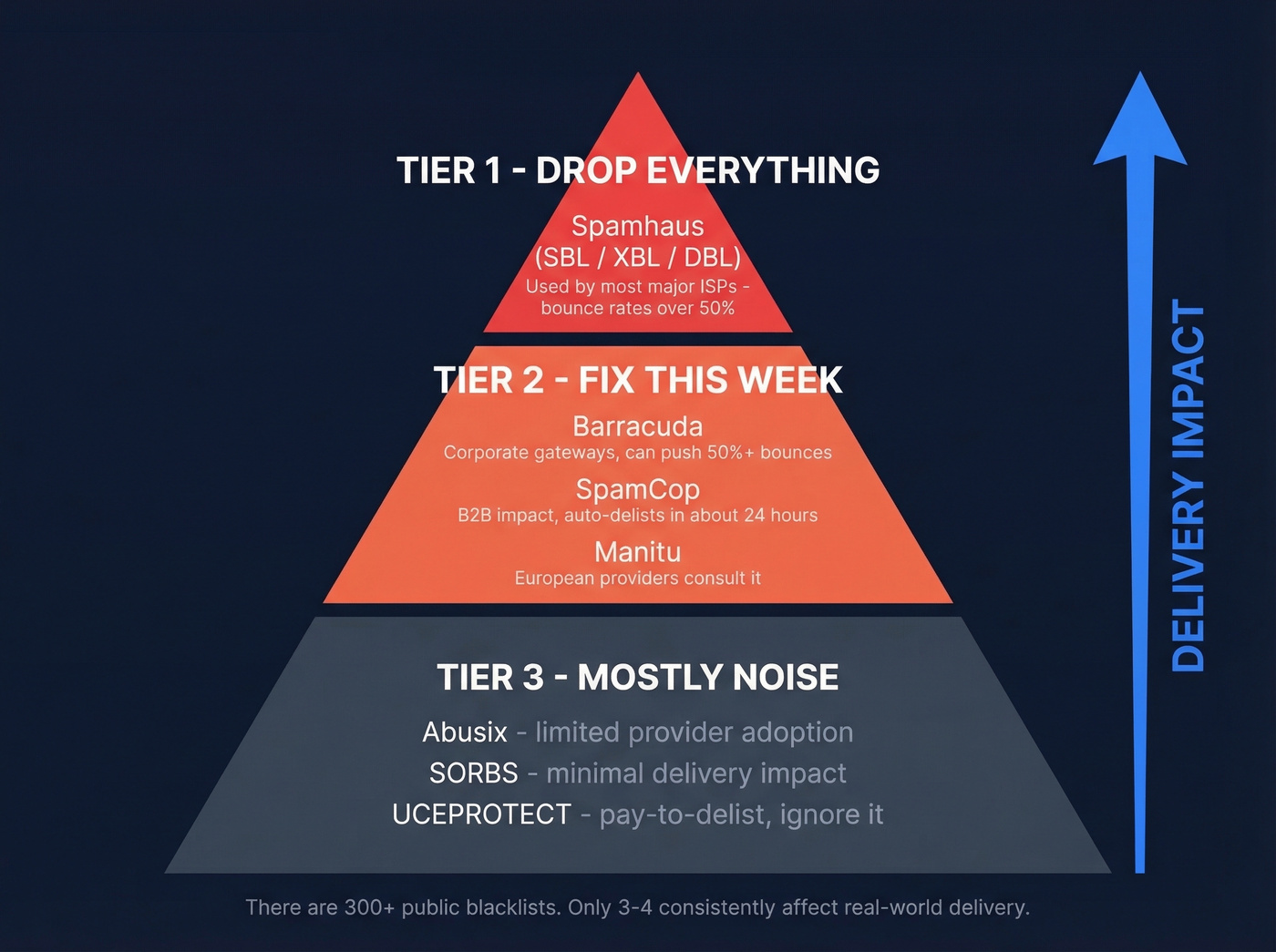
| Tier | Blacklist | Impact | What Happens |
|---|---|---|---|
| 1 | Spamhaus (SBL/XBL/DBL) | Critical | Bounce rates >50% |
| 2 | Barracuda | High | Can push >50% bounces |
| 2 | SpamCop | Moderate-High (B2B) | Auto-delists in ~24h |
| 2 | Manitu | Moderate (Europe) | Some EU providers consult it |
| 3 | Abusix | Low-Moderate (EU) | Limited provider adoption |
| 3 | SORBS | Minimal | Minimal delivery impact |
| 3 | UCEPROTECT | Ignore | Pay-to-delist, limited reach |
Spamhaus is the one that'll ruin your week. Most top North American ISPs use it for blocking decisions, and a listing there craters delivery overnight. Barracuda sits in a similar weight class - widely consulted by corporate mail gateways. SpamCop matters primarily for B2B senders; it isn't used by major consumer ISPs for blocking, but corporate gateways check it regularly. Listings typically resolve themselves within about a day if no new reports come in.
UCEPROTECT runs a pay-to-delist model with limited reach. Many deliverability teams ignore it entirely. The consensus on r/sysadmin backs this up - users consistently report that many blacklist hits are on "super niche" lists, and even brand-new domains show up listed on some of them. That's noise, not signal.
Don't panic over niche listings. Many small blacklists have near-zero adoption among major mailbox providers. A listing on an obscure DNSBL you've never heard of isn't worth 10 minutes of your time.
Best Free Blacklist Checker Tools
Running an IP blacklist check is a read-only DNS lookup - it won't affect your reputation or trigger any flags. If we had to pick three: MxToolbox for quick checks, Spamhaus Lookup for the listing that actually matters, and MultiRBL for the deepest scan.
| Tool | Lists Checked | Input Types | Pricing | Best For |
|---|---|---|---|---|
| MxToolbox | 100+ | IP, domain | Free; paid monitoring ~$129/mo | Quick daily checks |
| Spamhaus Lookup | Spamhaus only | IP, domain | Free | The one that matters |
| MultiRBL | 200+ | IP, domain | Free | Deep scans |
| DNSChecker | 50+ | IP, domain | Free | Auto MX IP lookup |
| ZeroBounce | 300+ | IP, domain | Free | Quick cross-checks |

MxToolbox is the default. Paste in your IP or domain, get results across 100+ blacklists in seconds. The free version handles one-off checks; paid monitoring starts around $129/mo for automated alerts. Most teams only need the free tier with a disciplined weekly check.
Spamhaus Lookup is the single most important check you'll run. It tells you exactly which Spamhaus list you're on (SBL, XBL, DBL, or PBL), why you're listed, and what to do about it. Bookmark this one.
MultiRBL scans 200+ blacklists simultaneously with granular statuses - listed, brownlisted, whitelisted, neutralized. We use it for monthly deep scans, then rely on MxToolbox or Spamhaus for weekly spot checks.
DNSChecker is handy because you input a domain and it automatically fetches IPs from your MX records. Useful if you aren't sure which IP is actually sending your mail.

Blacklist listings are a symptom. Bad data is the disease. Prospeo's 5-step email verification - with catch-all handling, spam-trap removal, and honeypot filtering - keeps bounce rates under 4%. That's the difference between staying off Spamhaus and spending every Monday morning filing delisting requests.
Pay $0.01 per verified email instead of paying with your sender reputation.
How to Read Your Results
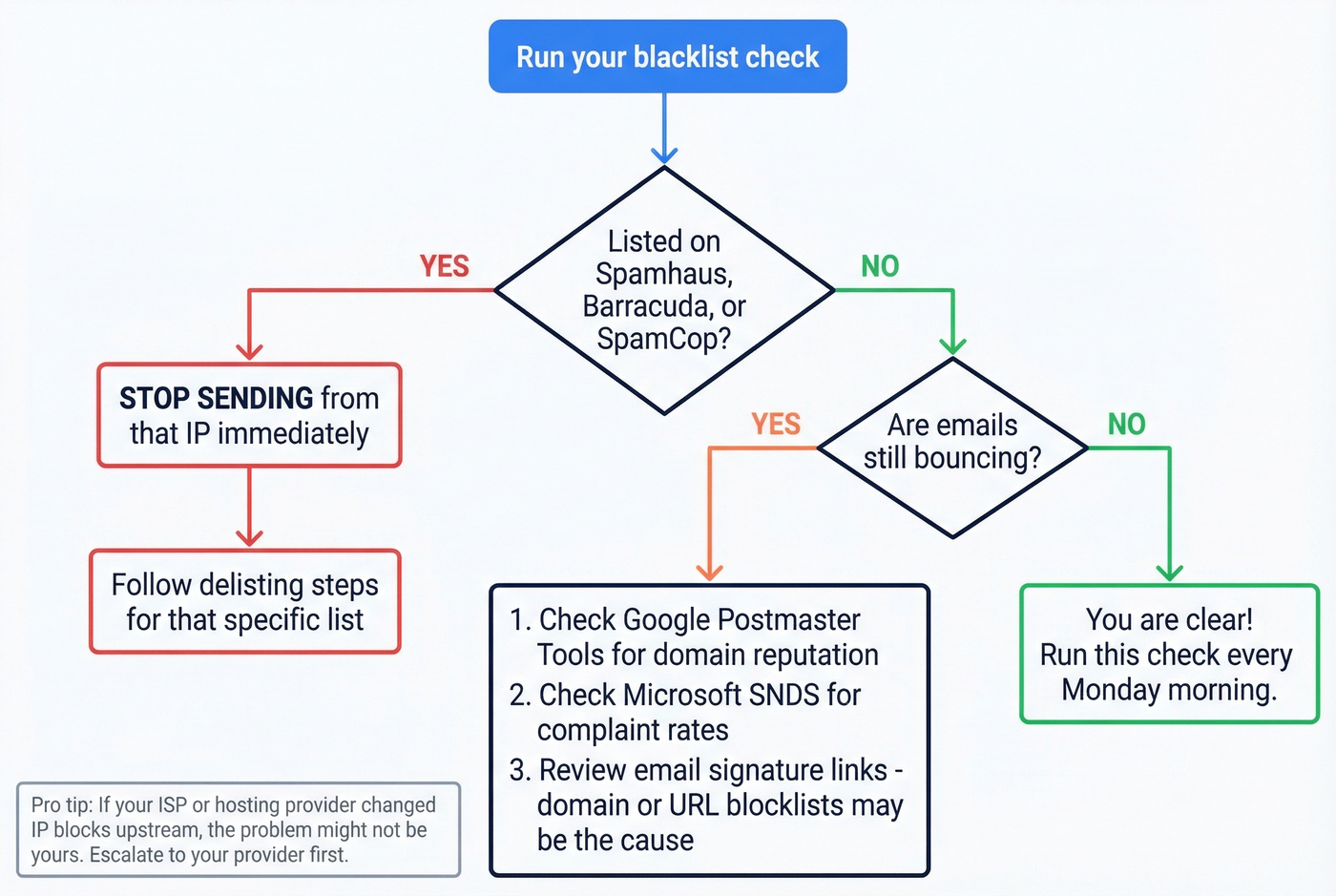
Listed on Tier 1 or Tier 2
This is urgent. Stop sending from the affected IP or domain immediately. Continuing to send while listed generates more spam reports, which makes delisting harder. Jump to the delisting playbook below.
Clean Scan, Still Bouncing
You ran a check, got a clean result, and your emails are still bouncing. The gap between what blacklist scanners test and what actually blocks your mail is wider than most people realize.
A real-world case from r/sysadmin: an admin's email was blocked for only two recipient organizations. Every public blacklist scanner showed clean. The fix? Removing the website link from the email signature. The domain in the signature was flagged by content filters, not by any traditional RBL.
Private blacklists are another blind spot. Gmail, Outlook, and Yahoo all maintain internal reputation systems that no public scanner can check. You need to monitor these separately through Google Postmaster Tools - look for your domain reputation rating (Bad/Low/Medium/High) - and Microsoft SNDS to track complaint rates and trap hits against your IPs.
Sometimes it isn't even your fault. In one incident, Comcast added an IP block range upstream that morning - multiple admins reported the same "blocked using Spamhaus" errors on Exchange Online connectors, and it resolved after Comcast removed the block. The lesson: escalate to your ISP or hosting provider before assuming you did something wrong.
Let's be honest - if your sender score looks fine and you're clean on every public blacklist, your problem is almost certainly email authentication or domain reputation, not blacklists. Most teams spend hours chasing blacklist ghosts when they should be fixing their DMARC policy or cleaning their list.
How to Get Delisted
Spamhaus
Which list you're on determines who requests removal:
- SBL: The ISP or network owner must submit the request. Spamhaus doesn't accept end-user requests. Contact your hosting provider.
- DBL: Domain owners request removal directly using an email address on the listed domain - not a free webmail account.
- PBL: Self-removal is possible for a single static IP through the Spamhaus lookup tool, provided your DNS is configured correctly.
Before submitting, lock down the basics: postmaster@ email configured, MX record pointing to the sending IP, SPF/DKIM/DMARC all passing, and HELO matching your PTR (reverse DNS). First-offense listings typically resolve within a day or two. Repeat listings take significantly longer. If you need the full playbook, follow our Spamhaus Blacklist Removal guide.
SpamCop
Auto-delists after roughly 24 hours if no new spam reports come in. Fix the underlying issue and wait.
Barracuda
Use their lookup tool to check your status, then submit a removal request. Resolution typically takes a few hours to 24 hours.
SORBS
Some SORBS lists require payment for removal; others auto-expire. If SORBS wants money, walk away. The listing has minimal delivery impact and isn't worth paying to resolve.
IP Reputation vs Domain Reputation
Switching IPs to escape a blacklist is like changing your phone number to fix your credit score. Modern inbox providers increasingly prioritize domain reputation over IP reputation, and domain reputation follows you everywhere.
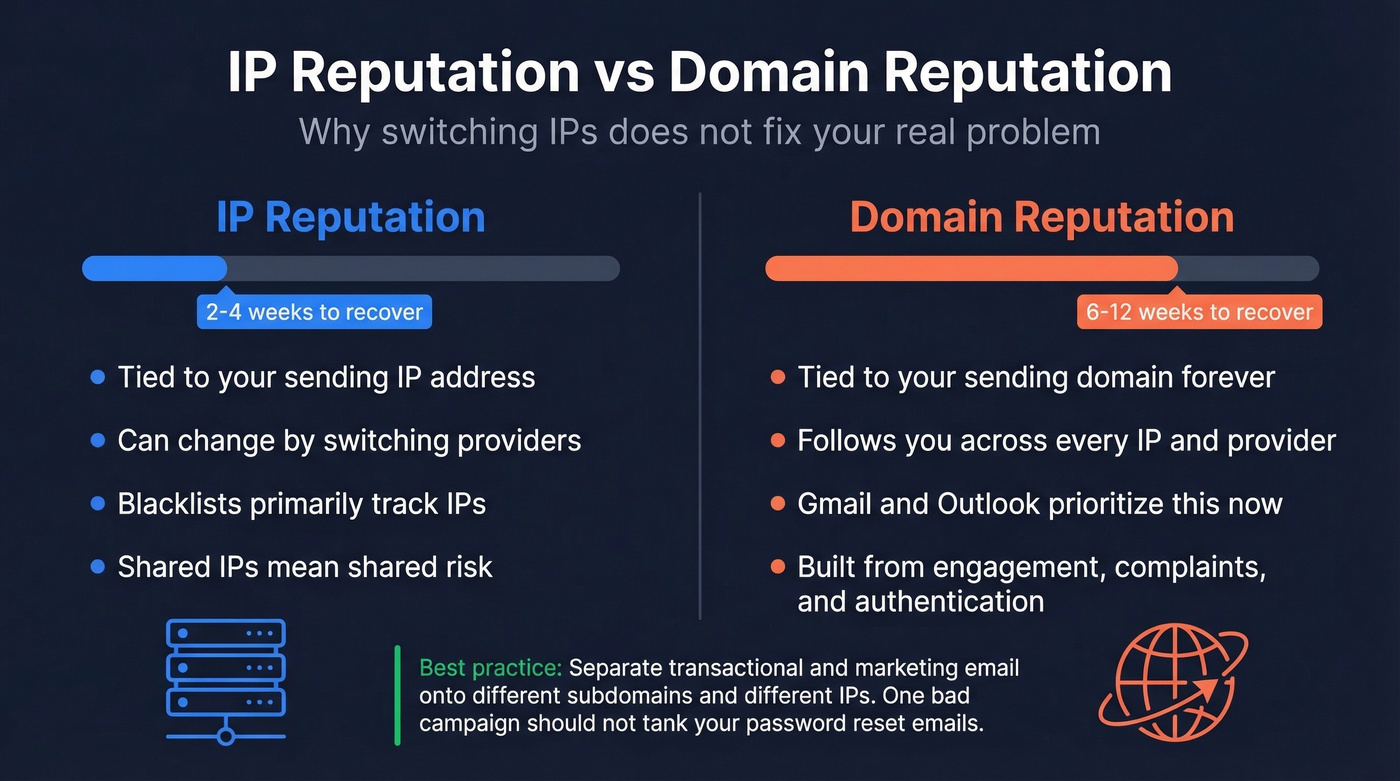
Per Twilio's research, IP reputation recovery takes roughly 2-4 weeks. Domain reputation recovery takes 6-12 weeks. That gap is why email authentication and domain hygiene matter more than ever. If you're troubleshooting deliverability end-to-end, use an email deliverability guide to avoid missing the basics.
Separate your transactional and marketing email streams onto different IPs and, ideally, different subdomains. If your marketing campaigns trigger a blacklisting, your order confirmations and password resets keep flowing. We've seen teams learn this lesson the hard way - one bad campaign tanks delivery for everything, including support tickets.
Prevention Checklist
Staying off blacklists is dramatically easier than getting delisted.
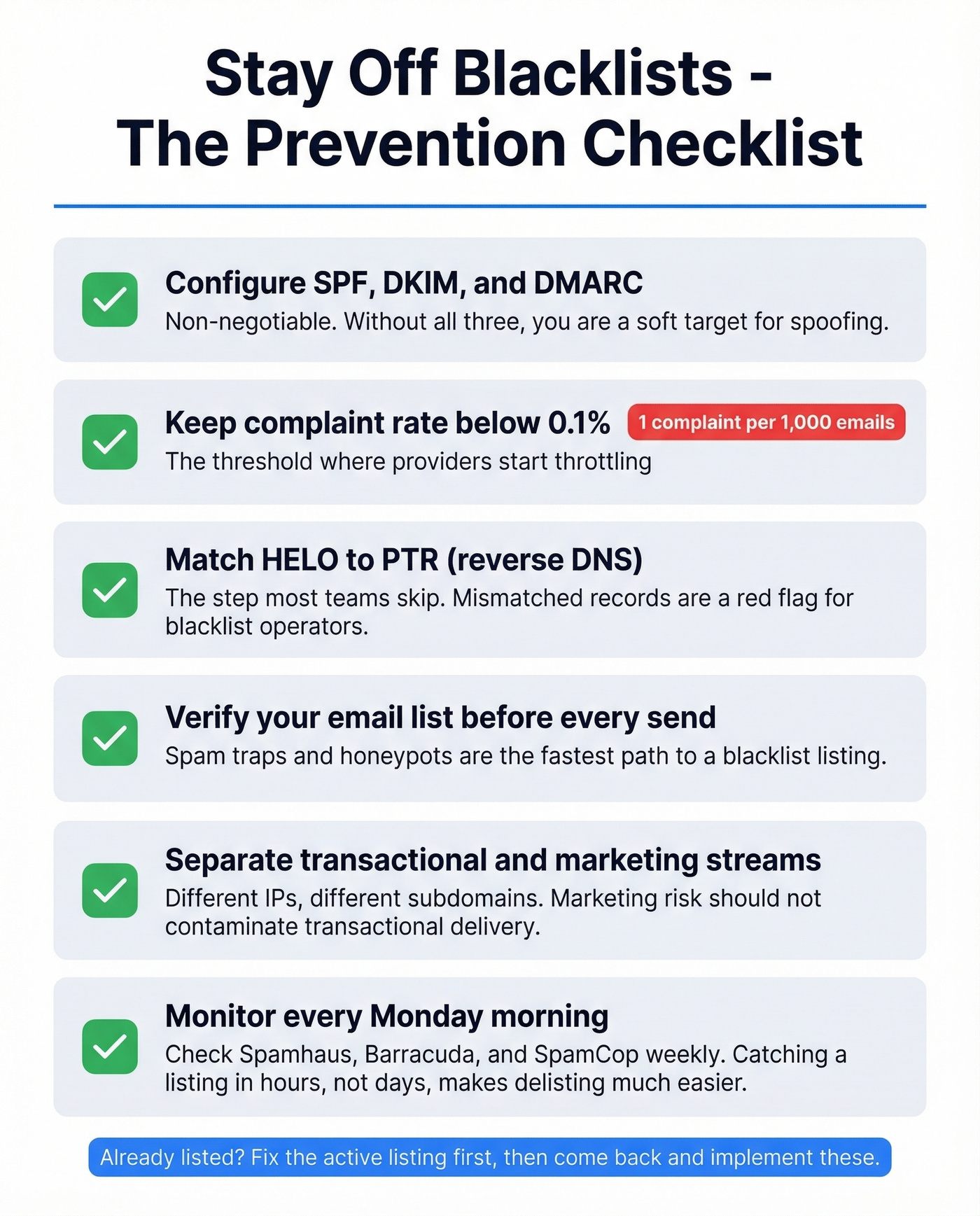
1. Configure SPF, DKIM, and DMARC. Non-negotiable. Without all three, you're a soft target for spoofing - and the resulting spam reports land on your IP's reputation. (If you need a quick audit, see how to verify DKIM is working and these SPF record examples.)
2. Keep spam complaint rates below 0.1%. That's 1 complaint per 1,000 emails. This is the threshold most mailbox providers use to start throttling or blocking.
3. Ensure HELO matches PTR (reverse DNS). The one most teams skip. Mismatched HELO and PTR records are a red flag for major blacklist operators.
4. Verify your email list before every send. Spam traps and honeypots are the fastest path to a blacklist. Run every list through an email verifier before hitting send. Prospeo's 5-step verification catches spam traps, honeypots, and catch-all domains with 98% accuracy across 143M+ verified emails - the free tier covers 75 verifications per month, and paid plans run about $0.01 per email. If you're already seeing issues, start with spam trap removal and then track your email bounce rate.
5. Separate transactional and marketing streams. Different IPs, different subdomains. Marketing risk shouldn't contaminate transactional delivery.
6. Monitor weekly. Check Spamhaus, Barracuda, and SpamCop every Monday morning. Set up MxToolbox alerts or run manual checks. Catching a listing within hours instead of days makes delisting dramatically easier. For a broader view beyond blacklists, keep a short list of email reputation tools.
Skip the prevention checklist if you're already listed - fix the active listing first, then come back and implement these so it doesn't happen again.
Every unverified email you send is a spam complaint waiting to happen. Prospeo delivers 98% email accuracy across 143M+ verified addresses - refreshed every 7 days, not every 6 weeks. Stack Optimize built a $1M agency on Prospeo data with zero domain flags across all clients.
Stop feeding Spamhaus. Start sending to addresses that actually exist.
FAQ
How often should I check for blacklist listings?
Weekly for Spamhaus, Barracuda, and SpamCop - the three that impact deliverability. Run a monthly deep scan via MultiRBL, and set up MxToolbox alerts for real-time notifications between manual checks.
Can clean scans still mean my email is blocked?
Yes. Clean public scans don't rule out private blocklists maintained by Gmail, Outlook, or Yahoo. Check Google Postmaster Tools and Microsoft SNDS for internal reputation data - the problem is often domain reputation or content filtering rather than a traditional DNSBL listing.
Can I get blacklisted without sending spam?
Absolutely. Compromised servers, shared IP neighbors, spam traps in purchased lists, and ISP-side errors all trigger listings without you sending a single spam message. Verifying your list before every send eliminates the trap-hit risk.
How long does delisting typically take?
SpamCop: ~24 hours automatically. Barracuda: hours to one day. Spamhaus: 1-2 days for first offenses, longer for repeats. Domain reputation recovery takes 6-12 weeks regardless of delisting speed.
Does being listed on UCEPROTECT matter?
No. UCEPROTECT has minimal delivery impact and runs a pay-to-delist model. Major deliverability teams ignore it entirely - focus your energy on Spamhaus, Barracuda, and SpamCop instead.