

Email Snippets: What They Are & How to Use Them in 2026
You sent a campaign to 50,000 subscribers and your email snippets read "Unsubscribe | View in browser | Having trouble viewing this email?" That's not a minor cosmetic issue - it's costing you opens, clicks, and revenue. The fix depends on which kind of snippet you're dealing with, because the term means three completely different things.
What "Email Snippets" Actually Means
The phrase gets thrown around in marketing meetings, sales standups, and dev Slack channels - and everyone means something different.
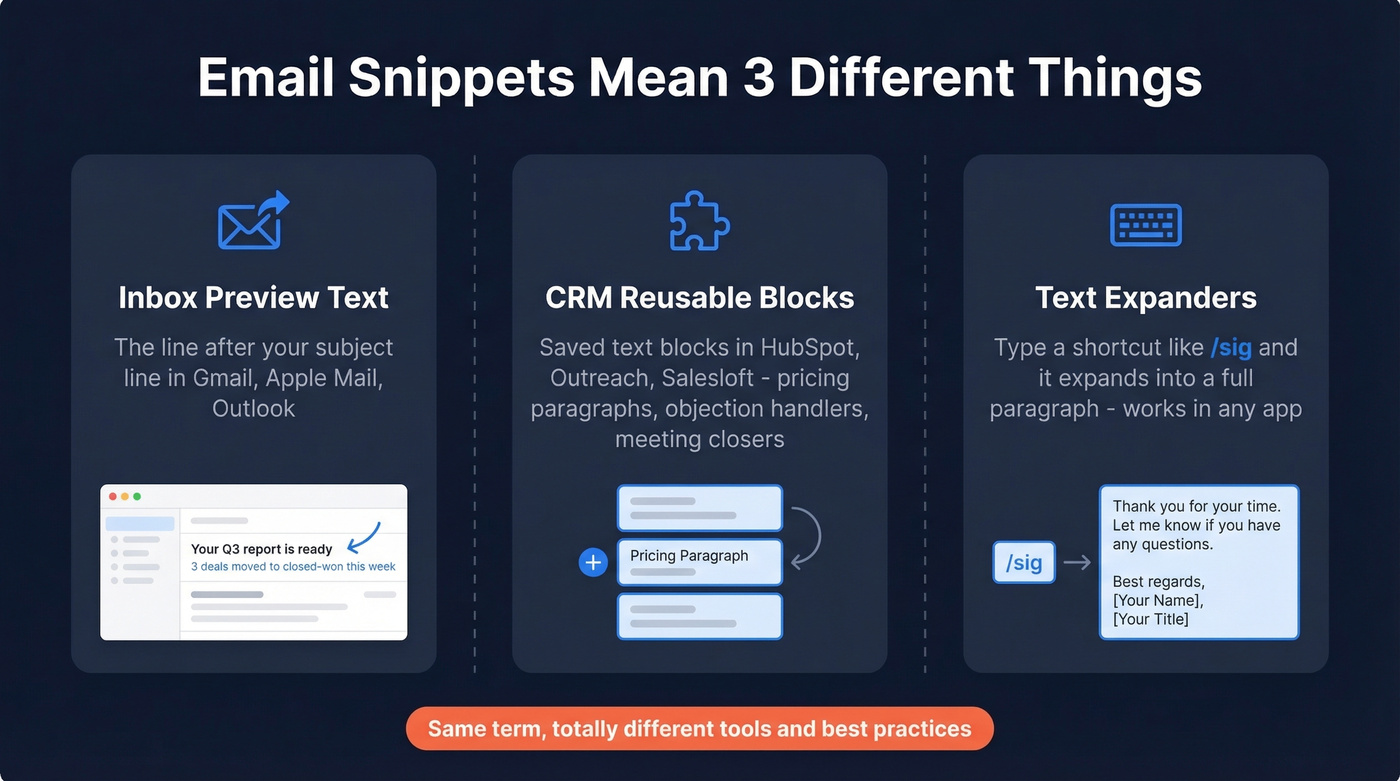
Inbox preview text. The line of text that appears after or below your subject line in the inbox. Gmail calls it "Snippets." Apple Mail calls it "preview." Outlook calls it "Message Preview." Same concept, different labels. If you don't set it deliberately, your email client pulls whatever it finds first - often utility links or alt text from images.
CRM reusable blocks. In tools like HubSpot and Marketo (and most sales engagement platforms), "snippets" are reusable blocks you insert into emails and other workflows. Think of them as building blocks for sales emails: a pricing paragraph, an objection handler, a meeting-request closer.
Text expanders. Desktop and browser tools where you type a short abbreviation - /sig or emm - and it expands into a full block of text. These work across any app, not just email.
Each meaning has its own best practices, tools, and gotchas. Let's sort them out.
What You Need (Quick Version)
- Email marketer? You need preheader text optimization. Jump to the preheader section below - the benchmarks alone will convince you to stop ignoring it.
- Sales or support rep? You need CRM snippets or a text expander. The CRM and text expander sections cover both native tools and third-party options.
Preheader Text: The Snippet That Drives Opens
Why It Matters
Preheader text is the single easiest lever most email marketers aren't pulling.
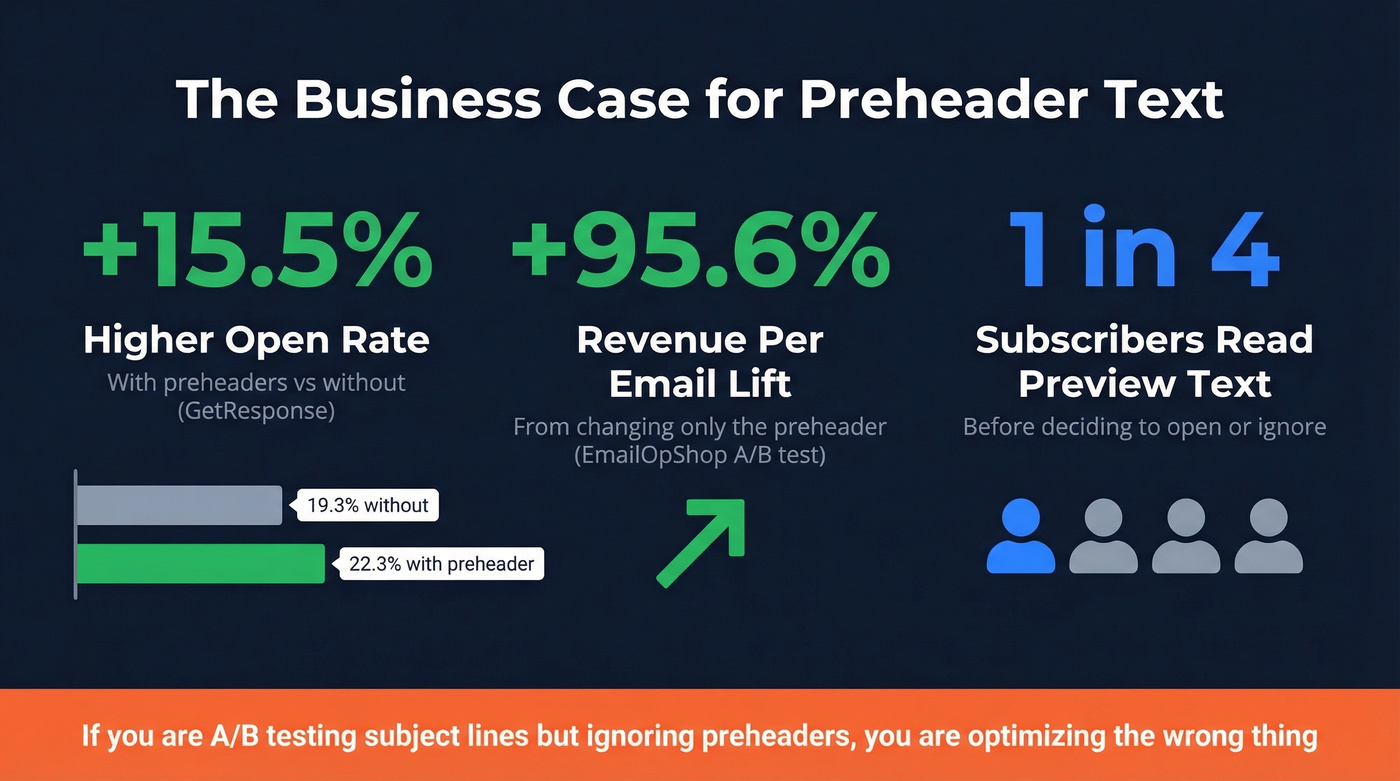
A GetResponse benchmark found that emails with preheaders hit a 22.3% open rate versus 19.3% without - and CTR jumped from 2.2% to 3.3%. That's a 50% CTR lift from a line of text most teams leave on autopilot.
Even more striking: an A/B test documented by EmailOpShop showed a 95.6% increase in revenue-per-email when only the preheader text changed. No subject line tweak, no creative redesign, no segmentation shift. Just the preheader. And a Litmus case study found WeddingWire boosted CTR by 30% through preheader optimization alone.
Meanwhile, roughly one in four subscribers reads the preview text before deciding whether to open. That's a quarter of your audience making their open/ignore decision based on a line you might not even be writing intentionally.
Here's the thing: if you're spending hours on subject line A/B tests but haven't touched your preheader text, you're optimizing the wrong thing. The preheader is lower effort, lower risk, and in our experience delivers more consistent lifts.
Character Limits by Client
Preview text length varies wildly across clients. Aim for under 60 characters to cover most clients comfortably, but front-load your best copy into the first 35 characters for Outlook's brutal limit.
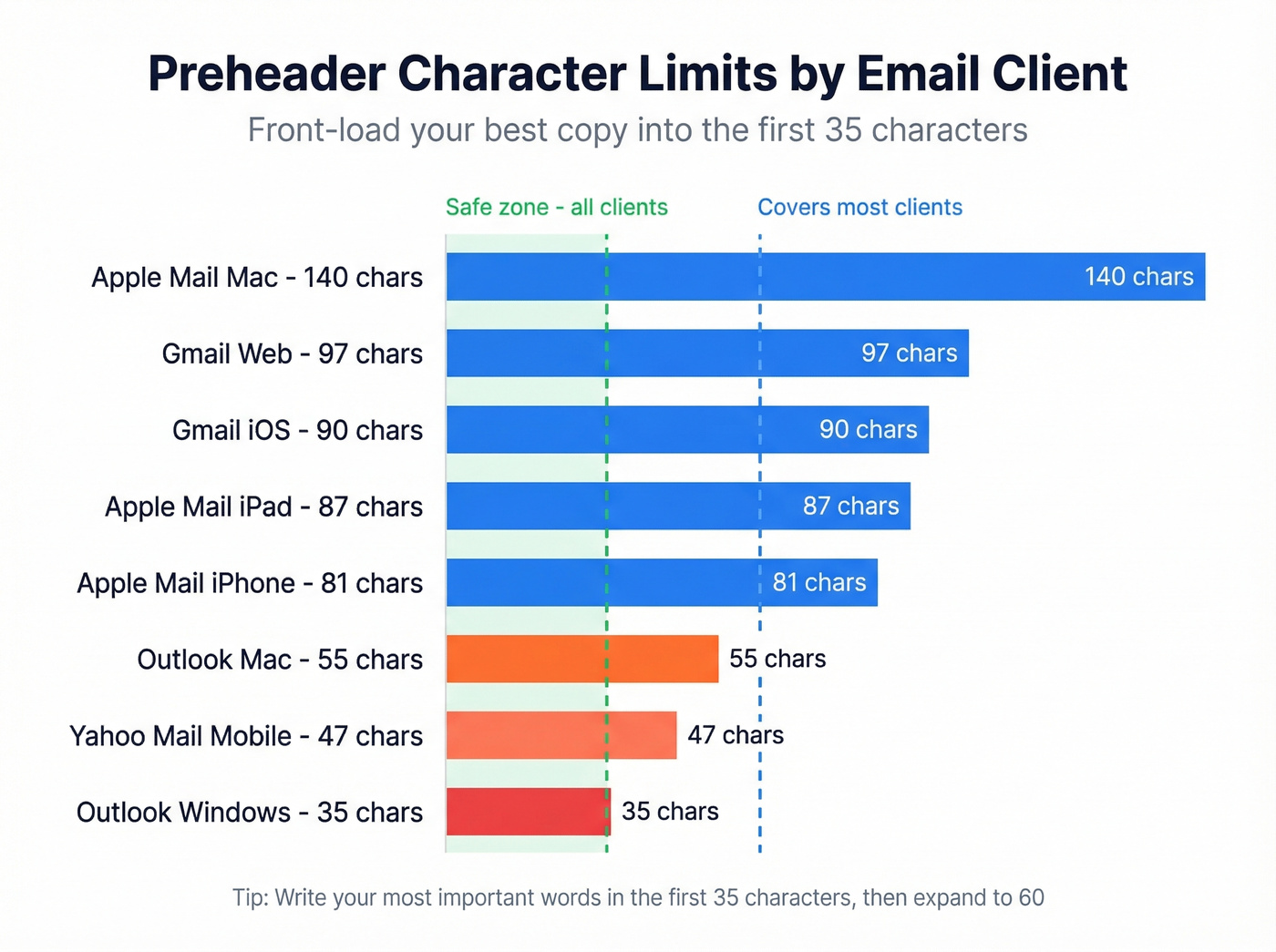
| Client | Device | Max Characters |
|---|---|---|
| Apple Mail | iPhone | 81 |
| Apple Mail | iPad | 87 |
| Apple Mail | Mac | 140 |
| Gmail | Web | 97 |
| Gmail | iOS | 90 |
| Outlook | Windows | 35 |
| Outlook | Mac | 55 |
| Yahoo Mail | Mobile | 45-50 |
In practice, the difference looks like this:
- "Unsubscribe | View in browser | Having trouble viewing this email?"
- "3 deals moved to closed-won this week - see your full pipeline report"
The first is what your subscribers see when you leave the preheader on autopilot. The second is what happens when you spend 30 seconds writing one.
How to Write Snippets That Get Opens
Two approaches consistently work, and they serve different purposes.
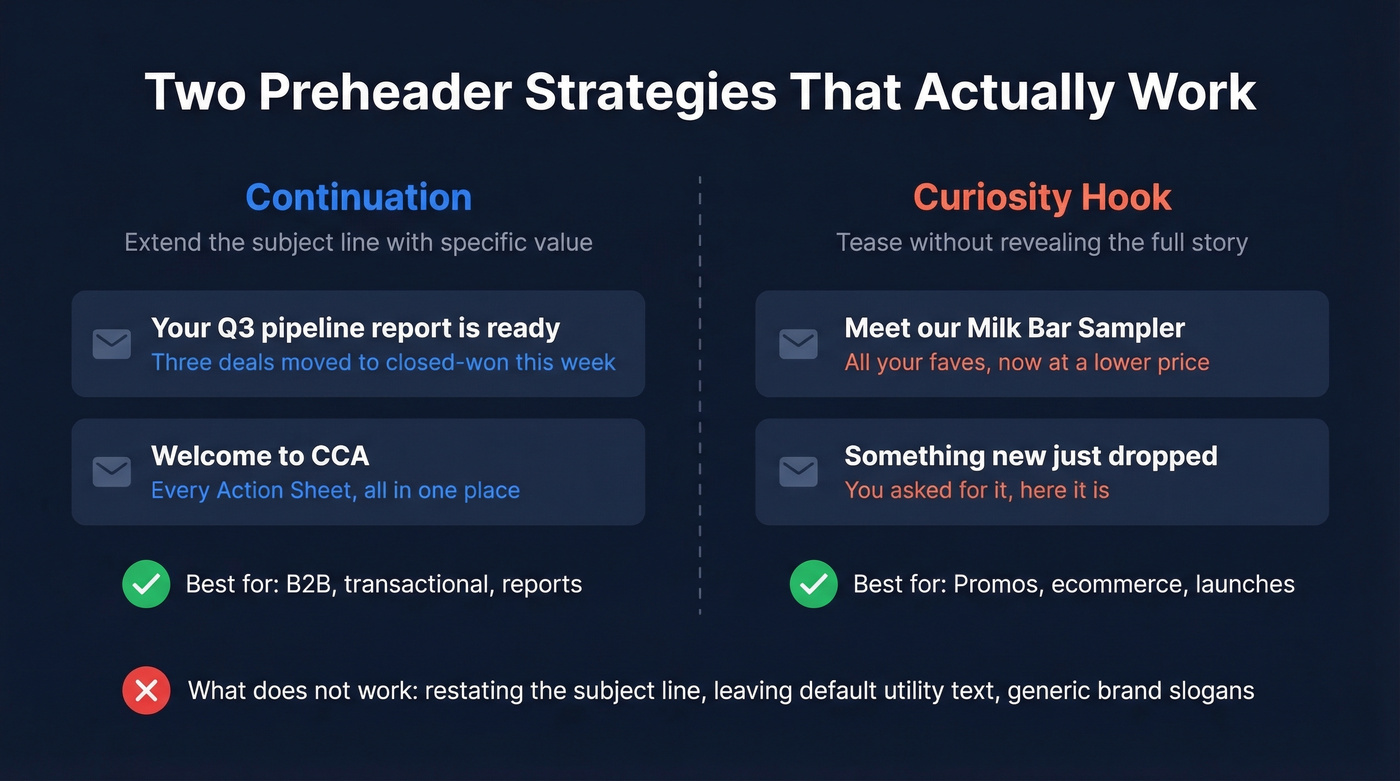
Continuation. Your preheader extends the subject line's thought. Subject: "Your Q3 pipeline report is ready." Preheader: "3 deals moved to closed-won this week." This works because it gives the reader a reason to open - there's specific value waiting inside.
Curiosity hook. Your preheader teases without revealing. Subject: "Meet our Milk Bar Sampler." Preheader: "All your faves, now at a lower price!" The subject names the thing; the preheader adds urgency or intrigue. This works well for promos but can feel gimmicky in B2B contexts, so match the approach to the email type.
A few more patterns we've seen work well: welcome series preheaders that deliver immediate value ("Every CCA Action Sheet, all in one place"), and transactional emails that include specifics like passenger name and travel date - exactly what someone scanning their inbox needs to see.
What doesn't work: restating the subject line, leaving the default "You're receiving this email because...", or writing generic brand slogans.
Hidden Preheader Code (Copy-Paste)
If your ESP doesn't have a dedicated preheader field, you'll need to code it. The problem: email clients pull enough characters to fill all available preview space - sometimes up to five lines. A short preheader means the client grabs whatever comes next, which is usually "View in browser" or navigation links.
The Litmus preview text hack solves this with zero-width characters that fill the remaining space invisibly:
<div style="display: none; max-height: 0px; overflow: hidden;">
Your preheader text goes here.
</div>
<div style="display: none; max-height: 0px; overflow: hidden;">
͏‌ ͏‌ ͏‌
͏‌ ͏‌ ͏‌
<!-- repeat as needed -->
</div>
For Outlook compatibility, use a <td> pattern with Microsoft-specific hiding:
<td style="display:none !important;
  visibility:hidden;
  mso-hide:all;
  font-size:1px;
  color:#ffffff;
  line-height:1px;
  max-height:0px;
  max-width:0px;
  opacity:0;
  overflow:hidden;">
  This is preheader text.
</td>
For Yahoo and iOS 16.4+, add   and ­ entities to your padding string. Test regularly - what worked last month will render differently today. Email clients change constantly.
Apple Mail AI Summaries
Apple Mail is phasing out traditional preheader display in favor of AI-generated summaries. Apple Mail users now see a machine-written summary of your email instead of your carefully crafted preheader text.
Don't panic. Gmail, Outlook, and Yahoo still display preheaders normally, and they represent the majority of business email opens. But it does mean your email body copy matters more than ever for Apple Mail recipients - the AI summary pulls from your full content, not just the preheader div. Write clear, benefit-driven opening paragraphs and your AI summary will take care of itself.

Optimizing preheaders and snippets only matters if your emails actually land. Prospeo's 98% email accuracy and 5-step verification keep bounce rates under 4% - so every word of that carefully crafted preview text gets seen.
Stop perfecting copy for emails that never arrive.
CRM and Sales Tool Snippets
Your SDR team is copying and pasting the same follow-up paragraph 40 times a day. That's what CRM snippets fix.
In HubSpot, snippets are short, reusable text blocks you can use on contact, company, deal, ticket, and custom object records. You insert them into email templates, chat conversations, and when logging an activity or note. The key distinction: snippets aren't templates. A template is a full email. A snippet is a paragraph or section - a pricing block, a case study reference, an objection response - that gets dropped into any email. Think Lego bricks versus pre-built houses.
HubSpot snippet limits. Free accounts created before September 18, 2024 can access the first five snippets. Free accounts created after that date are limited to three. Creating and editing more requires an assigned seat depending on your subscription tier.
Sales engagement platforms like Outreach and Salesloft also support snippet-style reusable blocks inside their sequencing workflows. Expect enterprise pricing in the $100-150/user/month range for full platform access. For teams that just need verified contact data to feed into those sequences, Prospeo's self-serve pricing starts at roughly $0.01 per email - a fraction of what you'd pay for a full engagement platform.
Text Expanders for Email
Gmail's Built-In Templates
Gmail has a native option, but it's barely functional for teams.
To enable it: Settings > See all settings > Advanced > Templates > Enable > Save Changes. Google renamed these from "Canned Responses" to "Templates," but the workflow is still clunky for team use.
You're capped at 50 templates with no personalization variables - every template is static text. Sharing with teammates means manually copying templates one by one, and versions inevitably drift. For a solo user sending a handful of recurring emails, it works. For a team, skip it.
Power-user trick: Gmail filters can auto-send templates, which is useful for auto-replies to specific senders or subjects. It's the one feature that makes Gmail's native option worth knowing about.
Best Text Expander Tools
Pick one that works across every app you use.
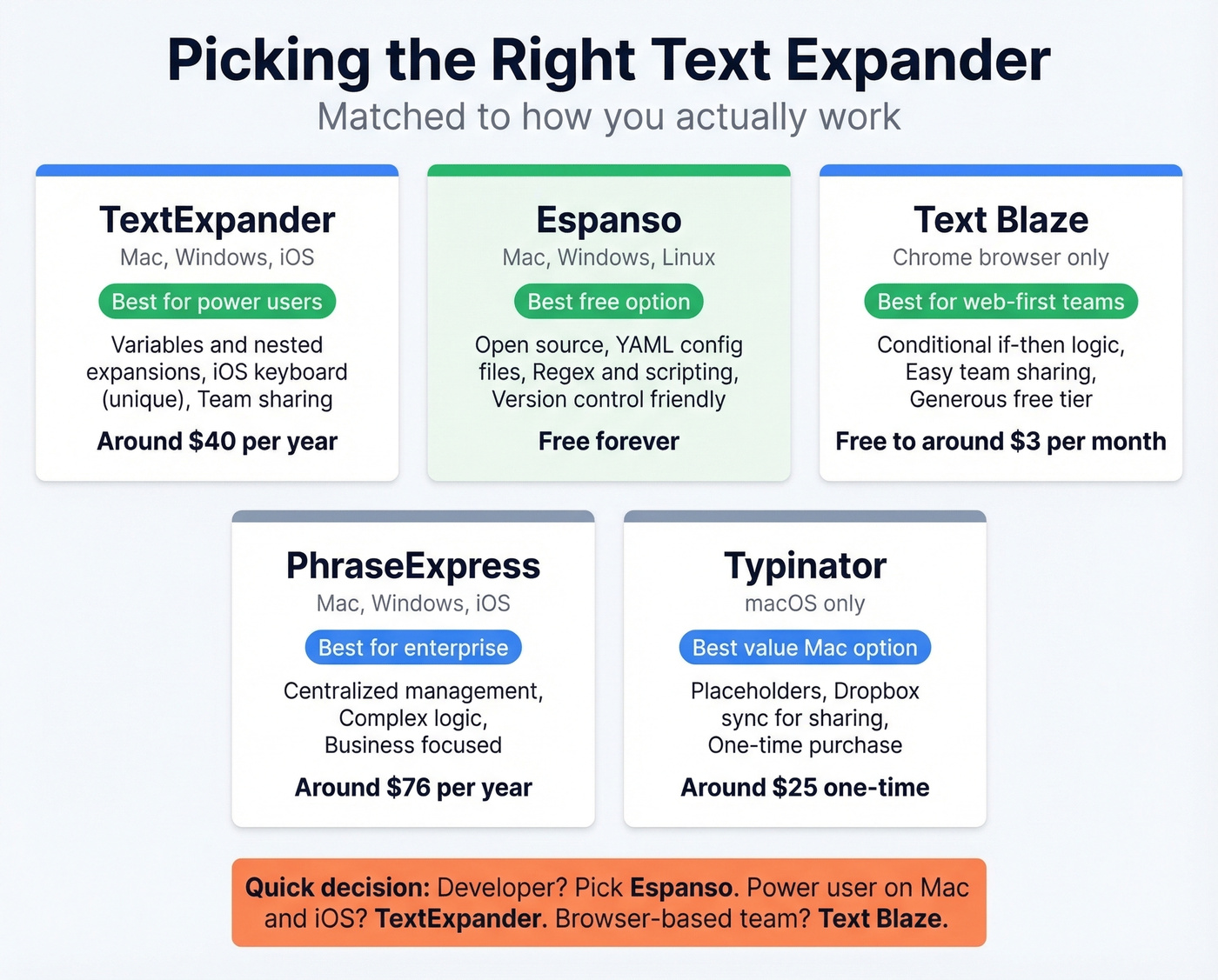
| Tool | Platform | Variables/Logic | Team Sharing | Price |
|---|---|---|---|---|
| TextExpander | Mac/Win/iOS | Yes | Yes | ~$40/yr solo |
| Espanso | Mac/Win/Linux | Regex/scripts | Via config | Free |
| Text Blaze | Chrome browser | Conditional | Yes | Free-~$3/mo |
| PhraseExpress | Mac/Win/iOS | Complex logic | Centralized | ~$76/yr |
| Typinator | macOS only | Placeholders | Dropbox sync | ~$25 one-time |
| Gmail Snippets | Chrome/Gmail | Basic | No | ~$5-10/mo |
| aText | Mac/Win | Basic | No | $4.99/yr or $29.99 lifetime |
TextExpander is the tool power users swear by and can't leave. Once you've built hundreds of snippets with variables and nested expansions, the switching cost is enormous. The iOS custom keyboard is the feature that keeps people locked in - your snippets follow you to mobile, which no other tool matches well. The consensus on r/productivity is that it's the gold standard, even when people wish it were cheaper.
Espanso is the free, open-source alternative that keeps coming up as the "if TextExpander went away" fallback. Configuration lives in YAML files, which means version control and portability. It supports regex and scripting for complex expansions. The tradeoff is setup time - there's no GUI, so you're editing config files. For developers, that's a feature, not a bug.
Text Blaze lives entirely in the browser, making it the easiest option for teams that work primarily in web apps. Conditional logic lets you build snippets with if/then branching - useful for support teams with decision-tree responses. The free tier is genuinely usable.
PhraseExpress targets business and enterprise teams with centralized management. Typinator is macOS-only and popular with people who want local processing and lightweight snippet sets. aText is the budget pick at under $5/year. One important note: macOS Text Replacements sync via iCloud but don't work in Word, Outlook, or Firefox - so use a dedicated tool if your workflow touches any of those apps.
Snippets Only Work If Emails Land
We've seen teams obsess over preheader copy and text expander workflows while 30% of their list bounces. All that optimization is wasted if emails never reach the inbox. Prospeo verifies emails in real time with 98% accuracy on a 7-day data refresh cycle. The free tier gives you 75 verified emails plus 100 Chrome extension credits per month - enough to clean a segment and see the difference in your next send. For a deeper dive on list hygiene, bounce codes, and what "good" looks like, see our email bounce rate benchmarks and fixes, plus the full email deliverability checklist. If you're scaling outbound, it also helps to understand email velocity so you don't burn your domain.
FAQ
What is a snippet in Gmail?
In Gmail, "snippet" refers to the preview text shown after the subject line in your inbox - and separately to Gmail's Templates feature (formerly Canned Responses) for saving reusable drafts. Templates are capped at 50, don't support variables, and require menu clicks to insert rather than keyboard shortcuts.
How long should email preview text be?
Keep your most critical message under 35 characters to render fully in Outlook on Windows. For broad compatibility across Gmail, Apple Mail, and Yahoo, aim for 40-60 characters total. Gmail desktop is the most generous mainstream client at 97 characters; Apple Mail on Mac shows up to 140.
Do email snippets affect open rates?
Yes - emails with preheader text average 22% open rates versus 19% without, and one A/B test showed a 95.6% revenue-per-email lift from changing only the preheader. None of this matters if emails bounce, though. Verify your list before investing more time in copy optimization.
What's the difference between a snippet and a template?
A template is a complete, pre-written email you send as-is or with minor edits. A snippet is a reusable paragraph or section - a pricing block, objection handler, or case study reference - that you drop into any email alongside other content. CRMs like HubSpot and platforms like Salesloft support both, but snippets give reps far more flexibility per message.
Your SDRs are building snippet libraries and reusable blocks - but are they sending to verified contacts? Prospeo gives your team 143M+ verified emails at $0.01 each, with native HubSpot and Salesforce integrations so snippets hit real buyers.
Pair better snippets with data that actually connects.