

Email Templates: Build Emails That Actually Work
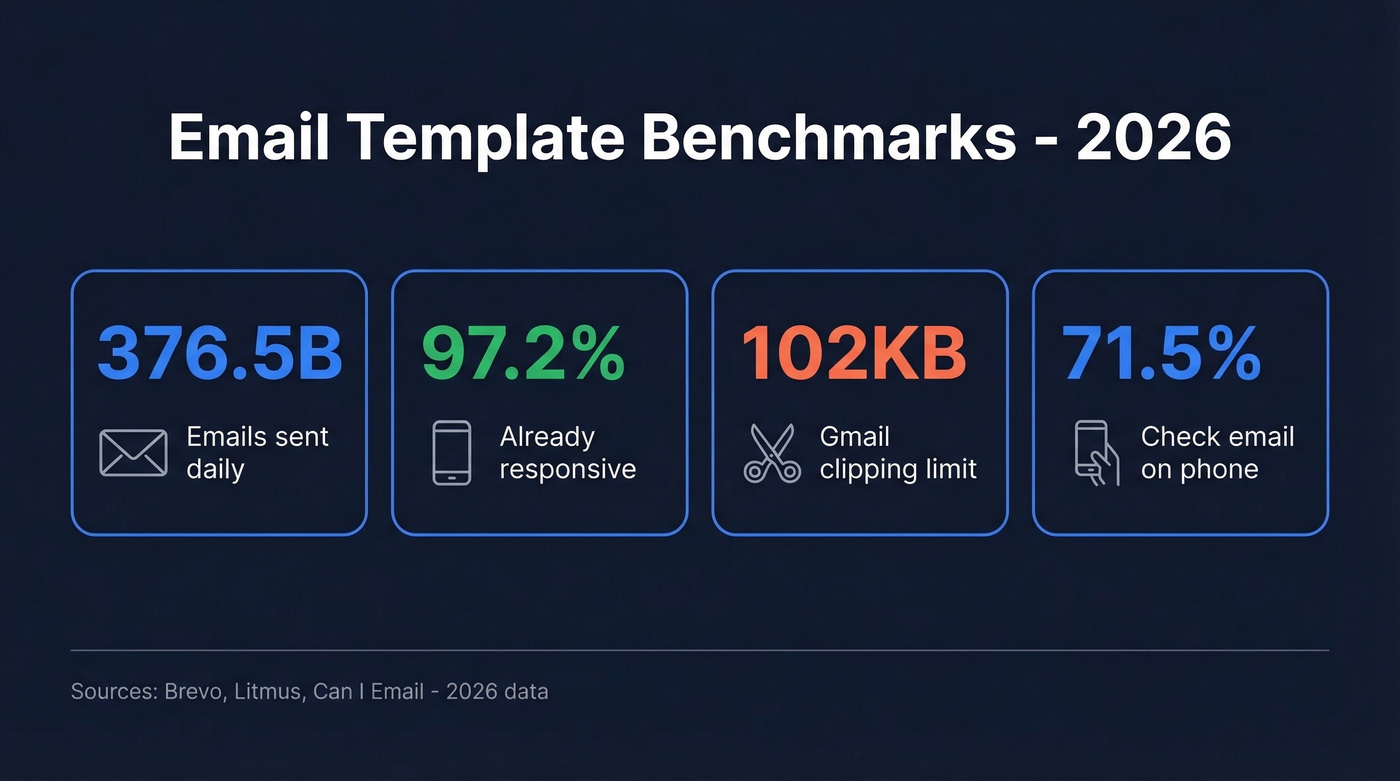
80% of recipients delete emails that don't display correctly on mobile. That's not a design preference - it's a death sentence for any email template built without a solid structural foundation. With 376.5 billion emails sent daily, the gap between emails that render beautifully and emails that break in Outlook is the gap between pipeline and spam folder.
Templates are structural insurance - a way to guarantee your message survives Gmail's stripping rules, Outlook's Word rendering engine, dark mode inversions, and the 4.7-inch screen your prospect reads on during their commute. Get the foundation right, and everything downstream gets easier. Get it wrong, and no amount of clever copy saves you.
Just want to grab a template? Jump straight to the free builder comparison.
Quick-Start Checklist
- Responsive design is table stakes. 97.2% of emails are already responsive. If yours aren't, you're in the bottom 3%.
- Outlook is still broken - but not for long. The Word rendering engine loses support October 2026. Until then, use tables, inline CSS, and VML for background images.
- Gmail clips emails over 102KB. Everything after the cut disappears behind a "View entire message" link most people never click.
- Stripo is the best free builder for most marketers. 1,600+ templates and 90+ ESP exports. The 4-export/month cap is annoying, but nothing else matches the breadth.
Types of Email Templates
Marketing Templates
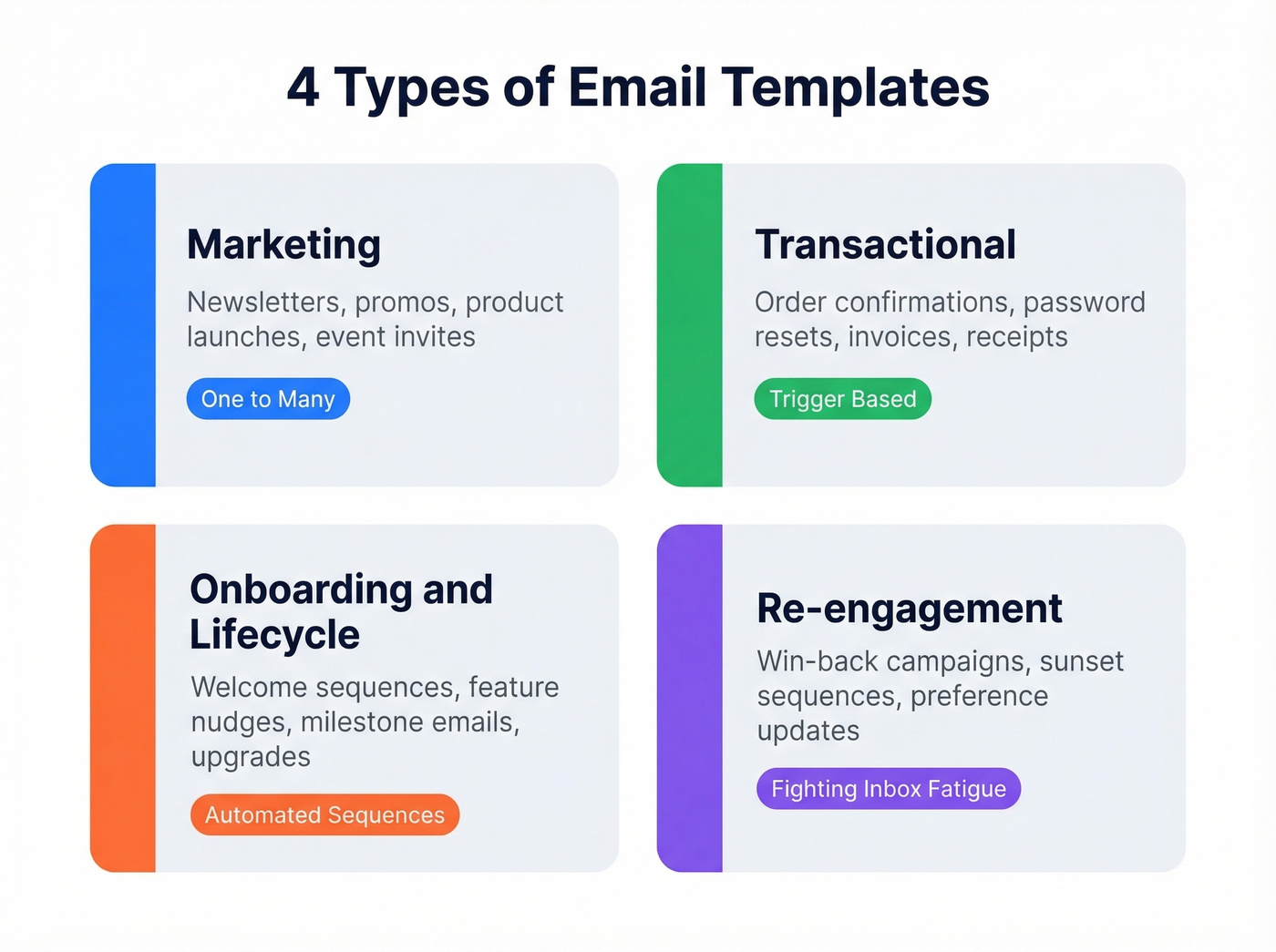
Newsletters, promotional blasts, product announcements, event invitations. These are the designs most people picture when they hear the term. They're built for volume - one-to-many communication where visual impact and CTA placement drive results. Marketing layouts need the most design flexibility because they change frequently with new offers, seasonal campaigns, and A/B test variants.
Transactional Templates
Order confirmations, shipping notifications, password resets, invoices, account registration confirmations, subscription receipts. These are trigger-based emails tied to a specific user action. That makes transactional designs an underused branding opportunity - most companies treat them as afterthoughts with plain-text defaults, leaving money on the table.
Onboarding & Lifecycle Templates
Welcome sequences, feature adoption nudges, milestone celebrations, upgrade prompts. These sit between marketing and transactional - automated but not tied to a single transaction. Good onboarding layouts are modular: you build a library of blocks like feature highlights, testimonials, and CTAs, then assemble sequences from them rather than designing each email from scratch.
Re-engagement Templates
Win-back campaigns, "we miss you" emails, sunset sequences for inactive subscribers. Re-engagement designs need to work harder than any other type because you're fighting inbox fatigue. They tend to be shorter, more direct, and often include an incentive or a clear "update your preferences" option.
If a re-engagement sequence doesn't move the needle, it's time to clean the list - not send more emails.
Design Best Practices for 2026
Design trends come and go, but the technical constraints of email haven't changed as fast as most marketers think. The core reason to use templates is consistency and speed - they enforce brand standards, reduce production errors, and free your team to focus on messaging instead of layout.
Mobile-First Layout Specs
Build for 320px first, then scale up to 600px for desktop. That's the standard container width, and going wider causes horizontal scrolling on most clients. Use fluid tables with percentage widths for the outer structure, and set a max-width of 600px on the container.
CTA buttons need a minimum tap target of 44x44 points - anything smaller and mobile users will mis-tap or skip it entirely. Single-column layouts are the most reliable mobile reading experience. If you're using a multi-column design for desktop, make sure it stacks cleanly on mobile with a breakpoint around 480px, and scale body font to at least 16px for readability. These aren't suggestions - they're the baseline that 97.2% of emails already meet.
Visual Hierarchy & CTAs
Two patterns dominate effective layouts: the Z-pattern, where the eye moves left-to-right then diagonally down, and the inverted pyramid, where a wide header narrows to a single CTA. The inverted pyramid is particularly effective for promotional emails - broad context at the top, specific value proposition in the middle, one clear button at the bottom.
Maintain a text-to-image ratio of roughly 70/30. Going heavier on images increases spam filter risk and creates a blank experience for the ~40% of recipients who have images blocked by default. Every image needs descriptive alt text - not just for accessibility, but because styled alt text via inline CSS on <img> tags can preserve your layout even when images don't load. Always add a background color behind background images so your text stays legible if the image fails to render.
Use bulletproof buttons instead of image-based CTAs. A bulletproof button is an HTML/CSS button that renders even with images off. If your CTA disappears when images are blocked, you've lost the click.
Accessibility Rules
Accessibility isn't optional - it's a retention lever. Screen readers can't parse image-only emails, and with AI-powered email summarization becoming more common, text-based content also ensures your message gets accurately represented in inbox previews.
The WCAG minimum contrast ratio is 4.5:1 for normal text. Use a contrast checker before finalizing your palette. Build with semantic HTML where possible, and always include a plain-text version. Font stacks matter too - web fonts aren't universally supported across email clients, so specify fallbacks like Arial, Verdana, or Georgia. Litmus recommends building a modular design system with reusable content blocks to enforce both brand consistency and accessibility standards across every send.
Subject Lines & Preheaders
Keep subject lines under 50 characters. Most mobile inboxes truncate around that mark, and a cut-off subject line looks sloppy.
Customize your preheader text. If you don't, inboxes pull boilerplate like "View this email in your browser" or the first line of body copy, which is almost never what you want the recipient to see. The subject line gets them to open. The preheader is your second chance to sell the open. Treat them as a pair, not an afterthought. If you want swipeable ideas, pull from these subject lines and test variations.
Email Client Compatibility
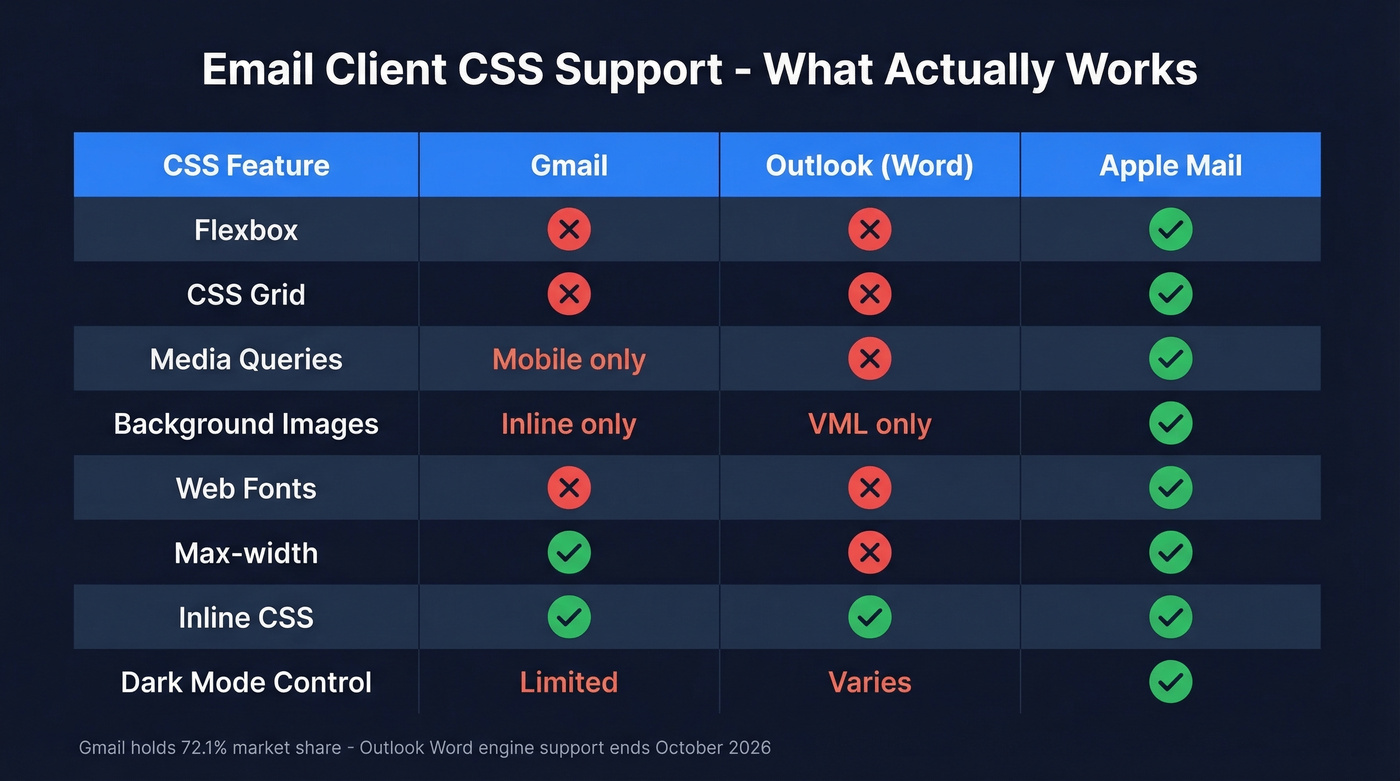
Your email doesn't render once. It renders differently in every client your recipients use - and 72.1% of them use Gmail. Before going further, bookmark Can I Email. It's the caniuse.com equivalent for email HTML/CSS support, and it'll save you hours of guesswork.
Gmail Rendering Rules
Gmail is the most common client and one of the most aggressive at stripping CSS. It removes external stylesheets, @import rules, most @font-face declarations, positioning properties, CSS Grid, transforms, animations, transitions, box-shadow, and filter.
Gmail's <style> block handling is particularly treacherous. One syntax error in your CSS causes Gmail to strip the entire <style> block - not just the broken rule, all of it. There's an 8,192-character limit for CSS within a <style> block; exceed it and the whole block gets removed. If any rule contains background-image inside <style>, Gmail may strip the entire style block, so use inline styles for background images instead.
The 102KB clipping limit is the other major constraint - if your raw HTML exceeds 102KB, Gmail hides everything after the cut. Your CTA, unsubscribe link, and footer can all vanish.
One more gotcha: Gmail desktop doesn't support media queries, but Gmail on mobile does. Your responsive breakpoints work on phones but not in the browser - which is where a lot of B2B recipients read email during work hours.
Outlook's Word Engine Problem
Outlook 2007 through 2019 uses Microsoft Word as its HTML rendering engine. A word processor - not a browser engine - is interpreting your HTML and CSS. It ignores flexbox, CSS Grid, max-width, min-width, positioning, float, and animations. Background images require VML, a Microsoft-specific format that feels like writing code from 2003.
Outlook for Mac uses WebKit, which behaves closer to Apple Mail. Outlook.com and Outlook mobile apps also use WebKit-based engines with much better rendering. The problem is specifically the Windows desktop client, which still dominates in enterprise environments.
Outlook Transition Timeline
The current timeline points to Outlook's Word rendering engine losing support in October 2026. Auto-migration for some business users began in January 2025, with enterprise migration starting April 2026.
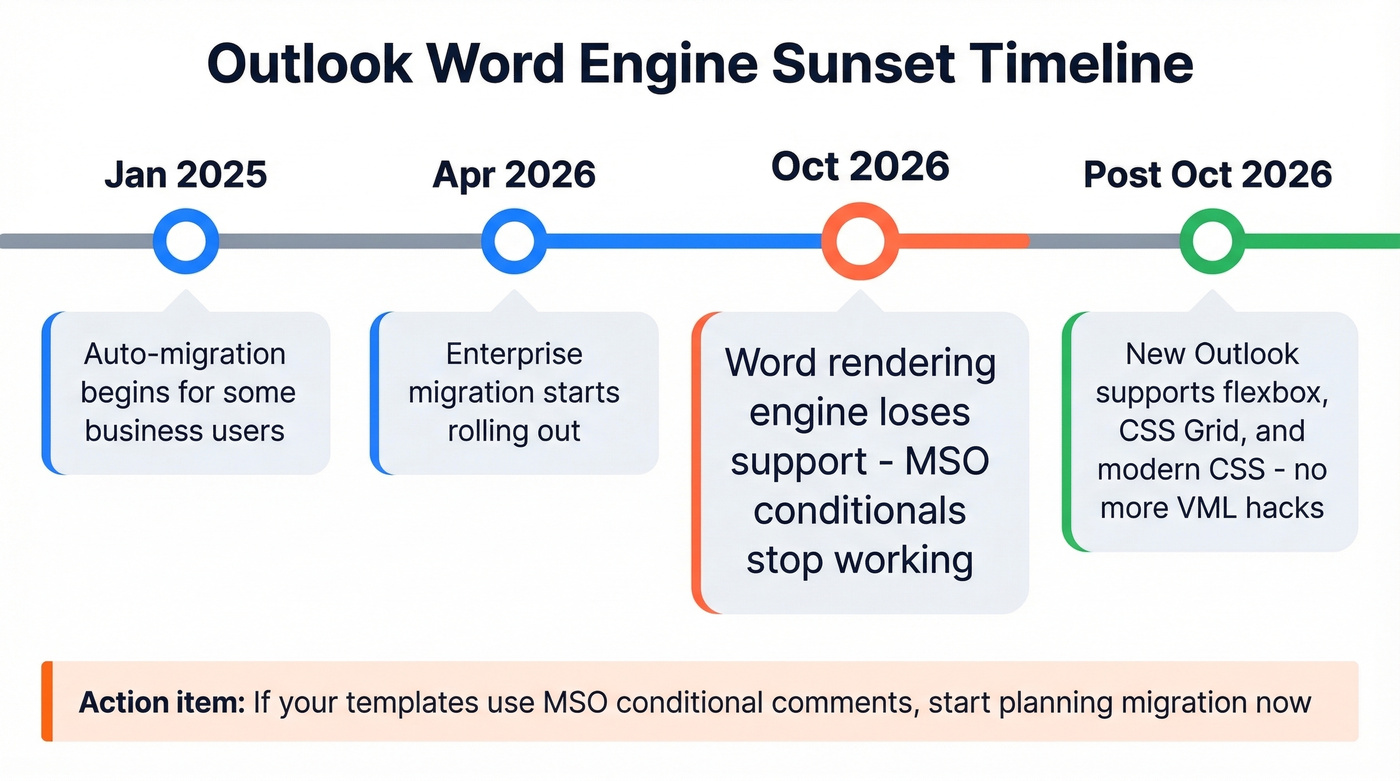
The new Outlook supports modern CSS like flexbox and grid. But it doesn't support MSO conditional comments, which means any Outlook-specific hacks using <!--[if mso]> will stop working. If you're maintaining legacy templates with heavy MSO conditionals, start planning the migration now.
Dark Mode
Dark mode isn't an edge case anymore. Most major email clients offer it, and many users leave it on permanently. The problem is that implementations vary wildly - some clients invert colors, some add a dark background behind your content, and some do both.
Test your designs in dark mode across at least Gmail, Apple Mail, and Outlook. Use transparent PNGs for logos so they don't get a white box behind them, and avoid hardcoding white backgrounds on text containers. A dark-mode-friendly design uses enough contrast and flexible color choices that it looks intentional in both modes.
Common Mistakes to Avoid
We've audited enough email programs to spot these patterns instantly. Here are the mistakes that keep showing up - and remember, 71.5% of people check email most often on their phone, so these hit harder than ever.
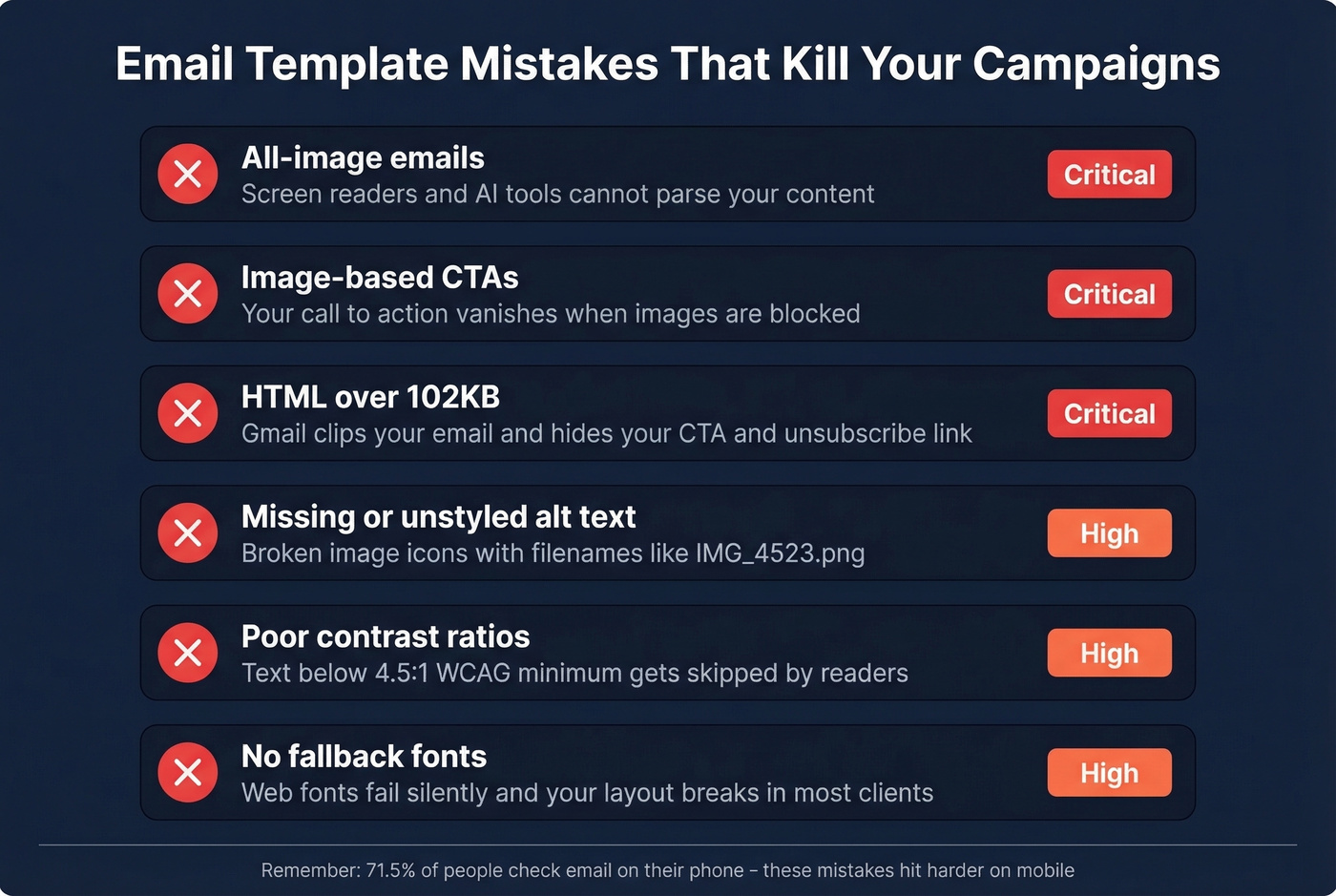
All-image emails. Screen readers can't parse them, AI summarization tools can't extract the content, and when images are blocked, your recipient sees a blank email. Use live text for all critical content.
Image-based CTAs. If your call-to-action is an image, it disappears when images are off. Use bulletproof HTML/CSS buttons that render regardless of image settings.
Missing or unstyled alt text. A broken image icon with "IMG_4523.png" underneath looks amateur. Write descriptive alt text for every image and style it with inline CSS.
Exceeding 102KB HTML. Gmail clips your email and hides everything after the cut. Strip unnecessary code, minify your HTML, and compress images. If you're using a builder, check the exported file size before sending.
Poor contrast ratios. Text that's hard to read gets skipped. Maintain a minimum 4.5:1 contrast ratio per WCAG guidelines. Use a contrast checker - don't eyeball it.
No fallback fonts. Web fonts fail silently in most email clients. Always specify a fallback font stack so your typography degrades gracefully.
Skipping Outlook testing. "It works in Gmail" isn't enough when your B2B audience is on Outlook desktop. Test in Outlook 2016/2019 and the new Chromium Outlook before every major send. Tools like Litmus and Email on Acid make this painless. If bounces are also creeping up, start with email bounce rate diagnostics before you blame the template.

You've built the perfect template. Now who are you sending it to? Bad data turns great design into bounced emails and burned domains. Prospeo delivers 98% verified email accuracy with a 7-day refresh cycle - so your templates land in real inboxes, not spam folders.
Stop perfecting templates that bounce. Start reaching real buyers.
Best Free Email Template Builders
Here's what you actually get for $0 - and where the paywalls hit. Templates save time only when the builder matches your workflow. Pick the wrong tool and you'll spend more hours fighting the editor than you save.
| Tool | Free-Tier Limits | Paid From | Best For |
|---|---|---|---|
| Stripo | 4 exports/mo, 2 projects | $20/mo | Most marketers |
| Beefree | Branding, limited rows | $30/mo | Collaborative teams |
| Canva | Basic templates | ~$13/mo | Non-technical users |
| Tabular | 3 emails, 3 downloads/mo | $24.17/mo | ESP integration |
| Topol.io | Limited templates | $15/mo | Budget builds |
| Unlayer | Core editor only | ~$15-25/mo | Dev starting points |
| Mailmodo | Branding + send limits | ~$49/mo | AMP email |
Stripo
Stripo is the best overall free builder for marketers, and it's not particularly close. The library runs 1,600+ designs across every category, and the free tier includes AI assistance, interactive modules, and exports to 90+ ESPs. That ESP breadth is the real differentiator - whether you're sending through HubSpot, Klaviyo, or Mailchimp, Stripo has a direct export path.
The frustrating part is the 4-export/month cap on the free plan. You also get just 2 projects and 10 stored templates. For a solo marketer sending a weekly newsletter, that means you'll hit the paid tier within the first month. If you need a custom design built from a design file, Stripo offers a $150 one-time build service - honestly reasonable compared to hiring a freelance email developer.
The consensus on r/emailmarketing mirrors what we've seen: most practitioners want clean, responsive HTML without ESP-specific constraints, and Stripo gets closest to that ideal in a drag-and-drop format.
Beefree
Skip Stripo and go straight to Beefree if you've got a team of designers and marketers working on templates simultaneously. The collaboration features justify the price, with plans starting at $30/month. The free tier includes branding on your exports and limited reusable rows, which makes it feel more like a trial than a permanent option. For solo users, Stripo offers more at a lower price.
The Canva Caveat
Canva works for non-technical users who need something that looks decent in 15 minutes. The Pro plan runs around $13/month, and the library is massive.
Here's the thing, though: Canva's HTML export isn't optimized for email clients. What looks great in the editor can break in Gmail or Outlook. Use Canva for quick internal communications or social-adjacent designs, not for production campaigns that need to render across major clients. If rendering matters - and it should - skip Canva for outbound.
Tabular
Tabular's real selling point is its integration list - SendGrid, Brevo, HubSpot, Klaviyo, Mailchimp, Postmark, SendPulse, and Mailgun all connect natively. The free tier gives you 3 emails and 3 HTML downloads per month with 5 preview emails per day. Tabular Plus is $24.17/month and unlocks unlimited emails and 100 downloads. For teams that build in one tool and send through another, Tabular handles the handoff cleanly.
Topol.io, Unlayer, and Mailmodo
Topol.io is a solid budget option at $15/month for the paid tier. The free plan restricts templates and integrations enough that you'll feel the limits quickly, but for simple one-off campaigns, it gets the job done.
Unlayer offers only the core editor on the free plan - no saved blocks, no team features. It's a bare-bones builder that works for developers who want a visual starting point before dropping into code.
Mailmodo is the outlier. Its unique angle is AMP email support - interactive elements like forms, carousels, and accordions that work inside the email itself. Plans start around $49/month. Worth exploring if AMP email is central to your strategy; overkill if you just need a newsletter layout.
Looking for design inspiration rather than a builder? Check out ReallyGoodEmails for curated examples across every category.
Developer Frameworks
Drag-and-drop builders solve the marketer's problem. Developers need version control, programmatic generation, type safety, build tool integration, and predictable output they can test in CI/CD pipelines.
MJML
MJML is the gold standard for developer email workflows. It's a markup language that compiles to email-safe HTML - you write clean, readable components, and MJML handles the ugly table-based output that email clients require:
<!-- unknown MDX component: mjml -->
MJML has a CLI for build pipelines and a Node.js library for programmatic generation. If you're building layouts as part of a product - transactional emails, notification systems - MJML is where you start. We've used it for our own transactional sends and the output is consistently reliable across clients.
React Email
React Email brings component-based architecture to email development. You build with React components and TypeScript, get hot-reload previews during development, and render to HTML for any ESP at send time. It's the most modern approach and feels natural for teams already working in React. The component library is still growing compared to MJML's ecosystem, but the developer experience is excellent.
Maizzle
Think of Maizzle as Tailwind CSS for email. It's a utility-first framework that lets you write layouts using Tailwind classes, then compiles them into inlined, email-safe CSS. Reddit's email development community frequently complains about CSS being inline-only and Tailwind not dropping in cleanly for email - Maizzle exists specifically to solve that problem. When your frontend team already thinks in Tailwind, Maizzle eliminates the context switch between web and email development.
Parcel
Parcel is an email-specific code editor with built-in client previews and linting. It's less of a framework and more of a development environment - useful as a companion to MJML or React Email when you need to debug rendering issues across clients without switching to a separate testing tool.
Organizing Your Template Library
Once you've built more than a handful of designs, finding the right one becomes its own bottleneck. A well-structured library eliminates that friction. Organize by type (marketing, transactional, lifecycle), then by use case within each category. Tag with metadata like last-updated date, tested clients, and owning team so anyone can grab the right starting point without Slacking the designer.
Most builders - Stripo, Beefree, and Tabular included - support folders or project-based organization on paid plans. When budget is tight and you're stuck on a free tier with limited storage, export your best-performing designs as HTML files and version-control them in Git alongside your codebase. That way your library grows alongside your product, not in a siloed tool you might switch away from next quarter.
Performance Benchmarks for 2026
Numbers without context are useless. Here's what "good" actually looks like this year, based on MailerLite's dataset of 3.6 million campaigns across 181,000 accounts.
Overall medians: 43.46% open rate, 2.09% click rate, 6.81% click-to-open rate, 0.22% unsubscribe rate.
| Industry | Open Rate | Click Rate |
|---|---|---|
| Non-profits | 52.38% | 2.90% |
| Health & fitness | 47.81% | 1.45% |
| Consulting | 45.96% | 2.41% |
| Authors | 43.14% | 2.75% |
| Software/web apps | 39.31% | 1.15% |
| E-commerce | 32.67% | 1.07% |
Apple Mail Privacy Protection inflates open rates by pre-loading tracking pixels, so the real numbers are likely lower across the board. Everyone's affected equally, which means the benchmarks are still useful for relative comparison - just don't treat 43% as gospel.
Let's be honest: if your average deal size is under five figures, you probably don't need a fancy email template at all. A clean, single-column layout with live text and one bulletproof button will outperform a heavily designed one in most B2B contexts. Design complexity is a marketing email problem, not a sales email problem. If you're writing outbound, pair this with proven sales follow-up templates and a tight B2B cold email sequence.
E-commerce sitting at 32.67% isn't surprising given the volume North American businesses send - 25.57 emails per 30 days on average. More sends means more fatigue. If you're in e-commerce and hitting above 35%, you're outperforming most of your peers. If you're in software and below 39%, your list hygiene or subject lines need work before you touch the template.
Verify Before You Send
You've built a beautiful email template. Mobile-responsive, bulletproof buttons, accessible contrast ratios, tested in Outlook and Gmail. You send it to 10,000 contacts. Open rate: 12%. Bounce report: 30% of the list was dead.
Template quality and list quality are two halves of the same equation. High bounce rates don't just waste sends - they damage your sender reputation with ISPs, which means future emails start landing in spam. In our experience, teams that invest in template design but skip verification end up worse off than teams with plain-text emails sent to a clean list. If you're troubleshooting deliverability, start with an email deliverability guide and then work through improve sender reputation.
Prospeo's verification runs every address through a 5-step process: syntax validation, domain verification, mailbox confirmation, catch-all handling, and spam-trap removal - delivering 98% email accuracy. The free tier covers 75 verifications per month, enough to test the workflow before scaling up. If you're comparing options, see our breakdown of Bouncer alternatives and email reputation tools.
A polished email template is only half the equation. The other half is a clean, verified contact list. Prospeo's 5-step verification catches spam traps, honeypots, and catch-all domains - dropping bounce rates below 4% for teams like Snyk and Meritt.
Protect your sender reputation with emails verified at $0.01 each.
FAQ
What's the best free email template builder?
Stripo is the best free builder for most marketers, offering 1,600+ designs and exports to 90+ ESPs on its free tier. The 4-export/month cap means you'll likely upgrade to the $20/month plan quickly. Canva works for quick, non-technical designs but its HTML export isn't optimized for email client rendering.
Why do emails look broken in Outlook?
Outlook 2007-2019 uses Microsoft Word as its HTML rendering engine, which ignores modern CSS like flexbox, grid, and max-width. Use tables for layout, inline CSS for styling, and VML for background images. Enterprise rollout of the Chromium-based Outlook begins April 2026, with Word engine support ending October 2026.
What dimensions should an email template use?
Set 600px maximum width for desktop and 320px for mobile viewports. Keep total HTML file size under 102KB to avoid Gmail clipping, which hides content behind a "View entire message" link. CTA tap targets need a minimum of 44x44 points for reliable mobile interaction.
How do I verify my email list before sending?
Use a verification service that checks syntax, domain, mailbox existence, catch-all status, and spam traps. Tools like Prospeo, ZeroBounce, and NeverBounce all handle this, though accuracy and pricing vary. The key is running verification before every campaign, not just once when you first build the list.
How do I make email templates accessible?
Use live text instead of all-image layouts so screen readers can interpret your content. Maintain a minimum 4.5:1 contrast ratio per WCAG guidelines, add descriptive alt text to every image, and include a plain-text version. AI summarization tools and screen readers can't parse image-only emails, so live text isn't just an accessibility feature - it's a deliverability one.