

10 Email Templates for Client Meetings That Actually Get Replies
The average professional receives 121 emails a day. Your meeting request is competing with vendor pitches, internal notifications, and three newsletters nobody subscribed to. Most guides on this topic hand you cold outreach scripts - but scheduling a meeting with an existing client is a different problem entirely. You don't need to sell them on a call. You need them to show up, prepared, at the right time.
What every client meeting email needs: a 2-3 bullet agenda, a specific time suggestion (not "let me know when works"), and one sentence explaining why this meeting matters to them.
Below you'll find 10 copy-paste templates organized by the meeting you're actually scheduling. Short on time? Skip to the subject line bank.
What Makes a Client Meeting Email Work
Every effective meeting request answers five questions in under 30 seconds: Who's attending? What's the agenda? Where - Zoom link, office address, or phone number? When, with a specific time zone? And why should the client care?
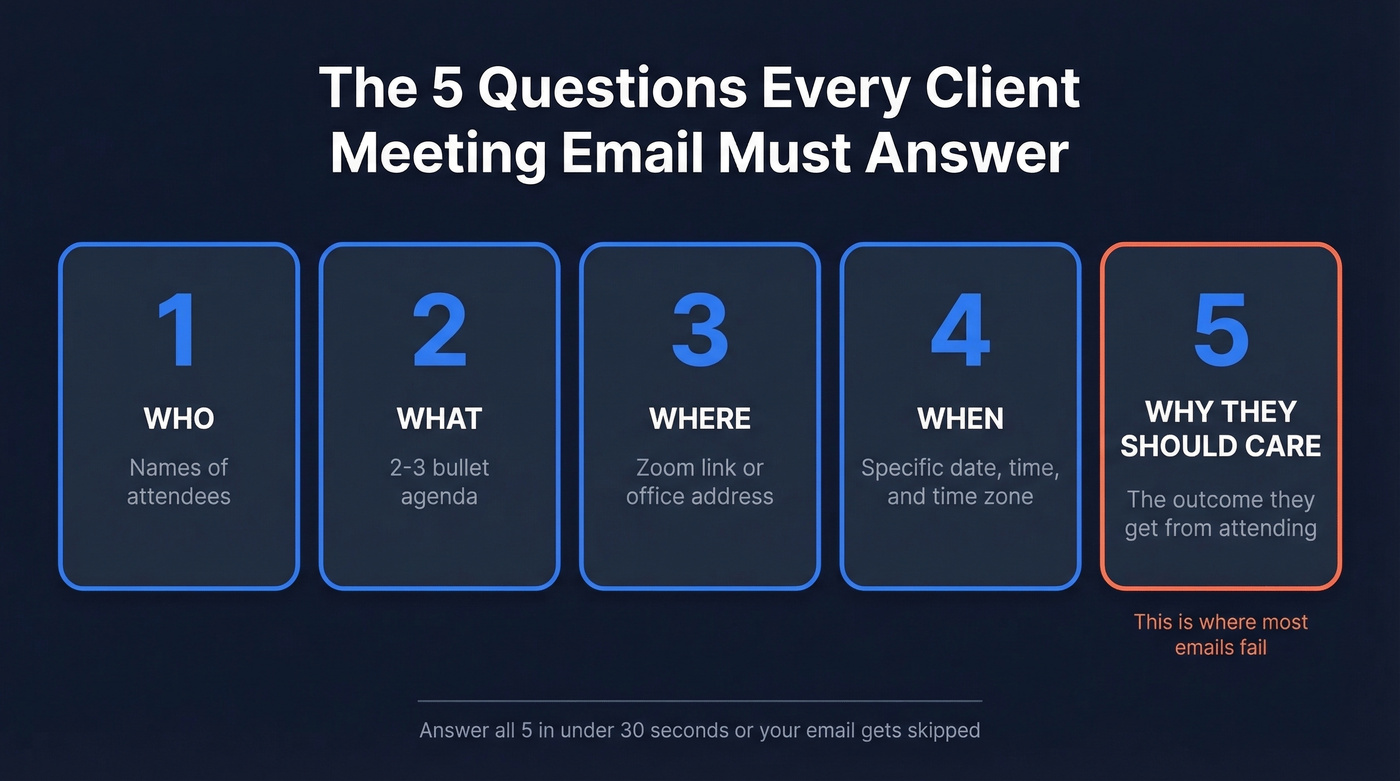
That last one is where most emails fail. "I'd love to sync on the project" makes the client think "I have 14 other things to do today." Flip the framing. Lead with the outcome they get from attending - "We'll finalize the Q3 launch timeline so your team can start briefing creative" beats "Let's discuss project status" every time.
Jessica Gilmartin, CRO at Calendly, put it bluntly: "If there's no agenda, cancel the meeting." That's the bar. Two to three bullet points showing what you'll cover signals preparation and respect for their time - especially in a meeting invitation email.
For the CTA, minimize friction. "Reply YES and I'll send the invite" works well when you want a quick micro-commitment before you send a calendar hold or full details. One asks for a small action. The other asks for homework. Outcome-first framing plus a single low-friction ask is a reliable pattern for prospects and existing clients alike.
10 Copy-Paste Meeting Templates
New Project Kickoff
When to use: You've signed the SOW and need everyone aligned on scope, timeline, and roles.
Subject: Kicking off [Project Name] - 30 min next week?
Hi [First Name],
Excited to get [Project Name] moving. I'd like to schedule a 30-minute kickoff so we're aligned before any work begins.
Agenda:
- Confirm deliverables and timeline milestones
- Identify key stakeholders and approval workflows
- Agree on communication cadence
Does [Tuesday at 2 PM ET] or [Thursday at 10 AM ET] work? Or grab a time here: [scheduling link]
Looking forward to it, [Your Name]
Pro tip: If you only send one template from this list with a filled-in example, make it this one. "Excited to get the HubSpot migration moving. Agenda: confirm migration phases and go-live date, identify your HubSpot admin and our technical lead, agree on weekly Slack check-ins vs. email updates." That level of specificity gets replies.
Recurring Check-In
When to use: Setting up or continuing a regular cadence - weekly, biweekly, or monthly.
Subject: [Client Name] biweekly sync - [Date]
Hi [First Name],
Here's the agenda for our check-in on [Date] at [Time + Time Zone]:
Agenda:
- Progress update on [current workstream]
- Blockers or decisions needed from your side
- Preview of upcoming deliverables
If anything's changed, reply and I'll adjust. Otherwise, see you [Day].
Best, [Your Name]
QBR / Business Review
When to use: Quarterly strategic review with a key account. Not a status call - a performance conversation.
Subject: Q[X] business review - [Client Name] + [Your Company]
Hi [First Name],
It's time for our Q[X] review. I've pulled together performance data and strategic recommendations to walk through with you and [stakeholder name].
Agenda (60 min):
- Q[X] results vs. goals (deck shared 24 hours ahead)
- What's working, what we're adjusting
- Q[X+1] priorities and resource planning
Can you do [Date] at [Time + Time Zone]? Happy to work around [stakeholder name]'s calendar.
[Your Name]
Real-world version for a consulting firm: "I've pulled together the engagement metrics from the org design rollout and have recommendations for Phase 2 hiring. We'll cover Q1 results vs. the 90-day milestones, change management adoption rates by department, and Q2 priorities including the APAC expansion timeline." See the difference? Specifics beat vague promises.
Project Working Session
This is distinct from the kickoff - it's the actual working session where the team digs in.
Subject: [Project Name] working session - [Date] at [Time]
Hi [First Name],
This is the working session for [Project Name]. Please have [relevant stakeholders] join - we'll need their input on [specific area].
Agenda (45 min):
- Walk through the project brief and confirm assumptions
- Assign workstream owners and set the first milestone
- Align on tools and communication channels
Meeting link: [Zoom/Teams/Google Meet link]
If anyone can't make it, let me know and I'll send a recording.
[Your Name]
Confirmation + Reminder
We've seen too many guides treat these as separate emails. In practice, you send a confirmation when the meeting is booked and a reminder 24 hours before. Same structure, different timing. Here's one template that works for both - just swap the subject line.
Subject (confirmation): Confirmed: [Meeting Topic] - [Day] at [Time] Subject (reminder): Reminder: [Meeting Topic] tomorrow at [Time]
Hi [First Name],
Quick note on our meeting [Day, Date] at [Time + Time Zone].
We'll cover:
- [Agenda item 1]
- [Agenda item 2]
- [Agenda item 3]
Meeting link: [link]
If anything's come up, reply and we'll adjust.
[Your Name]
Rescheduling Request
Give as much notice as you can. Short-notice reschedules create friction and signal disorganization. Always offer two to three specific alternatives - "let me know what works" puts the burden on them.
Subject: Rescheduling our [Day] meeting - new times below
Hi [First Name],
I need to move our [Day] meeting - apologies for the shift.
Three alternatives:
- [Option 1: Day, Date, Time + TZ]
- [Option 2: Day, Date, Time + TZ]
- [Option 3: Day, Date, Time + TZ]
Or pick a time: [scheduling link]
Sorry for the inconvenience - I'll make sure we cover everything in the new slot.
[Your Name]
Skip this template if you're rescheduling well in advance and the meeting is a low-stakes check-in. A quick Slack message or one-liner works fine in that case. Save the formal email for client-facing reviews, QBRs, or anything with multiple stakeholders.
Post-Meeting Recap
In our experience, the recap email is the highest-leverage email in a client relationship. It's the accountability mechanism - ambiguity is the most common reason action items die. Send it within 24 hours, same day if possible.
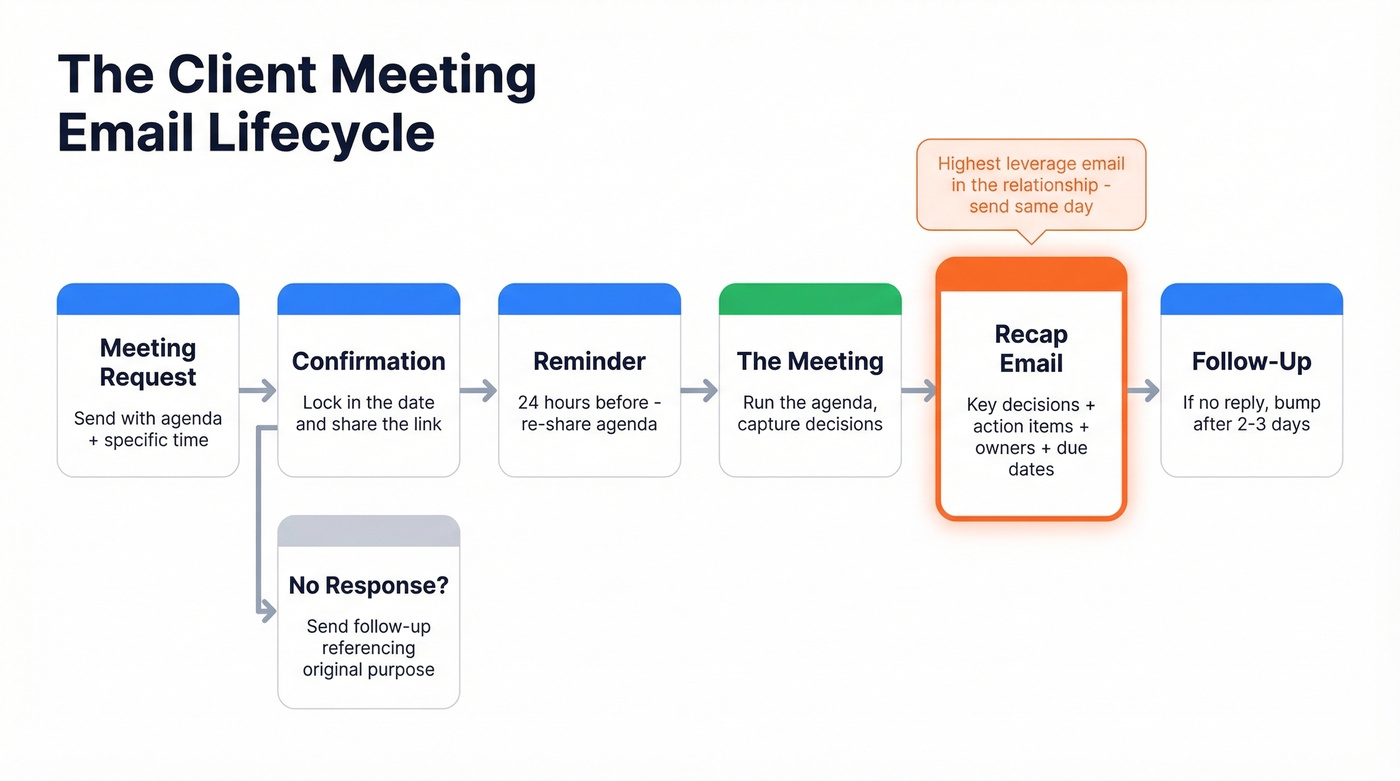
Subject: Recap: [Meeting Topic] - action items + next steps
Hi [First Name],
Thanks for the time today. Here's what we agreed on:
Key decision: [The most important outcome]
Action items:
- [Action 1] - Owner: [Name] - Due: [Date]
- [Action 2] - Owner: [Name] - Due: [Date]
- [Action 3] - Owner: [Name] - Due: [Date]
Next meeting: [Date, Time, Topic]
Let me know if I've missed anything.
[Your Name]
Lead with the key decision, not a summary of everything discussed. Even if the client skims, the most important takeaway gets read.
Follow-Up After No Response
You sent a meeting request and heard nothing. 70% of responses come from the 2nd to 4th email - don't give up after one. Reference the original email's purpose, not the fact that they didn't reply. Nobody likes being reminded they ghosted you.
Subject: Re: [Original Subject Line]
Hi [First Name],
Just bumping this up. I'd like to get [specific topic] on the calendar so we can [outcome they care about].
Does [new time option] work? Happy to keep it to 20 minutes.
[Your Name]
Reconnecting With a Dormant Client
If it's been a few months since you last spoke, this re-opens the door. Reactivating a warm relationship is cheaper than building a cold one - and it's a lot less awkward than you think.
Subject: [First Name] - quick catch-up on [relevant topic]?
Hi [First Name],
It's been a while, and I wanted to check in. [One sentence about something relevant to their business - a product launch, a hiring spree, an industry shift.]
I'd love 15 minutes to catch up and see if there's anything we can help with heading into [quarter/season].
Would [Day] or [Day] work?
[Your Name]

A perfect meeting email is useless if it lands in the wrong inbox. Prospeo gives you 98% accurate emails for every stakeholder on the invite list - from the project lead to the C-suite sponsor. No bounces, no wasted follow-ups.
Stop sending meeting requests to dead email addresses.
Subject Lines That Get Opened
43% of people open emails based on the subject line alone, and personalized subject lines get opened 26% more often. That doesn't mean "Hi {{FirstName}}" - it means including the client's company name, the project name, or a specific date. Here's what works:
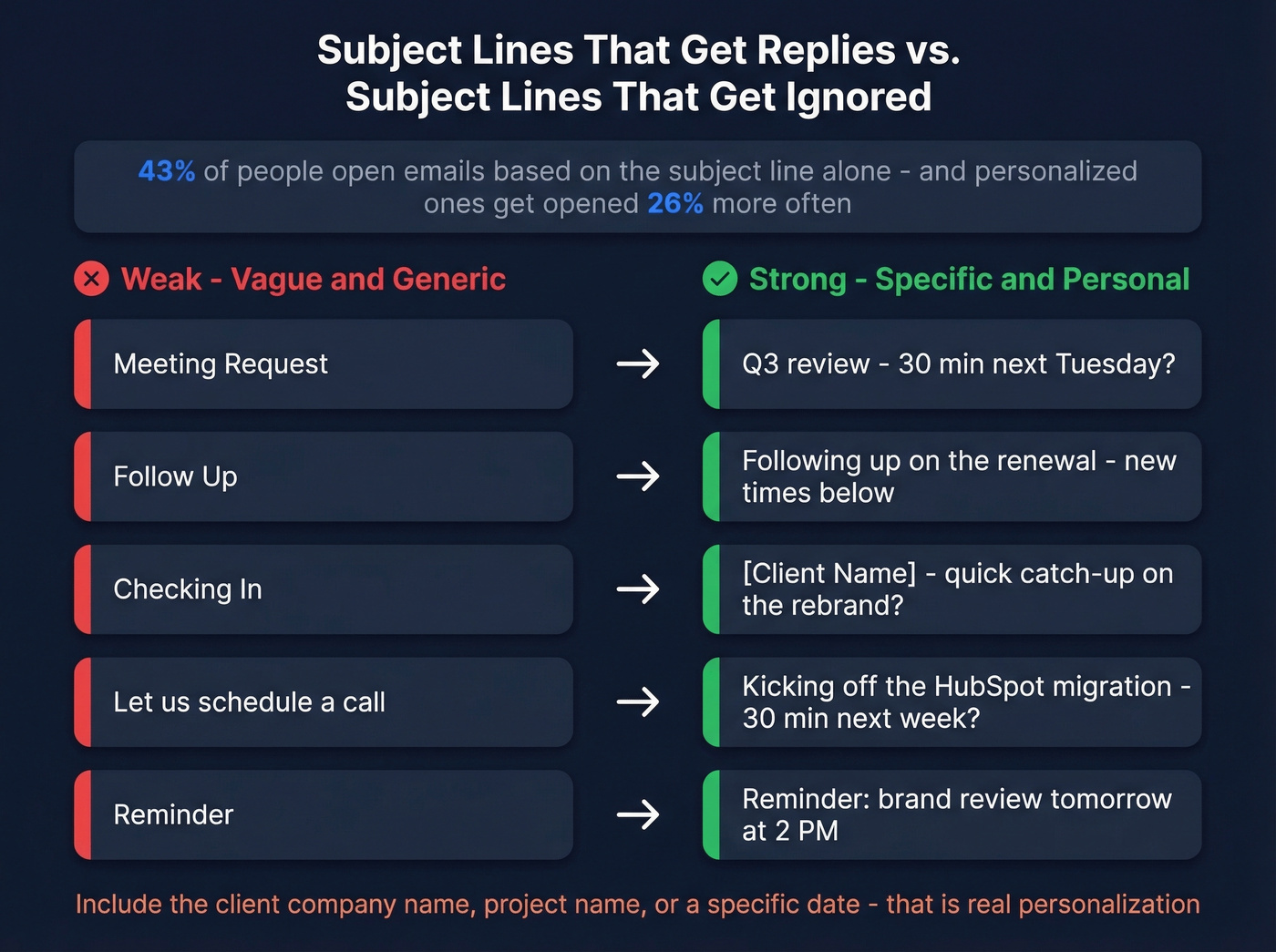
- Q3 review - 30 min next Tuesday?
- [Client Name] + [Your Company] kickoff - March 25
- Recap: action items from today's call
- Quick sync on the migration timeline?
- Rescheduling our Thursday meeting - new times
- Reminder: brand review tomorrow at 2 PM
- [First Name] - catch-up on the product launch?
- Status update: campaign performance + next steps
- Following up on the renewal conversation
- 15 min this week? Have an idea for Q2
Weak vs. Strong: "Meeting Request" becomes "Q3 review - 30 min next Tuesday?" ... "Follow Up" becomes "Following up on the renewal - new times below" ... "Checking In" becomes "[Client Name] - quick catch-up on the rebrand?"
One note on open rates: in 2026, they're directional at best thanks to privacy features inflating or masking opens. Focus on reply rates as your real signal.
5 Mistakes That Kill Response Rates
Sending to a dead address
Look, your perfectly crafted meeting email means nothing if it bounces. Client contacts change roles, companies rebrand, domains get consolidated after acquisitions. The email you used six months ago might be dead today. We've seen this trip up even experienced account managers - one bounced QBR invite and suddenly you're scrambling to find the right contact two days before the review. Prospeo verifies emails in real time with 98% accuracy, so one check before you hit send beats the embarrassment of a bounced meeting request. If you want a deeper dive, start with email bounce rate benchmarks and fixes.

Using a generic subject line
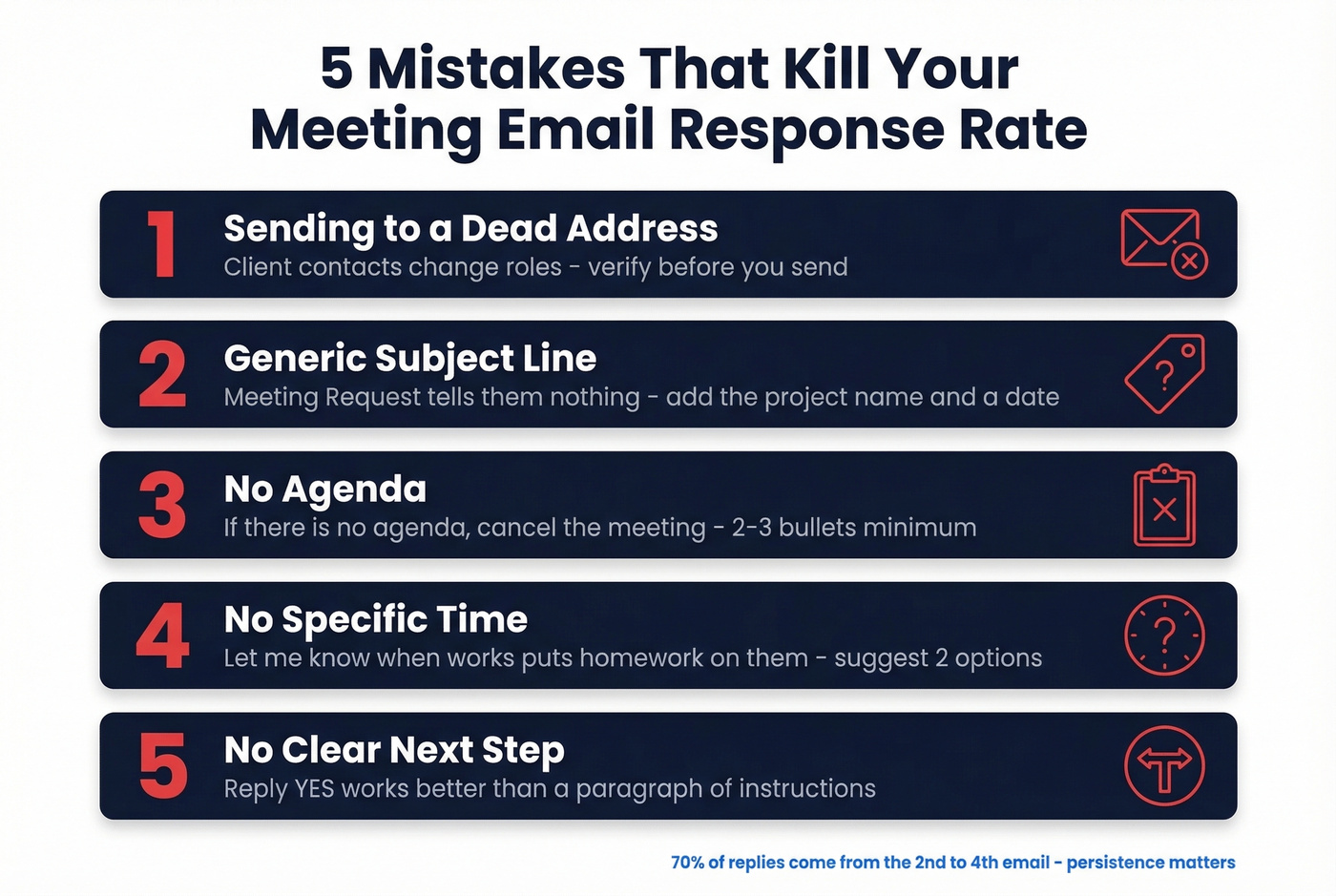
"Meeting Request" and "Quick Sync" tell the client nothing about why they should open your email instead of the other 120 in their inbox. Include the project name, the quarter, or the specific time you're proposing. It takes five extra seconds and doubles your odds of getting read. If you need more ideas, pull from these email subject line examples.
Wall-of-text formatting
If your email takes longer than 30 seconds to scan, it's too long. No agenda bullets, no paragraph breaks, no clear CTA - that's a recipe for "I'll read this later," which means never. Two to three short paragraphs max. Bullet the agenda. Make the ask obvious. For more on structure, see email copywriting best practices.
No follow-up
You send one email, get no reply, and assume the client isn't interested. They're not uninterested - they're buried. 70% of responses come from the 2nd to 4th email. Wait two to three business days, then follow up shorter and lighter. If you want more options, use these sales follow-up templates as a starting point.
Broken personalization tags
Nothing screams "I didn't check this" like "Hi {{FirstName}}, I'd love to discuss {{CompanyName}}'s Q3 goals." Always set fallback text for every dynamic field. Preview the email before it goes out - every single time. If you're tightening your messaging, borrow a few patterns from personalized outreach.
Pre-Send Checklist
- Recipient email is active - verify before sending
- Personalization tags render - fallback text set
- Scannable in 30 seconds - short paragraphs, bullet agenda, clear CTA
- Single clear CTA - one ask, not three (see email call to action rules)
- Agenda included - 2-3 bullets minimum
- Time zone stated - use the recipient's, not yours
- Mobile preview clean - subject line not truncated
- Scheduling link works - click it yourself first
Scheduling QBRs and kickoffs with new stakeholders? Prospeo's Chrome extension finds verified emails and direct dials from any company page or LinkedIn profile in one click - so your meeting request reaches the decision-maker, not a shared inbox.
Find any stakeholder's verified email in seconds for $0.01.
FAQ
How far in advance should I send a client meeting request?
Three to five business days for standard check-ins; one to two weeks for QBRs or reviews with multiple stakeholders. Same-day invites signal poor planning and consistently get lower reply rates.
How long should I wait before following up on a meeting email?
Two to three business days is the sweet spot. Don't apologize - reference the original ask and offer a new time. 70% of responses come from the 2nd to 4th email, so persistence pays.
How do I handle time zones in meeting emails?
Always state the time in the recipient's time zone, not yours. If you're in New York emailing London, write "3 PM GMT." Including a scheduling link that auto-adjusts eliminates confusion entirely.
Can I copy these templates and send them right now?
Yes. Start with the one matching your scenario - kickoff, QBR, check-in, reschedule, recap - fill in the bracketed fields, and send. The kickoff and recurring check-in templates cover the two most common situations.
How do I make sure my meeting email doesn't bounce?
Verify the recipient's address before sending. Tools like Prospeo check emails in real time, and the free tier gives you 75 verifications per month - enough to confirm every client contact on your calendar.