

How to Export Leads From Any Platform (and What to Do After)
You exported 2,000 leads last Tuesday, loaded them into your sequencer, and hit send. By Wednesday morning, 400 emails had bounced. Your domain reputation took a hit that'll take weeks to recover from.
Here's the thing: the mechanics of how you export leads are the easy part. Making that data usable - clean, verified, enriched - is where most teams fall apart, and it's the step most guides skip entirely. We're covering the actual export workflows for every major platform, plus the post-export process that keeps your domain alive.
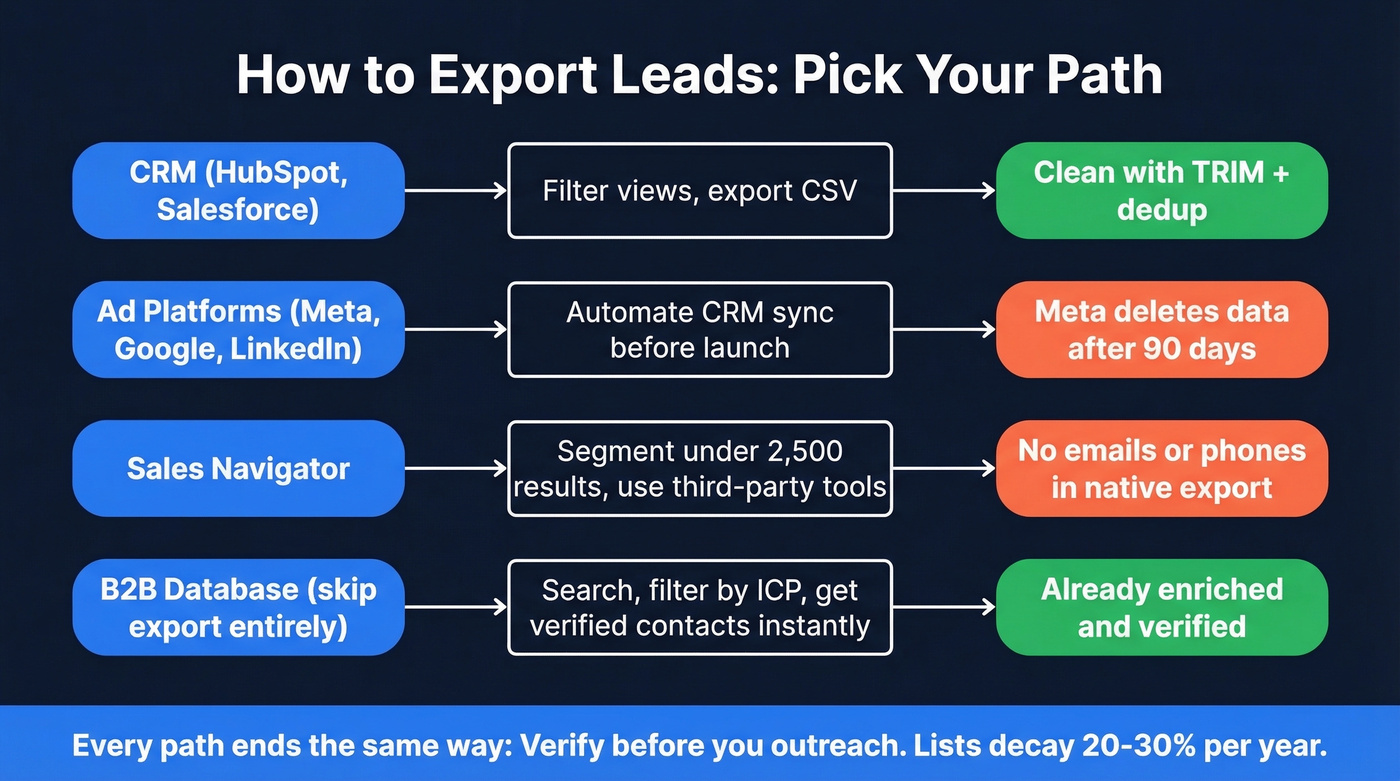
Quick Reference by Source
- From a CRM like HubSpot or Salesforce: Use filtered views, export to CSV, and clean the file before you touch anything else.
- From ad platforms like Meta: Automate the sync immediately. Meta deletes your lead data after 90 days.
- From prospecting tools: Many native exports won't include emails or phone numbers. You'll need an enrichment tool to make the data outreach-ready.
- No matter the source: Verify before you outreach. Email lists decay 20-30% per year. Run your exported CSV through an enrichment and verification tool to get verified emails and direct dials before a single message goes out.
Exporting From Your CRM
HubSpot
HubSpot's export logic is "what you see is what you get." The filtered table view you're looking at is exactly what exports, so set your filters before you click Export. One thing that catches people off guard: HubSpot sends a download link to your email rather than triggering an instant download.
The bigger gotcha is HubSpot's Prospecting feature. Lead records created through Prospecting don't support standard export or import. This has 99 upvotes on HubSpot's Ideas forum and the official status is "Not Currently Planned." The workaround: import your data as Contacts or Companies first, then bulk create Leads from that list. It's clunky, but it works.
Salesforce
Salesforce gives you two paths. For targeted exports, go to Reports, build or select a report with the fields you need, and hit Export. For full database backups, use the scheduled Data Export tool in Setup - it runs weekly or monthly and captures everything.
Most teams only need the Reports path for day-to-day lead data pulls.
Post-Export Hygiene Checklist
Every CRM export needs the same cleanup before it's useful:
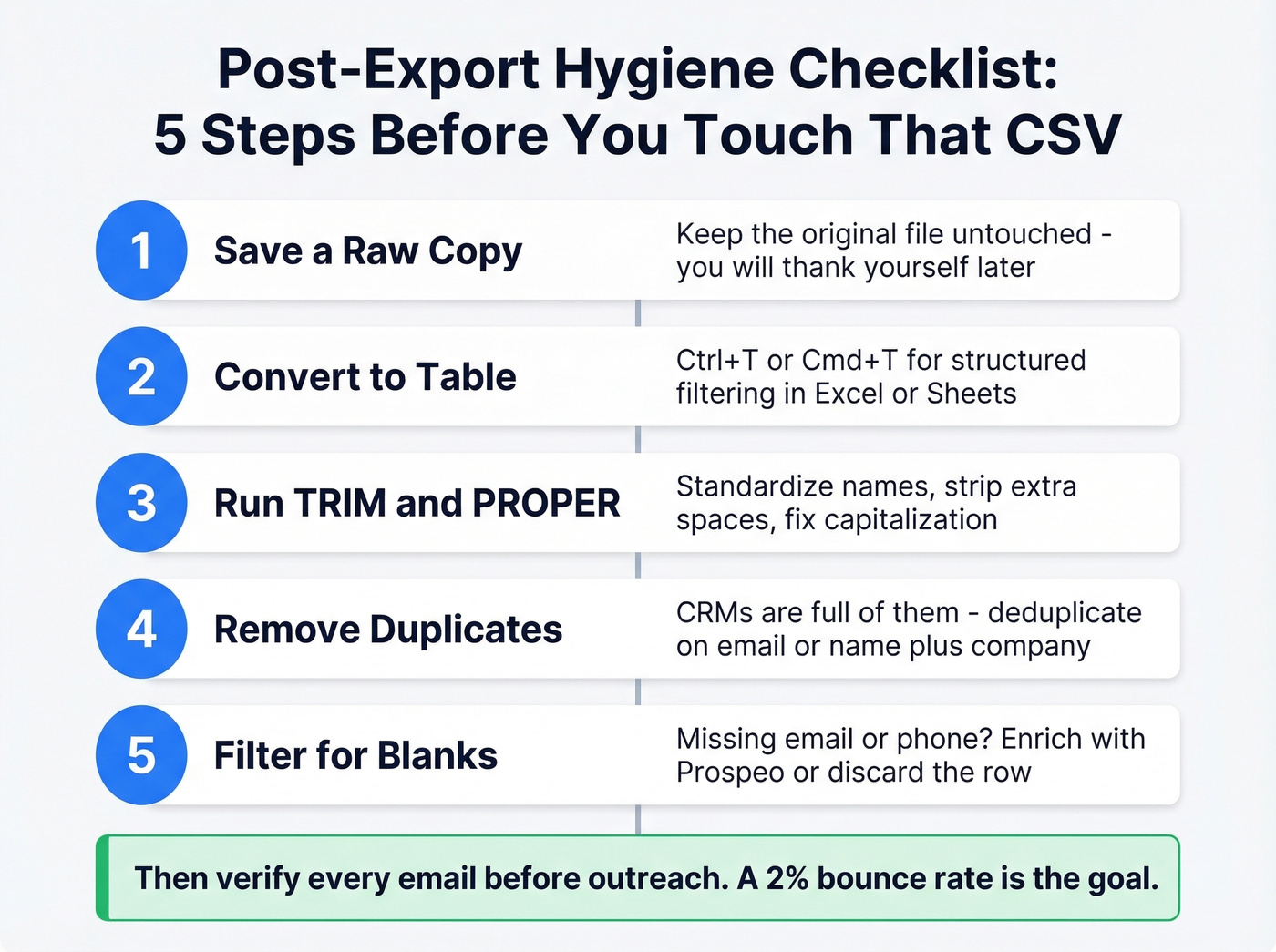
- Save a raw copy of the file before you edit anything. You'll thank yourself later.
- Convert the range to an Excel Table with Ctrl+T or Cmd+T for structured filtering.
- Run TRIM and PROPER formulas to standardize names and text fields.
- Remove duplicates - CRMs are full of them.
- Filter for blanks in email or phone columns and decide whether to enrich or discard those rows.
Exporting From Ad Platforms
Meta / Facebook Lead Ads
Meta deletes your Lead Ads form data after 90 days. If you launched a campaign three months ago and haven't downloaded those leads, they're gone.
Meta's Lead Ads forms can capture up to 18 preset fields, but each form must be downloaded separately - there's no bulk export across campaigns. You've got three options: manual CSV download from Ads Manager, which is tedious but works for small volumes; a direct CRM integration through HubSpot or Salesforce, both of which support this natively; or API/webhook automation through tools like Zapier or Make that continuously sync new leads so you never lose data past the 90-day cliff.
Set up the CRM sync before you launch the campaign. Not after. Before.
Google Ads & LinkedIn Ads
LinkedIn Ads lead form submissions can be exported from Campaign Manager via CSV download, and you can automate lead capture through CRM sync or tools like Zapier and Make.
For Google Ads, export and sync options depend on how you're collecting leads - native lead forms, landing pages, or a third-party form tool. The principle is the same: automate the sync early so leads flow into your CRM in real time rather than sitting in a platform you check once a month.
Exporting From Sales Navigator
What Native Export Actually Gives You
Don't expect a clean CSV with emails and phone numbers. There's no one-click "Export to Excel" for lead lists; the closest native route is LinkedIn's general data export flow. What you get: full name, profile URL, job title, company name, and date saved. What's missing: email, phone, notes, tags, custom lead list names, and engagement history. The download can take minutes to hours to prepare, and when it arrives, it isn't outreach-ready.
Beating the 2,500-Result Cap
Every Sales Navigator search caps at 100 pages x 25 results = 2,500 visible leads. Even if your search matches 15,000 people, you'll only ever see the first 2,500. As one agency owner put it on r/LeadGeneration: "Hitting the 2.5K Sales Nav limit is killing my workflow."
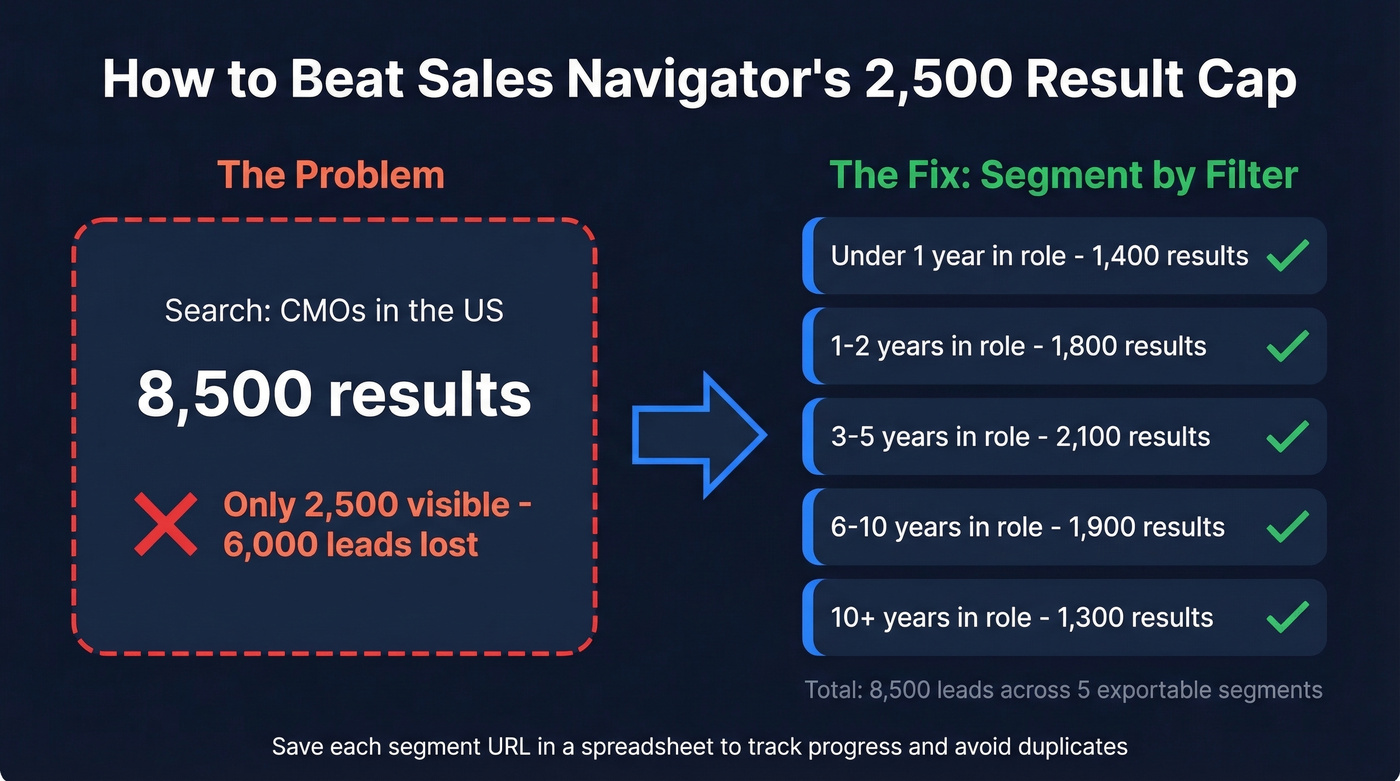
The workaround is segmentation. Add filters - seniority, geography, years in current role - until each segment returns fewer than 2,500 results. A search for CMOs returning 8,500 results can be split by "years in current position" into buckets: under 1 year, 1-2, 3-5, 6-10, and 10+. Each becomes exportable on its own. Save each segmented search URL in a spreadsheet to track progress and avoid duplicates.

CRM Sync vs. Third-Party Tools
The LinkedIn-approved way to get data out is CRM sync, but that requires an Advanced Plus plan at ~$1,600/seat/year. For most teams, that's overkill. Third-party tools like Evaboot and PhantomBuster are cheaper but operate in a ToS gray area. Keep batches small - 50 to 100 leads at a time - and pace your exports like a human would browse.
If you're building repeatable outbound, it also helps to standardize your sales prospecting techniques so list pulls, enrichment, and outreach stay consistent.

Every exported lead without a verified email is dead weight. Prospeo's enrichment engine matches 83% of your CSV rows, returning verified emails, direct dials, and 50+ data points per contact - all refreshed every 7 days so your exports never go stale.
Turn raw exports into verified outreach lists for $0.01 per lead.
Best Tools for Lead Export & Enrichment
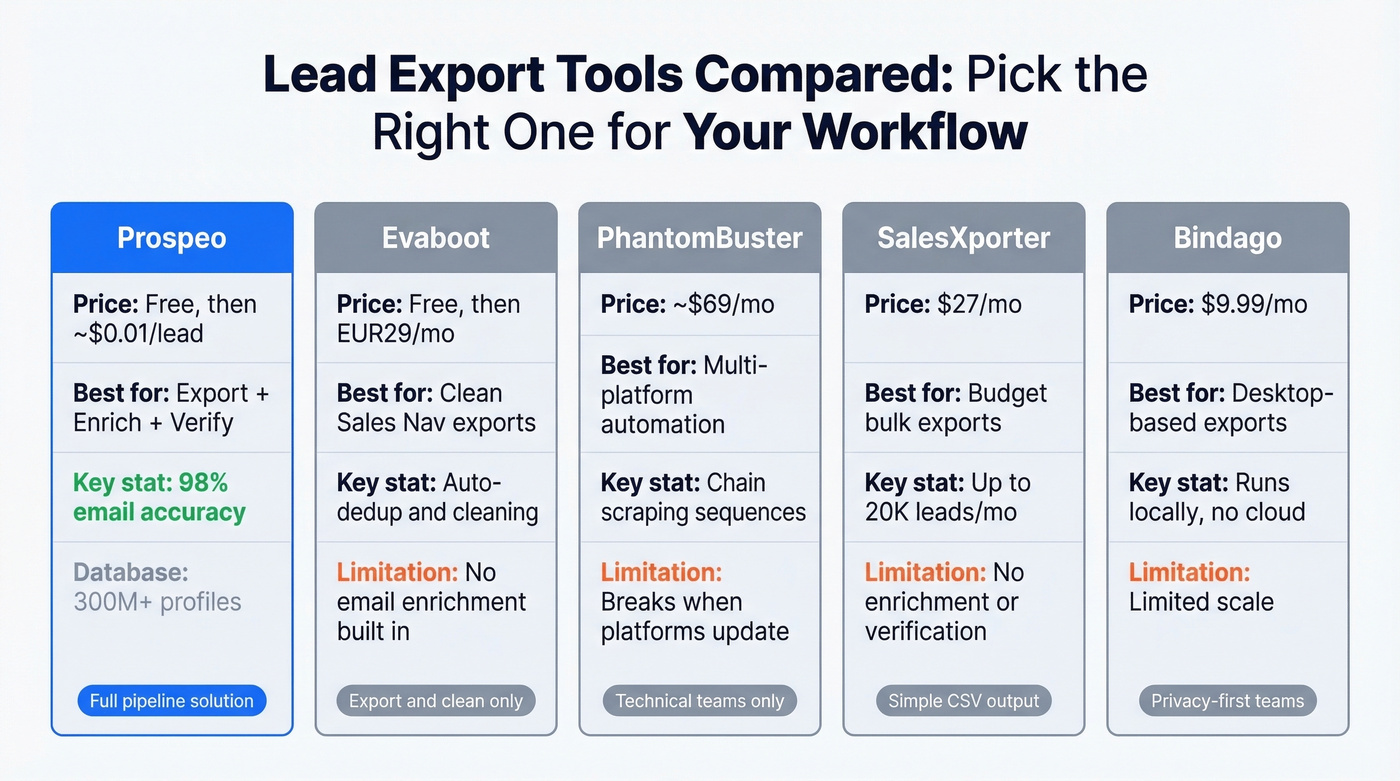
| Tool | Starting Price | Best For | Key Feature |
|---|---|---|---|
| Prospeo | Free (75 emails/mo) | Export + enrich + verify | 300M+ profiles, 98% email accuracy, 7-day refresh |
| Evaboot | Free (150 credits/mo) | Clean Sales Navigator exports | Auto-dedup, data cleaning |
| PhantomBuster | ~$69/mo | Multi-platform automation | Multi-step scraping sequences |
| SalesXporter | $27/mo | Budget bulk exports | Simple CSV output |
| Bindago | $9.99/mo | Desktop-based exports | Runs locally, no cloud |
Prospeo
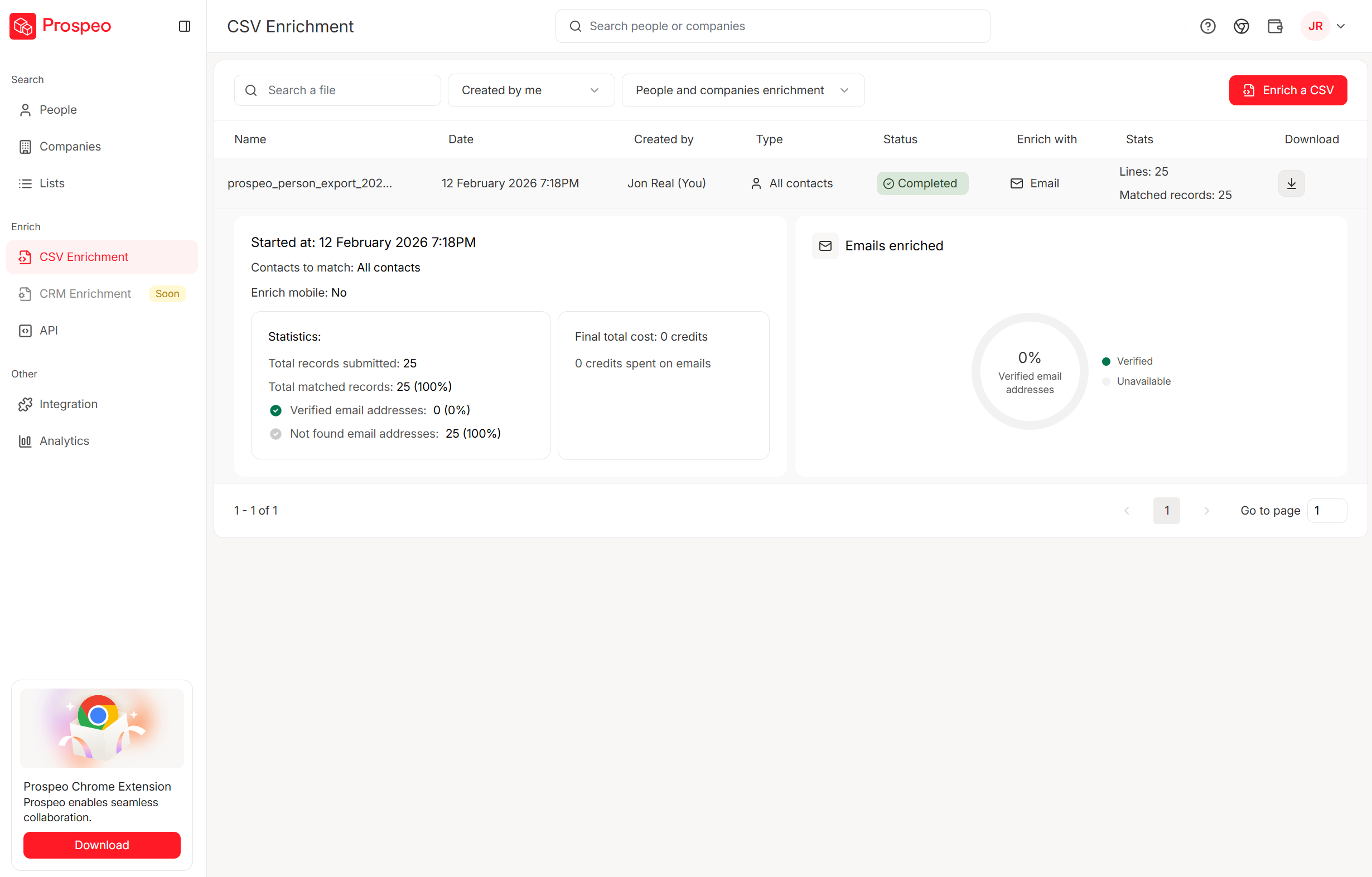
Prospeo eliminates the export-then-verify-then-enrich loop entirely. Upload a CSV of names and companies, and the enrichment engine matches 83% of leads, returning 50+ data points per contact - verified email, direct dial, company data, technographics. The database covers 300M+ profiles with 143M+ verified emails and 125M+ verified mobile numbers, all refreshed on a 7-day cycle.
What we like about the verification side: a proprietary 5-step process handles catch-all domains, spam traps, and honeypots, which is why the 98% email accuracy holds up in practice. At ~$0.01/lead, it's one of the cheapest ways to turn a raw export into an outreach-ready list. The free tier gives you 75 verified emails per month to test the workflow before committing.
If you want to go deeper on deliverability, pair verification with email reputation tools so you can spot issues before they tank a domain.
Evaboot
Evaboot is the go-to for cleaning Sales Navigator exports. It auto-cleans data on export - stripping emojis from names, standardizing job titles, and deduplicating contacts across lists. The free plan gives you ~150 credits per month, and paid plans start at EUR29/mo for ~2,000 extractions.
Use this if you need clean CSVs from Sales Navigator and want something that works out of the box. Skip this if you need email enrichment built in - Evaboot focuses on the export and cleaning step, not verification.
PhantomBuster
On Reddit, PhantomBuster discussions follow a predictable pattern: someone raves about chaining scraping, enrichment, and outreach steps across multiple platforms, then someone else replies that their workflow broke after a platform update. That's PhantomBuster in a nutshell - genuine power wrapped in genuine fragility. Plans start at ~$69/mo. It's a tool for teams with technical chops who don't mind debugging automations when things inevitably break, not a plug-and-play exporter.
If you're considering scraping as a core channel, read up on web scraping lead generation before you scale it.
SalesXporter & Bindago
Two budget options worth knowing about. SalesXporter offers straightforward bulk exports at $27/mo for 2,000 leads, $47/mo for 5,000, or $97/mo for 20,000. No frills, just CSV output. Bindago runs locally on your desktop at $9.99/mo with no cloud dependency, which appeals to teams with strict data handling policies.
When to Skip Exporting Entirely
Let's be honest: if you're pulling more than 1,000 contacts a month, the export-clean-enrich-verify loop is eating hours you don't have. A B2B database eliminates that entire chain - you search, filter, and get verified contacts from the start.
| Database | Starting Price | Database Size | Differentiator |
|---|---|---|---|
| Prospeo | Free; ~$0.01/lead | 300M+ profiles | 98% accuracy, 7-day refresh |
| Apollo | Free; $49/mo | 275M+ contacts | Large free tier, lower accuracy on some segments |
| ZoomInfo | ~$15,000+/year | Enterprise-scale | Deep firmographics |
| Lusha | Free; $49/mo | Mid-market | Simple Chrome extension |
| Hunter.io | Free; $49/mo | Email-focused | Domain search |
With a database-first approach, 30+ filters narrow to your exact ICP - buyer intent, technographics, job changes, funding, headcount growth - and records stay fresh on a weekly cycle. For teams doing serious outbound, the time savings alone justify the switch.
To compare options, start with a shortlist of sales prospecting databases.
Verify Before You Outreach
Remember those 400 bounced emails from the intro? That's what happens when you skip verification. Email lists decay 20-30% per year. People change jobs, companies rebrand domains, mailboxes get deactivated. A raw CSV from any source - CRM, ad platform, prospecting tool - will contain dead addresses.
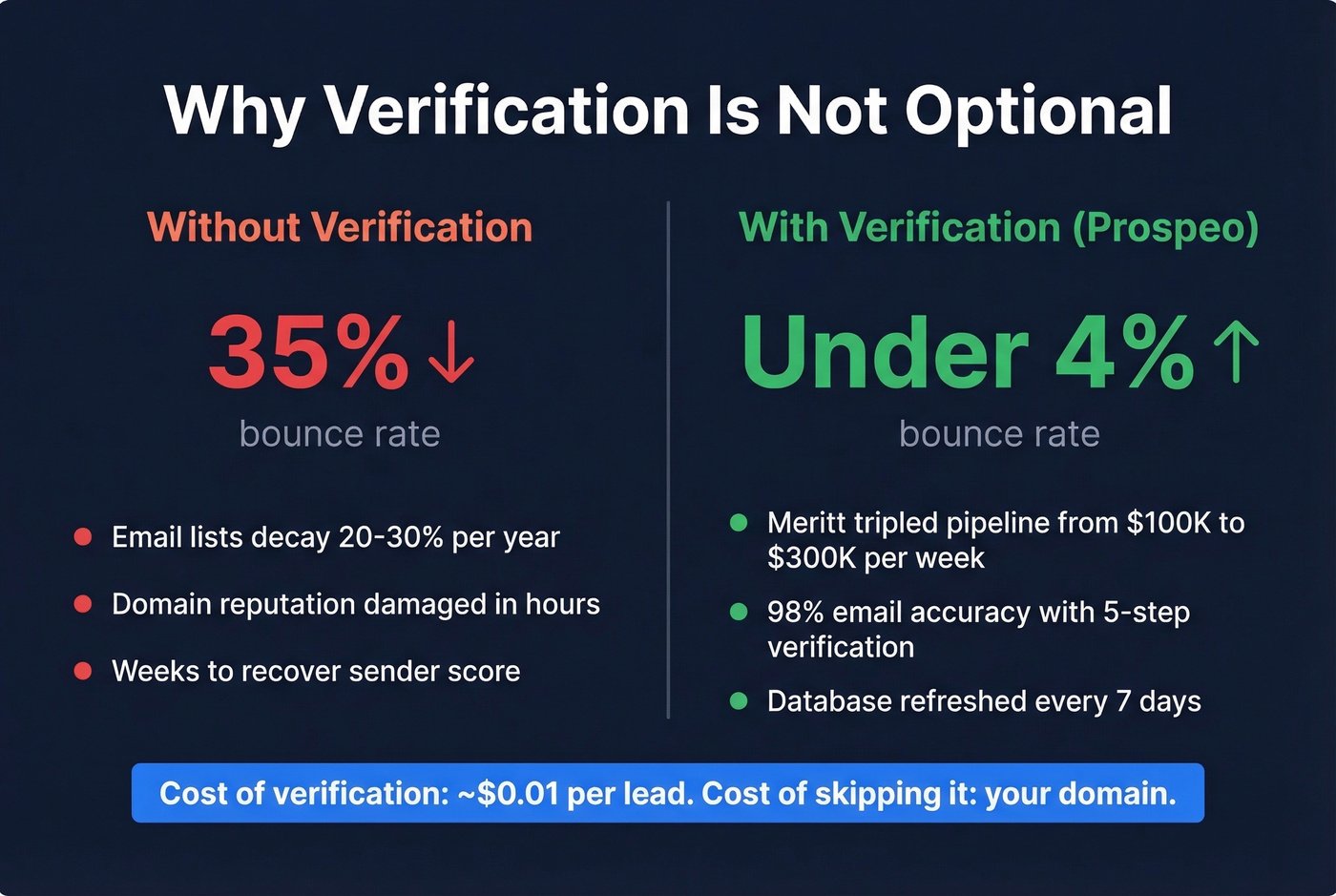
We've tested raw CRM exports against enriched ones, and the difference in bounce rates is stark. Meritt used an enrichment-first workflow and dropped their bounce rate from 35% to under 4%, tripling their pipeline from $100K to $300K per week. At $0.01/lead, verification is one of the cheapest deliverability wins you can buy.
If you're troubleshooting bounces, use an email bounce rate benchmark guide to sanity-check what you're seeing.
Verification isn't optional. It's the difference between a campaign that books meetings and one that gets your domain blacklisted.
Sales Navigator won't give you emails. CRM exports are full of blanks and duplicates. Prospeo closes the gap - 300M+ profiles, 143M+ verified emails, and a 5-step verification process that catches spam traps and honeypots before they torch your domain.
Skip the bounce rate nightmare. Verify before you send.
Compliance Checklist
Before you export leads, enrich, or outreach, make sure you aren't building a legal liability:
- GDPR applies if you target EU/EEA residents - regardless of where your company is based.
- Establish a lawful basis for processing. Legitimate interest works for B2B outreach in most cases, but document your reasoning.
- Minimize data collection. Export only the fields you'll actually use. "Export everything just in case" violates the data minimization principle.
- Set storage limits. Don't keep lead data indefinitely. Define a retention period and stick to it.
- Pre-ticked boxes and inactivity don't count as consent. If you're relying on consent as your basis, it must be freely given and unambiguous.
- Respect platform ToS. Exporting via third-party scrapers is a gray area. Keep volumes reasonable and don't automate aggressively.
- Know the fine thresholds. GDPR penalties run up to EUR20M or 4% of global turnover for serious violations. That isn't theoretical - enforcement is active.
If you're building a repeatable outbound motion, align compliance with your lead generation workflow so nothing slips through the cracks.
FAQ
What's the fastest way to export leads to CSV?
From CRMs like HubSpot or Salesforce, use built-in filtered views or reports for instant CSV downloads. From Meta Lead Ads, set up a Zapier or Make sync. From Sales Navigator, use Evaboot for clean exports, then run the file through an enrichment tool to add verified emails and phone numbers.
Does Meta delete lead data after 90 days?
Yes - Meta permanently removes Lead Ads form submissions after 90 days with no recovery option. Set up a CRM sync or automated export before launching any lead ad campaign.
How do I export more than 2,500 leads from Sales Navigator?
Segment your search using additional filters - seniority, geography, years in current role - until each segment returns fewer than 2,500 results. Save each segmented search URL in a spreadsheet to track progress and prevent duplicate pulls across segments.
Should I verify emails after exporting?
Always. Email lists decay 20-30% per year, and sending to unverified addresses damages sender reputation. A 5-step verification process that catches catch-all domains, spam traps, and honeypots at ~$0.01/lead is far cheaper than recovering a blacklisted domain.
Can I export HubSpot Prospecting leads?
Not directly - HubSpot's Prospecting feature doesn't support standard export or import, and the feature request is marked "Not Currently Planned." The workaround is importing your data as Contacts or Companies first, then bulk creating Leads from that list.