

How to Find Accounts by Email: 8 Methods That Work
A long-time internet user typically has 100-200+ online accounts. Power users push past 400. And every "free lookup" site promising to find accounts by email follows the same script: animated progress bar, fake suspense, paywall. That experience is garbage.
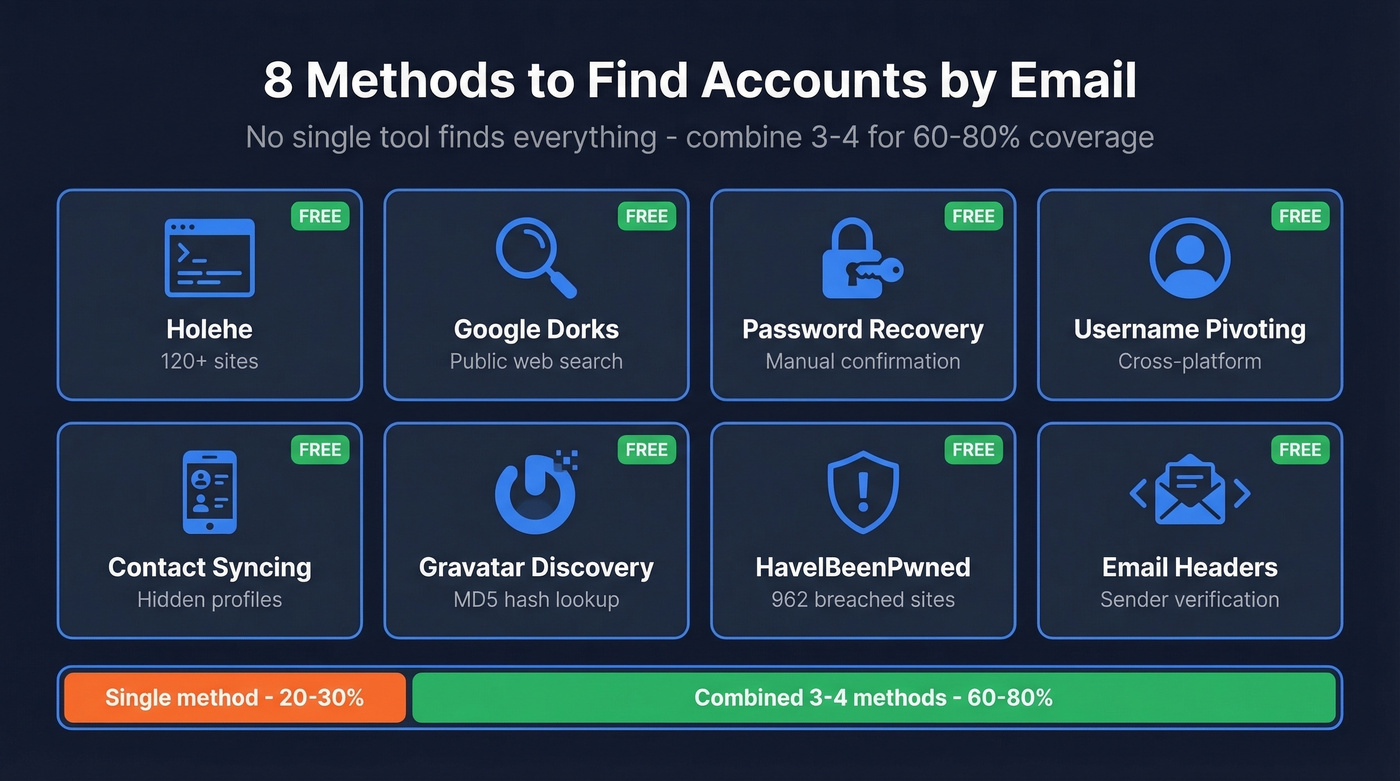
What actually works is combining multiple free methods - each one catches accounts the others miss. We've tested these extensively, and combining 3-4 methods gets you around 60-80% coverage. No single tool finds everything. Anyone claiming otherwise is selling you something.
If you're here because you received a threatening email with your real name and home address: that's almost certainly a sextortion scam built from recycled data-broker records and old breach data. Don't pay. But do audit your exposure using the methods below.
What You Need (Quick Version)
- Best free automated tool: Holehe - 120+ sites - 120+ sites, open-source, runs from your terminal
- Best free breach check: HaveIBeenPwned - 962 breached sites - 962 breached sites, 17.5B+ pwned accounts as of early 2026
- Best free manual method: Google dorks (copy-paste templates below)
- Best paid OSINT tool: Epieos - 140+ services, EUR29.99/mo
- Honest expectation: no single method finds everything. Combining 3-4 methods gets you to roughly 60-80% coverage.
Free Methods to Discover Linked Accounts
These eight methods cost nothing and, used together, will uncover the majority of accounts tied to any email address.
1. Holehe - Automated Enumeration
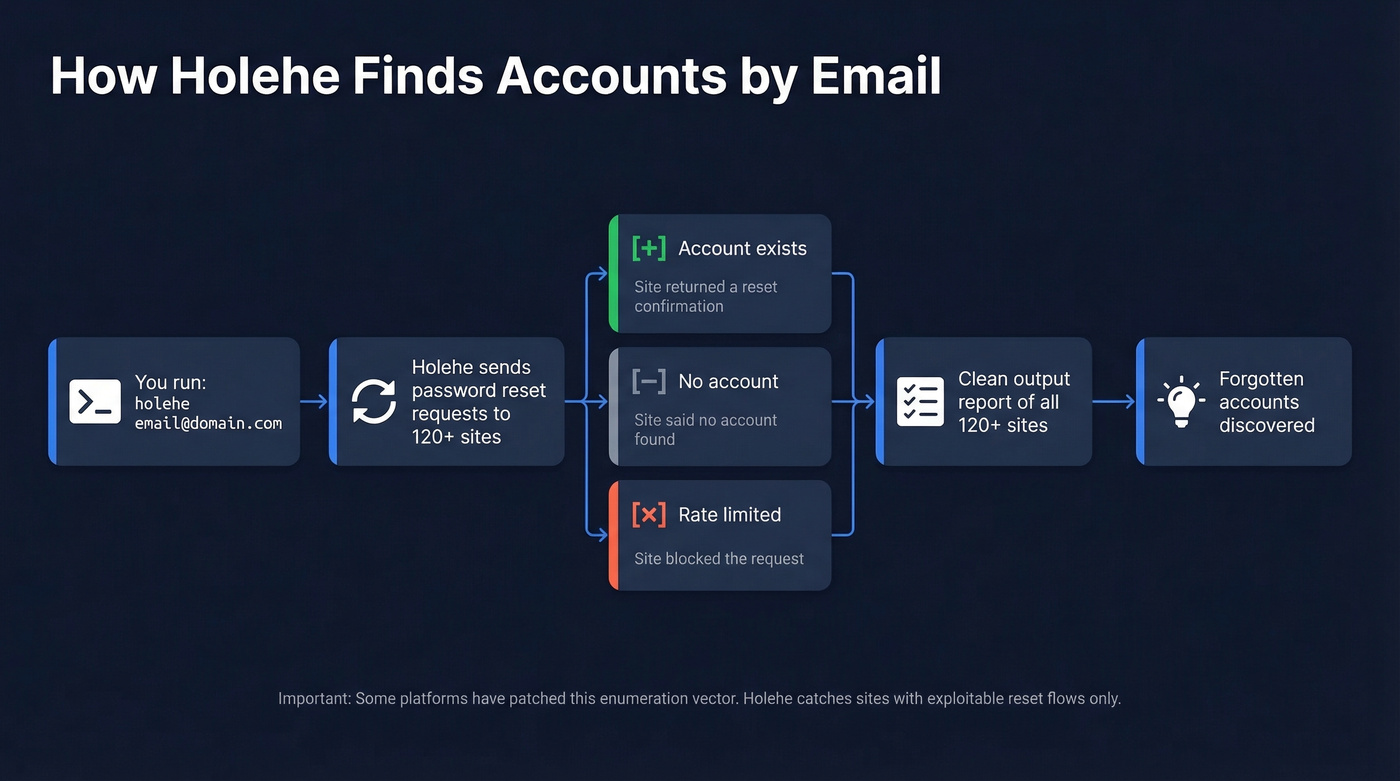
Holehe is open-source, runs in your terminal, and checks 120+ sites by analyzing password reset behavior. Two commands and you're running:
pip3 install holehe
holehe email@domain.com
The output is clean: each site gets a [+] (account exists), [-] (no account), or [x] (rate-limited/unknown). Scans finish fast and often surface forgotten accounts you didn't know existed.
Holehe only catches sites with exploitable password reset flows, and some platforms have patched this enumeration vector. For Gmail addresses specifically, GHunt is worth running alongside it - it pulls Google-account signals like reviews and Maps contributions that Holehe can't access. If you need a deeper walkthrough of existence checks, see check if an email exists.
2. Google Dorks - Search the Public Web
Google indexes more than you think. These exact-match searches find forum posts, leaked spreadsheets, cached profiles, and PDF documents where an email appears in the wild.
Copy these and replace with your target email:
"email@domain.com"- any public page mentioning the exact address"email@domain.com" filetype:pdf OR filetype:xlsx- documents where the email was embedded (conference attendee lists, invoices, org charts)site:github.com "email@domain.com"- Git commits, README files, and config files with the email hardcodedsite:pastebin.com "email@domain.com"- paste sites for leaked credentials or data dumps
The document search is the one most people skip, and it's often the most revealing.
Don't stop at live results. Plug any discovered usernames or profile URLs into the Wayback Machine to recover deleted or changed content. For Reddit specifically, pullpush.io can surface historical posts and comments, including content that's no longer visible. These archive tools are how OSINT professionals reconstruct digital footprints that someone tried to erase.
3. Password Recovery Confirmation
This is the manual version of what Holehe automates. Go to any platform's "Forgot Password" page, enter the email, and read the response. "We've sent a reset link" means the account exists. "No account found" means it doesn't.
It works on platforms Holehe can't reach - especially smaller or newer services. Important ethical boundary: don't automate this process, don't click any reset links that arrive, and don't attempt to access the account. You're confirming existence, nothing more. If you're doing this specifically for Gmail, use this guide to check if a Gmail account exists.
4. Username Pivoting
Your email's local-part - the bit before the @ - is often a username the person reuses everywhere.
For example, alex.photo@gmail.com gives you alex.photo. Run that through IDCrawl (idcrawl.com/u/alex.photo), which checks many major platforms in one pass: Instagram, TikTok, YouTube, Reddit, and more. Also try variations like alexphoto, alex_photo, and alex-photo. Namechk and InstantUsername check hundreds of platforms simultaneously for broader coverage.
The hit rate depends on how unique the username is. john.smith produces noise. Anything distinctive tends to find real matches quickly.
5. Contact Syncing Trick
Here's the thing - I'd argue this is the most underrated method on the entire list. Add the target email to your phone's contacts. Then open apps that sync your contact list: VSCO, BeReal, Snapchat, TikTok, Venmo, Telegram, and Duolingo all do this.
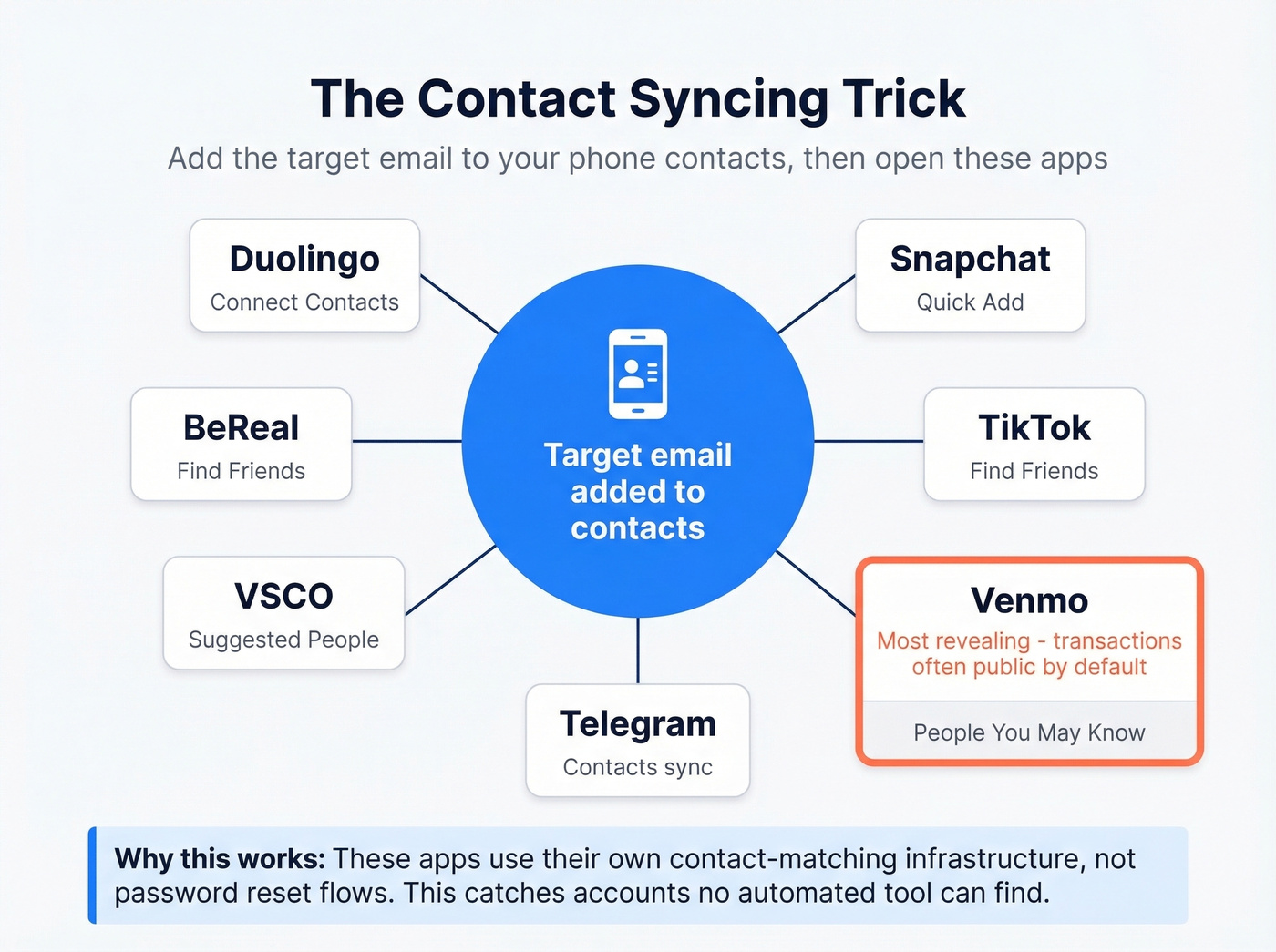
If the email is registered on any of these platforms, the associated profile shows up in your "People You May Know" or "Find Friends" section. Venmo is particularly revealing because many profiles and transactions are public by default. This method catches accounts that no automated tool will find, because it relies on the platform's own contact-matching infrastructure rather than password reset flows.
6. Gravatar Discovery
Gravatar ties a profile to the MD5 hash of an email address. Many WordPress-based sites automatically pull Gravatar images, which means the email owner's photo, display name, website, and bio can be publicly accessible without them realizing it.
Generate the MD5 hash of the email and query Gravatar via the hash-based URL. If a profile exists, you'll get a photo, a display name, and often a personal website link. Run a reverse image search on the Gravatar photo - it can uncover profiles the person never linked to that email.
7. HaveIBeenPwned - Breach Discovery
HaveIBeenPwned indexes 962 breached websites and over 17.5 billion compromised accounts as of early 2026. Enter any email and you'll see which breaches it appeared in - which effectively tells you which services that email was registered on.
This isn't just a security tool. It's an account discovery tool. That Canva breach from 2019? Now you know the email had a Canva account. The LinkedIn breach? Account confirmed. HIBP won't tell you about services that haven't been breached, but it fills in a massive chunk of the picture.
Set up "Notify Me" alerts for the email address. Future breaches will automatically reveal accounts you didn't know existed.
8. Email Header Analysis (Advanced)
This method is for investigating suspicious emails rather than general account discovery. In Gmail, open the email, click the three dots, and select "Show Original." Look for Received: lines showing the email's routing path and X-Originating-IP headers that can reveal the sender's approximate location.
Use MXToolbox to parse headers if you don't want to read raw SMTP data. This is most useful for verifying whether a threatening email actually came from who it claims - spoofed emails show mismatches between the From: address and the Return-Path or SPF/DKIM results. If you want to go deeper on authentication checks, see How to Verify DKIM Is Working and these SPF Record Examples.
How to Audit Your Own Email
If you're auditing your own digital footprint, the platforms themselves will tell you what's connected.
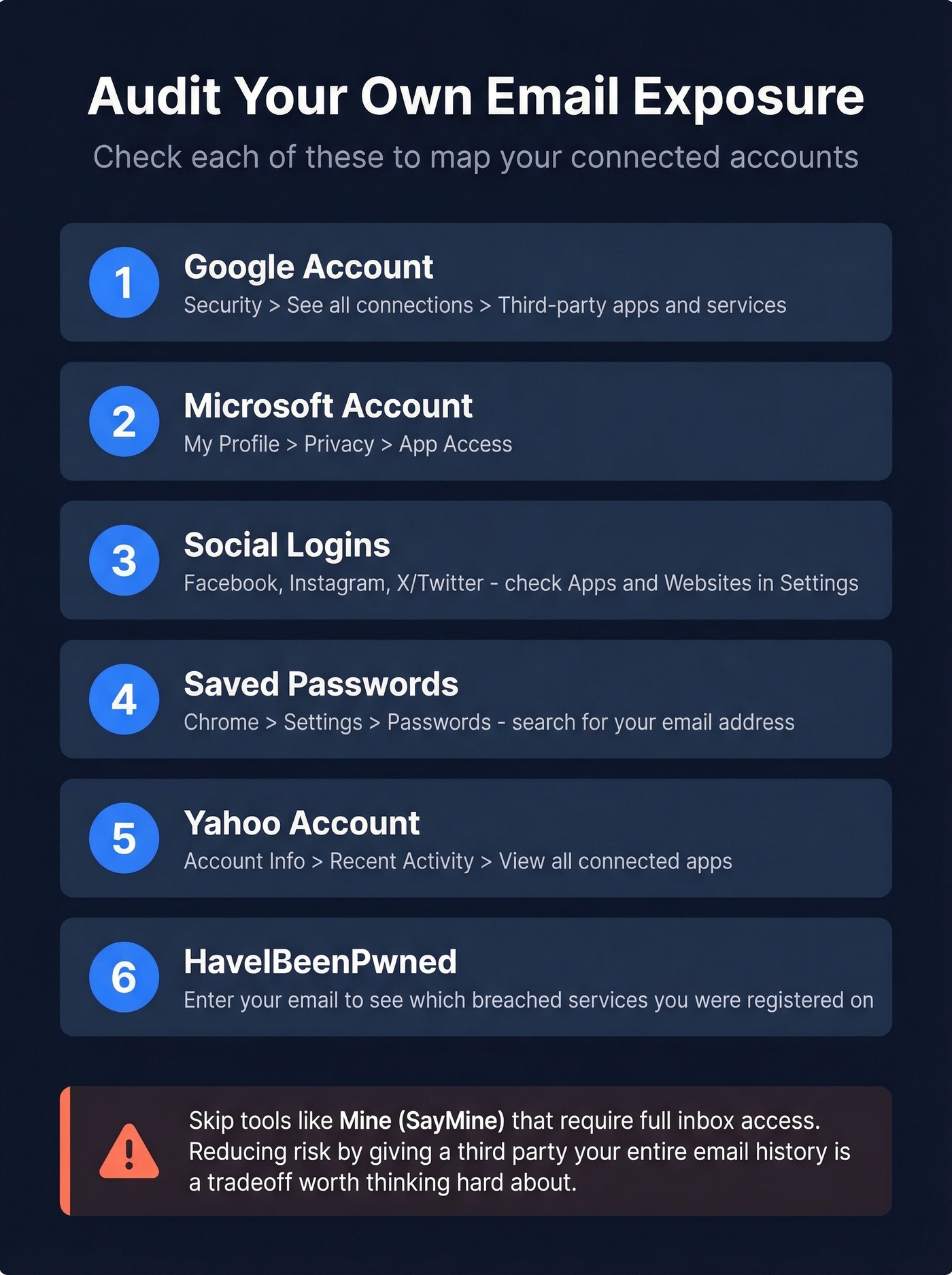
Google: Go to your Google Account > Security > "See all connections" under "Your connections to third-party apps & services." This shows every app you've authorized via "Sign in with Google" - and you can revoke access on the spot.
Microsoft: My Profile > Privacy > App Access. Same concept - see what's connected and cut what you don't recognize.
Yahoo: Account Info > Recent Activity > "View all connected apps."
Social logins: Check connected apps in Facebook (Settings > Apps and Websites), Instagram (Settings > Apps and Websites), and X/Twitter (Settings > Security and Account Access > Apps and Sessions).
Saved passwords: Open Chrome > Settings > Passwords and search for your email address. Every saved login is a confirmed account. If you've been using a password manager or browser autofill for years, this is essentially a complete registry of your accounts.
A warning about "automated" audit services: Tools like Mine (SayMine) promise to scan your inbox and find every account. They require full inbox access to work. If you're trying to reduce risk, handing a third party read access to your entire email history is a tradeoff worth thinking hard about. Stick with the manual methods above.
Even combining all of these, you'll miss accounts where you used a different email, signed up without a social login, or registered years ago on a service that's since been acquired. The 60-80% coverage estimate holds even for self-audits.

These OSINT methods find accounts linked to an email. But when you need the reverse - verified emails for decision-makers - Prospeo delivers 143M+ emails at 98% accuracy. No fake progress bars, no paywalls for garbage data.
Find any professional's verified email for $0.01. No guesswork.
Paid Email Profile Lookup Tools
Free methods get you far, but paid tools add breadth and speed.
| Tool | Best For | Price | Coverage | Key Limitation |
|---|---|---|---|---|
| Epieos | Broad OSINT lookup | EUR29.99/mo (30 requests) | 140+ services | Weak on phone lookups |
| Prospeo | B2B email ID | Free (75/mo); ~$0.01/email | 300M+ pro profiles | Built for work emails |
| SEON | Fraud/risk teams | Enterprise pricing | 300+ platforms | No individual pricing |
| Social Catfish | People search | Not transparent | Broad but vague | Paywall funnel |
| Lampyre | Power OSINT users | $89/mo | Deep | Steep learning curve |
| Mailmeteor | Quick free check | Free, no sign-up | Limited | Shallow results |
| Orbitly | One-off lookups | First lookup free | Moderate | Thin coverage beyond basics |
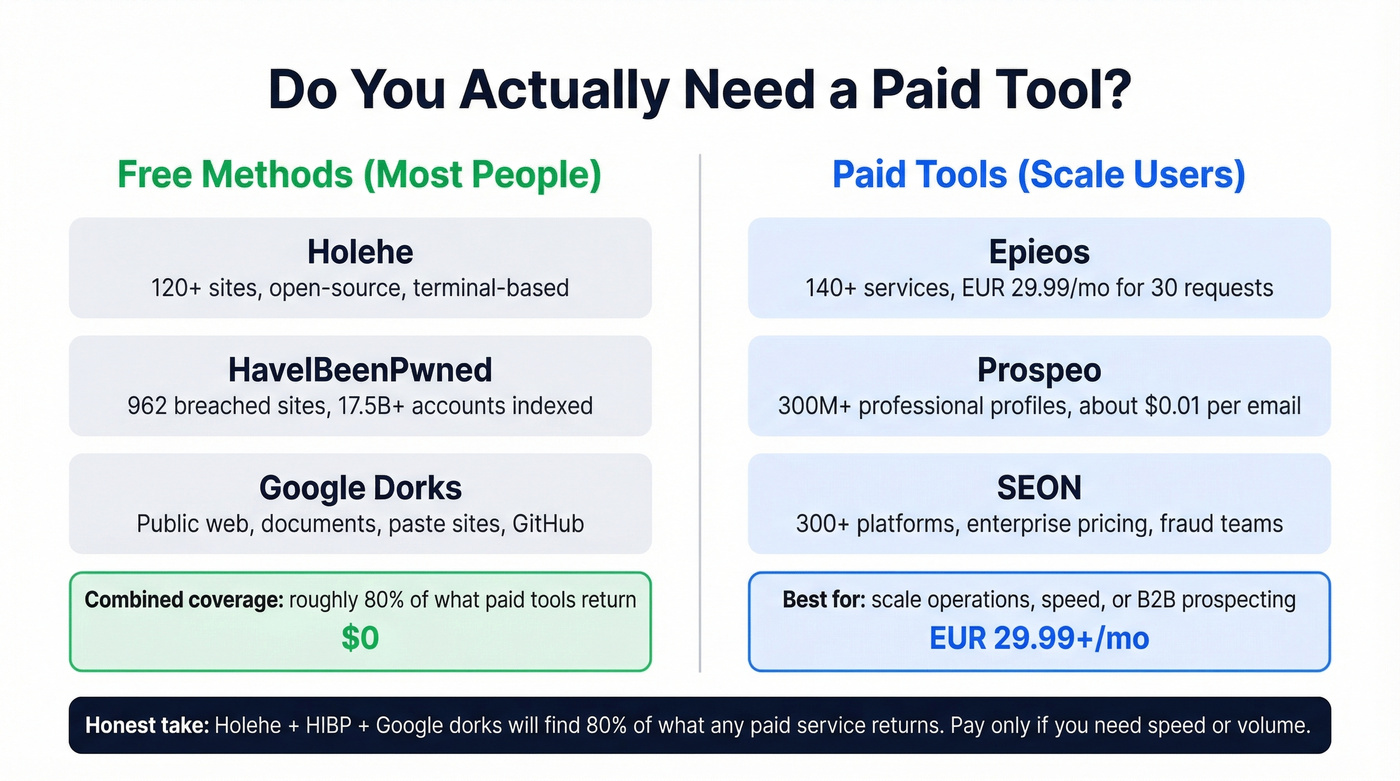
Let's be honest: most people reading this don't need a paid tool at all. Holehe + HIBP + Google dorks will find 80% of what any paid service returns. The paid tools earn their keep only if you're doing this at scale or need results in under five minutes.
The elephant in the room: Social Catfish ranks well for "free reverse email lookup" queries, but the "free" part funnels you into a paywall after the scan animation. Skip it.
Epieos is the most practical paid option for personal OSINT. Free access is limited to a couple of modules, but the EUR29.99/mo Osinter plan gives you 30 full-access requests per month across 140+ services. It doesn't log your queries and doesn't notify the target. The consensus on r/OSINT is that the results can be thin for some emails - which tracks with our experience - so treat it as a supplement to free tools, not a replacement.
SEON is trusted by over 5,000 organizations and is built for fraud prevention teams running email risk scoring at scale. If you're an individual auditing your own accounts, it's overkill.
Identifying the Person Behind a Work Email
Everything above works for personal email investigation. But if you've got a work email - say, j.smith@acme.com from a lead form or a conference badge - and need to identify the person for sales or recruiting, OSINT tools are the wrong approach entirely.

The free tier gives you 75 lookups per month with no credit card required. Paid plans run about $0.01 per email. If you're in sales or recruiting and you're trying to identify the human behind a work email, this is the fastest path. For more options, compare email ID finder tools and broader email search tools.
You just learned 8 ways to map an email to its linked accounts. Sales teams use Prospeo to go the other direction - mapping target companies to verified contact data across 300M+ profiles with 30+ filters like buyer intent, tech stack, and job changes.
Stop searching manually. Pull verified emails and direct dials in seconds.
How to Reduce Your Email Footprint
Once you've mapped your exposure, shrink it.
Delete unused accounts. If you haven't logged into a service in two years, delete the account entirely - don't just uninstall the app. Use email aliases going forward. Apple's Hide My Email, Firefox Relay, and SimpleLogin generate unique addresses that forward to your real inbox. One alias per service means a breach on one platform doesn't expose your primary email.
Unique passwords everywhere. A password manager like 1Password or Bitwarden makes this painless. Reusing passwords is how a single breach cascades across dozens of accounts. Enable 2FA on everything that matters. Authenticator apps over SMS. Hardware keys if you're serious.
Opt out of data brokers. Services like DeleteMe submit removal requests to Spokeo, WhitePages, BeenVerified, and similar aggregators. This is where sextortion scammers get your home address. And check HIBP periodically - set up the "Notify Me" alert and actually read the emails when they arrive.
FAQ
Can I find every account linked to my email?
No. Combining Holehe, Google dorks, HaveIBeenPwned, and platform self-audits typically uncovers 60-80% of accounts. The rest sit on platforms that don't expose registration status through any publicly accessible method - no tool can reach them.
Is it legal to look up someone else's email?
Using publicly available tools like Google, HIBP, and Gravatar is generally legal in most jurisdictions. Password recovery enumeration and contact syncing exist in a gray area - use them only for authorized purposes. Automated probing can violate the CFAA or GDPR depending on your location and intent.
Will the person know I searched their email?
Most methods - Google dorks, HIBP, Holehe, Epieos - don't notify the target. Password recovery attempts are the exception: some platforms send a notification email to the account holder when a reset is requested, even if you never click the link.
What's the best free reverse email lookup tool?
Holehe checks 120+ sites from your terminal in seconds and is completely open-source. Pair it with HaveIBeenPwned for breach-based discovery and Google dorks for public web mentions. That three-tool combo covers more ground than most paid services charging $30+/month.