

How to Find Verified Email Addresses That Don't Bounce
You uploaded 2,000 prospects into your sequencer on Monday. By Friday, your bounce rate hit 18%. Your domain reputation tanked, and now even the emails that were valid are landing in spam. The tool you paid for said every single one of those addresses was "verified."
One cold email practitioner on Reddit reported 20%+ bounces on addresses their tool marked as verified. That's not an edge case - it's the norm when you don't understand what "verified" actually means and which tools hold up in production.
TL;DR Picks
- Accuracy above all else - Prospeo. 98% email accuracy, 7-day data refresh, and you only pay for valid emails.
- Biggest database - Apollo. 250M+ contacts with unlimited email credits on paid plans. Verify separately; older contacts bounce at higher rates.
- Most recognized name - Hunter. Solid verification layer, confidence scores, and 6M+ users. Smaller database than you'd expect, though.
What "Verified" Actually Means
Most people assume "verified email" means "this email will land in an inbox." It doesn't. Verification is a multi-step process, and most tools cut corners on the steps that matter most.
The Three Verification Layers
Every legitimate email verification runs through three core layers. The first is syntax validation - checking that the address is formatted correctly, has an @ symbol, no illegal characters, no extra spaces. Basic stuff. This catches the obvious garbage.
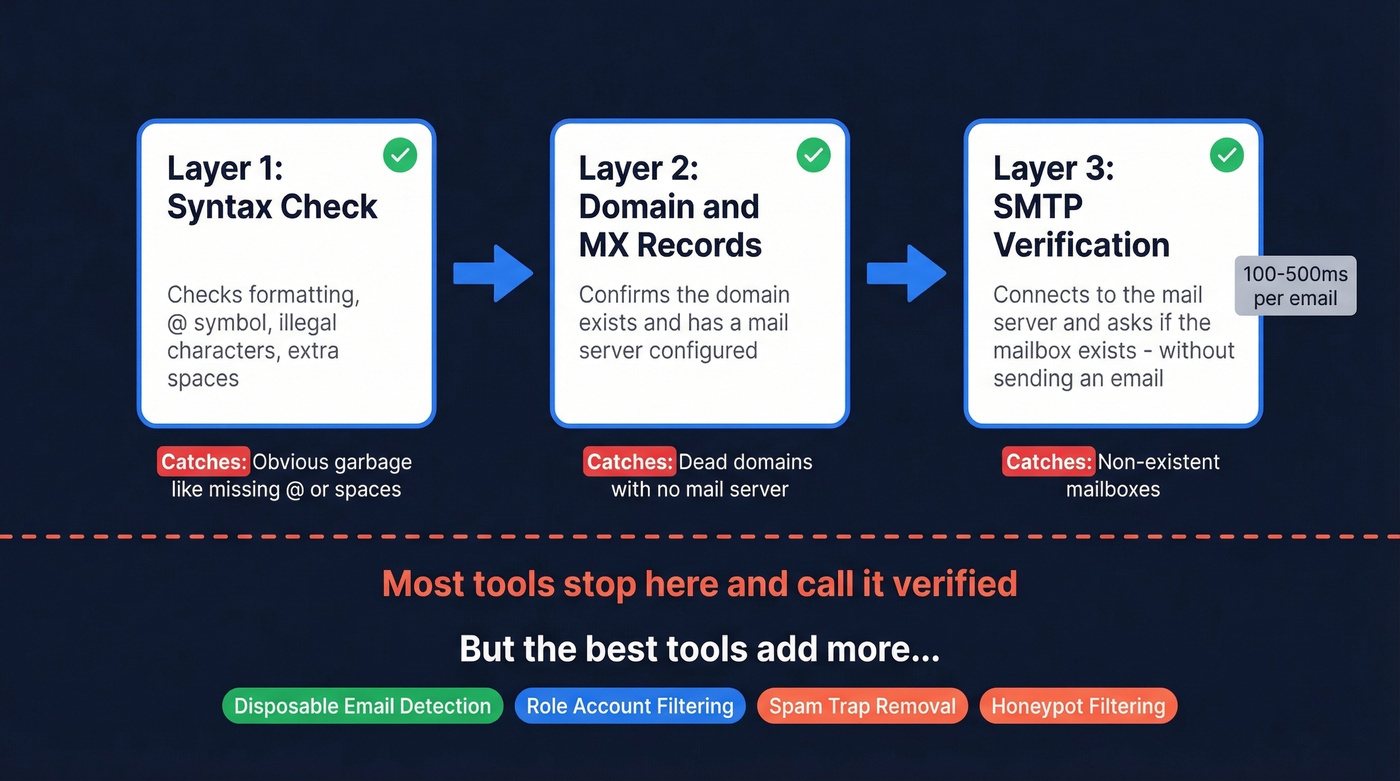
The second layer is domain and MX record validation. The verifier checks whether the domain actually exists and has mail exchange records configured. No MX record means no mail server, which means the address is dead.
Third is SMTP verification. The verifier connects to the mail server and asks - without actually sending an email - whether a specific mailbox exists. The whole process typically runs in 100-500 milliseconds per email. Most tools stop here and call it "verified."
What Separates Good Tools from Bad
The best email validation tools go further with checks that dramatically reduce false positives.
Disposable email detection flags addresses from throwaway services like Guerrilla Mail or Temp Mail - addresses that self-destruct within hours. Role account filtering catches generic addresses like info@, admin@, or support@ that rarely belong to a decision-maker and often trigger spam complaints. Spam-trap removal and honeypot filtering strip out addresses planted by ISPs specifically to catch senders using unverified lists. Hit enough of these and your domain gets blacklisted.
One distinction worth understanding: some tools return a binary verified/not-verified label, while others return a confidence score - a percentage indicating how certain the tool is that the address is real. Binary labels feel decisive but hide uncertainty. Confidence scores force you to make a judgment call about your risk tolerance, which is actually more honest. Neither approach is inherently better, but you need to know which one your tool uses so you can set appropriate thresholds.
If you're comparing vendors, it also helps to separate finding from verification - see our breakdown of email verification tools vs databases.
Why Catch-All Domains Break Everything
Here's the thing: catch-all domains are the #1 reason "verified" emails bounce, and most email finder articles gloss right over this.
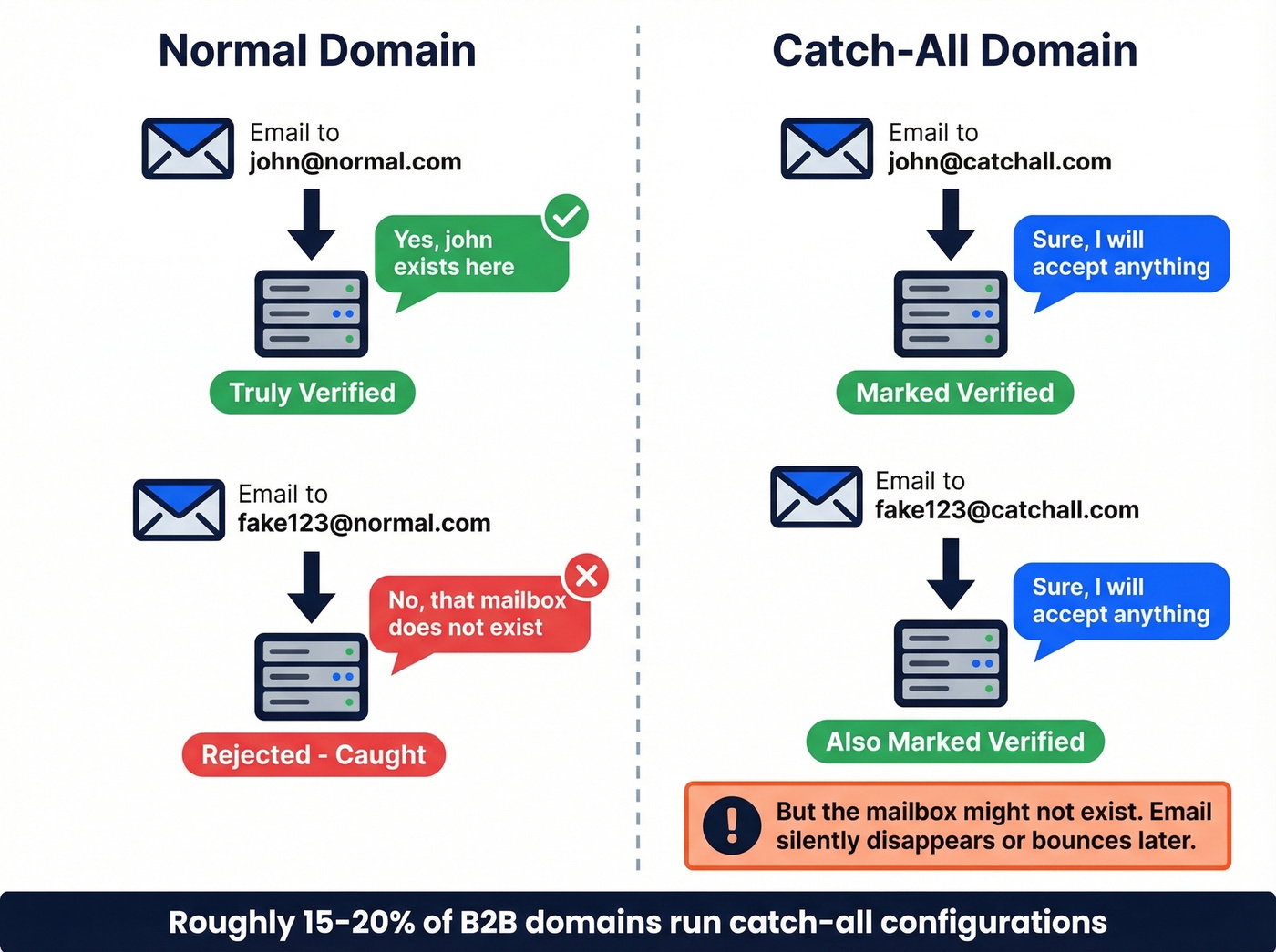
A catch-all server accepts all incoming mail to any address at that domain, whether the specific mailbox exists or not. Send an email to literally-anything@catchall-company.com and the server says "sure, I'll take it." But the mailbox might not exist. The email silently disappears - or worse, bounces after the fact.
Most verifiers can't confirm whether a specific mailbox exists behind a catch-all domain. They see the server accepting the connection and mark it "verified." Technically accurate from the verifier's perspective, practically useless for your deliverability. Some tools charge you credits for these catch-all results. Others don't - a meaningful difference when roughly 15-20% of B2B domains run catch-all configurations.
How Accurate Are Email Finders, Really?
A 5,000-contact benchmark across 8 email finders reveals just how wide the accuracy gap is. Anymail Finder ran this test - and yes, they topped their own benchmark - but the methodology used standardized inputs and fresh contacts, and the relative spreads are instructive.
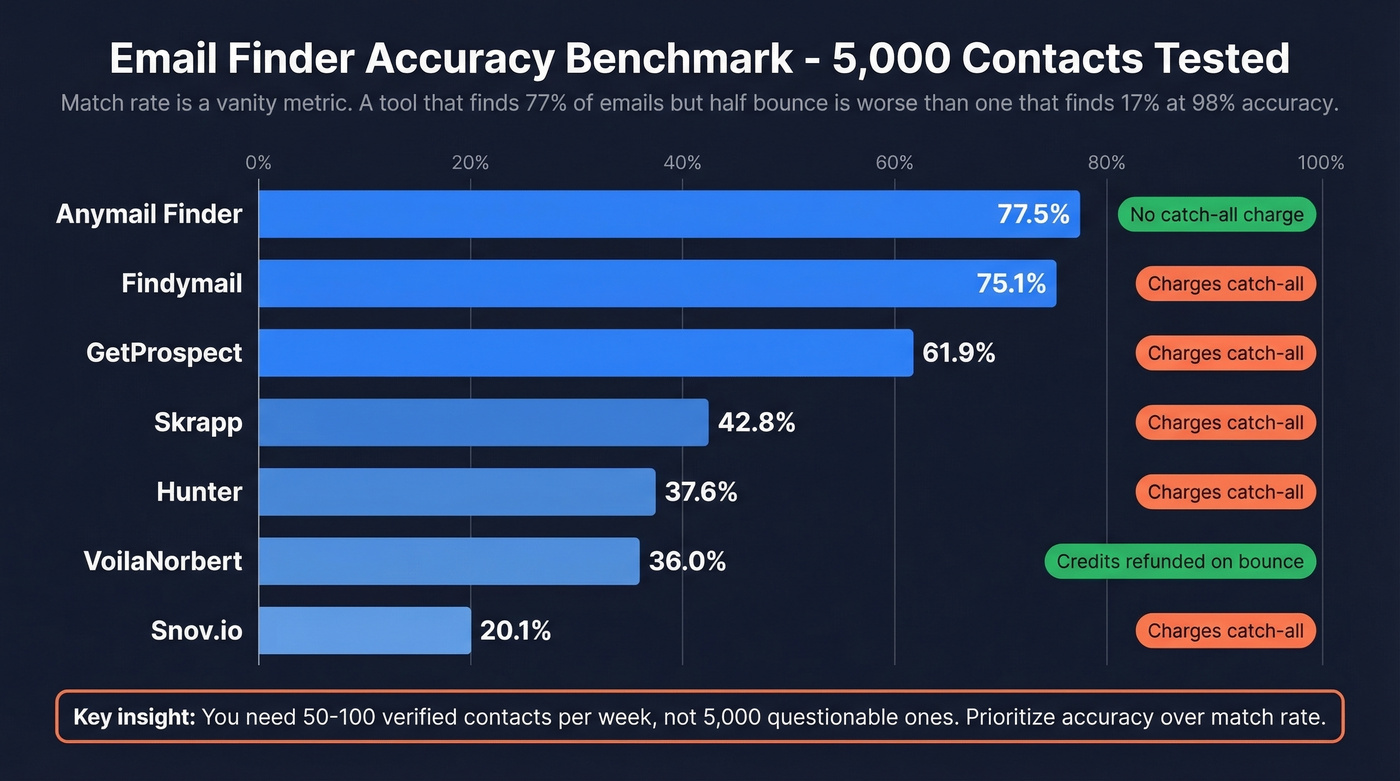
Match rate is a vanity metric. A tool that "finds" 77% of emails but half of them bounce is worse than a tool that finds 17% but 98% of those land in inboxes. The table below makes this obvious once you look at the right column.
| Tool | Verified Rate | Accuracy Claim | Bounce Rate (Production) | Catch-All Charged? | Best For |
|---|---|---|---|---|---|
| Anymail Finder | 77.5% | Pay-only-valid | Not published | No | Maximum coverage |
| Findymail | 75.1% | Not stated | Not published | Yes | High match volume |
| GetProspect | 61.9% | Not stated | Not published | Yes | Small team prospecting |
| Skrapp | 42.8% | Not stated | Not published | Yes | Mid-tier budgets |
| Hunter | 37.6% | Confidence score | Not published | Yes | Brand trust & transparency |
| VoilaNorbert | 36.0% | ~98% | Refund on bounce | Credits refunded | Risk-averse buyers |
| Snov.io | 20.1% | Not stated | Not published | Yes | International leads |
If your average deal size is modest, you probably don't need the highest match rate anyway. You need 50-100 verified contacts per week, not 5,000 questionable ones.
If you’re building lists at scale, pair this with a repeatable lead generation workflow so verification isn’t an afterthought.

You just read why most "verified" emails still bounce - catch-all domains, stale data, and single-layer verification. Prospeo's 5-step verification handles all three: catch-all detection, spam-trap removal, honeypot filtering, and a 7-day refresh cycle so you never send to dead addresses. 98% accuracy, and you only pay for valid emails.
Stop guessing which emails are real. Start with 75 free verified emails.
Best Tools for Verified Emails
Quick Decision Framework
Before we get into individual reviews, a few questions that'll narrow your list fast:
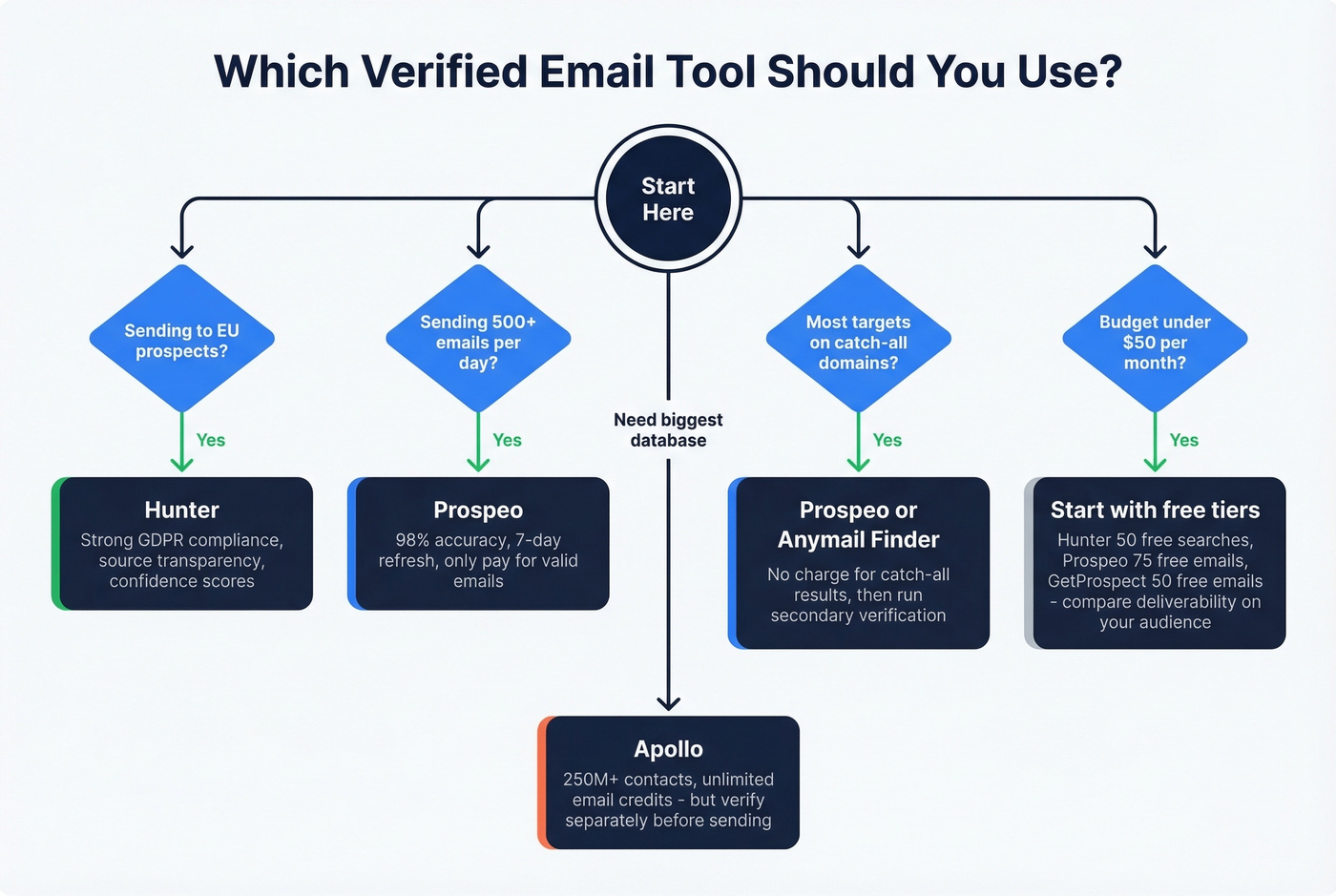
Sending to EU prospects? Prioritize GDPR compliance and catch-all handling. Sending 500+ emails per day? Verification accuracy matters more than match rate - a single bad batch can tank your domain for weeks. More than half your targets on catch-all domains? Use a tool that doesn't charge for catch-all results, then layer a secondary verification pass. Budget under $50/month? Start with free tiers from multiple tools and compare deliverability on your specific audience before committing.
If you’re sending at volume, make sure you understand email velocity and how it impacts deliverability.
Prospeo - Best for Accuracy
Prospeo's 300M+ profile database delivers 98% email accuracy through a 5-step verification process that includes catch-all handling, spam-trap removal, and honeypot filtering. Every record refreshes on a 7-day cycle - the industry average is six weeks, which means most competitors serve you data that's already stale by the time you use it.

The pricing model rewards accuracy-conscious teams: you only pay for valid emails. Catch-all results and duplicates don't cost credits. The free tier gives you 75 verified emails per month, paid plans start at $49/mo for 2,000 credits, and per-email cost drops as low as ~$0.01 on higher-volume tiers. The Chrome extension with 40,000+ users lets you pull verified contact data from web sources in one click.
If you’re evaluating alternatives, compare database + verification tradeoffs in our guide to sales prospecting databases.
The customer results tell the real story:
| Customer | Before | After | Impact |
|---|---|---|---|
| Snyk (50 AEs) | 35-40% bounce rate | Under 5% | AE-sourced pipeline up 180% |
| GreyScout | 38% bounce rate | Under 4% | Pipeline up 140% |
| Stack Optimize | Inconsistent deliverability | 94%+ for clients | Zero domain flags |
Hunter - Transparency You Can Verify
Hunter's standout feature isn't its database - it's the transparency. When Hunter finds an email from a publicly indexed source, it shows you the source URL and the discovery date. Very few tools do this. If you've ever wondered "where did this email come from?", Hunter gives you a direct answer.

The database covers 100M+ professional email addresses, combining direct matches with pattern-deduced emails. The verification layer returns either a green "Verified" shield or a confidence score for addresses it can't fully validate - a useful nuance that forces you to decide your own risk threshold rather than blindly trusting a binary label. Free plan gives you 50 searches per month, with failed searches not counting against credits. Paid plans start at $49/mo for 2,000 credits. With 6M+ users and strong GDPR compliance positioning, Hunter is the safe institutional choice.
If you’re shopping around, see our tested list of Hunter alternatives.
The tradeoff: the database is meaningfully smaller than competitors publishing 200M+ contact counts, and there's no published data refresh cycle.
Anymail Finder - Widest Net
If you need maximum coverage and plan to run a secondary verification pass before sending, Anymail Finder casts the widest net. If you want a single tool that handles both finding and verification end-to-end without a second pass, look elsewhere.
Apollo - Biggest Database, Verify Before Sending
Apollo's 250M+ contact database with unlimited email credits on paid plans starting at $59/mo makes it the obvious choice for teams that want database, sequences, and CRM in one platform. The catch: older contacts bounce at higher rates, and agency operators on Reddit flag this consistently. Per-seat pricing also adds up fast once you're past 3-4 users.
Best approach: use Apollo for discovery, then run your list through a dedicated verifier before sending.
If you’re connecting your data source to outreach, follow a clean connect outreach tool to CRM setup to avoid duplicates and bad fields.
VoilaNorbert - The Safety Net
VoilaNorbert offers something rare: if found emails bounce, you can contact support and get credits refunded. That's a meaningful financial guarantee in a space where most tools charge you regardless of outcome. The certainty score system uses an orange dot for addresses it can't fully validate - an honest approach to the catch-all problem. Pricing runs from $49/mo for 1,000 leads up to $499/mo for 50,000.
RocketReach, Snov.io, and the Rest
Snov.io starts at $39/mo for 1,000 credits - good for international leads with built-in automation, but the 20.1% verified rate in the benchmark is hard to ignore. Skrapp offers 50 free credits per month and $49/mo for 1,000 emails. GetProspect gives 50 free emails monthly with paid plans at $49/mo for 1,000 valid emails plus 2,000 verifications. Skip these unless you're already deep in their ecosystems or need a specific integration they offer.
If you’re also scraping sources, use a dedicated email scraper Chrome extension and verify before sending.
Bad data cost Snyk's 50 AEs a 35-40% bounce rate before switching. After? Under 5% bounces, 180% more pipeline, and 200+ new opportunities per month. The difference wasn't effort - it was email accuracy. Prospeo's proprietary verification delivers 98% accuracy at ~$0.01 per email with no charge for catch-all results.
Your sequencer is only as good as the emails you feed it.
Pricing at a Glance
Every tool in this space prices differently - some charge per search, some per verified result, some per seat. Here's the normalized view.
| Tool | Free Tier | Entry Price | Credits | Catch-All Policy |
|---|---|---|---|---|
| Prospeo | 75 emails/mo | $49/mo | 2,000 | Not charged |
| Hunter | 50 searches/mo | $49/mo | 2,000 | Charged |
| Anymail Finder | 100 credits | $14/mo | Varies by plan | Not charged |
| Apollo | Yes (limited) | $59/mo | Unlimited emails | Charged |
| VoilaNorbert | 50 leads | $49/mo | 1,000 leads | Credits refunded on bounce |
| RocketReach | - | ~$99/mo | ~5,000 lookups (Pro) | Not public |
| Snov.io | - | $39/mo | 1,000 | Charged |
| Skrapp | 50 credits/mo | $49/mo | 1,000 | Charged |
| GetProspect | 50 emails/mo | $49/mo | 1,000 valid | Charged |
The catch-all policy column matters more than most people realize. If roughly 15-20% of your target accounts run catch-all domains, tools that charge for those results are effectively inflating your cost per usable email by that same percentage.
To keep costs predictable, it helps to standardize your lead enrichment and verification steps before outreach.
After You Find the Emails
Locating verified professional emails is half the battle. Sending them without destroying your domain reputation is the other half.
Global inbox placement sits at roughly 84% - meaning 1 in 6 emails never reaches the inbox even under normal conditions. Gmail delivers at 87.2% inbox placement, while Microsoft's Outlook and Hotmail drop to 75.6%. Your verification quality directly affects where you land in that range.
If you want the full playbook, start with our email deliverability guide.
We've run campaigns through enough of these tools to know the thresholds that matter:
- Total bounces under 2% - exceed this and ISPs start throttling you
- Hard bounces under 1% - the line between "minor issue" and "domain damage"
- Spam complaints under 0.3% - Gmail enforces this aggressively
- RFC 8058 one-click unsubscribe headers - required for bulk senders since 2025
- Warmup new domains slowly - start at 5-10 emails per day and ramp over 4-6 weeks
Let's be honest: we've seen teams with great data still tank their deliverability by skipping warmup or ignoring the one-click unsubscribe requirement. The data gets you in the door. The sending hygiene keeps you there.
GDPR and Email Finding
B2B email finding is legal under GDPR - but only if you do it right. The legal basis is Article 6(1)(f), legitimate interest. The ICO's direct marketing guidance indicates that B2B contacts can reasonably expect to be contacted in a business context, which gives you room to prospect without explicit consent.
That said, EUR 5.88B in GDPR enforcement fines since 2018 means regulators aren't playing around. The practical compliance checklist:
- Use tools with EU data residency options
- Ensure your provider offers a Data Processing Agreement
- Maintain audit logs of where contact data came from
- Set retention limits - don't hoard data indefinitely
- Honor suppression lists immediately and permanently
If you're selling into the EU, pick tools that take GDPR seriously at the infrastructure level, not just in their marketing copy.
FAQ
How do email finders actually work?
Email finders generate candidate addresses using pattern recognition - formats like first.last@domain - then match against proprietary databases and verify via SMTP handshake. The best tools add spam-trap filtering, honeypot detection, disposable email removal, and catch-all domain handling. The entire process runs in milliseconds per email.
Can any email finder guarantee 100% accuracy?
No. Catch-all domains, recently deactivated mailboxes, and server-side filtering all introduce uncertainty that no tool can fully eliminate. The realistic goal is keeping your bounce rate under 2%. Prospeo's 98% accuracy and 7-day refresh cycle get closest to that standard, but "100%" is always an overpromise.
What's a catch-all domain and why does it matter?
A catch-all server accepts all incoming mail regardless of whether the specific mailbox exists. Most verifiers see the server accepting connections and mark everything "verified." This is the #1 reason "verified" emails still bounce. Tools that don't charge for catch-all results save you real money - roughly 15-20% of B2B domains use this configuration.
What bounce rate should I target?
Keep total bounces under 2% and hard bounces under 1%. Google and Yahoo enforce these limits for bulk senders as of 2026, and Microsoft has adopted similar thresholds. Well-verified lists targeting business addresses typically keep hard bounces in the 0.5-2% range. Exceed these numbers and your domain reputation takes real, lasting damage.
How many verified emails can I find for free?
Prospeo offers 75 free verified emails per month. Hunter gives 50 free searches, and Anymail Finder provides 100 free credits. Our recommendation: start with multiple free tiers to test deliverability on your specific audience before committing to a paid plan.