

How to Write a Follow-Up Email for an Update (Without Sounding Pushy)
You sent the proposal on Monday. It's Thursday. Nothing. You've rewritten "just checking in" three times and deleted it three times because you know it sounds exactly as weak as it feels.
Writing a follow-up email for an update shouldn't require this much agonizing - but with over 376 billion emails sent daily in 2026, your message is competing with hundreds of others in the same inbox. Most follow-up advice is written for salespeople running cold outreach sequences. This isn't that. This is for project updates, client check-ins, job applications, and vendor timelines - the everyday situations where you need a response and don't want to be annoying about it.
The Three Rules (Quick Version)
Before we get into templates, here's what actually matters:
- Specific subject line. Never use "Follow-up" or "Checking in" as your subject. Name the project, deliverable, or conversation. If you need ideas, borrow patterns from these email subject line examples.
- Add something new every time. Each follow-up must include new context - a deadline shift, a resource, a question. Empty bumps get ignored.
- Graduate your timing. Space follow-ups at 2, 4, 7, then 14 days. Static intervals look automated. (If you want a deeper timing breakdown, see when should I follow up on an email.)
Here's a template you can steal right now:
Subject: [Project Name] - quick update?
Hi [Name],
Wanted to check on the status of [specific item]. [One sentence of new context - a deadline, a related update, or a question].
Any update you can share by [day] would be great.
Thanks, [Your name]
Subject Lines That Get Opened
47% of recipients decide whether to open based on the subject line alone. Even worse, 69% mark emails as spam based purely on the subject. Your follow-up lives or dies before anyone reads a word.
"Follow-up" as a subject line signals low effort and triggers the mental spam filter. Use a pattern interrupt instead - something specific enough that the recipient's brain can't auto-dismiss it. If you're sending a sequence, it also helps to think in terms of sequence management so your subjects don't look templated.
| Bad Subject Line | Better Subject Line |
|---|---|
| Follow-up | Q3 report - status? |
| Checking in | Website redesign timeline |
| Just following up | Quick question on the proposal |
| Gentle reminder | [Project] - need your input by Friday |
| Re: Re: Re: Update | Budget approval - next step? |
Keep subject lines to 2-4 words. Personalized subject lines hit 46% opens vs. 35% without.
When to Send Your Follow-Up
Don't guess. Use the 2-4-7-14 Cadence - graduated spacing that mimics how a real person naturally escalates:
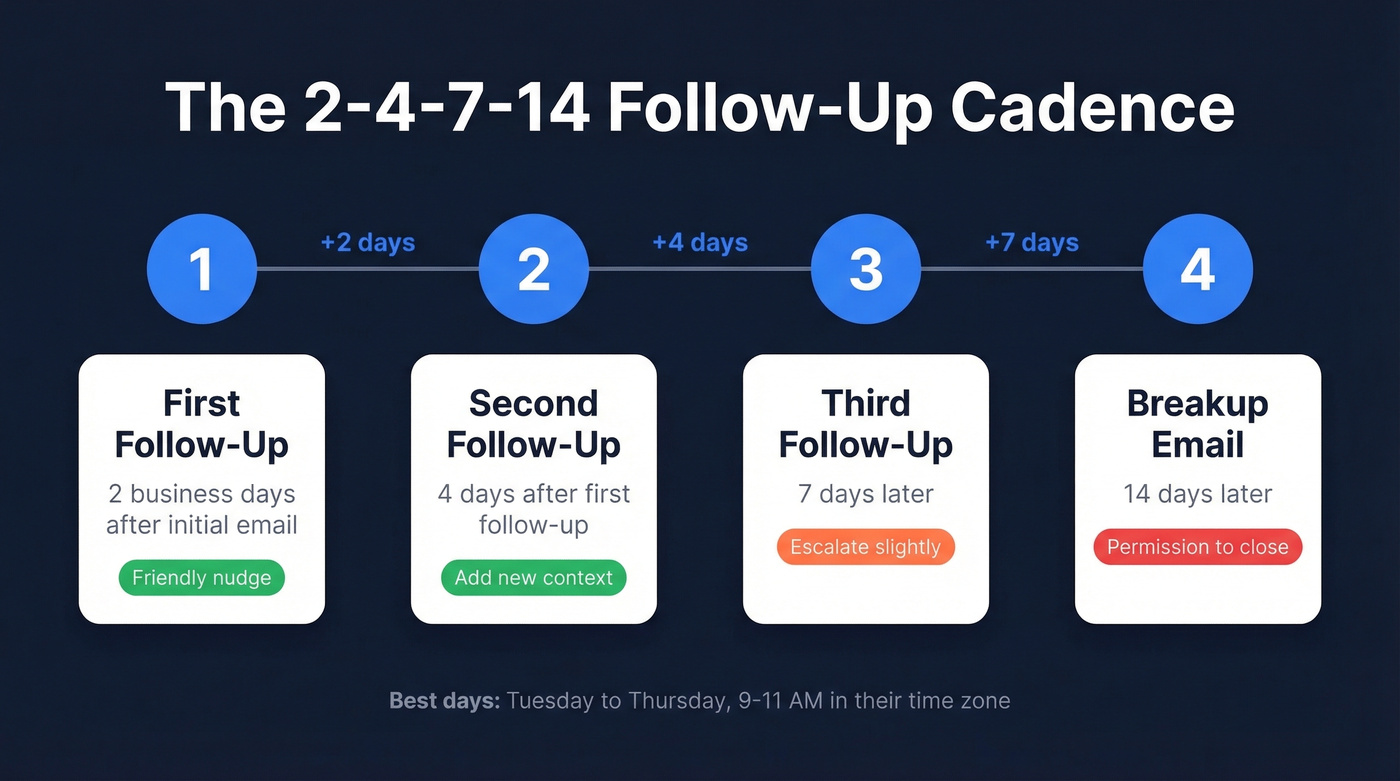
- First follow-up: 2 business days after your initial email
- Second: 4 days after the first follow-up
- Third: 7 days later
- Final (breakup): 14 days later
Tuesday through Thursday, 9-11 AM in the recipient's time zone, consistently gets the highest engagement. Monday inboxes are flooded. Friday attention is already gone.
Graduated spacing beats static intervals because it looks human, not robotic. Sending every 3 days like clockwork feels impersonal, and people notice the pattern even if they can't articulate why. Stop after two unanswered follow-ups. Send a breakup email or move on. Persistence has a ceiling, and blowing past it damages the relationship.
Match Your Tone to the Relationship
The same words land differently depending on who's reading them. A direct "Can you update me on X?" works perfectly for a teammate but reads as blunt to a new client you've spoken with once.
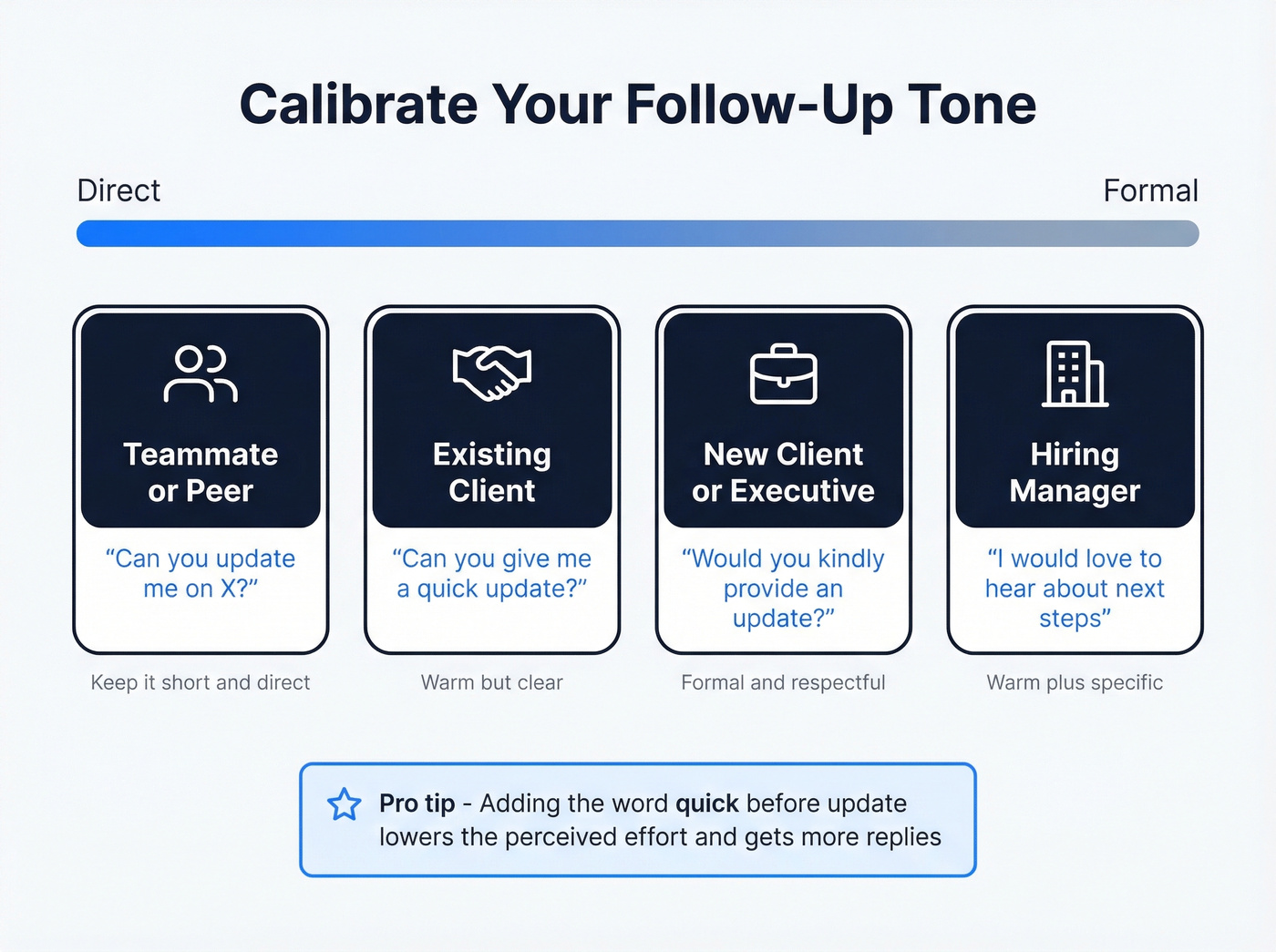
Here's the thing: knowing how to politely request an update is really about calibrating directness to the relationship. One trick that works across all of them - adding "quick" before "update" lowers the stakes. It signals you're not expecting a novel. One or two lines is fine. That small word matters more than you'd think.
| Relationship | Tone | Example Phrase |
|---|---|---|
| Teammate / peer | Direct | "Can you update me on X?" |
| Existing client | Warm but clear | "Can you give me a quick update?" |
| New client / exec | Formal | "Would you kindly provide an update?" |
| Hiring manager | Warm + specific | "I'd love to hear about next steps" |

Crafting the perfect follow-up is pointless if you're emailing a dead address. Prospeo's 98% email accuracy and 7-day data refresh mean your update requests hit active inboxes - not bounce back into the void.
Stop following up with ghosts. Start with verified contacts.
How to Ask Without Sounding Pushy
The biggest fear people have with follow-ups is coming across as nagging. The fix is simple: anchor every message to a reason that benefits the recipient, not just you.
Instead of "I need an update," try "I want to make sure we're aligned before the deadline so nothing falls through the cracks." That reframes your status request as a collaborative move rather than a demand. It's a subtle shift, but it changes how the entire email reads - suddenly you're the person helping them stay on track, not the person breathing down their neck.
Other tactics that keep the tone warm:
- Lead with empathy: "I know things are busy on your end."
- Offer an easy out: "Even a one-line reply works."
- Give a reason for the timing: "Flagging this now so we have buffer before [date]."
Phrases to Kill (and What to Say Instead)
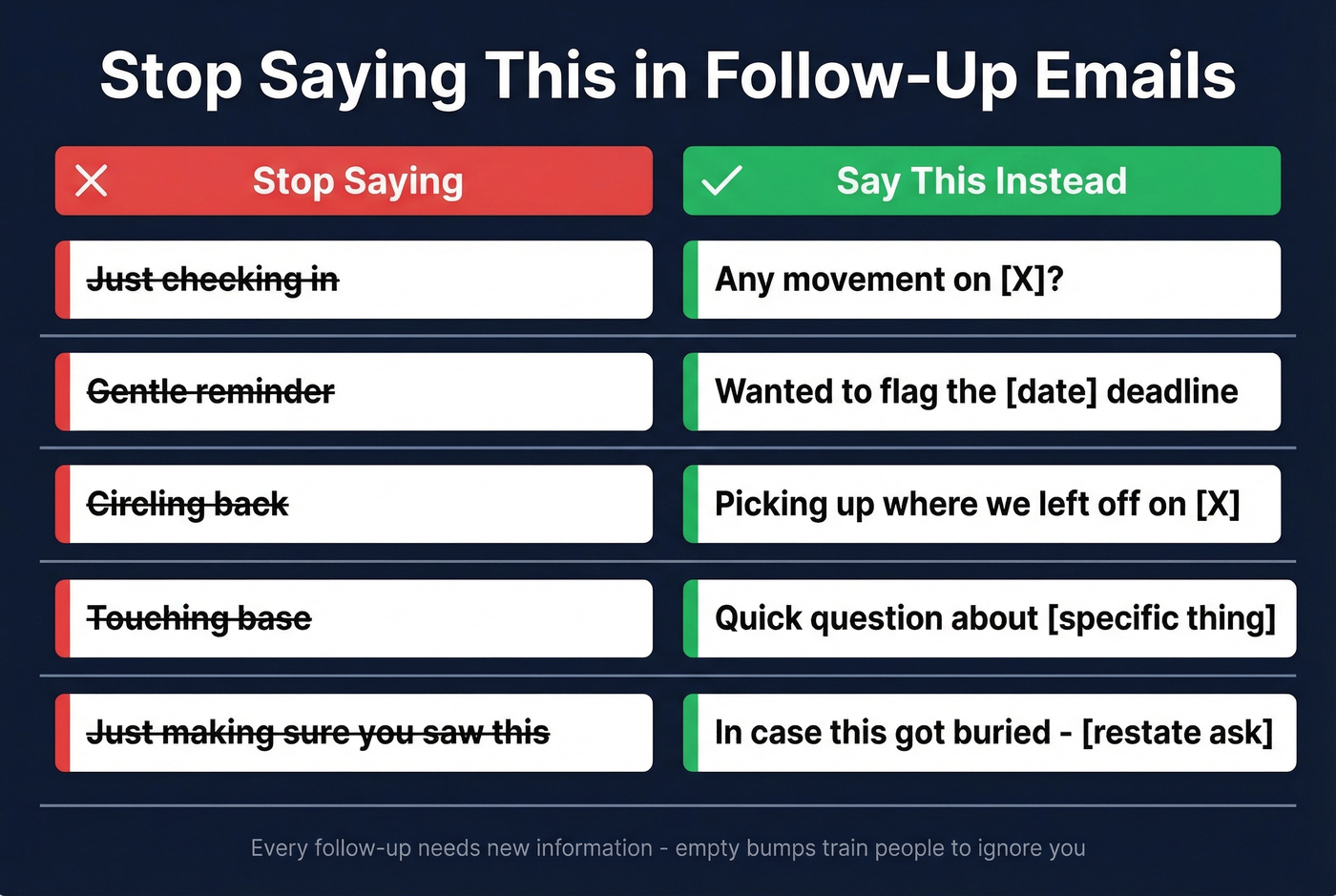
These phrases feel polite. They're actually noise - zero information, and the recipient reads them as "I have nothing new to say but I'm emailing you anyway."
| Stop Saying | Say This Instead |
|---|---|
| "Just checking in" | "Any movement on [X]?" |
| "Gentle reminder" | "Wanted to flag the [date] deadline" |
| "Circling back" | "Picking up where we left off on [X]" |
| "Touching base" | "Quick question about [specific thing]" |
| "Just making sure you saw this" | "In case this got buried - [restate ask]" |
Templates for Every Scenario
The tonal shift between these templates matters. A colleague needs speed and clarity. A client needs warmth and low friction. A hiring manager needs proof you were paying attention. Pick the one that matches your situation and customize the bracketed sections. (For more options, compare these sales follow-up templates and adapt the tone.)
Status Update (Colleague)
Subject: Website migration - status?
Hey [Name],
Where are we on the data migration? Marketing needs the staging URL by Thursday to start QA. Can you share a quick update today?
Thanks
Client Deliverable Update
Subject: [Project name] - quick update?
Hi [Name],
I wanted to check on the brand guidelines we discussed - we're building the landing pages around them, so any update helps us stay on track. Even a one-line reply works.
Best, [Your name]
Post-Interview Follow-Up
A hiring manager on Reddit who's conducted 1,000+ interviews shared what he called the "magic bullet" approach: reference a specific detail from your conversation. It proves you were listening and separates you from every generic "thank you for your time" email. In our experience, this single tactic generates more replies than any other post-interview move.
Subject: Great speaking with you, [First Name]
Hi [Name],
When you mentioned that the biggest challenge is [specific challenge from interview], it clicked - that's exactly the problem I solved at [previous company] by [brief example]. I'm excited about the role and would love to hear about next steps.
Best, [Your name]
Vendor or Supplier Timeline
Subject: [Deliverable] - timeline check
Hi [Name],
We're planning around a [date] launch and need the [deliverable] to stay on schedule. Can you confirm the current timeline or flag any delays?
[Your name]
The Breakup Email
This one's counterintuitive. People respond to the "permission to close" framing because it removes pressure entirely - there's no obligation, no guilt trip, just a clean exit. We've seen breakup emails pull more replies than the second and third follow-ups combined.
Subject: Should I close this out?
Hi [Name],
I've followed up a few times on [topic] and haven't heard back - totally understand if priorities shifted. If this isn't relevant anymore, I'll close my file on it. If you'd still like to move forward, just let me know.
[Your name]
Why Your Follow-Up Isn't Working
Before you rewrite your email for the fourth time, run through this diagnostic. 58% of professionals say they've missed an important email because it got buried - the problem might not be your message at all.
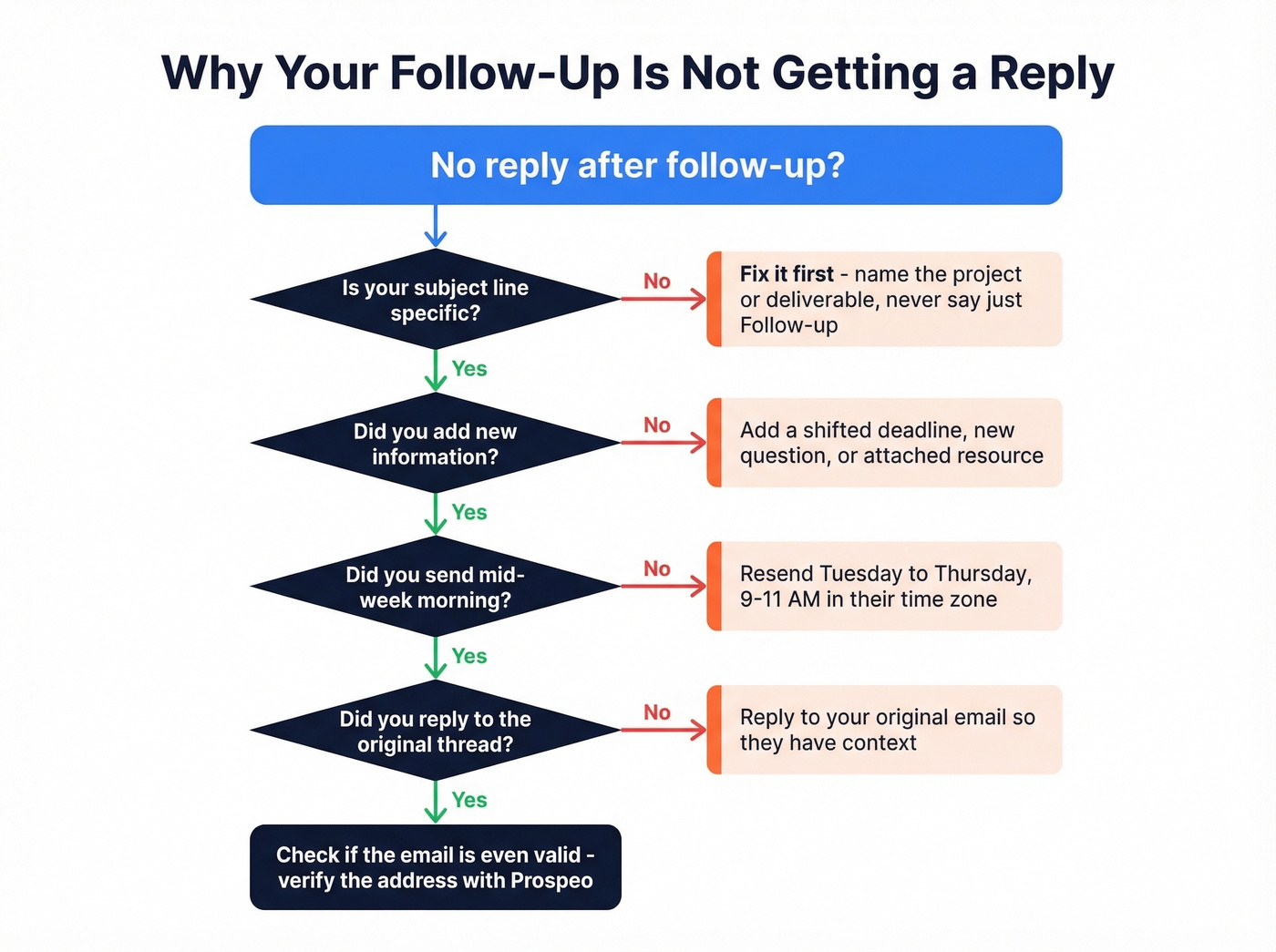
Let's be honest: most follow-up emails fail before they're even opened. If your subject line says "Follow-up" or "Checking in," that's your problem. Fix the subject line before touching anything else.
Beyond that, here are the usual culprits:
No new information. Empty bumps train people to ignore you. Every follow-up needs a reason to exist - a shifted deadline, a new question, an attached resource. If you can't think of something new to add, it's too early to follow up.
Wrong timing. Sending at 4 PM Friday is sending into a black hole. Stick to mid-week mornings. If you're trying to optimize send windows more broadly, use this guide on the best time to send cold emails as a reference point.
Starting a new thread instead of replying. Reply to your original email. It gives the recipient instant context without making them search. And if the conversation is getting complex, switch to a phone call and follow up with a summary email afterward.
The email is bouncing. Sometimes the address is just dead - the person changed jobs, the domain expired, or the mailbox is full. Prospeo's email verification checks any address at 98% accuracy, and the free tier covers 75 verifications per month. If you're troubleshooting deliverability more systematically, start with an email deliverability guide and keep an eye on your email bounce rate.

You nailed the tone, the timing, and the subject line. But 35% of B2B emails bounce because the data is stale. Prospeo refreshes 300M+ contacts every 7 days - so your follow-up actually reaches the person who owes you that update.
Every follow-up deserves a real inbox on the other end.
FAQ
How long should I wait before sending a follow-up?
Two to three business days is the right window for a first follow-up. After that, use the 2-4-7-14 Cadence: 4 days after your first follow-up, then 7, then 14. Mid-week mornings - Tuesday through Thursday, 9-11 AM - consistently get the highest engagement.
How many follow-ups is too many?
Two unanswered follow-ups is the cutoff. After that, send a breakup email giving the recipient permission to close the loop, or move on entirely. Pushing past two with no signal damages the relationship more than silence does.
What should a follow-up email for an update include?
Every follow-up needs three things: a specific subject line naming the project or deliverable, one piece of new context like a deadline or question, and a clear ask with a timeframe. If you're missing any of those, you're sending an empty bump - and empty bumps get ignored.
How do I know if my follow-up email is even arriving?
Use an email verification tool before following up with a new contact. Prospeo's free tier lets you verify 75 addresses per month at 98% accuracy - enough to confirm whether a bouncing address, not your message, is the real problem.