

Follow Up Reminder Email: Templates, Timing, and What the Data Says
You sent a proposal three days ago. Silence. Now you're staring at a blank compose window, typing "Just wanted to follow up..." and immediately deleting it because that phrase has never made anyone reply faster.
Here's the thing: 42% of all cold email replies come from follow-ups, not the first message. The follow up reminder email isn't optional - it's where nearly half the results live. You don't need 19 templates. You need three principles and the discipline to apply them.
The Short Version
Every effective reminder follow-up does three things:
- Adds something new. A link, an insight, a reframed ask. Never just "bumping this."
- Stays under 80 words, informal tone, same thread. Reply to your original email - don't start a new one.
- Stops at two or three follow-ups. After that, you're hurting yourself more than helping.
That's it. The rest of this article is the data behind those rules, plus 10 templates you can steal today.
Do Follow-Up Reminders Actually Work?
Yes - but the numbers are more nuanced than most guides admit, and the gap between data sources tells you something important.
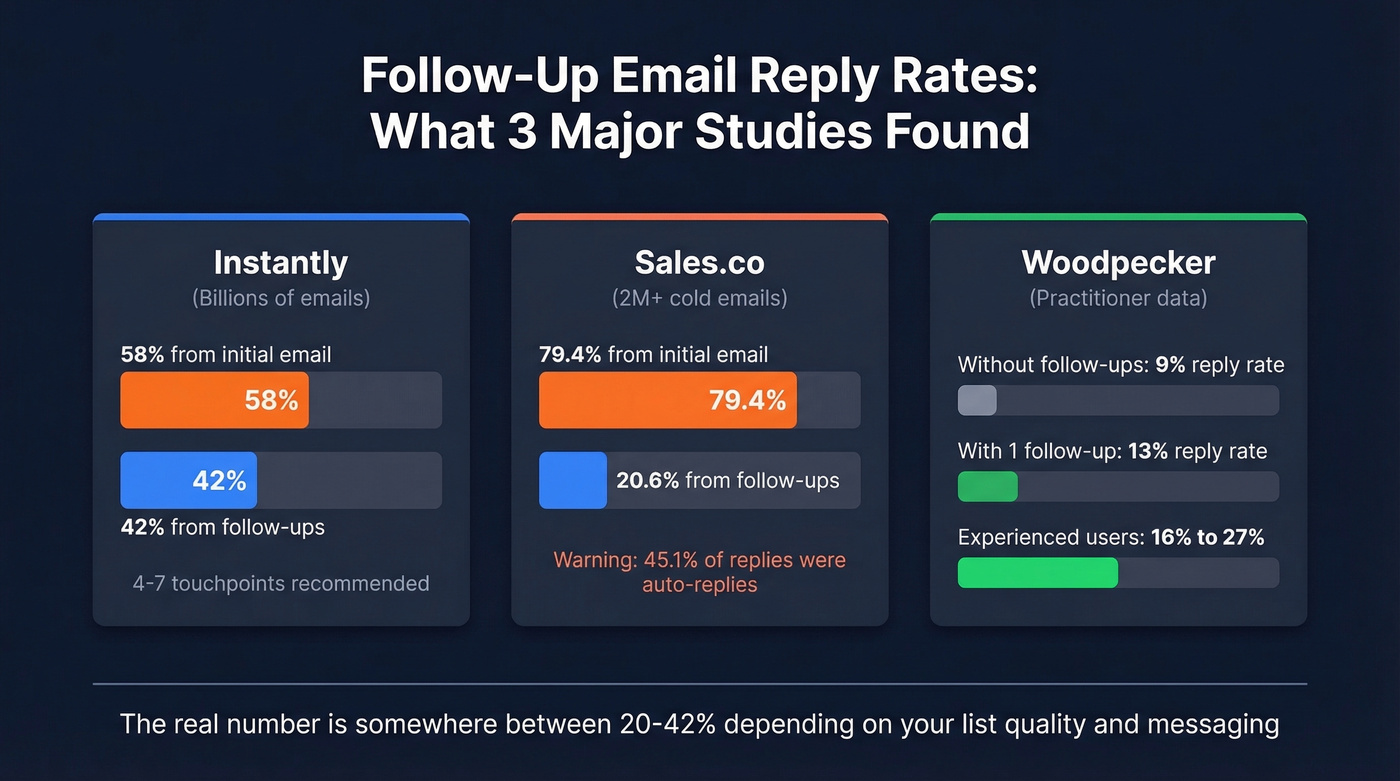
Instantly's benchmark report analyzed billions of cold email interactions. Their dataset puts the overall average reply rate at 3.43%, and the headline stat is that 42% of replies come from follow-ups, with 58% coming from the initial email. Their recommended sweet spot is 4-7 touchpoints per sequence, with diminishing returns beyond seven unless each touch adds genuine new value.
But Sales.co's dataset of 2M+ cold emails tells a very different story. In their data, initial outreach drives 79.4% of all replies, and follow-ups contribute just 20.6%. The overall reply rate was 2.09%, and only 14.1% of those replies were actually positive - a staggering 45.1% were auto-replies. So when someone tells you "follow-ups double your reply rate," ask them what kind of replies they're counting and which dataset they're citing. The real answer lives somewhere between Instantly's 42% and Sales.co's 20.6%, depending on your list quality, targeting, and messaging.
Woodpecker's data tells the clearest story from a practitioner standpoint. Without follow-ups, average reply rates sit around 9%. [Add just one follow-up](https://woodpecker.co/blog/follow-up-statistics/), and that jumps to 13%. For experienced users who've dialed in their messaging, the delta is even bigger: 16% without follow-ups, 27% with them.
Tone matters enormously. Sales.co found that informal emails generate a 10.36% positive reply rate versus 5.83% for formal ones - 78% more positive responses just from loosening up your language. Drop the "I hope this email finds you well" and write like a human.
Our take: Follow-ups work, but they aren't the magic multiplier that cold email gurus sell. The first email does most of the heavy lifting. Follow-ups pick up the people who were interested but busy. If your first email is bad, no amount of nudging saves it.
When to Send Your Follow-Up
Timing depends entirely on context. Woodpecker found that send time - morning vs. afternoon - has no significant impact on follow-up reply rates. MailerLite's newsletter analysis (2,138,817 campaigns) shows peak opens typically between 8-11 AM, but for follow-ups specifically, spacing between messages matters far more than the hour you hit send.
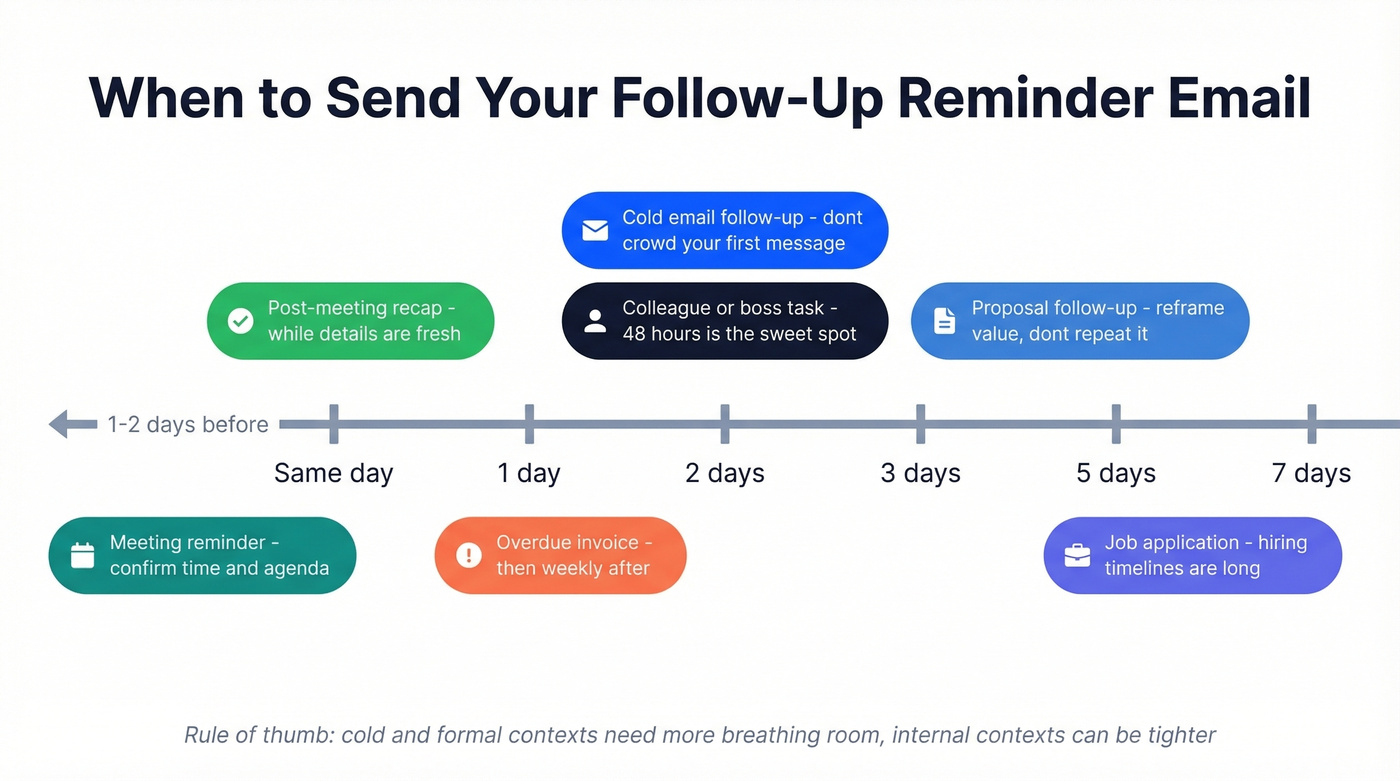
| Scenario | Wait Time | Notes |
|---|---|---|
| Cold email, no reply | 2-3 business days | Don't crowd your first message |
| Job application | 5-7 business days | Hiring timelines are long |
| Overdue invoice | 1 day after due date | Then weekly |
| Meeting reminder | 1-2 days before | Confirm time + agenda |
| Proposal follow-up | 3-5 business days | Reframe value, don't repeat it |
| Colleague/boss task | 48 hours | 24-hour response is the workplace norm; follow up at 48 if nothing |
| Post-meeting recap | Same day | While details are fresh |
The pattern: cold and formal contexts need more breathing room. Internal and operational contexts can be tighter. Research from cflowapps on workplace communication norms confirms that 24 hours is the expected response window for internal emails - so if a colleague hasn't replied by 48 hours, a nudge is completely reasonable.
Writing Follow-Ups That Get Replies
Five principles, each backed by data or practitioner consensus.
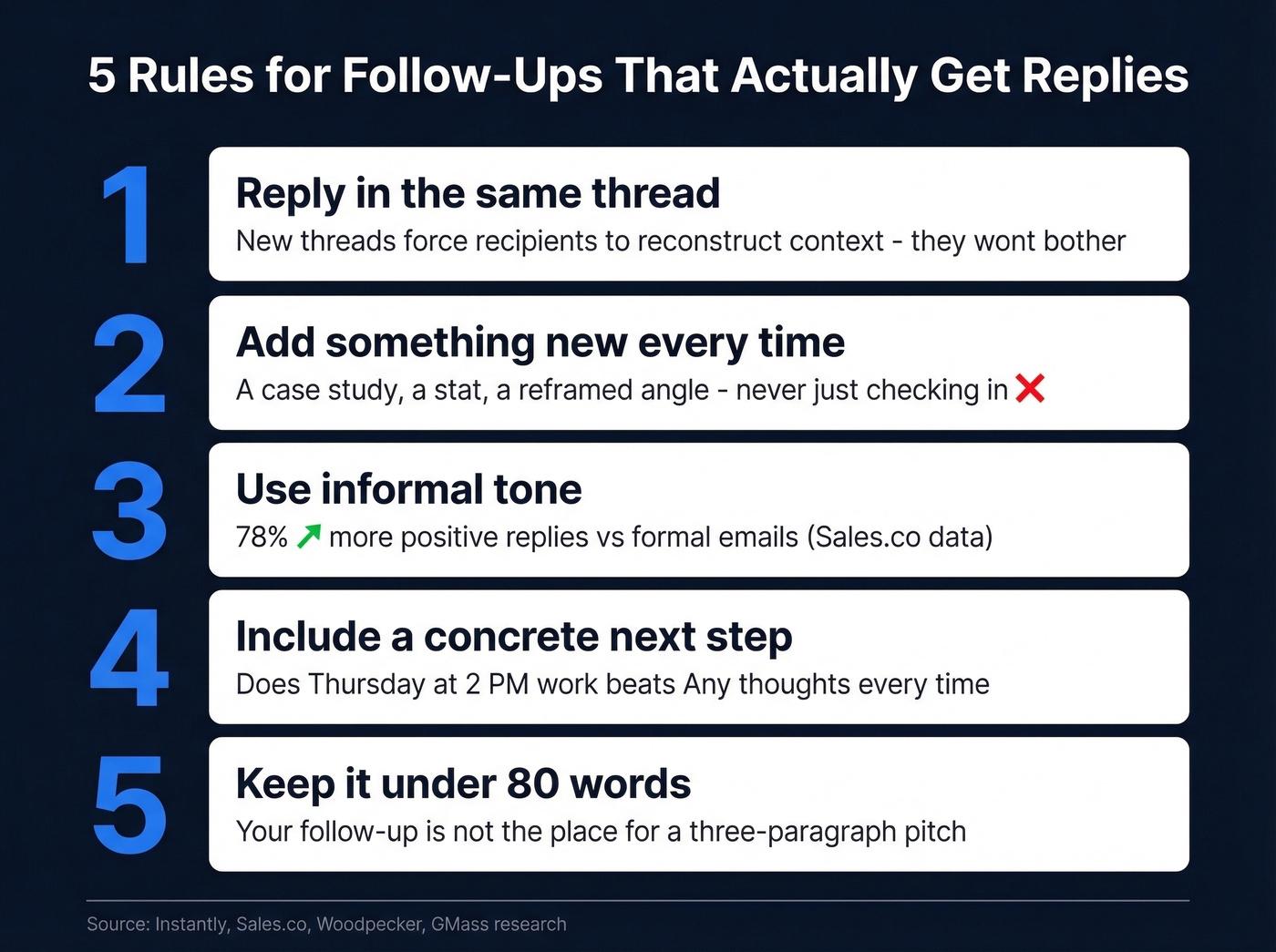
1. Reply in the Same Thread
Don't start a new email. Replying keeps the original context visible and signals continuity, not a fresh pitch. GMass calls this one of the most overlooked basics, and we agree - starting a new thread forces the recipient to reconstruct context, which usually means they don't bother.
2. Add Something New Every Time
A new case study, a relevant article, a reframed angle on the original ask. "Just checking in" is a delete signal. Every follow-up earns its existence by contributing something the last email didn't. (If you need better phrasing than "checking in," see how to say just checking in professionally.)
3. Use Informal Tone
The data is unambiguous: 78% more positive replies when you write informally. Contractions, short sentences, conversational phrasing. You're not writing a legal brief. And here's a stat that should change how you write workplace emails too: research shows roughly 50% of emails are misinterpreted in tone. When in doubt, err warm and direct.
4. Include a Concrete Next Step
"Any thoughts?" gives the recipient nothing to act on. Propose a specific date and time instead. One phrasing from r/sales that works well: "I'm trying to finalize my schedule for next week - does Thursday at 2 PM work?" A specific ask is easy to say yes or no to. An open-ended question is easy to ignore. If you want more options, borrow a few email wording patterns that consistently get yes/no replies.
5. Keep It Under 80 Words
Instantly's data shows short emails perform best. Your follow-up isn't the place for a three-paragraph pitch. Say what's new, propose a next step, stop.

Follow-ups drive 42% of replies - but only if they land in real inboxes. Prospeo's 98% email accuracy and 5-step verification mean your carefully crafted reminder actually reaches a human, not a dead address or spam trap.
Stop writing perfect follow-ups to bad email addresses.
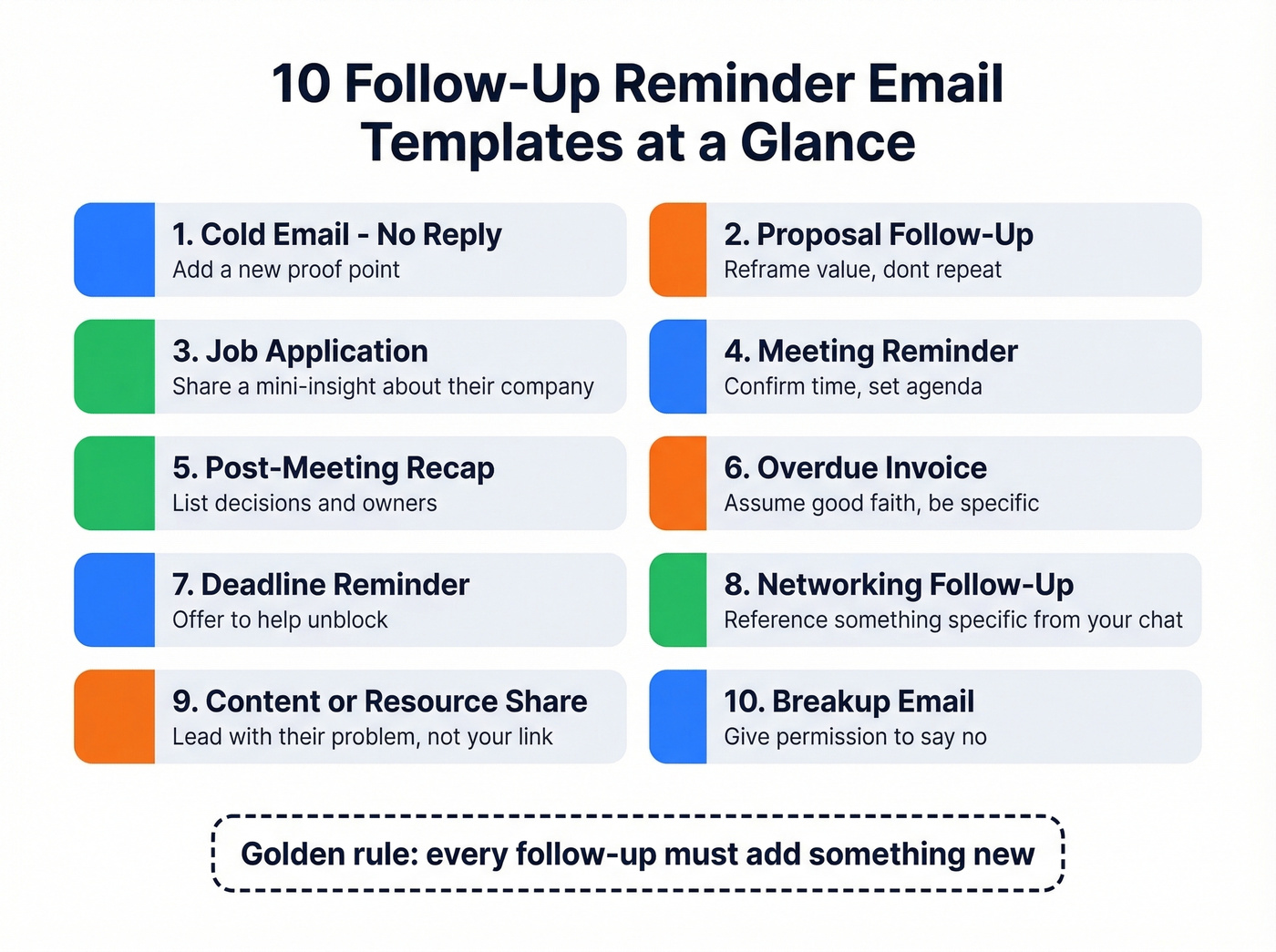
10 Follow Up Reminder Email Templates
No Response to a Cold Email
Subject: Re: [original subject line]
Hey [Name], wanted to share this quick - [Company similar to theirs] just cut their onboarding time by 30% using [your product/approach]. Thought it might be relevant given [specific detail about their business]. Would Thursday or Friday work for a 15-minute call?
Why this works: Replies in-thread, adds a new proof point, and proposes a specific time. No "just checking in."
How to customize: Swap the case study for any proof point relevant to their industry. If you don't have a case study, a relevant stat or article works. The key is that sentence two contains something they haven't seen before.
No Response to a Proposal
Subject: Re: [Proposal] for [Company]
Hi [Name], I know proposals can sit in the queue - totally get it. One thing I didn't emphasize enough: [specific ROI point or feature that maps to their stated pain]. Happy to jump on a quick call to walk through the numbers. I'll hold our current pricing through [date, 5-7 days out].
Why this works: Reframes value instead of repeating the pitch, and the soft deadline creates urgency without pressure.
Common mistake this avoids: Most proposal follow-ups just re-summarize the proposal. The recipient already has it. This template surfaces a new angle they might have missed, which gives them a reason to re-engage.
Job Application Follow-Up
Subject: Re: [Role Title] Application - [Your Name]
Hi [Name], I came across [relevant article/competitor news/industry insight] and thought it connected directly to what your team's working on with [specific initiative]. I'd love to bring that kind of thinking to the [role]. Would it be helpful to chat briefly this week?
This follows the add-value structure that's gained traction on r/jobsearchhacks - one reference to the application, two sentences adding something relevant, one soft CTA. One user reported their response rate jumped from roughly 5% to 30% after switching to this format: "I stopped 'checking in' and started sending mini-insights. Night and day difference."
How to customize: The insight doesn't need to be groundbreaking. A relevant industry article, a competitor's recent move, or a trend that affects their team all work. The point is demonstrating you're thinking about their problems, not just your application.
Meeting Reminder
Subject: Confirming tomorrow - [Meeting Topic]
Hi [Name], just confirming our call tomorrow at [time, timezone]. Here's what I'm planning to cover:
- [Agenda item 1]
- [Agenda item 2]
If something came up and you need to reschedule, no worries - just let me know.
Why this works: Confirms logistics, sets an agenda so they show up prepared, and gives an easy reschedule option that reduces no-shows.
Post-Meeting Recap
Subject: Quick recap - [Meeting Topic]
Hi [Name], great conversation today. Here's what I captured:
- [Decision/next step 1 - owner]
- [Decision/next step 2 - owner]
- [Decision/next step 3 - owner]
Let me know if I missed anything. I'll have [deliverable] to you by [date].
As one commenter on r/LifeProTips put it: "This takes two minutes and saves two weeks of 'that's not what we discussed' arguments." We've seen this play out dozens of times. The recap email is the single most underused follow-up in business communication - it creates a paper trail, assigns accountability, and eliminates the selective-memory problem.
Overdue Invoice / Payment Reminder
Subject: Invoice #[number] - past due as of [date]
Hi [Name], friendly heads-up that invoice #[number] for [amount] was due on [date]. If it's already been processed, please disregard this. If not, I've attached the invoice again for easy reference. Happy to answer any questions.
Why this works: Assumes good faith, includes the specific amount and date with no ambiguity, and keeps the tone neutral. Accusatory payment reminders damage relationships - and remember, roughly half of all emails get misinterpreted in tone. When money's involved, neutral is your friend.
Deadline Reminder to a Colleague
Subject: Re: [Project/Task] - due [date]
Hey [Name], just a quick nudge on [task] - it's due [date]. Is everything on track, or is there anything I can help unblock? Happy to jump on a quick call if that's easier.
This template is deliberately short and deliberately neutral. Offering help signals collaboration, not surveillance. Compare it to "Why haven't you finished this?" - which gets you defensiveness, not deliverables. Given that the workplace norm is a 24-hour response window, following up at 48 hours is completely reasonable.
How to customize: If the task is complex, add one sentence acknowledging that: "I know this one has a lot of moving parts." It shows you understand their workload, which makes the nudge feel supportive rather than impatient.
Reminder to Your Boss
Subject: Re: [Decision/Approval Needed]
Hi [Name], I know your plate is full - just wanted to flag that [decision/approval] is holding up [downstream task]. If priorities have shifted, happy to adjust the timeline. Otherwise, a quick yes/no by [date] would keep us on track.
Why this works: Shows empathy for their workload, offers to reprioritize, and makes the ask binary. Bosses respond faster to yes/no questions than open-ended ones. We've found that framing the consequence - "this is holding up X" - gets faster responses than simply re-asking for the approval.
Trial Expiration / Renewal Reminder
Subject: Your [Product] trial ends [date]
Hey [Name], your trial wraps up on [date]. Before it does - [one specific feature or result they've used]. Want to make sure you don't lose access to that. Here's a link to pick a plan: [link]. Questions? Just reply here.
Common mistake this avoids: Generic "your trial is ending" emails that list features the user never touched. Referencing their specific usage makes this feel personal, not automated. If your product tracks feature usage, pull that data into the email.
The Breakup Email (Final Follow-Up)
Subject: Should I close this out?
Hi [Name], I've reached out a few times and haven't heard back - totally understand if the timing isn't right. I'll close out my notes on this for now. If things change down the road, just reply to this thread and we'll pick up where we left off.
Breakup emails often get the strongest reply rates in a sequence. They work because they eliminate the obligation to commit. The recipient doesn't have to say yes to a meeting - they just have to say "not now" or "actually, let's talk." Removing pressure paradoxically creates engagement.
Mistakes That Kill Reply Rates
"Bumping" with no new info. "Just checking in" and "wanted to make sure you saw this" are delete signals. If your follow-up doesn't add a new angle, proof point, or question, it isn't a follow-up - it's noise.
No concrete next step. "Any thoughts?" and "let me know" give the recipient nothing to act on. Propose a date, a yes/no question, or a specific deliverable. Make it easy to respond.
Too formal. The data is unambiguous: informal tone generates 78% more positive replies. "I hope this message finds you well" is the email equivalent of a cold handshake. Write like you'd talk.
Wrong spacing. Woodpecker's research recommends giving prospects at least 2-3 days before following up. Match your spacing to the context using the timing table above. (For a deeper timing breakdown, see when should you follow up.)
How Many Follow-Ups to Send
For cold outreach, the data points to 2-3 follow-ups as the optimal range. Instantly's data suggests 4-7 total touchpoints for longer sales sequences, but each touch needs to earn its place with new value. If you're building full sequences, use a simple sequence management system so you don't over-nudge.
For workplace and job-search contexts, the math is simpler. One or two follow-ups is usually enough. If your boss hasn't responded to two reminders about an approval, walk over and ask. If a hiring manager hasn't replied after two value-add follow-ups, the role has likely moved on.
Real talk: after three follow-ups with no response, the answer is no. It might be "no, not now" or "no, I'm too busy to care," but it's still no. Move on. Your time is better spent on the next prospect, the next application, the next project.
Tools for Scheduling Email Reminders
Plenty of practitioners on r/sales just use Gmail's schedule send for simple follow-up workflows, and honestly, that's enough for a lot of people. Skip the paid tools if your volume is low. Here's the full toolkit for when you need more:
Gmail - Snooze emails to resurface them later, and use schedule send to time your follow-ups. Free, built-in, and enough for most individual workflows.
Outlook - Follow-up flags and task reminders integrate with your calendar. Included with Microsoft 365, solid for teams already in that ecosystem.
Boomerang - Gmail extension that brings back emails if you don't get a reply by a set date. Schedule send and read receipts included. Runs about $5-20/mo depending on the plan.
HubSpot - CRM sequences for automated sales follow-up cadences with tracking. Free CRM; Sales Hub starts around $20-100/user/mo depending on tier if you want sequence automation. If you're comparing options, start with follow up email software.
Prospeo - Verify email addresses before following up. 98% accuracy across 143M+ verified emails, with a free tier of 75 credits per month. No follow up reminder email fixes a bounced address. If deliverability is a recurring issue, read the email deliverability guide and keep an eye on your email bounce rate.
FAQ
How long should you wait before sending a follow-up reminder?
Two to three business days for cold outreach, 48 hours for workplace tasks, and five to seven business days for job applications. Woodpecker's research confirms that spacing matters far more than send time. Match your cadence to the context - internal requests can be tighter, external outreach needs more breathing room.
Is it rude to send a follow up reminder email?
No. 42% of cold email replies come from follow-ups, so recipients expect them. The key is adding value each time: a new insight, a concrete next step, or a reframed ask. What's actually rude is sending the same empty "bumping this" message three times with nothing new.
How do you make sure follow-up emails actually get delivered?
Verify every email address before sending. Bounces damage sender reputation, pushing future messages into spam folders. A verification step before any sequence protects your domain health for months - and it's far cheaper than rebuilding a burned domain.
What's the best free tool for scheduling follow-up reminders?
Gmail's built-in snooze and schedule-send features handle most individual workflows at zero cost. For verification, Prospeo offers 75 free email checks per month plus 100 Chrome extension credits. If you need CRM-level automation, HubSpot's free tier includes basic sequence tools.
The data is clear: informal, short follow-ups with a concrete next step win. But none of that matters if your contact list is stale. Prospeo refreshes 300M+ profiles every 7 days - so the decision-maker you're nudging still works there.
Send your follow-up to contacts verified this week, not last quarter.