

FollowUp.cc Review: Still Worth Paying For in 2026?
You're paying $18-$50/month for email reminders and follow-up features in Gmail. Meanwhile, Gmail itself includes snooze and schedule send for free. FollowUp.cc isn't dead, despite what you might've read, but the value proposition has narrowed considerably over the years. The product is still available and actively selling plans - but "functional" and "worth paying for" are two different things.
30-Second Verdict
FollowUp.cc is not discontinued. The official site is live, accepting signups, and displaying current pricing. The "discontinued" claim floating around comes from a competitor's promotional page with zero supporting evidence.
That said, for most Gmail users, it's overpriced. Gmail's built-in snooze and schedule send cover the core reminder use case for free. The only plan that genuinely earns its price is the Salesforce Edition at $40-50/month - and even then, you're paying a premium for a fairly narrow integration. If you're a casual follow-up user, save your money. If your follow-ups are bouncing rather than being forgotten, you've got a data quality problem, not a reminder problem.
What Is FollowUp.cc?
FollowUp.cc is a lightweight productivity suite for email follow-ups, built around a Chrome + Gmail workflow. Reminders arrive at the top of your inbox on the date you set. Simple concept, clean execution.
Core features across plans:
- Follow-up reminders - schedule a reminder for any email thread
- Send later - compose now, deliver on a schedule
- Open and click tracking - limited on Starter, full on Professional and Salesforce Edition (see email tracking basics)
- Auto follow-ups - automatically re-send if no reply (Professional and Salesforce Edition only) (more on AI tools for automating sales follow-ups)
- Contact details in Gmail - surface info without leaving your inbox (compare with contact management software)
- Salesforce integration - auto-add to Salesforce, Salesforce tab, and team reports (Salesforce Edition only) (related: Salesforce pricing)
It's a focused tool. No CRM, no sequencing, no multi-channel outreach. Just reminders, tracking, and a Salesforce bridge.
Pricing Breakdown
Three tiers, all paid. No free plan exists - not even a limited one.
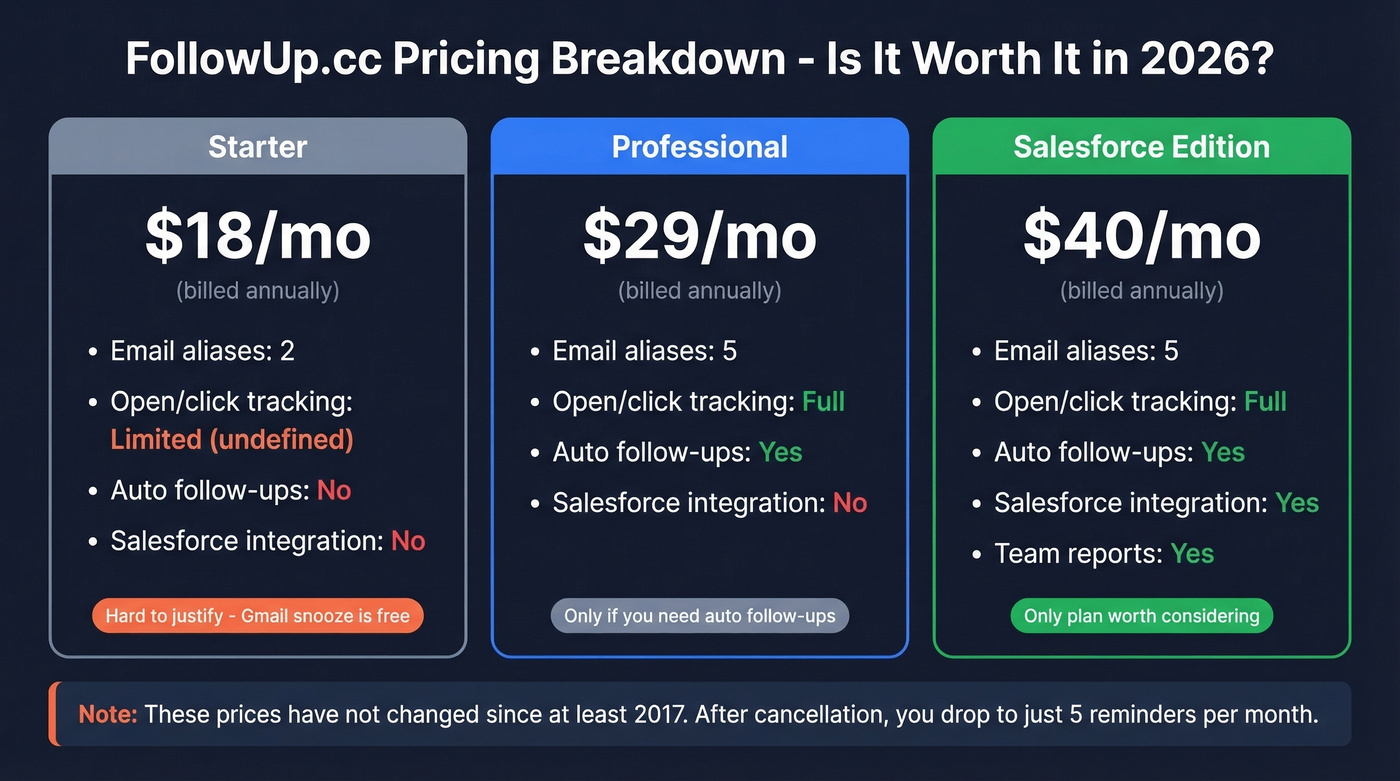
| Starter | Professional | Salesforce | |
|---|---|---|---|
| Monthly | $23/mo | $36/mo | $50/mo |
| Annual | $18/mo | $29/mo | $40/mo |
| Email aliases | 2 | 5 | 5 |
| Open/click tracking | Limited | Full | Full |
| Auto follow-ups | No | Yes | Yes |
| Salesforce integration | No | No | Yes |
| Team reports | No | No | Yes |
A few things jump out. "Limited" tracking on Starter is never defined on the pricing page - you don't know what you're getting until you're already paying. If you cancel, your account drops to just 5 reminders per month, which is barely functional. Even G2 reviewers have noticed the shift: one wrote, "Used to get it for free, now there is a cost."
Here's the thing: these prices haven't changed since at least 2017. A Vocus.io comparison page from that year lists the exact same numbers. Pricing stagnation for nearly a decade isn't necessarily bad, but combined with the lack of visible product updates, it paints a picture of a tool running on autopilot.

If your follow-ups are bouncing, no reminder tool will fix that. Prospeo delivers 98% verified email accuracy with a 7-day refresh cycle - so every follow-up actually lands. At $0.01 per email, it costs less than one month of FollowUp.cc's Starter plan to verify hundreds of contacts.
Stop scheduling follow-ups to dead inboxes. Start with verified data.
FollowUp.cc vs. Gmail Native Features
Gmail includes snooze and schedule send. Both are free, built in, and require zero extensions.
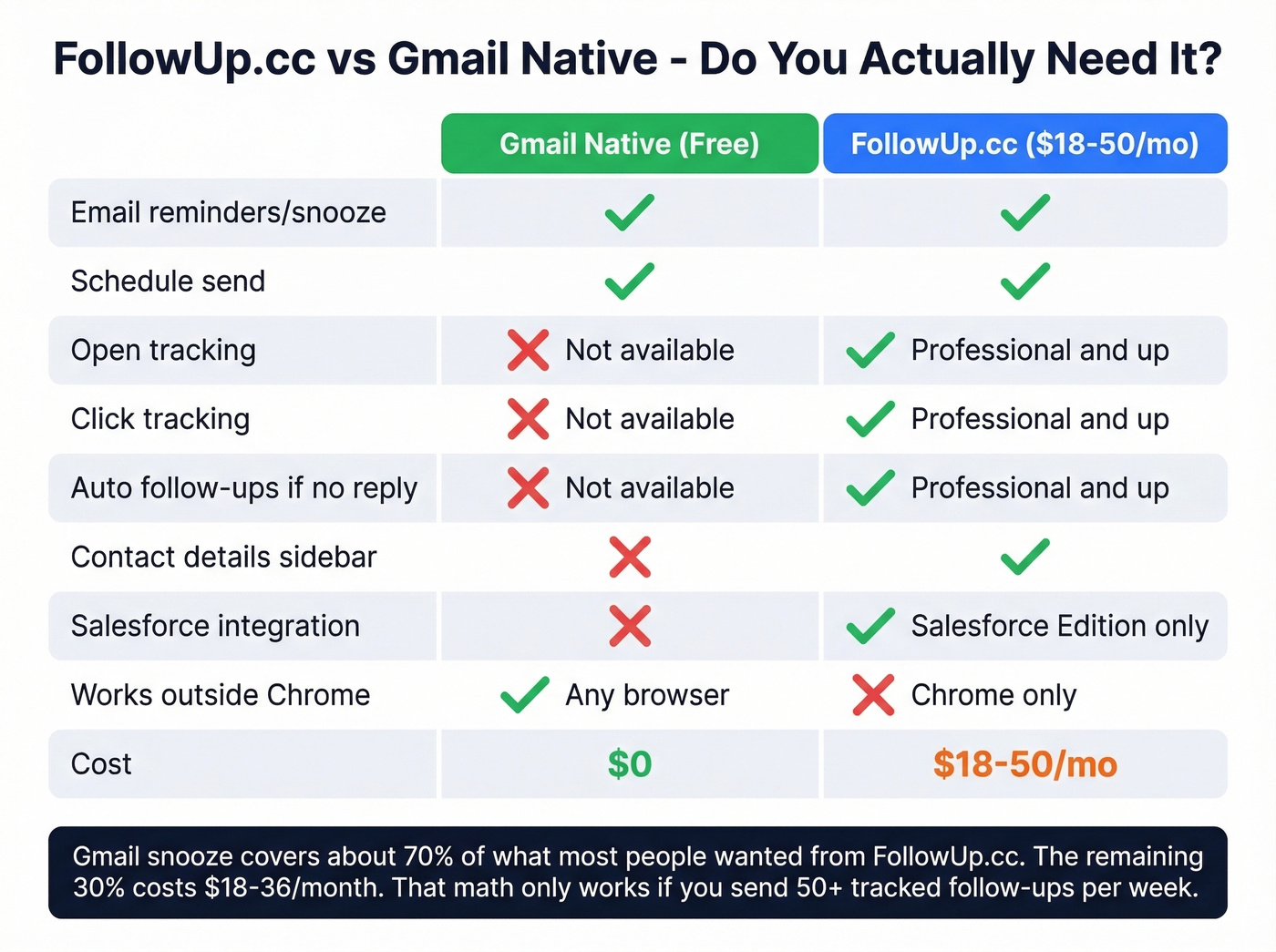
Use Gmail native if you just need to resurface emails at a specific time or schedule sends for later. That covers the core reason most people originally installed FollowUp.cc.
FollowUp.cc still adds value if you need open/click tracking, automatic follow-up sequences when someone doesn't reply, or the contact details sidebar. These features don't exist natively in Gmail.

In our experience, Gmail's snooze covers about 70% of what most people wanted from FollowUp.cc - for free. The remaining 30% (tracking, auto follow-ups) costs $18-36/month. That math only works if you're sending enough tracked follow-ups to justify it. For a salesperson running 50+ follow-ups a week, maybe. For everyone else, it's hard to defend.
Let's be honest: if your average deal size is under $5,000, you almost certainly don't need this tool. Gmail snooze plus a cheap alternative will get you 95% of the way there. Save the budget for better contact data (see data enrichment services).
Pros and Cons
What works:
- Clean, minimal UI that doesn't clutter Gmail
- Reminder workflow is genuinely simple - set and forget
- Email tracking works as advertised on Professional and Salesforce Edition
- Salesforce Edition includes team reports plus Salesforce-specific workflows
What doesn't:
- No free plan at all - the 5 reminders/month post-cancellation tier is barely a taste
- Gmail-centric, so if you're not living in Gmail and Chrome, it's the wrong fit
- Review volume is alarmingly low: 4.8/5 on G2 from just 2 reviews, with the last one from 2022, and G2's profile carries a notice that it "hasn't been active for over a year"
- Trustpilot sits at 4.0/5 from 34 reviews, but the most recent visible review is from 2018
- Trustpilot complaints include billing disputes and an allegation that the tool "sends sales emails to your contacts"
- "Limited" tracking on Starter is undefined - you're buying a black box
- Users report occasional syncing issues, which is particularly frustrating for a tool whose entire job is reliability
The lights are on, but the product doesn't look like it's being pushed forward.
Who Should (and Shouldn't) Use It
Use FollowUp.cc if you're a Salesforce user who wants Gmail-to-CRM support without a full platform like Outreach or Salesloft, you need auto follow-ups with open tracking, and you're committed to the Gmail ecosystem.
Skip it if you just need reminders - Gmail snooze handles that for free. Also skip it if your follow-ups bounce rather than get ignored. That's a data problem, not a reminder problem, and we'll get to that below (start with email bounce rate).
Best Alternatives
Gmail Native (Snooze + Schedule Send)
Use this if you want zero cost and zero extensions. Snooze resurfaces any email at the time you pick. Schedule send lets you compose now and deliver later. Skip this if you need open tracking or automated re-sends - Gmail doesn't do either.
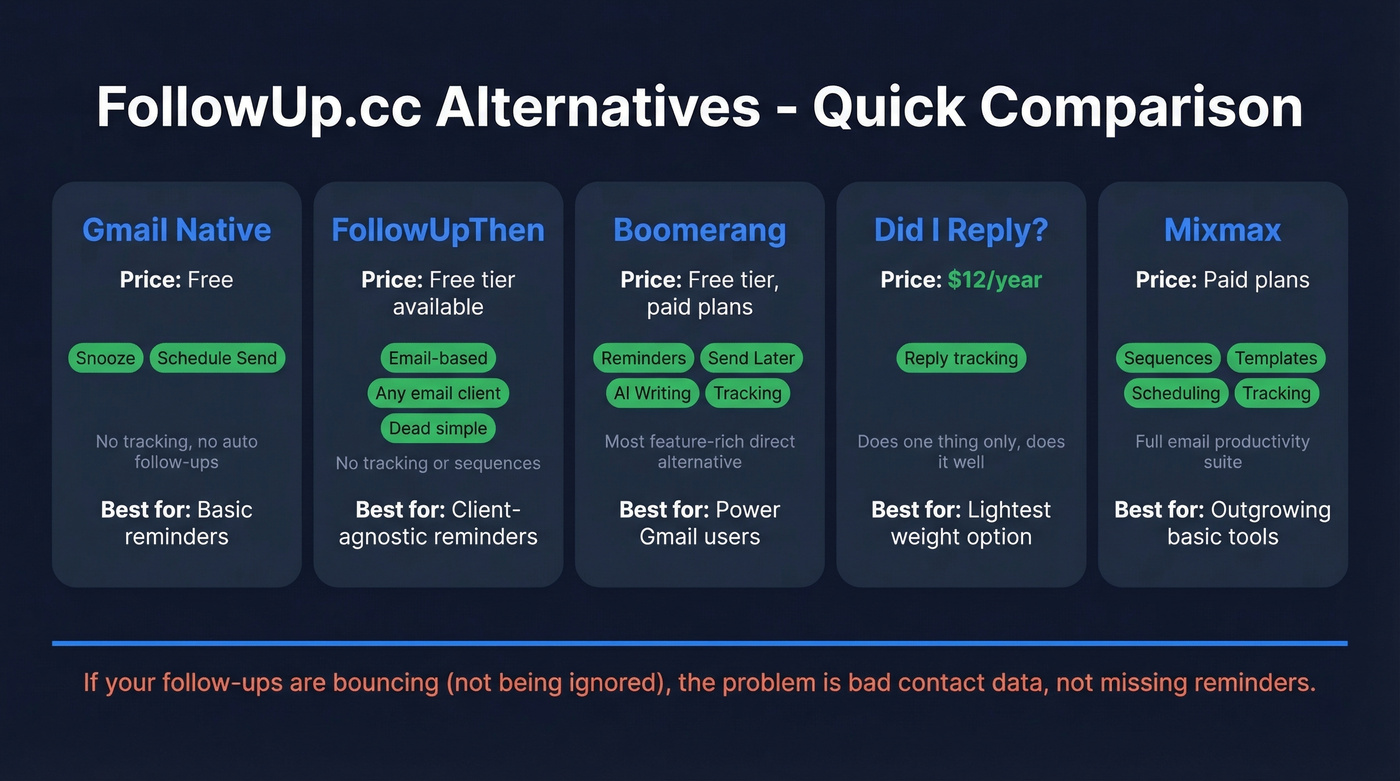
Cost: free.
FollowUpThen
FollowUpThen takes a beautifully simple approach: CC an address like aug15@followupthen.com and the email comes back to your inbox on August 15th. No extension, no Chrome dependency, works with any email client. Reddit users on r/ExecutiveAssistants call it "life-changing," and we've recommended it to dozens of teams. It's dead simple. Free for basic use, with paid plans available. For pure reminders, it's one of the best tools in this space.
Boomerang for Gmail
Boomerang is the most popular direct alternative in the "reminders + send later + tracking" category. It offers AI-assisted writing and response tracking on top of the basics. If you want a more feature-rich option than FollowUp.cc without jumping to a full sales engagement platform, Boomerang is worth evaluating. Free tier available with limited sends.
Did I Reply?
If you want the absolute lightest-weight option, Did I Reply? costs $12/year and runs entirely inside the browser without storing data externally. It only handles the "did someone reply?" question - nothing more. But for many people, that's the only question that matters.
Mixmax
Mixmax sits at the opposite end of the spectrum: a full email productivity suite with sequences, scheduling, templates, and tracking. It's overkill for simple reminders, but if you're outgrowing basic follow-up tools and want multi-step outreach without jumping to Outreach or Salesloft, Mixmax fills that middle ground well (see Mixmax alternatives).
When the Problem Is Data, Not Reminders
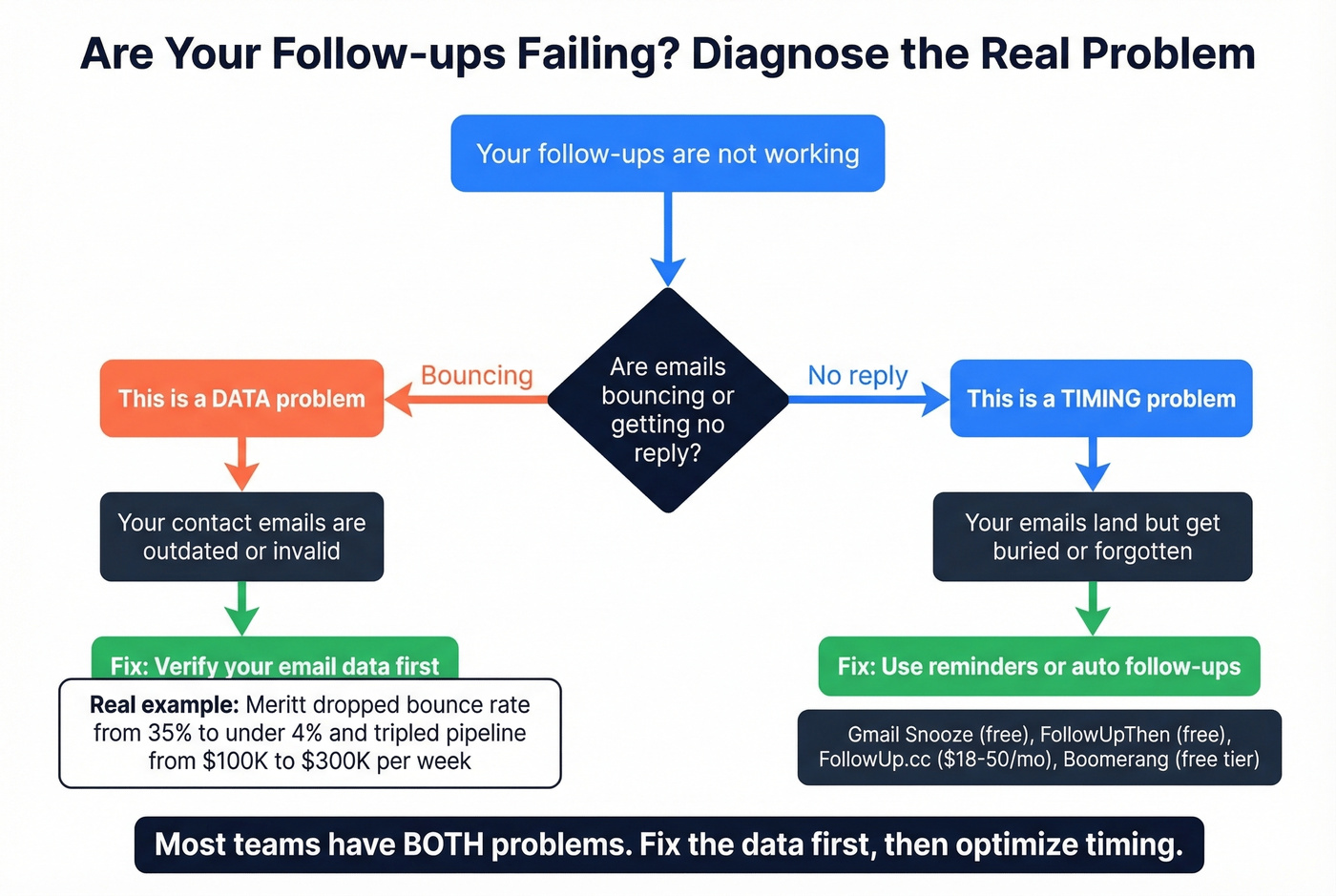
Look - sometimes the issue isn't that you forgot to follow up. It's that your follow-up bounced because you had the wrong email address. That's a completely different category. We've seen teams obsess over reminder workflows while 30% of their emails never reach anyone. One of our customers, Meritt, saw their bounce rate drop from 35% to under 4% after switching to Prospeo for verified emails, and their pipeline tripled from $100K to $300K per week. At ~$0.01 per email with a free tier of 75 verified emails per month, it solves the upstream data problem that makes follow-ups fail in the first place (see email deliverability).
You're evaluating a $18-50/month reminder tool - but the real ROI killer is sending follow-ups to outdated or invalid addresses. Prospeo's 300M+ profiles are refreshed every 7 days, not every 6 weeks. Teams using Prospeo book 26% more meetings than ZoomInfo users because the data actually connects.
Better contact data beats better reminders. Every single time.
FAQ
Is FollowUp.cc discontinued?
No. The official site at followup.cc is live with current pricing. The "discontinued" claim originates from a competitor's blog post with no supporting evidence. The product appears to be in maintenance mode - minimal updates, sparse reviews - but it's still functional and accepting new signups.
Is there a free plan?
No free plan exists. After cancellation, accounts drop to 5 reminders per month, which is barely usable. The cheapest option is Starter at $18/month billed annually. For free alternatives, use Gmail snooze for reminders or FollowUpThen's free tier for email-based follow-up scheduling.
Does it work with Outlook?
FollowUp.cc is built exclusively around a Gmail + Chrome workflow. If you're an Outlook user, you'll be better served by Outlook's built-in follow-up flags or a client-agnostic tool like FollowUpThen.
What if my follow-ups bounce instead of getting ignored?
That's a data quality problem, not a reminder problem. Fixing your contact data upstream eliminates most bounce issues before any reminder tool enters the picture. Prospeo's email finder delivers 98% accuracy across 143M+ verified addresses, with a free tier of 75 emails per month.
Final Verdict
FollowUp.cc isn't dead, but it's hard to recommend enthusiastically in 2026. The Salesforce Edition at $40/month is the only plan that offers something you genuinely can't get elsewhere for cheaper or free. For everyone else, Gmail's native features handle reminders, FollowUpThen handles email-based bumps, Did I Reply? handles reply tracking for $12/year, and if your real problem is bounced emails rather than forgotten ones, that's a data quality fix - not a reminder fix (use sales follow-up templates once deliverability is solid). The tool works. It just doesn't justify its price for what most people actually need.