

Free Email Verification Code in 2026: What It Means (and What to Do)
"Free email verification code" is a deceptively messy search. Half the time you're trying to receive a one-time code (OTP) so you can log in or finish signup. The other half you're trying to validate an email address (deliverability checks) before you store it or send campaigns.
Google mixes those intents together, so you click a "verifier" tool when what you needed was "why isn't my code arriving?" Or you read OTP troubleshooting when what you needed was list hygiene.
Here's the payoff: this guide does two things, fast.
If you're waiting on a code, you'll get the inbox + deliverability checks that fix most "code never arrived" situations (including the Outlook's 550 5.7.515 hard-reject that stops mail before it even hits spam).
If you're building the system, you'll get OTP + magic link defaults you can ship without creating a support-ticket factory.
What you need (quick version)
Pick your path (2-track decision tree)
A) You need to receive an OTP/activation code (what most people mean by a free email verification code)
- You're signing up, logging in, resetting a password, or confirming a device.
- The app says "We sent you a verification code," but nothing shows up.

B) You meant "validate an email address" (no code involved)
- You want to check if
name@company.comis deliverable before you store it or email it. - You're cleaning a list, reducing bounces, or blocking disposable emails at signup.
Micro-split: are you a user or a developer?
If you're a user (you just want the code):
- Search your inbox for the sender domain (not the subject).
- Check Spam/Junk, Promotions and Updates, and All Mail.
- Wait 2-5 minutes, then hit resend once.
- If it's a work email, ask IT to check quarantine/secure email gateway.
If you're a developer (users say "code never arrives"):
- Check your ESP event for that message ID: Delivered vs Bounced vs No event.
- If Delivered -> it's filtering/quarantine (not "sending").
- If Bounced/Rejected -> it's authentication/policy (SPF/DKIM/DMARC/alignment).
- If No event -> your app didn't send (queue, webhook, template, provider outage).
60-second "what happened?" decision nodes
- ESP says Delivered -> user-side filtering (spam, promotions, quarantine) is the culprit.
- ESP says Bounced/Rejected -> fix auth/alignment; Outlook's 550 5.7.515 is the usual smoking gun at scale.
- ESP shows Deferred/Throttled -> you're rate-limited; slow down resends and OTP bursts.
- Multiple resends, codes arrive out of order -> you're triggering throttles; invalidate old codes on resend.
- Only corporate domains fail -> security gateway/quarantine rules are eating OTPs; adjust content + authentication and ask for allowlisting.

Free email verification code vs email validation: what people actually mean
People use the same phrase for two different jobs:
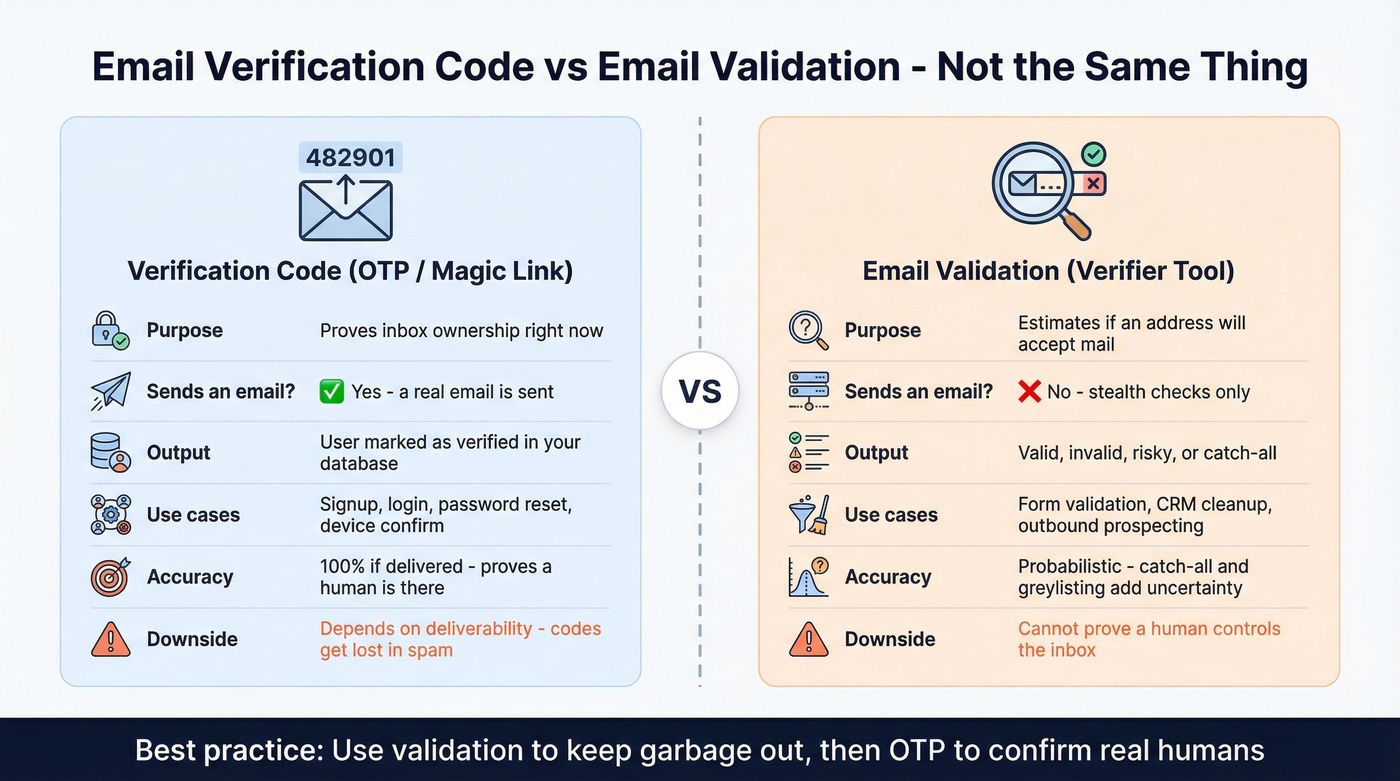
- Email verification (OTP / activation): prove the user controls the inbox right now by sending a code or link.
- Email validation (verifier tools): estimate whether an address will accept mail without sending an email.
A standard ownership verification flow looks like: generate a code/link -> send it -> user enters/clicks -> you mark the email as verified in your database. Mailtrap has a clear walkthrough if you want a reference: https://mailtrap.io/blog/email-verification/
Validators are different. They do "stealth verification," which usually includes syntax checks, DNS/MX checks, SMTP handshake probing, catch-all detection, and disposable/risk signals.
Here's the nuance people miss: SMTP-based validation is probabilistic, not magic. Some servers accept everything (catch-all), some greylist (temporary deferrals), and some block directory harvesting by returning generic responses that hide whether a mailbox exists.
So validation answers: "Is this address likely deliverable and low-risk?"
OTP answers: "Is there a human who can receive mail at this address right now?"
Practical difference:
| Term people mean | What it does | Sends an email? | Output | Typical use case |
|---|---|---|---|---|
| Verification code (OTP) | Confirms inbox ownership | Yes | Verified user/email | Signup, login, password reset |
| Magic link | Confirms ownership via URL click | Yes | Verified + session | Passwordless login |
| Email validation tool | Checks deliverability signals | No (stealth) | valid/invalid/risky | Forms, CRM cleanup, outbound |
| Syntax validation | Checks format only | No | pass/fail | Frontend typo prevention |
Look, if you're selling a lower-ticket product, you don't need an "all-in-one GTM platform" to solve this. You need clean auth mail (SPF DKIM & DMARC + sane rate limits) and a validator to keep garbage addresses out. Everything else is optional.
Why your email verification code isn't arriving (fast troubleshooting)
Use this as a "do this / skip that" checklist. Start with user-side fixes, then move to sender-side signals.
User-side: do this first
Do this
- Search your inbox for the sender domain (example:
@auth.company.com), not "verification code." - Check Spam/Junk and any Quarantine folder (corporate email security tools love eating OTPs).
- In Gmail, check Promotions and Updates tabs.
- Wait 2-5 minutes. Transactional mail gets delayed under provider throttling.
- If you can, try receiving the code on a different provider (Gmail vs Outlook) to isolate filtering.
Skip this
- Don't hammer "resend" 10 times. You'll trigger throttles and the oldest code often arrives last.
- Don't assume "the app is down." Most failures are filtering, authentication, or rate limits.
One resend is plenty.
Sender-side: what to look for (the stuff users can't see)
If you're the sender (or you can ask your dev/ops team), check your mail logs for:

Outlook.com enforcement (big one in 2026) Outlook's consumer service (hotmail.com, live.com, outlook.com) enforces stricter authentication for high-volume senders at 5,000+ emails/day. If you miss the bar, messages get rejected with:
"550; 5.7.515 Access denied, sending domain [SendingDomain] does not meet the required authentication level."
In our experience, 550 5.7.515 is almost always authentication + alignment, not "your subject line sounded spammy."
Other common causes
- SPF passes but DKIM fails (or vice versa), so DMARC fails.
- DMARC is missing or published on the wrong domain (common when product mail uses a subdomain).
- Return-Path / 5321.MailFrom doesn't align with 5322.From (classic third-party sender misconfig).
- Rate limiting: too many OTPs to the same mailbox/IP in a short window.
- Corporate gateways rewrite links or strip content (magic links break; codes survive).
Microsoft-style remediation: verify alignment in headers (concrete steps)
When Outlook rejects or filtering is severe, stop guessing and check the message headers from a test send.
- Send a test OTP email to an Outlook.com mailbox you control.
- Open the message (or the bounce) and view message headers.
- Find
Authentication-Results:and confirm:spf=passfor the domain that actually sent the messagedkim=passand check the DKIM signing domain (d=)dmarc=passand confirm it evaluates against the From: domain
- Confirm DKIM alignment: the DKIM
d=domain should match (or be a subdomain of) the visible From domain. - Confirm Return-Path alignment: the Return-Path / 5321.MailFrom domain should align with the From domain (or ensure DKIM aligns if SPF can't).
- Confirm SPF includes the real sender: if you use an ESP, your SPF record must include that provider (and only the right one).
- Watch the SPF 10-lookup limit: too many
include:chains can cause SPF to fail even if the record looks "correct."
If you're using a subdomain like auth.yourdomain.com, make sure DMARC and DKIM are set up for that exact domain family, not just the root domain, and make sure your visible From matches what you're authenticating.
Quick "deliverability vs app logic" test (no debate, just answers)
- ESP shows Delivered -> filtering/quarantine/user-side.
- ESP shows Bounced/Rejected -> authentication/policy/alignment.
- ESP shows nothing -> your app didn't send (queue stuck, webhook failure, template error, provider outage).
This saves hours of arguing.


Tired of codes bouncing because the email address was bad in the first place? Prospeo validates 143M+ emails through a 5-step verification process - catching spam traps, honeypots, and catch-all domains before you ever hit send. 98% accuracy at $0.01 per email.
Stop debugging deliverability. Start with emails that actually exist.
Sender-side deliverability requirements for verification emails at scale (Outlook + Yahoo)
Verification emails feel "transactional," but at volume they get treated like any other bulk stream. Outlook and Yahoo tightened expectations, and they don't care that it's an OTP.
Mailbox provider requirements snapshot (Outlook.com vs Yahoo)
| Provider | When it bites | Hard requirements | Extra requirements |
|---|---|---|---|
| Outlook.com | 5,000+/day | SPF pass + DKIM pass + DMARC (p=none+) + alignment | Watch SPF 10-lookup limit |
| Yahoo | Bulk thresholds | SPF + DKIM + DMARC pass | Spam rate <0.3%, 1-click unsub, honor in 2 days |

Outlook.com checklist (high-volume)
- SPF passes for the sending domain.
- DKIM passes for the same domain family.
- DMARC exists with at least
p=none. - Alignment: your 5322.From domain aligns with SPF or DKIM domain; also check 5321.MailFrom (Return-Path) vs 5322.From.
- If you use a third-party sender, make sure they're signing and sending with your domain correctly.
Microsoft's guidance: https://learn.microsoft.com/en-us/defender-office-365/email-authentication-about
Yahoo checklist (bulk sender reality)
Yahoo's bar is blunt:
- Keep spam complaint rate under 0.3%.
- Bulk streams need SPF + DKIM + DMARC, and DMARC must pass.
- Support one-click unsubscribe and honor it within 2 days.
- Ensure forward + reverse DNS are valid for sending IPs (especially if you self-host).
Yahoo's sender requirements: https://senders.yahooinc.com/best-practices/
Concrete example: if you send 20,000 OTP emails/day and even 100 people hit "This is spam," you're already at 0.5%. That's why OTP streams need monitoring like marketing mail, plus content that doesn't look like a promo blast and rate limits that don't spray the same mailbox every 10 seconds.
OTP vs magic link (and why you should ship both)
Magic links are great until they aren't.

Magic link wins
- Less typing, faster on mobile.
- Great for "sign in on this device" flows.
OTP wins
- Stays in-session (copy/paste a code).
- Survives corporate link scanners and email previews.
- More resilient when users open email on a different device.
Link scanners and previews can auto-open magic links. JumpCloud makes the practical point: don't rely on magic links alone for authentication flows. https://jumpcloud.com/blog/magic-link-authentication
We've tested both patterns in real products, and the combo is the one that keeps support sane: link for the happy path, code for the "my phone opened the email but my laptop has the form" reality.
Here's a scenario you'll recognize: a user requests a magic link on desktop, then opens the email on mobile because that's where notifications are. They tap the link, it opens the app on the phone, and now they're stuck staring at the desktop login screen again. Put a code in the email and the ticket never gets created.
How to implement verification emails (OTP + magic link defaults)
These defaults are boring on purpose. Boring is secure.
OTP defaults (what actually works)
- 6-digit numeric OTP
- TTL: 5-10 minutes
- Max attempts: 3-5 per code
- Resend cooldown: 30-60 seconds
- Single-use: invalidate on success, and invalidate old codes when issuing a new one
Rate limiting (good starting points)
- OTP send endpoint: 2 sends / 60s per IP
- OTP verify endpoint: 2 verify attempts / 30s per IP
Also rate limit per email address and per device fingerprint. IP-only limits are easy to bypass.
Node.js: generate a 6-digit OTP safely
Use a CSPRNG. In Node, crypto.randomInt() is the right primitive.
export function generateOtp() {
  const n = crypto.randomInt(0, 1_000_000); // 0..999999
  return String(n).padStart(6, "0");
}
Store OTPs like secrets (not like "temporary strings")
Even experienced teams mess this up: they log OTPs, store them in plaintext, or leave them valid after resend. Treat OTPs like passwords.
Do this:
- Hash the OTP before storing (Argon2id is ideal; bcrypt is acceptable).
- Store:
otp_hash,expires_at,attempts,used_at,user_id/email. - Never log the OTP (not in app logs, not in ESP event payloads).
- Invalidate after success, and rotate on resend.
If you take one thing from this section, take that.
Verification endpoint checklist
- Compare hashes in constant time (most libs handle this).
- Increment attempts on failure.
- Lock out after max attempts until resend window.
- Return generic errors ("invalid code") to avoid account enumeration.
Magic link pattern (JWT/token + short expiry)
A common pattern is:
- Generate a token (JWT or random opaque token)
- Email a link like
https://app.com/verify/:token - Verify token server-side and mark email verified
Illustrative example (trimmed for clarity). In production: store a token hash for single-use, add rate limits, and return generic errors.
function createVerifyToken(userId, email) {
  return jwt.sign(
    { sub: userId, email },
    process.env.JWT_SECRET,
    { expiresIn: "10m" }
  );
}

// GET /verify/:token
function verifyHandler(req, res) {
  const payload = jwt.verify(req.params.token, process.env.JWT_SECRET);
  // check single-use store, mark verified, mark token used
  res.redirect("/verified");
}
Email content that improves deliverability
- Put the code at the top: "Your code is 123456"
- Avoid URL shorteners
- Include both link + code
- Use a consistent From name/domain
- Keep formatting simple (OTP mail doesn't need marketing HTML)
OTP isn't enough: reduce abuse (disposable + hyper-disposable) without breaking UX
Ownership verification proves someone can receive mail at that address. It doesn't prove they're a real customer, and it doesn't stop disposable signups.
Disposable email is also getting weirder. Didit's fraud write-up calls out that 46% of high-risk disposable domains are "hyper-disposable" (domains spun up and burned quickly). Static blocklists can't keep up. https://www.didit.me/blog/hyper-disposable-emails
What works without torching UX:
- Verify ownership (OTP/magic link) to stop typos and obvious bots.
- Validate/risk-check the address (MX/SMTP signals + disposable detection).
- Add progressive friction: only challenge high-risk signups (CAPTCHA, phone step-up, delayed access).
- Watch patterns: same IP creating many accounts, many signups to the same domain, plus-addressing bursts.
If you meant "validate an email address for free" (tools + pricing)
Email validators don't generate a verification code. They do stealth checks (syntax, DNS/MX, SMTP probing, catch-all handling, disposable detection) without sending an email.
Below are the ones worth considering in 2026, with pricing anchors you can actually use.
Prospeo (Tier 1): best for accuracy + fresh B2B data
Prospeo is "The B2B data platform built for accuracy," and it's the pick when you care about two things at once: keeping bad emails out of your outbound and working from data that doesn't go stale for weeks. It includes 300M+ professional profiles, 143M+ verified professional emails, and real-time verification with 98% email accuracy on a 7-day refresh cycle.
Two details matter in day-to-day ops: Prospeo uses proprietary email-finding infrastructure (not third-party email providers), and verification includes catch-all handling plus spam-trap and honeypot filtering. If you're finding emails (not just verifying), the Email Finder is built around paying only for valid addresses: https://prospeo.io/email-finder
Pricing stays simple: free tier includes 75 emails + 100 Chrome extension credits/month, and paid usage lands around ~$0.01 per email. https://prospeo.io/pricing
Hunter Email Verifier (Tier 1)
Hunter's verifier is the clean, team-friendly option: simple UI, clear deliverability labels, and consistent handling of accept-all domains. It's easy to operationalize because the outputs are stable enough to turn into rules ("send," "don't send," "manual review").
Pricing: free (50 credits/month), then $49/month, $149/month, $299/month depending on volume. https://hunter.io/pricing
Skip Hunter if you need heavy API throughput or deeper scoring. Pick it if you want something non-technical teams will actually use without a training session.
ZeroBounce (Tier 1)
ZeroBounce is the "I need scale + controls" choice. It's strong for bulk hygiene and teams that care about data protection controls and more granular risk labeling around catch-alls.
Pricing: 100 free monthly validations (business/premium domain required). Pay-as-you-go starts at $20 for 2,000 validations (~$0.01/email). At higher volumes, pricing drops (for example, ~$0.009/email at 5,000 and ~$0.008/email at 10,000), and subscriptions commonly start around $99/month for larger bundles. https://www.zerobounce.net/pricing/
Pick ZeroBounce if you're cleaning big lists and want a mature, enterprise-friendly verifier. Skip it if you only need occasional checks and want the simplest workflow.
NeverBounce (Tier 2)
NeverBounce is the pragmatic "keep bounces down" tool, and it's strong for embedding verification into workflows with real-time verification and lots of integrations.
Pricing anchor: pay-as-you-go around $8 per 1,000 (~$0.008/email) and subscriptions starting around $49/month for up to 10,000 verifications. https://www.neverbounce.com/pricing
Verifalia (Tier 2)
Verifalia is the more technical validator: deeper diagnostics and a clear explanation of the multi-step validation process (syntax, DNS/MX, disposable detection, stealth SMTP probing). https://verifalia.com/validate-email
Pricing anchor: free online validator, then bulk/API that usually lands around ~$0.005-$0.02 per email depending on speed and volume, with entry plans commonly around $10-$30/month for a few thousand credits.
Mailmeteor Email Checker (Tier 2)
Mailmeteor's checker is best for one-off checks and education, like when someone on your team wants to understand why an address looks risky before they hit send. It runs a multi-check flow (format, DNS, MX, SMTP) and leans into privacy messaging. https://mailmeteor.com/email-checker
Pricing anchor: the single checker is free; paid plans typically start around $10-$30/month, and bulk verification in this category usually works out to roughly ~$0.005-$0.02/email depending on volume.
Emailable / QuickEmailVerification / Site24x7 / VerifyEmailAddress.org (Tier 3 roundup)
Good for quick checks when you don't want a full platform. Expect free single checks, then bulk/API pricing that typically falls around ~$0.004-$0.02 per email (volume and speed drive the rate), with entry spend often around $10-$30 for a small credit pack or month.
Free tiers & pricing snapshot (2026)
| Tool | Free tier | Paid starting point | Best for |
|---|---|---|---|
| Prospeo | 75 emails + 100 extension credits/mo | ~$0.01/email | Fresh B2B verification + workflows |
| Hunter | 50 credits/mo | $49/mo | Simple B2B checks + clear catch-all handling |
| ZeroBounce | 100/mo | $20 / 2,000 | Bulk list cleaning + data protection controls |
| NeverBounce | Limited | $8 / 1,000 or $49/mo | Integrations + real-time verification |
| Verifalia | Free online validator | ~$0.005-$0.02/email | Technical validation + deeper diagnostics |
| Mailmeteor | Free single checks | ~$10-$30/mo | One-offs + lightweight workflows |
| Tier 3 tools | Free single checks | ~$0.004-$0.02/email | Utility validation without commitment |
Temporary email inboxes to receive codes (why it's unreliable + safer alternative)
Sometimes "free email verification code" really means: "I need a free inbox to receive a code," especially when a site asks for an email ID for verification before you can proceed.
Temporary inboxes work for low-stakes signups, but they're unreliable and often blocked. Many services expire quickly (Internxt notes its temporary inbox expires after 3 hours of inactivity), and lots of products block disposable domains outright. https://internxt.com/temporary-email
They're also a security risk. Proton's warning is the one I agree with: many disposable services have public inboxes or weak access controls, so anyone who guesses the address can read your verification code or password reset. https://proton.me/blog/temporary-email
Use this if
- You're testing a product and don't care about account recovery.
- You're avoiding spam on a throwaway signup.
Skip this if
- You care about security, recovery, or anything tied to money/data.
- You're signing up for a corporate tool (they often block temp domains).
Safer alternative: use email aliases (you keep control of the inbox and can revoke the alias later) instead of public disposable inboxes.
FAQ
What's the difference between a free email verification code and email validation?
A verification code proves you control the inbox by sending a code or link you must enter or click, while email validation checks syntax, MX/DNS, and SMTP signals without sending anything. Use OTPs for login/signup security, and use validators to cut bounces and block disposable or risky addresses before you email them.
Why does my verification code email not arrive even after resending?
Most "not received" cases are filtering or rejection: if your ESP says delivered, it's landing in spam/promotions/quarantine; if it says bounced/rejected, it's usually SPF/DKIM/DMARC alignment. For Outlook at scale, a common hard reject is 550; 5.7.515, which points to authentication requirements not being met.
What OTP settings should I use (length, expiry, attempts, cooldown)?
Use a 6-digit code with a 5-10 minute expiry, allow 3-5 attempts, and enforce a 30-60 second resend cooldown with per-IP and per-email rate limits. Invalidate old codes on resend and make every code single-use to prevent out-of-order arrivals and replay attempts.
Are temporary/disposable emails safe for receiving verification codes?
Disposable inboxes are unreliable and often blocked, and they can be unsafe because access controls are often weak or inboxes are guessable. They're fine for low-stakes testing, but for anything you might need to recover later, use an alias on an inbox you control and revoke it when you're done.
What's a good free option to validate emails before sending campaigns?
For small teams, start with a free tier from a real validator and treat catch-all as "review," not "send." Prospeo includes 75 free email credits/month with 98% verified email accuracy and catch-all handling, while tools like Hunter (50 credits/month) and ZeroBounce (100/month) are also solid for basic hygiene.
If you're cleaning lists or blocking disposable signups, free tools only get you syntax checks. Prospeo runs DNS, MX, SMTP, catch-all, and spam-trap detection on 300M+ profiles - refreshed every 7 days, not every 6 weeks like competitors.
Real email validation that goes far beyond syntax and MX lookups.
Do this next (no fluff)
- If you're a user: search by sender domain -> check spam/promotions/quarantine -> wait 2-5 minutes -> resend once.
- If you're a developer: look at ESP status (delivered vs bounced vs no event) -> if Outlook shows 550 5.7.515, fix SPF record, DMARC monitoring, and alignment using header checks.
- If you meant "free email verification code" but you're actually trying to stop bounces: run validation before you send, and treat catch-all/risky as a separate lane instead of "valid."