

Email Search: Find Any Email Address in 2026 (Free & Paid)
You just sent 500 cold emails. 150 bounced. Your domain reputation tanked overnight, and now even the good emails are landing in spam. That's not a hypothetical - it's the most common story I hear from SDRs who grabbed a list from whatever tool had the biggest free tier and hit send without thinking twice. Getting email search right is the difference between a pipeline and a spam folder.
Here's the thing: 91% of businesses use email as their primary communication channel, and 77% of B2B buyers prefer email contact over every other method - more than double any other channel. The email address is still the skeleton key to B2B sales. But finding the right email address, one that actually works, is where most teams fall apart.
What You Need (Quick Version)
Trying to find someone's email address? Use a dedicated finder tool. Head to the methods section below.

Trying to search within your inbox? Gmail and Outlook have powerful search operators most people never learn. See the inbox search section.
Trying to look up who owns an email? That's a reverse email lookup - a different workflow entirely. Covered in the reverse lookup section.
How to Find Someone's Email Address
There are five reliable methods, ranging from "click a button" to "detective work." The right one depends on your volume and budget.
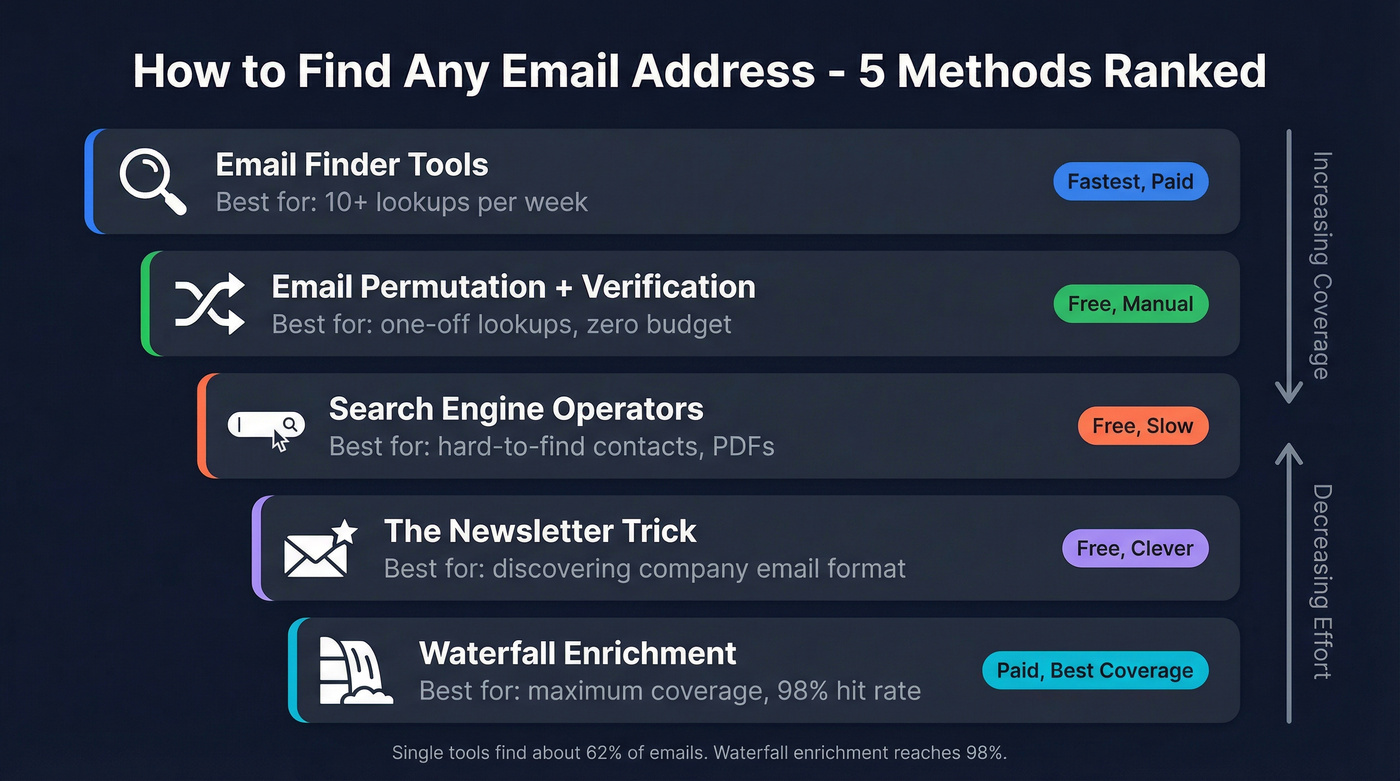
Email Finder Tools (The Fast Way)
If you're looking up more than a handful of emails per week, a dedicated tool is the only sane approach. These platforms query massive databases of professional contacts, verify the address in real time, and return it - often in under a second.
The best tools use proprietary infrastructure to find and verify professional emails. They're not just guessing formats and checking SMTP. They run multi-step verification that catches spam traps, honeypots, and catch-all domains before you ever hit send. Here's the dirty secret: 98% of email enrichment solutions pull from the same underlying data sources. The difference isn't usually where they get the data - it's how they verify it and how often they refresh it. A tool that re-verifies every 7 days will outperform one sitting on 6-week-old records, even if the raw database is smaller.
For most teams, this is method #1. Save the manual tricks for edge cases.
Email Permutation + Verification (The Free Way)
If you don't want to pay for a tool, you can reverse-engineer someone's email by guessing the format their company uses. Most businesses follow predictable patterns:
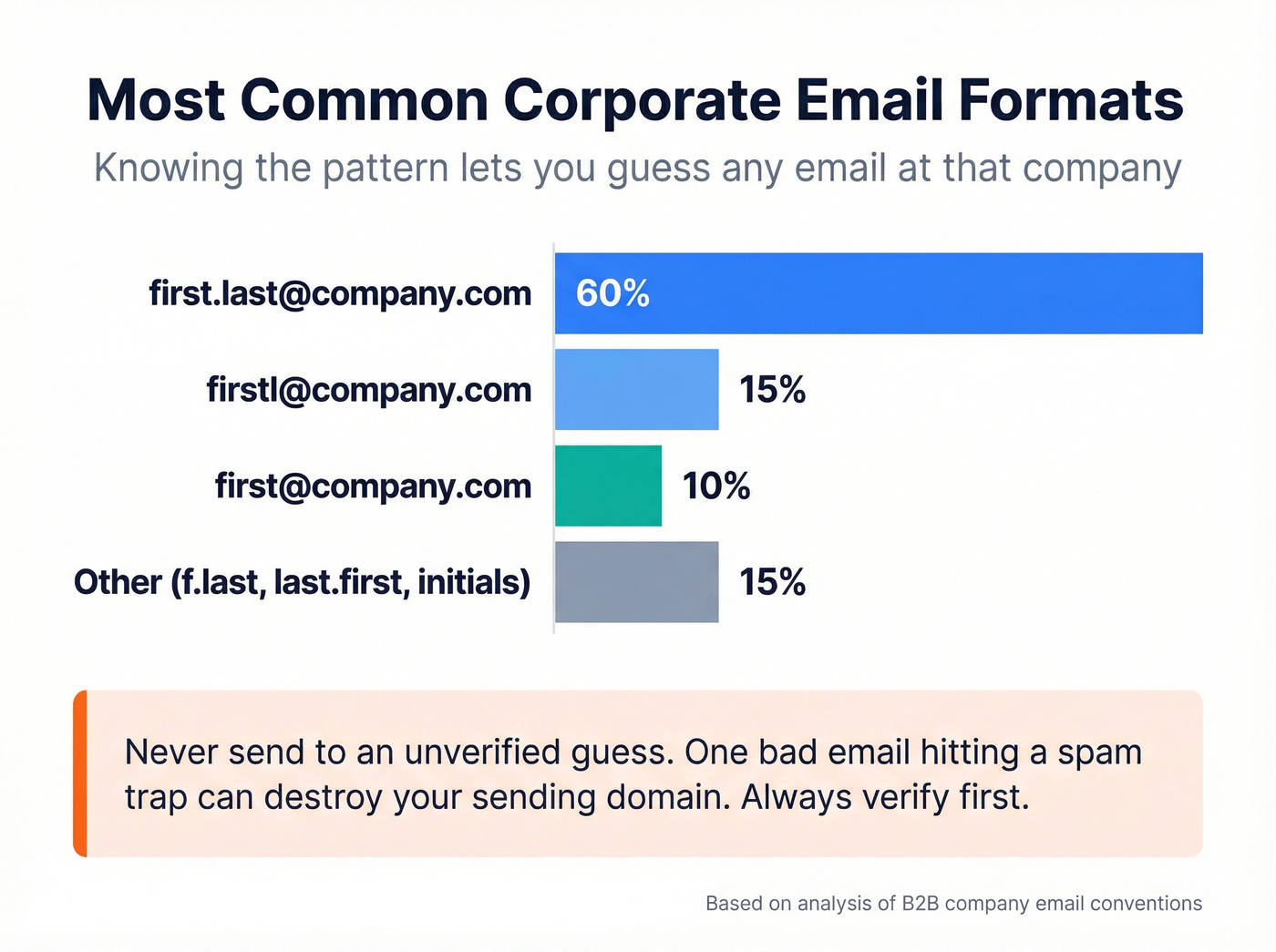
- first.last@company.com - ~60% of companies
- firstl@company.com - ~15%
- first@company.com - ~10%
- Other variations (f.last@, last.first@, initials) - ~15%
The workflow: generate every plausible permutation for your target contact, then run them through a free verification tool to see which one is live. You can even use an LLM to generate the permutations - paste in the person's name and company domain, ask for every common format, and you'll get 8-12 variations in seconds.

Critical warning: never send to an unverified permutation. One bad guess hitting a spam trap can torch your sending domain. Always verify first. (If you need a workflow, see verify.)
Search Engine Operators (The Manual Way)
You can sometimes surface email addresses directly from search engines using the right query syntax. Think of Google or DuckDuckGo as a free lookup engine - one that indexes publicly available contact information across millions of pages.
Most people miss this: DuckDuckGo is actually better than Google for finding emails. Google tends to return social profiles when it sees the "@" symbol, while DuckDuckGo indexes email addresses directly.
Try these operators:
site:companydomain.com + "email" + "contact" + "Jane Smith"
"Jane Smith" + "@companydomain.com"
"Jane Smith" email site:companydomain.com filetype:pdf
PDFs are goldmines. Conference speaker lists, press releases, and whitepapers often include direct email addresses that never show up on the company's main website.
One more manual method worth trying: check the "Contact info" section on professional profiles. Many people list their work email publicly and don't realize it. Takes 10 seconds. Works surprisingly often for senior executives who set up their profiles years ago and forgot what they made public. (Related: key decision makers.)
The Newsletter Trick
This one's underrated. Subscribe to the target company's newsletter or blog. The welcome email that hits your inbox reveals the format the company uses - if the sender is marketing@company.com that's less useful, but often you'll see firstname.lastname@company.com or similar in the headers or signature.
Once you know the format, apply it to your target contact's name. Then verify before sending. Five minutes, zero dollars. (More on safe guessing: Guess Email Address Format.)
Waterfall Enrichment (The Maximum Coverage Way)
Here's the data that changed how I think about finding emails: a Cleanlist test of 1,000 records in January 2026 found that a single finder tool returns valid emails for about 62% of contacts. Run those same contacts through a waterfall - multiple tools queried sequentially, stopping when a verified result is found - and coverage jumps to 98%.

That's not a marginal improvement. That's the difference between a pipeline and a half-pipeline.
Waterfall enrichment tools like Clay, Fullenrich, and BetterContact connect to multiple independent data providers and query them in sequence. The first provider to return a verified result wins. Field-level merging means you might get the email from Provider A and the phone number from Provider B. (If you’re comparing stacks, see waterfall alternatives.)
Important distinction: single-source tools like Apollo, ZoomInfo, and Lusha are not waterfall, even though they have large databases. They're querying one dataset. Waterfall means multiple independent sources. Diminishing returns kick in around 10-15 providers. Below 5 leaves significant coverage gaps. For most teams, 3-5 providers in a waterfall hits the sweet spot.

You just read about 30% bounce rates destroying domains. Prospeo's 5-step verification catches spam traps, honeypots, and catch-all domains before you hit send - delivering 98% email accuracy on a 7-day refresh cycle. At ~$0.01 per email, one verified address costs less than the damage a single bounce does to your sender reputation.
Find any email address and know it's real before you send.
Best Email Search Tools Compared
Quick Picks
| Pick | Tool | Why |
|---|---|---|
| Best free tier | Apollo | Unlimited email credits (fair use) |
| Best for speed | Findymail | 2-min processing, pay only for verified |
Reddit's Rule of Thumb
This mapping comes straight from r/Entrepreneur and r/sales threads - it's the closest thing to consensus I've found:
- Enterprise ABM -> ZoomInfo
- Outbound reps (US-focused) -> Apollo
- API / automation workflows -> People Data Labs
- EU/UK compliance -> Cognism
- Quick enrichment -> Lusha
- HubSpot inbound teams -> Breeze
My hot take: if your average deal size is under $10K, you probably don't need ZoomInfo-level data. A $39/month tool with 98% accuracy will outperform a $15K/year platform that your team barely uses. Most teams overspend on data and underspend on the outreach itself. (See the bigger picture: B2B data providers.)
Pricing Overview
| Tool | Free Tier | Starting Price | Credits | Best For |
|---|---|---|---|---|
| Prospeo | 75 emails/mo | $39/mo | Varies (~$0.01/email) | Accuracy + freshness |
| Apollo | Limited | $49/user/mo (annual) | Unlimited (fair use) | Volume prospecting |
| Findymail | 10 emails | $99/mo | 5,000 (~$0.02/email) | Speed + verified only |
| Hunter | 50/mo | $34/mo (annual) | 2,000 (~$0.02/email) | Brand recognition |
| Snov.io | 50 credits | $29.25/mo (annual) | 1,000 (~$0.03/email) | International leads |
| Lusha | 70 credits/mo | $29.90/user/mo | 250 (~$0.12/email) | Quick enrichment |
| GetProspect | 50 emails | $34/mo (annual) | 1,000 (~$0.03/email) | Pay-for-valid model |
| Skrapp.io | 100/mo | $30/mo (annual) | 1,000 (~$0.03/email) | Budget teams |

Prospeo - Best for Email Accuracy
Use this if: You're tired of "verified" emails that still bounce 20%. You need data you can trust on the first send, and you don't want to babysit a complex platform.
Prospeo's database covers 300M+ professional profiles with 143M+ verified emails, all refreshed on a 7-day cycle. That refresh cadence matters more than most people realize - the industry average is 6 weeks, which means most tools are serving you data that's already stale by the time you export it. The platform uses proprietary email-finding infrastructure - it doesn't rely on third-party email providers, which is why the accuracy numbers hold up independently of what happens to shared data sources.

The 98% email accuracy comes from a proprietary 5-step verification process that includes catch-all handling, spam-trap removal, and honeypot filtering. This isn't a single SMTP check - it's a full pipeline designed to eliminate the garbage before it reaches your sequences. The proof points speak for themselves: Meritt went from a 35% bounce rate to under 4%, and their pipeline tripled from $100K to $300K per week. Stack Optimize built from $0 to $1M ARR using Prospeo data, maintaining bounce rates under 3% with zero domain flags across all clients.
Free tier gives you 75 emails plus 100 Chrome extension credits per month. Paid plans run about $0.01 per email. No contracts, no sales calls.
Skip this if: You specifically need an all-in-one platform with a built-in dialer. Prospeo pairs with any sequencer - Instantly, Lemlist, Smartlead - so you get best-in-class data with your preferred sending tool. (If you’re building the system end-to-end, see cold email outreach tools.)
Apollo - Best Free Tier
Use this if: You're an outbound rep who needs volume and doesn't want to pay for email credits. Apollo's unlimited email credits on paid plans (subject to fair use) and generous free tier make it the obvious starting point for US-focused teams.
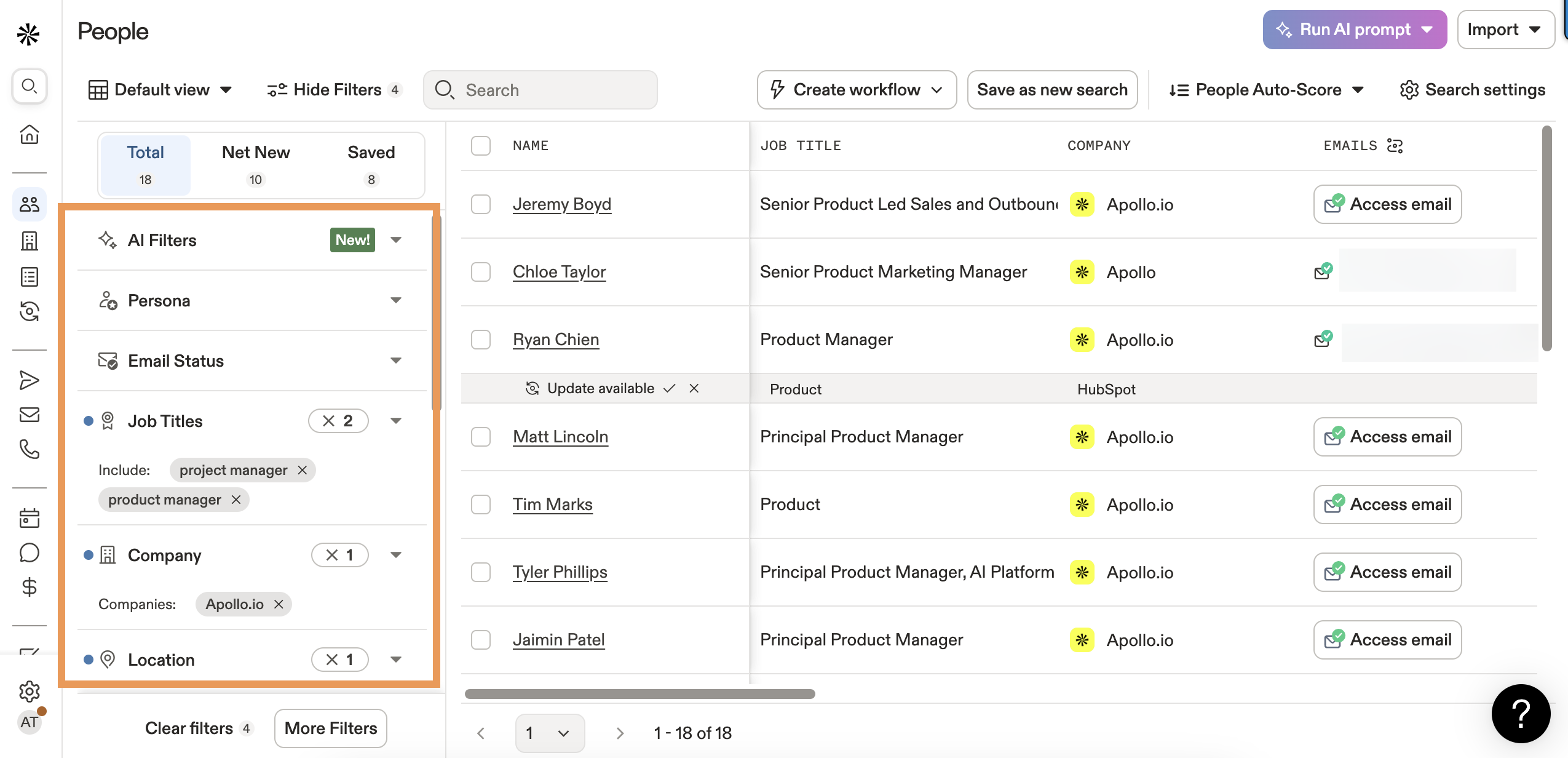
Apollo's database covers 275M+ contacts, making it one of the largest single-source providers. The $49/user/month annual plan includes intent data, job change alerts, and advanced filtering. (Deep dive: Apollo.io accuracy.)
The tradeoff is data freshness. The #1 complaint on Reddit: "biggest database but contacts are out of date." I've seen this firsthand - Apollo's volume is impressive, but you'll hit more bounces than you'd expect from a database that size. Also worth knowing: Apollo experienced two data breaches (2018 and 2021) compromising 130M+ records. They've tightened security since, but it's part of the history.
Skip this if: You're prospecting outside the US, or data accuracy matters more than volume.
Findymail - Best for Speed
Use this if: You value your time and hate paying for unverified junk. Findymail processes files in about 2 minutes (vs. 15-30 minutes at competitors) and only charges for verified results.
In the Anymail Finder benchmark (Sep 2025) of 5,000 contacts, Findymail hit 75.1% accuracy - second only to Anymail Finder itself. The Dropcontact benchmark showed a 1.1% hard bounce rate across 20,000 tests. Most users report bounce rates under 5%.
Pricing starts at $99/mo for 5,000 emails. A lower tier at $49/mo for 1,000 emails may still be available. Phone numbers cost 10 credits each. Credits roll over, capped at 2x your monthly plan.
Skip this if: You need a built-in CRM or sequencing - Findymail is purely a data tool.
Hunter.io
Hunter has 6M+ users and strong brand recognition. The free tier gives you 50 credits/month, and the $49/mo starter plan includes 2,000 credits with email verification at 0.5 credits per check. Annual billing drops it to $34/mo. The UI is clean and the API is well-documented.
Real talk - Hunter scored just 37.6% accuracy in the Anymail Finder benchmark and had an 11.2% hard bounce rate in the Dropcontact test. Reddit users consistently call it a "tiny database." For a tool that's been around this long, those numbers are disappointing. Best suited for US contacts at well-known companies where the email format is already common knowledge.
Snov.io
Snov.io bundles email automation and verification into one platform, which is convenient if you want fewer tools in your stack. It's solid for international leads. The starter plan at $39/mo ($29.25 annual) includes 1,000 credits with unlimited team seats. The add-on for multi-channel automation ($69/mo) is useful if you're running sequences across channels.
The downside: 20.1% accuracy in the Anymail benchmark is rough. It nearly completely failed company-name-only searches - 19 valid results out of 2,500 attempts. If your prospects are at smaller companies where you only have the company name, Snov.io will leave you empty-handed.
Lusha
| Pros | Cons |
|---|---|
| 70 free credits/month - generous for light users | Phone reveals cost 10 credits each - burns through allocation fast |
| Pro plan at $29.90/user/month is affordable | Not ideal for building large lists from scratch |
| Strong phone number data - 280K+ revenue teams use it | Credit system gets expensive at scale |
| Best for quick enrichment on identified leads | Some users report ~2,000 contact cap under "unlimited" fair use |
GetProspect
GetProspect hit 61.9% accuracy in the Anymail Finder benchmark - middle of the pack but respectable. Their site claims 84% accuracy, but the independent benchmark of 5,000 contacts is a more reliable figure. The pay-only-for-valid-emails model means you're not burning credits on dead ends. Starts at $49/mo ($34 annual) for 1,000 valid emails. A solid choice for teams that want predictable costs.
Skrapp.io
Budget-friendly option at $30/mo annual for 1,000 credits. Reports a 92% search success rate and is trusted by 2M+ professionals. The interface is no-frills but functional.
If you're a solo founder doing 200 lookups a month, Skrapp gets the job done without overthinking it.
Cognism - Best for EU/UK Teams
If you're prospecting in Europe, Cognism is the default recommendation across Reddit's sales communities - and for good reason. It's built around GDPR compliance from the ground up, with verified phone numbers that are particularly strong in the UK and DACH regions. Pricing starts around $1,000/month based on market positioning and community reports, which puts it firmly in the mid-market tier. Skip it if you're US-only; choose it if a single GDPR misstep would cost you more than the annual subscription. (More: GDPR for sales and marketing.)
RocketReach
RocketReach shows up constantly in Reddit threads as a "good enough" option for teams that need broad coverage without committing to a big platform. The database covers 700M+ profiles across 35M+ companies. Pricing starts at $53/mo ($39 annual) for 80 lookups. Accuracy is middle-of-the-pack - Reddit sentiment puts it roughly on par with Hunter, which means you'll want to verify externally. Best for one-off lookups rather than bulk prospecting.
Waterfall enrichment gets you to 98% coverage - but Prospeo's proprietary email infrastructure means you start at a higher baseline than tools pulling from the same third-party sources. 143M+ verified emails, refreshed every 7 days, not the 6-week-old data most providers sit on. Teams using Prospeo book 35% more meetings than Apollo users.
Start with better data and skip half the waterfall.
Email Finder Accuracy - What the Benchmarks Say
Accuracy claims in this space are mostly marketing. Every tool says "95%+ verified." The benchmarks tell a different story.
Three independent tests paint a consistent picture:
The Anymail Finder benchmark (Sep 2025) tested 5,000 fresh contacts across 8 tools - 2,500 with domain only, 2,500 with company name only. The Dropcontact benchmark (Feb 2025) ran 20,000 real-world tests across 15 tools. The Tomba benchmark (Feb 2026) tested 5,000 contacts with nearly identical methodology.
| Tool | Anymail Test (5K) | Tomba Test (5K) | Dropcontact Bounce (20K) |
|---|---|---|---|
| Anymail Finder | 77.5% | 77.5% | - |
| Findymail | 75.1% | 75.1% | 1.1% |
| GetProspect | 61.9% | 61.9% | - |
| Skrapp | 42.8% | 42.8% | - |
| Hunter | 37.6% | 37.6% | 11.2% |
| Snov.io | 20.1% | 20.1% | - |
Note: Tomba ranked itself #1 in its own test at 80.3% - we've excluded self-reported results from this table.
Two independent benchmarks produced nearly identical rankings. Those numbers are real.

A critical concept most teams miss: catch-all domains. Between 15-28% of B2B domains are configured as catch-all, meaning they accept email to any address - even fake ones. A basic SMTP check will mark totallynotreal@catchalldomain.com as "verified." That's why "verified" doesn't mean "accurate." Tools that specifically handle catch-all domains - flagging them, running additional checks, or excluding them from "verified" counts - produce dramatically lower bounce rates. (More: email deliverability.)
The difference between a 1% bounce rate and an 11% bounce rate isn't academic. At 11%, you're actively damaging your sender reputation with every campaign.
Mistakes That Kill Your Email Search Results
Sending to "risky" addresses. Verified emails deliver at 97%+. Addresses flagged as "risky" or "accept-all" hover around 70%. If you must send to risky addresses, use a separate sending domain you can afford to burn.
Relying on stale data. An email verified 6 months ago might belong to someone who left the company 5 months ago. Real-time verification or tools with weekly refresh cycles eliminate this. We've seen teams import "fresh" lists from a tool that hadn't re-verified in 8 weeks - 22% bounced on the first send. (Related: B2B contact data decay.)
Skipping SPF, DKIM, and DMARC. Even a perfect email list will underperform if your sending domain isn't properly authenticated. These three protocols tell receiving servers you're legitimate. Without them, you're starting every campaign with a handicap. Use MXToolbox to check your setup. (Full setup guide: SPF DKIM & DMARC.)
Double-verifying with a second tool. Counterintuitive, but running a verified list through a second verification tool can reduce your valid list by up to 20%. Different verifiers have different thresholds for catch-all domains, and the stricter tool will flag valid addresses as risky. Pick one good verifier and trust it. (If you’re comparing vendors: email verifier websites.)
Using a burned sending domain. If your domain's already been flagged for spam, the most accurate email list in the world won't save you. Check your domain reputation before blaming your data provider. (See: domain reputation.)
Not personalizing outreach. Finding the right email is step one. Sending a generic template to it is step zero. Personalization isn't optional - it's the difference between a reply and a spam report.
Ignoring catch-all domains. Some teams either send to all catch-all addresses (risky) or skip them entirely (leaving 15-28% of their TAM on the table). The smart move: use a tool that specifically handles catch-all verification, or segment catch-all contacts into a separate, lower-volume sending stream.
How to Search Your Inbox Like a Pro
Not everyone searching for "email search" is trying to find a stranger's address. Sometimes you just need to find that one PDF your boss sent in March. Gmail is the best inbox search among all email providers. ProtonMail is the worst - encryption means it can only search headers, not body text. Outlook falls somewhere in between.
Gmail Search Operators
Gmail supports 50+ search operators. Here are the ones that actually matter:
| Operator | What It Does | Example |
|---|---|---|
from: |
Emails from a sender | from:raj@company.com |
to: |
Emails sent to someone | to:team@company.com |
subject: |
Words in subject line | subject:Q4 report |
has:attachment |
Has any attachment | from:boss has:attachment |
filename: |
Specific file type | filename:pdf |
before: |
Before a date | before:2026/03/01 |
after: |
After a date | after:2026/01/01 |
older_than: |
Relative time | older_than:6m |
newer_than: |
Relative time | newer_than:2w |
larger: |
By file size | larger:5M |
in:anywhere |
All folders + spam/trash | in:anywhere invoice |
is:unread |
Unread only | is:unread from:ceo |
label: |
Specific label | label:clients |
AROUND [n] |
Words near each other | budget AROUND 5 approval |
OR |
Either term | from:raj OR from:olga |
The power move is combining them. Need that PDF Olga sent after January 2026?
from:olga has:attachment filename:pdf after:2026/01/01
Use parentheses for grouping: (seo sem) from:marketing finds emails from marketing containing either "seo" or "sem." Exact phrases go in quotes: "seo audit" matches only that exact phrase.
If operators feel like learning a programming language, MailQueryAI converts plain English queries into Gmail/Outlook search syntax using GPT. Type "find PDFs from Olga this year" and it spits out the operator string. It's new, but it works.
Outlook Search Tips
Outlook's search isn't as powerful as Gmail's, but it's more capable than most people realize.
- Scope your search using the dropdown: All Mailboxes, Current Mailbox, Current Folder, or Subfolders. Narrowing scope dramatically speeds up results.
- Use Refine filters in the ribbon: From, Subject, Has Attachment, Categorized, Sent To, Unread, Flagged, Important. These are faster than typing operators for most people.
- Exact phrases work with quotation marks, just like Gmail:
"quarterly review"finds that exact phrase. - Combine filters by clicking multiple Refine options - Outlook ANDs them together automatically.
- These features work across Outlook for Microsoft 365, 2024, 2021, 2019, and 2016.
Look, Outlook search is "also bad" compared to Gmail - that's the consensus from pretty much every power user I've talked to. But using the Refine filters instead of free-text search gets you 80% of the way there.
Reverse Email Lookup
Sometimes you have the email and need to figure out who's behind it. Maybe an inbound lead filled out a form with just an email address, or you're verifying a sender's identity before responding to a cold pitch. Running a lookup in reverse - starting from the address instead of the person - requires a different set of tools entirely.
Reverse Contact ($99/mo for 2,000 credits) is the standout here. It uses OSINT algorithms rather than a static database, which means it retrieves data in real time. It pulls professional profile data, employment history, company info, and more. It carries a 4.6/5 on G2 across 107 reviews and is used by companies like Lemlist for enriching sign-up data. (More options: email lookup.)
For lighter needs, Epieos and Mailmeteor offer free or low-cost reverse lookup. They won't give you the depth of Reverse Contact, but they'll confirm whether an email is tied to a real person and surface basic profile data.
The defensive angle: If you're wondering whether someone has looked up your email, tools like Epieos can show what data is publicly tied to your address - social accounts, data breaches, public records. Employers increasingly use these tools during hiring to investigate candidates' digital footprints. Worth running your own email through one just to see what's out there.
Use cases beyond sales: verifying the identity of someone who emailed you, enriching inbound leads that only provided an email, cleaning up CRM records where you have emails but missing contact details, and investigating suspicious senders before clicking any links.
FAQ
What is the most accurate email finder tool?
Independent benchmarks show accuracy ranging from 20% to 77% among popular providers. Prospeo sits at 98% accuracy thanks to its 5-step verification and 7-day refresh cycle. The gap comes down to catch-all handling and data freshness - tools with multi-step verification consistently outperform those relying on basic SMTP checks.
Are free email finder tools reliable?
Free tiers are demos, not production tools. Most give you 50-100 credits per month - fine for testing accuracy against your specific ICP, but not enough for sustained prospecting. Prospeo's free plan (75 emails/mo) includes full verification, while Hunter caps at 50 with limited enrichment.
How do I find someone's email address without paying?
Use the permutation method: guess the format (first.last@company.com covers ~60% of companies), generate variations, and verify with a free tool. DuckDuckGo search operators can surface published addresses. The newsletter subscription trick reveals a company's format from their welcome email. These methods work for under 100 contacts per month.
How to search for emails in Gmail using advanced operators?
Combine Gmail's built-in operators to narrow results fast. Start with from: or to:, add subject: for topic keywords, and layer on date filters like after:2026/01/01 and before:2026/06/01. For attachments, use has:attachment filename:pdf. The in:anywhere operator is especially useful because it includes spam and trash folders that default search skips.
What's the difference between email finding and email verification?
Finding discovers the address - it answers "what is this person's work email?" Verification confirms the address exists, accepts mail, and won't bounce. The best tools do both simultaneously. Using them separately creates a gap where a finder returns an address a verifier would flag. Integrated find-and-verify workflows produce the lowest bounce rates.