

GoHighLevel vs Keap (2026): Which CRM Fits Your Business Model?
Pick the wrong CRM and you won't just waste money. You'll accidentally hire yourself into a part-time ops job: fixing automations, untangling texting rules, and explaining to your team why leads "disappeared" after a form change.
HighLevel and Keap solve different problems. HighLevel is an agency operating system (multi-client, sub-accounts, templates, resale). Keap is a single-business CRM that leans harder into guided onboarding and support.
Here's the part nobody says out loud: the "best" choice is mostly about your business model, not features.
30-second verdict (HighLevel vs Keap + when to skip both)
Choose HighLevel if...
- You run an agency and need sub-accounts, white-label, and SaaS-mode economics.
- You want to templatize funnels, calendars, pipelines, and follow-up, then deploy it across clients.
- You're fine owning deliverability setup and ongoing platform admin.
Micro-scenario: You manage 10-50 client accounts and want one login where each client gets their own CRM + automations. HighLevel's $97 / $297 / $497 tiers match that operating model.
Choose Keap if...
- You're a single business and want a more guided CRM + automation experience.
- You want stronger support and structured onboarding, even if it costs more.
- You're OK with pricing that scales as users and contacts scale.
Micro-scenario: You run one services business, want a "do it with me" implementation, and don't want to build an internal marketing ops department.
Skip both if...
Your bottleneck is lead data quality: bounces, stale numbers, and automations firing on junk records.
Fix the inputs first.
GoHighLevel vs Keap at a glance
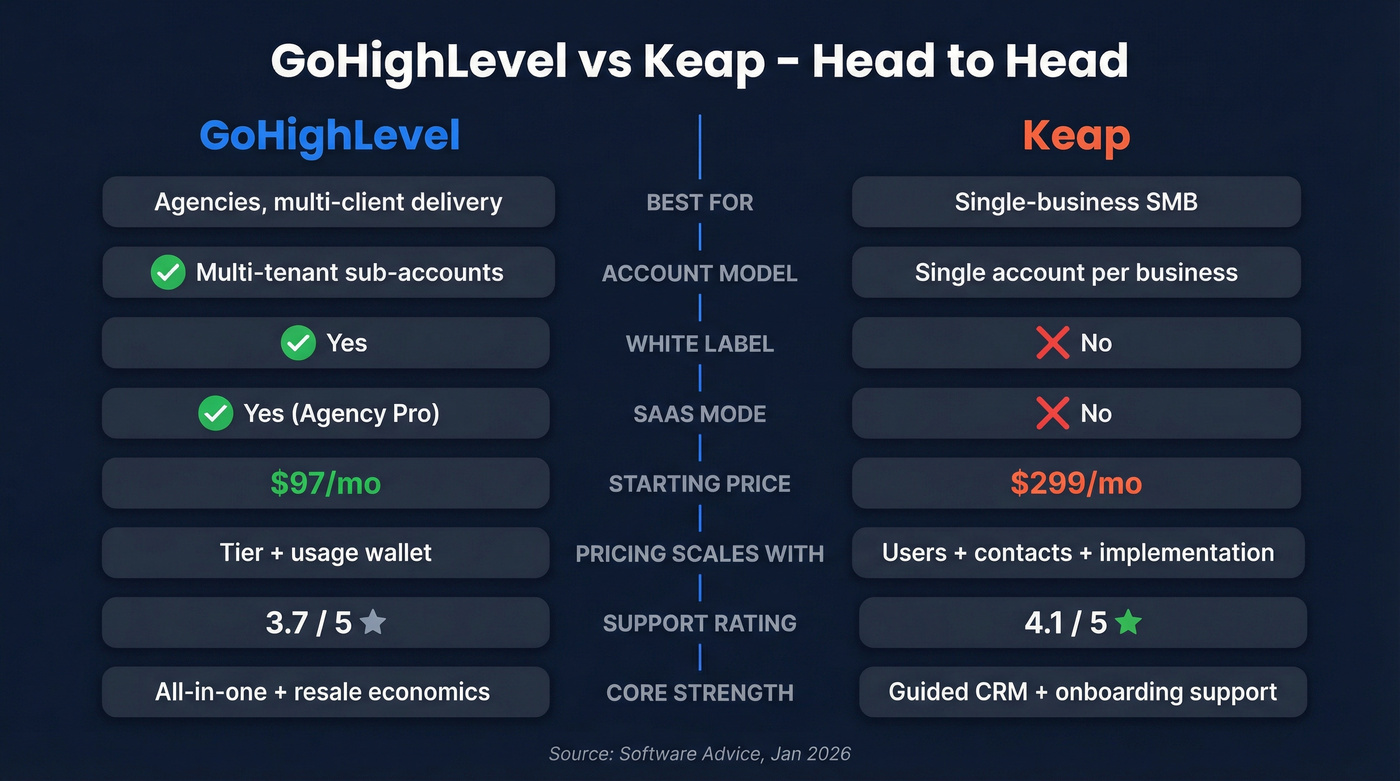
| Category | GoHighLevel (HighLevel) | Keap |
|---|---|---|
| Best for | Agencies, multi-client delivery | Single-business SMB |
| Account model | Agency sub-accounts (multi-tenant) | Single account per business (typical) |
| White-label | Yes | No |
| SaaS mode | Yes (Agency Pro) | No |
| Core strength | All-in-one + resale economics | Packaged CRM + onboarding/support |
| Starting price | $97/mo | $299/mo (monthly) |
| Pricing scales with | Tier + usage wallet | Users + contacts + implementation + usage |
| Customer support rating | 3.7 (Software Advice) | 4.1 (Software Advice) |
Three things to remember
- HighLevel wins when you need sub-accounts, templating, and resale economics.
- Keap wins when you want vendor-led onboarding and stronger support.
- If you're not reselling or managing multiple client accounts, HighLevel's edge shrinks fast.
Ratings snapshot (Software Advice, Jan 2026)
Software Advice's comparison (updated Jan 15, 2026) shows them tied overall at 4.1 vs 4.1, but that tie hides the real split: HighLevel tends to win on value; Keap tends to win on support. That's the difference you'll feel week to week.
Link: https://www.softwareadvice.com/marketing/highlevel-profile/vs/infusionsoft-crm/
GoHighLevel vs Keap pricing transparency (what vendors don't tell you)
Keap pricing + required implementation services
Keap's headline pricing is simple: $299/mo billed monthly, or $2,988/year ($249/mo) on annual billing. That starting point includes 2 users and 1,500 contacts.
The catch is right on Keap's pricing page: implementation services are required.
Treat Keap like "subscription + onboarding project," not a self-serve tool you casually swipe a card for. Someone on your team still has to show up for setup calls, clean up data, and make migration decisions, but Keap's process does add guardrails that a lot of owner-led teams genuinely need.
Category verdict: Predictability winner = Keap, once you accept the onboarding project and budget for scaling tiers.
HighLevel plans + common add-ons
HighLevel's base tiers are blunt: $97 / $297 / $497. It also makes it obvious you'll have usage-based charges (email, SMS, calling, AI) funded via a wallet.
For agencies, the base plan is rarely the full story because add-ons change your unit economics:
- HIPAA compliance: $297/mo
- Listings management: $30/mo per sub-account
- Dedicated IP: $59/mo
- Premium support: $500/mo
- White label mobile app: $497/mo
If you're a single business, you might never touch most of these. But if you're a single business, you're also not buying HighLevel for its biggest advantage: multi-client delivery.
Category verdict: Subscription transparency winner = HighLevel. The tiers and add-ons are easy to see and easy to model.
How Keap scales (users + contacts) vs HighLevel (unlimited users/contacts)
This is where budgeting splits in two:
- Keap scales with users and contacts. As your list grows and you add team members, you move up packages. That's why Keap gets called "expensive" - it charges you for growth.
- HighLevel is effectively unlimited users/contacts inside the account model, so your base platform cost doesn't spike just because your database grows. Your cost grows through usage (sending) and optional add-ons.
If you're contact-heavy (big list, lots of nurture), HighLevel's model is easier to live with. If you're team-heavy and want vendor guidance, Keap's scaling can still be worth it.
Reality check on "add-ons" (Mailgun/Twilio/Yext framing)
Keap often frames alternatives as a pile of third-party add-ons. In practice:
- In HighLevel, LC Email and LC Phone live inside the platform and are priced like infrastructure (wallet-funded). You're not forced to stitch together separate vendor accounts just to send.
- Listings management is optional at $30/mo per sub-account and only matters if you sell listings as a service. If you don't, ignore it.
Look, if your average deal size is a few thousand dollars and you're not reselling software, you don't need "all-in-one" anything. You need one pipeline, clean data, and two automations that actually fire.

HighLevel or Keap, neither CRM fixes bad data. Bounces, stale numbers, and junk records break every automation you build. Prospeo's 7-day refresh cycle and 98% email accuracy mean your workflows fire on real contacts - not dead ends.
Clean data in, pipeline out. Start with 100 free credits.
12-month total cost of ownership (TCO) - 3 real scenarios
"Cheaper per month" is a rookie metric. Compare 12-month TCO: subscription + onboarding + usage fees + the ops time you burn keeping it running, because the hours you spend debugging a broken workflow at 9:30pm are still a cost even if nobody invoices you for them.

Scenario A - SMB owner (2 users, ~1,500 contacts)
| Cost line | HighLevel | Keap |
|---|---|---|
| Base plan | $97/mo | $299/mo |
| 12-mo subscription | $1,164 | $3,588 |
| Implementation | $0 | $500-$2,000+ |
| Usage (light) | $20-$80/mo | $20-$80/mo |
| 12-mo TCO range | ~$1.4k-$2.1k | ~$4.3k-$6.6k |
What this means: For a small owner-operator, HighLevel's the cost winner by a mile. Keap can still be the better choice if you value guided onboarding more than saving ~$3k-$5k in year one.
Scenario B - Agency (10 client sub-accounts)
| Cost line | HighLevel | Keap |
|---|---|---|
| Plan fit | $297 or $497 | 10 separate accounts (realistic) |
| 12-mo subscription | $3,564-$5,964 | $35,880/yr (10 x $299 x 12) |
| Implementation | Internal build | $5,000-$20,000+ (10 onboardings) |
| 12-mo TCO reality | Best fit | Uneconomic fast |
Worked example (the part agencies feel immediately): Try to run 10 clients on Keap cleanly and you'll end up with 10 Keap accounts. That's $2,990/mo before implementation. Even if you negotiate, the model fights you: separate logins, separate assets, separate billing, separate onboarding, and a ton of duplicated work.
Category verdict: Agency economics winner = HighLevel. It's not close.
Scenario C - High-volume sender (email + SMS heavy)
| Cost line | HighLevel | Keap |
|---|---|---|
| Plan fit | $297+ | $299+ |
| Subscription (12 mo) | $3,564-$5,964 | $3,588+ |
| Email sending | LC Email wallet | Plan-based sending + usage rules |
| SMS | LC Phone wallet | Credits + $0.015 over |
| Deliverability ops | Higher | Lower |
What this means: If you send real volume, HighLevel often wins on raw sending economics, but only if you run deliverability like an adult: authentication, warmup, and list hygiene. If you want fewer moving parts and more guardrails, Keap's calmer operationally.
Assumptions (so you can adjust):
- Keap implementation budget: $500-$2,000+ one-time for a single business; multiply for multi-account agency setups.
- HighLevel usage costs are wallet-funded (next section).
- Admin time is real. If you pay $75-$150/hr for ops help, DIY setup has a price tag.

Usage-based costs: SMS, email, and phone minutes
Keap SMS credits + $0.015 overage (plus SMS gotchas)
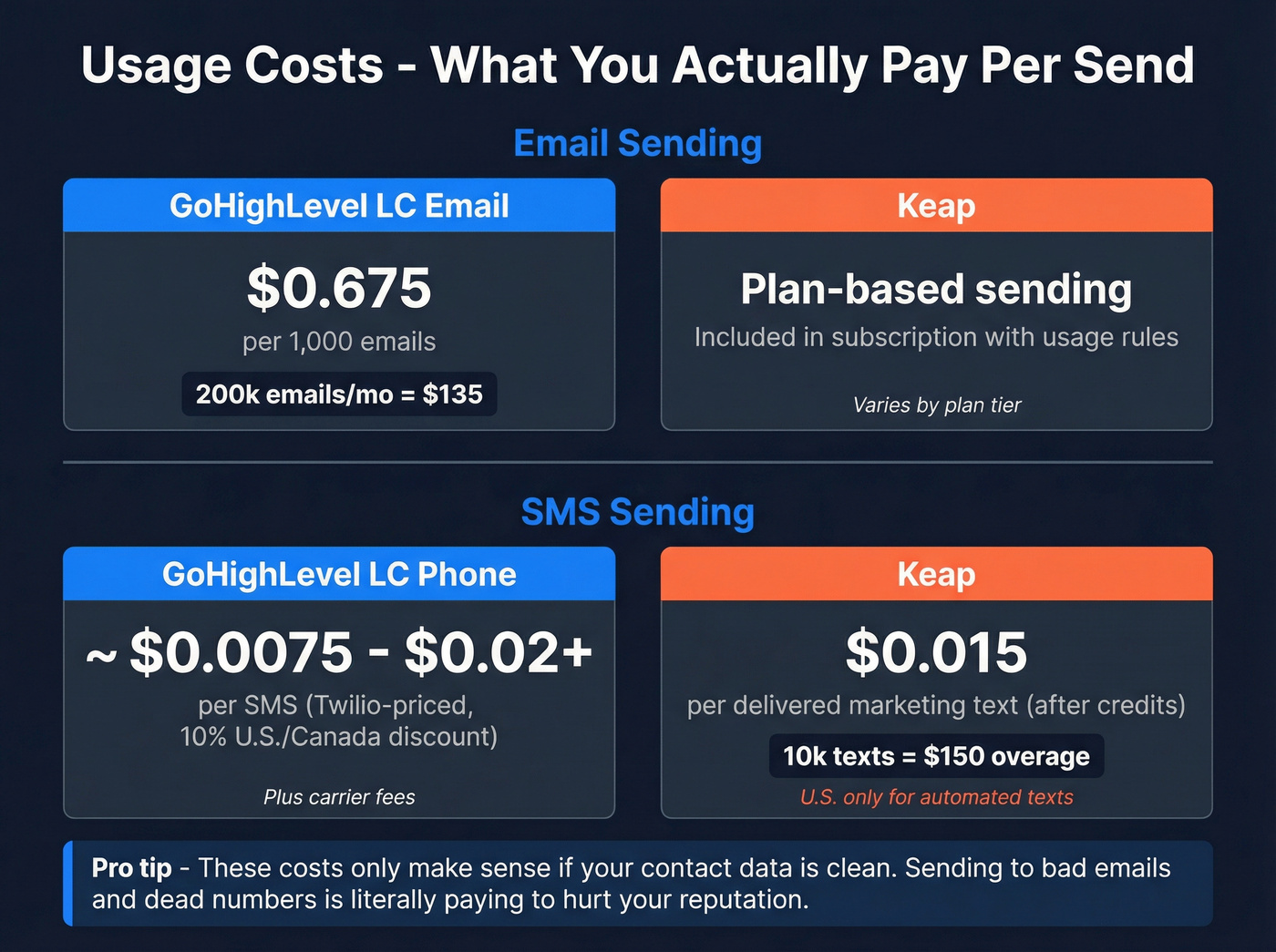
Keap includes monthly text marketing credits. After you use them, additional marketing texts cost $0.015 per delivered marketing text.
Mini math:
- 10,000 delivered marketing texts after credits
- 10,000 x $0.015 = $150 overage
Keap SMS gotchas (these matter):
- Automated texts + broadcasts via a Marketing Number are U.S.-only.
- 1:1 texts via Business Line are U.S. & Canada only.
- Some Keap plans include texting as a 3-month trial, then you need a package or an upgrade to keep it.
Category verdict: Predictability winner = Keap (easy to model), coverage winner = neither if you operate outside the U.S./Canada.
HighLevel wallet + LC Email + verification + LC Phone (Twilio-priced)
HighLevel runs on an Agency Wallet that auto-recharges. Finance teams hate the "prepaid utility" feel; operators love how fast it is.
Email pricing is clean:
- LC Email: $0.675 per 1,000 emails
- Email verification: $2.50 per 1,000 validations
Mini math:
- Send 200,000 emails/month: 200 x $0.675 = $135
- Verify 50,000 emails/month: 50 x $2.50 = $125
- Total: $260/month (plus subscription)
For phone/SMS, LC Phone is priced the same as Twilio with a 10% discount in the U.S./Canada. In practice, that lands around ~$0.0075-$0.02+ per SMS plus carrier fees depending on route and message type.
Category verdict: Unit-cost winner = HighLevel for high volume - if your list's clean. If your list's dirty, you're paying to damage your sender reputation.
Deliverability & setup burden (the hidden "ops cost")
Authentication checklist (SPF/DKIM/DMARC) + warmup
If you're sending meaningful volume, deliverability isn't a checkbox. It's a project.
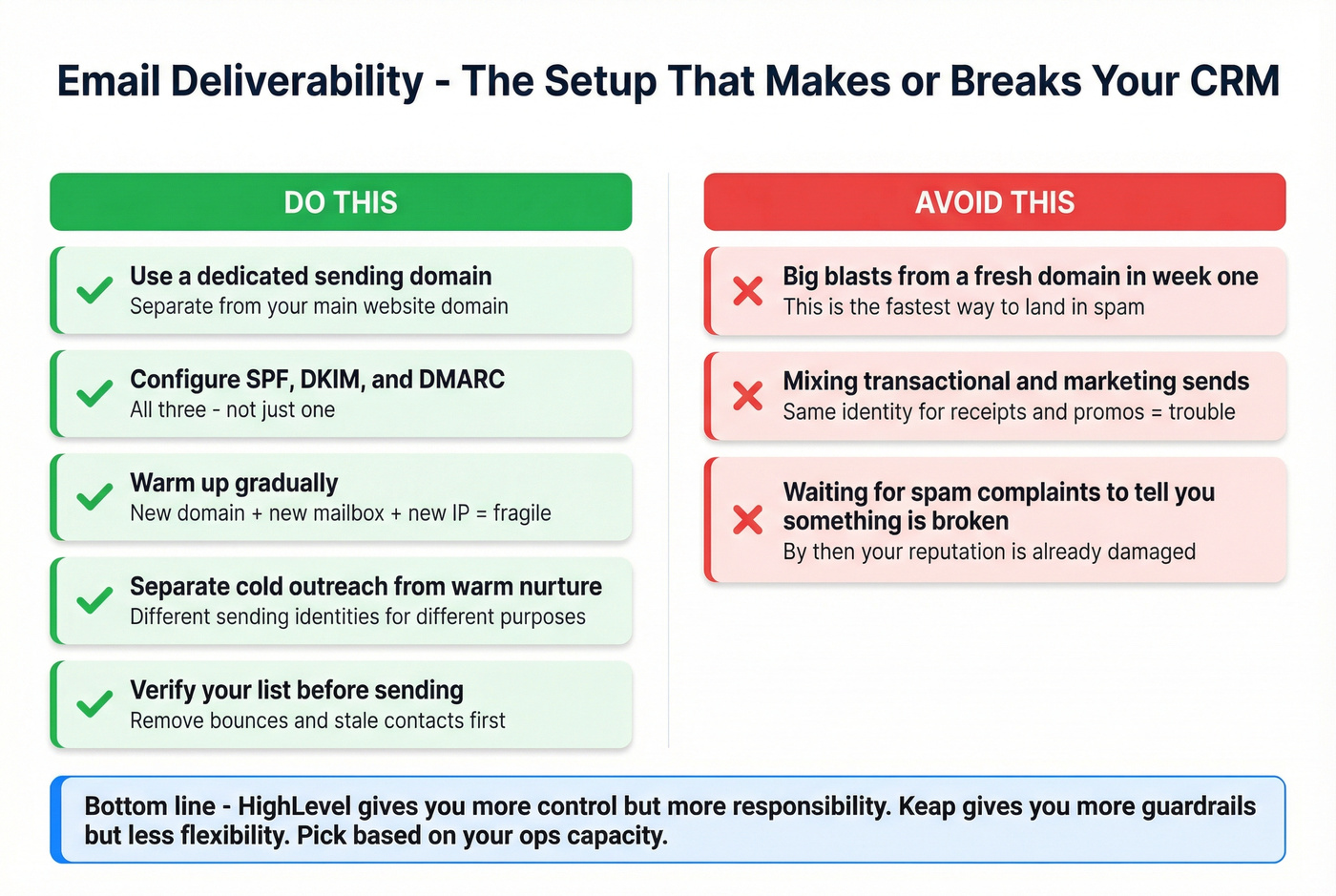
Do this
- Use a dedicated sending domain.
- Configure SPF, DKIM, and DMARC correctly (see our SPF, DKIM, and DMARC setup guide).
- Warm up gradually (new domain + new mailbox + new IP = fragile).
- Separate cold outreach from warm nurture so you don't torch reputation.
Avoid this
- Big blasts from a fresh domain in week one.
- Mixing transactional and marketing sends from the same identity.
- Waiting for spam complaints to tell you something's broken.
My blunt opinion: HighLevel implementations "fail" more from deliverability neglect than from missing features. The platform sends fine; the internet just doesn't trust sloppy senders.
Category verdict: Operational simplicity winner = Keap. Control/flexibility winner = HighLevel.
When to use a dedicated IP (200,000 emails/week) + $59/mo
HighLevel flags 200,000 emails/week as the point where a dedicated IP starts to matter more. The dedicated IP add-on is $59/mo and, per HighLevel's pricing guide, it's available on Agency Pro ($497).
That $59 isn't the cost. The cost is the discipline required to keep the IP clean (more on that in our dedicated IP vs shared IP guide).

Migration reality (Keap -> HighLevel) + effort scorecard
Keap -> HighLevel migration isn't "click a button." Contacts move; your system design gets rebuilt.
What transfers cleanly
- Contacts exported to CSV and imported with field mapping (use this import leads checklist)
- Basic tags/standard fields (with clean mapping)
- Some notes/history (often partial)
What you must rebuild (fields, workflows, pages, pipelines)
Plan to:
- Recreate custom fields manually
- Document automations/campaigns and rebuild them in workflows
- Rebuild pages/forms in HighLevel's builder
- Recreate pipelines
- Run a parallel system during transition to validate everything
I've seen teams rush this and end up with "two CRMs and no truth" for a month. The parallel run feels slow; it prevents revenue-impacting gaps.
Parallel run plan to avoid downtime
- Week 1: Export/import contacts, rebuild fields, recreate pipelines
- Week 2: Rebuild top 5 automations, recreate forms/pages, test routing
- Week 3: Run parallel, compare lead flow + attribution, train users
- Cutover: Freeze changes in Keap, final export/import deltas, go live
Effort scorecard (what transfers vs rebuild)
| Component | Transfer? | Rebuild? | Est. hours |
|---|---|---|---|
| Contacts | Yes | Some cleanup | 3-8 |
| Custom fields | No | Yes | 2-10 |
| Automations | No | Yes | 10-40 |
| Pages/forms | No | Yes | 6-25 |
| Pipelines | No | Yes | 2-8 |
| Reporting | Partial | Usually | 4-16 |
| Training | N/A | Yes | 4-20 |
Category verdict: Migration winner = neither. If you're switching, budget a real project and protect your lead flow.
What users complain about (and what that means for your team)
Keap: "too expensive" sentiment (56% on Capterra)
Keap's most consistent complaint is price. Capterra's sentiment analysis shows 56% of reviewers say Keap's too expensive.
Link: https://www.capterra.com/p/132440/Keap/reviews/
Operationally, that creates three predictable problems:
- Teams feel pressure to "use everything" to justify cost.
- Adding users/contacts becomes a recurring budget fight.
- Contact hygiene gets ignored, then you pay for dead records (fix it with this keep CRM data clean framework).
My recommendation: pick 5-10 revenue-critical workflows, ship those first, and delete junk contacts aggressively.
HighLevel: learning curve + support complaints (G2 themes)
HighLevel's common complaints on G2 include steep learning curve (131 mentions) and poor support (51 mentions).
Link: https://www.g2.com/products/gohighlevel/reviews
Software Advice reflects the same pattern in customer support scoring: Keap 4.1 vs HighLevel 3.7.
Operationally:
- You'll want a real internal admin (someone who likes systems).
- If you resell it, you'll become the first line of support for clients.
Here's a scenario I've watched play out: an agency signs client #2, copies a half-finished setup from client #1, forgets to update one webhook and one calendar routing rule, and then spends two weeks arguing about "lead quality" when the leads were fine - they were just going to the wrong place.
My recommendation: invest in templates (snapshots, pipelines, forms) before you onboard client #2. That's how you stop rebuilding the same setup 20 times.
Final decision framework (choose this if...) + "skip both" option
If you're an agency / want white-label + sub-accounts
Pick HighLevel if your business model depends on multi-client delivery and you want to standardize your stack.
Decision cues:
- You need sub-accounts and templating more than vendor-led onboarding.
- You're willing to own deliverability, wallet billing, and client training.
- You want SaaS-mode economics (especially on $497).
Winner call: HighLevel wins for agencies.
If you're a single business optimizing one pipeline
Pick Keap if you want guided implementation and you're willing to pay for it.
Decision cues:
- You want stronger support (4.1 vs 3.7 on Software Advice).
- You don't need white-label or sub-accounts.
- You'd rather pay more than become your own systems integrator.
Winner call: Keap wins for single-business teams that value onboarding and support.
If you need clean lead data to make either CRM work
If your emails bounce and your numbers don't connect, both CRMs will feel "broken" no matter which one you pick.
In our experience, fixing data quality upstream is the fastest way to make automations behave and keep deliverability stable. Prospeo is the B2B data platform built for accuracy: 300M+ professional profiles, 143M+ verified emails with 98% accuracy, and 125M+ verified mobile numbers, refreshed on a 7-day cycle (industry average: 6 weeks). You can pull a tight list from the B2B leads database, verify before you send with the email finder, then import clean records into Keap or HighLevel.
Skip this if you're only running inbound and your list is already pristine.

You just spent 20 minutes comparing CRM pricing. Now ask: what's the cost of automations firing on bad emails? Prospeo delivers 143M+ verified emails at $0.01 each - 90% cheaper than ZoomInfo - so every sequence you build actually reaches a real person.
Fix the inputs before you optimize the system.
Trial plan (7 days / 30 days) to pick the winner without guessing
7-day plan (prove fit fast)
- Pick one pipeline (one offer, one lead source).
- Import 200 contacts and map fields cleanly.
- Build 2 automations: (1) new lead follow-up, (2) no-show/reactivation.
- Send 1,000 emails and 200 SMS (where supported).
- Track: bounces, reply rate, booked calls, and how many admin hours it took.
30-day plan (validate real operations)
- Migrate your core forms/landing pages and your top 5 workflows.
- Implement SPF/DKIM/DMARC + warmup and set a weekly email verification list hygiene routine.
- Rebuild reporting for one KPI: lead -> booked -> showed -> closed.
- Run a parallel period for at least one full sales cycle, then cut over.
FAQ
Is Keap's implementation required, and how much does it cost?
Yes. Keap lists required implementation services on its plans, so budget $500-$2,000+ one-time for a typical small-business setup. If you're migrating a messy database or rebuilding lots of automations, expect it to land above that range.
Is GoHighLevel actually cheaper than Keap over 12 months?
For most small teams, yes: HighLevel starts at $97/mo while Keap starts at $299/mo, and Keap adds paid implementation. HighLevel can increase with sending volume and optional add-ons, but year-one TCO is usually still lower for straightforward setups.
How do SMS and email usage fees compare (Keap vs HighLevel)?
Keap charges $0.015 per delivered marketing text after monthly credits and limits some texting features to the U.S./Canada. HighLevel uses a wallet with $0.675 per 1,000 emails, $2.50 per 1,000 verifications, and SMS priced like Twilio (with a 10% discount in the U.S./Canada).
How hard is it to migrate from Keap to HighLevel?
Contacts transfer via CSV, but most of the system has to be rebuilt: custom fields, workflows, forms/pages, pipelines, and reporting. Plan 20-100 hours depending on complexity. A 2-3 week parallel run is the safest way to avoid broken lead routing and attribution.
Summary: the real answer to gohighlevel vs keap
If your model is multi-client delivery (sub-accounts, templates, resale), HighLevel's the better fit, even if it comes with more admin and deliverability responsibility. If you're one business that wants guided onboarding and stronger support, Keap's usually the calmer choice.
Either way, clean inputs matter. Verified emails and valid mobile numbers will do more for results than another "automation feature" ever will.