

How to Find a Company Email Address: Free Methods, Paid Tools, and What Works
Seventy-seven percent of B2B buyers prefer email as their first point of contact. Yet a lot of sales teams burn through prospect lists with a 10%+ bounce rate because they skip the basics: finding the right address, verifying it properly, and understanding why "verified" doesn't always mean "deliverable." If you’re tightening your outbound process, align this with broader B2B sales best practices.
Here's the thing - we've watched teams nuke their domain reputation in a single afternoon by sending to unverified lists. The cost isn't the subscription fee. It's the weeks you spend rebuilding deliverability after inbox providers flag you. If you’re scaling volume, follow a deliverability-first approach like this guide on how to scale outbound campaigns.
Need one email right now? Use the Google search operator templates below - they're copy-paste ready. Need emails in bulk? Jump to the tool comparison table. Already have emails but aren't sure they're valid? Read the verification section. Catch-all domains are the silent killer of cold email campaigns - especially in high-volume outbound email campaign workflows.
Free Methods That Actually Work
Stop paying for email finder tools before you've exhausted free methods. Most guides lead with paid tools because they're affiliate-driven. If you want to find a business email address without spending a dime, start here. For more options, see our roundup of how to find email addresses for free.
Google Search Operators
These are the most underrated free tactics for locating company contacts. Swap in your target company's domain and run them in Google.
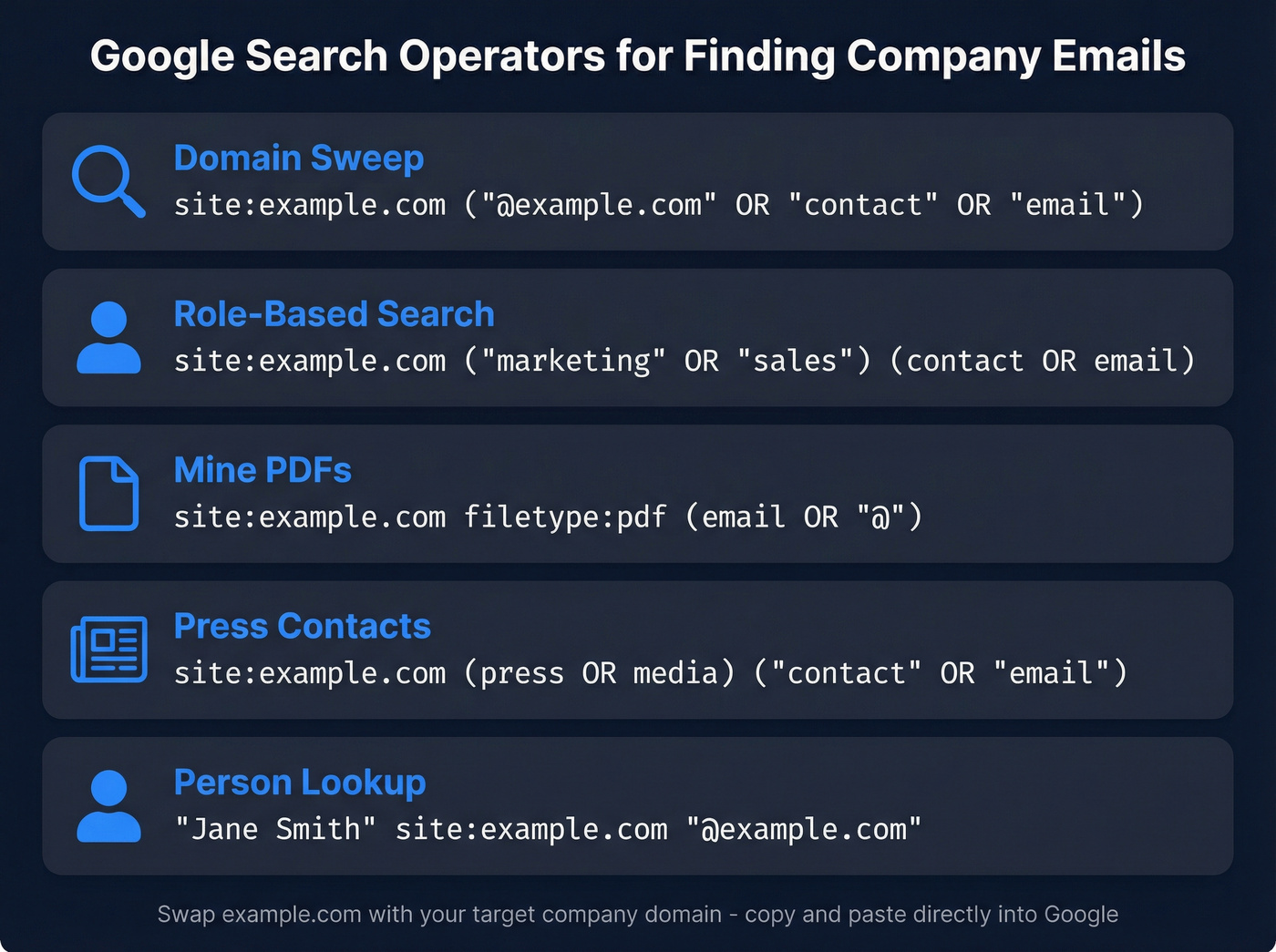
Company domain sweep:
site:example.com ("@example.com" OR "contact" OR "team" OR "email")
Role-based search:
site:example.com ("marketing" OR "PR" OR "sales") (contact OR email OR "@")
Mine PDFs and documents:
site:example.com filetype:pdf (email OR "@")
Press and media contacts:
site:example.com (press OR "media") ("contact" OR "email")
Known person lookup:
"Jane Smith" site:example.com "@example.com"
These work because companies leak email addresses across their sites - in PDFs, press releases, team pages, and blog author bios. The PDF mining query is especially effective for larger companies that publish whitepapers with author contact info embedded.
You'll often find role-based addresses like info@ or sales@. Those are fine for general inquiries but useless for cold outreach to decision-makers. You want personal addresses - then pair them with strong outreach email templates to actually get replies.
Check the Company Website First
Before you get clever with operators, check the obvious places. About/team pages, footer contact sections, and blog author bios often list direct emails. Startups are particularly generous - many list their entire team's contact info publicly.
Guess the Email Format
If you know someone's name and company domain, you can often guess the format. Smaller companies tend to use firstname@domain.com. Mid-size and enterprise companies lean toward firstname.lastname@domain.com, firstinitiallastname@domain.com, or firstnamelastname@domain.com. If you want a safer workflow, use this guide to guess email address format.
To discover a company's pattern, find one confirmed email from anyone at the company - check their newsroom, press releases, or team page - and reverse-engineer the format for everyone else.
Creative Tricks Worth Trying
Newsletter sender address: Sign up for a company's newsletter, then check the "from" address in the welcome email. If it reads sarah.jones@company.com, you've just learned the naming pattern for the entire organization.
Gmail password-recovery trick: Enter a suspected email address into Gmail's account recovery flow. If the address is invalid, Google shows a "No account found with that email address" message. It won't confirm deliverability, but it's a quick sanity check.
Wayback Machine: Check archived versions of a company's website. Team pages that have since been removed often had email addresses listed - sometimes going back years.
Press releases: Search "company name" press release contact email - companies distribute press releases with media contact emails that reveal naming patterns.
Paid Tools for Finding Company Emails
Free methods hit a wall when you need 50+ emails for a campaign. Most email finder tools claim 95-99% accuracy in their marketing, but those numbers depend heavily on domain types and verification standards. Here's what you're actually choosing between. If you’re building a stack, compare options in our guide to cold email marketing tools.
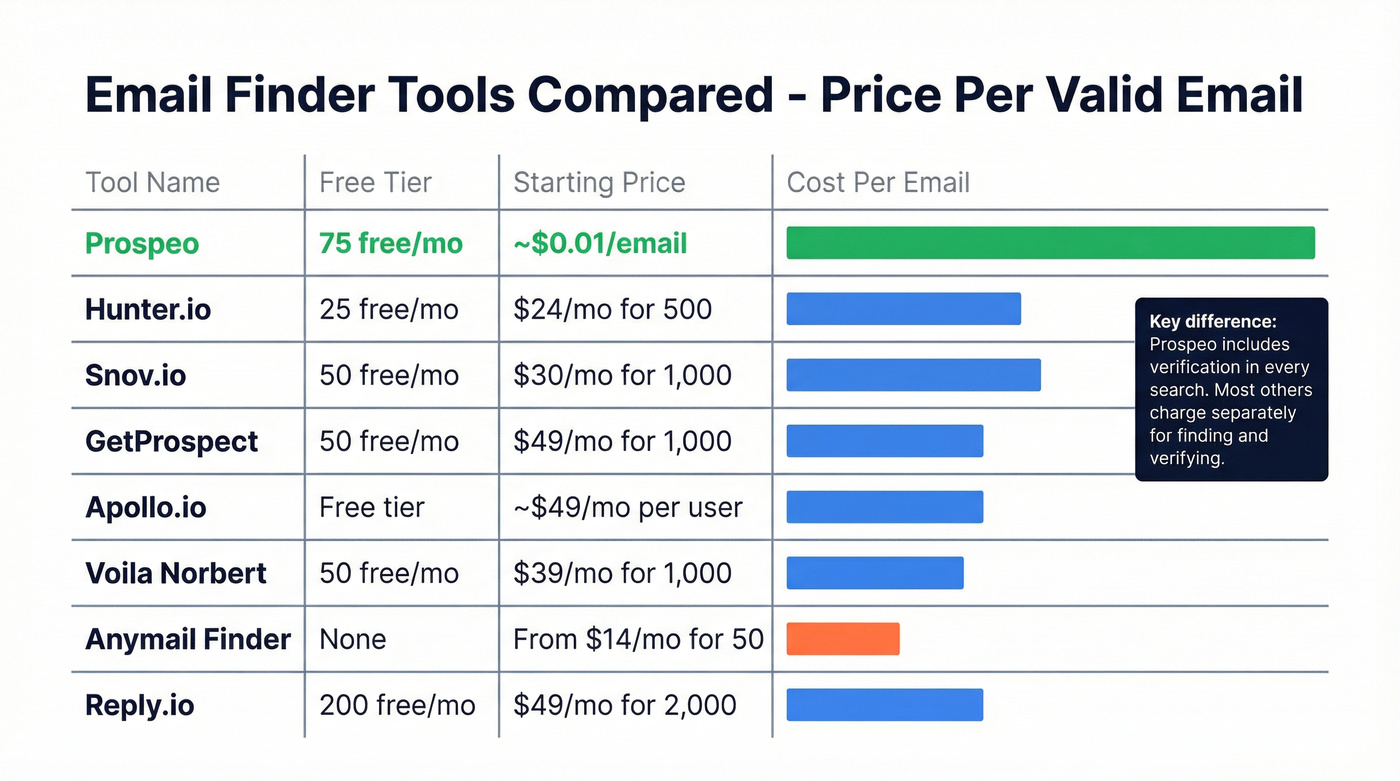
| Tool | Free Tier | Starting Price | Searches Included | Best For |
|---|---|---|---|---|
| Hunter.io | 25 searches/mo | $24/mo | 500 | Quick free lookups |
| Snov.io | 50 searches/mo | $30/mo | 1,000 | Email + drip combo |
| GetProspect | 50 searches/mo | $49/mo | 1,000 | Browser-based prospecting |
| Apollo.io | Free tier | ~$49/mo per user | Varies | All-in-one sales teams |
| Voila Norbert | 50 searches/mo | $39/mo | 1,000 | Verification included |
| Anymail Finder | None | From $14/mo | 50 | Budget-conscious teams |
| Reply.io | 200 searches/mo | $49/mo | 2,000 | Generous free tier |
Prospeo
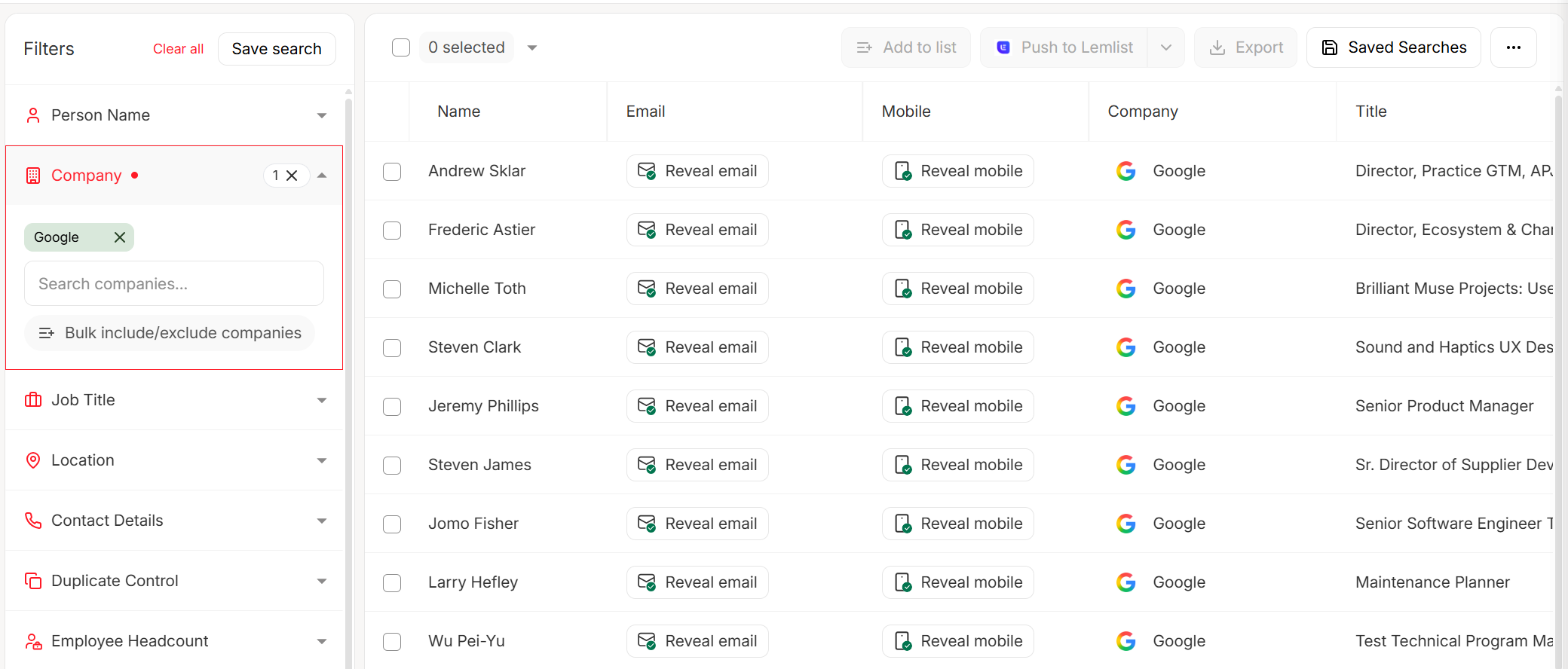
Prospeo finds and verifies in one step - you never pay for an invalid email. Paste a company domain into the search, and it returns every verified address it can find, each one run through a 5-step verification process that includes catch-all handling and spam-trap removal. That 98% email accuracy rate is why outbound agencies trust it for client campaigns where domain reputation is non-negotiable.
The free tier gives you 75 emails per month - three times what Hunter offers. Paid plans run roughly $0.01 per email on a credit-based system, making it one of the cheapest per-valid-email options available. The Chrome extension with 40,000+ users lets you pull verified contacts from any website without leaving your browser.
What sets it apart is its proprietary email-finding infrastructure. It doesn't rely on third-party email providers, so the data is fresher - refreshed on a 7-day cycle versus the 6-week industry average. For outbound teams burning through prospect lists, that freshness gap matters more than most people realize. In our experience, teams using weekly-refreshed data see noticeably fewer bounces on lists older than 30 days.

Free methods get you one email. Prospeo gets you every verified address at a company in seconds - 98% accuracy, catch-all handling included, refreshed every 7 days so you never send to a dead inbox.
Find 75 company emails free this month. No credit card required.
Hunter.io
Hunter is the tool most people think of first - and for good reason. The domain search is clean, fast, and shows you the email pattern a company uses alongside individual addresses. The free tier gives you 25 searches per month, enough for occasional lookups but dry within a day of real prospecting.

Paid plans start at $24/mo for 500 searches. That's reasonable for light use, but the cost per email climbs quickly compared to credit-based alternatives. Hunter's strength is simplicity - it does one thing well. The tradeoff: verification is a separate step and a separate credit, so you're paying twice if you want both finding and verifying.
Snov.io
Use Snov.io if you want email finding and drip campaigns in one platform. It bundles prospecting with basic email sequencing, which saves you from stitching together separate tools. The free tier offers 50 searches per month, and paid plans start at $30/mo for 1,000 searches.
Skip this if you only need email addresses. You're paying for campaign features you won't use. In our testing, Snov.io returned noticeably fewer results for companies under 50 employees where data coverage is thinner.
GetProspect
Picture this: you're browsing a company's team page and want to grab contact data without switching tabs. That's where GetProspect shines - its browser extension pulls contact data in real time while you browse. The free tier gives you 50 searches per month, and paid plans run $49/mo for 1,000 searches. Solid for individual prospecting, but bulk search capabilities aren't as refined as dedicated email finders.
Apollo.io
Apollo is a different animal entirely. It's not an email finder - it's a full sales platform with sequencing, CRM-style workflows, and a large contact database. The free tier is generous enough to test, and paid plans start around $49/mo per user.
Let's be honest: if your deals average under $10k, Apollo is probably overkill. You're paying for a sales intelligence platform when all you need is accurate emails. The email accuracy doesn't match dedicated finding tools, and the learning curve eats into the time you'd save. But for teams that genuinely need an all-in-one tool and hate stitching together five subscriptions, it's the best option in that category.
Other Notable Tools
Voila Norbert offers 50 free searches per month with verification included - $39/mo for 1,000 on paid plans. Reliable but not differentiated. Anymail Finder has no free tier and starts from $14/mo; you pay only for valid emails, and invalid/not-found results are free - a fair model for cost-conscious teams. Reply.io has the most generous free tier at 200 searches per month and $49/mo for 2,000 searches, though it's primarily a sales engagement platform that happens to include email finding.
Bad data doesn't just bounce - it tanks your domain reputation for weeks. Prospeo's 5-step verification with spam-trap and honeypot removal keeps your sender score intact at roughly $0.01 per verified email.
Stop paying twice to find and then verify. Prospeo does both in one step.
Why "Verified" Emails Still Bounce
You ran every email through a verification tool. Green checkmarks across the board. Then 8% bounced anyway.
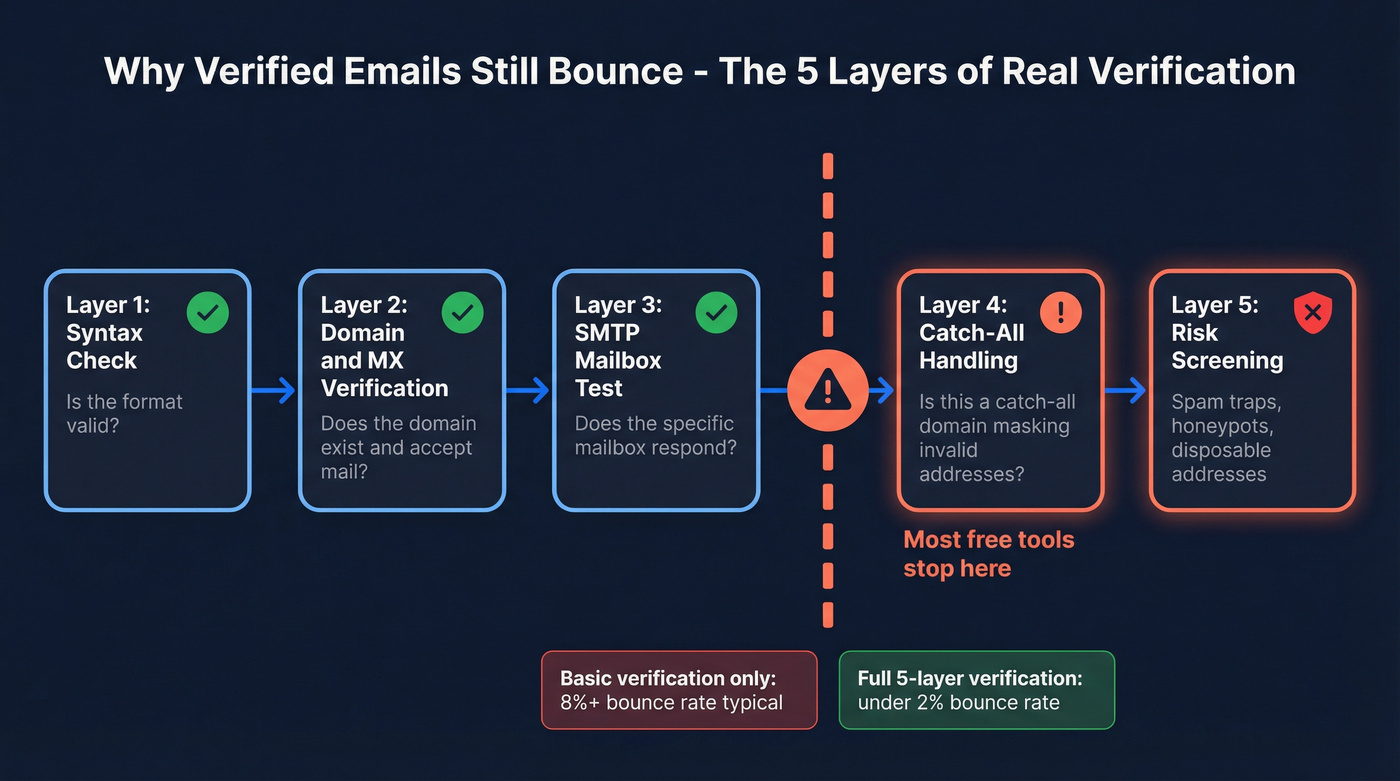
The answer is usually catch-all domains. A catch-all domain accepts mail sent to any address - even ones that don't exist. When a verification tool pings totallyFake@company.com, the server says "sure, I'll take it." The tool marks it as valid. But nobody's reading that inbox, and the email either silently disappears or eventually hard bounces.
The consensus on r/coldemail is frustration with tools that charge credits for catch-all addresses that never actually deliver. This is why basic SMTP verification isn't enough. A thorough verification process needs five layers - if you want a deeper validator breakdown, see our list of email ID validators:
- Syntax check - is the format valid?
- Domain/MX verification - does the domain exist and accept mail?
- SMTP mailbox test - does the specific mailbox respond?
- Catch-all handling - is this a catch-all domain masking invalid addresses?
- Risk screening - is this a spam trap, honeypot, or disposable address?
Many free verification tools stop at layer three and call it done. That gap between "verified" and "deliverable" is where domain reputations go to die. If you’re troubleshooting bounces, start with the basics of a hard bounce.

Keep Your Email List Clean
Even a perfectly verified list decays. Email lists lose roughly 22.5% of their contacts per year due to job changes, domain closures, and mailbox deactivations. A list you built six months ago can have 10%+ of contacts go stale. For benchmarks and mitigation, see B2B contact data decay.
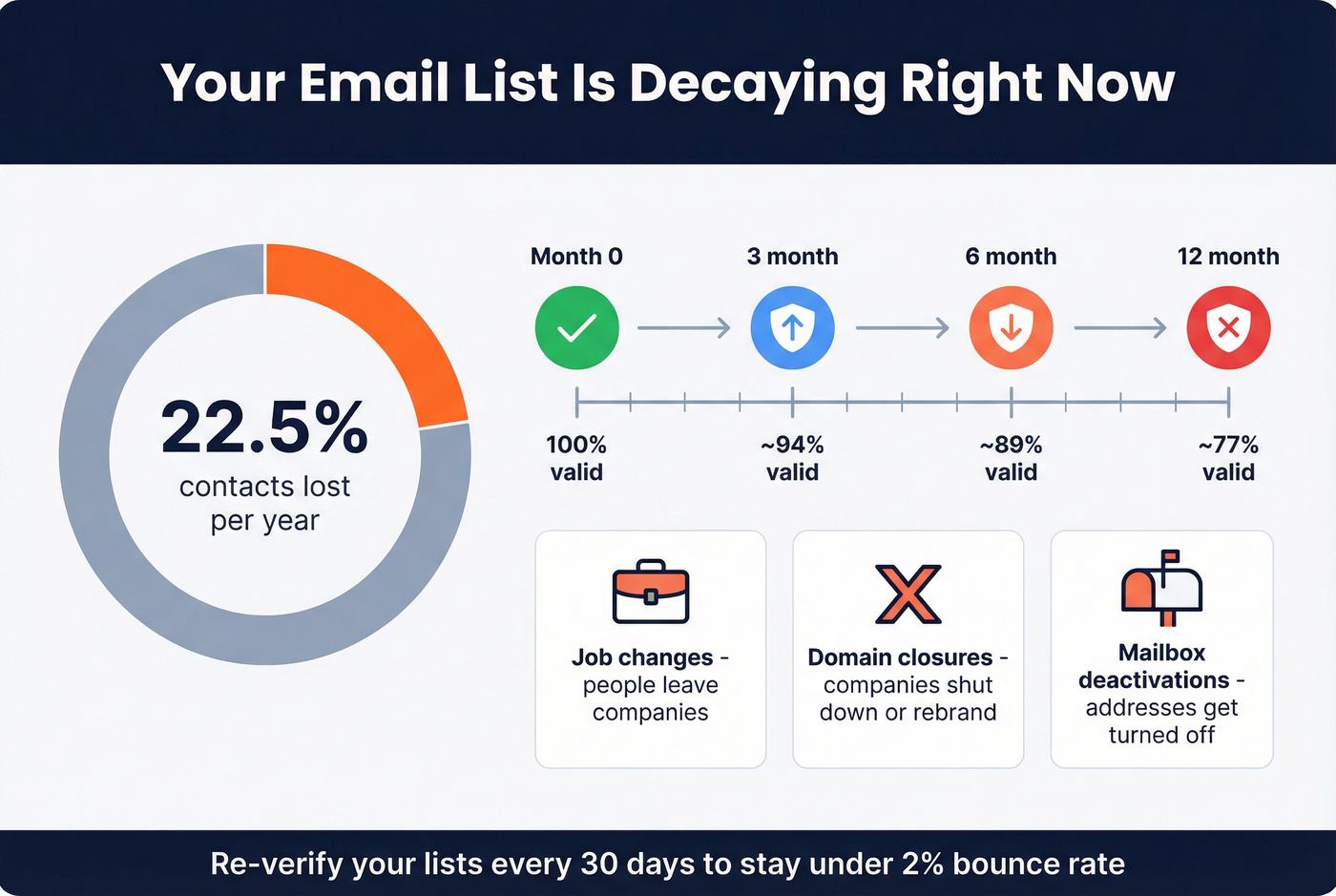
Keep your bounce rate at or below 2% - anything higher and inbox providers start throttling you. Spam complaints need to stay under 0.3%, which is Gmail's Postmaster Tools threshold. We've seen teams with 0.4% complaint rates lose primary inbox placement fast.
Re-verify your lists every 60-90 days. Non-negotiable if you're running ongoing campaigns. Email marketing averages 36:1 returns, but only with clean data. Bad lists don't just reduce ROI - they actively damage your sending infrastructure.
Legal Compliance Cheat Sheet
Finding someone's email is legal. Spamming them isn't.
| Regulation | Max Penalty | Key Requirement |
|---|---|---|
| GDPR | EUR 20M or 4% of revenue | Legitimate interest or consent |
| CAN-SPAM | $50,120 per email | Opt-out within 10 business days |
| CCPA | $7,500 per violation | Right to opt out of data sale |
Three things to do before you send a single cold email:
- Include an unsubscribe link in every message - visible and functional, not buried in size-6 font.
- Document how you collected each contact. "I found their email on their company's press page" is a valid record. "I bought a list from some guy" is not.
- Honor deletion requests promptly. GDPR gives data subjects the right to access, correct, and delete their information.
Most B2B cold email in the US falls under CAN-SPAM, which is relatively permissive as long as you identify yourself honestly and honor opt-outs. GDPR is stricter - if you're emailing prospects in the EU, you need a legitimate interest assessment documented before you hit send. For a practical outbound view, see GDPR for Sales and Marketing.
FAQ
Can I find someone's work email for free?
Yes. Google search operators, company websites, and free tiers from tools like Hunter (25/mo) and Prospeo (75/mo) let you find emails without paying. Free methods handle most individual lookups - paid tools become necessary when you need addresses in bulk for outreach campaigns.
What's the most common corporate email format?
firstname.lastname@domain.com dominates at mid-size and enterprise companies, followed by firstinitiallastname@domain.com. Smaller companies often use firstname@domain.com. Find one confirmed employee email from a press release or team page and reverse-engineer the pattern for everyone else.
How do I verify an email before sending?
Use a verification tool that checks syntax, domain, MX records, SMTP response, and catch-all status. Basic verification that stops at SMTP isn't enough - catch-all domains will fool it. A 5-step process that includes catch-all handling and spam-trap removal is the minimum standard for outbound campaigns.
Is it legal to cold email someone I found online?
In most jurisdictions, yes - include an unsubscribe link, identify yourself honestly, and honor opt-outs within 10 business days. GDPR requires documented legitimate interest for EU contacts. CAN-SPAM is more permissive for US-based outreach but still carries penalties up to $50,120 per violation.
How often should I re-verify my email list?
Every 60-90 days. Lists decay roughly 22.5% per year from job changes and domain closures. A list verified in January can have 5%+ invalid addresses by April - enough to push your bounce rate past the 2% threshold that triggers deliverability problems.