

Legitimate Email Checker: 8 Tools Tested in 2026
Fifteen percent of emails collected through signup forms contain typos - and that's before you factor in role addresses, catch-all domains, and addresses that were valid six months ago but aren't anymore. So when you're looking for a legitimate email checker, you're really asking two questions: will this tool actually work, and can I trust it with my data?
The verification market is crowded with fly-by-night apps that store your lists, resell your contacts, or run a syntax check and call it "verified." You need to vet tools against transparent practices and real track records, not flashy landing pages.
Three Top Picks
| Pick | Why | Price |
|---|---|---|
| Prospeo | Pre-verified emails - skip verification entirely | ~$0.01/email (finding + verification combined) |
| Clearout | Best accuracy-to-price ratio for cleaning existing lists | $40/10k |
| ZeroBounce | Most-reviewed, 49 integrations, battle-tested | $80/10k |
Prospeo flips the model. Instead of finding emails and then verifying them separately, you search a database of 143M+ verified emails backed by a 5-step verification process - and Prospeo runs real-time verification when you find contact data. Clearout wins on pure cost efficiency. ZeroBounce wins on ecosystem maturity with 515 G2 reviews and deep integration support.
Here's the thing: most teams don't need a standalone email bounce checker at all. If you're building prospect lists from scratch, the cheapest verification is starting with clean data. The $40-80 you'd spend cleaning 10,000 emails disappears when those emails arrive pre-verified.

What Makes an Email Checker Legitimate?
The word "legitimate" does heavy lifting here. It's not just about accuracy - it's about whether you can trust the tool with your prospect data. A verification service should prove its own legitimacy first.
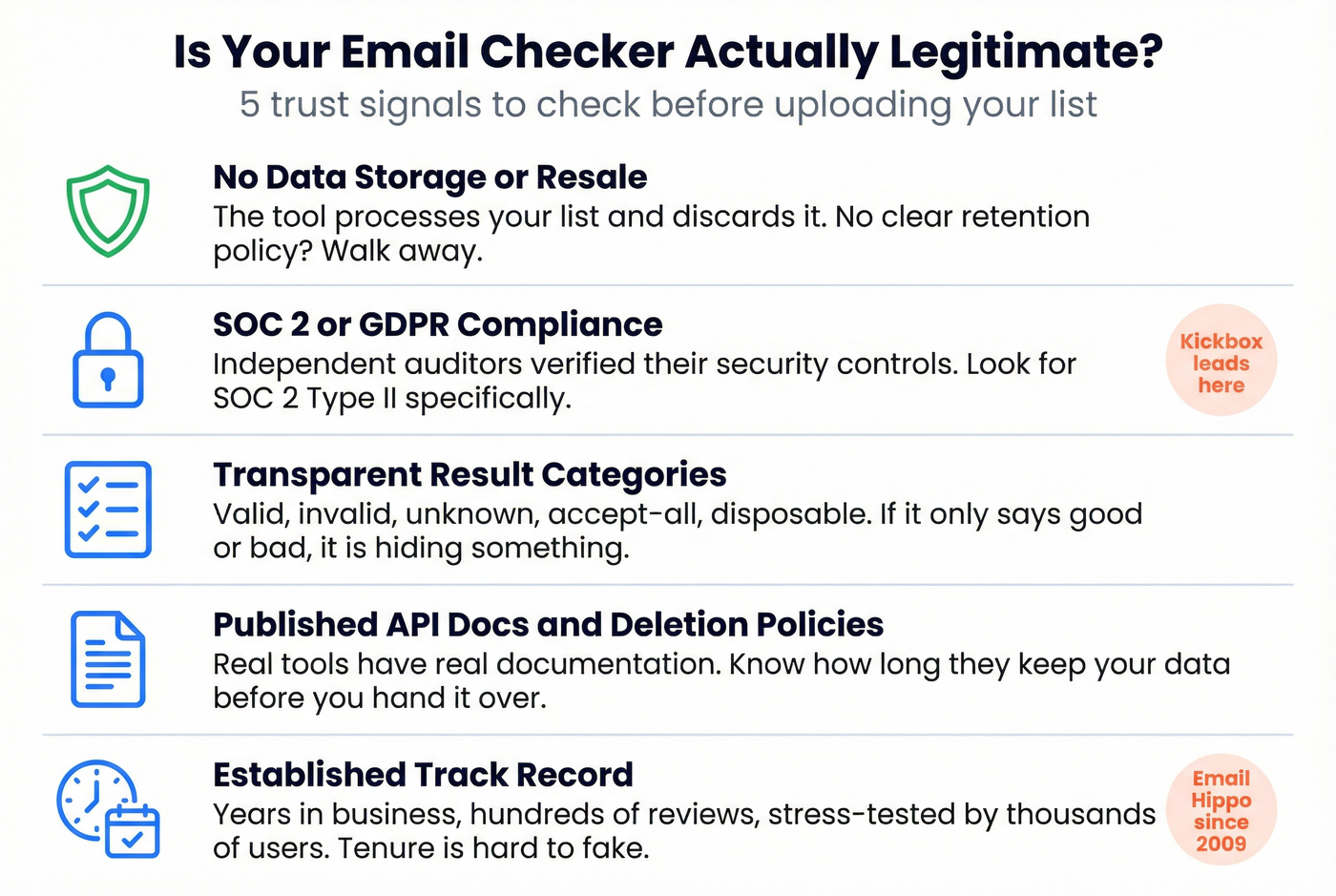
No data storage or resale. The tool should process your list and discard it. If there's no clear data retention policy on their site, walk away. Some free tools monetize by harvesting the very lists you upload.
SOC 2 or GDPR compliance. SOC 2 Type II means an independent auditor verified their security controls. GDPR compliance means they can't retain EU personal data without a lawful basis. Kickbox is the standout - SOC 2 Type II, GDPR, CCPA, and HIPAA ready with a zero data retention policy. If you're building a compliance-first outbound motion, start with a GDPR for Sales and Marketing baseline.
Transparent result categories. A trustworthy email address validator tells you exactly what it found: valid, invalid, unknown, accept-all, disposable. If a tool only returns "good" or "bad," it's hiding something - probably a high unknown rate.
Published API documentation and clear deletion policies. Real tools have real docs. You should know exactly how long they keep your uploaded lists before you hand them over.
Established track record. Email Hippo has operated since 2009. ZeroBounce has 515 G2 reviews. NeverBounce has survived multiple independent benchmarks. Tenure and review volume are hard to fake. Threads on r/sales and r/emailmarketing consistently flag unknown vendors as the biggest data-privacy risk - stick with names that have been stress-tested by thousands of users.
How Email Verification Works
The Verification Pipeline
Every reputable verification tool runs the same basic sequence. The difference is how well they handle edge cases.
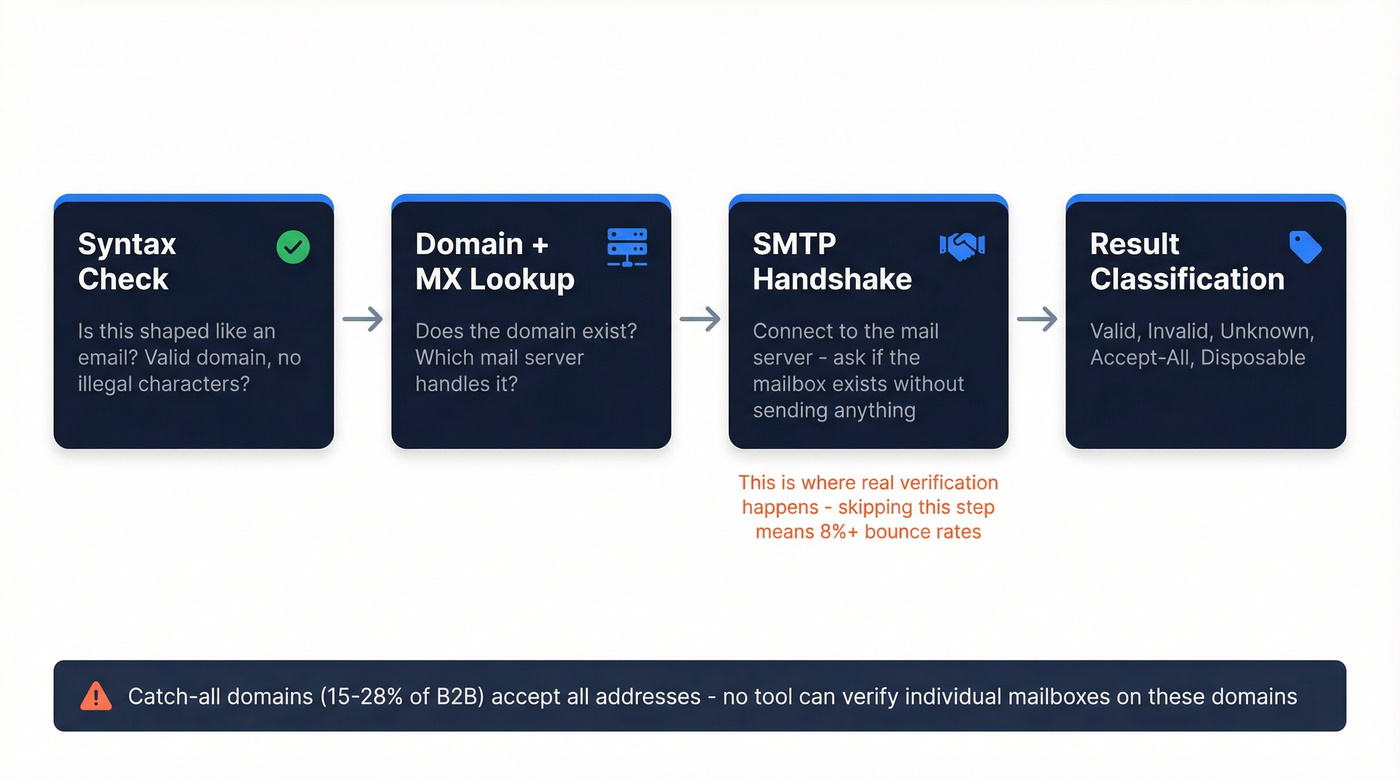
Syntax check. Is this shaped like an email? Valid domain extension, no illegal characters? This catches obvious garbage and many typos.
Domain and MX lookup. Does the domain exist, and which mail server handles its email? You can check this yourself with nslookup -type=MX example.com. No MX record means nobody's receiving email there. Think of it as an infrastructure-level check - if the domain can't receive mail, nothing else matters.
SMTP handshake. This is where the real verification happens. The tool connects to the mail server and asks "would you accept a message for john@example.com?" without actually sending anything. The server's response reveals whether the mailbox exists. We've seen teams skip this step and just run syntax + MX checks, then wonder why they're still bouncing at 8%. The SMTP handshake separates a real verification tool from a glorified regex check.
If you want the deeper version of this workflow (including how modern tools use models to reduce unknowns), see our guide to AI email verification.
The Catch-All Problem
Here's where every verification tool hits a wall. Between 15-28% of B2B domains are catch-all, meaning the mail server accepts messages for any address - real or fake. No verification tool can confirm whether an individual mailbox exists on a catch-all domain.
Any tool claiming 100% accuracy on catch-alls is lying to you. The honest ones label these results as "accept-all" or "risky" and let you decide.
Dropcontact's research found that 98% of email data solutions pull from the same underlying sources. The tools that stand apart use proprietary infrastructure rather than repackaging shared databases.

Why run emails through a separate checker when you can start with clean data? Prospeo's 5-step verification - including catch-all handling, spam-trap removal, and honeypot filtering - runs before you ever export a contact. 143M+ emails, 98% accuracy, ~$0.01 each.
Skip the verification step entirely. Start with emails that are already clean.
Accuracy Benchmarks: What Tests Found
Two independent benchmarks tested overlapping tools and got wildly different numbers. That's not a bug - it's the most important thing to understand about email list hygiene.
LGM Test (47,000 Emails, 12 Tools)
LaGrowthMachine tested 12 verification services over 90 days, measuring accuracy against actual bounce data.
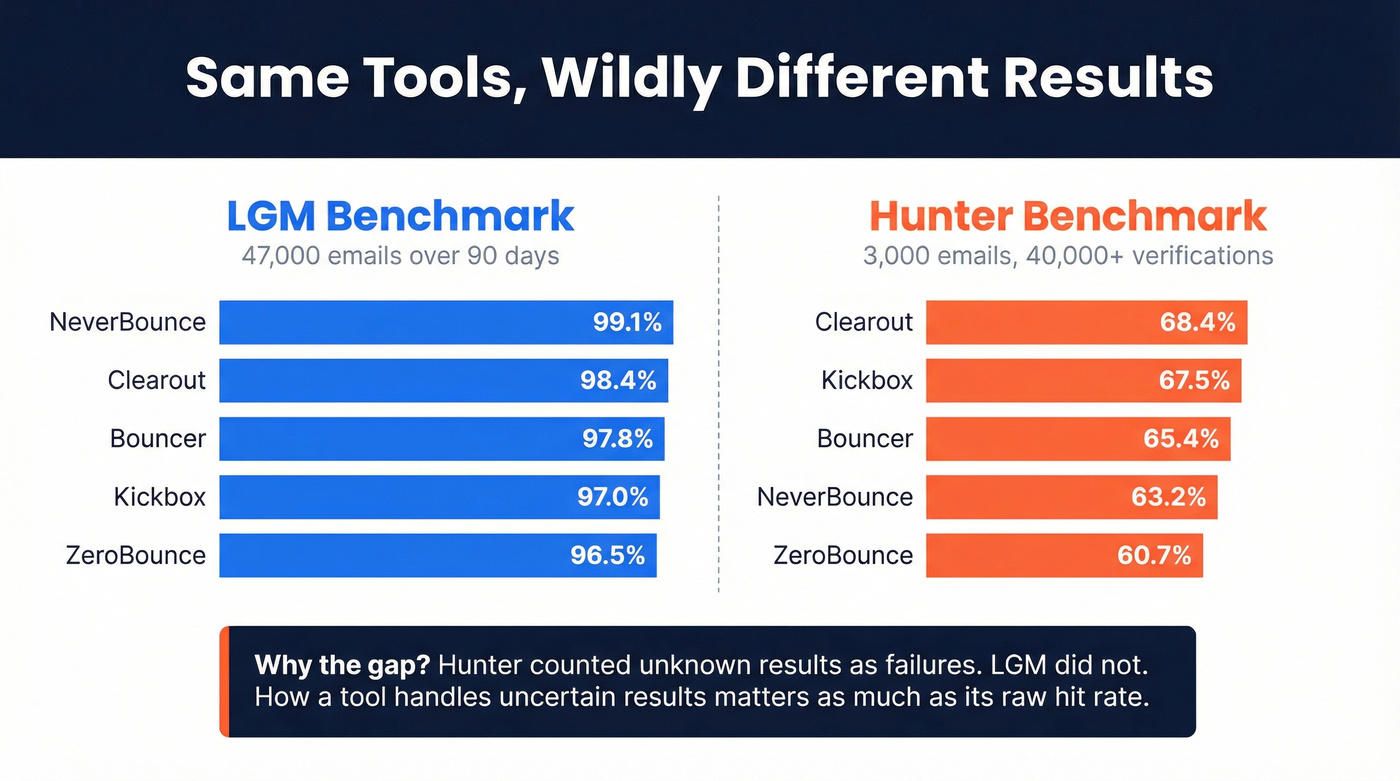
| Tool | Accuracy | Price/10k |
|---|---|---|
| NeverBounce | 99.1% | $80 |
| Clearout | 98.4% | $40 |
| Bouncer | 97.8% | $49 |
| Emailable | 97.2% | $69 |
| Kickbox | 97.0% | $70 |
| ZeroBounce | 96.5% | $80 |
Now look at the same tools through a different lens.
Hunter Test (3,000 Emails, 15 Verifiers)
Hunter benchmarked 15 verifiers using 2,700 real addresses plus 300 known-invalid ones, running 40,000+ total verifications.
| Tool | Accuracy |
|---|---|
| Hunter | 70.0% |
| Clearout | 68.4% |
| Kickbox | 67.5% |
| Bouncer | 65.4% |
| NeverBounce | 63.2% |
| ZeroBounce | 60.7% |
Same tools, dramatically lower scores. Hunter counted "unknown" results as failures; LGM didn't. Hunter also disclosed their dataset drew from email activity patterns on their own platform.
Both methodologies are defensible. But the gap tells you something critical: how a tool handles unknowns and accept-all addresses matters as much as its raw hit rate. When evaluating any email verification service, ask how it categorizes uncertain results. That's where the real accuracy story lives.
Best Email Checkers Compared
| Tool | Accuracy | Price/10k | Best For |
|---|---|---|---|
| Prospeo | 98% | ~$100 (finder + verifier) | Pre-verified prospecting |
| Clearout | 98.4% | $40 | Budget list cleaning |
| ZeroBounce | 96.5% | $80 | Integration-heavy stacks |
| Bouncer | 97.8% | $49 | Small teams |
| NeverBounce | 99.1% | $80 | Maximum accuracy |
| Kickbox | 97.0% | $70 | Compliance-first orgs |
| IPQS | - | ~$50-100 (API-based) | Fraud detection |
| Email Hippo | - | ~$50-80 | Quick spot checks |
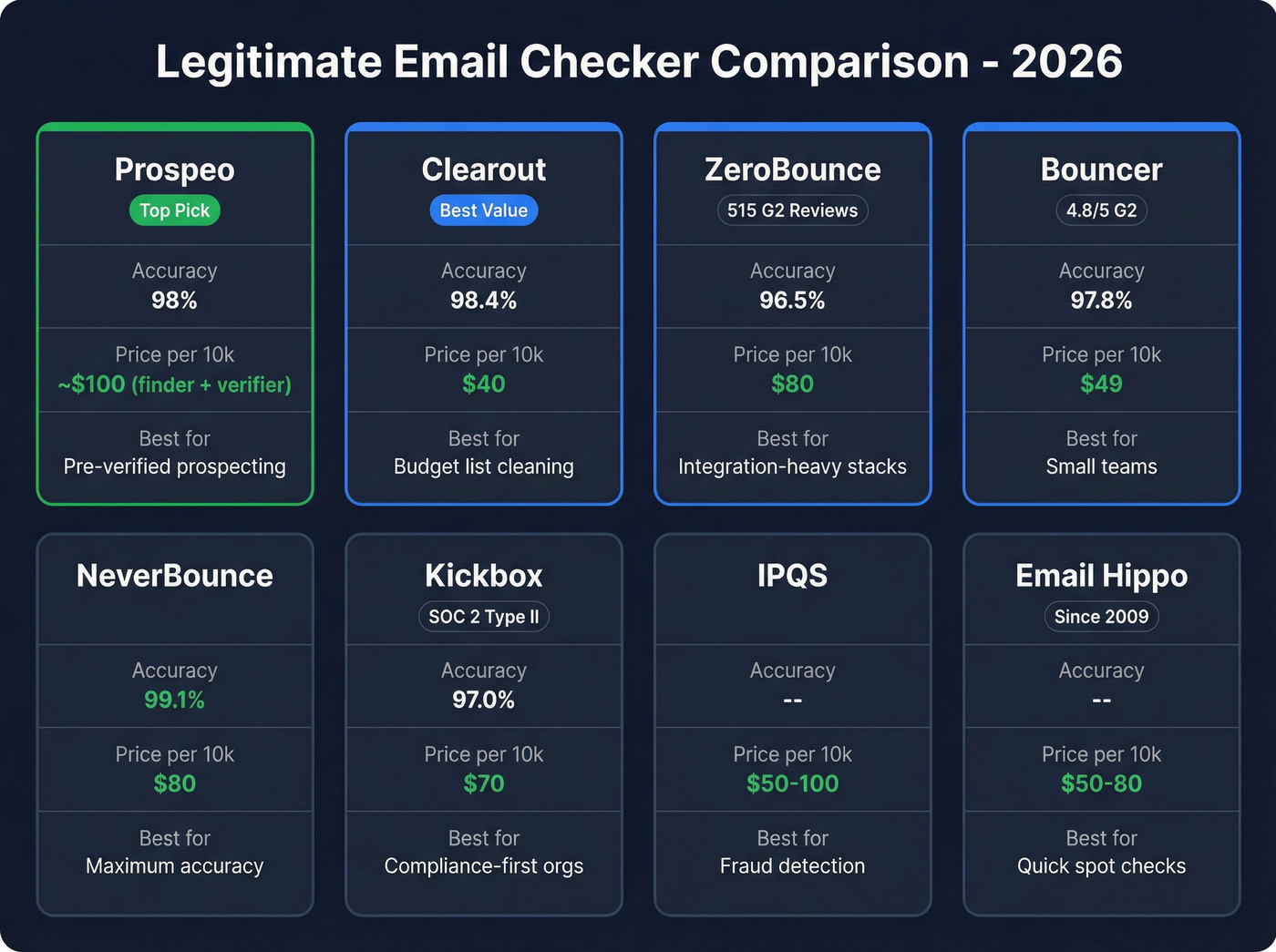
A note on Prospeo's pricing: $0.01 per email covers both finding and verification in one step. With other stacks, you pay for a finder plus a separate verifier, which easily totals $120+ per 10,000. The combined cost is actually lower.
Clearout - Best Accuracy Per Dollar
At 98.4% accuracy and $40 per 10,000 emails, Clearout delivers the best cost-efficiency ratio in independent testing. Their starter plan runs $21/month for 3,000 credits - accessible for smaller teams running monthly hygiene cycles. G2 reviewers (4.7/5 across 307 reviews) consistently praise the bulk upload experience and API reliability. The tool handles both one-off list cleaning and real-time API verification for signup flows.
The tradeoff: Clearout's integration library is thinner than ZeroBounce's 49-tool ecosystem. If you're running a complex martech stack, check compatibility first.
ZeroBounce - Most Battle-Tested
ZeroBounce carries 515 G2 reviews at 4.7/5 and 458 Capterra reviews at the same rating. That volume means the tool has been stress-tested across thousands of use cases, and their 49 native integrations cover most CRMs, ESPs, and marketing platforms. Entry pricing starts at $18-20 for 2,000 emails; at scale, $80 per 10,000.
The accuracy tradeoff is real: 96.5% in independent testing puts it behind Clearout and Bouncer. You're paying a premium for ecosystem breadth and brand trust, not peak accuracy. If you're optimizing purely on cost-per-verification, Clearout delivers better accuracy at half the price.
Bouncer - Highest G2 Rating
4.8/5 on G2 with 232 reviews, 4.9 on Capterra, 97.8% accuracy, $49 per 10,000 emails. Monthly subscriptions start at $6.40/month. For small teams running lean outbound - where cold email response rates average 1-5% and every bounced email is a wasted opportunity - Bouncer's accuracy-to-price ratio hits the sweet spot. If you're building a full outbound stack, compare it against other cold email marketing tools.
NeverBounce - Maximum Accuracy
NeverBounce topped the independent benchmark at 99.1% accuracy with 94% catch-all detection. At $80 per 10,000 it's tied with ZeroBounce on price, but the accuracy edge is measurable. Processing speed clocks in at 0.5 seconds per email. If your entire deliverability strategy depends on minimizing bounces to the absolute floor, NeverBounce is the tool to beat.
Kickbox - Compliance-First
The pick for regulated industries. SOC 2 Type II certified, GDPR and CCPA compliant, HIPAA ready, with a zero data retention policy. Your uploaded lists aren't stored, period. Accuracy landed at 97.0% in independent testing at $70 per 10,000 - a slight premium, but the compliance posture justifies it for healthcare, finance, and enterprise teams with strict vendor security requirements.
Skip the other tools on this list if compliance is your primary concern. Kickbox is the clear winner.
IPQS - Spam and Fraud Detection
IPQS goes deeper than mailbox existence. It scores emails across 25+ data points including fraud risk, spam trap detection, and checks against 5B+ leaked addresses from 3,700+ breaches - processing 75M+ requests daily. If you need a spam email address checker that catches threats beyond simple bounces, IPQS is purpose-built for that. Pricing typically runs $50-100 per 10,000 depending on volume, and there's a free tool for spot checks.
Email Hippo - The Veteran
Operating since 2009, Email Hippo offers 100 free verifications per day with no-email-sent verification. Paid plans land around $50-80 per 10,000 depending on product and volume across their CORE, MORE, and ASSESS tiers. Not the flashiest option, but seventeen years in the category speaks for itself.
Other Tools Worth Knowing
Verifalia ranks highly for free email validation and offers a solid free validator - good for one-off checks but limited at scale. Mailmeteor offers an email verifier for Google Sheets, which is handy if your workflow lives in spreadsheets. MxToolbox is an infrastructure health tool, not an address verifier - use it to diagnose DNS and MX issues, not to clean lists.
If you're deciding between a general verifier and a more specialized option, start with our breakdown of the best email checker tools.
Most teams spend $40-80 cleaning every 10,000 emails - on top of what they paid to find them. Prospeo combines finding and real-time verification in one step with proprietary infrastructure, not repackaged third-party data. Data refreshes every 7 days, not every 6 weeks.
One tool, one credit, verified on delivery. That's the legitimate way to do it.
Deliverability Rules That Matter
Bounce rate: Keep it below 2%. Top performers target hard bounces under 1%.
Spam complaints: Google and Yahoo's bulk sender requirements cap complaints at 0.3%. Exceed it and you're in trouble.
Authentication: SPF, DKIM, and DMARC are required. One-click unsubscribe must process within two days. (If you need the setup steps, use this SPF, DKIM, DMARC guide.)
Recovery time: If deliverability tanks from bad data, expect 15-45 days to rebuild sender reputation. That's 15-45 days of sequences landing in spam. For the full playbook, see our email deliverability checklist.
Let's be honest - the $40-80 you'd spend cleaning 10,000 emails is nothing compared to burning a domain. We've watched teams lose months of pipeline because they skipped verification on a single campaign. Running a legitimate email checker before every send is the cheapest insurance you'll buy.
FAQ
Are free email checkers safe?
Free tools from established companies like Clearout, Email Hippo, Verifalia, and ZeroBounce are safe - they publish clear privacy policies and data retention terms. Red flags include no company identity, no privacy policy, and no explanation of what happens to your data.
How accurate are email verification tools?
Top tools range from 96-99% on standard domains in independent testing. When catch-all domains are included, effective accuracy drops to 60-70%. No tool is 100% accurate - any that claims otherwise is misleading you. Prioritize tools that transparently label "accept-all" results.
How often should I verify my email list?
Every 30-60 days for active outbound lists. Email addresses decay at roughly 2-3% per month from job changes and domain shutdowns. Running verification on a regular cadence prevents stale addresses from tanking your sender reputation.
What's the difference between verification and validation?
Validation checks format and syntax - no illegal characters, valid domain extension. Verification confirms the mailbox exists via DNS, MX, and SMTP checks. Most modern tools do both automatically, but verification is the step that actually prevents bounces.
Can I skip verification if I use a pre-verified database?
Yes. Platforms that deliver contacts with verification built into the finding step eliminate the need for a separate cleaning tool on fresh lists. You'll still benefit from periodic re-verification on older records, since addresses decay over time, but starting with pre-verified data cuts out an entire step in your workflow.