


Crono Pricing (2026): What You'll Actually Pay for Pro, Ultra & Titan
Search "crono pricing" and you'll get a bunch of noise about the Cronos (CRO) token. Wrong Crono.
This one's about Crono the sales platform: what the plans cost, how quarterly vs annual changes the bill, where seat minimums quietly inflate spend, and how the credit system turns into real money once you scale list-building.
Here's the hook: most teams don't blow the budget on the per-seat price. They blow it on minimum seats and credit overages they didn't model.
Crono pricing snapshot (2026) - official numbers
Crono pricing at a glance (EUR)
- Pro (annual): EUR79/user/mo billed annually - min 2 users
- Ultra (annual): EUR119/user/mo billed annually - min 5 users
- Pro (quarterly): EUR99/user/mo billed quarterly - min 2 users
- Ultra (quarterly): EUR149/user/mo billed quarterly - min 5 users
- Titan: custom pricing (Contact Us); typically mid five-figures to low six-figures per year for 50+ users (quote-based)
Crono keeps the current public numbers on its pricing page: https://www.crono.one/pricing/
The gotchas are predictable:
- Quarterly carries a clear premium: Pro is +EUR20/user/mo vs annual (EUR99 vs EUR79). Ultra is +EUR30/user/mo vs annual (EUR149 vs EUR119).
- Seat minimums matter more than the per-seat number. Ultra's 5-seat minimum is the real step-change.
- Titan quotes move based on more than seats: credit volumes, roles/permissions, onboarding depth, support/SLA, and contract terms.
Crono plans compared: Pro vs Ultra vs Titan
Crono's packaging is simple. The buying decision usually comes down to three questions: Do you need more inboxes per rep? Do you need calling? Do you need API + Signals (and Salesforce)?
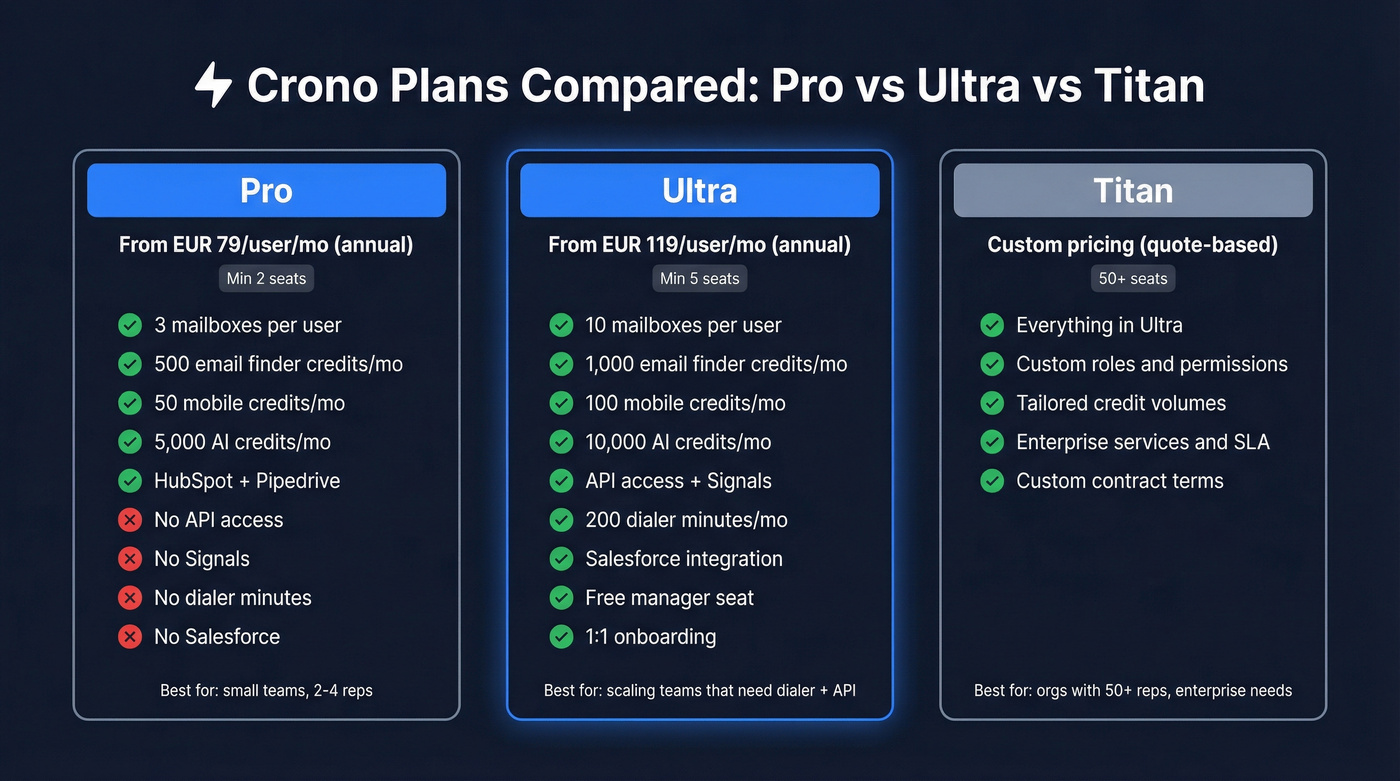
| Plan | Seat min | Annual EUR/user/mo | Quarterly EUR/user/mo | Big unlocks |
|---|---|---|---|---|
| Pro | 2 | EUR79 | EUR99 | Core sequences + enrich |
| Ultra | 5 | EUR119 | EUR149 | API + Signals + dialer |
| Titan | 50+ | Quote | Quote | Roles + services + terms |
Decision-driving inclusions (the stuff that changes rollout):
- Pro: 3 mailboxes per user; CRM integrations like HubSpot and Pipedrive.
- Ultra: 10 mailboxes per user, 200 dialer minutes, API access, Signals, a free manager seat, 1:1 onboarding, and Salesforce integration.
- Titan: built for 50+ seats with custom roles/permissions, tailored credits, and enterprise services/terms.
We've seen teams "upgrade early" because Ultra sounds like the serious plan, then spend the next two quarters trying to justify five seats while only three people use the extra features.
My take: if you don't need Salesforce + API/Signals + dialer, don't aspire to Ultra. Pro is the plan that keeps your budget honest.
Credits explained (what's included + what 1 credit means)
Crono is seat-based, but the day-to-day "why did our spend jump?" question is almost always credits.

What credits you get each month (they reset)
- Pro monthly credits: 500 email finder / 50 mobile / 5,000 AI
- Ultra monthly credits: 1,000 email finder / 100 mobile / 10,000 AI
Included monthly credits reset every month. If you don't use them, they don't roll over.
One sentence that saves arguments later: treat included credits like a monthly allowance, not a bank account.
What each credit type covers (plain English)
- Email finder credits: used when Crono successfully returns contact/company data during enrichment.
- Mobile credits: used for direct mobile numbers.
- AI credits: used for AI actions (rewrites, AI-assisted enrichment, and similar workflows).
What "1 credit per successful find" means (and why it's good)
Crono runs enrichment through a waterfall process (querying multiple sources behind the scenes). The part that matters is you get charged when it finds the data, not for every attempt, which is exactly how it should work if you're enriching messy CRM records at scale.
Crono documents credit purchasing and usage mechanics in its help center: https://help.crono.one/

Crono's credit system charges per successful find - fair enough. But at EUR10 per 100 emails and EUR50 per 100 mobiles, overages add up fast. Prospeo gives you 98% accurate emails at ~$0.01 each and 125M+ verified mobiles - no seat minimums, no quarterly premiums, no five-figure surprises.
Stop budgeting around seat minimums and credit meters.
Add-ons & overages (the part most pricing pages ignore)
Crono's included credits cover light enrichment. The moment you scale data enrichment or run mobile-heavy workflows, you'll buy add-ons, so budget for them from day one.
Look, this is where people get annoyed: the seat price feels "known," but credits feel like a meter running in the background, and nobody notices until the team starts doing real volume.
Add-on credit pricing (starting points)
| Add-on type | Pack size | Price | |---|---:|---:|---:| | Email finder | 100 | EUR10 | | Mobile finder | 100 | EUR50 | | AI credits | 1,000 | EUR5 |
Two mechanics that matter:
- Purchased add-ons don't expire (they roll forward).
- Charges still follow "successful find" logic.
Skip this if you're only doing a few dozen lookups a week. If you're building lists every day, model overages like you model ad spend: assume you'll use them, then decide if the ROI's there.
Crono pricing: real cost scenarios (with exact math)
Here are three common buying situations with the math that actually hits your invoice, especially where minimum seats change the total.

| Scenario | Billing | Seat count used for billing | Total (before VAT) | What drives the total |
|---|---|---|---|---|
| 2 reps on Pro | Annual | 2 | EUR1,896/yr | Pro seat minimum (2) |
| 3 reps want Ultra | Annual | 5 | EUR7,140/yr | Ultra seat minimum (5) |
| 5 reps, mobile-heavy | Quarterly | 5 | EUR10,040/yr eq. | Quarterly premium + mobile add-ons |
Scenario A: 2 reps on Pro (annual), no add-ons
- Pro annual: EUR79/user/mo
- Minimum seats: 2
Math: EUR79 x 2 x 12 = EUR1,896/year
Scenario B: You want Ultra for 3 reps (annual)... but Ultra forces 5 seats
- Ultra annual: EUR119/user/mo
- Minimum seats: 5
Math: EUR119 x 5 x 12 = EUR7,140/year
This is the most common budgeting faceplant with Crono: people compare EUR119 vs EUR79 and miss that the minimum seat jump is what changes the bill.
Scenario C: 5 reps on Ultra (quarterly) + add-ons for enrichment volume
- Ultra quarterly: EUR149/user/mo
- Seats: 5
Base math: EUR149 x 5 x 3 = EUR2,235 per quarter -> EUR8,940/year equivalent
Add a realistic overage example:
- Mobile add-on: 2,000 extra mobiles EUR50 per 100 -> 20 packs -> EUR1,000
- Email add-on: 1,000 extra emails EUR10 per 100 -> 10 packs -> EUR100
Total example spend: EUR8,940 + EUR1,000 + EUR100 = EUR10,040/year equivalent (before any in-app volume discounting).
In our experience, quarterly Ultra is the fastest way to "accidentally" end up in five-figure annual spend, because you're paying the quarterly premium while also learning (in real time) how many mobile credits your team burns once they stop being polite and start prospecting.
Why some sites show EUR39/EUR69/EUR99 (and why it matters)
If you've seen Crono priced at EUR39/EUR69/EUR99, you're not imagining it. You're looking at legacy directory tiers.
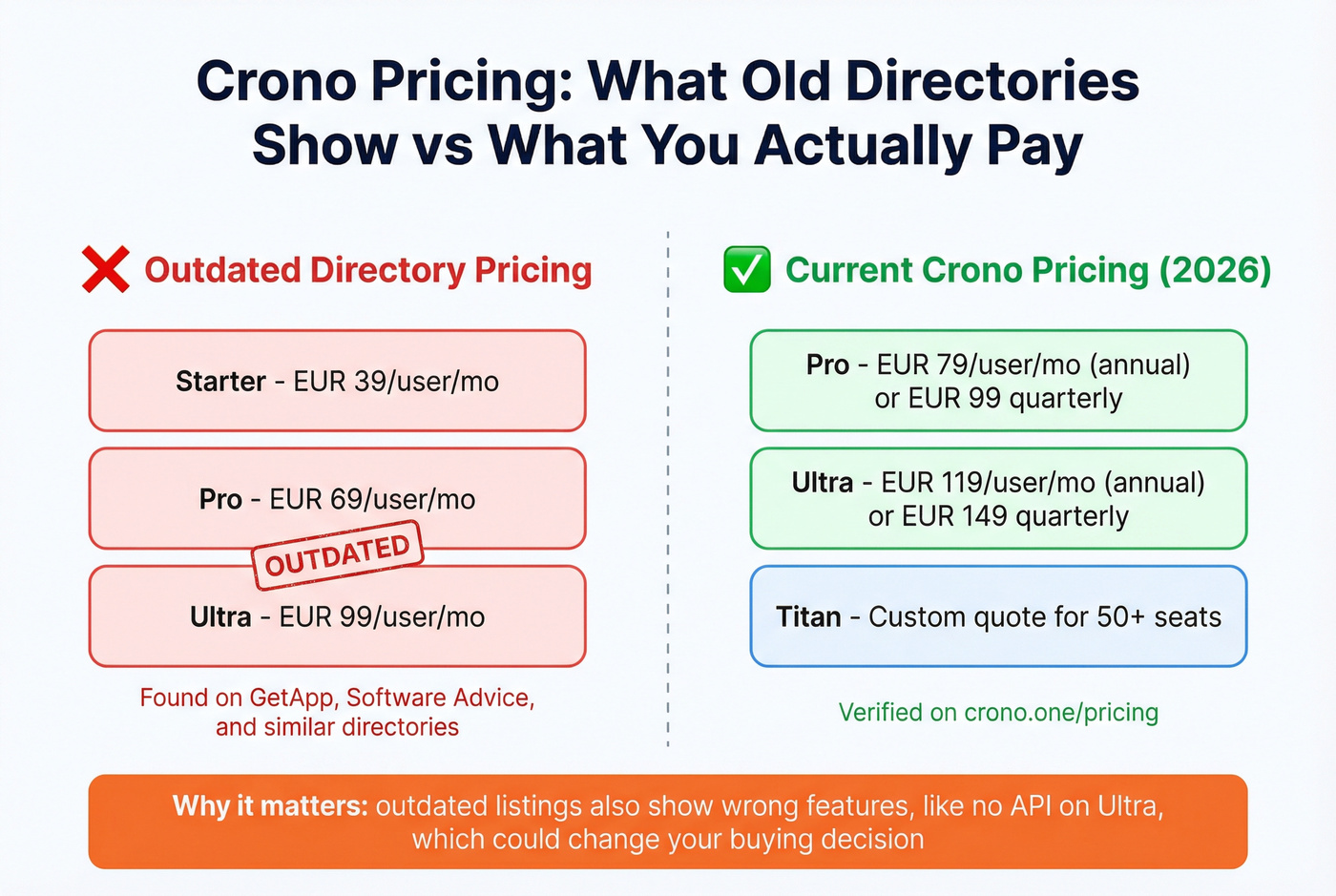
Myth vs reality
- Myth: Crono starts at EUR39/user/mo (Starter), then EUR69 (Pro), EUR99 (Ultra).
- Reality: Crono's current public pricing is EUR79 Pro and EUR119 Ultra on annual billing, with quarterly options at EUR99 and EUR149.
This matters because outdated directories also create feature confusion. One listing will say "no API," while Crono's current Ultra plan includes API access, which is exactly the kind of detail RevOps uses to decide whether Ultra's mandatory.
Examples:
- GetApp listing: https://www.getapp.com/all-software/a/crono/
- Software Advice: https://www.softwareadvice.com/
Contract, billing, VAT, and admin rules (buyer gotchas)
Use this checklist before procurement signs:
- Cancellation timing: cancel anytime, but it takes effect at the end of the billing period (end of quarter or end of year).
- Upgrades: upgrades apply immediately.
- Account rules: one account per user at a time (no seat-sharing).
- Admin control: licenses can be transferred by the subscription admin (useful for outbound sales teams churn/ramp).
- VAT: Crono doesn't spell out VAT handling on the pricing page; for EU budgeting, assume VAT's added at checkout unless you provide a VAT ID.
Is Crono worth the price? (independent signals)
Crono has strong review momentum: 4.7/5 on G2 from 108 reviews.
That's enough volume to trust the trend lines in what customers consistently praise and complain about, even if you don't agree with every individual review.
What buyers consistently like: a unified workflow, time-saving automation, and a UI that doesn't feel like five tools taped together.
What buyers consistently flag: data accuracy, performance at higher volumes, and bugs/stability. That's not a deal-breaker, but it is a buying instruction: test Crono on your exact ICP before you commit to large add-on packs, because overages are where the "real" cost shows up.
For pricing freshness, G2 shows the pricing page was last updated Dec 15, 2026.
Titan's worth evaluating when you need custom roles/permissions + services + tailored credits across 50+ seats. That's where enterprise sales packaging actually pays for itself.
If Crono's pricing model isn't a fit (data-only option)
Prospeo is the publisher's product, and it's "The B2B data platform built for accuracy": 300M+ professional profiles, 143M+ verified emails, and 125M+ verified mobile numbers, with 98% email accuracy and a 7-day data refresh cycle (the industry average is 6 weeks). If you're running enrichment workflows, it also includes API access with a 92% match rate and CRM/CSV enrichment that returns 50+ data points with an 83% enrichment match rate.
If you want the nuts-and-bolts of enrichment workflows, here's the deep dive: https://prospeo.io/b2b-data-enrichment
You just did the math on Ultra's 5-seat minimum turning a $79/seat plan into $7,140/year. Prospeo has no seat minimums, no annual contracts, and a 7-day data refresh cycle that keeps your enrichment accurate - not stale. 15,000+ companies already made the switch.
Get enterprise-grade data without the enterprise pricing traps.
FAQ
Is Crono priced per user or per credit?
Crono's priced per user (seat), and each plan includes a monthly bundle of credits for enrichment, mobile numbers, and AI actions. If you exceed included credits, you buy add-on packs, so your total cost is your seat bill plus any overages you trigger.
Do Crono add-on credits expire?
No. Purchased add-on credits don't expire and roll forward until you use them. Included monthly credits reset every month, so treat them like a "use it or lose it" allowance.
Why does GetApp show Crono starting at EUR39/user?
It's showing legacy/outdated tiers (EUR39/EUR69/EUR99) that don't match the current public plans (EUR79 Pro and EUR119 Ultra on annual billing). If you're budgeting, sanity-check against Crono's own pricing page before you lock a number into a forecast.
Does Crono Ultra include an API?
Yes. Ultra includes API access, and it's one of the main reasons teams step up from Pro. Budget it as a 5-seat minimum purchase, because that minimum is what usually changes the invoice more than the per-seat delta.
What's a good free alternative for prospect data if Crono credits aren't enough?
Prospeo's a strong free starting point because it includes 75 emails plus 100 Chrome extension credits per month, with 98% verified email accuracy and a 7-day data refresh cycle. If your team just needs data (not a seat-based orchestration UI), it often pencils out cheaper than paying for extra seats and ongoing overage packs.
Summary: how to budget Crono in 2026
If you're modeling crono pricing and don't want surprises later, anchor your budget on (1) annual vs quarterly, (2) the 2-seat vs 5-seat minimum jump, and (3) whether your workflow burns mobile credits.
Under 5 seats, Pro's the only plan that won't force shelfware. If you need API/Signals/dialer (or Salesforce), budget Ultra at the minimum and add a separate line item for mobile overages, because that's where costs move fastest.