

ABM One-to-Many (1:Many ABM): Definition, Strategy, and Execution in 2026
$15k in ads later, your SDRs are still saying "this feels like fluff." Then someone "fixes" it by adding 800 more accounts to the TAL... and performance falls off a cliff because TAL bloat killed performance. ABM one-to-many works, but only when you treat it like an operating system: tight targeting, fast routing, and boringly consistent measurement.
Here's the thing: if sales doesn't trust the queue, nothing else matters.
If you only do three things, do these. Everything else is optional until you've proven MQA -> meeting.
What you need (quick version)
- Tier rules = Fit + Intent + Timing, with a 14-day intent surge rule to pull accounts into "act now" (and separate "good fit" from "ready"). (If you need a working model, start with Fit + Intent + Timing.)
- MQA threshold + 24-hour SLA: when an account crosses the engagement threshold, sales touches it within 24 hours - or you're just paying for awareness. (This is basically speed-to-lead with ABM-tier routing.)
- Buying-group coverage tracking: for Tier 1 accounts, aim for >=5 roles engaged (not "one champion clicked an ad"). (More on buying committees.)
What ABM one-to-many means (and what it isn't)
This motion is programmatic ABM: you're targeting a defined list - typically 100-1,000+ accounts - with automation, intent signals, and scalable personalization. In practice, it's how teams do account-based marketing at scale without losing the discipline that makes ABM work in the first place.
Momentum ITSMA's taxonomy (often repeated by vendors and analysts) is the cleanest way to talk about it without everyone arguing definitions:
- Strategic ABM (1:1): a small set of named accounts with bespoke plays.
- ABM Lite (1:few): clusters of similar accounts with semi-custom plays.
- Programmatic ABM (1:many): hundreds (and sometimes thousands) of accounts with rules-based targeting and orchestration.
Here's what it isn't: "run ads to a big list and call it ABM." If your only output is impressions and clicks, you're doing demand gen with a target account list taped on top.
Myth vs reality
- Myth: 1:many ABM is "light personalization." Reality: It's tight segmentation + fast speed-to-lead + buying-group coverage, then repeat.
- Myth: It's a marketing program. Reality: It's a revenue workflow with SLAs, routing, and stage definitions.
- Myth: Bigger TAL = more pipeline. Reality: Bigger TAL usually means worse fit density, weaker intent, and lower sales trust.
The ITSMA principles still apply in 1:many - you just translate them into ops:
- Client-centric insight: pick 2-3 problems you can win, then build segments around them (not around channels).
- Alignment: one shared definition for tiers, MQAs, and "what happens next," enforced by SLAs.
- Reputation + relationship: consistent category story across ads, email, site, and sales touches (no random acts of content).
- Tailored programs: tailored by segment + stage, not by individual flattery tokens.
I've watched teams "scale" 1:many by tripling the account list and seeing CTR stay fine while meetings crater. The ads weren't the problem. The targeting and follow-up were.
One-to-one vs one-to-few vs ABM one-to-many (the table you'll actually use)
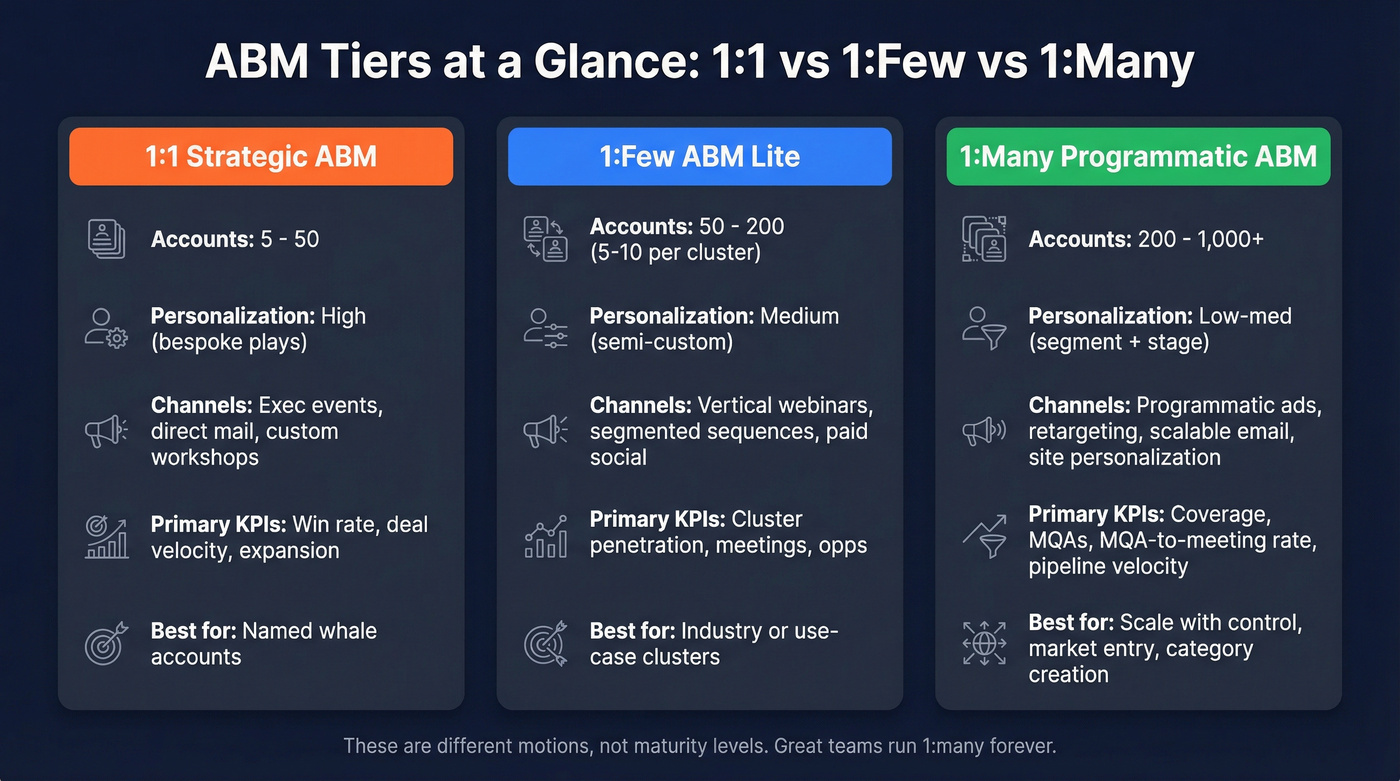
YoGrow's 2026 tier guidance is a usable shorthand: 1:1 (5-50), 1:few (50-200), 1:many (200+). Madison Logic adds the practical detail most people skip: for 1:few, 5-10 accounts per cluster is the sweet spot.
| ABM tier | ITSMA term | Account volume | Personalization | Primary goal |
|---|---|---|---|---|
| 1:1 | Strategic ABM | 5-50 | High | Win named whales |
| 1:few | ABM Lite | 50-200 | Medium | Win clusters |
| 1:many | Programmatic ABM | 200+ | Low-med | Create demand + MQAs |
The mistake is treating these as "maturity levels." They're different motions. Plenty of great teams run 1:many forever and only do 1:1 for a handful of strategic expansions.
Typical channels by tier
- 1:1: highly targeted email, exec events, direct mail, custom workshops, bespoke landing pages.
- 1:few: vertical webinars, segmented sequences, paid social to clusters, light site personalization.
- 1:many: programmatic + paid social, retargeting, scalable email, website personalization by segment, occasional virtual events.
Primary KPIs by tier
- 1:1: meetings, opportunities, win rate, expansion, deal velocity.
- 1:few: meetings + opps, plus cluster penetration and progression.
- 1:many: coverage + progression + MQAs, then MQA-to-meeting and pipeline velocity.
Hot take: if your average deal is small, you probably don't need a heavy "ABM platform" to run 1:many. You need a clean TAL, fast routing, and ruthless measurement. Most teams buy orchestration before they've earned the right to orchestrate.
When one-to-many ABM is the right move (decision framework)
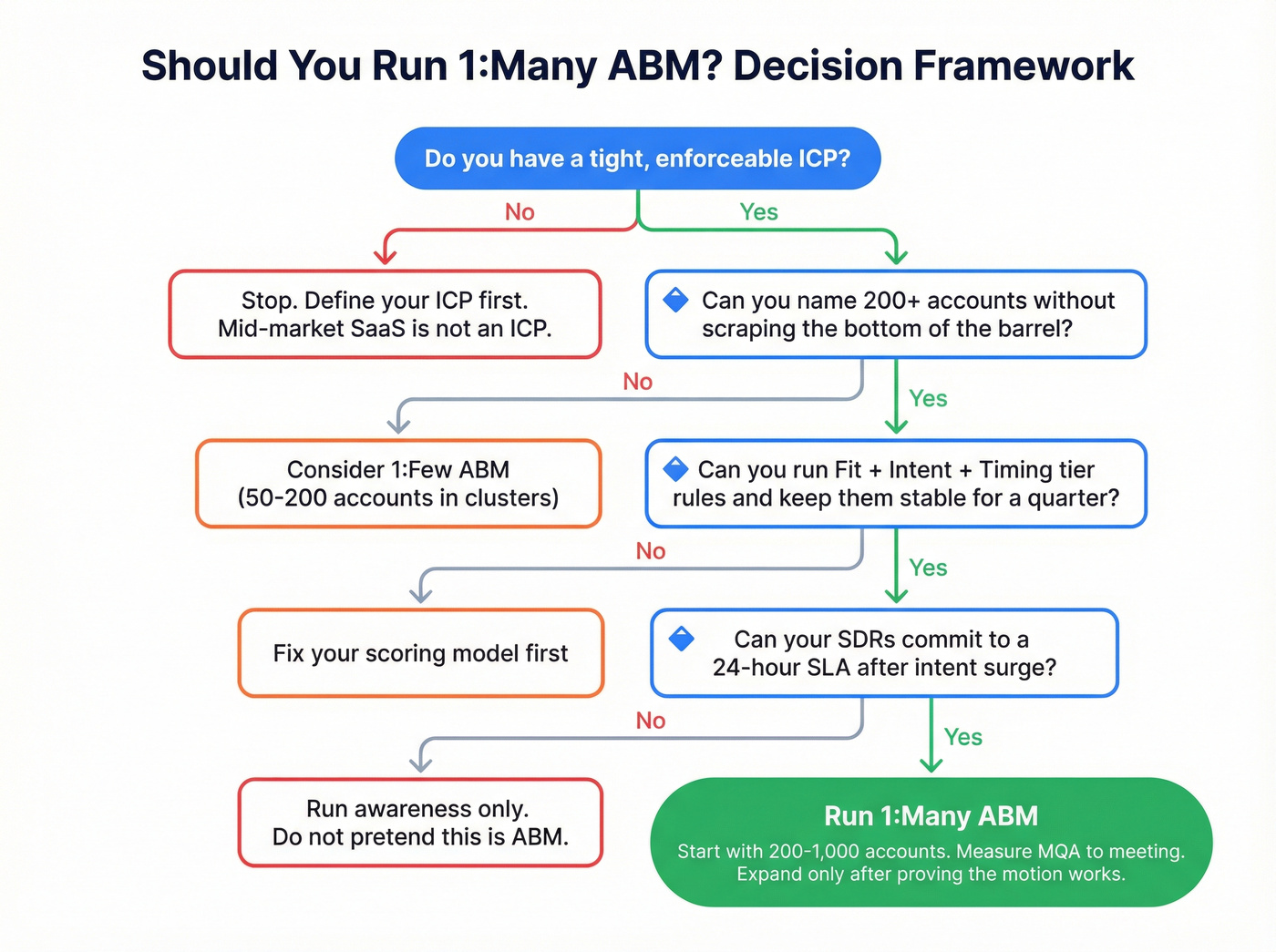
Use 1:many when you need scale with control: you've got a defined ICP, you can target accounts reliably, and you can operationalize fast follow-up. That's the core promise of 1:many ABM: repeatable execution without turning your program into generic demand gen.
Use 1:many ABM if...
- You can name a tight ICP (industry + size + tech + trigger) and enforce it with TAL governance. (If you want a practical definition + validation loop, use ICP.)
- You have enough TAM to justify 200+ accounts without scraping the bottom of the barrel.
- You can run Fit + Intent + Timing tier rules and keep them stable for a quarter. (See intent signals if your model keeps drifting.)
- You can commit to MQA routing and a 24-hour SDR SLA after an intent surge. (If your handoff keeps breaking, start with a lead qualification process.)
- You can identify and act on anonymous website visitors at the account level (even if you can't tie every touch to a person). (Related: account identification.)
- Your motion needs faster time-to-value than 1:few/1:1 (for example, you can't wait 90 days for bespoke plays to pay back).
Two high-leverage use cases most teams ignore:
- Market entry: when you're entering a new vertical, 1:many is the fastest way to learn which sub-segments respond. Your KPI shifts to segment penetration + first meetings, not immediate pipeline.
- Customer education (category creation): when the market doesn't understand the problem, 1:many is how you teach it at scale. Your KPI shifts to multi-role engagement + progression, not form fills.
Avoid 1:many ABM if...
- Sales won't follow up fast. If SDR SLA can't be <24h, don't run 1:many ABM - run awareness and stop pretending.
- Your ICP is still vibes. "Mid-market SaaS" isn't an ICP.
- Your sales cycle is long and you don't have patience for compounding (1:many often looks quiet before it looks inevitable).
- You can't measure account movement (you'll end up arguing about attribution forever).
Graduate to 1:few if...
- You're seeing repeatable engagement in a segment and want higher conversion.
- You have enough content depth to support 5-10 account clusters with a real point of view.
- Your AEs want plays for specific verticals (and will actually run them).
Governance metrics (the ones that keep 1:many honest)
Track these weekly by segment (and review them monthly in the same forum you review pipeline):
- ICP Match Rate: % of accounts in the TAL that meet your current ICP rules. If this slips, everything downstream becomes noise.
- Intent Hit Rate (30-day): % of TAL accounts above your intent threshold in the last 30 days. If this is near-zero, your intent model or topics are wrong.
- SLA compliance: median time-to-first-touch after MQA (and % touched within 24 hours).
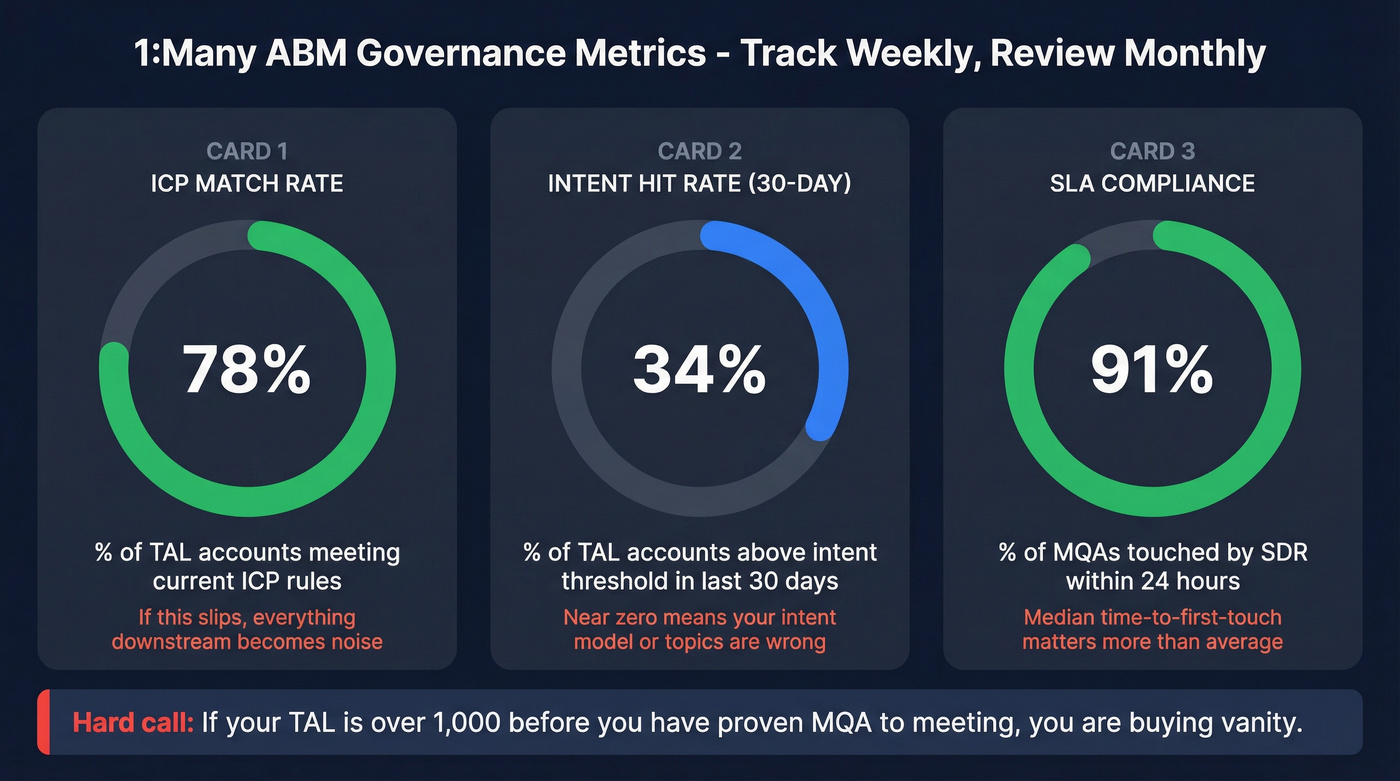
Hard call: If your TAL is >1,000 before you've proven MQA -> meeting, you're buying vanity.
The buying-group reality that makes 1:many hard (and how to design for it)
Directive cites Salesforce's State of Marketing 2025: the average B2B deal involves 11 stakeholders, and each consumes 5-7 assets before they'll engage sales.

That's why "personalize the email to the person" is the wrong hill to die on at 1:many scale.
Your job is to personalize by segment + stage, and then win on:
- coverage (are you reaching the buying group?)
- consistency (are they seeing the same story across channels?)
- speed (do you respond when timing flips?)
Design rules that actually work
- Build plays around roles, not individuals: economic buyer, champion, technical evaluator, procurement, security, finance.
- Build content around stage, not channel: problem-aware -> solution-aware -> vendor-shortlist.
- Treat "one engaged person" as a weak signal. Treat "multiple roles engaging in a 14-day window" as a strong one.
We've audited programs where marketing celebrated "account engagement" while sales couldn't name a single stakeholder beyond the original clicker. That's not ABM. That's a dashboard.

Your 1:many ABM dies when SDRs can't reach the buying group within 24 hours. Prospeo gives you 143M+ verified emails at 98% accuracy and 125M+ direct dials - so when an account surges, your team connects with real buyers, not bounced inboxes.
Stop paying for intent signals you can't act on. Get the contact data.
How to run a one-to-many ABM program (7-step operating workflow)
This cadence holds up in production: Day 1 setup, Day 7 launch, Day 14 optimization, Day 30 governance.

1) Build your TAL (and keep it "uncomfortably small")
High-performing teams keep the list uncomfortably small. List expansion feels like progress, but it usually just dilutes fit and intent. (If you need a repeatable build process, use this account list workflow.)
Rules I use for 1:many TALs
- Start with 200-1,000 accounts, not 5,000.
- Separate Fit (ICP match) from Intent (in-market signals). Don't blend them into one score or you'll chase the wrong logos.
- Add Timing as a recency window: Tier 1 = intent surge in the last 14 days; Tier 2 = steady intent; Tier 3 = baseline/no surge.
A practical Tier 1 definition that works: (Intent surge in last 14 days) + (>=2 buying-group roles engaged) + (>=1 high-intent page view).
One place teams waste weeks: they treat "data" like a procurement line item instead of a workflow. If you can't quickly find and verify contacts for the buying group, your 24-hour SLA's dead on arrival, and you'll end up with the same ugly pattern I've seen a dozen times - marketing hits the MQA number, SDRs get buried in bounces and wrong titles, and everyone quietly decides ABM "doesn't work." (This is classic B2B contact data decay.)

In the UI, you're basically living in three areas: the filters panel (industry, headcount, technographics, growth signals, intent topics), the results table (contacts with verified email/mobile status), and the export/enrich actions to push into your CRM or sequencer.
2) Segment by industry × persona × stage (minimum viable segmentation)
Keep segmentation so simple you can explain it on one slide and ops can implement it without creating 40 micro-audiences. (If your tiers and rollups are messy, start with account segmentation.)
Use:
- Industry (or vertical)
- Persona (role group)
- Stage (problem-aware / solution-aware / shortlist)
Example you can steal:
- Segment: Manufacturing (500-5,000 employees)
- Persona group: Ops + IT
- Stage: Solution-aware
- Offer: "ROI calculator + 2-page implementation plan"
- Proof: "2 manufacturing case studies + security one-pager"
If you add geo, company size bands, and tech stack on Day 1, you'll end up with segments too small to learn from and too annoying to maintain.
3) Build a messaging matrix (1 page)
Make a one-page matrix with:
- Rows = personas (economic buyer, champion, technical, security, finance)
- Columns = stages
- Cells = pain -> value -> proof -> CTA
Contrarian rule: stop individual-level personalization for 1:many. Win with segment+stage relevance and speed-to-lead when intent spikes.
I've watched teams spend weeks perfecting "Hi {{FirstName}} loved your recent post" while taking 72 hours to call an account that just surged on a competitor keyword. Guess which one moves pipeline.
4) Choose channels + orchestration (programmatic, paid social, email, site)
A clean 1:many orchestration looks like this:
- Programmatic display for reach + retargeting at the account level.
- Paid social for tighter persona targeting and higher-intent formats.
- Email for controlled sequencing once you've got verified contacts.
- Website personalization for segment-level relevance (industry proof points, use cases, CTAs).
Operator tip: decide your "one truth" location. For most teams it's the CRM, with the ABM platform and ad tools feeding it. If your "truth" is a spreadsheet plus three dashboards, you'll spend your quarter arguing about numbers instead of fixing the motion.
5) Launch always-on + retargeting (what runs continuously vs in sprints)
Split your motion into two tracks:
Always-on (never stops)
- Retargeting to engaged accounts
- Baseline programmatic to the full TAL
- Always-on category narrative creative
Sprints (2-4 weeks)
- Segment-specific offers (webinar, report, calculator)
- Competitive conquest bursts
- Event-driven pushes (conference, product launch)
This is how you avoid the "we ran ABM for 6 weeks and it didn't work" problem. 1:many is a system, not a campaign.
6) Score to MQA (engagement threshold)
MQA is the bridge between marketing activity and sales action. It's not a form fill. It's an engagement score threshold that means "this account's heating up."
A simple scoring model:
- Ad click: 3 points
- Key page view (pricing, integration, comparison): 10 points
- Webinar attendance: 15 points
- Demo request: 25 points
- Multiple roles engaging: +10 bonus (or a multiplier)
A real threshold that's easy to run: MQA = 35 points in 14 days + at least 2 distinct roles engaged. That prevents "one person binge-read the blog" from flooding SDRs.
Hard call: If you can't measure buying-group coverage, your "account engagement" metric's noise.
7) Route to sales + SLA (24h after surge; what SDR does in first 3 touches)
When intent surges, SDR follow-up should happen within 24 hours. Not "same week." Not "when they get to it." Within 24 hours.
SLA instrumentation (make it measurable, not motivational) Create these fields (or equivalents) so you can audit the workflow:
MQA Timestamp(when the account crossed threshold)MQA Reason(top intent topic + top engaged asset/page)Buying Group Roles Engaged(count + which roles)Last 3 Touches(channel + timestamp)Owner Assigned TimestampFirst Sales Touch TimestampSLA Met?(Yes/No based on 24h rule)Disposition(Connected / No answer / Not ICP / Nurture / Bad timing)
Then build one report: median time-to-first-touch by segment and by SDR. This is the fastest way to turn "ABM is fluff" into "ABM is a queue I can trust."
Routing rules that keep you sane
- Route by segment (industry/pod), not by "whoever's free."
- Include the "why now" context in the task: intent topic + last 3 touches + roles engaged.
- Enforce a "no contact left behind" rule: if you can't find at least 3-5 roles, the account goes back to enrichment before SDR outreach.
First 3 touches (what actually works)
- Day 0-1: call + voicemail + short email referencing the problem category (not "saw you visited our site").
- Day 2: persona-specific value prop + proof (case study in their vertical).
- Day 4: breakup + alternate CTA (invite to webinar, benchmark report, or "send me to the right owner").
Do the math: how many accounts do you need for one-to-many ABM?
This is the block most ABM guides dodge because it forces decisions.
Start with the pipeline goal, then work backward:
- Opps needed = Pipeline goal ÷ ACV
- MQAs needed = Opps needed ÷ (MQA -> Opp rate)
- TAL needed = MQAs needed ÷ (TAL -> MQA rate)
A compact formula:
TAL size = (Pipeline goal ÷ ACV) ÷ (MQA->Opp rate × TAL->MQA rate)
Example (mid-market):
- Pipeline goal: $1,200,000
- ACV: $60,000 -> Opps needed = 20
- MQA->Opp rate: 20% -> MQAs needed = 100
- TAL->MQA rate (per quarter): 10% -> TAL needed = 1,000
Now sanity-check it against capacity:
- If you generate 100 MQAs/quarter, that's ~8/week.
- If each MQA requires ~45 minutes of research + touches in week one, that's ~6 hours/week of focused SDR time (before follow-ups).
If your math says you need 1,000 accounts but you can't staff the follow-up, don't "solve" it with more ads. Solve it with tighter tiering, better intent thresholds, or a smaller initial TAL.
KPIs that make sales trust 1:many ABM (with formulas + thresholds)
Sales trusts 1:many when you report movement and coverage, not vibes.
Here's the KPI pack I'd put on a weekly dashboard.
Core account KPIs (with formulas)
Penetration Rate = (Engaged target accounts ÷ total target accounts) × 100
Example: 50 engaged / 200 total = 25%
Progression Rate = (Accounts advancing ÷ accounts in stage) × 100
Example: 30 advanced / 100 in stage = 30%
Pipeline Velocity (proxy) = (Pipeline value ÷ avg sales cycle days)
Example: $500k / 50 days = $10k/day This is the simple pipeline-per-day proxy; if you prefer classic velocity, use (Opps × Win rate × ACV) ÷ cycle length.
MQA = accounts that hit the engagement score threshold that triggers sales action.
Coverage KPI (the one most teams skip)
For Tier 1 accounts, aim for >=5 roles engaged.
A practical definition:
- Required roles (Tier 1): economic buyer, champion, technical evaluator, security/IT, finance/procurement
- Coverage Rate = engaged contacts ÷ required roles
If coverage's low, don't blame creative. Fix data and targeting.
A quick scenario we see a lot: marketing drives a surge to a "security checklist" page, the account hits MQA, and the SDR reaches out... but the only contact in CRM is a junior analyst from two years ago, so the first three touches bounce or go nowhere, the SLA looks "met" on paper, and the AE decides the whole program's noise.
A proof point from a Prospeo customer: Meritt cut bounce rate from 35% to under 4% and tripled pipeline from $100K to $300K/week. That's what contactability looks like when it shows up in revenue, not just deliverability dashboards.
Mini dashboard spec (what I'd show weekly)
- TAL size (by tier) + net changes
- Penetration rate (by segment)
- Progression rate (by stage)
- Coverage rate (Tier 1 accounts)
- MQAs created + MQA-to-meeting rate
- Median time-to-first-touch (SLA compliance)
- Pipeline velocity (ABM-sourced + ABM-influenced)
My opinion: the fastest way to kill an ABM program is to show marketing engagement charts in a pipeline meeting. Bring progression, coverage, and SLA compliance instead.
Budgeting + performance expectations (benchmarks for 2026 planning)
If you're planning 1:many ABM budgets, you need two things: realistic ad benchmarks and realistic cost mechanics. These are the most recent published programmatic benchmarks available going into 2026 planning (Mar-Dec 2025 dataset; Nov 2025 trend snapshot).
Programmatic display benchmarks (directional)
Focus Digital's dataset is a good baseline for CTR expectations:
| Benchmark | Value |
|---|---|
| Tech CTR | 0.34% |
| Pro Services CTR | 0.31% |
| Manufacturing CTR | 0.21% |
| 1P+lookalike CTR | 0.73% |
| Contextual CTR | 0.30% |
| Dynamic CTR | 0.68% |
| Static CTR | 0.32% |
| PMP CPM | $4.85 |
| Open exch. CPM | $1.24 |
Planning note: PMP inventory costs more, but it often buys you better placement and less junk traffic. If your sales team keeps calling your MQAs "fluff," low-quality inventory's usually part of the story.
Databeat's trend snapshot adds the macro context:
- Display CPM +12.3% MoM, -8.8% YoY
- Video CPM +18.9% YoY
LinkedIn (planning ranges)
For LinkedIn, the ranges that hold up for planning:
- CTR: 0.4-0.8%
- CPC: $6-$12
- CPL: $80-$250
CPL's a misleading metric in ABM anyway. You care about account movement and MQA-to-meeting, not cheap leads.
If you want the raw benchmark tables, use the Focus Digital CTR benchmarks report and the Databeat programmatic trends snapshot.
Attribution reality check (so you stop arguing about "influenced pipeline")
Attribution in 1:many ABM breaks for boring reasons: cookies get dropped, UTMs get lost, redirects happen, ad blockers do their thing, and Safari ITP ruins your day.
ZenABM's list of pitfalls is basically a checklist of why last-click is a trap:
- Cookie/UTM loss from ad blockers + ITP
- Redirects and tracking gaps
- Lead sync and lifecycle hygiene issues
- Contacts not associated cleanly to deals
Also: if you're using Conversions API, you're living inside a 90-day attribution window for credit. That's fine, but it isn't "truth."
Do:
- Report account movement (stage progression) and opp creation.
- Use influence thresholds at the account level (impressions + visits + multi-role engagement).
- Review ABM performance in pipeline/forecast forums, not just marketing meetings.
Don't:
- Fight about last-click.
- Count MQLs as success. Measuring ABM by MQLs creates sales distrust.
If you want a clean mental model, Demandbase's breakdown of ABM metrics into Engagement, Journeys, and Attribution is the right framing: Demandbase's ABM measurement model.
Common ways one-to-many ABM fails (and the fix for each)
Look, most "ABM doesn't work" stories are just broken handoffs with expensive media on top.
Here's the table I wish every team taped to the wall before they buy more ad inventory.
| Failure mode | Symptom | Fix |
|---|---|---|
| List bloat | CTR ok, meetings down | Cut TAL 30-50% |
| Fit != intent | SDRs chase wrong logos | Separate scores |
| Vanity engagement | "Engaged!" no opps | Track progression |
| Governance drift | KPI fights monthly | RevOps owns defs |
The cleanest fix is governance: define tiers, stages, MQAs, and SLAs once, then review them in the same forum you review pipeline.
Minimum viable 1:many ABM stack (categories, example tools, and real costs)
You don't need a 12-tool martech tower. You need a stack that can: identify accounts, detect intent, reach the buying group, route MQAs, and measure movement. That's the practical requirement for account-based marketing at scale - not "more tools," but fewer broken handoffs. (If you're trying to do this lean, start with ABM without expensive tools.)
Stack categories (minimum viable)
- Contact + verification + enrichment (foundation)
- Intent + account identification
- Ads (programmatic + paid social)
- Orchestration + personalization
- CRM + sales engagement
- Measurement + attribution
Healthy ops targets worth enforcing:
- >=90% account matches within 24 hours
- <5% unknown touches
Selection criteria (how to choose)
Pick tools in this order (it prevents expensive regret):
- Data/contactability first (verified emails/phones + refresh + enrichment workflows)
- Routing + SLA instrumentation (CRM fields, queues, alerts, dashboards)
- Account identification + intent (so you can prioritize timing)
- Ads + retargeting (to create and capture demand)
- Orchestration/personalization (only after the above is stable)
- Measurement (tighten once you have consistent definitions)
Platform positioning (so you don't buy the wrong thing for the wrong job):
- Demandbase: buying-group orchestration + measurement-first ABM suite when you'll actually use the workflows.
- 6sense: prediction/AI-first account prioritization when you have enough volume for models to learn.
- RollWorks: ad-first simplicity for teams that want to get programmatic running without a giant implementation.
Cost realism (what you'll pay)
| Category | Example tools | Typical cost (2026 planning ranges) |
|---|---|---|
| Data layer | Prospeo | Self-serve, credit-based (free tier available; paid plans vary by usage) |
| ABM platform | Demandbase | $30k-$100k+/yr |
| ABM platform | 6sense | $60k-$300k/yr |
| ABM ads | RollWorks | $15k-$60k/yr + media |
| Intent/content syndication | Madison Logic | $40k-$250k/yr (package + volume dependent) |
| Person-based ads | Influ2 | $20k-$120k/yr |
| Data layer (alt) | ZoomInfo Marketing | $25k-$80k/yr |
| ABM platform (alt) | Terminus | ~$30k-$120k/yr |
| Programmatic (alt) | DemandScience | ~$25k-$150k/yr + media |
Prospeo's worth calling out here because it solves the part that quietly wrecks 1:many: contactability at buying-group scale. You get 98% verified email accuracy, 125M verified mobiles, 83% enrichment match rate, and a 92% API match rate, with a 7-day refresh cycle so your "Tier 1 surge" doesn't get routed to someone who left the company six weeks ago. (If bounces are killing your sequences, start with an email verification workflow.)
Skip this if you're already sitting on clean, verified buying-group data and your bounce rate's consistently under 3-5%. In that case, put your energy into SLA enforcement and stage definitions first.
RollWorks: what users love vs what annoys them (operator summary) G2 reviewers consistently praise RollWorks for being straightforward to launch and for helpful "account spike" style alerts that surface surging accounts without digging through dashboards. The common complaints are also consistent: account identification can feel weak in certain segments, journey history is often limited (a frequent callout is roughly a 90-day lookback), and attribution can look inflated if you don't lock down definitions and dedupe rules. Translation: it's a solid ad-first engine, but you still need tight TAL governance and a skeptical measurement posture.
Buying-group coverage across 200+ accounts requires verified contacts at scale. Prospeo's 30+ filters - intent data, technographics, headcount growth, funding - let you build TALs with tight ICP fit and enrich every account with 50+ data points at $0.01/email.
Tight targeting starts with data that's refreshed every 7 days, not 6 weeks.
Closing: the 1:many ABM operating system (the part people skip)
ABM one-to-many isn't "ads to accounts." It's governed targeting + buying-group coverage + a 24-hour sales response loop. If you want 1:many ABM to perform, treat it like account-based marketing at scale: strict tiering, repeatable plays, and measurable handoffs.
Three takeaways:
- If you can't enforce the SLA, don't call it ABM.
- If you can't name the buying group, your engagement score's theater.
- If you can't keep the TAL clean, every dashboard becomes a debate.
Start here this week:
- Cut your TAL to 200-800 and lock tier rules for 30 days.
- Define MQA (threshold + roles) and add the SLA fields to CRM.
- Run one segment sprint with a single offer and measure MQA -> meeting.
FAQ: One-to-many ABM
How many accounts is "one-to-many ABM"?
One-to-many ABM usually means 200+ target accounts running through the same programmatic plays, with segmentation by industry/persona/stage. If you're under 200 accounts you're typically closer to 1:few.
What's the difference between programmatic ABM and demand gen?
Programmatic ABM targets a defined TAL and measures success by account progression, coverage, and opportunity creation. Demand gen targets broader audiences and often optimizes to leads/MQLs. If you can't name the accounts you're targeting and track their movement, it's demand gen.
What is an MQA in one-to-many ABM?
An MQA is a target account that crosses a predefined engagement score threshold indicating sales readiness. It's a composite signal (multi-touch, often multi-role) that triggers a sales action with a 24-hour SLA.
What KPIs should I report weekly for 1:many ABM?
Weekly reporting should focus on penetration rate, progression rate, buying-group coverage, MQAs created, MQA-to-meeting rate, and pipeline velocity. Add SLA compliance (time-to-first-touch) so sales sees you're converting signals into conversations.
How do teams keep contact data accurate at 1:many scale?
They combine verification + frequent refresh + enrichment workflows so buying groups stay reachable as people change roles. The simplest rule: if bounce rate climbs or coverage drops, treat it like a production incident - fix contactability before you optimize creative.