

GetAccept vs PandaDoc: Digital Sales Room or Document Automation?
If you've dragged form fields into a document for the tenth time, waited days wondering whether a prospect even opened your proposal, or manually chased signatures with zero auto-reminders - you already know why teams outgrow basic doc tools. On r/pipedrive, users regularly vent about exactly these problems with built-in document features. Both GetAccept and PandaDoc solve these pain points, but in fundamentally different ways.
Pick the wrong one and you're paying for capabilities you'll never touch - or missing the ones you actually need. B2B buying teams spend only 17% of their time meeting with sales reps. The tool you choose determines what happens during the other 83%.
30-Second Verdict
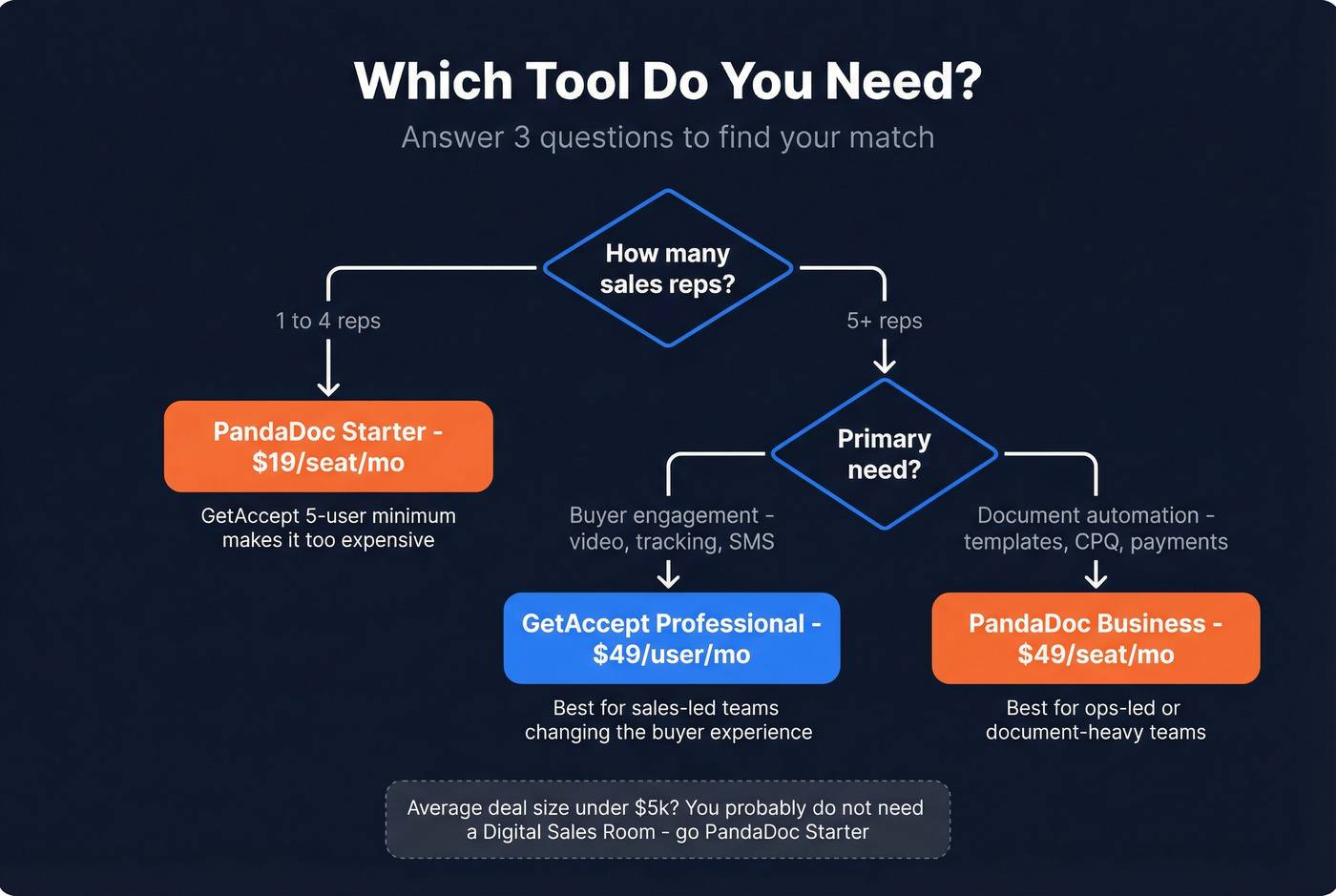
GetAccept is the pick for sales teams with 5+ reps who want buyer engagement - video proposals, SMS nudges, real-time tracking, and mutual action plans. It's a Digital Sales Room first, e-signature tool second.
PandaDoc is the pick for ops-led teams who need document automation - templates, CPQ, payment collection, and 53 integrations. It's a document engine first, deal room second.
Small teams of 1-4 reps should default to PandaDoc Starter. GetAccept's 5-user minimum on its Professional plan prices you out before you even start.
The Real Difference
It's tempting to treat these two as interchangeable e-signature tools. They're not.
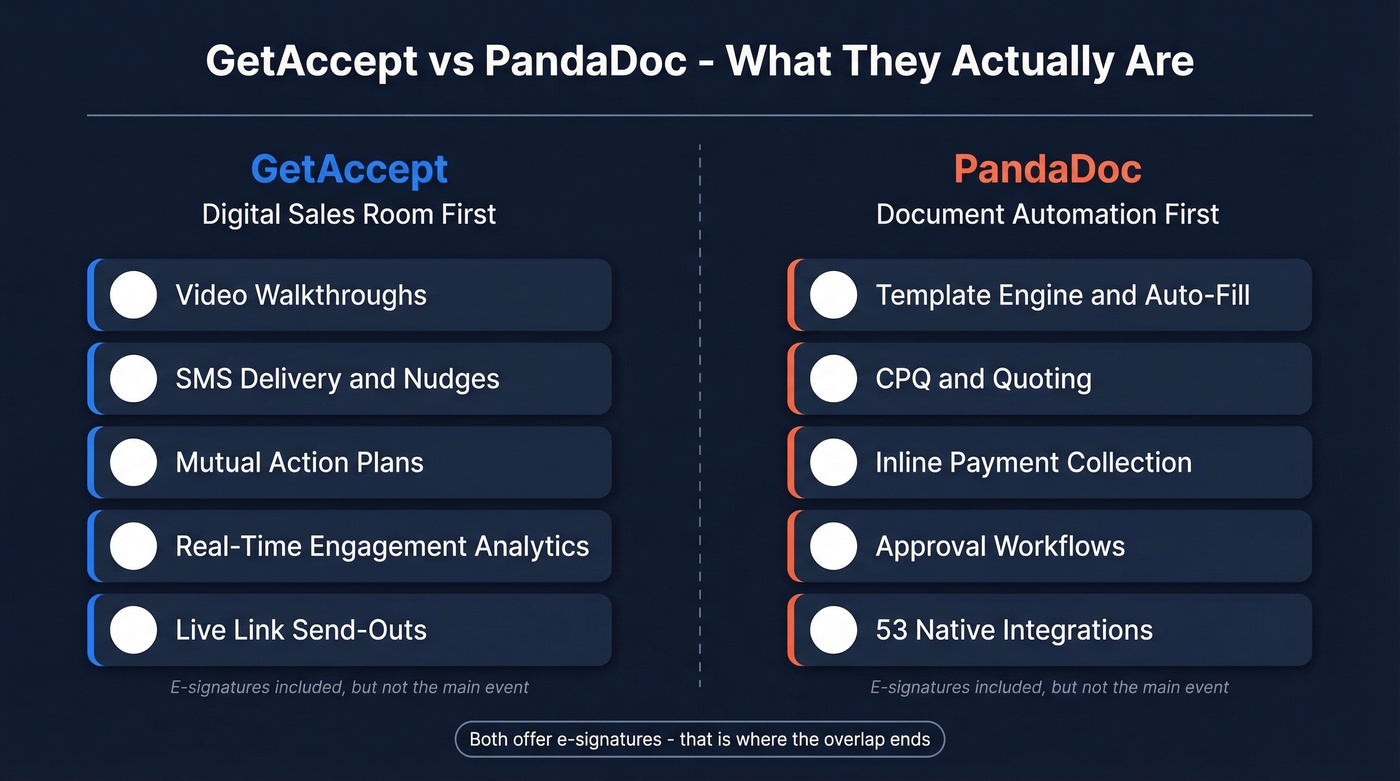
GetAccept is a Digital Sales Room. The Professional plan unlocks video walkthroughs, SMS delivery, mutual action plans, live link send-outs, and real-time engagement analytics - features designed to keep buyers active inside your deal when you're not in the room. PandaDoc is a document automation platform. Its strength is templating, auto-populating fields from your CRM, collecting payments inline, and managing approval workflows. Over 75% of B2B buyers say their most recent purchase was "very complex or difficult," and PandaDoc's bet is that simplifying the paperwork reduces that friction.
Both offer e-signatures. That's where the overlap ends.
Pricing in 2026
Here's the side-by-side from each vendor's pricing page:
| GetAccept | PandaDoc | |
|---|---|---|
| Free tier | - | $0/mo, unlimited seats, 60 docs/yr |
| Entry paid | eSign: $25/user/mo (max 5 users) | Launch: $9/mo (60 docs, then $3/doc) |
| Mid-tier | Professional: $49/user/mo (min 5 users, annual only) | Starter: $19/seat/mo annual / $35/seat monthly |
| Full-featured | - | Business: $49/seat/mo annual / $65/seat monthly |
| Enterprise | Custom | Custom |
A few things jump out.
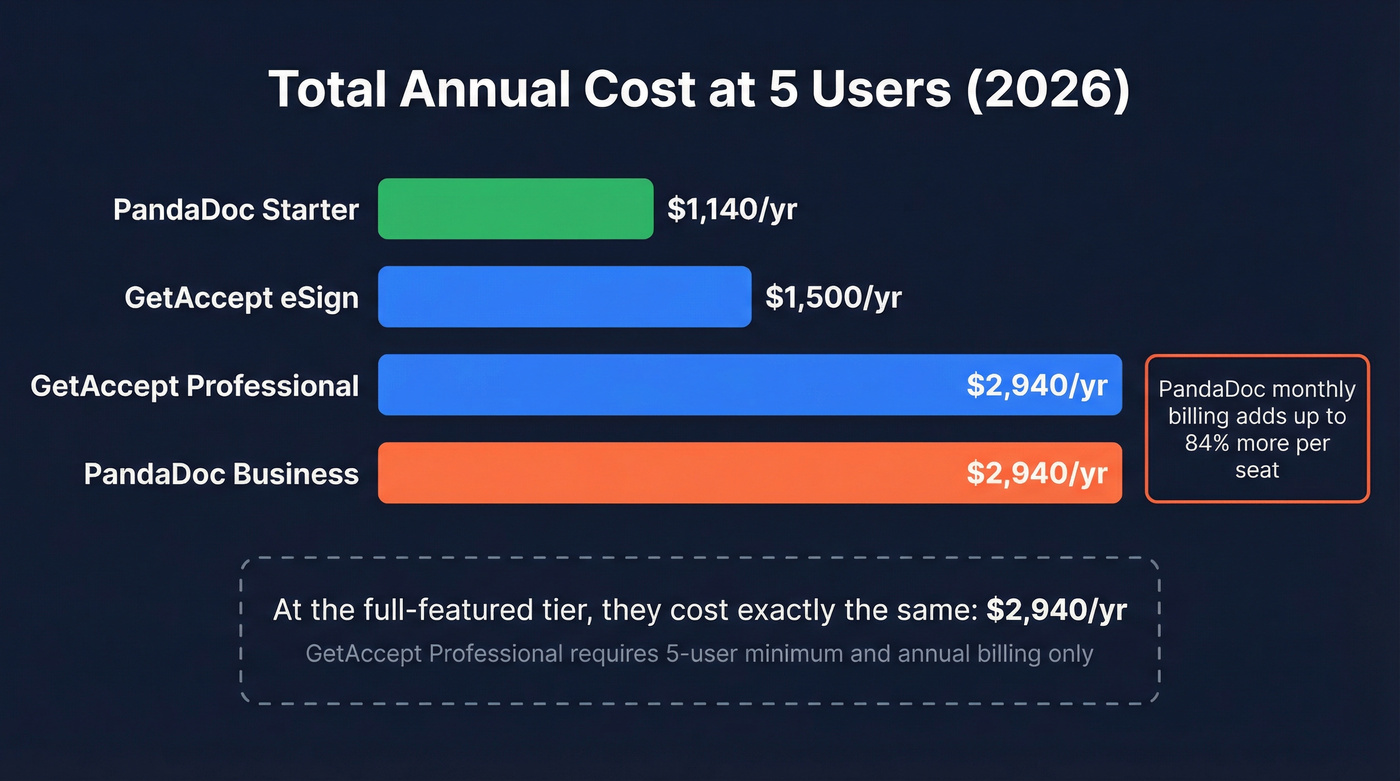
GetAccept's Professional plan requires a minimum of 5 users and annual billing only. Your real entry point for the full DSR experience is $245/mo - $2,940/year. Got 2-3 reps? You're either paying for ghost seats or stuck on eSign, which strips out deal rooms, SMS, mutual action plans, edit-after-send, and AI features.
PandaDoc's monthly billing premium is steep. They advertise up to 46% savings with annual billing, and the numbers back it up: Starter jumps from $19 to $35 per seat on monthly billing, roughly 84% more for month-to-month flexibility. Business goes from $49 to $65.
Total cost at 5 users:
- GetAccept eSign: $1,500/yr
- GetAccept Professional: $2,940/yr
- PandaDoc Starter: $1,140/yr (annual)
- PandaDoc Business: $2,940/yr (annual)
At the full-featured tier, they cost exactly the same. The question is what you get for that money.
What's Locked Behind Each Tier
GetAccept eSign gives you unlimited e-signatures with basic branding and templates. Skip it if you want deal rooms, SMS delivery, mutual action plans, AI features, or a team larger than 5. All of that lives on Professional or above.
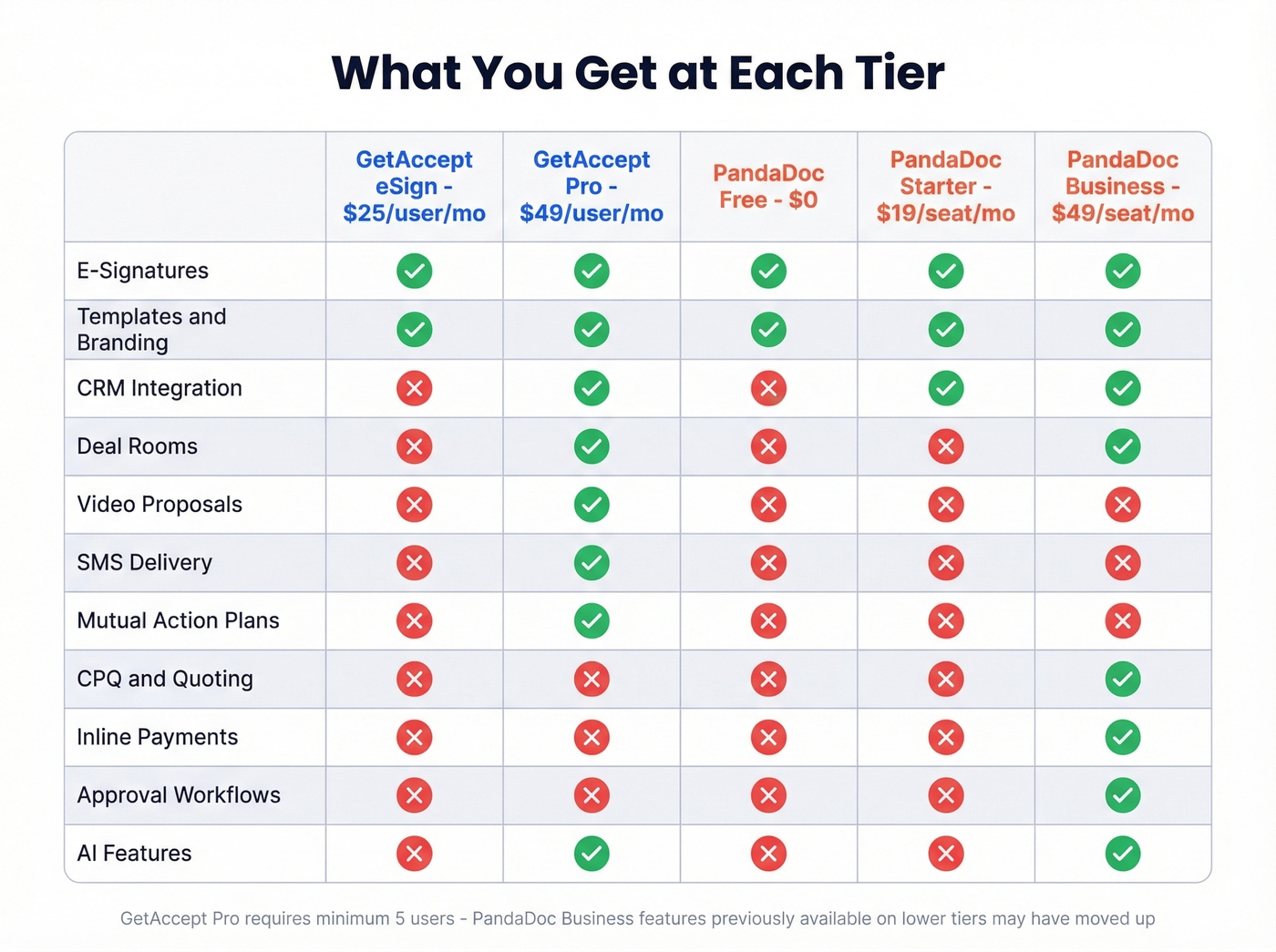
PandaDoc Free/Launch works if you send fewer than 60 documents a year and don't need CRM integrations. Skip it if you need CRM sync, deal rooms, approval workflows, or the broader automation stack - those are Business-tier features at $49/seat/mo.

GetAccept and PandaDoc handle what happens after you reach a buyer. But 83% of the buying journey happens without your reps in the room - which means the contacts you load into those deal rooms need to be real. Prospeo delivers 98% email accuracy and 125M+ verified mobile numbers so your proposals actually land.
Fix the data before you fix the deal room.
Why Teams Switch
The switching reasons on TrustRadius tell a clear story. One user moved from PandaDoc to GetAccept specifically for "SMS and video capabilities." Another cited PandaDoc being "difficult to edit" with a Salesforce integration that was "hard to use as a rep."
On the PandaDoc side, a recurring complaint is tier restructuring: "Plan tiers and pricing recently changed, so now we get less value/less features for the same price." We've talked to teams that were happily on a mid-tier plan and suddenly needed to upgrade to Business just to keep core quoting and payment workflows they'd been using for months.
The G2 numbers are close - GetAccept sits at 4.6/5 from 1,046 reviews; PandaDoc at 4.7/5 from 3,408 reviews. PandaDoc's larger review base skews heavily toward small businesses (2,323 small-business reviews), while GetAccept's praise clusters around real-time tracking and personalized video, suggesting a more mid-market audience.
Integrations and Compliance
PandaDoc connects to 53 tools out of the box - Salesforce, HubSpot, Pipedrive, Zapier, Stripe, QuickBooks, Slack, and more. That breadth matters if your stack is complex. GetAccept covers the major CRMs (HubSpot and Pipedrive on Professional; Salesforce on Enterprise) and offers 500+ connectors through its automation engine, but the native integration list is shorter.
Here's the thing: listing Salesforce as an integration and having a smooth bidirectional sync are two very different things. We've seen teams pick a tool based on the integrations page, only to discover the CRM connector is half-baked and requires constant manual cleanup.
Both support SES, AES, and QES under eIDAS (PandaDoc's QES is available on annual plans). PandaDoc holds SOC 2 Type II certification and offers HIPAA compliance on annual plans only. GetAccept offers SMS verification and mobile BankID authentication for higher-assurance signing scenarios. If you're selling into regulated European industries, both handle it - just confirm the specific authentication methods your compliance team requires.
The Verdict
This isn't a close call once you know what you need.
| Category | Winner | Why |
|---|---|---|
| Buyer engagement | GetAccept | Video, SMS, mutual action plans, real-time tracking |
| Document automation | PandaDoc | Templates, CPQ, inline payments, approval workflows |
| Small teams (1-4) | PandaDoc Starter | GetAccept's 5-user minimum kills the math |
| Integration breadth | PandaDoc | 53 native integrations vs. a shorter list |
| Compliance flexibility | Tie (edge: GetAccept for BankID) | Both cover eIDAS; PandaDoc adds SOC 2 + HIPAA |
| Pricing value | PandaDoc (at lower tiers) | Free and $19/seat tiers have no GetAccept equivalent |
Sales-led teams with 5+ reps who want to change the buyer experience: GetAccept Professional. In our experience, the engagement tracking and video proposals are where the real value lives - not the e-signatures.
Ops-led or document-heavy teams who need templates, CPQ, and payment collection: PandaDoc Business.
Small teams of 1-4 people who mostly need proposals and e-signatures: PandaDoc Starter at $19/seat.
Let's be honest: if your average deal size is under $5k, you probably don't need a Digital Sales Room. The buyer isn't spending weeks evaluating your deal - they need a clean proposal and a fast signature. PandaDoc wins that race.
DocuSign, Proposify, and Qwilr deserve a look if neither tool fits. DocuSign for pure e-sign at scale, Proposify for design-forward proposals, Qwilr for interactive web-based quotes.
The Step Before the Proposal
The best proposal tool in the world doesn't matter if it's going to the wrong inbox. Neither GetAccept nor PandaDoc helps you find buyer contact data - that's not their job.
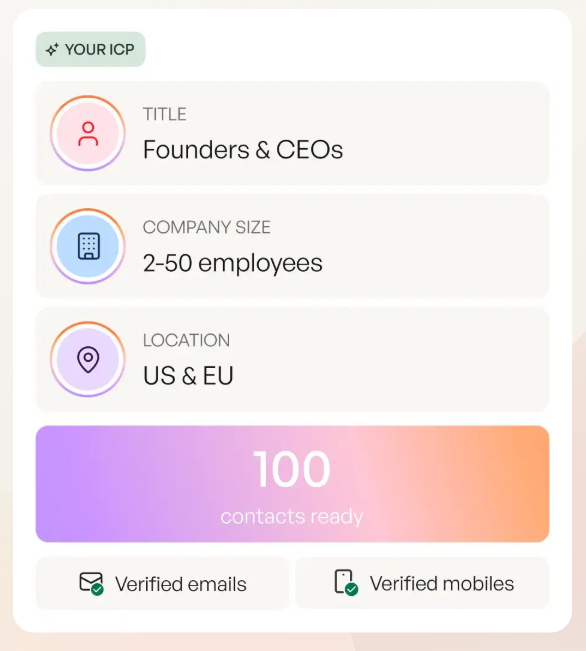
Prospeo covers 300M+ professional profiles with 98% email accuracy and a 7-day data refresh cycle. Find verified emails and direct dials, push them to your CRM, then send proposals through whichever tool you pick. If you're building lists at scale, start with lead enrichment and a clear Ideal Customer Profile so your reps aren't guessing.
If you're still filling pipelines manually, use proven sales prospecting techniques and keep a set of sales follow-up templates ready for the "opened but didn't reply" moments. And if deliverability is the real bottleneck, fix it with an Email Deliverability Guide before you blame the proposal tool.
Spending $2,940/year on a digital sales room but sending proposals to outdated emails? That's expensive silence. Prospeo's 7-day data refresh cycle ensures every contact in your CRM is current - for roughly $0.01 per verified email. Pair it with whichever tool wins your comparison.
Stop paying for deal rooms that reach dead inboxes.
FAQ
Can GetAccept replace PandaDoc?
Not without trade-offs. GetAccept excels at buyer engagement - video, tracking, SMS - while PandaDoc is built for document workflows like templates, CPQ, and inline payments. Replacing one with the other means losing core functionality in the area you didn't choose.
Does PandaDoc have a free plan?
Yes. PandaDoc's free tier costs $0/month with unlimited seats but caps you at 60 documents per year. The Launch plan at $9/month adds pay-as-you-go overage at $3 per additional document beyond that cap.
Which tool is better for teams under 5 reps?
PandaDoc Starter at $19/seat/mo (annual). GetAccept's Professional plan requires a minimum of 5 users, so teams of 2-3 reps either overpay for unused seats or get stuck on the limited eSign tier without deal rooms or engagement features.