

Gmail Sender Guidelines: What Changed and How to Comply in 2026
Gmail inbox placement dropped from 89.8% to 87.2% after bulk sender enforcement kicked in. Microsoft's Outlook properties cratered harder - 49.33% down to 26.77%.
The gmail sender guidelines themselves haven't changed since February 2024, but starting in late 2025, Gmail ramped up enforcement on non-compliant traffic: more rate limiting (4.7.x errors) and more hard failures (5.7.x rejections). That's a different problem entirely. The rules are the same. The consequences aren't.
What you need: SPF, DKIM, and DMARC aligned on your sending domain (see DMARC alignment). One-click unsubscribe headers for bulk sends. Spam complaint rate under 0.1% - never above 0.3%. Stricter enforcement applies to anyone sending 5,000+ messages per day to personal Gmail accounts.
Who Counts as a Bulk Sender?
Google's threshold is 5,000 messages to personal Gmail accounts in a single 24-hour period. Once you hit it, you're permanently classified as a bulk sender. There's no way to undo it.
The count aggregates across your root domain and all subdomains. If marketing@news.yourcompany.com sends 3,000 and sales@yourcompany.com sends 2,500, you've crossed the line. Plan accordingly.
For B2B teams: the 5,000/day threshold counts messages to personal @gmail.com and @googlemail.com accounts - not Google Workspace addresses. If your recipients are mostly on company domains hosted by Workspace, you won't hit the bulk sender threshold. But you still need authentication in order, because Microsoft and Yahoo have similar requirements for high-volume senders (more context in our email deliverability guide).
Complete Requirements
| Requirement | All Senders | Bulk (5,000+/day) |
|---|---|---|
| SPF or DKIM | ✅ Required | ✅ SPF + DKIM required |
| DMARC | Recommended | ✅ Required (p=none min) |
| TLS encryption | ✅ Required | ✅ Required |
| Forward/reverse DNS | ✅ Required | ✅ Required |
| RFC 5322 format | ✅ Required | ✅ Required |
| One-click unsubscribe | - | ✅ Required (RFC 8058) |
| Spam rate target | < 0.1% | < 0.1%, never 0.3% |
| Valid From/Reply-To | ✅ Required | ✅ Required |
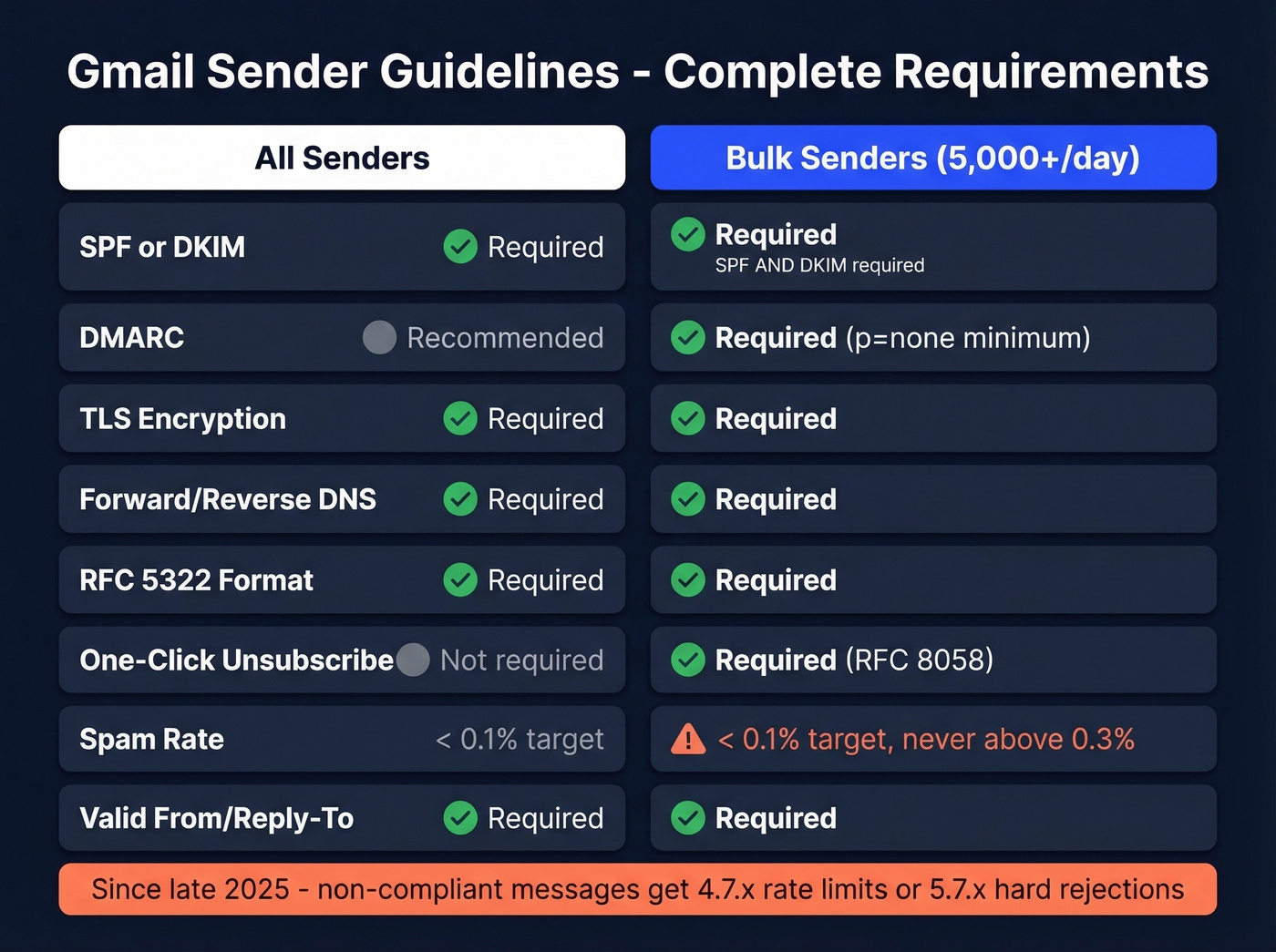
Since late 2025, non-compliant messages get rate-limited or rejected outright instead of quietly landing in spam. Gmail returns 4.7.x temporary failures or 5.7.x permanent rejections when enforcement hits.
SPF, DKIM, and DMARC Setup
This is the part most teams get wrong - not because it's conceptually hard, but because small DNS mistakes cascade into authentication failures weeks later. We've debugged dozens of these setups, and the root cause is almost always something boring: a duplicate record, a forgotten ESP, or a lookup limit nobody checked.
SPF Configuration
Add a single TXT record to your domain's DNS. For Google Workspace:
v=spf1 include:_spf.google.com ~all
For Microsoft 365:
v=spf1 [include:spf.protection.outlook.com](https://learn.microsoft.com/en-us/defender-office-365/email-authentication-spf-configure) ~all
If you use multiple sending services, combine them into one record:
v=spf1 include:_spf.google.com include:sendgrid.net ~all
You can't have two SPF records on the same domain - that causes a PermError and your entire SPF check fails. Watch the 10-DNS-lookup limit; every include: counts toward it. Verify with dig txt yourdomain.com (and keep a few SPF record examples handy when troubleshooting).
DKIM Signing
In Google Workspace, go to Admin Console > Apps > Gmail > Authenticate email. Generate the key and publish the google._domainkey TXT record. For Microsoft 365, enable DKIM in Defender and publish two CNAMEs for selector1 and selector2.
Use 2048-bit RSA keys. Rotate every 6-12 months, and keep the old key published for about 30 days after rotation so in-transit messages still verify (here’s a practical walkthrough on how to verify DKIM is working).
DMARC Policy
Start with a monitoring-only policy:
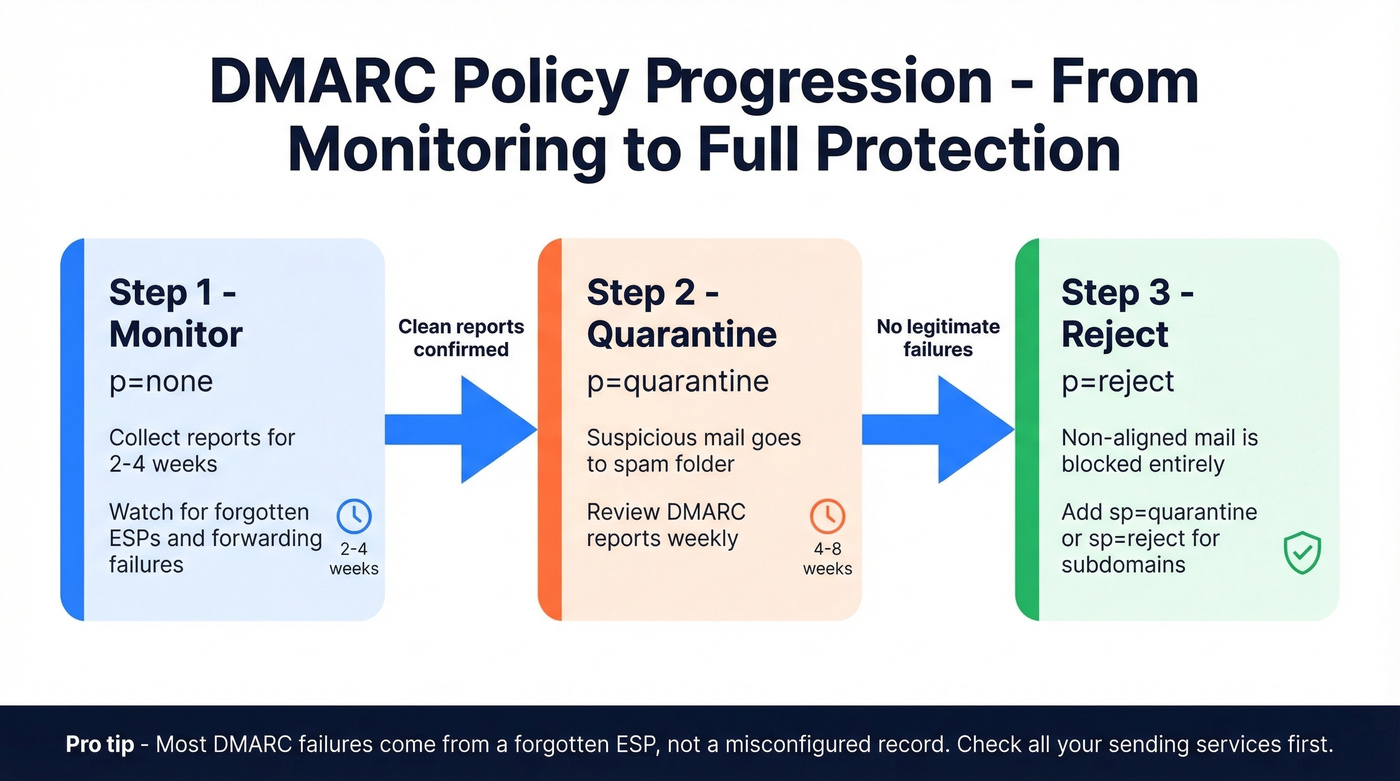
v=DMARC1; p=none; rua=mailto:dmarc-reports@yourdomain.com
Here's the thing - p=none is the bare minimum. Treat it as step one, not the finish line. In our experience, most DMARC failures trace back to a forgotten ESP, not a misconfigured record. After 2-4 weeks of clean reports, move to p=quarantine. After another 4-8 weeks, move to p=reject. Add sp=quarantine or sp=reject to cover subdomains explicitly.
Verify everything works by sending a test email to Gmail, clicking "Show original," and confirming SPF=pass, DKIM=pass, DMARC=pass. Google's sender requirements documentation covers troubleshooting in detail.

Perfect SPF, DKIM, and DMARC won't save you if you're sending to dead addresses. Bounces spike your spam rate, and Gmail's enforcement now means 5.7.x rejections instead of quiet spam folder placement. Prospeo's 5-step verification - with spam-trap removal and catch-all handling - keeps your bounce rate under control at 98% accuracy.
Fix your list before Gmail fixes it for you.
One-Click Unsubscribe (RFC 8058)
Bulk senders must include header-driven one-click unsubscribe - a footer link alone doesn't count. Add both headers:
List-Unsubscribe: <https://yourdomain.com/unsubscribe/token>

List-Unsubscribe-Post: List-Unsubscribe=One-Click
The URL must be HTTPS, wrapped in angle brackets, and respond to an HTTP POST by immediately unsubscribing the recipient. No confirmation pages, no redirect chains - just a 200 OK. The endpoint should be idempotent so a double POST doesn't throw an error.
GET requests must not trigger unsubscription because email security scanners prefetch links. And watch your DKIM signatures - middleware that modifies headers can break alignment and invalidate the whole setup.
Keep Spam Rate Below 0.1%
Target under 0.1%. Hit 0.3% and Gmail removes access to mitigation support. You'll need to maintain sub-0.3% for seven consecutive days to get it back.
Google Postmaster Tools is non-negotiable for monitoring. It now puts more emphasis on compliance checks for bulk sender requirements, not just reputation graphs. One quirk: you'll sometimes see a 100% spam rate on days with zero sends. That's a delayed-complaint artifact, not a real spike. Focus on the 30-day trend.
Let's be honest: full authentication gets you to the door. It doesn't get you in. Gmail also evaluates engagement signals - opens, clicks, replies. You can pass every SPF/DKIM/DMARC check and still land in spam if nobody interacts with your messages. Authentication is table stakes; relevance is the game (and it’s why teams obsess over subject lines that get opened).
The variable you actually control is list quality. Bad data causes bounces. Bounces spike your spam rate. Verify every address before you send. Prospeo's 5-step verification catches spam traps and dead addresses at 98% accuracy before they ever reach Gmail's scoring system - which is exactly the kind of preventive layer that keeps Postmaster Tools boring and uneventful (see bounce mechanics in our email bounce rate guide).
Beyond Gmail: Yahoo and Microsoft
Gmail isn't the only provider enforcing these rules.
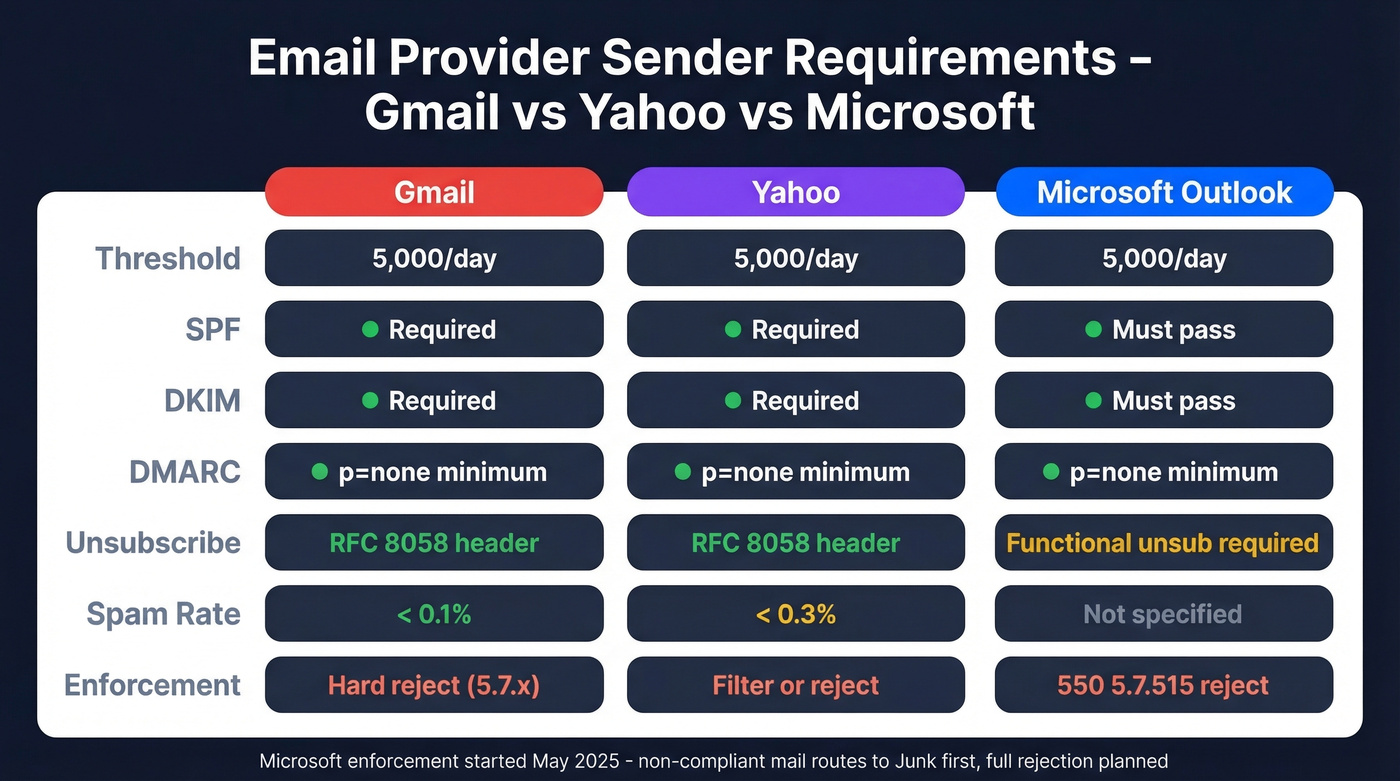
| Gmail | Yahoo | Microsoft (Outlook.com) | |
|---|---|---|---|
| Threshold | 5,000/day | 5,000/day | 5,000/day |
| SPF | Required | Required | Must pass |
| DKIM | Required | Required | Must pass |
| DMARC | p=none minimum | p=none minimum | p=none minimum |
| Unsubscribe | RFC 8058 header | RFC 8058 header | Functional unsub required |
| Spam rate | < 0.1% | < 0.3% | Not specified |
| Enforcement | Reject (5.7.x) | Filter/reject | 550; 5.7.515 |
Microsoft's enforcement started in May 2025 - non-compliant mail routes to Junk first, with full rejection planned. If you're forwarding mail through mailing lists, implement ARC (Authenticated Received Chain) to preserve authentication through the forwarding hop. Yahoo's requirements closely mirror Gmail's.
When Authentication Still Fails
You set up SPF, DKIM, and DMARC six months ago. Then you added a new ESP and suddenly 40% of your DMARC reports show alignment failures. We've seen this pattern repeatedly, and the consensus across email ops communities on Reddit is the same - these three scenarios account for almost every "I set everything up and it still fails" complaint.
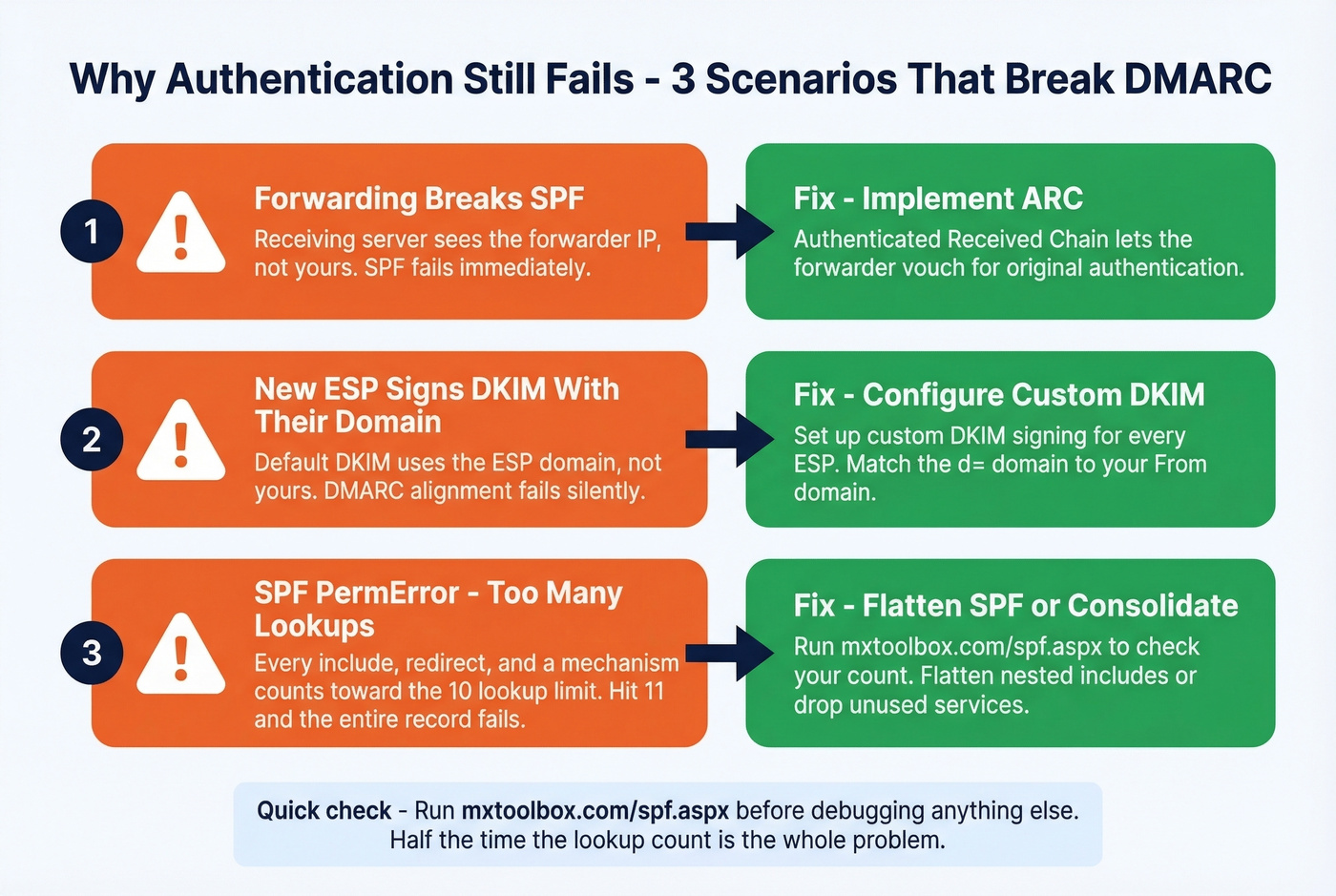
Forwarding breaks SPF. The receiving server sees the forwarder's IP, not yours. SPF fails. The fix is ARC, which lets the forwarding server vouch for the original authentication.
New ESP signs DKIM with their domain. Many platforms default to their own domain unless you configure custom DKIM. Your DMARC alignment fails because the DKIM domain doesn't match your From domain. Configure custom DKIM signing for every ESP you use - this one catches people constantly.
SPF PermError from too many lookups. Every include:, redirect, and a mechanism counts toward the 10-lookup limit. Add a third-party tool and you're at 12. The entire SPF record fails. Flatten your SPF or consolidate sending services.
Skip the debugging entirely if you haven't checked your lookup count recently. Run mxtoolbox.com/spf.aspx first - half the time that's the whole problem (and if you’re also scaling volume, review email velocity to avoid compounding issues).
You read the compliance checklist. You set up authentication. Now the variable that actually matters is list quality - and that's where most teams fail. Prospeo catches honeypots, spam traps, and invalid addresses before they ever touch Gmail's scoring system. At $0.01 per email, clean data costs less than one domain reputation rebuild.
Keep your Postmaster Tools dashboard boring and green.
FAQ
Is bulk sender classification permanent?
Yes. Once your domain sends 5,000+ messages to personal Gmail accounts in a single day - including subdomain traffic - Google permanently classifies you as a bulk sender, even if volume drops later.
What happens if I exceed 0.3% spam rate?
Gmail removes mitigation support immediately, and messages face rate limiting or outright rejection. You must stay below 0.3% for seven consecutive days to regain access - there's no shortcut or appeal process.
Have the sending rules changed since 2024?
The core requirements introduced in February 2024 remain identical - SPF, DKIM, DMARC, one-click unsubscribe, and spam rate thresholds. What changed is enforcement severity. Since late 2025, Gmail rejects non-compliant mail with hard 5.7.x failures instead of soft-filtering it to spam.
How do I confirm my authentication is working?
Send a test email to a personal Gmail account, click "Show original," and confirm SPF=pass, DKIM=pass, DMARC=pass. For ongoing monitoring, set up Google Postmaster Tools - it's the only way to see Gmail's real-time view of your domain's compliance and reputation.
How does bad contact data affect Gmail compliance?
Invalid addresses cause hard bounces, which directly inflate your spam complaint rate in Postmaster Tools. Exceeding 0.3% triggers enforcement. Verifying every email before sending prevents bounces from ever reaching Gmail's scoring system - that's the single highest-leverage thing you can do for deliverability outside of authentication itself.