


GMass Review 2026: Pricing, Pros, Cons, and the Risk Nobody Talks About
Most GMass reviews obsess over features. The real question: do you trust your primary Gmail account to a bulk sending tool - and does the cost justify the risk once you understand what each tier actually includes? Here's an honest look drawn from real user reviews and our own testing.
30-Second Verdict
GMass is the best Gmail-native cold email tool, but "Gmail-native" is both its superpower and its ceiling. It scores a 4.8/5 on G2 across 1,274 reviews - and a brutal 2.3/5 on Trustpilot from 35 reviews. That gap tells you everything. People who love it love the simplicity. People who hate it got burned by billing issues or account suspensions.
We've tested dozens of Gmail-based sending tools, and GMass is the most polished. But polish doesn't eliminate Gmail's hard limits. The tool has worked with 700,000+ accounts, and its users have collectively sent 9+ billion emails.
Skip the Standard plan. Premium at $39.95/mo is the real starting point because Standard doesn't include sequences or follow-ups - and follow-ups are where replies come from. (If you want a tighter framework for follow-ups, start with these sales follow-up templates.)
GMass Pricing Breakdown (2026)
GMass rolled out its third price increase in 10 years on January 1, 2026. The increases are modest, but there's a catch in how annual pricing displays.
Individual Plans
| Plan | Monthly | Annual Total | Annual Per Month |
|---|---|---|---|
| Standard | $29.95 (was $25) | $249 | $20.75 |
| Premium | $39.95 (was $35) | $349 | $29.08 |
| Professional | $59.95 (was $55) | $599 | $49.92 |
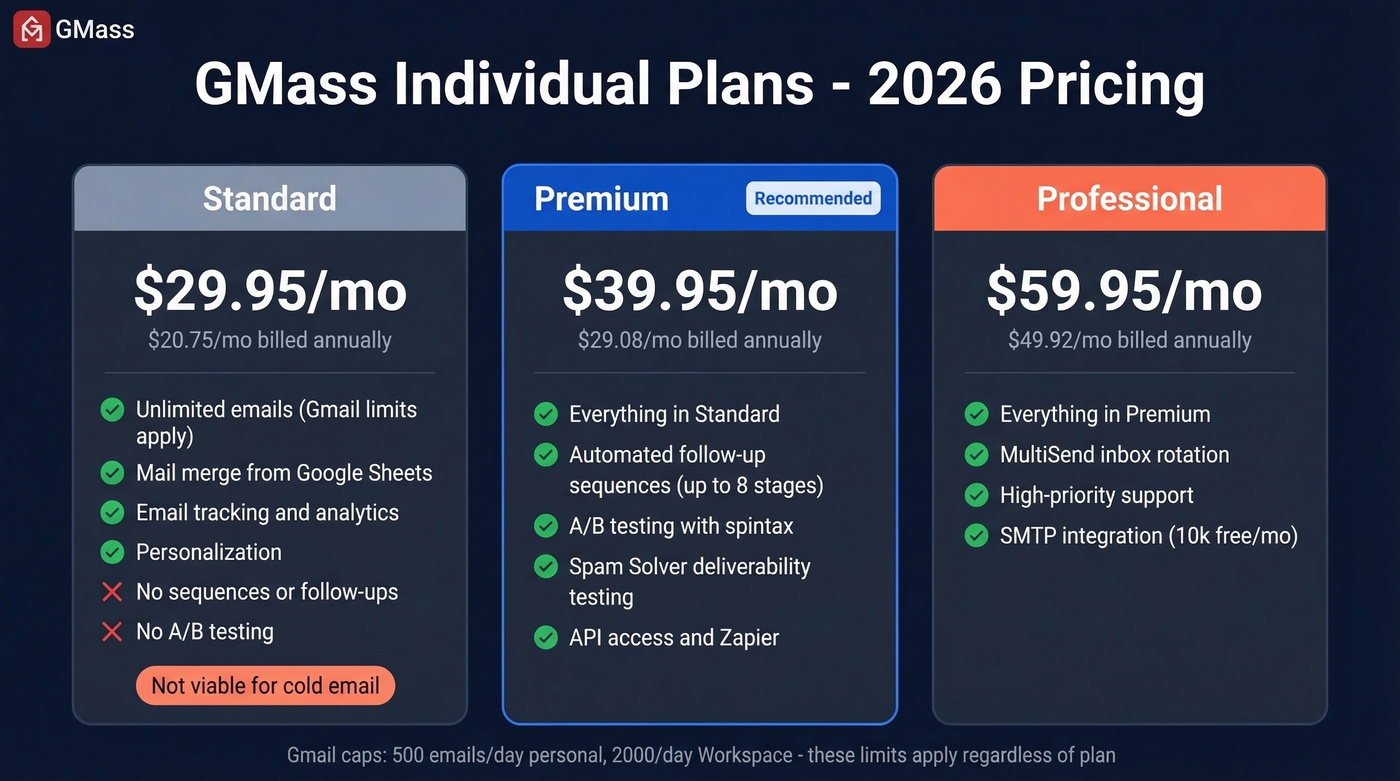
Watch the rounding: the pricing page shows rounded annual figures ($20/mo, $29/mo, $49/mo) on the toggle. The actual math from the annual totals works out slightly higher.
All plans advertise "unlimited emails" - technically true on GMass's side but misleading in practice. Gmail caps you at 500/day on personal accounts or 2,000/day on Workspace. More on that below. (For a deeper breakdown of safe sending speeds, see email velocity.)
Standard is missing sequences and follow-ups. That's a non-starter for cold email. Premium is the minimum viable plan.
Team Plans
| Team Size | Per User/Mo | Monthly Total |
|---|---|---|
| 5 users | $35.00 | $175 |
| 10 users | $29.50 | $295 |
| 25 users | $29.00 | $725 |
| 50 users | $27.00 | $1,350 |
| 100 users | $22.00 | $2,200 |
Team plans include all Professional-tier features - MultiSend inbox rotation, high-priority support, the works. If you're routing through SMTP, the first 10,000 emails/month are free, then $5 per 10,000 after that.
What Users Actually Like
The Gmail-native workflow is genuinely the draw. You compose campaigns in Gmail, personalize with Google Sheets merge fields, and track everything without leaving your inbox. No new UI to learn. No onboarding call. Just install the Chrome extension and go. (If you're building a more complete outbound stack, these SDR tools are a good place to compare options.)
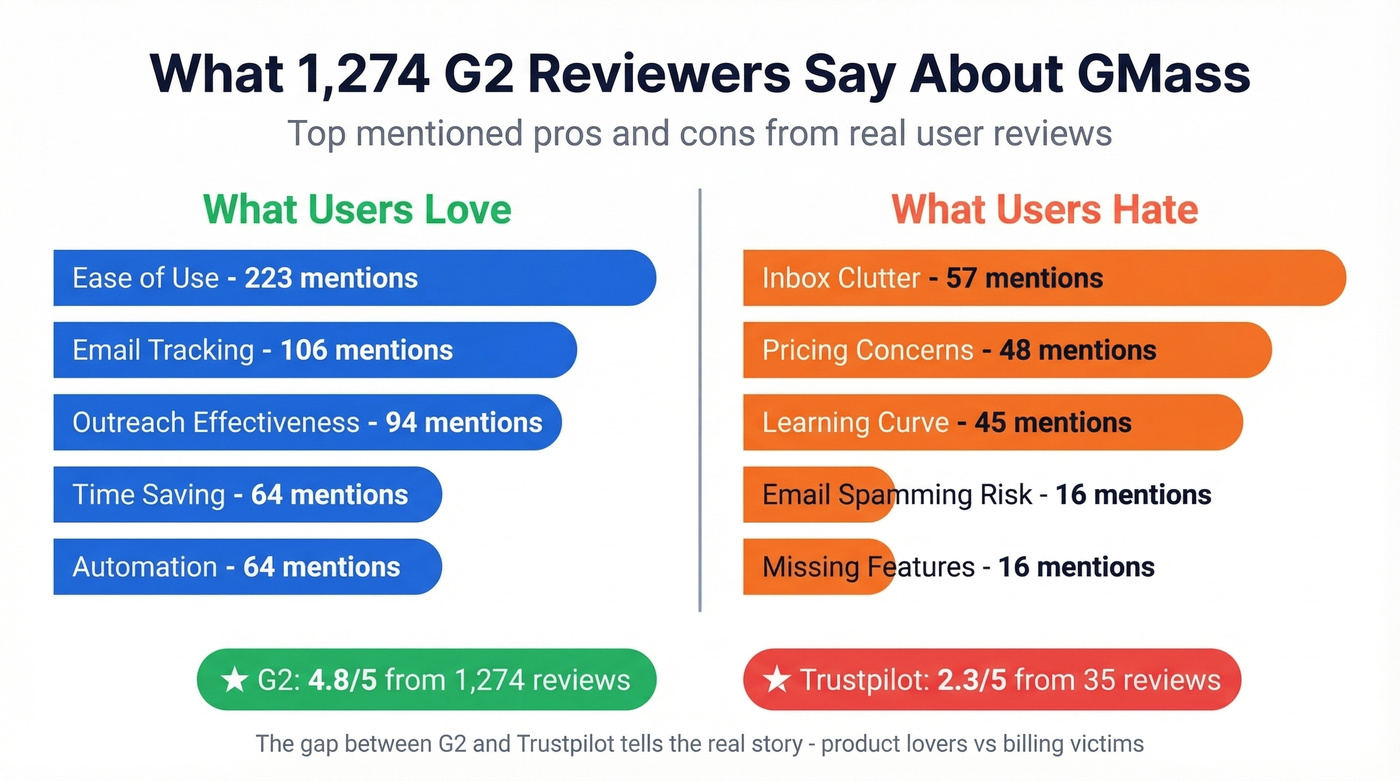
Across 1,274 G2 reviews, ease of use dominates with 223 mentions - more than double any other category. Email tracking follows at 106, outreach effectiveness at 94, time-saving at 64, and automation at 64.
GMass also packs in solid deliverability tooling. Spam Solver lets you test variations before sending, and their free inbox tester sends to 15 test addresses including Workspace accounts filtered by Barracuda, Mimecast, and Sophos. You can run up to 8 follow-up stages and A/B test via spintax with winner selection options. (For a broader playbook, see our email deliverability guide.)

GMass follow-ups only work when emails actually land. Bad data triggers bounces, bounces trigger suspensions, and suspensions kill your pipeline. Prospeo's 98% email accuracy and 5-step verification process keep bounce rates under 4% - exactly the hygiene Gmail demands.
Verify your list before GMass sends a single email.
What Users Actually Hate
The G2 cons paint a different picture: inbox clutter leads complaints with 57 mentions, followed by pricing concerns at 48 and learning curve at 45. Email spamming risk and missing features each clock 16 mentions.
Those are annoyances. The real risks are structural.
Gmail Limits Aren't "Unlimited"
"All plans include unlimited emails" is the headline on GMass's pricing page. In reality, Gmail caps you at 500/day and 2,000/day on Workspace. Those are ceilings, not guarantees - Google throttles based on account age, bounce rate, conversation history, and content quality. A brand-new Gmail account might max out at roughly 10 emails. (If you're trying to avoid getting blacklisted, read best way to send bulk email without getting blacklisted.)
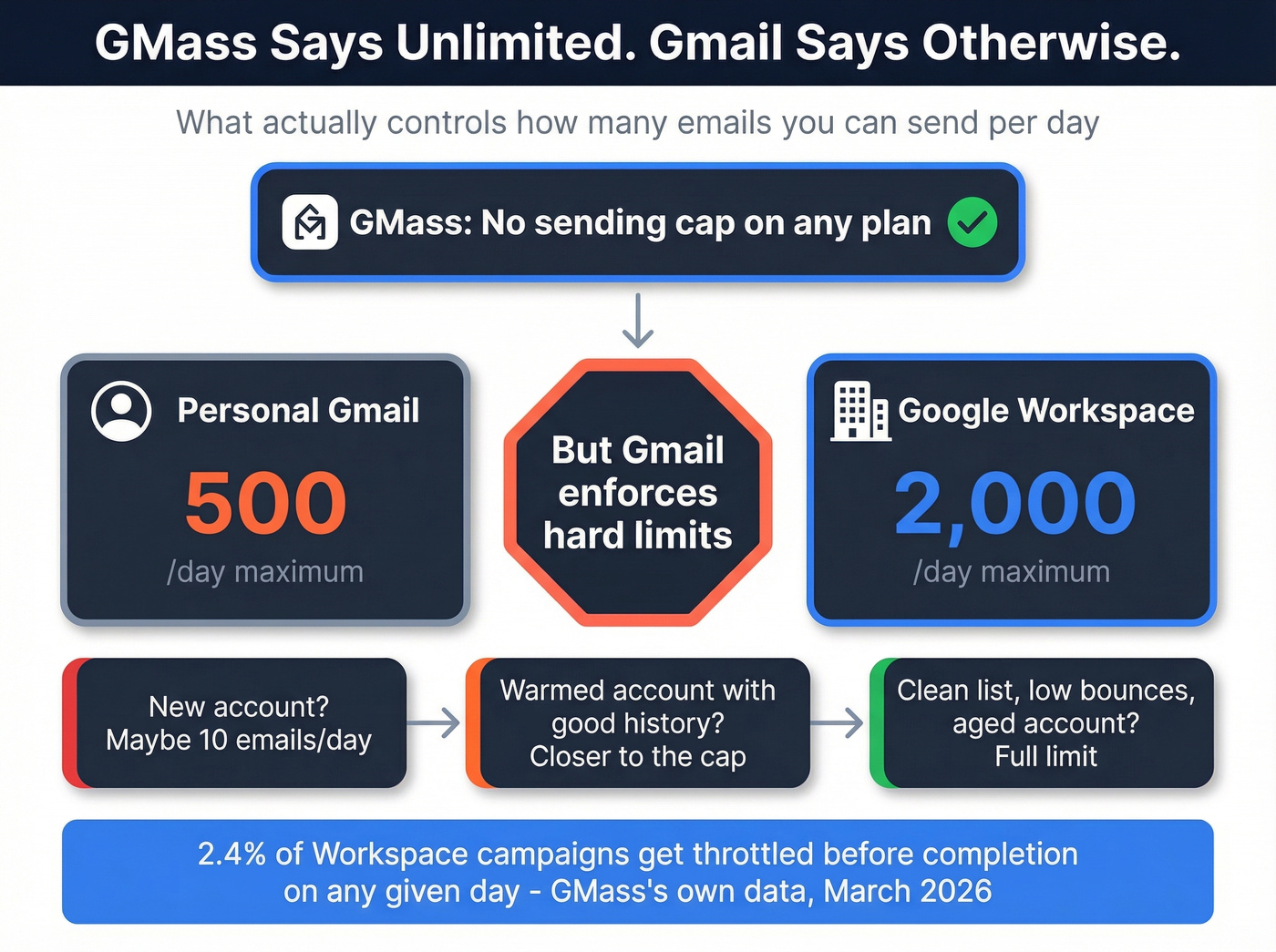
GMass publishes live daily stats that make this concrete: on March 22, 2026, 15,298 Workspace campaigns were sent and 374 hit limits prematurely. That's 2.4% of Workspace campaigns getting throttled before completion.
Suspension Risk Is Real
Here's the thing most reviews won't say plainly: GMass itself acknowledges increased account suspensions and says they can't help re-activate suspended accounts. They can't skirt Gmail's rules or give your account more sending ability than Google allows. (If you need the technical side of staying compliant, start with DMARC alignment.)
The community anecdotes are worse. One user on r/coldemail reported that GMass sent 480 emails in a single batch instead of drip-feeding them, leading to a ban. A Trustpilot reviewer says 59 Gmail accounts got restricted after using MultiSend. These are individual cases, but the pattern repeats across forums and review sites.
Bounces Start the Cascade
High bounce rates trigger throttling, which triggers suspension. GMass has a built-in email verifier, but it isn't as purpose-built as a dedicated verification platform. (If you want benchmarks and fixes, see email bounce rate.)
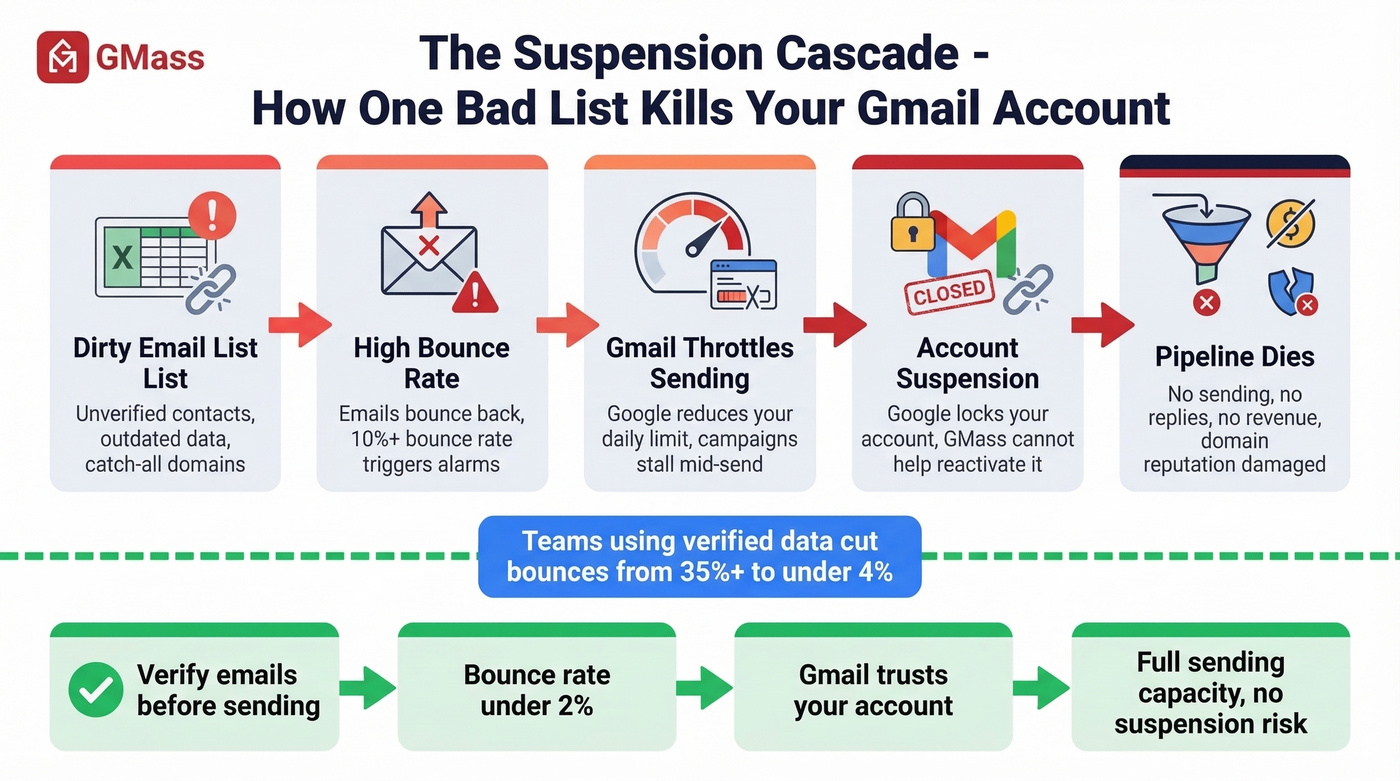
In our experience, lists verified before sending consistently stay under 2% bounce rate - that's the difference between inbox placement and a suspension notice. We've seen teams using Prospeo's verification (98% accuracy, 7-day data refresh) cut bounce rates from 35%+ down to under 4%, which is exactly the kind of hygiene that keeps Gmail accounts alive.

The Billing Problem
That 2.3/5 Trustpilot score isn't about the product - it's about billing and support. The complaints follow a pattern: a July 2024 reviewer reported continued charges after cancellation, a November 2024 reviewer was "charged thrice in a day," and a December 2025 reviewer found it "impossible to get through to any support department."
Small sample? Yes, 35 reviews. But when nearly every negative review hits the same theme, that's a signal worth paying attention to.
Who GMass Is (and Isn't) For
Hot take: If your average deal size is under $5k and you're sending fewer than 300 emails a day, GMass is probably the smartest tool you can buy. The moment you need scale beyond Gmail's walls, it becomes the wrong tool entirely - no matter how good the UX is. (If you're building a more repeatable outbound motion, these sales prospecting techniques help.)
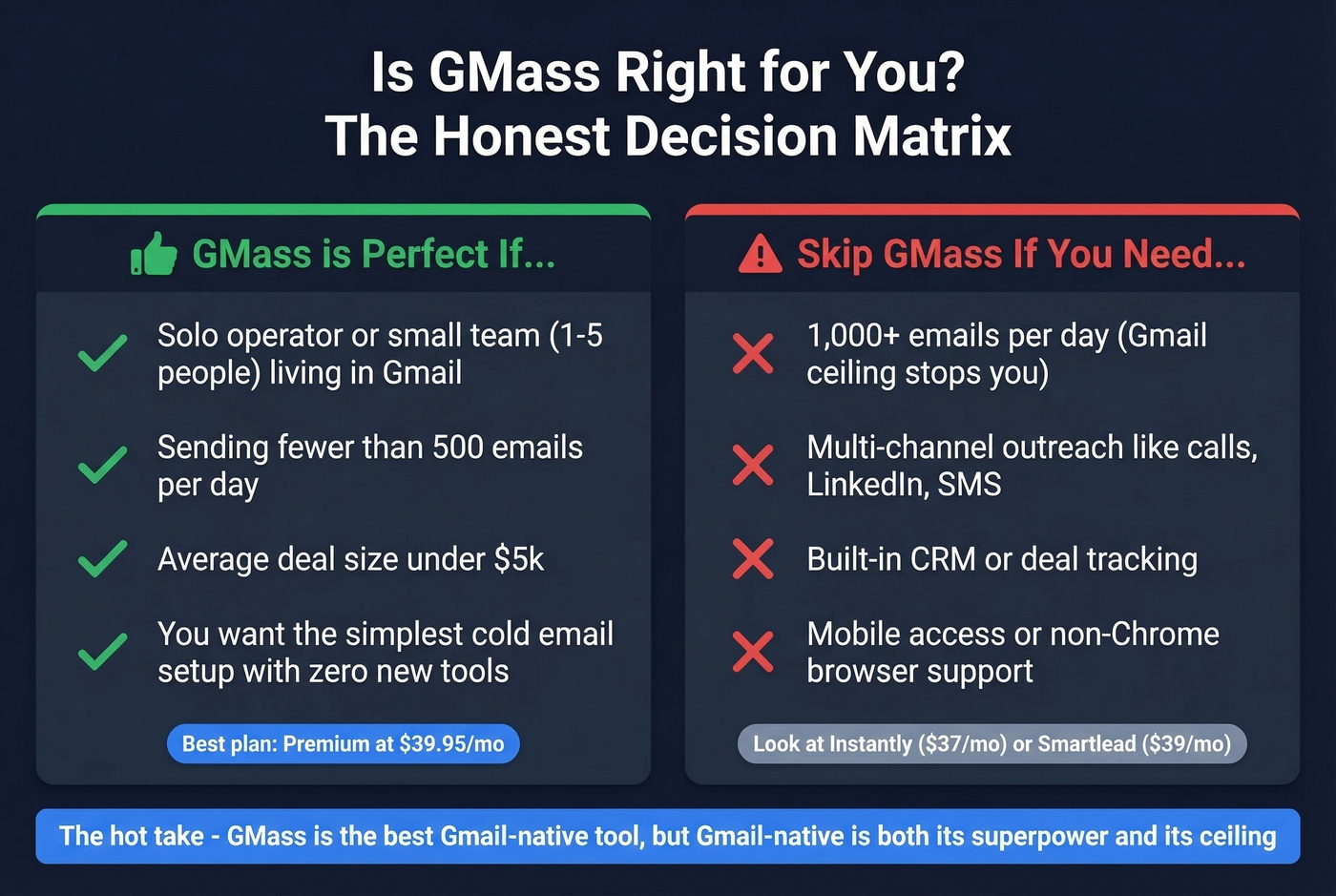
Use GMass if you're:
- A solo operator or small team living in Gmail
- Sending fewer than 500 emails/day
- Looking for the simplest possible cold email setup with zero new tools to learn
Skip GMass if you need:
- 1,000+ emails/day (you'll hit Gmail's ceiling immediately)
- Multi-channel outreach - calls, social touches, SMS
- Built-in CRM or deal tracking
- Mobile or non-Chrome access
For teams outgrowing Gmail's limits, look at Instantly (from $37/mo, 4.8/5 on G2 with 3,496 reviews) or Smartlead (from $39/mo, 4.6/5 on G2 with 213 reviews). Both offer multi-inbox rotation natively without Gmail's sending caps. (If you're evaluating other senders, compare against our list of AI bulk email senders.)
Frequently Asked Questions
Is GMass worth it for cold email in 2026?
For solo senders doing under 300 emails/day from Gmail, GMass at $39.95/mo (Premium) is the most cost-effective option available. It falls short once you need multi-inbox rotation at scale, multi-channel sequences, or sending volumes above Gmail's 2,000/day Workspace cap.
Can GMass really send unlimited emails?
No. GMass itself imposes no cap, but Gmail enforces hard limits: 500/day on personal accounts, 2,000/day on Google Workspace. GMass's own data shows 2.4% of Workspace campaigns get throttled before completion on any given day.
How do I avoid getting suspended using GMass?
Keep bounce rates under 2% by verifying every email before sending. Warm your account gradually, space sends across the day, and avoid spammy content triggers. Let's be honest - most suspensions we've seen trace back to dirty lists, not the tool itself.
What are the best GMass alternatives for higher volume?
Instantly ($37/mo) and Smartlead ($39/mo) both support multi-inbox rotation and bypass Gmail's per-account sending caps. For teams needing verified contact data alongside outreach, pairing a dedicated sending tool with a data platform like Prospeo gives you cleaner lists and higher deliverability than GMass's built-in verifier alone.
Gmail suspensions start with high bounce rates. Teams using Prospeo's 7-day refreshed data cut bounces from 35%+ to under 4% and tripled their connect rates. At $0.01 per verified email, protecting your sending domain costs less than one day of downtime.
One cent per email beats one suspended Gmail account.