

The Only Go-to-Market Strategy Template for Excel You Actually Need
Your CEO wants the GTM plan by Friday. You've got the strategy deck, but no execution plan with dates, owners, or accountability. Most "go-to-market strategy template Excel" pages want your email before you can even see what's inside. That's not a template - it's a lead magnet.
Here's what you actually need: one workbook, eight tabs, built in Excel, updated weekly until launch day. Companies with a defined launch process hit 63% success rates versus 53% without one. McKinsey estimates that for every successful product launch, about four fail. The difference isn't talent or budget. It's a plan with dates and owners.
As one PMM on r/ProductMarketing put it, they needed an actionable GTM plan with dates, not just strategy bullets. That's exactly what this workbook delivers.
What Your GTM Excel Template Needs
Eight tabs, each with a specific job. Build them in this order - each one feeds the next, following a natural flow: analyze your market, design your approach, then deliver the plan.
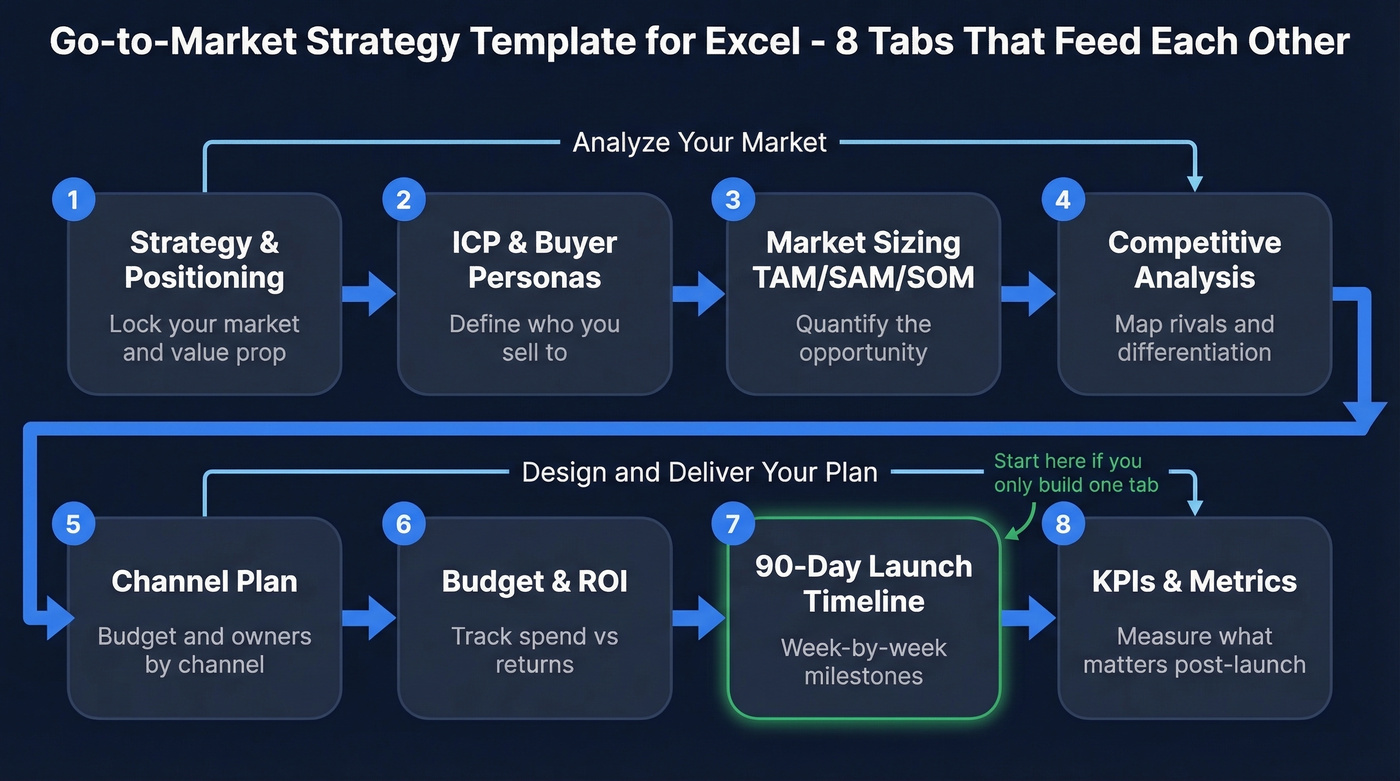
| Tab | Purpose |
|---|---|
| Strategy & Positioning | Lock your market, value prop, and first-mover segment |
| ICP & Buyer Personas | Define exactly who you're selling to |
| Market Sizing (TAM/SAM/SOM) | Quantify the opportunity |
| Competitive Analysis | Map rivals and your differentiation |
| Channel Plan | Allocate budget and owners by channel |
| Budget & ROI | Track spend against expected returns |
| 90-Day Launch Timeline | Week-by-week milestones with owners |
| KPIs & Metrics | Measure what matters post-launch |
Why build your own instead of downloading a generic template? Most results hand you a pre-filled spreadsheet designed for someone else's workflow. A build-your-own workbook forces your team to think through each tab - and you'll actually use it past week one. If you prefer working in a different format, this same structure translates into a go-to-market strategy doc or Word file. The tab logic stays identical.
Tab-by-Tab Walkthrough
Strategy & Positioning
This tab answers the five strategic questions every GTM plan hinges on. Three columns - Answer, Evidence, Owner - with these row headers:
- What segment do we target first?
- What niche inside that segment?
- How will we position the product?
- What growth channels will we use?
- How will we get our first customers?
The evidence column matters most. A link to a customer interview or competitor pricing page counts. The point is backing gut feelings with something tangible.
ICP & Buyer Personas
Columns: Segment, Job Title, Pain Points, Buying Triggers, Decision Criteria. One row per persona. A typical B2B purchase involves 6-10 decision-makers, so plan for 3-5 rows minimum.
Example row: Mid-market SaaS / VP of Revenue Operations / Manual enrichment eating 10+ hours per week / Just hired third SDR / Needs CRM integration and data accuracy proof.
This is the tab that pays dividends later. Every channel decision, every piece of messaging, every outbound sequence should trace back to a row here. If it doesn't, you're guessing.
Market Sizing (TAM/SAM/SOM)
Three formulas, three cells:
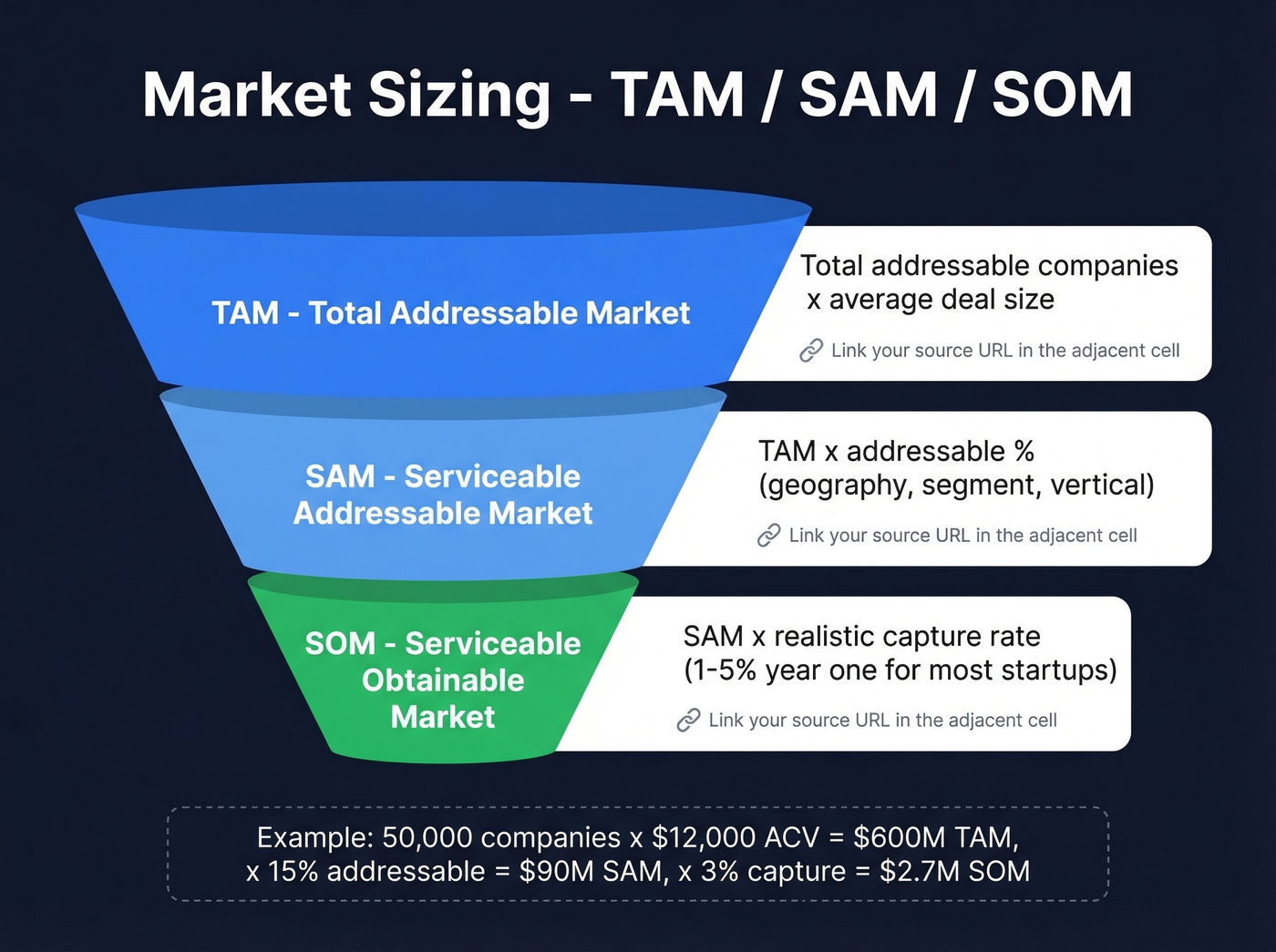
- TAM = Total addressable companies x average deal size
- SAM = TAM x addressable percentage by geography, segment, and vertical
- SOM = SAM x realistic capture rate - 1-5% in year one for most startups
Link each input cell to your source. If your TAM comes from a Gartner report, paste the URL in an adjacent cell. Investors will ask.
Competitive Analysis
SWOT grid format. Columns: Competitor, Strengths, Weaknesses, Their Positioning, Our Differentiation. Four to six competitors is the sweet spot - more than that and the tab becomes noise.
Here's the real test: if you can't fill the "Our Differentiation" column with something specific for each competitor, your positioning tab needs more work. Go back and fix it before moving forward.
Channel Plan
Columns: Channel, Budget %, Owner, KPI, Launch Week. Default splits to adjust based on your motion: 30-50% paid demand gen, 20-30% content and creative, 10-20% events and partnerships.
Every channel needs a named owner and a single KPI. "Brand awareness" isn't a KPI. "Demo requests from paid social" is.
Budget & ROI
Columns: Line Item, Estimated Cost, Actual Cost, Expected ROI. Add a total row with =SUM() formulas. We've watched teams skip this tab and discover they're 40% over budget at the worst possible moment - two weeks before launch, when there's no room to course-correct. Update it weekly once spend starts flowing.
90-Day Launch Timeline
The most important tab. If you only build one, build this.
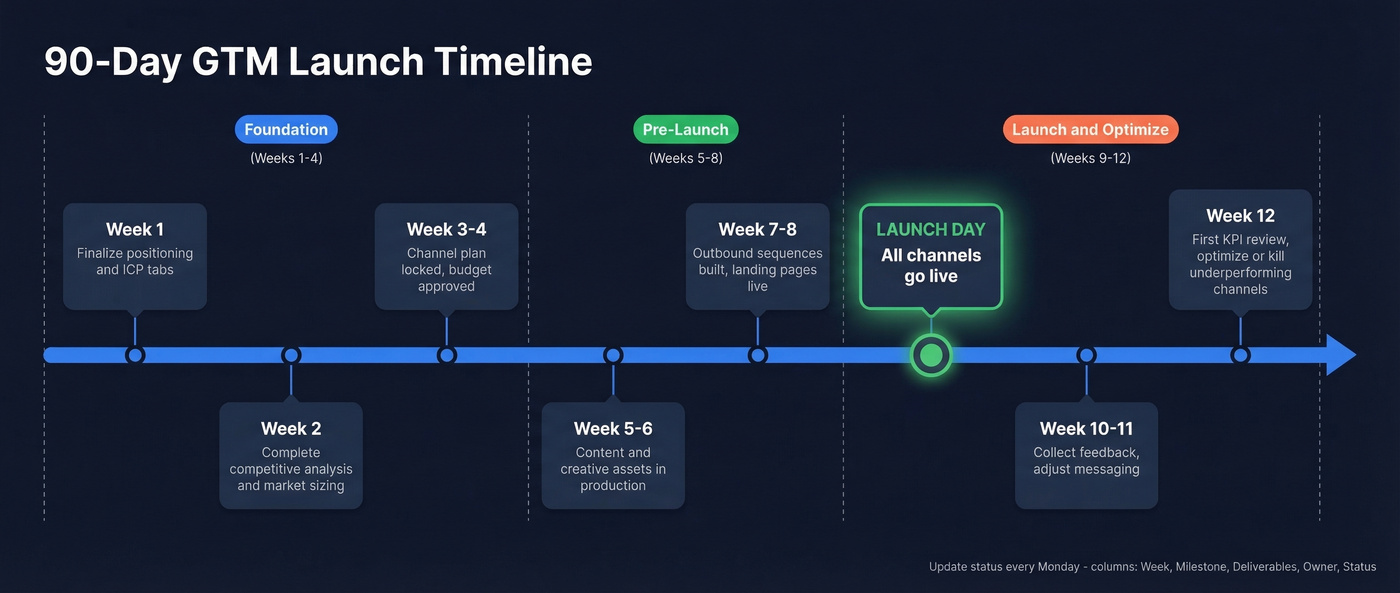
Week-by-week rows. Columns: Week, Milestone, Deliverables, Owner, Status. A 90-day framing works for most B2B launches - long enough to be thorough, short enough to maintain urgency. Update status every Monday.
Let's be honest: a GTM plan that sits untouched after week two isn't a plan. It's a wish list.
KPIs & Metrics
Split this tab based on your motion. Product-led growth: activation rate, free-to-paid conversion, time-to-value. Sales-led: SQL volume, demo-to-close rate, CAC, and pipeline velocity. Add Target, Actual, and Delta columns. Review weekly for the first 90 days, then shift to monthly.

Your ICP tab defines who to target. Prospeo's 300M+ profiles with 30+ filters - buyer intent, technographics, headcount growth, funding - turn those persona rows into verified contact lists in minutes. 98% email accuracy means your launch outbound won't torch your domain.
Turn your ICP spreadsheet into a pipeline the same week you launch.
Mistakes That Kill Launches
Fewer than 33% of companies have a formal GTM playbook. IDC estimates 10%+ of all revenue is lost in the GTM phase alone. We've seen the same five problems over and over:
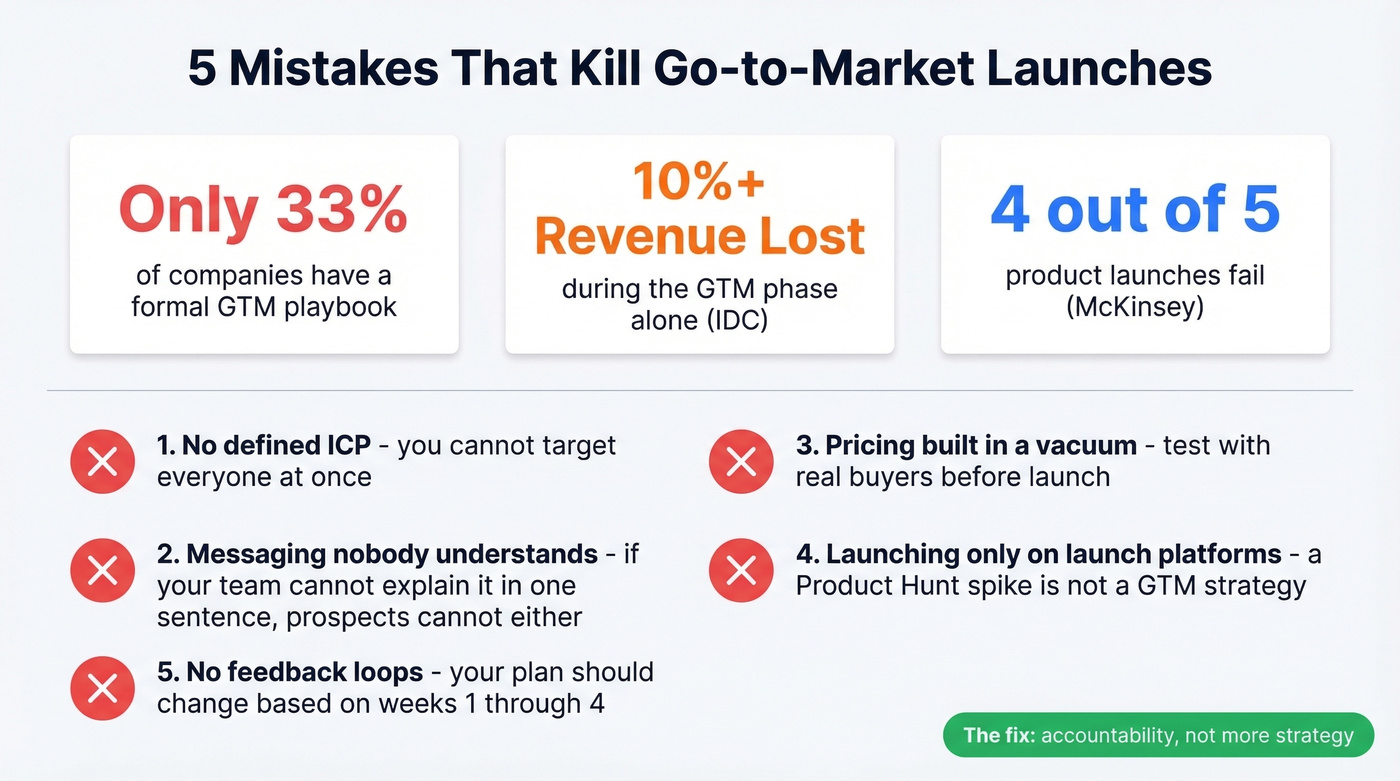
- No defined ICP. You can't target everyone. Pick a segment, win it, then expand. (If you need a starting point, use an ICP scoring rubric.)
- Messaging nobody understands. If your team can't explain what you sell in one sentence, prospects can't either. (Borrow a few elevator pitches to pressure-test clarity.)
- Pricing built in a vacuum. Test pricing with real buyers before launch, not after.
- Launching only on launch platforms. A Product Hunt spike isn't a GTM strategy.
- No feedback loops. Your plan should change based on what you learn in weeks 1-4.
Most GTM failures aren't strategy failures - they're accountability failures. The plan existed. Nobody owned the rows.
When Excel Isn't Enough
Stay with Excel if you're a team of 2-5 running a single launch and you want full control over structure. Switch to a PM tool once you're running multiple concurrent launches or your team exceeds 5-6 people. Lost updates and overwritten changes are the top complaints about spreadsheet-based tracking on Reddit - and for good reason.
Even after upgrading, keep the Excel workbook as your strategic planning layer. PM tools handle tasks well. They're terrible for freeform analysis like TAM/SAM/SOM and competitive mapping. Some teams keep a companion document in Word or Google Docs alongside their spreadsheet: the doc captures the narrative rationale while Excel handles the numbers and timelines.
From Plan to First Outbound
Your ICP tab tells you exactly who to reach - job titles, industries, company size, buying triggers. But a spreadsheet can't send emails. The gap between "we know our target buyer" and "we have 500 verified contacts in a sequence" is where most launches stall.
If you're building lists manually, it helps to understand the underlying firmographic and technographic data you actually need to filter on.
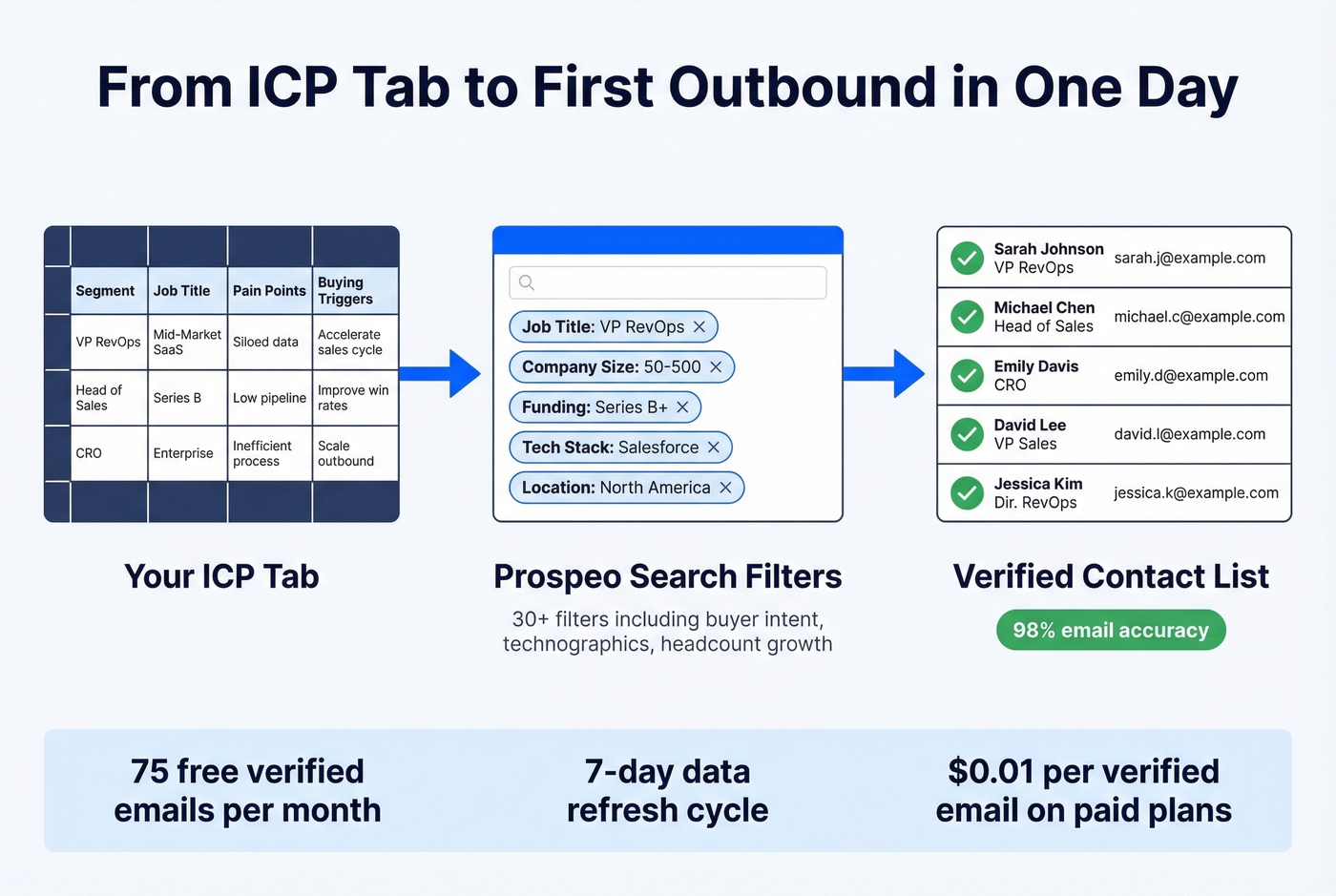
This is where that ICP work pays off. Take those criteria and use Prospeo's 30+ search filters to build a prospect list matching those exact parameters - buyer intent, technographics, headcount growth, the works. With 98% email accuracy and a 7-day data refresh cycle, you're launching outbound on fresh data instead of stale lists scraped six weeks ago. The free tier gives you 75 verified emails per month, enough to validate your first segment before committing budget.
Once you have contacts, plug them into a simple B2B cold email sequence and track replies by persona.
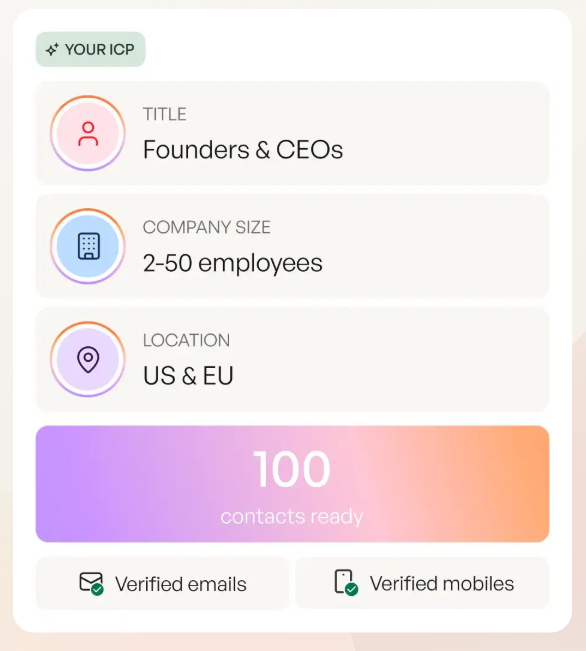
A 90-day launch timeline without contact data is just a calendar. Prospeo gives you verified emails at $0.01 each and 125M+ direct dials so your channel plan tab actually converts. Teams using Prospeo book 35% more meetings than Apollo users.
Stop planning outbound. Start sending it.
FAQ
What should a go-to-market strategy template for Excel include?
Eight tabs covering positioning, ICP, market sizing, competitive analysis, channel plan, budget, a 90-day launch timeline, and KPIs. Each tab feeds the next so your workbook functions as a single connected system, not isolated spreadsheets.
Can I adapt this structure into a document format?
Yes. The eight-tab framework translates directly into an eight-section document. Export each tab as a section in Google Docs or Word, keeping the same row headers as subheadings and column data as bullet points beneath them.
How long does it take to build a GTM plan in Excel?
A focused team completes the 8-tab workbook in one to two weeks. PMMs typically spend 50+ hours per launch - this structured template cuts that by roughly 40% because each tab has predefined columns and row headers ready to fill.
How do I turn my ICP tab into a real prospect list?
Export your ICP criteria - job titles, industries, company size - then use a B2B data platform to find verified emails matching those filters. Prospeo's search filters map directly to typical ICP fields, and the free tier lets you test before spending.