


Guru Pricing, Reviews, Pros and Cons (2026)
You open Guru's pricing page and the $25/seat number looks reasonable. Then you hit the catch: Guru requires a 10-seat minimum. Your 6-person team just went from $150/month to $250/month - paying for four ghost seats nobody will use.
That minimum changes the math for a lot of teams. Here's what the pricing actually looks like, what 2,378 G2 reviewers say about daily use, and where Guru falls short.
Quick Verdict
Guru is a solid AI knowledge management tool for mid-size sales and support teams living in Slack and Teams. But the 10-seat floor means you're paying $250/month minimum, not the $25/seat headline price. Search quality degrades as content scales - and G2 feedback is consistent on that point. Best for 50-500 person teams with a dedicated content owner.
Guru Pricing Breakdown
Some review sites still list Guru at $15/seat. That's outdated. The official pricing page shows plans starting at $25/seat/month on annual billing, or $30/seat/month if you go monthly.
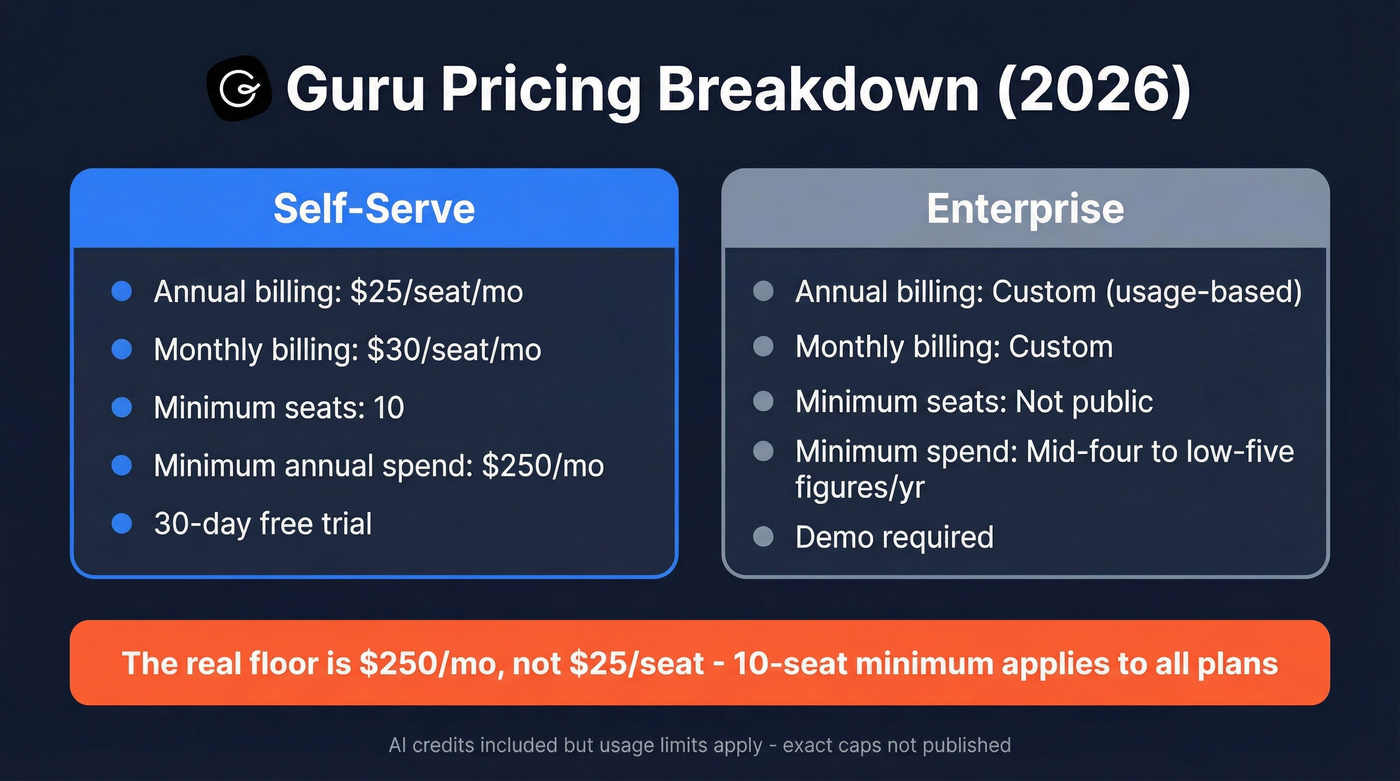
| Self-Serve | Enterprise | |
|---|---|---|
| Annual billing | $25/seat/mo | Custom (usage-based) |
| Monthly billing | $30/seat/mo | Custom |
| Minimum seats | 10 | Not public |
| Minimum spend | $250-$300/mo | Mid-four to low-five figures/yr |
| Free trial | 30 days | Demo required |
All plans include Guru's core AI and knowledge governance bundle: AI Knowledge Agents, knowledge quality automation, enterprise search, and 100+ integrations. Enterprise mainly changes the packaging for scale with custom pricing and deeper governance controls.
AI credits are included, but usage limits apply. Guru doesn't publish exact per-seat credit caps.
What the Pricing Page Hides
Three things you won't find on that page.
The 10-seat minimum hits small teams hard. A 6-person team pays for 10 seats. That's $100/month in wasted spend on annual billing, and there's no way around it.
Guru is built for internal knowledge sharing, not public docs. Need a customer-facing documentation portal or public help center? You'll need a second tool.
Enterprise pricing is a black box. "Usage-based" sounds flexible, but without published tiers or credit rates, you're negotiating blind. We've heard from teams that the jump from self-serve to enterprise can be jarring.

Paying $250/month for knowledge management but still watching reps chase bad contact data? Prospeo delivers 98% email accuracy and 125M+ verified mobile numbers at ~$0.01/email - no 10-seat minimums, no contracts, no sales calls required.
Stop saving time on answers just to waste it on bounced emails.
What 2,378 Users Actually Say
The Pros
Guru earns a 4.7/5 on G2 from 2,378 reviews and a 4.8/5 on Capterra from 639 reviews. Those are strong numbers for a knowledge management tool.
Ease of use dominates the praise - 742 mentions on G2. Teams highlight how fast they get answers without leaving Slack, Teams, or their CRM. The integration ecosystem draws 418 mentions, with native connections to Salesforce, Zendesk, and the usual suspects. Guru's verification workflow shows up heavily too (287 mentions), and it genuinely helps reduce knowledge rot by forcing regular content reviews.
The Cons
Search is Guru's weak spot, and the data is unambiguous.
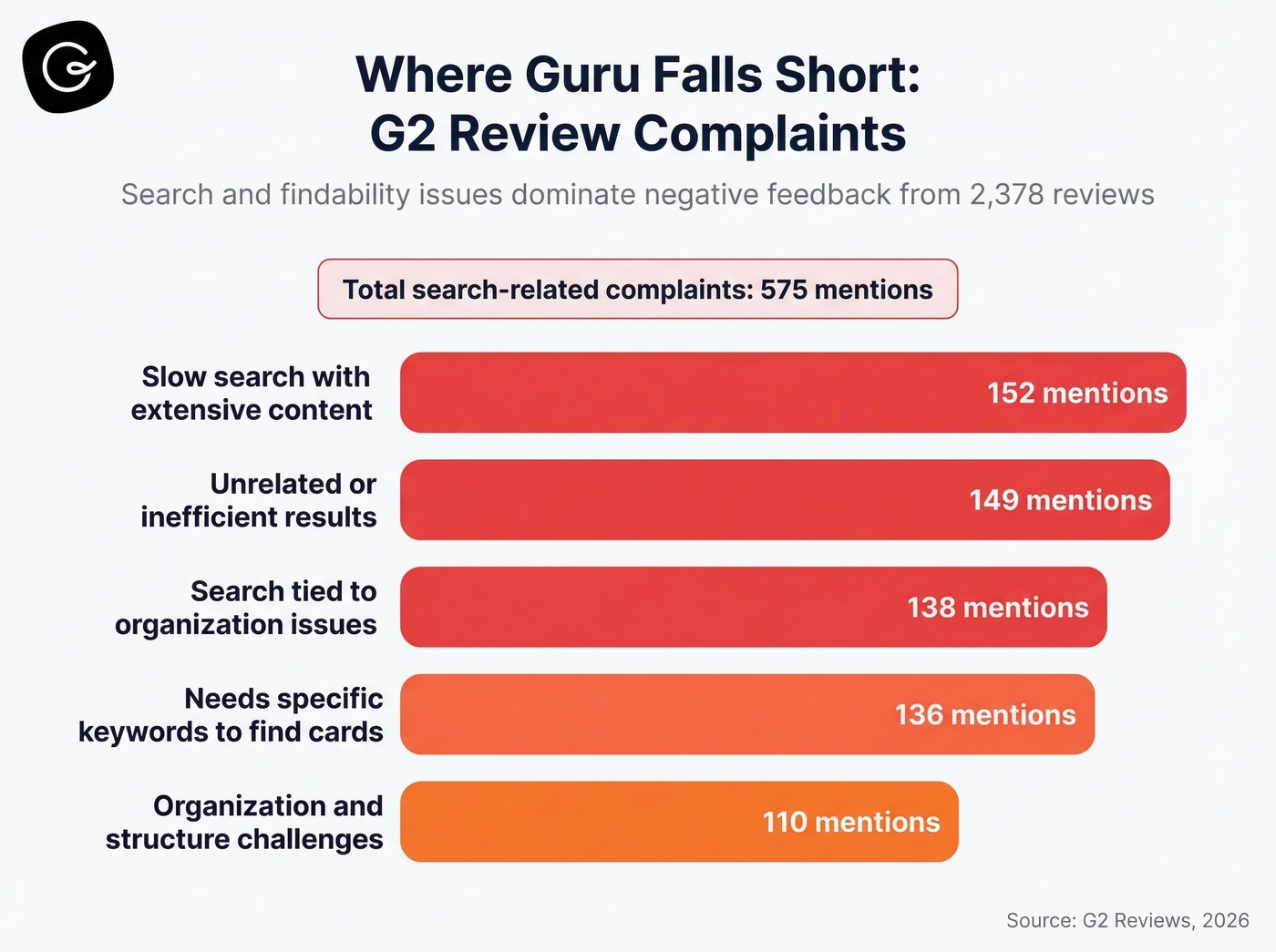
On G2, search and findability complaints add up to 575 mentions across four categories: slow search results with extensive content (152), unrelated or inefficient results (149), search issues tied to organization challenges (138), and needing specific keywords to find cards (136). Here's what that looks like in practice: your team has hundreds of cards, agents complain search takes too long, and the workaround becomes "just ask Sarah" - defeating the entire purpose of a knowledge management tool.

Organization challenges compound the problem (110 mentions on G2). One Capterra reviewer described folders and card linking as "clunky," which tracks with what we've heard from sales ops teams evaluating the tool.
There's also a subtle operational cost nobody warns you about. Guru's verification workflow requires someone to actually verify cards on schedule. Without a dedicated content owner, verification slips. And if someone deletes an article? Nothing comes up in search. No redirect, no notice. The knowledge just vanishes.
Is Guru Worth It?
IDC and McKinsey research puts the number at 19% - that's how much time knowledge workers spend just searching for information. Guru's own customer data shows a 12% reduction in handle time, 35% increase in calls per hour, QA scores hitting 93%, and teams avoiding a typical 15% seasonal headcount increase.
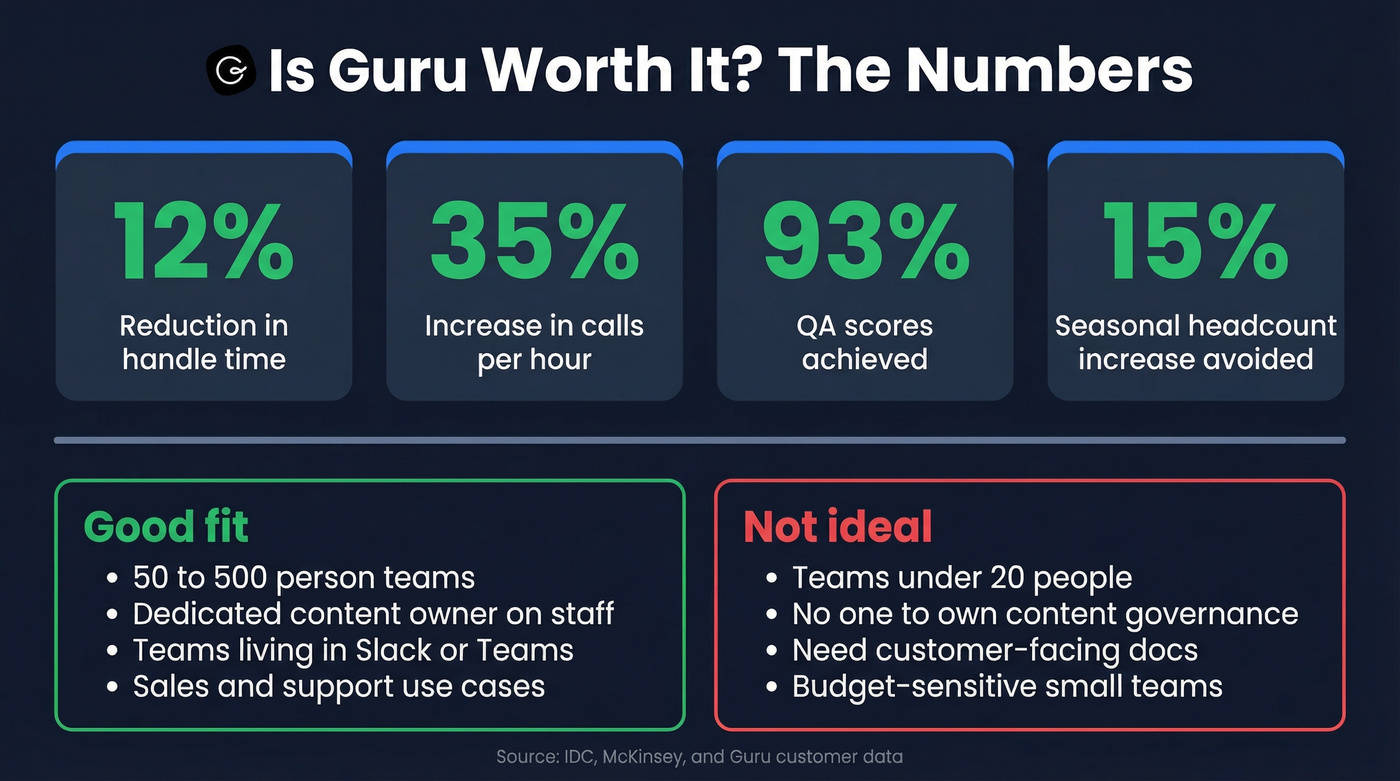
For mid-size teams (50-500 people) with someone owning content governance, Guru delivers real ROI. For teams under 20, the 10-seat minimum and organizational overhead make it a harder sell. Skip it entirely if you need external documentation.
Let's be honest, though: knowledge management is only half the efficiency equation. Guru keeps internal answers trustworthy, but if your reps are spending the time they saved chasing bounced emails and dead phone numbers, you haven't actually fixed the problem. Prospeo handles that side - 98% email accuracy and 125M+ verified mobiles on a 7-day refresh cycle, with a free tier to test it.
If you want to pressure-test the rest of your outbound stack, start with data enrichment and a clean sales prospecting database before you scale volume.
Guru cuts the time reps spend searching for answers. Prospeo cuts the time they spend hunting for accurate contact data. With a 7-day refresh cycle and 30+ search filters, your team reaches real decision-makers - not outdated inboxes.
Give your reps verified emails and direct dials, not dead ends.
Alternatives Worth Considering
If Guru's pricing or limitations don't fit, here's the shortlist:
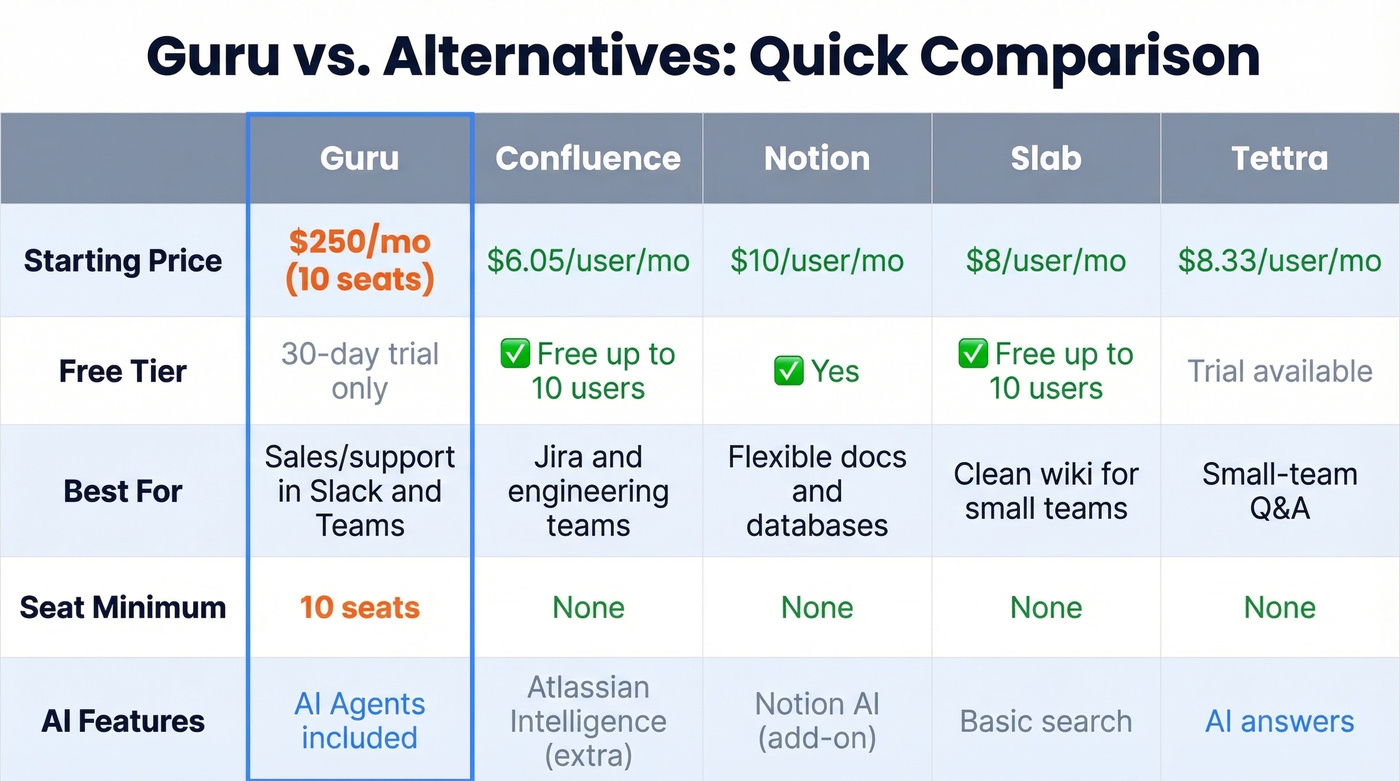
| Tool | Starting Price | Free Tier | Best For |
|---|---|---|---|
| Guru | $250/mo (10 seats) | 30-day trial | Sales/support in Slack/Teams |
| Confluence | $6.05/user/mo | Up to 10 users | Jira/engineering teams |
| Notion | $10/user/mo | Yes | Flexible docs + databases |
| Slab | $8/user/mo | Up to 10 users | Clean wiki for small teams |
| Tettra | ~$8.33/user/mo | Trial available | Small-team Q&A |
Confluence is the obvious pick if your engineering team already lives in Jira - the free tier for up to 10 users makes it a no-brainer for small shops. Notion offers the most flexibility as a workspace, though it's less structured for pure knowledge management. Slab is the cleanest modern wiki we've seen for teams under 50; the consensus on r/sales and r/SaaS threads tends to agree. Tettra mirrors Guru's card-based Q&A approach at a lower price point, worth a look for teams under 20.
If you're comparing tools because you're trying to improve pipeline efficiency, it also helps to tighten your sales prospecting techniques and standardize sales follow-up templates so reps don't reinvent outreach every week.
FAQ
Does Guru have a free plan?
No. Guru offers a 30-day free trial but no permanent free tier. All paid plans require a 10-seat minimum, putting the floor at $250/month on annual billing or $300/month billed monthly.
Is Guru SOC 2 compliant?
Yes. Guru holds SOC 2 Type 2 certification, is GDPR-ready, and supports SAML SSO, SCIM provisioning, and IP whitelisting - meeting enterprise security requirements out of the box.
Can Guru handle customer-facing documentation?
No. It's designed for internal knowledge sharing only. If you need a public help center or external docs portal, you'll need a separate tool like Zendesk Guide or GitBook alongside it.
What if my real problem is bad prospect data, not internal knowledge?
Different problem, different tool. Guru manages internal knowledge - it won't touch your outbound data quality. For verified emails and direct dials, Prospeo offers a free tier with 98% email accuracy and 300M+ professional profiles.