

How to Write a Heads Up Email That's Clear, Professional, and Actually Helpful
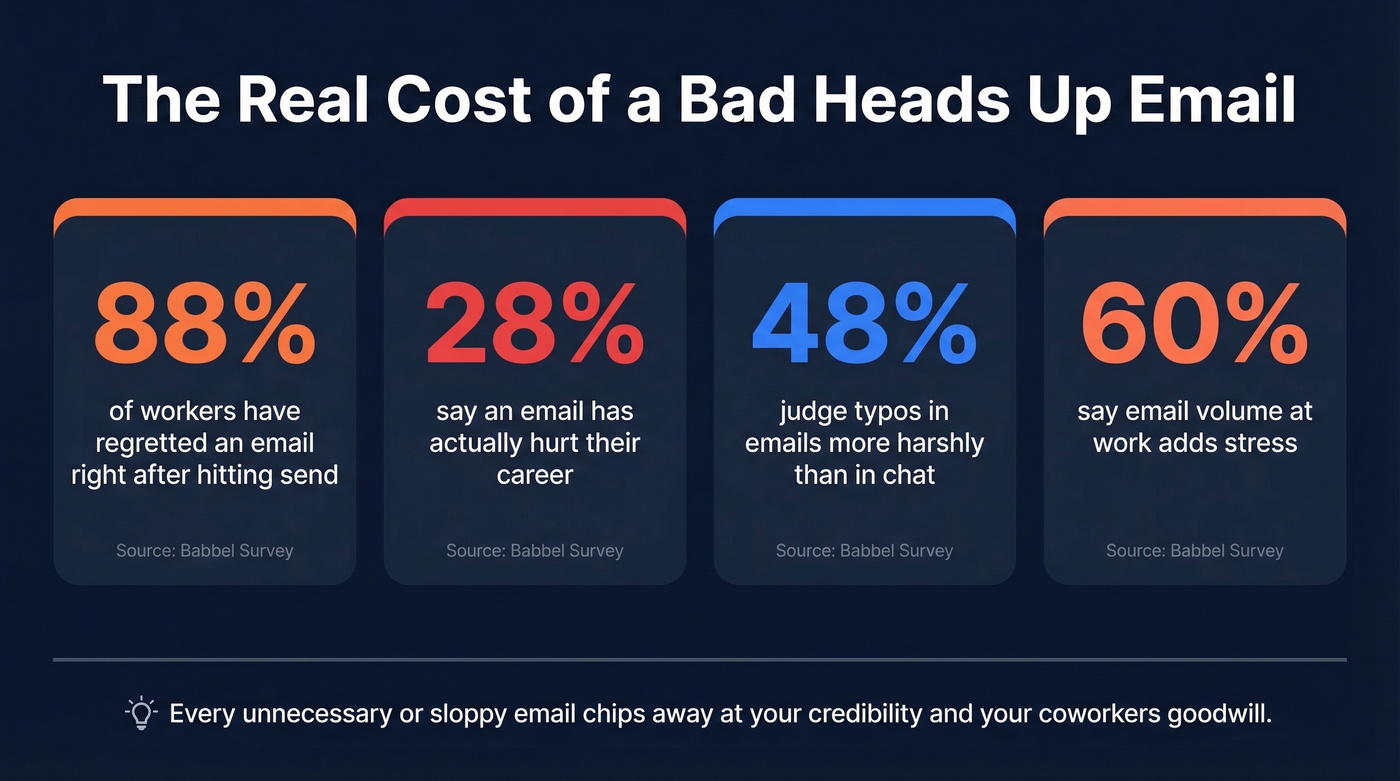
Your manager just forwarded your heads up email to the VP - and now you're staring at your sent folder wondering if "just a heads up" was too casual for someone three levels above you. You're not alone. A Babbel survey of 2,000 U.S. office workers found that 88% have regretted an email's contents or language right after hitting send.
The good news: this is one of the easiest email formats to get right once you know the rules.
The Quick Version
- "Just a heads up" is fine most of the time. It works for peers and direct reports. Swap it out for executives and clients.
- The subject line matters more than the body. A vague subject like "Quick Update" kills your email before anyone opens it.
- Aim for 70-100 words. If it's longer, it's a briefing, not a heads-up.
What Is a Heads Up Email?
A heads up email is informal advance notice designed to prevent surprises. That's it. You're giving someone time to prepare, adjust, or simply be aware before something happens.
The three broad categories: changes (meeting moved, deadline shifted, pricing updated), reminders (upcoming maintenance, expiring deadline), and announcements (new hire, policy rollout, product launch). Every advance-notice message you'll ever write falls into one of these buckets, and knowing which one you're sending shapes the tone, the timing, and the level of detail you include. Get the category right and the rest practically writes itself.
When "Just a Heads Up" Works
Every guide gives you 15 alternative phrases. You need three. The real question is who you're emailing.
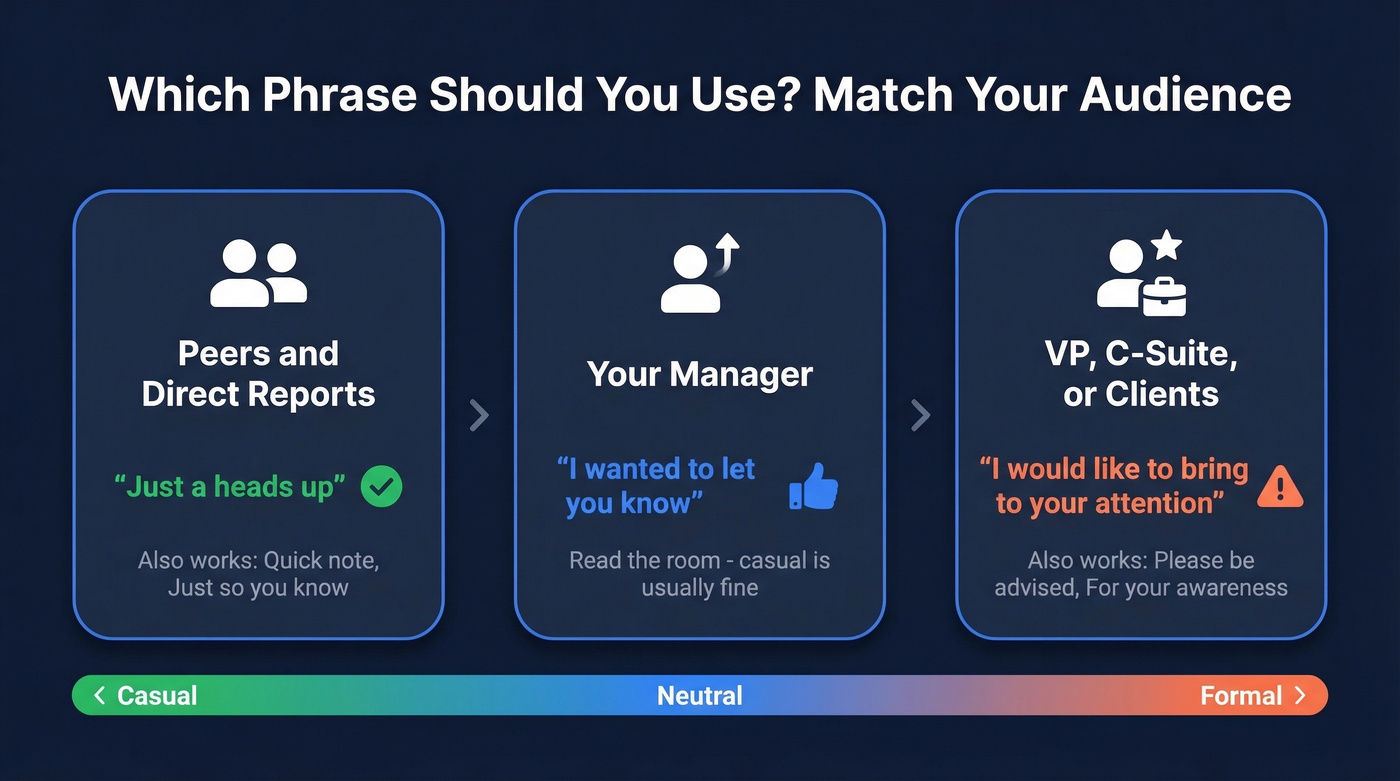
| Audience | "Just a Heads Up" OK? | Use Instead |
|---|---|---|
| Peers / direct reports | Yes | - |
| Your manager | Usually yes - read the room | "I wanted to let you know" |
| VP / C-suite / clients | No | "I'd like to bring to your attention" |
There's a telling Reddit thread where someone's boss bounced back a perfectly clear cancellation email - "Hello, I am writing to inform you that the meeting will be cancelled today... Best, Me" - because it lacked pleasantries. The email was fine. The audience expectation wasn't met. That's the gap these messages live in: it's not about what you say, it's about who's reading it.
For peers, be direct. For anyone above you or outside your company, add one line of warmth and swap the casual phrasing. That's the whole framework.
Professional Alternatives
"I wanted to let you know" is the best all-around replacement - warm without being stiff. "Please be advised" is the most formal. "Quick note" is the most casual peer-to-peer option. These three cover 95% of situations, but here's the full phrase bank:
| Phrase | Formality | Best For | Example |
|---|---|---|---|
| Quick note | Casual | Peers, Slack-like teams | "Quick note - standup moved to 10 AM." |
| Just so you know | Casual | Peers, direct reports | "Just so you know, the repo moved." |
| I wanted to let you know | Neutral | Manager, cross-functional | "I wanted to let you know we're pushing the launch." |
| For your awareness | Neutral | Stakeholders, skip-levels | "For your awareness, Q3 targets shifted." |
| Please note | Semi-formal | Clients, external partners | "Please note the updated timeline." |
| I'd like to bring to your attention | Formal | VP, C-suite | "I'd like to bring to your attention a scope change." |
| Please be advised | Formal | Legal, compliance, board | "Please be advised the policy takes effect June 1." |
| This is to inform you | Very formal | Official notices | "This is to inform you of a rate adjustment." |

A flawless heads up email won't matter if it lands in a dead inbox. Prospeo's 98% verified email accuracy means your advance notices actually reach the right people - not bounce back and leave stakeholders blindsided.
Stop sending heads up emails to addresses that don't exist.
How to Write the Subject Line
If your subject line says "Quick Update," you've already failed. The subject line IS the advance notice - most people read it on their phone, decide whether to open it, and move on. University of Minnesota's comms guidance recommends keeping subject lines under 40 characters and front-loading the key information.
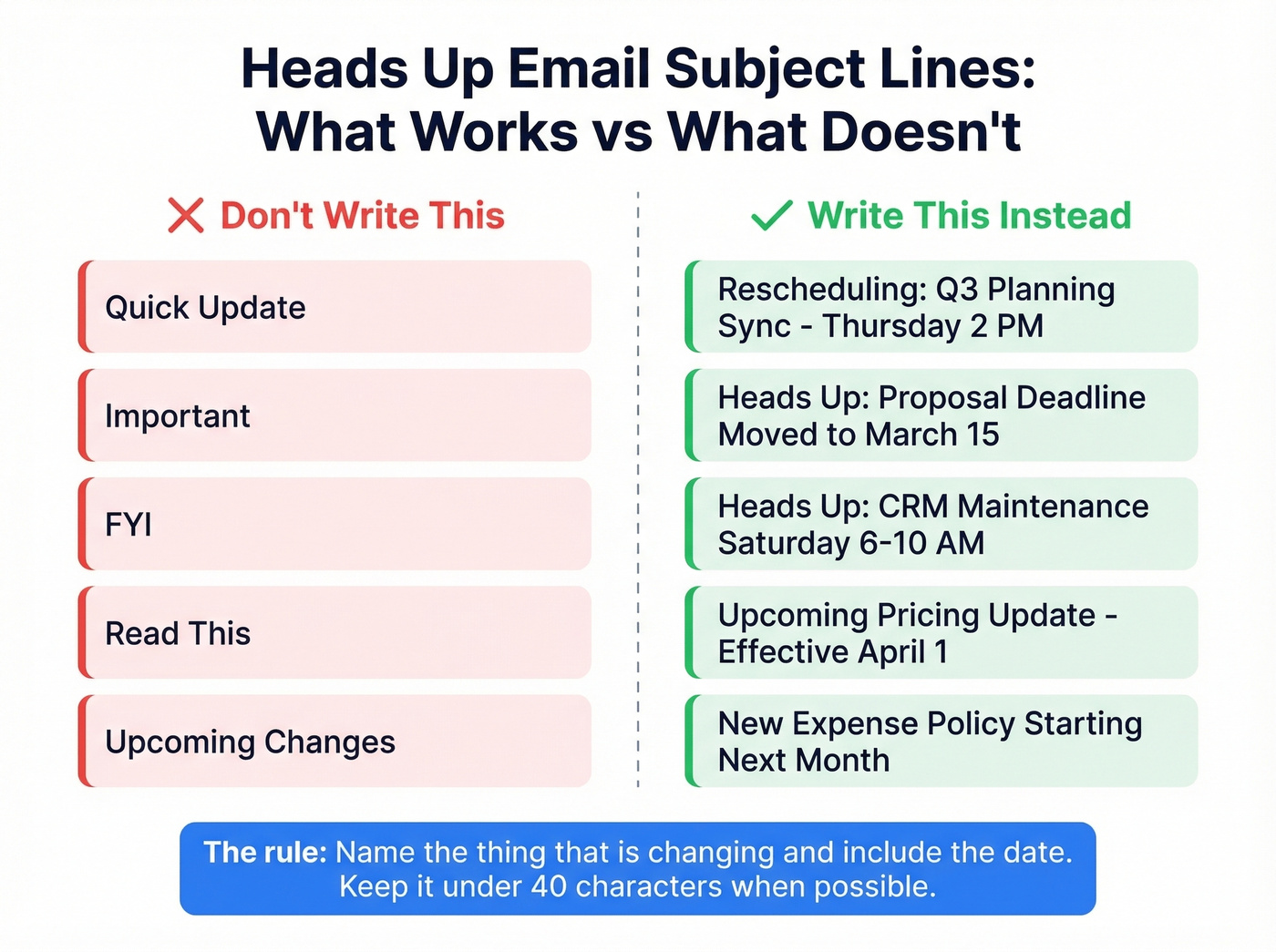
Three rules:
- Name the thing that's changing. "Heads Up: Server Maintenance Friday 8 PM" beats "Upcoming Changes."
- Include the date or deadline. Time-sensitive info belongs in the subject, not buried in paragraph two.
- Skip emojis in professional contexts. Screen readers and emojis don't mix, and they look unserious to senior stakeholders.
We've seen subject lines with specific dates outperform vague ones by a wide margin - people scan inboxes for urgency, and a date signals exactly how urgently they need to care. Here are examples by scenario:
- Meeting change: "Rescheduling: Q3 Planning Sync -> Thursday 2 PM"
- Deadline shift: "Heads Up: Proposal Deadline Moved to March 15"
- System downtime: "Heads Up: CRM Maintenance Saturday 6-10 AM"
- Pricing change: "Upcoming Pricing Update - Effective April 1"
- Policy update: "New Expense Policy Starting Next Month"
- Team absence: "Heads Up: I'm OOO Dec 18-22 - Coverage Plan Below"
Avoid the "mysterious subject line" pattern - "Important," "FYI," "Read This" - that forces the reader to open the email just to understand what it's about. That's not advance notice. That's a guessing game.
Heads Up Email Templates
Each template below is designed to be copied and sent in under a minute. Keep bodies around 70-100 words. Grab the one that fits your scenario and customize the bracketed fields.
Meeting Reschedule
Subject: Rescheduling: [Meeting Name] -> [New Day/Time]
Hi [Name],
I need to reschedule our [meeting name] originally set for [original date/time]. Something came up on my end - apologies for the short notice.
Would [new date/time] work for you? If not, I'm also open [alternative slot]. I'll send an updated invite once we confirm.
Thanks for your flexibility.
Why this works: Leads with the change, offers alternatives, and keeps it brief. The structure - clear subject, concise reschedule request, proposed new time, appreciation - is built to get quick responses.
Deadline Change
Subject: Heads Up: [Project] Deadline Moved to [New Date]
Hi team,
The deadline for [project/deliverable] has moved from [original date] to [new date]. This is due to [one-sentence reason].
Your next milestone is [specific action] by [interim date]. Let me know if this creates any conflicts.
Why this works: States the change, explains why in one line, and gives the reader a clear next step.
Pricing Change to Prospects
Subject: Upcoming Pricing Update - Effective [Date]
Hi [Name],
I wanted to let you know that our pricing for [product/plan] will be updating on [date]. [One sentence on what's changing - e.g., "The Growth plan will move from $X to $Y/month."]
If you'd like to lock in current pricing, we can finalize your agreement before [date]. Happy to walk through the details - just reply to this email.
Why this works: Gives advance notice, creates urgency without pressure, and makes the next step easy. Before sending pricing notifications to prospects, verify your contact list - a bounced email turns a proactive update into a missed touchpoint. Prospeo checks emails in real time with 98% accuracy, so your message actually lands.
More Templates - Quick Reference
For these common scenarios, the formula is the same: specific subject line, one-paragraph body, clear next step.
| Scenario | Subject Line | Key Line |
|---|---|---|
| System downtime | "Heads Up: [System] Maintenance [Day] [Time]" | "[System] will be down [time]-[time]. No action needed - back online by [time]." |
| Policy change | "New [Policy Name] Starting [Date]" | "The key change: [one sentence]. Full details in [link]." |
| Team absence | "Heads Up: [Name] OOO [Dates]" | "For urgent items, contact [backup] at [email]. Non-urgent can wait until [return date]." |
| New hire intro | "Welcome [Name] - Joining [Team] on [Date]" | "[Name] joins as [title], working on [area]. Please say hello - first weeks matter." |
Mistakes That Kill Heads Up Emails
Here's a stat that should make you pause: 28% of workers say an email has hurt their careers. A quick advance-notice message is low-stakes in theory, but it's still a written record with your name on it.
Vague subject lines top the list. "Quick Update" tells the reader nothing. Name the change and the date. If you want more swipeable options, pull from a bank of email subject line examples.
Length is the second killer. In our experience, the emails that get forwarded up the chain are always the brief ones. If yours hits three paragraphs, it's a briefing, not a heads-up. Let's be honest - nobody reads a 300-word "quick FYI."
Typos matter more than you think. 48% of workers judge typos in work emails more harshly than in chat tools. Proofread once before sending. If you're writing high-stakes messages often, a lightweight AI email checker can help catch issues fast.
Rapid-fire multiple emails - sending three messages in 20 minutes instead of one consolidated email - makes you look scattered, not thorough. And 60% of workers say email volume at work adds stress, so every unnecessary email chips away at goodwill.
Know when to pick up the phone. Bad news, complex topics, and emotionally charged situations deserve a conversation. A heads up email works for logistics, not for "we're eliminating your role."
Here's the thing: if you're agonizing over one of these for more than five minutes, it probably shouldn't be an email. The whole point of the format is speed and simplicity. Write it, proofread it once, send it. If it takes longer to compose than to read, rethink the medium.
When to Send
Timing depends on what you're communicating, not just when you write it.
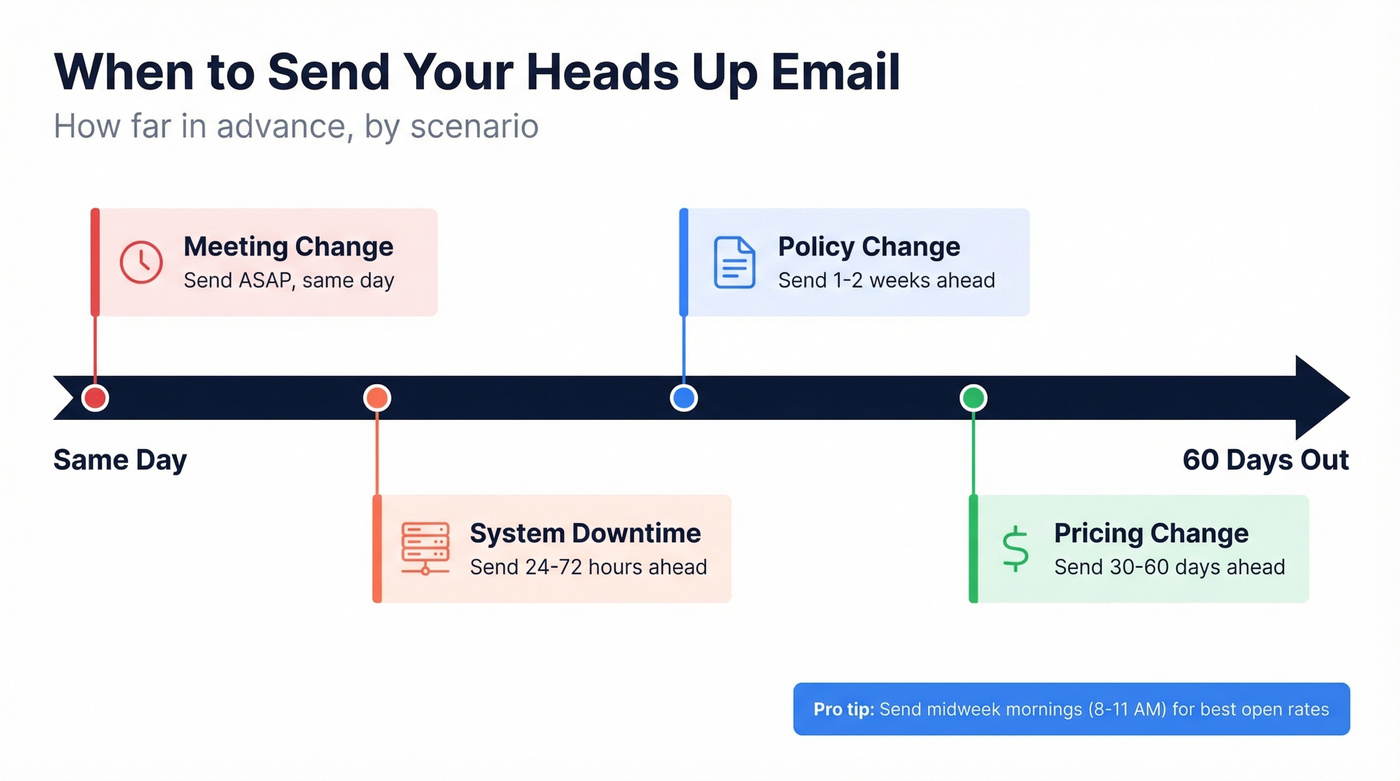
| Scenario | How Far Ahead |
|---|---|
| Meeting change | ASAP, same day |
| System downtime | 24-72 hours |
| Policy change | 1-2 weeks |
| Pricing change | 30-60 days |
For teams running outbound campaigns, timing matters even more - a heads up about a pricing change that bounces off an invalid address is worse than no email at all. If you need the email read quickly, send midweek in the morning, around 8-11 AM. Tuesday tends to correlate with slightly higher open rates, and morning sends are commonly associated with stronger engagement (see more data on the best time to send cold emails).
If you're sending these at scale, protect deliverability first: monitor your email bounce rate, and follow a practical email deliverability guide so urgent updates don't get filtered.
Sending pricing updates or meeting changes to prospects? You need the right contact first. Prospeo gives you 143M+ verified emails with a 7-day refresh cycle, so your heads up emails reach real, active inboxes - not outdated ones.
Find any prospect's verified email in seconds for $0.01.
FAQ
Is "just a heads up" unprofessional?
No - it's perfectly acceptable for peers and direct reports in most workplaces. Swap it for "I wanted to let you know" when emailing executives, or "please be advised" for clients and external partners. The phrase itself isn't the problem; mismatching formality to your audience is.
What's the best subject line for a heads up email?
Front-load the key change and include a date, keeping it under 40 characters. Example: "Heads Up: Server Maintenance Friday 8 PM." Avoid vague subjects like "Quick Update" or "FYI" - they force the reader to open the email just to understand what it's about.
When should I send a notification email instead of calling?
Use an advance-notice email for straightforward logistical updates - schedule changes, deadline shifts, policy rollouts. If the news is complex, emotionally sensitive, or likely to spark back-and-forth discussion, pick up the phone or schedule a quick meeting instead.
How do I verify prospect emails before sending?
Use a real-time verification tool before blasting outbound messages. Prospeo catches invalid, catch-all, and spam-trap emails before they damage your sender reputation. Hunter and NeverBounce also offer verification, though accuracy and catch-all handling vary by provider.