

How to Look Up Someone's Email Address: 7 Methods That Work
You don't need 15 methods to find someone's email address. You need two good ones and a backup. Most guides pad the list with tactics that stopped working years ago or tools that return garbage data half the time.
So how do you look up someone's email address reliably? Here's the short version: for a one-off lookup, Google search operators and the Gmail hover trick cost nothing and take under a minute. For regular prospecting, a dedicated email finder with built-in verification saves hours and keeps your bounce rate clean (see Email Bounce Rate). And for hard-to-find contacts, OSINT reverse lookups through tools like Epieos fill the gap.
The rest of this article explains each method, when to use it, and how to avoid torching your sender reputation with unverified addresses.
Free Methods (No Tools Required)
Check Their Website and Social Profiles
Start with the obvious. Company websites bury email addresses in surprising places - About and Team pages, press kits, even PDF speaker lists from last year's conference. YouTube About tabs frequently include a business email, and Twitter/X bios are a goldmine for founders, freelancers, and DevRel folks.
We've found this works more often than expected, especially for companies under 200 employees. Ninety seconds of checking beats paying for a credit.
Guess the Pattern and Validate It
Most companies use one of a handful of email formats:
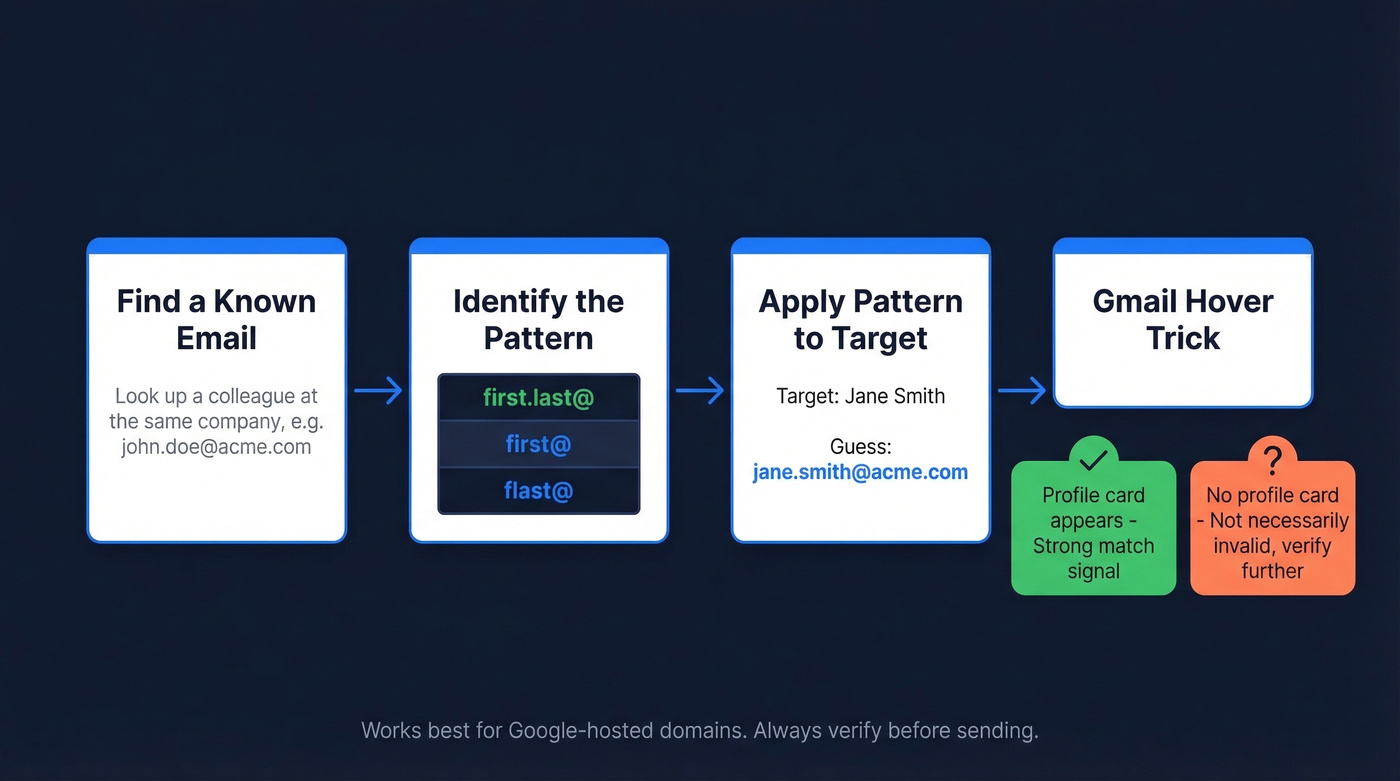
first.last@company.com
first@company.com
flast@company.com
If you know someone else's email at the same company, you already know the pattern. Apply it to your target contact.
Here's the Gmail hover trick: open Gmail, type a guessed email into the "To:" field, and hover over it. If it's a Google-hosted address and Google can match it to an account, you'll see a profile card with a name and photo. No profile card doesn't necessarily mean the email is invalid - it can also mean there's no associated profile data. But a match is a strong signal.
Google Advanced Search Operators
Google is the most underrated email finder. The trick is knowing the right operator syntax. Here are copy-paste queries that actually work:
site:example.com ("@example.com" OR "contact" OR "email")
Your general sweep - catches contact pages, footers, and staff directories.
"Jane Smith" site:example.com "@example.com"
Targets a specific person. Replace the name and domain.
site:example.com filetype:pdf (email OR "@")
This one is gold. Companies publish internal directories, speaker lists, and event programs as PDFs that often contain direct email addresses. We've used this to find emails for executives at companies that scrub their websites clean - the PDF from a 2024 panel discussion still had their direct line.
One important note: the cache: operator was discontinued in 2024. Older guides still recommend it, but it hasn't worked in two years. Stick to the operators above.
Email Finder Tools for Regular Prospecting
Free methods work for one-off lookups. If you're prospecting regularly - sending 50+ cold emails a week - you need a dedicated tool (see Sales Prospecting Techniques). A Saleshandy test of 100 verified business contacts showed accuracy ranging from 79% to 98%. That gap matters: at 79% accuracy, one in five emails bounces. At 98%, you're clean.
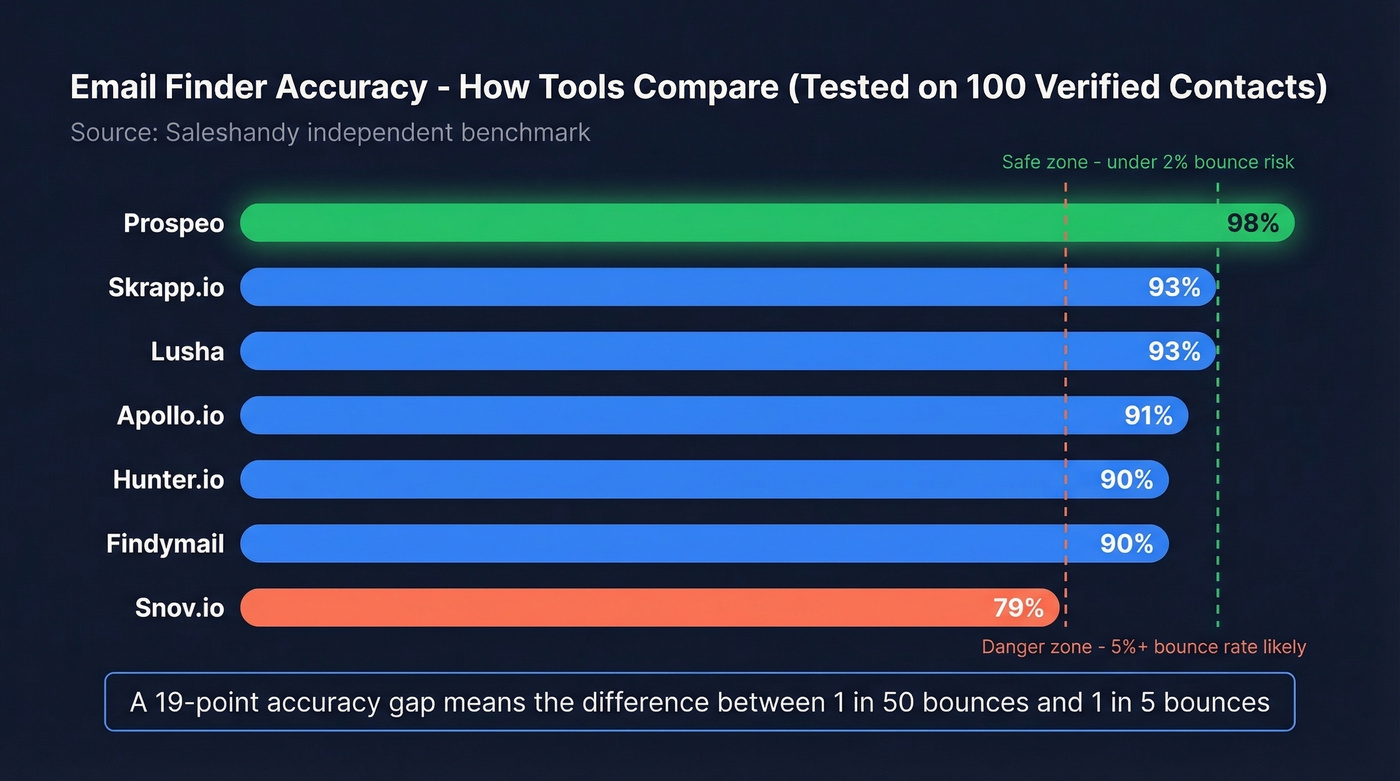
| Tool | Free Tier | Starting Price | Tested Accuracy | Best For |
|---|---|---|---|---|
| Prospeo | 75 emails/mo | ~$0.01/email | 98% | Best overall - accuracy + built-in verification |
| Hunter.io | 50 requests/mo | $49/mo | 90% | Second-pass verification |
| Apollo.io | 100 credits/mo | $49/mo per user | 91% | CRM-integrated prospecting |
| Snov.io | 50 credits (trial) | $39/mo | 79% | International leads |
| Findymail | 10 credits trial | $49/mo | 90% | Sales Navigator exports |
| Skrapp.io | 100 credits/mo | $39/mo | 93% | Budget bulk |
| Lusha | Limited free | $36/mo | 93% | Quick phone + email |
| Voila Norbert | 50 credits once | $49/mo | N/A | Simple name-to-email |

If your team already uses a CRM, Apollo.io makes sense - it bundles prospecting and sequencing in one place (compare options in Best Contact Management Software). The tradeoff is data freshness. A thread on r/agency flags Apollo for bounces on contacts that haven't been refreshed recently, and per-seat pricing adds up fast for growing teams.
Hunter.io has solid verification but a relatively small database. It's better as a second-pass verifier than a primary email source - if you already have an email and want to confirm it's deliverable, Hunter's free tier handles that well (or see Hunter Alternatives).
Let's be honest: if you're sending fewer than 10 cold emails a month, skip all of these. The free methods above are enough. Paid tools earn their keep at scale, not for occasional outreach.
Findymail is purpose-built for exporting from Sales Navigator. Skrapp offers one of the most generous free tiers at 100 credits/month. Lusha bundles phone numbers with emails. Skip Voila Norbert unless you literally need one email and never plan to scale - it has no automation, no integrations, and no real growth path.

You just read that email finder accuracy ranges from 79% to 98%. That gap is the difference between a clean sender reputation and a blacklisted domain. Prospeo sits at the top of that range - 98% accuracy, built-in verification, and a 7-day data refresh cycle so you're never emailing someone who left the company six weeks ago.
Look up 75 emails free this month. No credit card required.
Advanced Lookup Techniques
OSINT Reverse Lookup
When standard tools come up empty, OSINT techniques fill the gap. Epieos is a go-to for reverse email lookups - enter an email address and it surfaces linked accounts across platforms. It's not perfect, but one user on r/privacy said it provided more information than any other site they'd tried.
For username-based discovery, idcrawl.com searches a username across major platforms. If you know someone's handle on one network, you can often find their professional profiles elsewhere. Google the username in quotation marks for exact-match results across forums, directories, and archived pages.
Developer contacts often expose emails in GitHub commit metadata and README files. Slack and Discord communities for SaaS products sometimes list team members with contact info - join the community, check the member directory, and you'll often find what you need.
Another tactic most guides miss: syncing your phone contacts with apps like Snapchat, TikTok, or Telegram can surface linked accounts through their "find friends" features.
Stay on the professional side of these techniques. Finding a VP of Sales's work email is standard practice. Digging through someone's personal digital footprint crosses a line (more on this in Ethics in Sales).
Ask an AI Assistant
ChatGPT and Perplexity can suggest likely email formats for a given person and company. Here's the thing: AI will confidently give you a fake email. It'll look perfect - correct format, correct domain - and it'll be completely made up. AI is useful for suggesting patterns, not confirming addresses. Always verify whatever it gives you (see AI Email Checker).
Just Ask
Mutual connections on professional networks can make a warm introduction. A direct DM saying "Hey, I'd love to send you something - what's the best email?" converts surprisingly well. At conferences, people hand out contact info freely. Don't overcomplicate it.
Why You Must Verify Every Email
Here's a scenario we've seen play out dozens of times. Your SDR sends 500 emails. 47 bounce. That's a 9.4% bounce rate. The ESP flags the account. Domain reputation drops. Now even your emails to valid addresses land in spam.
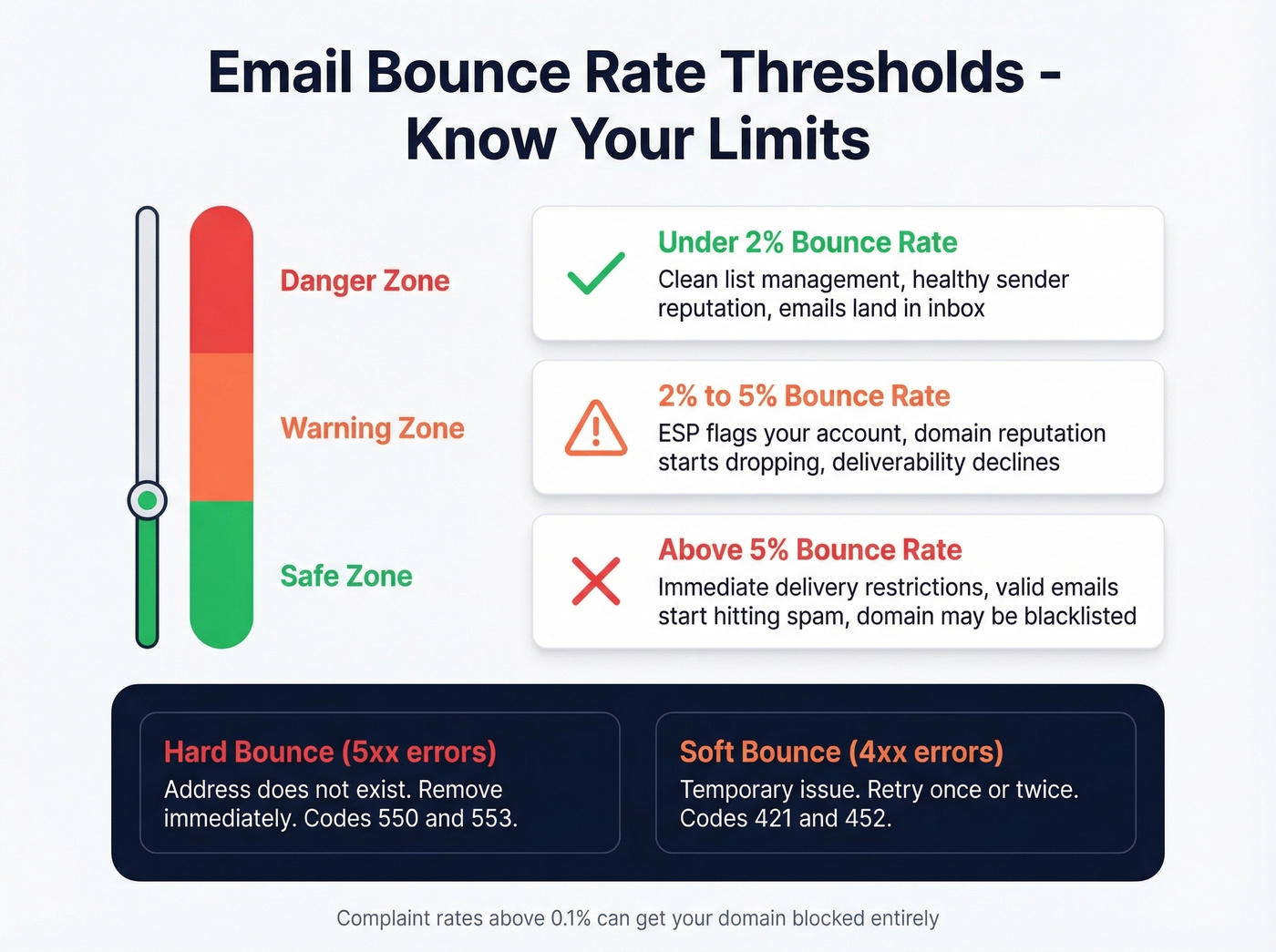
The thresholds are unforgiving. Bounce rates above 2% signal poor list management to email providers. Above 5%, you're looking at immediate delivery restrictions. Complaint rates above 0.1% can get your domain blocked entirely.
Hard bounces return 5xx error codes - 550 or 553 - meaning the address doesn't exist. Remove these immediately. Soft bounces return 4xx codes like 421 or 452, which are temporary issues worth retrying once or twice. Catch-all domains are the trickiest: the server accepts everything, so verification tools can't confirm whether a specific mailbox exists. Good tools flag these as "risky" so you can decide whether to send (see Email Deliverability Guide).

Standalone verification tools like ZeroBounce (starting at $18/mo for 2,000 verifications) and Clearout handle this well. But the cleanest workflow is using a finder that verifies during lookup, so bad addresses never reach your list in the first place (see Bouncer Alternatives for Email Verification).
Free methods work for one-off lookups. But if you're sending 50+ cold emails a week, guessing patterns and hovering in Gmail doesn't scale. Prospeo's email finder returns verified addresses from 300M+ profiles at ~$0.01 per email - with catch-all handling, spam-trap removal, and honeypot filtering built in so every address you send to is real.
Find any professional email in seconds and only pay for verified results.
Legal and Ethical Ground Rules
Looking up someone's email is standard B2B practice. But there are rules, and ignoring them gets expensive.
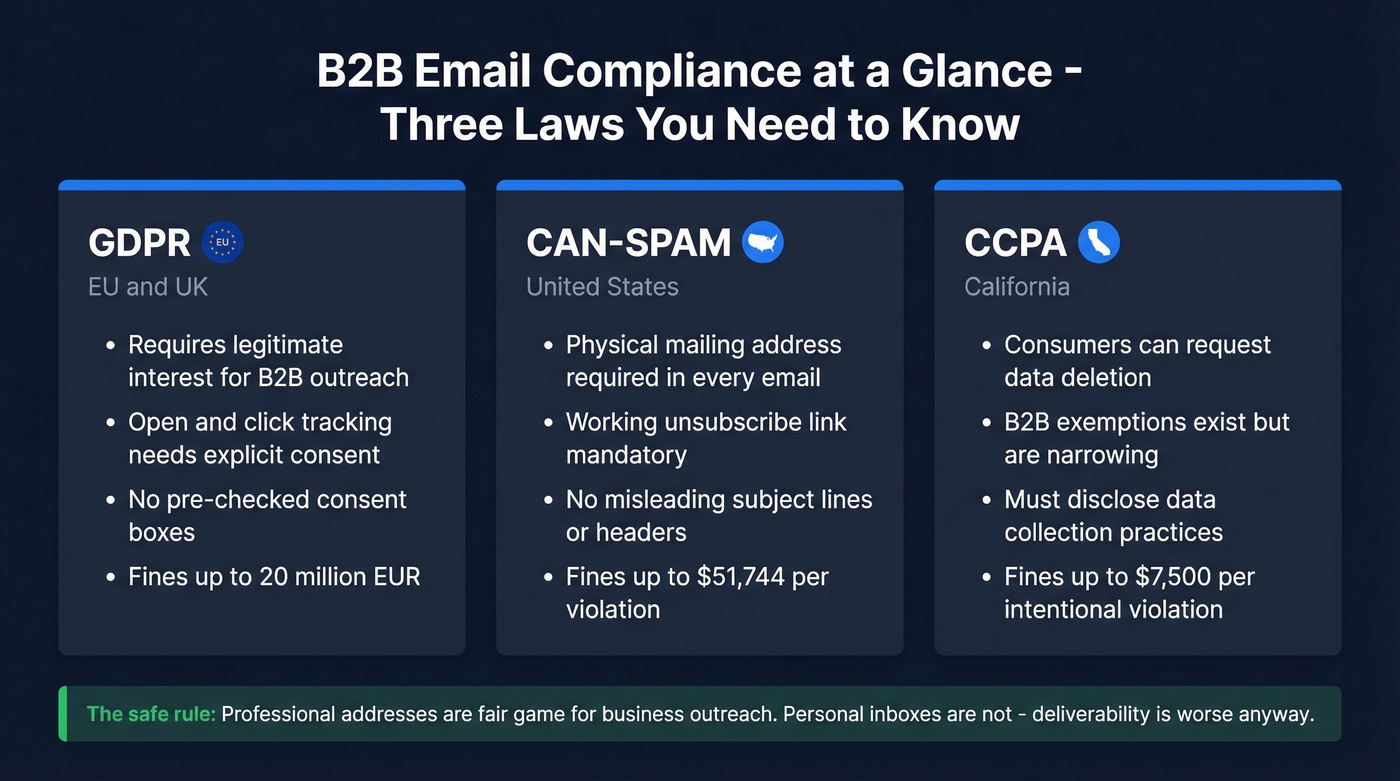
GDPR requires legitimate interest to email someone for B2B purposes in the EU and UK. Tracking opens and clicks requires explicit consent - no pre-checked boxes. Fines run up to EUR 20 million. CAN-SPAM mandates a physical mailing address and working unsubscribe link in every cold email. CCPA gives California consumers the right to request data deletion, though B2B exemptions exist.
The ethical line is clear: professional addresses are fair game for business outreach. Personal inboxes aren't - and deliverability is worse anyway, since consumer email providers are far more aggressive about spam filtering (see How to Improve Sender Reputation).
FAQ
How can I find someone's email address for free?
The fastest free methods are Google search operators and the Gmail hover trick. A query like site:example.com "@example.com" surfaces published addresses, while the hover trick confirms Google-hosted accounts without any tools. Prospeo also offers 75 free email lookups per month with full verification - enough for light prospecting without spending a dollar.
Can you find someone's personal Gmail address?
Personal email discovery is unreliable and ethically questionable. The Gmail hover trick works for Google-hosted accounts, and OSINT tools like Epieos can surface linked accounts. Stick to professional addresses - they're easier to find, more likely to be accurate, and won't get you flagged as spam.
Is it legal to look up someone's email?
Finding publicly available business emails is legal in most jurisdictions. GDPR requires legitimate interest for B2B outreach in the EU, CAN-SPAM mandates unsubscribe links and a physical address in every message, and CCPA covers California consumer data. Never scrape personal emails for unsolicited contact.
What's the most accurate email finder tool in 2026?
Accuracy ranges from 79% to 98% depending on the tool and data freshness. Tools with weekly data refresh cycles consistently outperform those refreshing monthly or less. Regardless of which tool you pick, always verify before sending to keep bounce rates under 2%.
How do I verify an email without sending a message?
Use a verification service like ZeroBounce or NeverBounce that checks MX records, SMTP responses, and catch-all status without delivering an actual email. The Gmail hover trick also works for Google-hosted addresses. Knowing how to look up someone's email address is only half the battle - confirming deliverability is what protects your sender reputation.