

How Email Verification Actually Works (and Where It Breaks Down)
You just sent 5,000 cold emails. 1,150 bounced. Your domain reputation tanks overnight, and now even the good addresses see nothing from you. That's what happens when you skip verification - or trust a tool that only does half the job.
Here's the short version: tools check whether a mailbox exists using DNS and SMTP probes. Basic tools stop there. Good ones add catch-all handling and spam-trap removal. At least 23% of email lists decay every year, so one-time verification isn't enough.
Validation vs. Verification vs. Checker
Look, these three terms get used interchangeably, but they mean different things. Validation checks format and syntax - does the address follow the rules? No spaces, proper @ placement, a real domain suffix. It catches typos like gmial.com before anything hits a server.
Verification goes deeper. It confirms the mailbox actually exists and can receive mail by querying DNS records and probing the mail server via SMTP. Understanding this distinction is what separates surface-level checks from real deliverability protection.
Checker tools - the products you actually buy - combine both steps into a single pipeline. When someone says "email verification," they usually mean the whole package: syntax validation, domain lookup, and mailbox probing rolled into one.
The 5-Step Verification Pipeline
So how does an email verifier work in practice? Every step matters, and skipping any of them creates blind spots that'll cost you later.
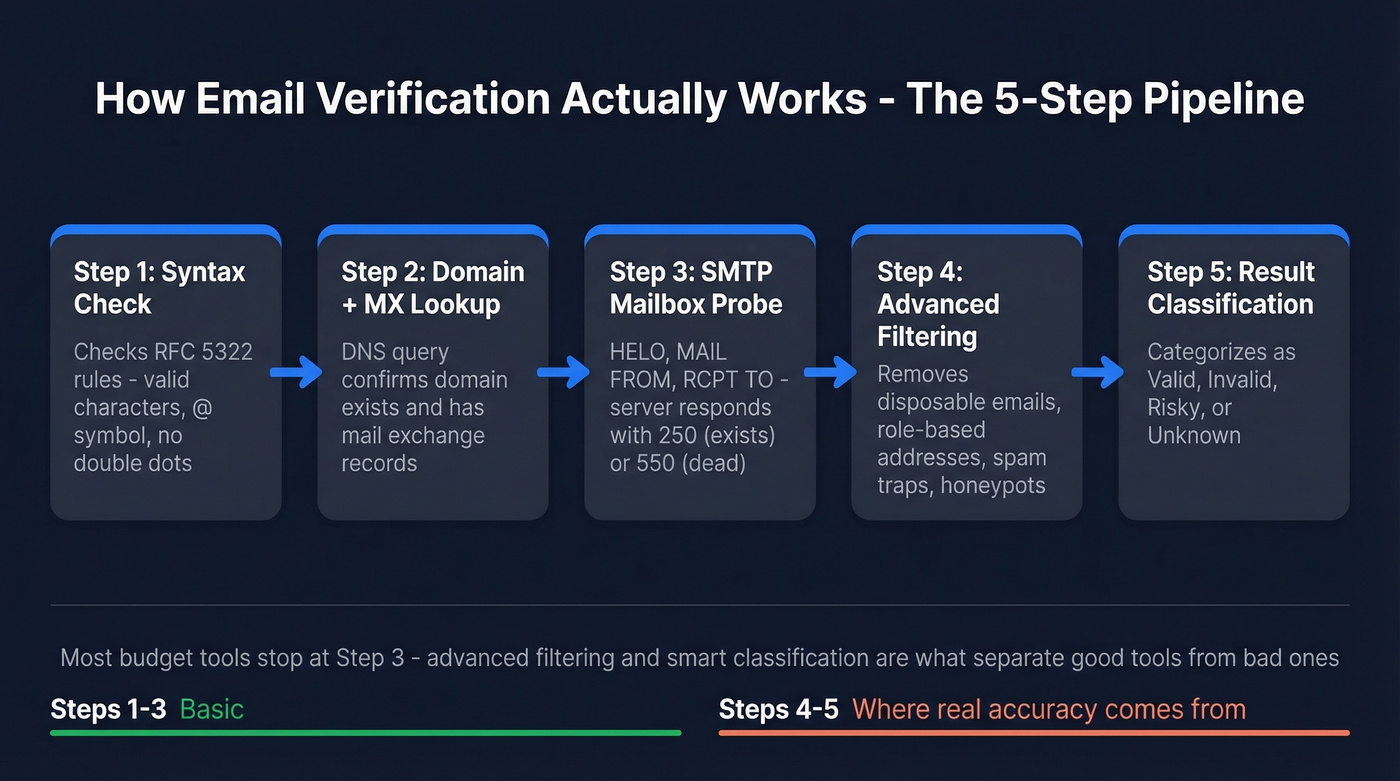
Step 1: Syntax Check
The tool checks the address against basic RFC 5322 formatting rules. Invalid characters, missing @ symbols, double dots - all caught here. This is the cheapest check and eliminates obvious garbage before anything touches a network.
Step 2: Domain and MX Lookup
A DNS query checks whether the domain exists and has valid MX (mail exchange) records. If @company.com doesn't resolve to a mail server, the address is dead regardless of what comes after the @.
Step 3: SMTP Mailbox Probe
This is the core of the process. The tool opens a connection to the mail server and walks through the SMTP handshake: HELO then MAIL FROM then RCPT TO. The server's response tells you whether the specific mailbox exists.
| SMTP Code | Meaning | Action |
|---|---|---|
| 250 | Mailbox exists | Mark valid |
| 421 | Connection refused / temporary failure | Retry later |
| 450 | Temporary failure (often greylisting) | Retry in 15-30 min |
| 550 | Mailbox doesn't exist | Mark invalid |
Good tools use exponential backoff on 421 and 450 codes rather than marking the address as unknown. Cheap ones just shrug and label it "unverifiable."
Step 4: Advanced Filtering
This is where budget tools stop and serious ones keep going. Advanced filtering catches disposable email services like Mailinator and Guerrilla Mail, role-based addresses like info@ and support@, known spam traps, and honeypot addresses that exist solely to catch senders with dirty lists. Think of this step as the email qualifier - it separates addresses that technically exist from addresses that are actually worth sending to.

Prospeo runs this full pipeline with catch-all handling, spam-trap removal, and honeypot filtering, with records refreshed every 7 days. At 98% email accuracy, it executes exactly what we just walked through, end to end.
Step 5: Result Classification
The tool categorizes each address: valid (safe to send), invalid (hard bounce), risky (catch-all or unverifiable), or unknown (server didn't cooperate). How a tool handles that "risky" bucket is what separates the good from the mediocre.
Where Verification Breaks Down
Here's the thing: even a perfect SMTP probe has structural limits.
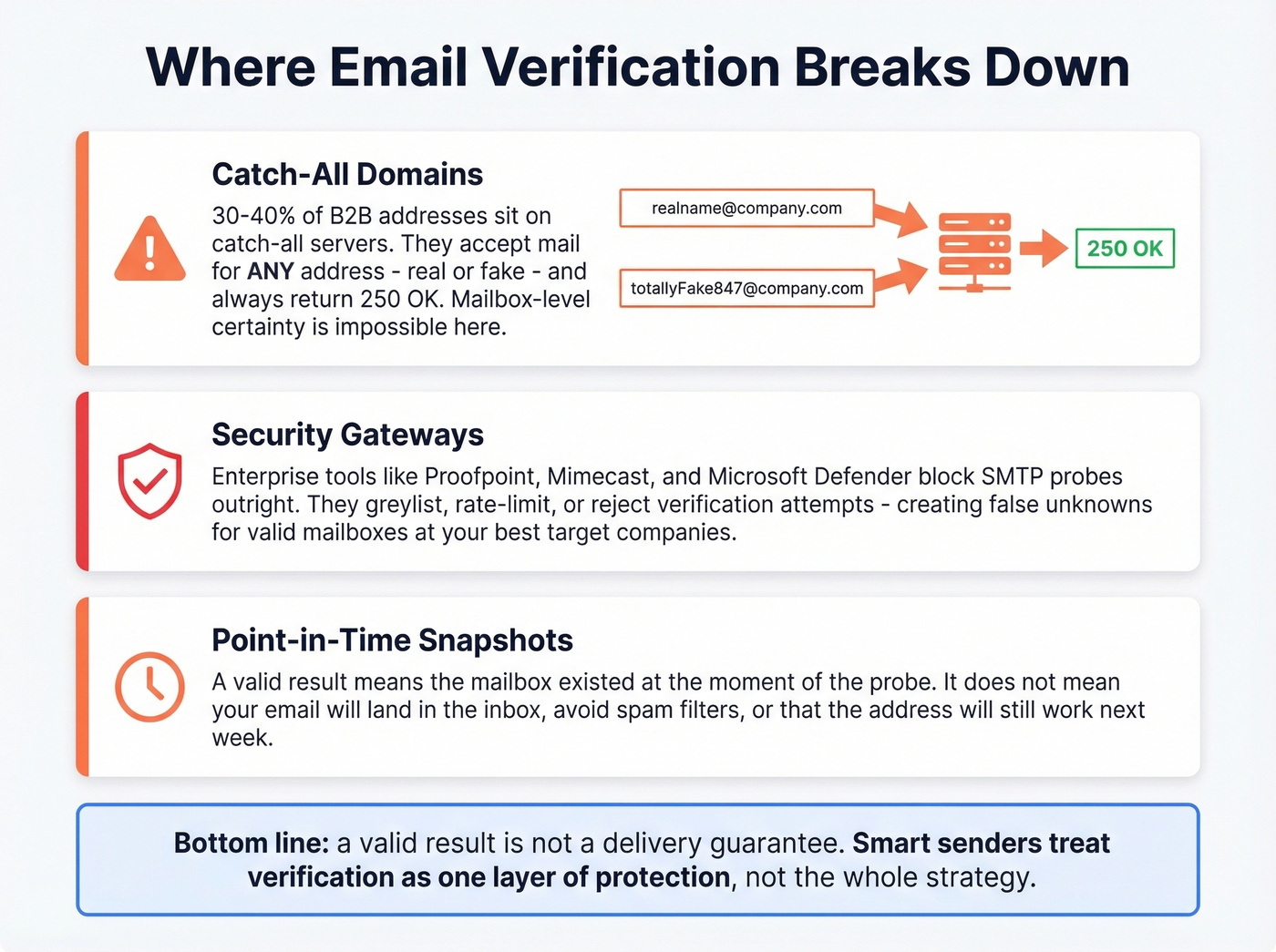
30-40% of B2B email addresses sit on catch-all domains. These servers accept mail for any local-part - realname@company.com and totallyFake847@company.com both return a 250 OK. The mailbox-level certainty you're paying for simply doesn't exist on these domains, and the consensus on r/coldemail is that catch-all handling is the single biggest differentiator between verification tools.
Then there's the security gateway problem. Enterprise environments running Proofpoint, Mimecast, Barracuda, or Microsoft Defender often block SMTP verification attempts outright - greylisting, rate-limiting, or flat-out rejecting the probe. This creates false "unknown" results for perfectly valid mailboxes at exactly the companies you most want to reach.
A "valid" result doesn't guarantee delivery. That's the biggest lie in verification marketing. It means the mailbox existed at the moment of the probe. It doesn't mean your email won't land in spam, get filtered by a gateway, or bounce next week when the employee leaves.
If you want the bigger picture beyond list cleaning, pair verification with an email deliverability plan that covers content, infrastructure, and sending behavior.

You just read the full 5-step pipeline - syntax, DNS, SMTP, advanced filtering, classification. Prospeo runs every step with catch-all handling, spam-trap removal, and honeypot filtering. 98% accuracy. Data refreshed every 7 days, not 6 weeks.
Get 75 free verified emails and see the pipeline in action.
Why Verification Matters in 2026
An analysis of 11B+ emails by ZeroBounce found that at least 23% of any email list degrades annually. More than 9% of all emails checked were catch-all addresses. Spam traps accounted for just 0.01% - but even a handful can torch your sender reputation.
If you're trying to keep bounces under control at scale, it helps to know the benchmarks and what different bounce types mean - see our bounce rate breakdown.
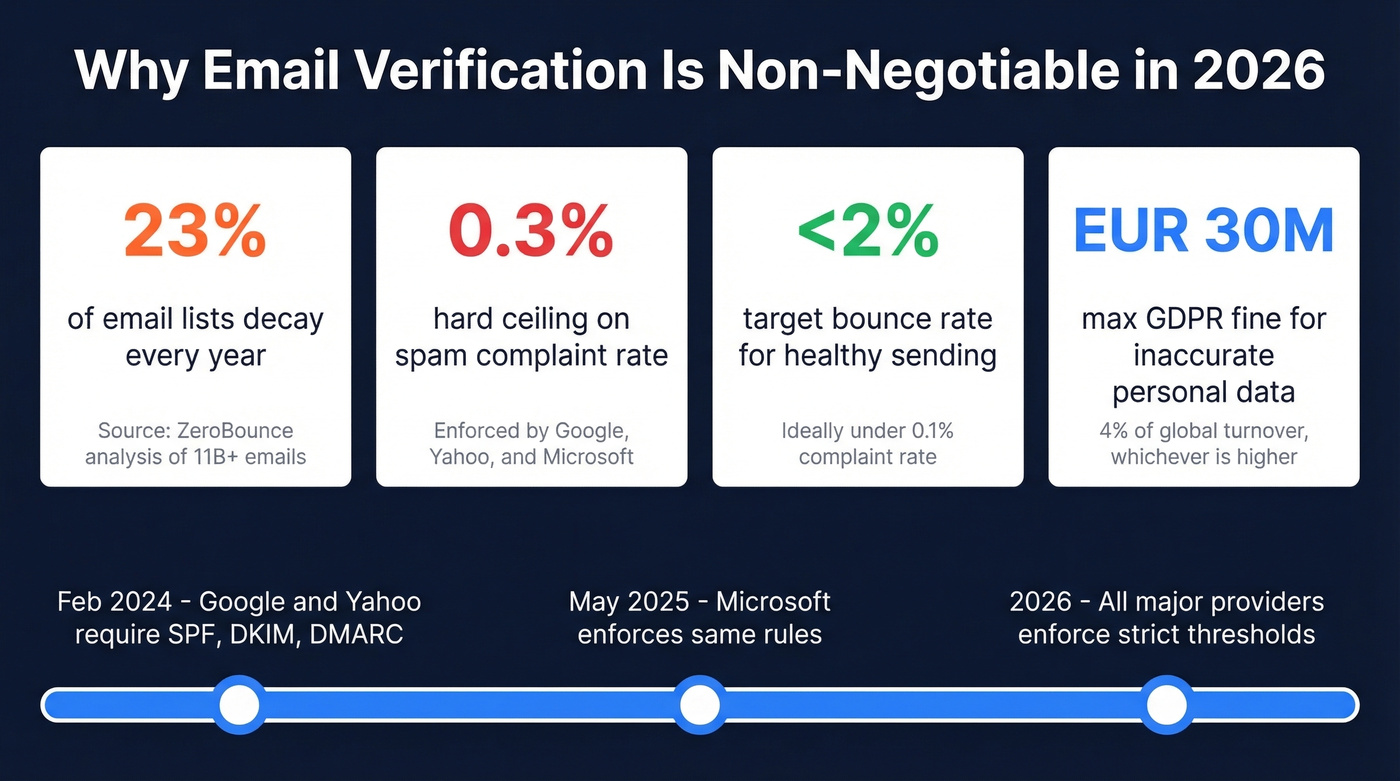
The enforcement landscape has tightened dramatically. Google and Yahoo have required SPF, DKIM, and DMARC for bulk senders since February 2024. Microsoft followed in May 2025. The hard ceiling on spam complaints is 0.3% - ideally under 0.1%. Exceed that, and your emails get rejected outright.
If you’re auditing your setup, start with SPF and then confirm DKIM is actually passing.
There's also a compliance angle most teams overlook. GDPR's accuracy principle requires organizations to keep personal data up to date. Regular verification is a direct implementation of that principle, and fines for non-compliance run up to EUR 30M or 4% of global turnover.
Let's be honest: if your bounce rate is under 2% and you're only sending 500 emails a month, you probably don't need a dedicated verification tool. But the moment you scale past that - or start buying lists - verification isn't optional. It's infrastructure.
If you’re scaling outbound, it’s worth mapping verification into your cold email sequence so risky segments get handled differently.
What to Expect From Verification Services
In our testing, the accuracy gap between top-tier tools is far smaller than vendors want you to believe. A 10,000-contact benchmark by WarmupInbox showed observed accuracy ranging from 98.5% to 98.9% across leading tools - a tighter spread than the marketing suggests.
| Tool | Cost per 1,000 | Accuracy | Note |
|---|---|---|---|
| Prospeo | ~$10 (~$0.01/email); free: 75/mo | 98% | Full 5-step pipeline, 7-day refresh |
| EmailListVerify | $4 | ~98.5% observed | Budget bulk cleaning |
| Bouncer | $7 | 99.5% claimed | Solid mid-range |
| NeverBounce | $8 | 99.9% claimed | Established, reliable |
| ZeroBounce | $8 ($16 min buy) | 96-98% claimed | Premium analytics |
| Kickbox | $10 | Not public | Strong API docs |
If you’re comparing vendors specifically in this category, our roundup of Bouncer alternatives can help you shortlist faster.
What actually matters is how tools handle catch-all domains, how fresh the data is, and whether they flag risky addresses clearly enough for you to make smart decisions. We've found that the best services aren't just pinging a server - they're giving you actionable classifications you can build sending logic around. Skip any tool that lumps catch-all addresses into the "valid" bucket without flagging them separately.
Best Practices for Ongoing List Hygiene
One-time verification is a recipe for slow domain decay. We've watched teams treat catch-all addresses as verified and torch their sender reputation within a week. Here's what actually works:
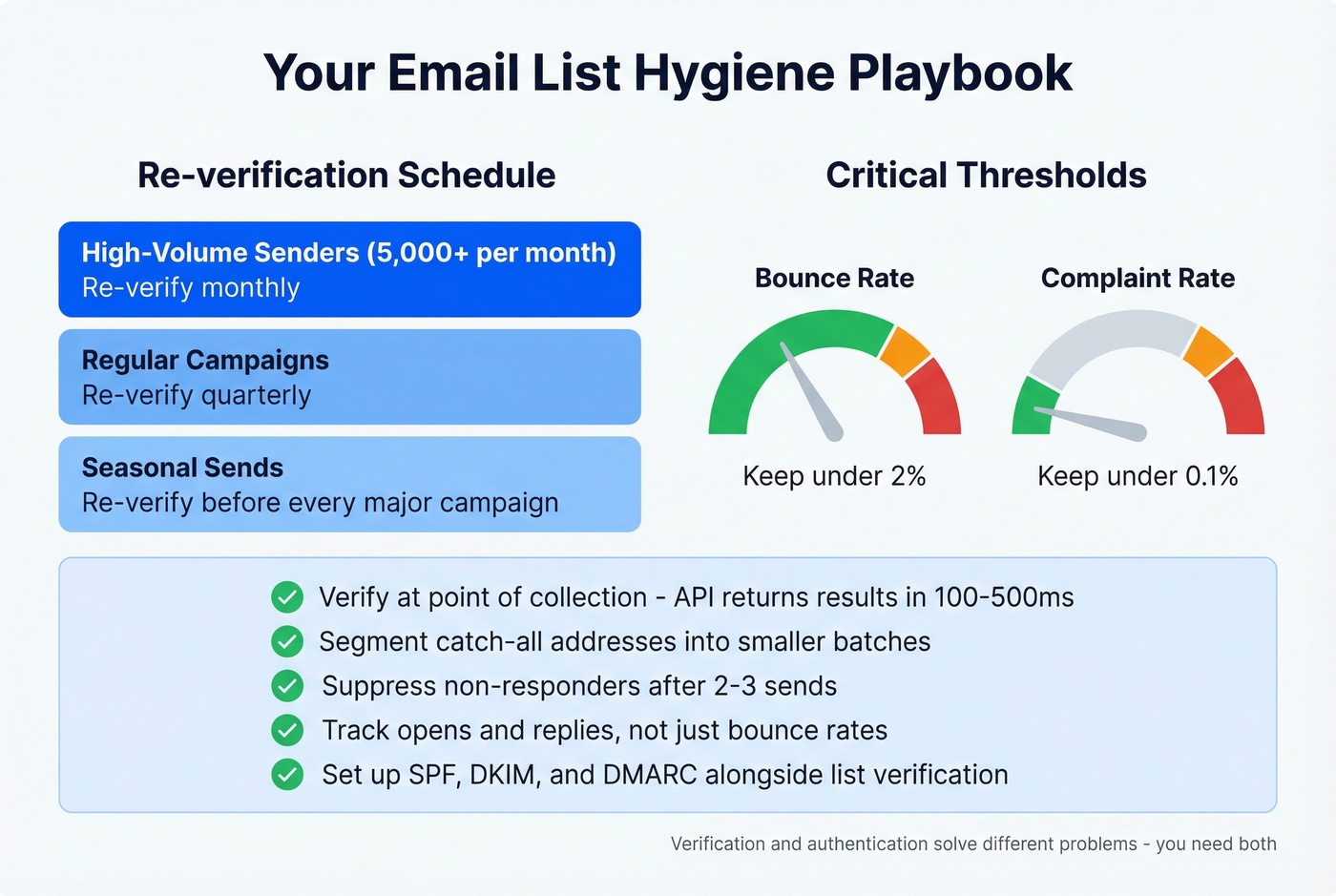
Verify at point of collection. Real-time API verification typically returns results in 100-500ms - fast enough for form submissions without noticeable delay. This single step prevents most list quality problems before they start.
Re-verify monthly for high-volume senders, quarterly for regular campaigns, and before every major seasonal send. Keep bounce rate below 2% and complaint rate under 0.1% - these are the thresholds that matter under current enforcement rules.
For catch-all addresses, segment them into smaller batches, monitor engagement closely, and suppress non-responders aggressively after 2-3 sends. Track opens and replies, not just bounce rates. An email that lands in spam is technically "delivered" but practically invisible.
If you’re pushing volume, also watch your email velocity so verification doesn’t get undone by sending behavior.
Use authentication records (SPF, DKIM, DMARC) alongside list verification to maximize inbox placement. Verification and authentication solve different problems - you need both.
Catch-all domains break most verification tools. Prospeo's proprietary infrastructure handles them - plus spam traps and honeypots - so your bounce rate stays under 2%. At $0.01 per email, bad data stops being a cost you absorb.
Stop paying for bounces. Pay a penny per verified email instead.
FAQ
Is email verification the same as email validation?
No. Validation checks format and syntax - proper @ placement, valid domain suffix, no illegal characters. Verification confirms the mailbox exists via SMTP probing. Most commercial tools combine both into a single automated workflow, which is why the terms get confused so often.
How often should I re-verify my email list?
Monthly for high-volume senders (5,000+ emails/month), quarterly for regular campaigns. Lists lose roughly 23% of valid addresses annually due to job changes, domain shutdowns, and deactivated accounts.
Can verification catch all bad addresses?
No. Catch-all domains accept mail for any local-part, making individual mailbox confirmation impossible. The best tools flag catch-all addresses separately so you can segment and monitor them rather than sending blindly.
What happens if I skip verification entirely?
Expect bounce rates of 15-25% on purchased or aged lists, which triggers spam filters and damages your sender reputation. Once major providers like Google or Microsoft flag your domain, even verified addresses stop receiving your emails. Recovery takes weeks - sometimes longer if you've hit spam traps.