

How to Check an Email Address: 5 Methods From Manual to Automated
15% of email addresses collected through forms contain typos. That's not a rounding error - it's a pipeline leak. Whether you're trying to check an email address before cold outreach or figure out if that "urgent invoice" message is a phishing attempt, this is a skill every professional needs. And the cost of skipping it isn't just a bounced message. Reputation recovery after a deliverability hit takes 15-45 days, and we've seen teams lose months of momentum from a single bad send.
What You Need (Quick Version)
Check one email right now? Use Verifalia or Mailmeteor. Paste the address, click verify, get a result in seconds.
Check a list of hundreds or thousands? Use a bulk tool like ZeroBounce or NeverBounce, or skip the verification step entirely with a source that only delivers pre-verified emails.
Check if an email you received is legit? Inspect the message headers for SPF, DKIM, and DMARC authentication. Method 5 walks you through it.
Verification vs. Validation
These terms get swapped constantly, but they mean different things.
| Verification | Validation | |
|---|---|---|
| What it does | Confirms a user controls an inbox (double opt-in, confirmation link) | Checks whether an address is formatted correctly and deliverable |
| Requires recipient action? | Yes | No |
This guide focuses on validation: can this address receive email? But the distinction matters because Google and Yahoo's bulk sender requirements now demand proper SPF, DKIM, and DMARC authentication, one-click unsubscribe, and spam complaint rates under 0.3%. Email validation isn't optional anymore - it's table stakes.
How Email Checking Works
Every email check - manual or automated - follows four stacked filters.
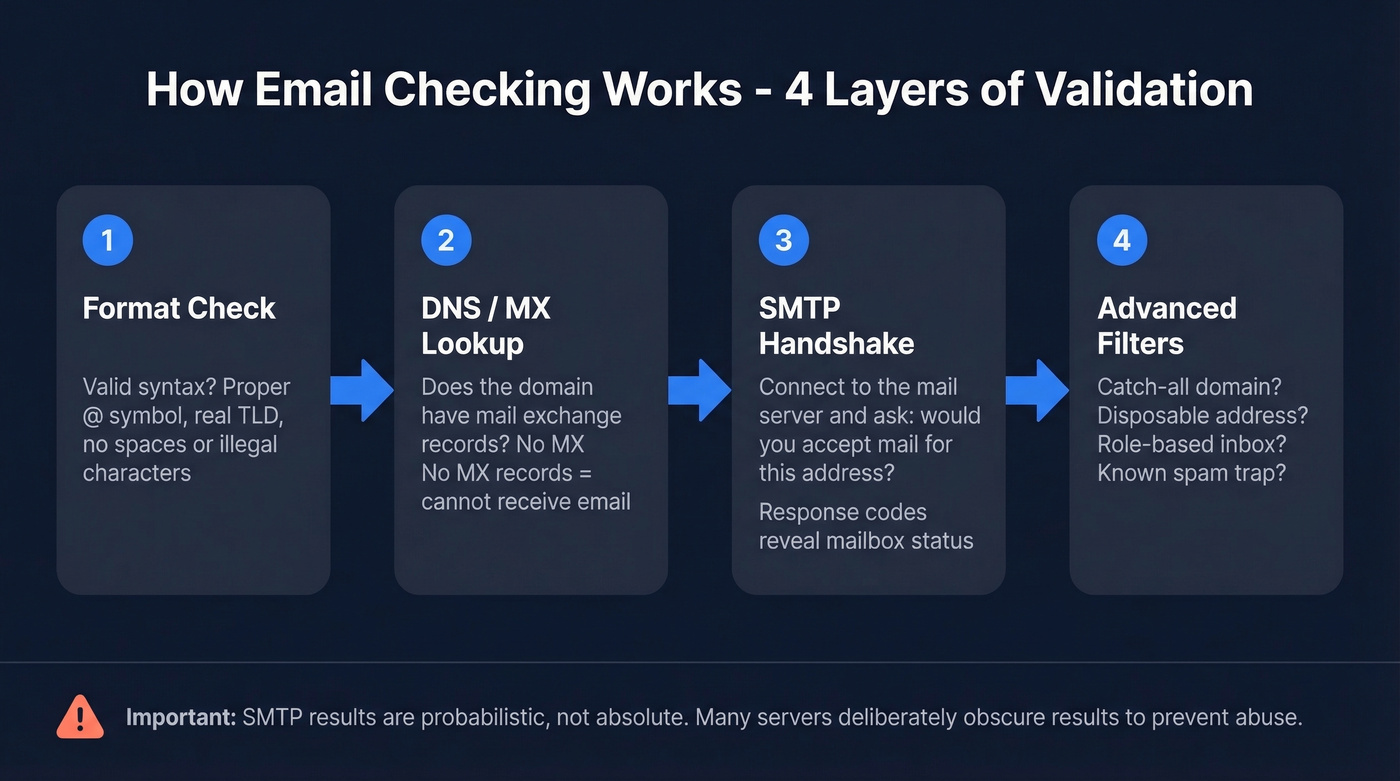
Layer 1: Format check. Does the address follow valid syntax? No spaces, proper @ symbol, real TLD.
Layer 2: DNS/MX lookup. Does the domain have mail exchange records? If not, it can't receive email. Full stop.
Layer 3: SMTP handshake. Connect to the mail server and ask "would you accept a message for this address?" without actually sending one. The server's response tells you whether the mailbox exists.
Layer 4: Filters. Is it a catch-all domain? A disposable address? A role-based inbox like info@ or support@? A known spam trap?
Here's the thing - SMTP results are probabilistic, not absolute. Many servers deliberately obscure results to prevent abuse. That's why tools layer multiple checks together; no single method gives you certainty.

You just learned 5 ways to check an email address. Prospeo eliminates 4 of them. Every email in our 143M+ database passes a 5-step verification pipeline - catch-all handling, spam-trap removal, honeypot filtering - refreshed every 7 days. 98% accuracy, out of the box.
Skip the verification step. Start with emails that are already verified.
5 Methods to Verify Any Address
Method 1 - Syntax and Format Check
The simplest check catches the dumbest mistakes. You'd be surprised how many databases contain addresses ending in @gamil.com or @outlok.com. A format check validates the standard pattern: local-part@domain.tld.
Technically, this is a regex pattern match. Most programming languages and form validation libraries include one. It checks for a valid local part (no illegal characters, no double dots), an @ symbol, and a syntactically valid domain. Format validation catches typos in the domain, missing @ symbols, illegal characters, and obviously malformed addresses.
It misses everything else. A perfectly formatted address can still point to a nonexistent mailbox, a dead domain, or a spam trap. This is the first layer, not the last.
Method 2 - DNS / MX Record Lookup
Once the address passes format checks, verify the domain can actually receive email by looking up its MX (Mail Exchange) records.
From a terminal:
dig MX gmail.com
You'll see something like:
gmail-smtp-in.l.google.com.    5
alt1.gmail-smtp-in.l.google.com.  10
alt2.gmail-smtp-in.l.google.com.  20
The numbers are priority values - lower means preferred. On Windows, use nslookup -type=MX domain.com instead.
If a domain returns no MX records, it can't receive email. The address is invalid regardless of the local part. This check takes seconds and eliminates dead domains before you waste time on deeper verification.
Method 3 - Manual SMTP Verification
This is where it gets interesting. You're going to connect directly to a mail server and simulate sending an email - stopping before you transmit anything. The server's response tells you whether the mailbox exists.
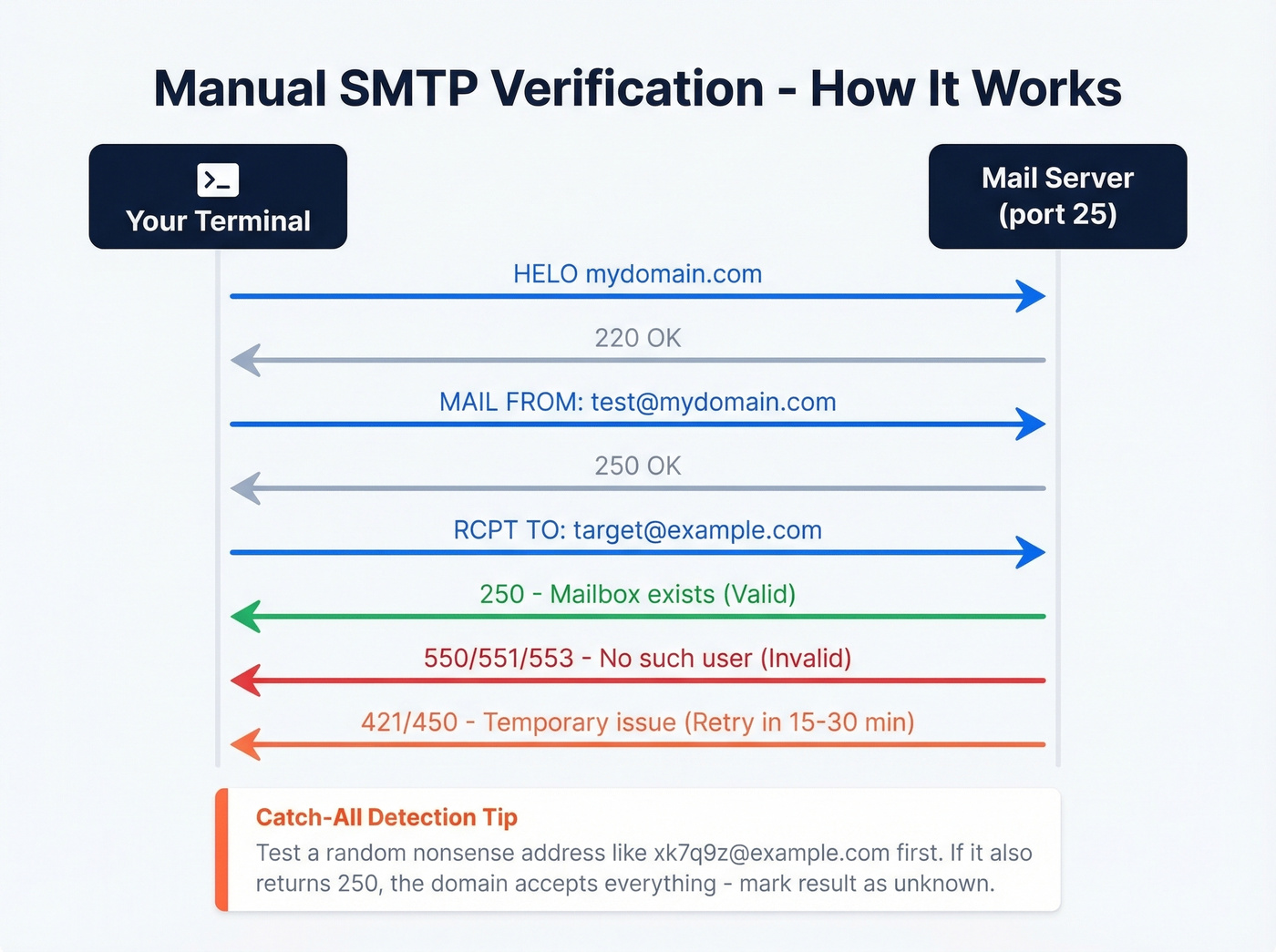
Open a terminal and connect on port 25:
telnet mail.example.com 25
(ncat works as an alternative if telnet isn't available.)
Then walk through the SMTP handshake:
HELO mydomain.com
MAIL FROM:<test@mydomain.com>
RCPT TO:<target@example.com>
The response to RCPT TO is what matters:
| Response Code | Meaning | Action |
|---|---|---|
| 250 | Mailbox exists | Valid |
| 550/551/553 | No such user | Invalid |
| 421/450 | Temporary issue | Retry in 15-30 min |
Catch-all detection: Before trusting a 250, test a random nonsense address at the same domain like xk7q9z@example.com. If that also returns 250, the domain is a catch-all - it accepts everything. Mark the result as unknown.
Greylisting is another wrinkle. Some servers return a 450 "try again later" on the first attempt to filter spam bots. Wait 15-30 minutes and retry.
In our testing, manual SMTP checks failed on roughly half of corporate domains. Microsoft 365 blocks sender verification entirely, and many major providers and secured gateways increasingly restrict SMTP callback accuracy. This method is great for understanding how verification works under the hood, but it doesn't scale past a handful of addresses.
Method 4 - Use a Verification Tool
Manual SMTP checks fall apart past 10 addresses. For anyone who needs to check an email address at scale, tools automate the entire four-layer pipeline and handle the edge cases - catch-alls, greylisting, provider restrictions - that would eat your afternoon.
The industry benchmark: keep total bounces below 2%, with top performers targeting hard bounces under 1%. Exceeding that threshold risks ESP throttling and sender reputation damage. Catch-all handling and false positives are the two problems that break most free checkers. A paid tool pays for itself the first time it saves your domain reputation.
Let's break down the options worth considering.
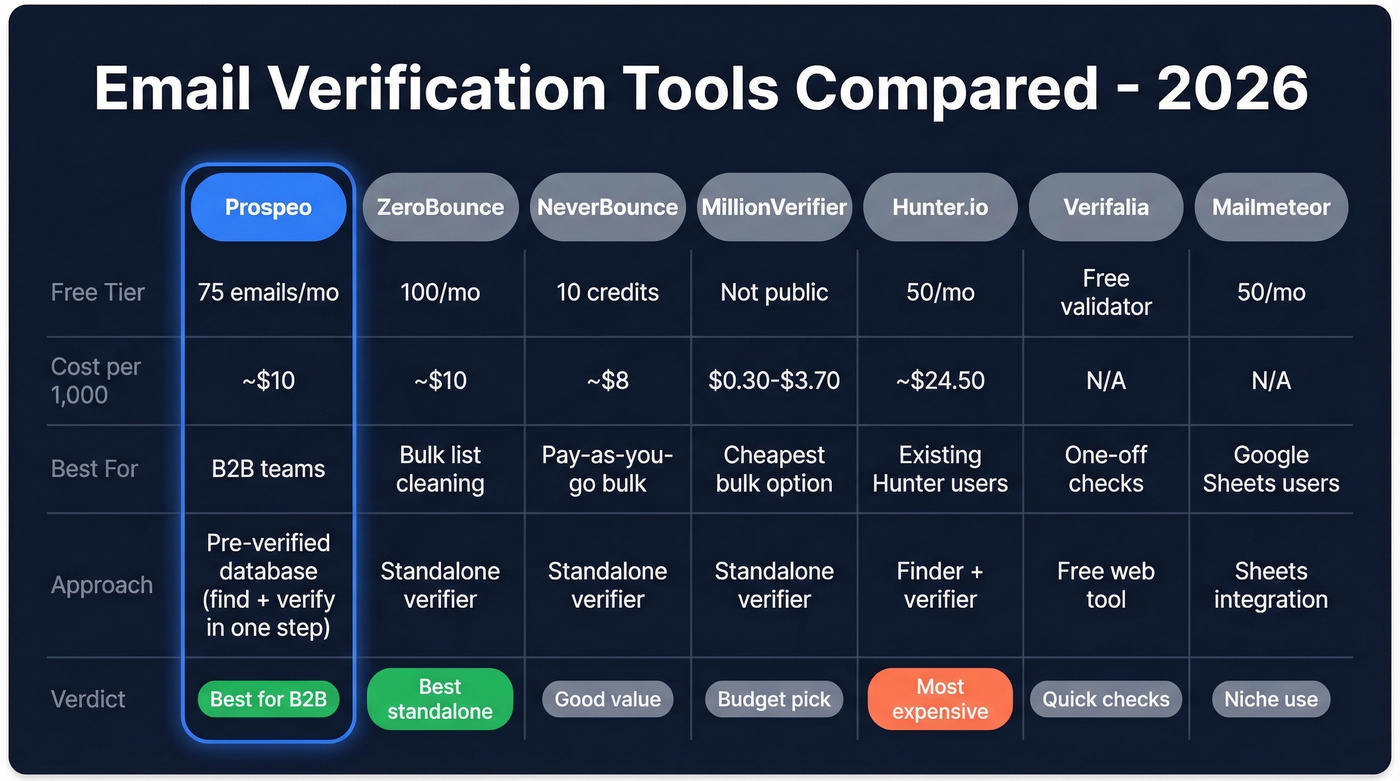
Prospeo takes a different approach entirely. Instead of verifying emails after collection, Prospeo's email finder returns only pre-verified addresses from 143M+ verified emails, built on proprietary email-finding infrastructure. Every record goes through a 5-step verification process with catch-all handling, spam-trap removal, and honeypot filtering - refreshed on a 7-day cycle. The result: 98% email accuracy out of the box. Meritt dropped their bounce rate from 35% to under 4% after switching. Free tier includes 75 emails per month; paid plans run about $0.01 per email.

ZeroBounce is the go-to standalone verifier for teams that already have lists and need them cleaned. The free tier gives you 100 verifications per month. Monthly plans start at ~$15/mo for 2,000 emails; pay-as-you-go runs roughly $10 per 1,000. It handles catch-all detection, abuse/spam-trap flagging, and returns detailed status codes. If you've already got a database and just need it scrubbed, this is where we'd start.

At ~$8 per 1,000 emails, NeverBounce is one of the cheapest pay-as-you-go options for pure bulk work. The free tier is thin - just 10 credits - but pricing scales well for large one-time list cleans.
MillionVerifier wins on price alone: bulk rates drop as low as $0.30 per 1,000 emails at high volume, with standard pricing around $3.70 per 1,000. If you're cleaning a massive legacy database and catch-all accuracy isn't your top concern, this gets the job done for pennies.
At ~$24.50 per 1,000 verifications, Hunter.io is the most expensive option here for pure verification. The 50 free monthly verifications are fine for spot-checking. Skip it unless you're already paying for their email finder.
If your workflow lives in Google Sheets, Mailmeteor integrates directly and covers 50 free verifications per month. Not built for heavy volume, but for small teams managing prospect lists in Sheets, it's frictionless.
Verifalia has a free email validator for quick single-address checks.
| Tool | Free Tier | Cost per 1,000 | Best For |
|---|---|---|---|
| Prospeo | 75 emails/mo | ~$10 | B2B teams: find + verify in one step |
| ZeroBounce | 100/month | ~$10 | Standalone bulk verification |
| NeverBounce | 10 credits | ~$8 | Pay-as-you-go bulk cleans |
| MillionVerifier | Not public | ~$0.30-$3.70 | Cheapest bulk option |
| Hunter.io | 50/month | ~$24.50 | Only if you already use Hunter |
| Verifalia | Free validator | - | Free one-off checks |
| Mailmeteor | 50/month | - | Google Sheets users |
For most B2B teams, Prospeo eliminates the verification step entirely. For teams cleaning existing lists, ZeroBounce or NeverBounce are the strongest standalone options.
If you're comparing more verifiers, see email verification options beyond the big names.
Manual SMTP checks fail on half of corporate domains. Free tools cap at 100 verifications. Meanwhile, teams using Prospeo's pre-verified emails dropped bounce rates from 35% to under 4% - at roughly $0.01 per address. 75 free emails per month, no credit card required.
Stop cleaning bad data. Start with clean data instead.
Method 5 - Received Email Legitimacy Check
This method flips the question. Instead of "will this address bounce?" you're asking "is this message actually from who it says it's from?"
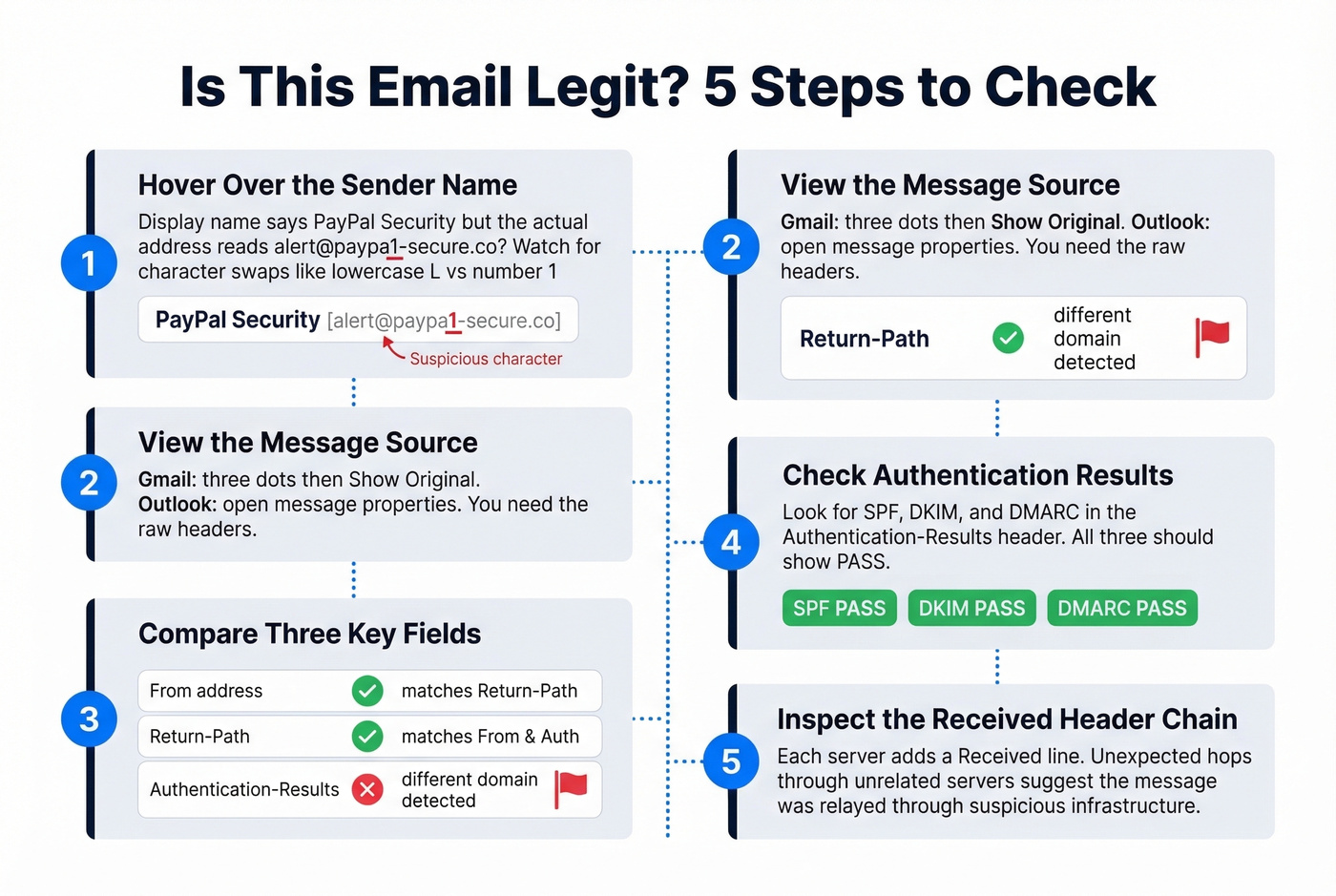
Step 1: Hover over the sender name. The display name says "PayPal Security" but the actual address reads alert@paypa1-secure.co. Watch for character substitutions - lowercase L vs. the number 1, .com vs. .co.
Step 2: View the message source. In Gmail, click the three dots then "Show original." In Outlook, open message properties. You're looking at raw headers.
Step 3: Compare three fields. The From address, the Return-Path, and the Authentication-Results header. In legitimate email, these align. If the From says billing@company.com but the Return-Path points to a different domain, that's a red flag. (If you want a deeper breakdown of Return-Path behavior, see Return-Path.)
Step 4: Check authentication results. Look for SPF, DKIM, and DMARC in the Authentication-Results header. All three should show PASS. If you're troubleshooting, use this guide on how to verify DKIM is working.
Step 5: Inspect the Received header chain. Each server adds a Received line. If the routing trail shows unexpected hops through servers that don't match the sender's domain, treat the message as suspicious.
One more heuristic worth checking: the sender's domain age. A domain created less than 90 days ago that claims to represent an established company is almost certainly fraudulent. WHOIS lookups take 30 seconds and are free.
Understanding Your Results
Verification tools return three buckets, not two. Understanding all three matters.
Valid: The mailbox exists and accepts email. Send away.
Invalid: The mailbox doesn't exist, the domain is dead, or the address is a known spam trap. Remove immediately. (If you’re cleaning lists after a deliverability incident, follow a spam trap removal process too.)
Unknown: The tool couldn't determine deliverability. This happens more often than most people expect.
In a 10,000 B2B email benchmark test, the dataset broke down like this:
| Category | Share | Notes |
|---|---|---|
| Corporate (verifiable) | 42% | Standard verification works |
| Catch-all | 28% | Inherently unknown |
| Known invalid | 15% | Remove immediately |
| Disposable | 5% | Temp Mail, Guerrilla Mail, etc. |
| Role-based | 4% | info@, support@, etc. |
| Free providers | 4% | Gmail, Yahoo personal |
| Typo domains | 2% | @gamil.com, @yaho.com |
That 28% catch-all figure is the number that matters. More than a quarter of B2B emails sit on catch-all domains where no verification tool can confirm whether a specific mailbox exists. Send to valid addresses, delete invalid ones, and segment unknowns for cautious sending - small batches with careful bounce monitoring. Never treat unknown as valid.
How Often to Re-Verify
Email lists decay faster than most teams realize. Average professional turnover runs around 41% annually, with 38% of employees leaving within their first year - and 40% of those departures happening within the first 90 days. Every job change creates a dead email address in your database.
Re-verify your lists every four months at minimum, and use real-time validation on every intake form, signup page, and lead capture workflow. If you're running outbound sequences, verify before every major campaign launch. And look - if your data source is giving you emails that bounce at 10%+, the problem isn't your verification tool. It's your data source. (More on managing bounce thresholds in our email bounce rate guide.)
Common Mistakes
Not verifying on intake. Every form submission, list import, and manual entry should hit a validation check before it touches your database. Cleaning up later is ten times harder and twice as expensive.
Treating "unknown" as "valid." This is the most expensive mistake on the list. Unknown addresses include catch-all domains and restricted providers. Sending to them at full volume will spike your bounce rate past the 2% threshold, and the consensus on r/coldemail is that recovering from that kind of hit takes weeks of careful warmup. If you need a playbook, start with how to improve sender reputation.
Ignoring disposable emails. Services like Guerrilla Mail generate addresses that work for minutes, then die. Your verification tool should flag these separately.
Skipping re-verification. A list that bounced at 1% three months ago can bounce at 8% today. Lists rot. People change jobs. Domains expire. We learned this the hard way with a 50,000-contact database that went from clean to 12% bounces in a single quarter. If you're scaling outbound, pair verification with a solid email deliverability guide.
FAQ
Can I check an email address without sending a message?
Yes. SMTP verification simulates a send up to the RCPT TO step without transmitting any message body. Tools like ZeroBounce and Verifalia automate this at scale, returning valid, invalid, or unknown results without the recipient ever knowing you checked.
How do you handle catch-all domains?
Catch-all domains accept mail for any address, so standard SMTP checks always return a 250 response. Use a verification tool with dedicated catch-all detection - it flags these domains so you can segment them for cautious, low-volume sending instead of treating them as confirmed valid.
How accurate are free email checkers?
Free checkers handle format and MX checks reliably but struggle with catch-all domains, which represent about 28% of B2B emails. Paid tools with multi-step pipelines deliver mid-to-high 90% accuracy on non-catch-all domains.
What bounce rate is acceptable?
Keep total bounces below 2%. Top performers target hard bounces under 1%. Exceeding these thresholds risks ESP throttling and sender reputation damage that takes 15-45 days to recover from.
Is there a tool that finds AND verifies emails in one step?
Yes. Prospeo's email finder returns only pre-verified addresses from a 143M+ database refreshed every 7 days. The free tier includes 75 emails per month - useful for teams that want to skip the separate verification step entirely.