

How to Close a Follow-Up Email That Actually Gets a Reply
You're staring at the cursor, three lines into a follow-up, and you've got nothing for the ending. Most email advice obsesses over subject lines and openers - but the closing line is where the reply decision actually happens. Gong's research found that interest-based CTAs ("Is this worth exploring?") outperform meeting requests by 30%, and most deals require 5-12 touchpoints before closing. Only 8% of reps follow up more than five times. Your closing line is doing more heavy lifting than you think.
The 3-Part Closing Framework
Every email ending has three distinct components, and most people conflate them. The closing line is your CTA - the sentence that tells the reader what to do next. The sign-off is the word or phrase before your name ("Thanks," "Best," "Cheers"). The signature block is your name, title, and contact info.
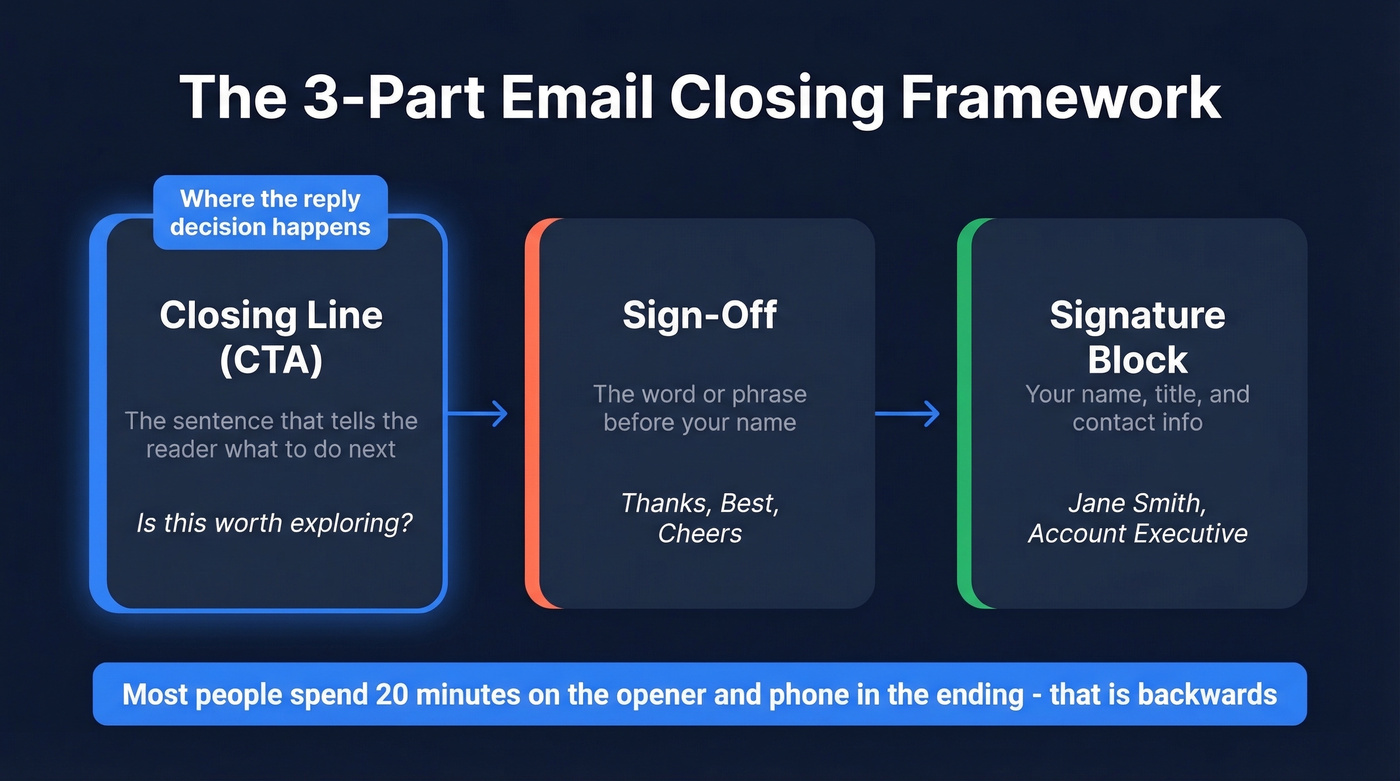
The closing line is where the reply decision happens. Recipients often skip straight to the bottom of an email to see what you're asking for. We've seen people spend twenty minutes on the opener and phone in the ending - that's backwards. Nail the last sentence, and the sign-off and signature just need to stay out of the way.
How Your Close Should Evolve Across a Sequence
Here's the thing: sending the same soft CTA four times in a row trains the recipient to ignore you. Ending each follow-up email differently is what separates a real sequence from noise. Your closing line should change temperature with each touch.
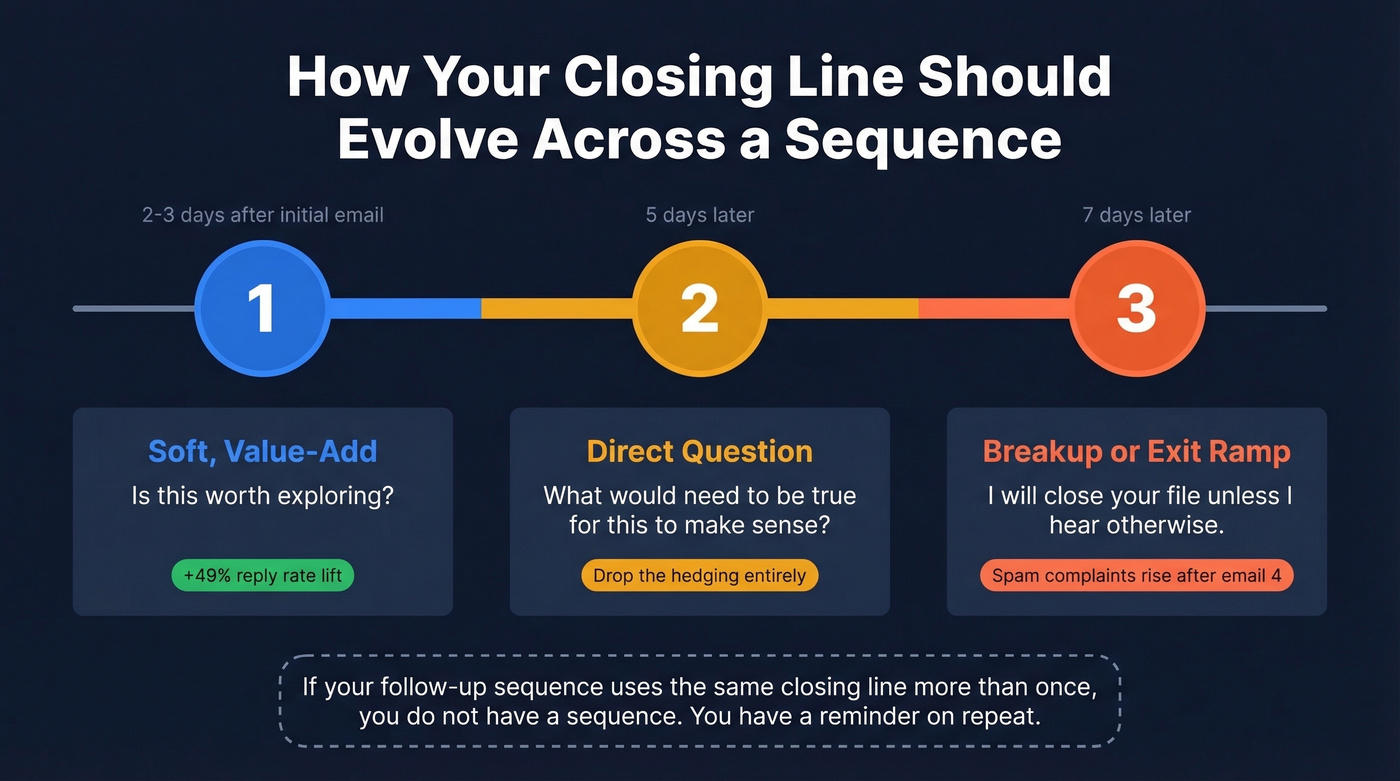
| Follow-Up | Tone | Example Close | Timing |
|---|---|---|---|
| #1 | Soft, value-add | "Is this worth exploring?" | 2-3 days after initial |
| #2 | Direct question | "What would need to be true for this to make sense?" | 5 days later |
| #3 | Exit ramp / breakup | "I'll close your file unless I hear otherwise." | 7 days later |
Your first follow-up can lift reply rates by up to 49%, so don't waste it on a bump - add new information the original email didn't include. By follow-up #2, drop the hedging entirely. By #3, the breakup close works because it's the only follow-up that gives the recipient something to lose. Spam complaints tend to rise by the fourth email, so make that third one count.
If your follow-up sequence uses the same closing line more than once, you don't have a sequence. You have a reminder on repeat.
Closing Lines for Every Scenario
Gong's core insight applies everywhere: interest-based CTAs perform 30% better than specific or open-ended ones. Keep that principle in mind across every scenario below.
After No Response
The "exit ramp" technique is the most underrated move in follow-up emails. Give the recipient permission to say no, and they're more likely to say yes.
- "If this isn't a priority right now, just let me know and I'll stop following up."
- "Totally understand if the timing's off - worth revisiting in Q3?"
- "Sorry, did I do something wrong or are you just super busy?"
That last one feels risky. It's a staple in sales CTA libraries for a reason though - it breaks the pattern, it's human, and it's dead simple to reply to.
After a Meeting or Proposal
Late-stage follow-ups need to surface blockers, not just nudge. Your closing line should make it easier to say yes than to ignore you.
- "Would you prefer the Standard or the Pro plan?" (either/or close)
- "What would stop you from moving ahead today?" (objection surfacing)
- "Whose name should I put on the paperwork?" (commitment close)
- "Please let me know by Friday if you're ready to move forward." (deadline close)
The either/or close is particularly effective because the recipient is choosing between options, not deciding whether to engage at all. We've found it helps to draft your follow-up closing line before the meeting so you can reference something specific from the conversation rather than scrambling afterward.
After a Job Interview
Generic gratitude doesn't differentiate you. Instead of bullet-pointing your way through a thank-you, weave specificity into a short, warm paragraph. Reference the exact project or challenge you discussed, restate why it excited you, and close with a clear question about timeline.
Something like: "Our conversation about migrating the analytics stack reinforced my excitement about this role - I'd love to hear about next steps. Is there anything else I can provide in the meantime?" The specificity proves you were listening, and the question gives them an easy reply path.
The Breakup Email
The breakup email works because of loss aversion - people respond more to what they might lose than what they might gain.
- "I'm going to assume you're all set and will close your file. If anything changes, just reply here."
- "This'll be my last note. If the timing's ever right, I'm easy to find."
Keep it short. Two sentences max. The brevity is the point.

You just learned how to craft closing lines that get replies. But none of that matters if your follow-up lands in a dead inbox. Prospeo's 5-step email verification catches bad addresses before you hit send - 98% accuracy, refreshed every 7 days, starting at $0.01 per email.
Stop perfecting closes for emails that bounce. Verify first.
Which Sign-Offs Actually Work
A Boomerang analysis of 350,000+ email threads gives us hard data on this:
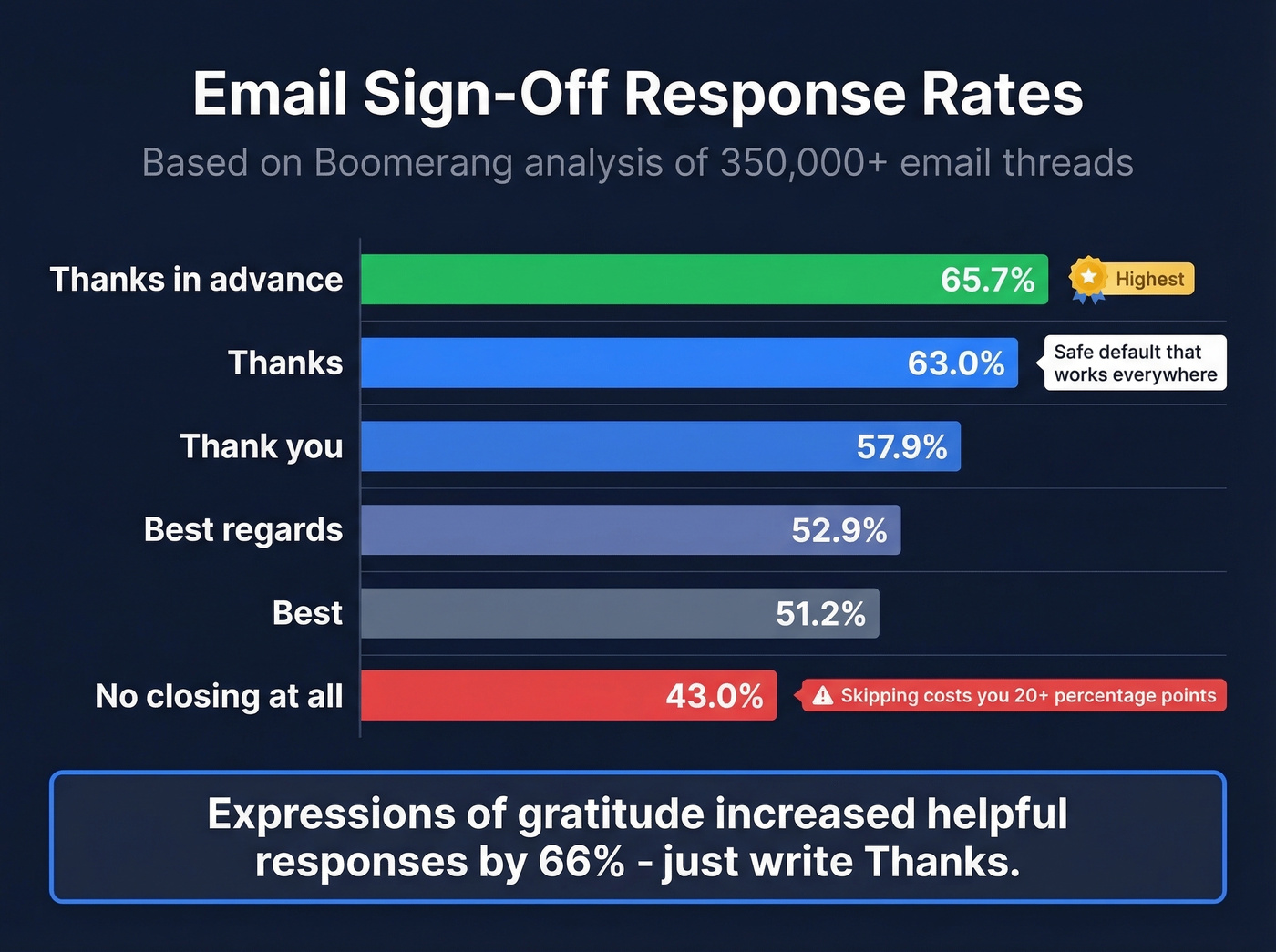
| Sign-Off | Response Rate |
|---|---|
| Thanks in advance | 65.7% |
| Thanks | 63.0% |
| Thank you | 57.9% |
| Best regards | 52.9% |
| Best | 51.2% |
| No closing | 43.0% |
"Thanks in advance" wins the numbers, but it can feel presumptive with new contacts - you're thanking someone for something they haven't agreed to do. "Thanks" is the safe default that works everywhere. Grant & Gino's research found that expressions of gratitude increased helpful responses by 66%, and skipping the sign-off entirely drops your response rate to 43%. Just write "Thanks." Two seconds of work for a measurable lift.
Five Closing Mistakes That Kill Replies
1. Bumping with no new info. "Just bumping this to the top of your inbox" tells the recipient you have nothing new to say. Add a proof point, then close with a question.
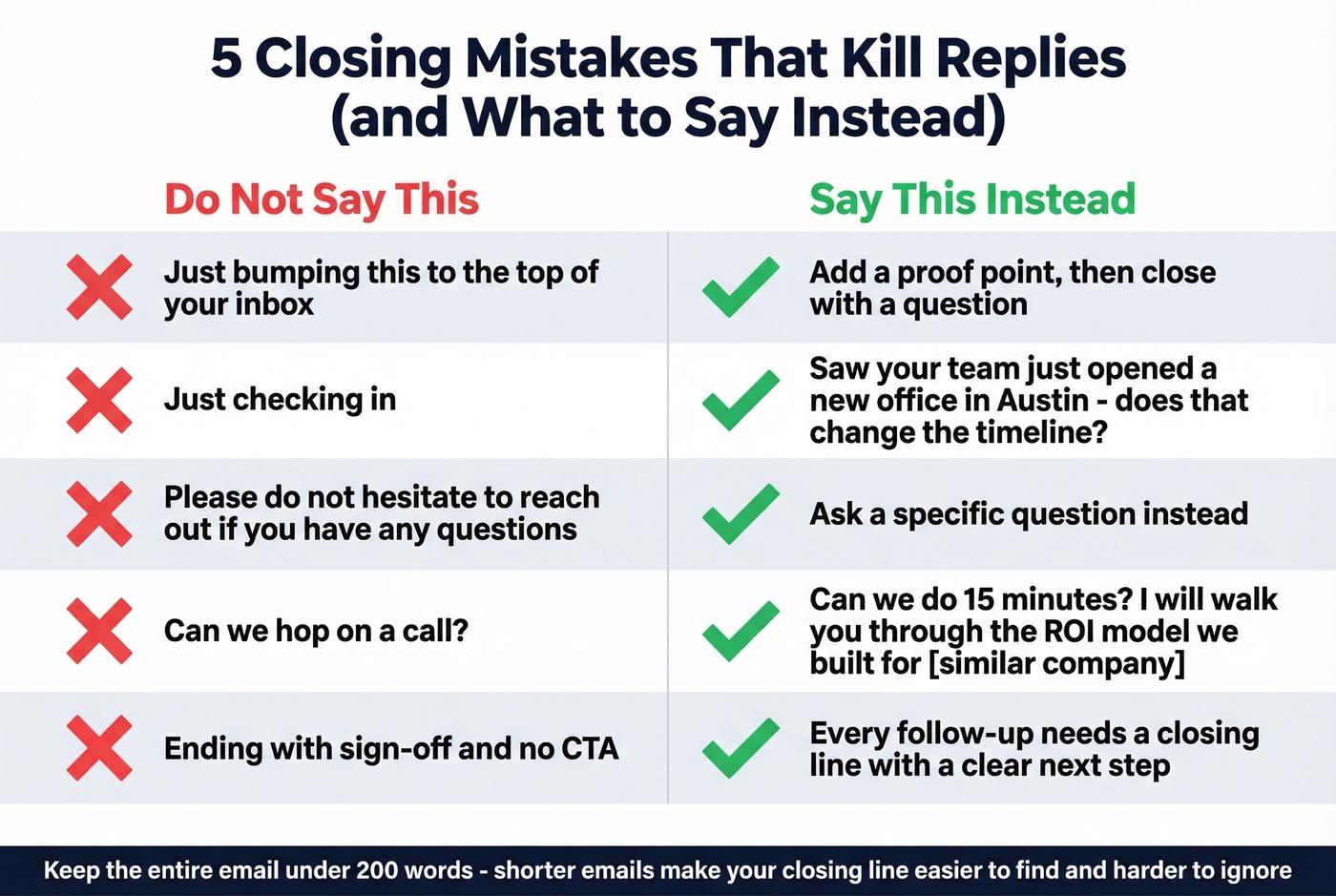
2. "Just checking in." Filler that signals obligation, not value. Replace with a reason: "Saw your team just opened a new office in Austin - does that change the timeline?" (Or use these alternatives to "Just checking in.")
3. The passive close. "Please don't hesitate to reach out if you have any questions" has never made anyone reach out. Ask a specific question instead.
4. Asking without offering value. "Can we hop on a call?" needs a reason attached. Try: "Can we do 15 minutes? I'll walk you through the ROI model we built for [similar company]."
5. No clear next step. Ending with your sign-off and no CTA is like walking away mid-sentence. Every follow-up needs a closing line. And keep the entire email under 200 words - shorter emails make your closing line easier to find and harder to ignore.
Before You Hit Send
Let's be honest: the best closing line in the world is worthless if the email bounces. Before you craft that perfect exit ramp, make sure the address is real. Prospeo verifies emails in real time with 98% accuracy through a proprietary 5-step verification process, so your follow-up actually reaches a real inbox. The free tier covers 75 verifications a month, no credit card required.
If you're building a full follow-up sequence, it also helps to track your follow-up email reply rate and keep an eye on email bounce rate so you don't burn your domain.
Building a follow-up sequence takes real effort - the right tone, the right CTA, the right timing. Don't waste it on outdated contact data. Prospeo gives you 143M+ verified emails with 98% accuracy and a 7-day refresh cycle, so every carefully crafted closing line reaches a real person.
Great follow-ups deserve real inboxes. Get verified contacts now.
FAQ
What's the best sign-off for a follow-up email?
"Thanks" - it hit a 63% response rate across 350,000 emails analyzed by Boomerang. "Thanks in advance" scores higher at 65.7% but can feel presumptive with new contacts. Match the sign-off to your relationship and tone.
How many follow-ups should I send before stopping?
Send at least 3-4 follow-ups, each with new information and a different closing line. Most deals require 5-12 touchpoints, yet only 8% of reps follow up more than five times. Include a breakup email as your final touch - it's often the one that gets the reply.
How do I end a follow-up email without sounding pushy?
Give the recipient an easy out. Phrases like "No worries if the timing isn't right" or "Happy to close the loop if this isn't a fit" reduce pressure while still prompting a response. Pair a soft exit ramp with a specific question, and you'll sound helpful rather than desperate.
How do I make sure my follow-up email doesn't bounce?
Verify the email address before sending. A single bounce hurts your sender reputation and wastes every word you wrote. Prospeo's real-time verification catches invalid addresses, spam traps, and catch-all domains - the free plan includes 75 checks per month so you can validate contacts before any outreach.