

How to Create a Sell Sheet (Step-by-Step)
You've got 60 seconds of a buyer's attention and a single page to make your case. That's the sell sheet - your product's elevator pitch on paper. Knowing how to create a sell sheet that earns a second conversation is one of the highest-return skills in sales enablement. Here's the full workflow.
What You Need Before Starting
Before you open any design tool, get these ready:
- One product or service to feature - never more than two
- One buyer persona you're writing for (use an Ideal Customer Profile to stay tight)
- Under 100 words of body copy - headlines, subheads, and bullets do the heavy lifting
- One strong CTA with contact info
- High-res visuals like a product photo, logo, or hero image
- Export specs decided upfront: PDF for email, print-ready assets for print
If you're spending more than 30 minutes choosing a tool, you're procrastinating.
What a Sell Sheet Is
A sell sheet is a single-page document that summarizes your product's key benefits, features, and value proposition. Think of it as a physical or digital elevator pitch - something a prospect can scan in under a minute and walk away understanding what you sell and why it matters.
The format varies. Glossy handout at a trade show, PDF attached to a follow-up email, one-pager left behind after a demo. But the goal never changes: capture attention fast and leave the reader wanting more.
Sell Sheet vs Brochure
These get confused constantly.
| Sell Sheet | Brochure | |
|---|---|---|
| Length | 1 page, front or double-sided | Multi-page |
| Scope | One product/service | Multiple offerings |
| Purpose | Spark interest | Deepen interest |
| Best for | First meetings, trade shows | Follow-ups, objection handling |
The rule of thumb from Wilson Printing is clean: sell sheets start conversations, brochures move them forward. If you're trying to cram three products and a testimonial wall onto one page, you're building a brochure. Stop and pick one thing to sell.
The 7 Must-Have Elements
Every effective sell sheet includes these components. Miss one and the page feels incomplete.
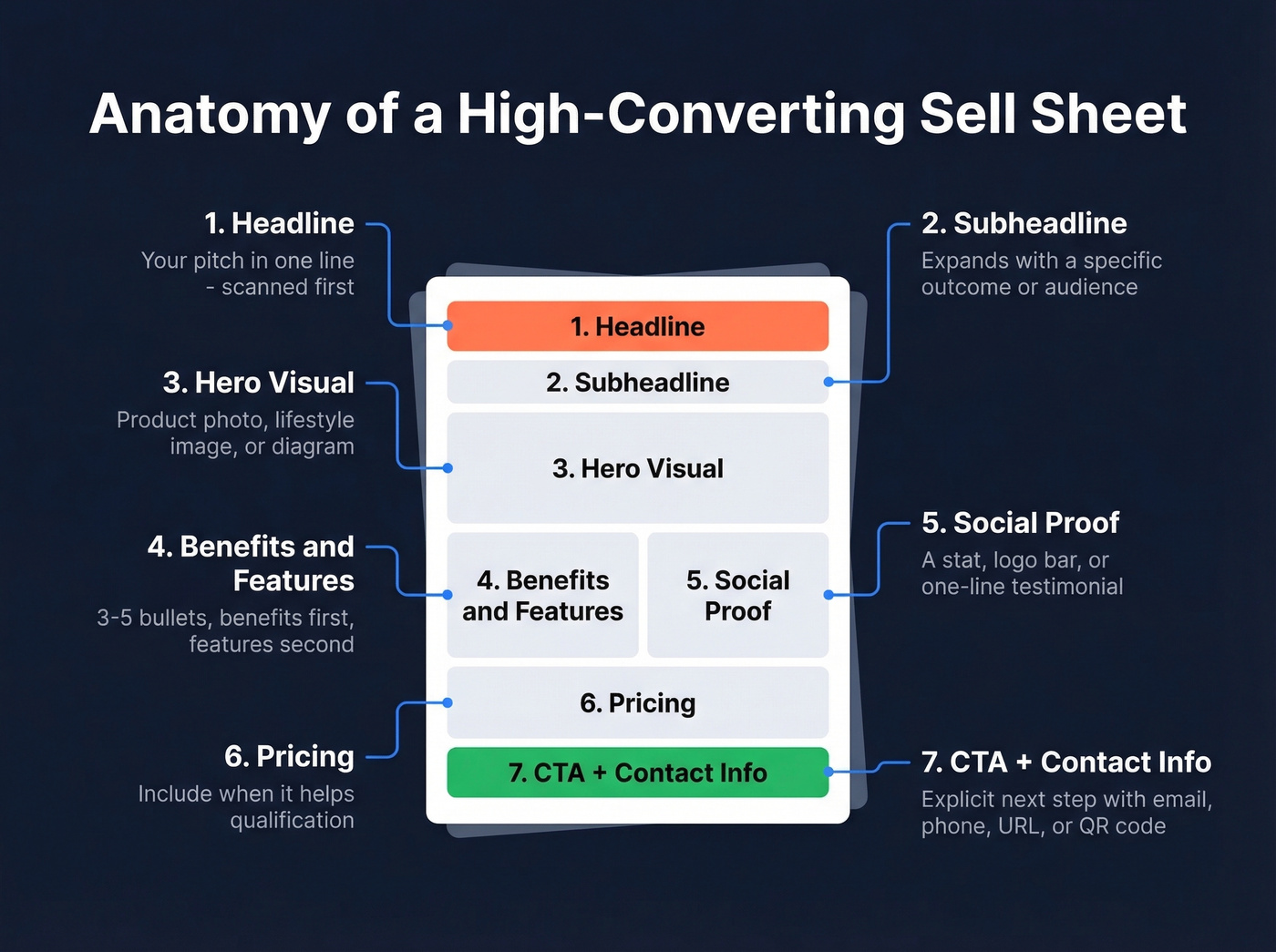
- Headline - your pitch in one line, scanned first
- Subheadline - expands the headline with a specific outcome or audience
- Hero visual - product photo, lifestyle image, or diagram
- Benefits/features - 3-5 bullets, benefits first, features second
- Social proof - a stat, logo bar, testimonial, or case study snippet
- Pricing - include it when it helps qualification; complex pricing belongs in a follow-up, not a one-pager
- CTA + contact info - explicit next step with email, phone, URL, or QR code
Build Your Sell Sheet in 5 Steps
Step 1: Pick One Buyer + One Promise
Answer two questions before anything else: who's reading this, and what's the single most important thing they need to hear? A sell sheet for a VP of Operations looks different from one aimed at a retail buyer. Narrow your audience, then narrow your message. One page, one promise.
Step 2: Write the Copy
The copy framework that works best on a single page follows three beats: articulate the problem, highlight the outcome, then address the motivation keeping the buyer from acting.
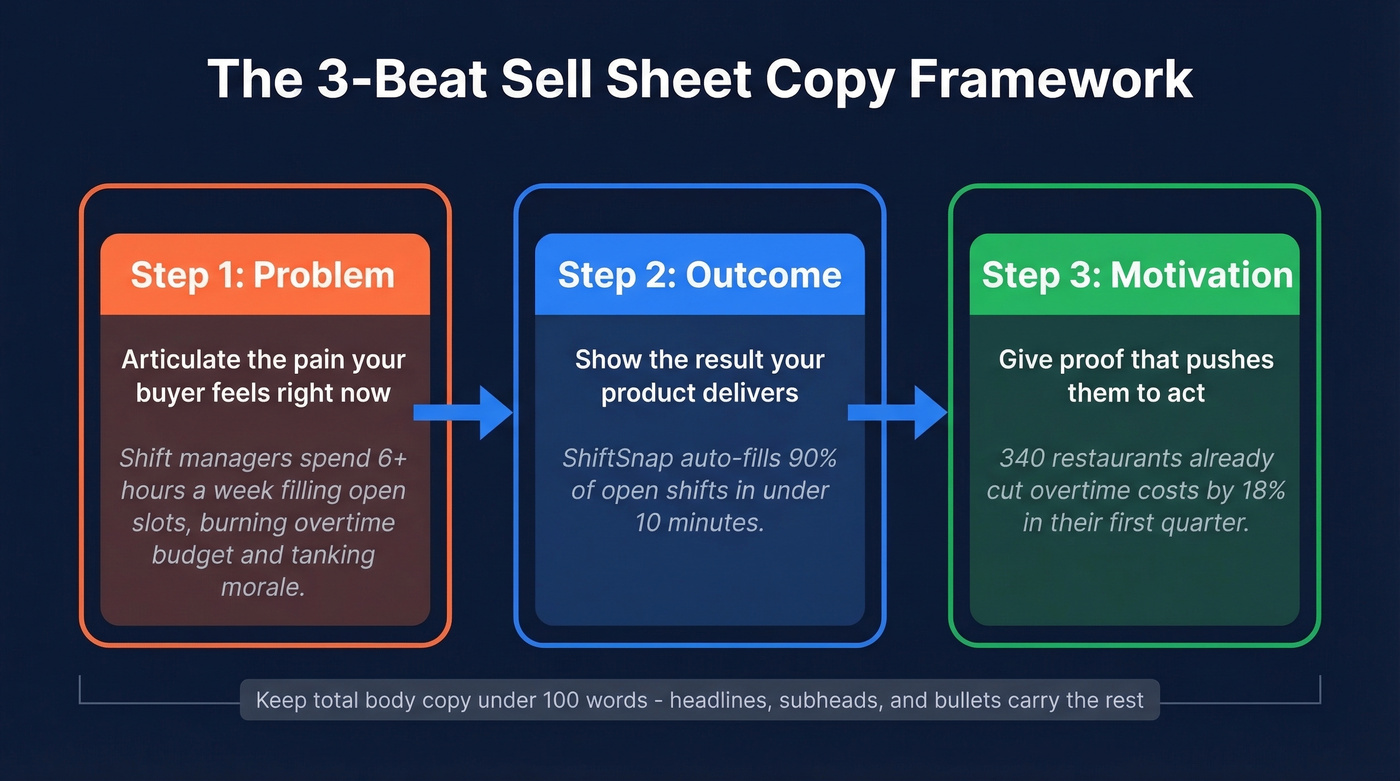
Here's a completed example for a fictional scheduling product:
Problem: Shift managers spend 6+ hours a week filling open slots, which burns overtime budget and tanks morale. Outcome: ShiftSnap auto-fills 90% of open shifts in under 10 minutes. Motivation: 340 restaurants already cut overtime costs by 18% in their first quarter.
Keep total body copy under 100 words. Headlines, subheads, and bullet points carry the rest.
Here's the thing - the most common mistake we see is leading with product features instead of the buyer's problem. Nobody cares about your "AI-powered algorithm" until they understand the pain it solves.
Step 3: Write a Headline That Sells
People skim. Your headline is the pitch. If it doesn't land, nothing else matters. These Proposify-style headline templates are a solid starting point:
- "{Product type} to {benefit}" - "Scheduling software to fill every open shift"
- "Get rid of {pain point}" - "Get rid of manual invoice chasing"
- "{Outcome} without {sacrifice}" - "Cut onboarding time without cutting corners"
Three formulas is plenty. Pick the one that matches your strongest selling angle and commit.
Step 4: Choose a Layout Pattern
Most sell sheets follow one of three patterns. Pick the one that matches your content, not the one that looks prettiest.
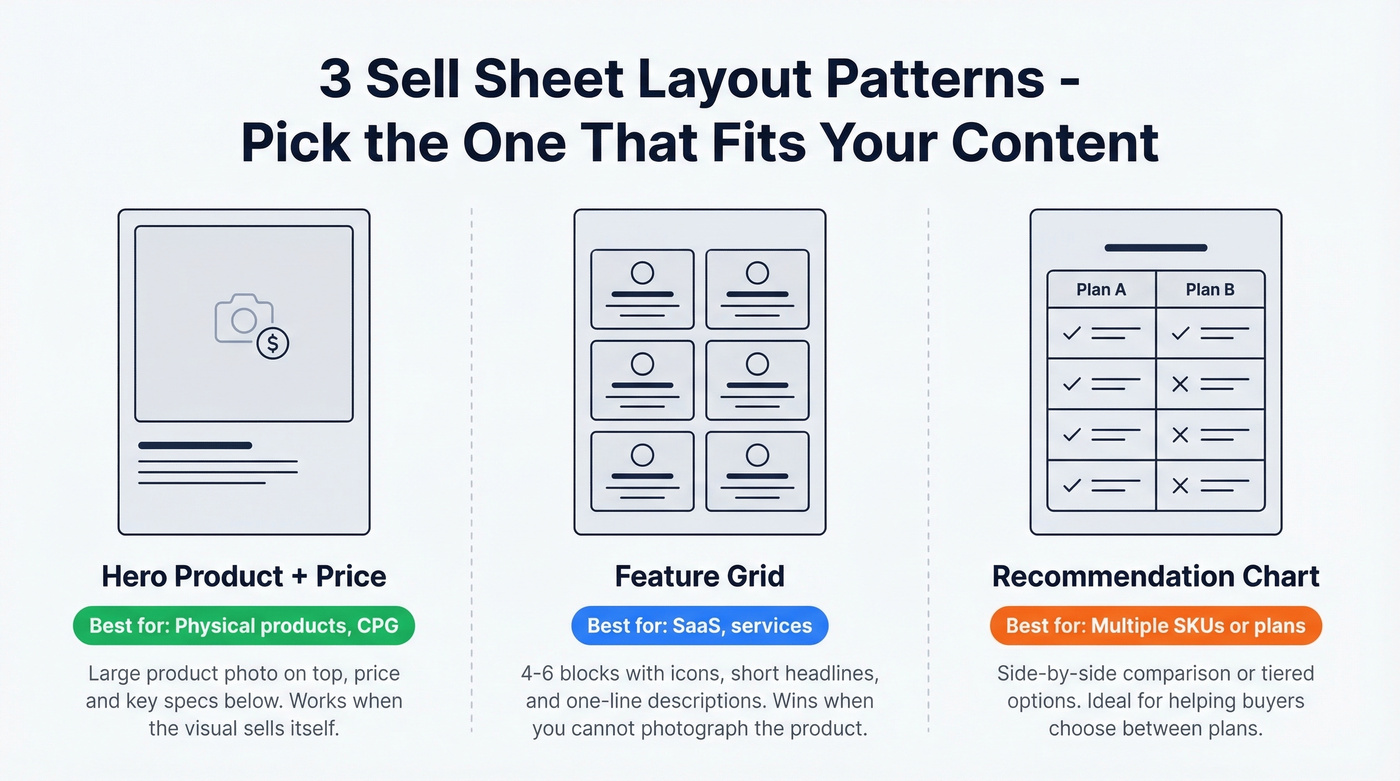
Hero product + price puts a large product photo on top with price and key specs below. Best for physical products and CPG where the visual sells itself. In our experience, this layout converts best when you have a genuinely attractive product shot - if you don't, use the feature grid instead.
Feature grid divides content into 4-6 blocks, each with an icon, short headline, and one-line description. Works well for SaaS and services where no single image tells the story. We've tested both approaches for B2B sell sheets, and the feature grid wins almost every time when the product isn't something you can photograph.
Recommendation chart uses side-by-side comparison or tiered options. Ideal when helping buyers choose between SKUs or plans. The Visme template gallery has solid examples of all three.
Step 5: Add Proof + CTA
Proof converts skeptics. A single customer stat, a recognizable logo bar, or a one-line testimonial is enough. Don't bury it - place it in the lower third where eyes naturally land after scanning. And don't skip proof for low-ticket products either. Unfamiliar brands at any price point need trust signals.
Your CTA needs to be explicit. "Learn more" is weak. "Book a 15-minute demo" or "Email sarah@company.com for samples" gives the reader a concrete next step. Include at least two contact methods.
Another trap: cramming dense paragraphs into every available inch. White space isn't wasted space - it's what makes your one-pager scannable instead of overwhelming.

A great sell sheet gets attention. But who are you sending it to? Prospeo gives you 300M+ profiles with 30+ filters - buyer intent, job title, technographics - so your one-pager lands in front of the exact decision-maker it was designed for.
Build the list that matches your sell sheet's buyer persona in minutes.
Examples Worth Studying
Real sell sheets pulled from TextMagic's breakdown, with what makes each one work.
The standout is 6sense - benefits-first messaging with readable fonts where the headline does the selling and the body copy just supports it. Clean hierarchy that guides the eye top to bottom. It's the one I'd hand to a junior marketer and say "do this."
Threekit/Salesforce integration takes the opposite approach: USP highlighted immediately, generous white space, and a visual hierarchy that shows what happens when you resist the urge to fill every inch. Hershey's proves that even CPG sell sheets work when the product photo is the hero and the copy stays tight - strong imagery paired with clear nutritional callouts.
Zendesk and Dole round out the list with organized, scannable layouts that match their brand tone without sacrificing clarity. The common thread across all five: none of them try to say everything. They each pick one angle and commit.
Export and Print Specs
Getting the design right means nothing if the file doesn't work when someone prints it or opens it on a tablet.
Design for US Letter (8.5x11") or A4, keeping critical content inside safe margins so nothing gets clipped. Export as PDF for sharing, and use print-ready images at 300 DPI if you plan to print - lower resolution works for email-only distribution, but 300 DPI keeps your options open.
Don't assume full bleed. Standard office printers force margins, so your edge-to-edge design will show a white border. Reddit practitioners confirm this is the reality for anything printed in-house. Always print a test copy before a trade show run - colors shift between monitors and printers, and you don't want to discover that at your booth.
Tools and Pricing
| Tool | Free Tier | Paid Plans | Best For |
|---|---|---|---|
| Canva | Yes | Pro $15/mo, Teams $30/mo | Quick, polished designs |
| Google Slides | Yes | Free | Collaboration, simplicity |
| PowerPoint | No dedicated free tier | M365 $7/mo Personal | Teams already in Microsoft |
| Adobe Express | Yes | Premium ~$10/mo | Brand-kit consistency |
| Figma | Yes | ~$15/editor/mo | Design-heavy teams |
Canva is the default for most teams - the template library gets you 80% of the way there in minutes. I've seen teams waste hours evaluating design tools when a Google Slides template would have been fine. PowerPoint works if your company already pays for Microsoft 365, though watch for font compatibility issues on shared files. For trackable, interactive PDFs, Proposify is worth a look.
Skip Figma unless your team already uses it. It's powerful but overkill for a one-pager, and the learning curve will eat your afternoon.
Distributing Your Sell Sheet
A sell sheet sitting in a shared drive doesn't generate pipeline. It works in four places:
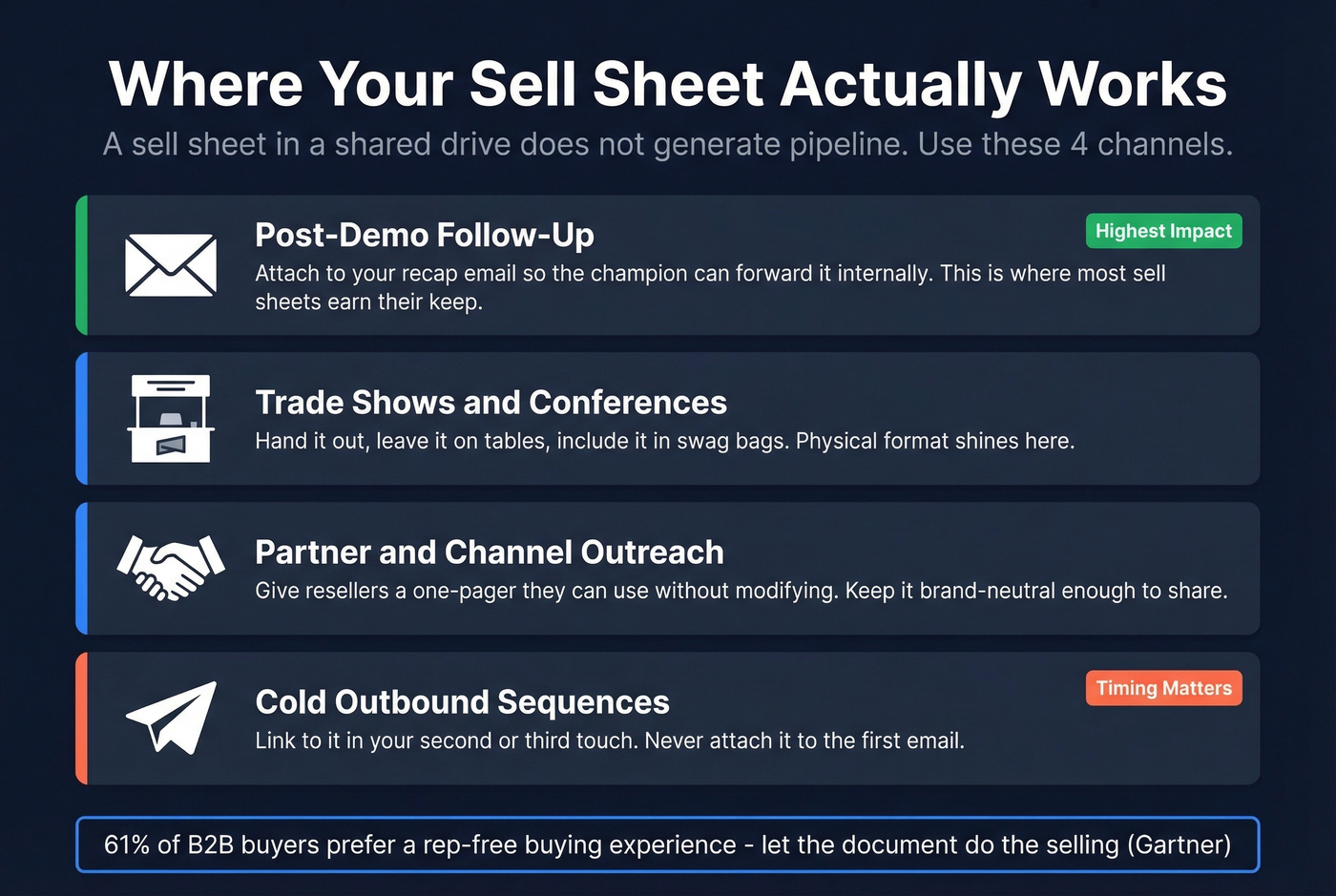
Post-demo follow-up - attach it to your recap email so the champion can forward it internally. This is where most sell sheets earn their keep, because the person you demoed isn't always the person who signs the check. (If you need copy, use these sales follow-up templates.)
Trade shows and conferences - hand it out, leave it on tables, include it in swag bags.
Partner and channel outreach - give resellers a one-pager they can use without modifying.
Cold outbound sequences - link to it in your second or third touch, don't attach it to the first email. (Pair it with a tighter B2B cold email sequence.)
Let's be honest: most sell sheets fail at distribution, not design. Gartner research shows 61% of B2B buyers prefer a rep-free buying experience and 73% actively avoid suppliers sending irrelevant outreach. A well-targeted sell sheet lets the document do the selling while you stay out of the way. But it only works if it reaches the right inbox. Prospeo covers 300M+ professional profiles with 143M+ verified emails at 98% accuracy - search by job title, industry, and company size, then send your one-pager to actual decision-makers instead of generic info@ addresses. (If you're building lists at scale, see our lead generation workflow and sales prospecting techniques.)
One operational note: keep one master version of your sell sheet and update it quarterly. Stale pricing or outdated screenshots undermine the credibility you worked to build.
You just built a sell sheet with a killer headline and a clear CTA. Now make sure the contact info on the other end is just as sharp. Prospeo's 98% verified emails and 125M+ direct dials mean your follow-up actually reaches the prospect - not a dead inbox.
Stop sending perfect sell sheets to bad email addresses.
Quick Checklist
Before you hit export, run through this:
- One product/service, one buyer persona
- Headline that communicates the core benefit
- Under 100 words of body copy
- Hero visual - product photo, diagram, or lifestyle image
- 3-5 benefit/feature bullets
- Social proof: stat, logo, or testimonial
- Explicit CTA with 2+ contact methods (use proven email call to action patterns)
- Exported as PDF, print-ready images at 300 DPI if printing
- Tested on US Letter and A4
- Printed a test copy if distributing physically
A great sell sheet doesn't close the deal - it gets your one-pager forwarded to the person who can. Keep it tight, keep it to one page, and get it in front of someone with budget.