

How to Determine If an Email Address Is Valid - Without Sending a Single Email
You pulled 15,000 contacts from a trade show, loaded them into your sequencer, and watched the bounce rate climb past 8% on the first send. Your sender reputation took a hit that'll take weeks to repair - and depending on your domain age, the damage could cost you tens of thousands in lost pipeline while you claw back deliverability. That scenario plays out constantly. It's entirely preventable.
Learning how to determine if an email address is valid before you send is the fix, and it doesn't require test emails. It requires understanding what happens before you ever hit send.
What You Need (Quick Version)
If you're checking a single email, any free tool works. If you're verifying a list before a campaign, you need a dedicated verification service. Three worth starting with:
- Prospeo - 98% email accuracy, 5-step verification with catch-all handling and spam-trap removal. Free tier gives you 75 verifications/month.
- ZeroBounce - 97.8% accuracy in a 10,000-email benchmark, 100 free verifications/month, strong reporting.
- NeverBounce - 96.9% accuracy in the same benchmark, pay-as-you-go from $0.008/email. Strong budget option at scale.
The decision framework is simple: single email, use a free tool. List of 500+, use a paid verification service. List over 10K, compare cost per verification and catch-all resolution rates. Keep reading to understand what's actually happening when you hit "verify" - because no tool is magic.
Validation vs. Verification vs. Risk Scoring
These three terms get used interchangeably, but they mean different things - and the distinction matters when you're evaluating tools.
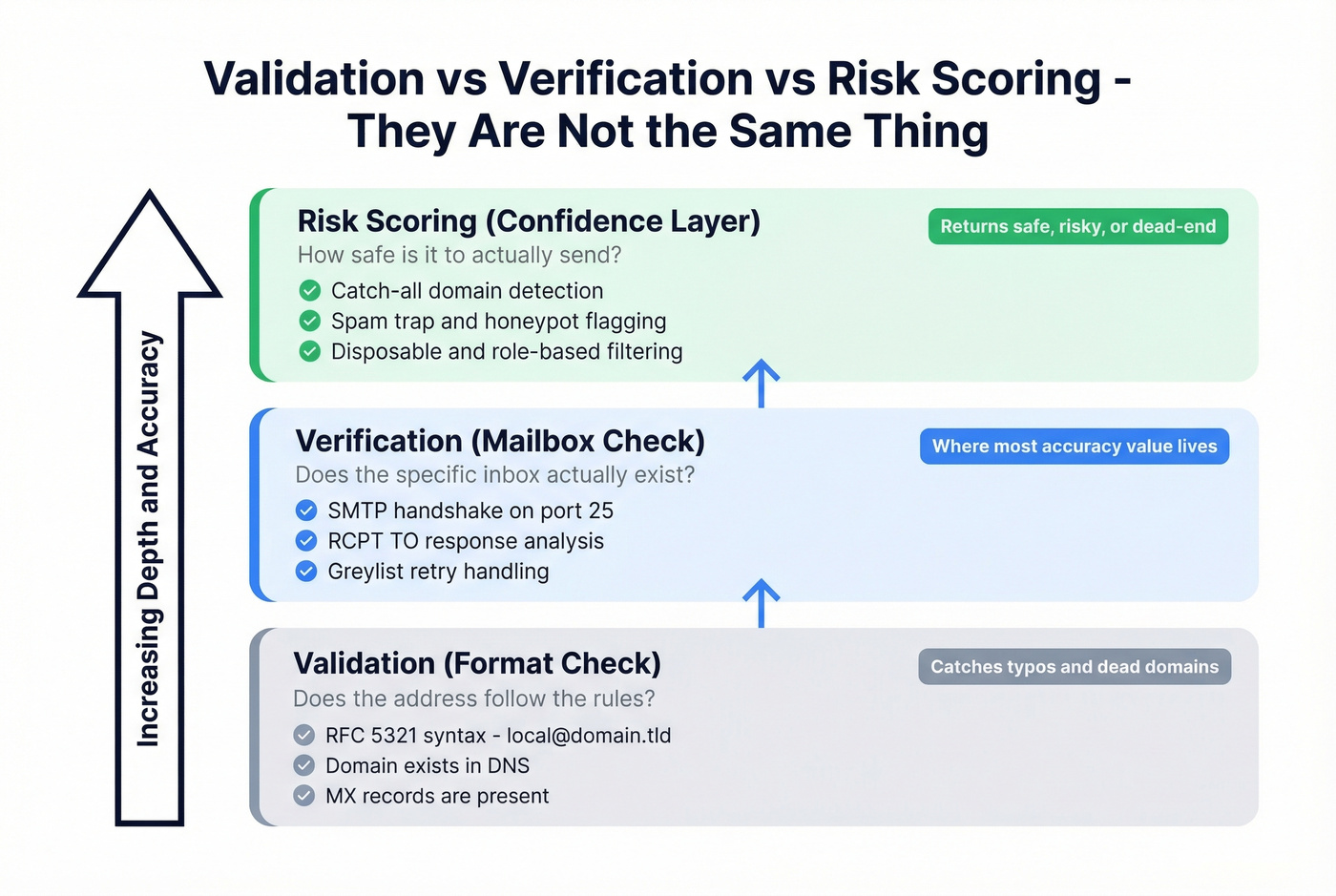
Validation checks format and domain. Does the address follow RFC 5321 syntax? Does the domain have working MX records? This catches typos and dead domains but tells you nothing about whether the actual mailbox exists.
Verification goes deeper. It probes the mail server to check if the specific mailbox is real. This is the SMTP handshake layer, and it's where most of the accuracy value lives.
Risk scoring adds a probabilistic confidence layer on top. Instead of binary valid/invalid, modern tools return categories like safe, risky, or dead-end. This matters because catch-all domains, disposable addresses, and spam traps all exist in a gray zone that simple verification can't resolve cleanly.
The 5 Layers of Email Verification
Every serious verification tool runs some version of these five checks. Understanding them helps you evaluate which tools are thorough and which are cutting corners.
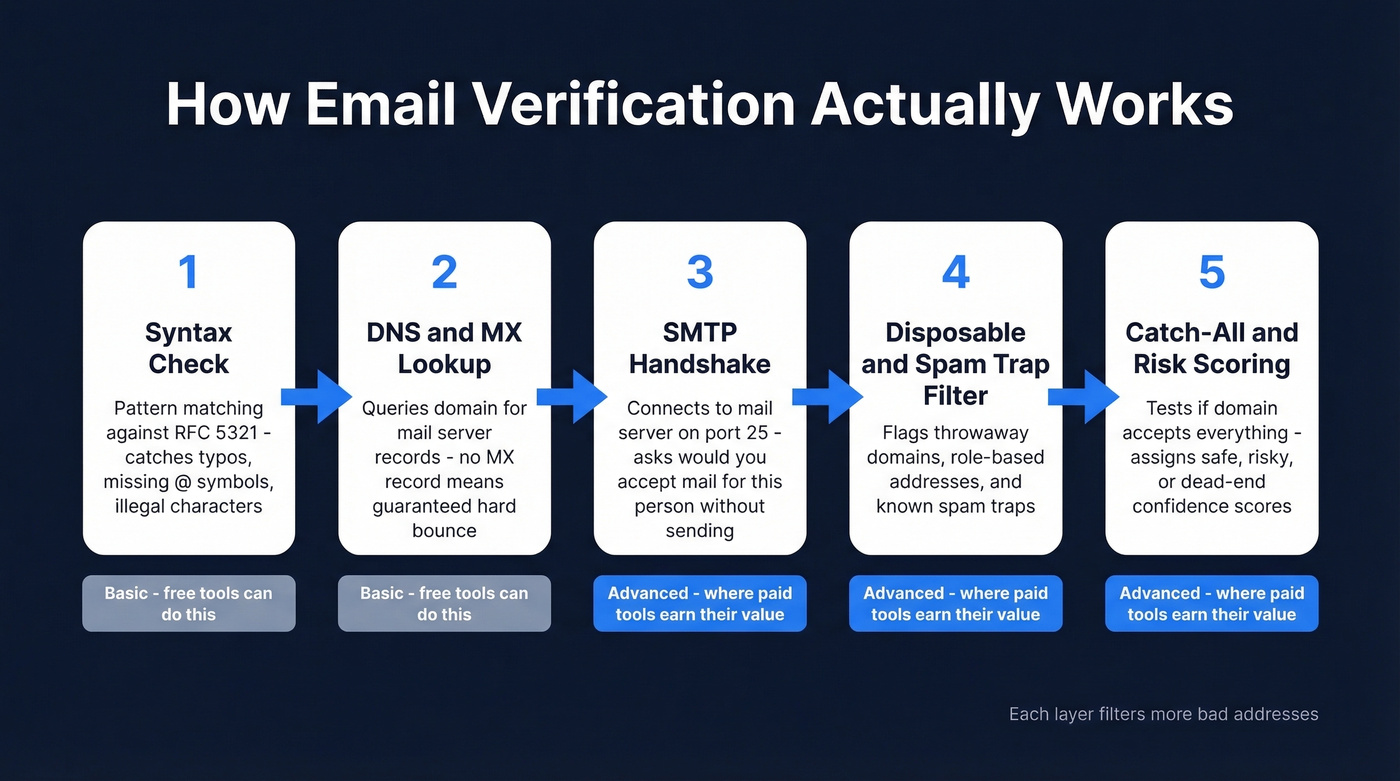
Layer 1 - Syntax Check
Pure pattern matching. Does the address follow the local@domain.tld structure defined in RFC 5321? This catches missing @ symbols, spaces, illegal characters, and common typos like gmial.com or outlok.com. A basic regex handles most of it. Any address that fails syntax is dead on arrival.
Layer 2 - DNS and MX Lookup
The tool queries DNS for the domain's MX records - the servers designated to receive email. No MX record and no fallback A record means mail will hard-bounce. You can run this yourself: dig MX example.com or nslookup -type=mx example.com in a terminal. Fast, free, and catches expired or misconfigured domains.
If you're wondering how to check whether an email exists without a paid tool, this layer alone eliminates a surprising number of dead addresses.
Layer 3 - SMTP Handshake
This is the core of verification and where tools differentiate themselves. The verifier opens a connection to the mail server on port 25 and initiates an SMTP dialogue: HELO then MAIL FROM then RCPT TO with the target address. The critical moment is the server's response to RCPT TO. A 250 response means the server accepted the recipient - the mailbox likely exists. A 550 5.1.1 means no such user. A 450 is a temporary rejection, often from greylisting, which requires a retry after 15-30 minutes.
Here's the thing: the verifier stops before DATA. No email is ever composed or sent. It's a handshake that asks "would you accept mail for this person?" and interprets the answer.
Layer 4 - Disposable and Spam Trap Filtering
Passing SMTP doesn't mean an address is safe to email. Disposable domains create temporary inboxes that vanish. Role-based addresses (info@, support@, sales@) route to shared inboxes and carry higher complaint rates. Spam traps represent just 0.01% of emails in ZeroBounce's dataset, but hitting even one can land your domain on a blacklist.
Layer 5 - Catch-All and Risk Scoring
Catch-all domains accept mail for any address, real or fake. The detection method is straightforward: send an SMTP probe for a clearly fake address like xz9q7random@domain.com. If the server returns 250, it's catch-all - and the verifier can't confirm whether your target mailbox actually exists. The result comes back as "unknown" or "accept-all," not "invalid."
Catch-all prevalence ranges from roughly 10% to 40% depending on the dataset, with B2B enterprise-heavy lists skewing higher.

Prospeo runs all 5 verification layers automatically - syntax, DNS, SMTP, spam-trap removal, and catch-all resolution - returning 98% accurate results. No scripts to maintain, no IP blocks to manage. Start with 75 free verifications/month.
Skip the DIY headache. Get verified emails at $0.01 each.
Why No Tool Is 100% Accurate
Every verification vendor wants to claim 99% accuracy. The reality is messier.
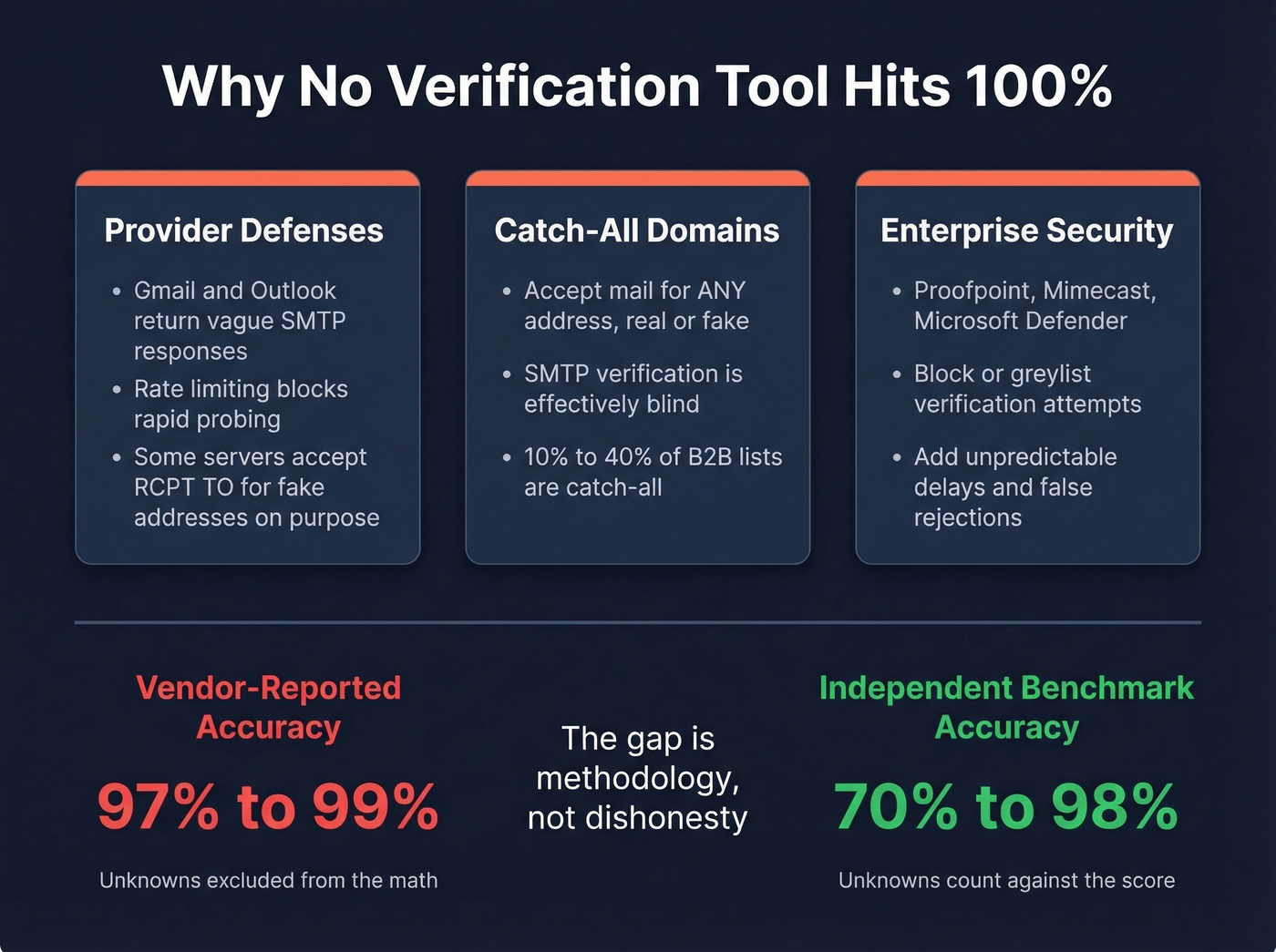
Major email providers actively fight enumeration. They return non-committal SMTP responses, rate-limit connections, and sometimes accept RCPT TO for nonexistent mailboxes just to frustrate probing. Enterprise security layers like Proofpoint, Mimecast, and Microsoft Defender add another wall, blocking or greylisting verification attempts outright.
Then there's catch-all - the single biggest accuracy killer. If a domain accepts everything, SMTP verification is effectively blind for that domain. The consensus on r/coldemail is that tools returning huge chunks of lists as "catch-all/unknown" is the most common frustration, which is exactly why catch-all resolution rates matter more than headline accuracy numbers.
A Hunter benchmark testing 15 verifiers on 3,000 real business emails - where "unknown" counted against accuracy - found the top tool hit just 70%. Hunter acknowledges potential bias in how the dataset was derived. That 70% is a far cry from the 99% vendors advertise. The gap isn't dishonesty; it's methodology. Vendor benchmarks typically exclude unknowns from the denominator. Independent benchmarks don't.
Why you can't just build your own verifier. If you're tempted to write a Python script and handle SMTP yourself, know that major email providers will rate-limit and block aggressive probing. You'll need rate limiting (around 2 per second is a common engineering rule of thumb), exponential backoff and retry logic for greylisted responses, and safeguards to avoid getting your IP blocked. Add connection pooling, IP rotation, and the ongoing maintenance of disposable-domain and spam-trap databases, and you're looking at a full engineering project - not a weekend hack. Dedicated tools exist because this problem is genuinely hard at scale.
Let's be honest about something else: if your average deal size is under $15K, you probably don't need 99% verification accuracy. A tool that hits 95% at $6 per 10K emails will serve you better than one that hits 98% at $100 per 10K. Match the tool to the stakes.
Email Verification Tool Comparison
Here's how the top verification tools stack up.
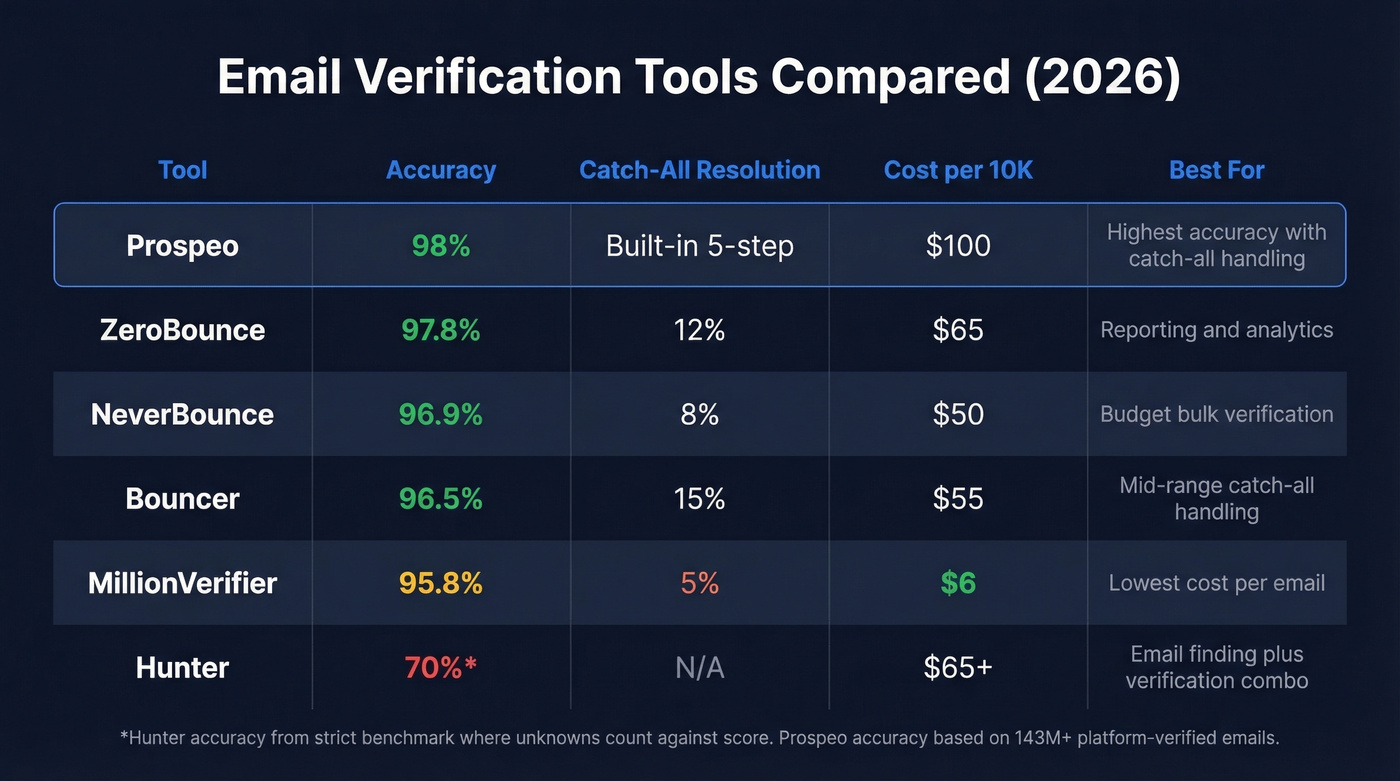
| Tool | Accuracy | Catch-All Res. | Free Tier | Paid From | Cost/10K | Best For |
|---|---|---|---|---|---|---|
| ZeroBounce | 97.8% | 12% | 100/mo | $15/mo (2K) | ~$65 | Reporting + analytics |
| NeverBounce | 96.9% | 8% | 10 credits | $0.008/email | ~$50 | Budget bulk verification |
| Bouncer | 96.5% | 15% | 100 credits | $24/mo | ~$55 | Mid-range catch-all handling |
| MillionVerifier | 95.8% | 5% | 500 credits | PAYG | ~$6 | Lowest cost per email |
| Hunter | 70%* | N/A | 50/mo | $49/mo | ~$65+ | Email finding + verification combo |
Prospeo accuracy based on 143M+ platform-verified emails. Other accuracy figures from a 10K-email benchmark. Hunter accuracy under strict methodology where "unknown" counts against.
Prospeo
Use this if: you want the highest email accuracy with catch-all handling built in and don't want to negotiate contracts.
The 5-step verification process covers every layer described above - syntax, DNS, SMTP, disposable/role-based filtering, and catch-all resolution with spam-trap and honeypot removal. Data refreshes every 7 days, compared to the 6-week industry average, so you're verifying against current records rather than stale ones. We've seen this make a real difference on lists that are even a few weeks old - addresses that other tools mark "valid" based on month-old data come back invalid on a fresh check.
The free tier gives you 75 email verifications per month plus 100 Chrome extension credits. Paid plans run about $0.01 per email with no annual contracts - upload a CSV, get results in minutes, push verified contacts to Salesforce, HubSpot, Lemlist, or Instantly.
If you're comparing vendors specifically for verification, start with our breakdown of Bouncer alternatives and Hunter alternatives to see where each tool fits.
ZeroBounce
Use this if: you want strong accuracy plus deep reporting on list health and industry trends.
ZeroBounce hit 97.8% accuracy in a 10,000-email benchmark with 12% catch-all resolution. They've processed 11+ billion emails, giving them a massive dataset for spotting decay patterns and spam traps. The 100 free verifications per month are generous for spot-checking. Paid plans start at $15/mo for 2,000 emails, scaling to roughly $65 per 10K.
Their catch-all resolution sits at 12%, which means enterprise-heavy lists will still return a significant chunk of unknowns. But the reporting and analytics layer is genuinely useful if you're managing large lists over time - you get trend data on list health that most verifiers don't offer.

NeverBounce
Use this if: you're running high-volume verification and cost per email matters most. Skip this if: catch-all domains are a big chunk of your list.
NeverBounce scored 96.9% accuracy with just 8% catch-all resolution in the same benchmark. At $0.008 per email (~$50 per 10K), it's one of the most affordable options at scale. The free tier is thin - only 10 credits - so it's really a paid tool. Solid for bulk cleaning before campaigns, but you'll want to pair it with a stronger catch-all handler if your list skews enterprise.
Bouncer
The quiet mid-range pick that deserves more attention. Bouncer posted 96.5% accuracy with the second-best catch-all resolution rate in the benchmark at 15%. Pay-as-you-go starts at $8 per 1,000 verifications, with subscriptions from $24/mo. It doesn't have the brand recognition of ZeroBounce or the volume pricing of NeverBounce, but the catch-all handling punches above its weight. Worth testing if you're in that 5K-50K emails/month range.
MillionVerifier
The budget option - and we mean that as a compliment. At roughly $6 per 10K emails, MillionVerifier is the cheapest verifier by a wide margin. The tradeoff is 95.8% accuracy and only 5% catch-all resolution. Use this when budget is the hard constraint and you're willing to accept more unknowns. Skip it if your list has significant catch-all exposure; you'll end up re-verifying with another tool anyway, which defeats the savings.
Hunter
Hunter is better known as an email finder than a verifier. Under strict benchmarking methodology where unknowns count against accuracy, it scored 70%. The free tier offers 50 verifications per month, and paid plans start at $49/mo. Use it if you're already in Hunter's ecosystem for email finding and want one platform. For standalone verification, every other tool on this list outperforms it.
Catch-all domains kill accuracy for most tools. Prospeo's proprietary 5-step verification includes catch-all handling and honeypot filtering, so you send to real inboxes - not traps. Data refreshes every 7 days, not 6 weeks.
Your bounce rate drops under 4%. Prospeo users already proved it.
Why Email Addresses Go Bad
Email lists decay faster than most teams realize. ZeroBounce's 2026 report, analyzing 11+ billion emails verified throughout 2025, found that at least 23% of any email list degrades within a year. The decay rate has fluctuated - 22% in 2022, 25% in 2023, 28% in 2024, and 23% in 2025 - but it never drops below one in five. That's not a rounding error; it's a structural reality of how business email works.
The primary driver is job turnover. Average professional turnover runs around 41%, and when someone leaves a company, their corporate email gets deactivated - sometimes within days, sometimes after a grace period, but eventually it bounces. Add company acquisitions, domain changes, and email system migrations, and the decay compounds fast.
Catch-all configurations shift too. ZeroBounce found 9%+ of emails in their 2025 dataset sat on catch-all domains. A domain that was catch-all last quarter might not be today, and vice versa. This is why re-verification isn't optional - it's maintenance. We've watched teams go from sub-2% bounce rates to 6%+ in a single quarter just by neglecting list hygiene.
If you haven't verified your list in 30 days, you're sending blind.
Keep Your List Clean
Verification cadence is the foundation. Verify at point of capture - use a real-time API on forms and import workflows so bad addresses never enter your CRM in the first place. Then re-verify every 30 days for active outbound lists and every 90 days at minimum for marketing databases. These two habits alone prevent the majority of deliverability problems.
Beyond cadence, follow these rules:
- Remove hard bounces immediately. Don't wait for a batch cleanup. Hard bounces should trigger automatic suppression.
- Use double opt-in for marketing lists. It's the only method that truly confirms a person controls the mailbox.
- Monitor bounce rate continuously. Target under 2%. Between 2-5% is a warning sign. Above 5%, stop sending and clean the list.
- Segment catch-all and unknown addresses into a separate, slower sending cadence. Don't suppress them entirely - just send more carefully.
- Deduplicate before verifying. Paying to verify the same address three times is money you'll never get back.
If you want a deeper breakdown of bounce codes, thresholds, and remediation, see our guide to email bounce rate and how to improve sender reputation. For teams sending at scale, it also helps to understand email velocity and the best way to send bulk email without getting blacklisted.
Knowing how to determine if an email address is valid is only half the equation. The other half is building a system that keeps your data clean automatically - verification at capture, scheduled re-checks, and instant bounce suppression working together so deliverability never degrades silently.
FAQ
How can I check an email address for free?
Most verification tools offer free tiers for single checks or small batches. Prospeo gives you 75 free verifications per month with full 5-step verification, ZeroBounce offers 100 per month, and Hunter offers 50 per month. For checking individual addresses before a sales email, any of these free tiers is more than enough.
What does a "valid" result actually mean?
A "valid" result means the mail server accepted the recipient address during the SMTP handshake - the mailbox exists and can receive mail. It doesn't guarantee the person reads that inbox or that the address won't bounce next month. An "invalid" result means the server explicitly rejected the address with a 550 error.
What does "catch-all" mean in verification results?
A catch-all domain accepts mail for any address - real or fake - so the verification tool can't confirm whether the specific mailbox exists. Roughly 10-40% of B2B email addresses sit on catch-all domains, making this the most common reason tools return "unknown" results.
How often should I re-verify my email list?
Re-verify active outbound lists every 30 days and marketing databases every 90 days at minimum. ZeroBounce data shows 23% of any list degrades within a year, and the decay accelerates as job changes and domain shifts compound. Lists older than 90 days without verification will almost certainly push your bounce rate above safe thresholds.
What's a safe bounce rate for cold email?
Under 2% is healthy for cold outbound campaigns. Between 2-5% is a warning sign that your list needs immediate cleaning. Above 5%, your sender reputation is actively degrading - stop sending, verify your entire list, remove invalids, and rebuild sending reputation before resuming.