

How to Find a Company's Email Address: 8 Methods That Actually Work
Your SDR just uploaded 200 target accounts with zero email addresses. That list is dead weight until someone fills in the gaps. And most "guides" on this topic are just tool landing pages wearing a blog post costume.
We've run lists through most of the major email finders and tested the free methods ourselves. Here are the 8 approaches that actually produce results - with real pricing, accuracy benchmarks, and the verification data that other guides conveniently skip.
What You Need (Quick Version)
- Free and fast? Google search operators and the company website. Zero cost, unlimited searches.
- Always verify before sending. One hard bounce hurts your domain reputation more than ten missed emails ever will.
8 Ways to Find Business Email Addresses
1. Check the Company Website
Hit the contact page, about/team page, and footer first. Even a generic info@ address reveals the domain format. Then check press releases and job postings - these almost always include a real person's email.
Here's the real trick, though: if you find one address like jane.smith@company.com, you've cracked the format for the entire org. Most companies use the same pattern across every employee. Note whether it's firstname.lastname, first initial + last name, or something else, and you've got a template for everyone at that company. This is the simplest way to uncover contact details without spending a dime.
2. Search Professional Profiles and Social Media
Say you're looking for a VP of Engineering at a mid-market SaaS company. You pull up their professional profile, but there's no email in sight.
On LinkedIn, go to Settings & Privacy, then Visibility, then Profile viewing options, and switch to Private Mode. Now you can browse without notifying the prospect. Check bios, personal websites linked from profiles, and any "contact me" sections.
A creative angle most people miss: review sites like TripAdvisor and Yelp list manager and owner names for hospitality, retail, and restaurant businesses. Once you have a name and company, finding the email is straightforward with any of the methods below.
3. Use Google Search Operators
Google is a free email finder if you know the right queries. We use these weekly - copy and paste them right now:
site:company.com "email" OR "contact"- surfaces any page on their domain mentioning email or contact info."@company.com" filetype:pdf- finds PDFs where someone's email appears in the document (whitepapers, case studies, speaker bios)."John Smith" "@company.com"- targets a specific person's email at that domain.
These Google dork techniques work because companies publish more than they realize. Conference presentations, regulatory filings, and partnership announcements all leak email addresses into indexable documents.
4. Guess the Format and Verify
If you know someone's name and company domain, you can guess the email. These four patterns cover the vast majority of corporate addresses:
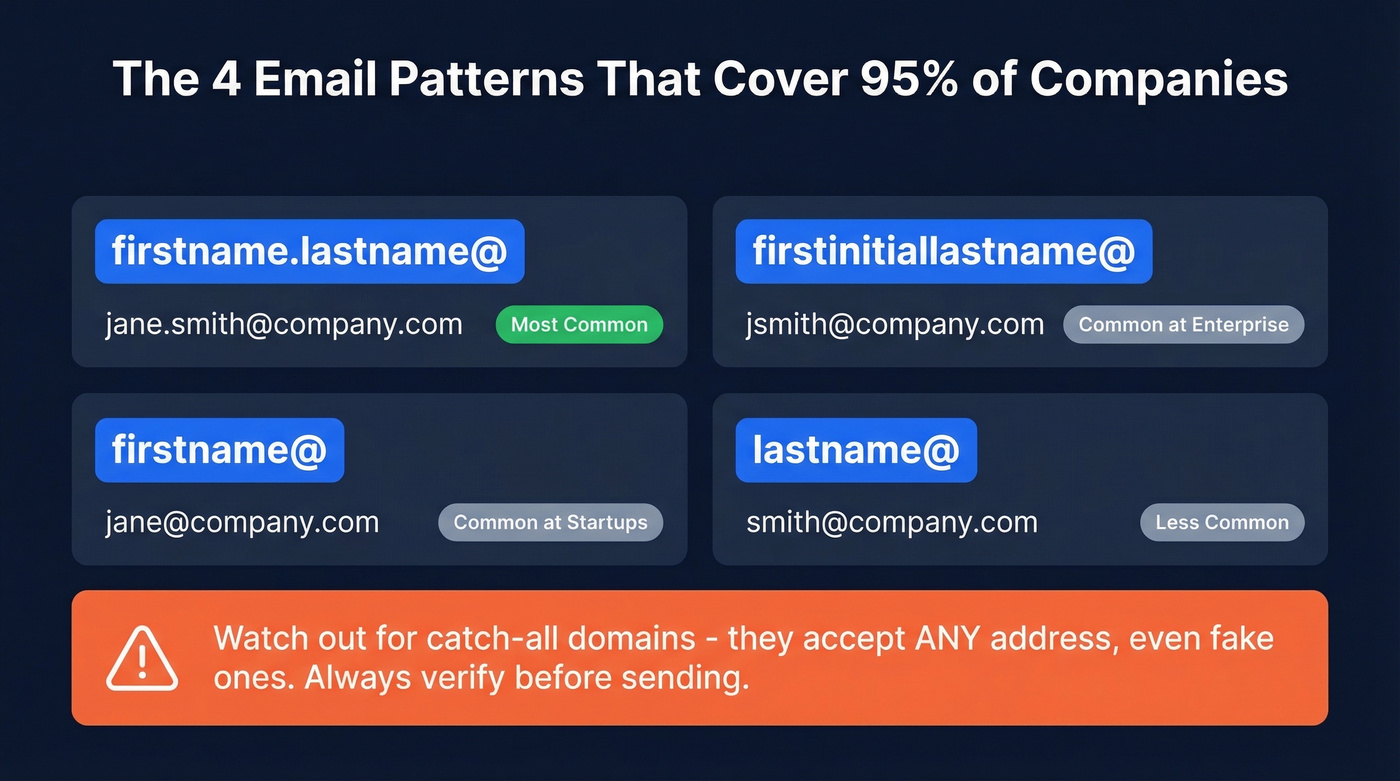
| Pattern | Example |
|---|---|
| firstname.lastname@ | jane.smith@company.com |
| firstinitiallastname@ | jsmith@company.com |
| firstname@ | jane@company.com |
| lastname@ | smith@company.com |
The firstname.lastname format dominates at mid-size and enterprise companies. Generate your best guess, then run it through a verification tool before sending.
One warning about catch-all domains: these servers accept emails sent to any address, even fake ones. Verification tools can't reliably tell you whether a specific mailbox exists - the server says "yes" to everything. If you hit a catch-all, send in smaller batches and expect some bounces.
5. Use an Email Finder Tool
Email finder tools combine database lookups with real-time verification. You paste in a company domain, the tool returns verified email addresses for people at that organization. If you need company emails at scale, this is the most reliable path.
Here's the thing about accuracy claims in this space: independent benchmarks show accuracy ranges from 16.9% to 80.3% depending on the tool and the input type. A domain search produces very different results than a company-name search, and list quality matters enormously. That's why verification isn't optional - it's the whole game.
Prospeo runs a proprietary 5-step verification process that handles catch-all domains, removes spam traps, and filters honeypots, delivering 98% email accuracy with a 7-day data refresh cycle. The free tier gives you 75 emails/month, and paid plans run about $0.01 per email.
Hunter works better as a verification layer than a primary finder - verification accuracy is solid, and pricing starts around $49/mo. Snov.io is worth a look for international leads with automation built in, starting at $29.25/mo on annual billing. Apollo has a massive database (250M+ contacts), but the consensus on r/sales is that bounce rates on older contacts can make the "cheap per seat" pricing deceptive once you calculate cost per usable email.
6. Use a Chrome Extension
You're on a prospect's company page and need their VP of Sales' email in 10 seconds. That's where Chrome extensions earn their keep - no tab-switching, no copy-pasting into a separate tool.
If you're evaluating options, compare a few SDR tools and pick the one that fits your workflow.
7. Try Waterfall Enrichment
No single email finder covers everyone. In our testing, individual tools deliver 60-70% valid emails on a given list. Waterfall enrichment solves this by cascading your search across multiple providers - if the first source misses, the second tries, then the third.

The result? Valid rates push toward ~90% instead of plateauing at 65%. Tools like FullEnrich and Instantly Lead Finder offer this as a service. Some platforms achieve waterfall-level coverage through proprietary multi-step verification internally, so you get the same result without stitching together multiple subscriptions.
If you want a deeper breakdown of providers, see our guide to data enrichment services.
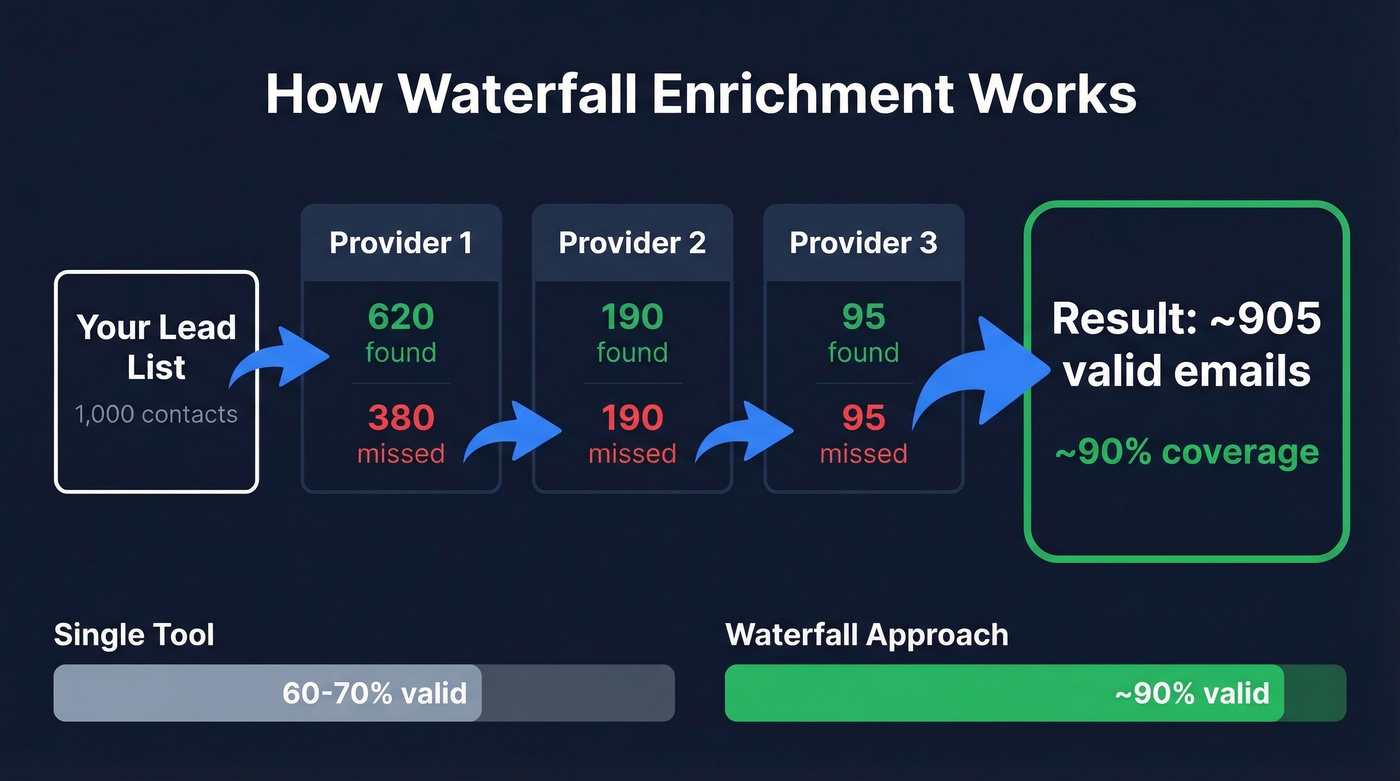
When does waterfall matter most? Large lists, agency work at scale, or any situation where leaving 30-40% of contacts unfound costs you real pipeline.
8. Just Ask
For high-value targets, a two-minute phone call beats an hour of searching. Fill out the company's contact form. Call the main line and ask for the person's email. Use a mutual connection for an intro. The VP you absolutely need to reach, the decision-maker at your dream account - don't overthink it.
If you need a tighter system for outreach, borrow a few sales prospecting techniques that work well alongside email finding.

You just read that individual email finders top out at 60-70% valid emails. Prospeo's proprietary 5-step verification - with catch-all handling, spam-trap removal, and honeypot filtering - delivers 98% accuracy on a 7-day refresh cycle. Start with 75 free emails/month.
Find any company's email addresses in seconds, not hours.
Email Finder Tools Compared
Here's how the major tools stack up on the metrics that matter. Accuracy varies by list quality and data age, so treat these as directional benchmarks rather than guarantees.
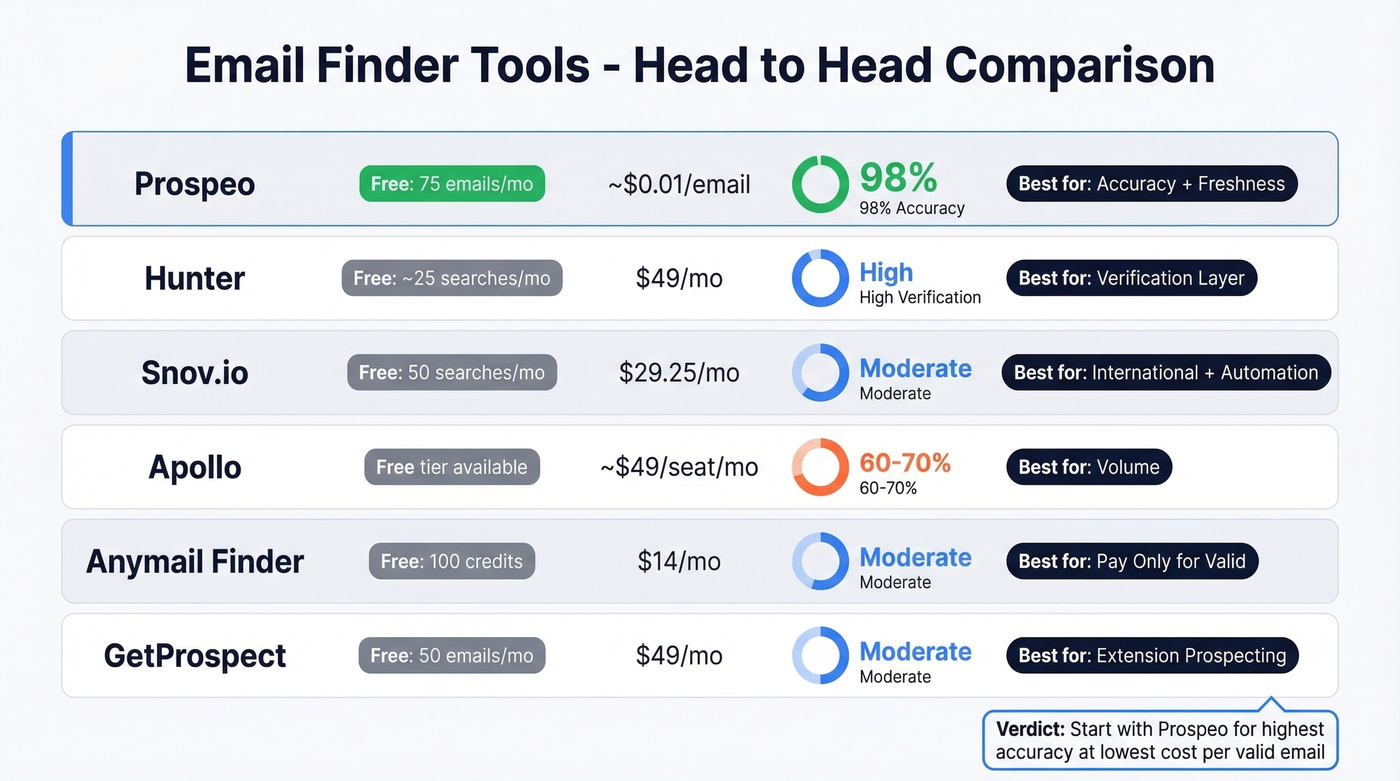
| Tool | Free Tier | Starting Price | Accuracy | Best For |
|---|---|---|---|---|
| Prospeo | 75 emails/mo | ~$0.01/email | 98% | Accuracy + freshness |
| Hunter | ~25 searches/mo | ~$49/mo | High verification | Verification layer |
| Snov.io | 50 searches/mo | $29.25/mo | Moderate | International + automation |
| Apollo | Free tier | ~$49/seat/mo | 60-70% valid | Volume, lower accuracy |
| Anymail Finder | 100 credits | $14/mo | Moderate | Pay-only-for-valid |
| GetProspect | 50 emails/mo | $49/mo | Moderate | Extension prospecting |
The verdict for most teams: start with Prospeo for the highest accuracy at the lowest cost per valid email. Use Hunter as a secondary verification layer, and Apollo only if you need sheer database volume and can tolerate higher bounce rates.
Let's be honest: if your average deal size is under $10k, you probably don't need a $49/seat/mo platform with 250M contacts. You need 98% accuracy on the 500 prospects you actually plan to email this quarter. Overpaying for volume you'll never use is the most common mistake we see.
If you're building lists from scratch, pair this with a few free lead generation tools to keep costs down.
The Cost-Per-Valid-Email Math
This is the number that actually matters, and most teams never calculate it.
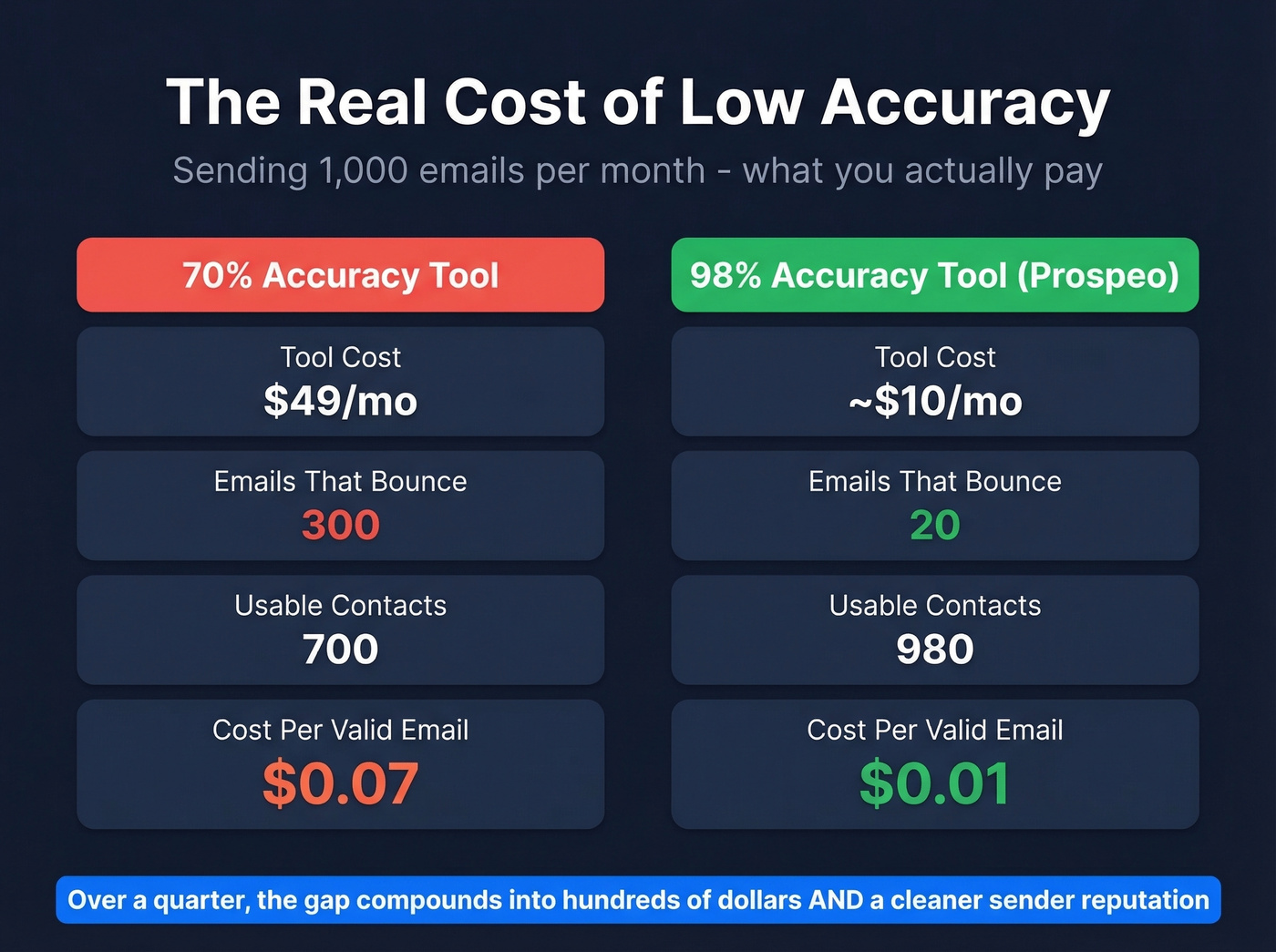
If you send 1,000 emails at 70% accuracy, 300 bounce. At $49/mo for a tool that delivered those contacts, your real cost per usable contact is about $0.07. At 98% accuracy, only 20 bounce - and at $0.01 per email, your cost per usable contact stays at roughly $0.01. Over a quarter, that gap compounds into hundreds of dollars and, more importantly, a cleaner sender reputation that keeps your future campaigns out of spam folders.
Every method above works better when you verify before sending. One hard bounce damages your domain more than ten missed emails. Prospeo verifies every address through proprietary infrastructure - no third-party providers - at ~$0.01 per email with 98% accuracy.
Protect your domain reputation with emails you can actually trust.
How to Verify Emails Before Sending
Finding an email and verifying it are two different steps. Skip the second one and you'll destroy your sender reputation.
In our experience, a false positive is more dangerous than a "not found." A Contactzilla test across four tools found that Hunter returned zero false positives out of 14 tests, while Voila Norbert produced two false positives in the same sample. Those false positives are the emails that look valid but bounce - and each bounce chips away at your domain reputation.

Catch-all domains make this worse. When a domain accepts everything, standard verification can't distinguish real mailboxes from dead ones. Whatever tool you use, never skip verification. A clean list with 150 contacts outperforms a dirty list of 500 every single time.
If you're seeing deliverability issues, start with the fundamentals of sender reputation and keep an eye on your email bounce rate.
Is Cold Email Legal?
Cold email is legal in most jurisdictions - but the rules have teeth.
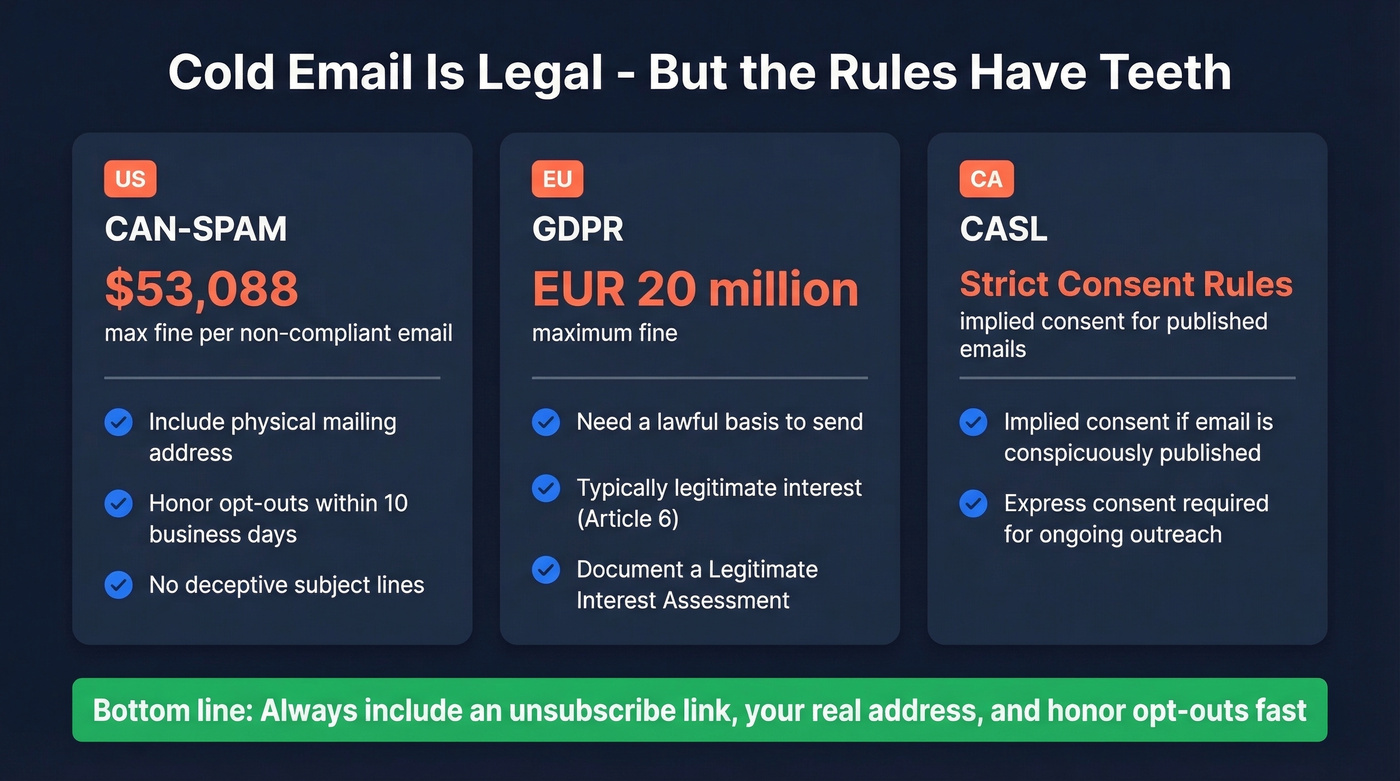
United States (CAN-SPAM): Penalties run up to $53,088 per non-compliant email. You must include a physical mailing address, honor opt-outs within 10 business days, and avoid deceptive subject lines.
European Union (GDPR): Fines up to EUR 20 million. You need a lawful basis - typically legitimate interest under Article 6(1)(f). Document a Legitimate Interest Assessment covering purpose, necessity, and balancing tests before you send.
Canada (CASL): Implied consent applies when a business email is conspicuously published and your message is relevant to the recipient's role. Unsubscribe requests must be honored within 10 business days.
Your compliance checklist:
- Identify yourself honestly - real name, real company
- Include a physical mailing address
- Honor opt-outs within 10 business days
- No deceptive subject lines (skip the fake "Re:" trick)
- Document legitimate interest for EU contacts
Real talk: compliance isn't just about avoiding fines. ISPs and email providers track your sending reputation. A pattern of complaints or bounces gets you blacklisted faster than any regulator moves.
FAQ
What's the most common corporate email format?
The firstname.lastname@ pattern dominates at mid-size and enterprise companies. Other formats include firstinitiallastname@, firstname@, and lastname@. Always run your guess through a verification tool before sending - a wrong guess that bounces hurts your sender reputation.
How many emails can I find for free each month?
Prospeo gives 75 verified emails/month, Hunter around 25 searches, and Snov.io 50 searches. Google search operators are unlimited and completely free - they just require more manual work per contact.
What's a catch-all domain?
A catch-all domain accepts emails sent to any address at that domain, even fake ones. Standard verification can't confirm whether a specific mailbox exists because the server says "yes" to everything. Segment catch-all results separately and send in smaller batches to manage bounce risk.
How do I get an organization's email if there's no public contact page?
Start with Google search operators targeting the company domain, then guess the email format using employee names from professional profiles. If both come up empty, use a dedicated email finder tool or waterfall enrichment. For high-priority accounts, calling the front desk directly is still one of the fastest approaches.
Why do my cold emails keep bouncing?
Stale data is the most common cause - people change jobs, companies restructure, and addresses go dead. Use a tool with frequent data refresh (look for a 7-day cycle versus the 6-week industry average) and always verify your list before launching a sequence.