

How to Find Recruiter Emails (and Actually Get a Reply)
You've submitted 30 applications this month. Maybe 40. Internal recruitment teams are drowning in 300+ applications per role, and your resume is one in a pile that nobody's reading carefully. The fastest way to cut through that noise? Skip the portal entirely, find the recruiter's direct email, and send a 3-sentence message that proves you're worth a conversation.
That's the entire system. One email finder tool, one short email, one follow-up. Let's break it down.
What You Need
Three things:
- A short, specific email. Three sentences. Not five paragraphs about your "passion for innovation."
- Verification. Never send to an address you haven't verified. One bounce can flag your entire domain.
Find the Right Recruiter
There's a meaningful difference between a recruiter and a hiring manager. Recruiters manage the pipeline - they screen candidates, schedule interviews, and coordinate the process. Hiring managers make the final call. For most roles, email the recruiter first. They're actively looking for candidates to fill open positions, and they're far more likely to respond to a cold email than a hiring manager buried in product work.
Start with the job posting - many list the poster's name directly. On the company's page, go to People and filter by titles like "recruiter" or "talent acquisition." A quick Google search using operators like "recruiter" "company name" email surfaces public contact info surprisingly often. The goal is a specific person, not a generic careers@ inbox.
3 Methods to Get a Recruiter's Email Address
Once you've got a name and a company, finding the actual email takes about 30 seconds with the right tool.
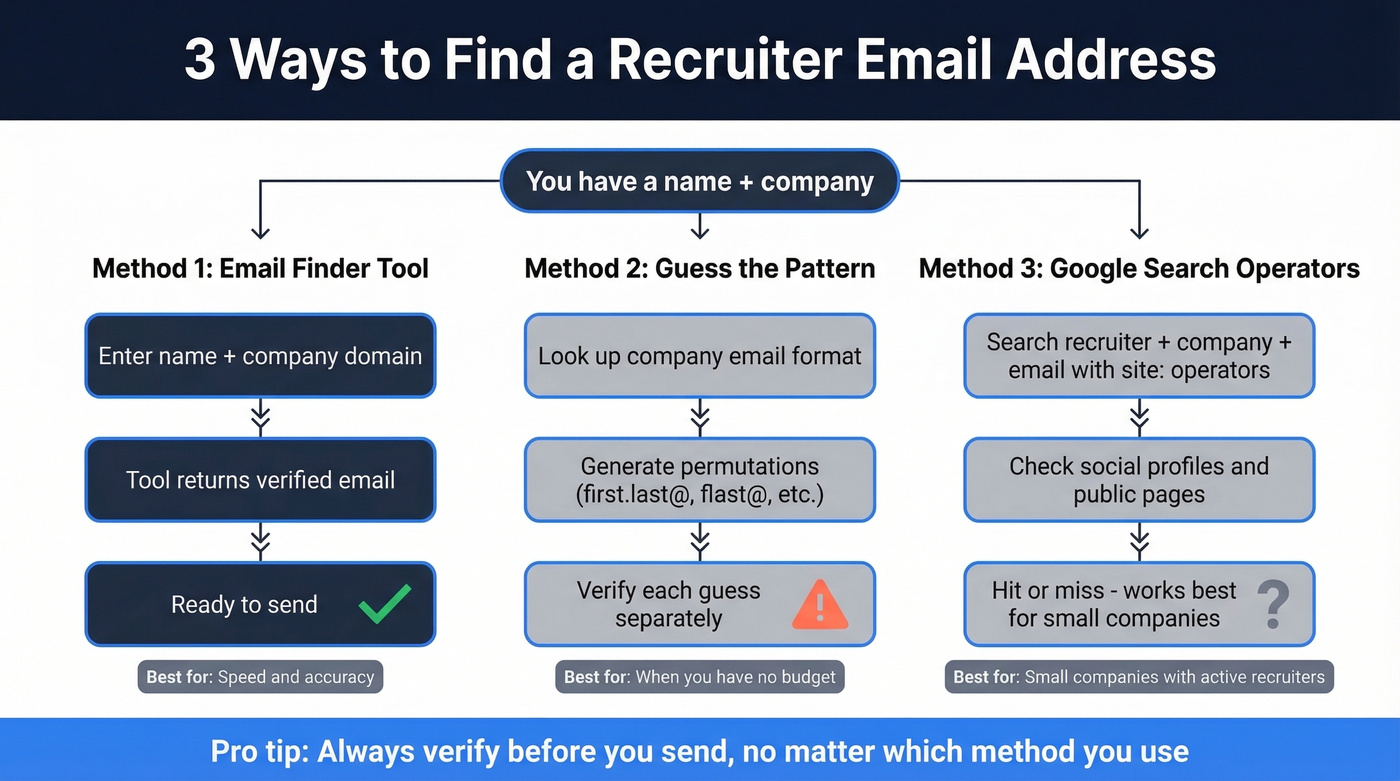
Method 1: Use an Email Finder
For job seekers, what matters is free tier size, accuracy, and built-in verification. You don't want to pay $49/month when you're between jobs.
| Tool | Free Tier | Paid From | Best For |
|---|---|---|---|
| Prospeo | 75 verified emails/mo | $0.01/email (pay-per-use) | Accuracy + built-in verify |
| Apollo | 10,000 email credits | ~$49/mo | High volume on a budget |
| Hunter | 25 searches/mo | $24/mo | Domain pattern discovery |
| Snov.io | 50 credits | $30-$39/mo | Finder + drip campaigns |
| RocketReach | Limited free | $49/mo | Direct dials + emails |
Prospeo returns verified emails through a 5-step verification process that runs automatically on every lookup. Enter a name and company domain - or paste a URL - and you get a verified address back. With 98% accuracy across 143M+ verified emails, you're not burning credits on dead addresses. No separate verification step, no extra cost. The free tier covers 75 emails per month with no credit card required.

Apollo's free tier is generous at 10,000 email credits, but it's still smart to verify addresses before you send. Hunter indexes 100M+ email addresses and excels at discovering a company's email pattern, though 25 searches per month runs out fast if you're actively job hunting. A common workflow we've seen people use: Hunter to find the pattern, then Apollo or Prospeo to pull a direct email.

Method 2: Guess the Email Pattern
Most companies use a standard email format - but which format depends on company size. An Interseller analysis of over 5 million companies found clear patterns:
| Company Size | Most Common Format | Frequency |
|---|---|---|
| 1-10 employees | firstname@ | 71% |
| 51-200 employees | flast@ | 42% |
| 10,001+ employees | first.last@ | 56% |
This table alone saves you from guessing blindly. If you're emailing a recruiter at a Fortune 500, first.last@company.com is right more than half the time. For a 20-person startup, try firstname@ first.
A permutator tool generates 20-40 possible combinations from a name and domain. The catch: you still need to verify each one, and sending unverified guesses damages your sender reputation. If you're contacting more than a handful of recruiters, use a finder tool - the free tiers make guessing pointless.
Method 3: Google Search Operators
Don't overlook plain Google. A search like "recruiter" "company name" email site:twitter.com or "talent acquisition" "company name" "@company.com" can surface publicly shared contact info. This works best for smaller companies where recruiters are active on social media.
It's inconsistent, but it costs nothing and takes 30 seconds. Skip this method if you're targeting mid-market or enterprise companies - their recruiters rarely post contact info publicly.

Stop guessing email patterns and hoping for the best. Prospeo's email finder returns 98% accurate, pre-verified recruiter emails - no separate verification step needed. The free tier gives you 75 lookups per month, enough to land interviews without spending a dime.
Get verified recruiter emails for free - start finding them now.
Verify Before You Send
Here's the thing: one bounced email to a company domain can flag you as a spammer. Corporate email servers track bounce patterns, and a bad first impression with the mail server means your follow-up lands in spam too.
If you used Prospeo, verification is already done - the 5-step process handles catch-all domains, spam traps, and honeypots automatically. If you guessed the format or used a tool without built-in verification, run the address through a dedicated service. Clearout charges $21 for 1,500 verifications. ZeroBounce runs $18/month for 2,000. Don't skip this step.
Write the Email
Recruiters scan cold emails in seconds. The average cold email response rate sits between 1% and 5%, but personalized emails pull more than double the replies according to Woodpecker's cold email benchmarks. Personalization doesn't mean writing a novel - it means proving you read the job posting.
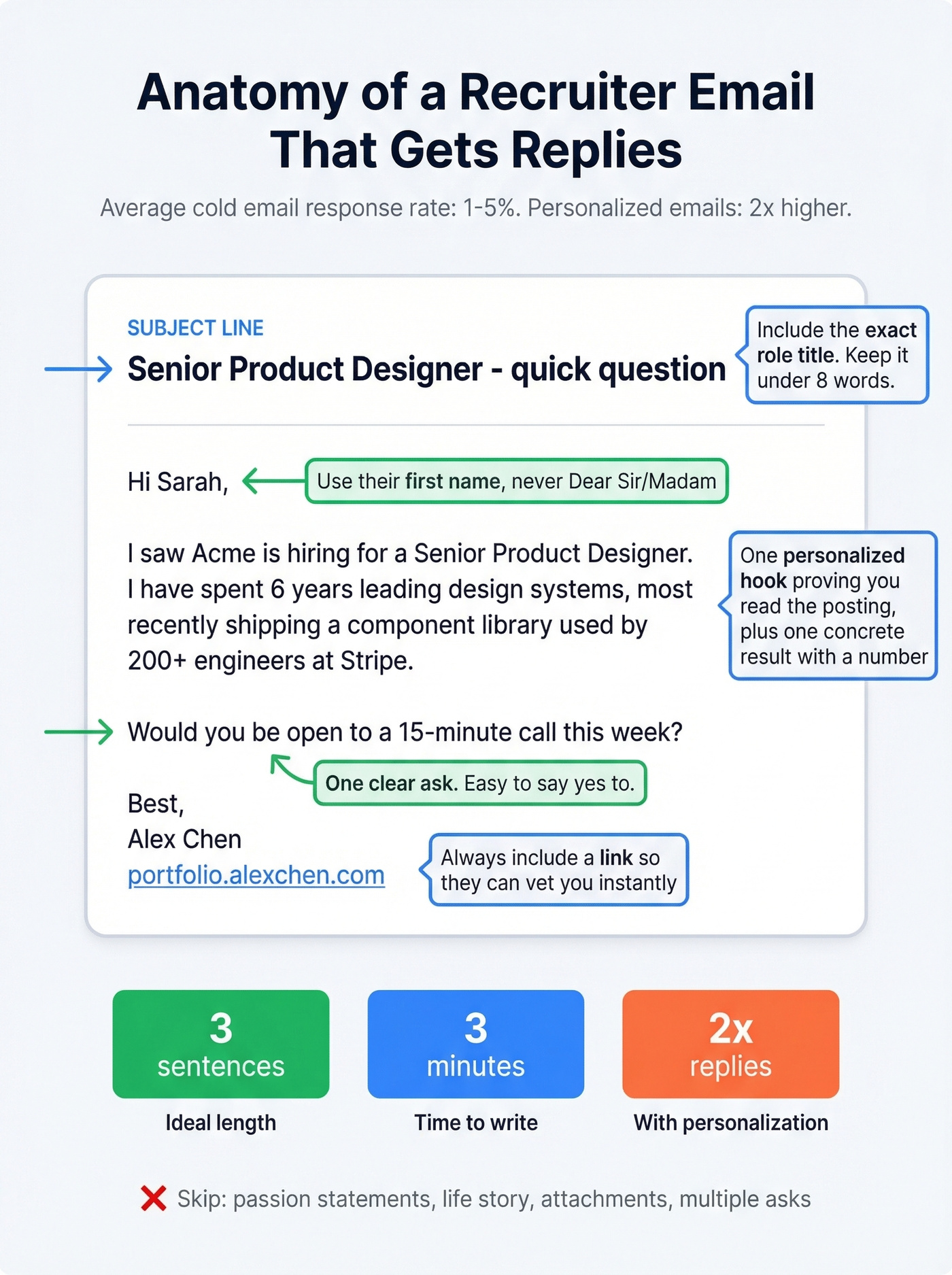
We've found this template consistently outperforms longer emails:
Subject: [Role title] - quick question
Hi [First name],
I saw [Company] is hiring for [role]. I've spent [X years] doing [relevant thing] - most recently [one concrete result].
Would you be open to a 15-minute call this week?
[Your name] [Portfolio/profile URL]
One personalized hook, one proof point, one ask. The recruiter either has a role that fits or they don't - a longer email won't change that math. Your email should take 3 minutes to write, because it should be 3 sentences long.
If you want more options, borrow a few proven email subject lines and keep the body tight.
Follow Up (Once)
Wait 5 business days. Then send one follow-up - short, referencing your original email, with no guilt-tripping: "Hi [Name], just bumping this in case it got buried. Still interested in [role] - happy to chat whenever works."
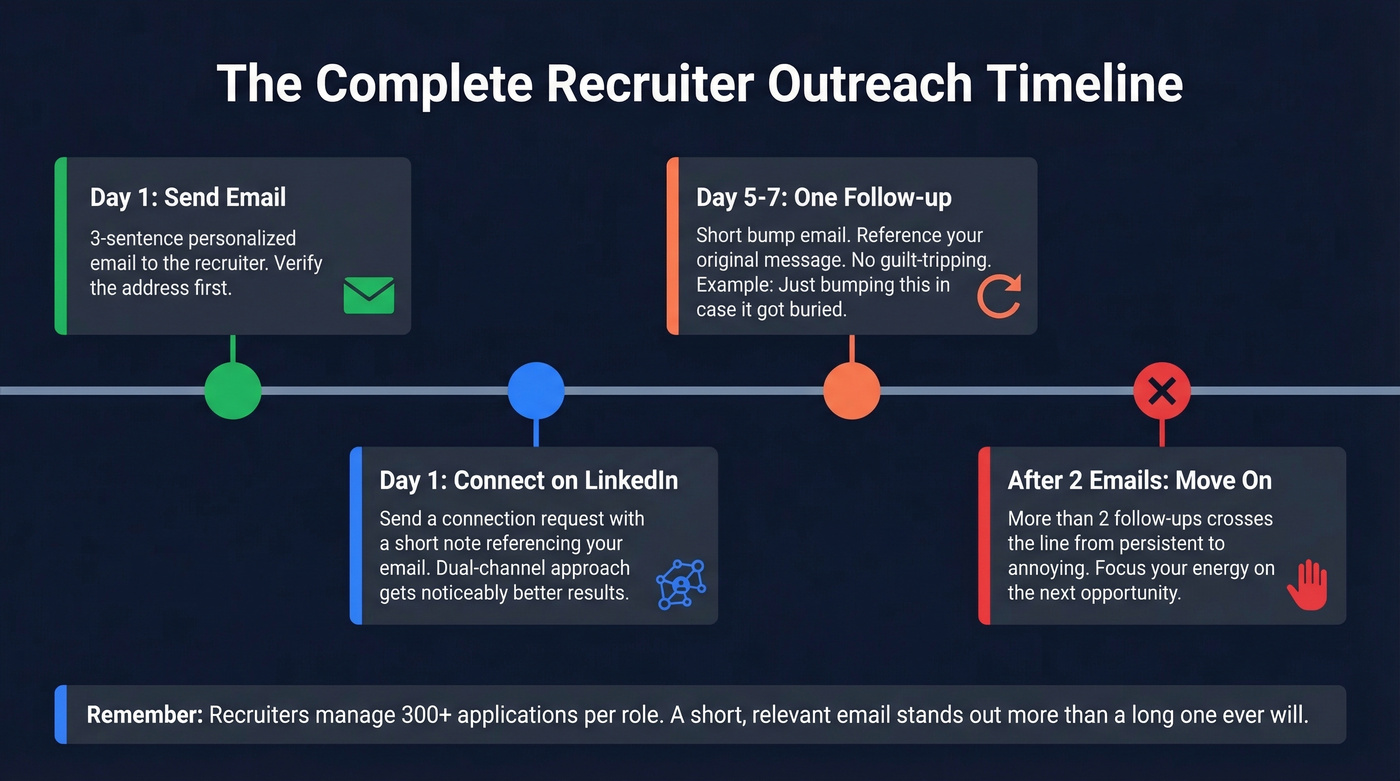
If you don't hear back after two total emails, move on. More than two follow-ups crosses the line from persistent to annoying. A dual-channel approach helps too - send a connection request alongside your email. Some recruiters respond faster on professional networks than in their inbox, and the consensus on r/recruitinghell is that a combined approach gets noticeably better results than email alone.
If you need a second nudge that doesn't sound needy, use these follow-up templates and adapt the tone for recruiting.
Stay Legal
Cold emailing a recruiter about a job they posted is about as legitimate as interest gets. But here's the legal framework worth knowing:
| US (CAN-SPAM) | EU (GDPR) | |
|---|---|---|
| Cold email allowed? | Yes | Yes, with legitimate interest |
| Requirements | Sender info + opt-out + postal address | Legitimate interest basis |
| Max penalty | $50,120 per email | EUR 20M or 4% of revenue |
A polite email to a recruiter about an open role isn't going to trigger enforcement action. Include your real name, an opt-out line, and keep it relevant. You're fine.
If you're sending more than a few messages per day, read up on email deliverability and email bounce rate so you don't accidentally tank your inbox placement.
Every bounced email to a company domain hurts your sender reputation and kills your chances at a follow-up. Prospeo's 5-step verification catches bad addresses, spam traps, and catch-all domains before you hit send - automatically, on every single lookup. At $0.01 per email, protecting your reputation costs less than a cup of coffee.
Never bounce a recruiter email again. Verify before you send.
FAQ
Is it okay to cold-email a recruiter?
Yes - CAN-SPAM allows cold emails with accurate sender info and an opt-out link. GDPR permits outreach under legitimate interest, and contacting a recruiter about an active role qualifies. Keep it short, relevant, and include your real name.
What's the best free tool to find recruiter email addresses?
Prospeo's free tier (75 verified emails/month) offers the best accuracy-to-volume ratio for job seekers, with 98% accuracy and built-in verification. Apollo gives you 10,000 credits for higher volume, and Hunter provides 25 free searches focused on domain pattern discovery.
What if the email bounces?
A single bounce hurts your sender reputation and can route future messages to spam. Always verify addresses before sending - use a tool with built-in verification, or run addresses through Clearout ($21/1,500 verifications) or ZeroBounce ($18/mo for 2,000).