

How to Find a Website Email Address in 2026
Only 8.5% of outreach emails get a response. That number drops to zero when your email bounces. Before you worry about subject lines or call-to-action buttons, you need the right address - and finding a website email address is easier than most people think.
The Short Answer
Check the Obvious Places First
Start with the obvious. Most business emails are hiding in plain sight:
- Contact page - even if it's a form, some companies list a general inbox alongside it.
- About / Team page - individual bios sometimes include direct emails, especially at smaller companies.
- Blog author bios - writers often link their email at the bottom of posts.
- Footer - a surprising number of sites tuck an email address next to their physical address.
- Privacy policy - GDPR-compliant sites list a Data Protection Officer email. Not your target contact, but it confirms the domain's email format.
- WHOIS records - historically useful, but post-GDPR most registrant emails are redacted. Only worth checking for older business domains or misconfigured registrations.
We've found the newsletter signup trick works surprisingly well for smaller companies: subscribe, wait for the welcome email, then reply. You'll often reach a real person or get routed internally. It's one of the simplest ways to surface a contact address without any special tools.
One email from any of these sources tells you the company's naming pattern - which brings us to the next method.
Guess the Email Pattern
Most companies use one of five formats. If you know the person's name and the company domain, try these:
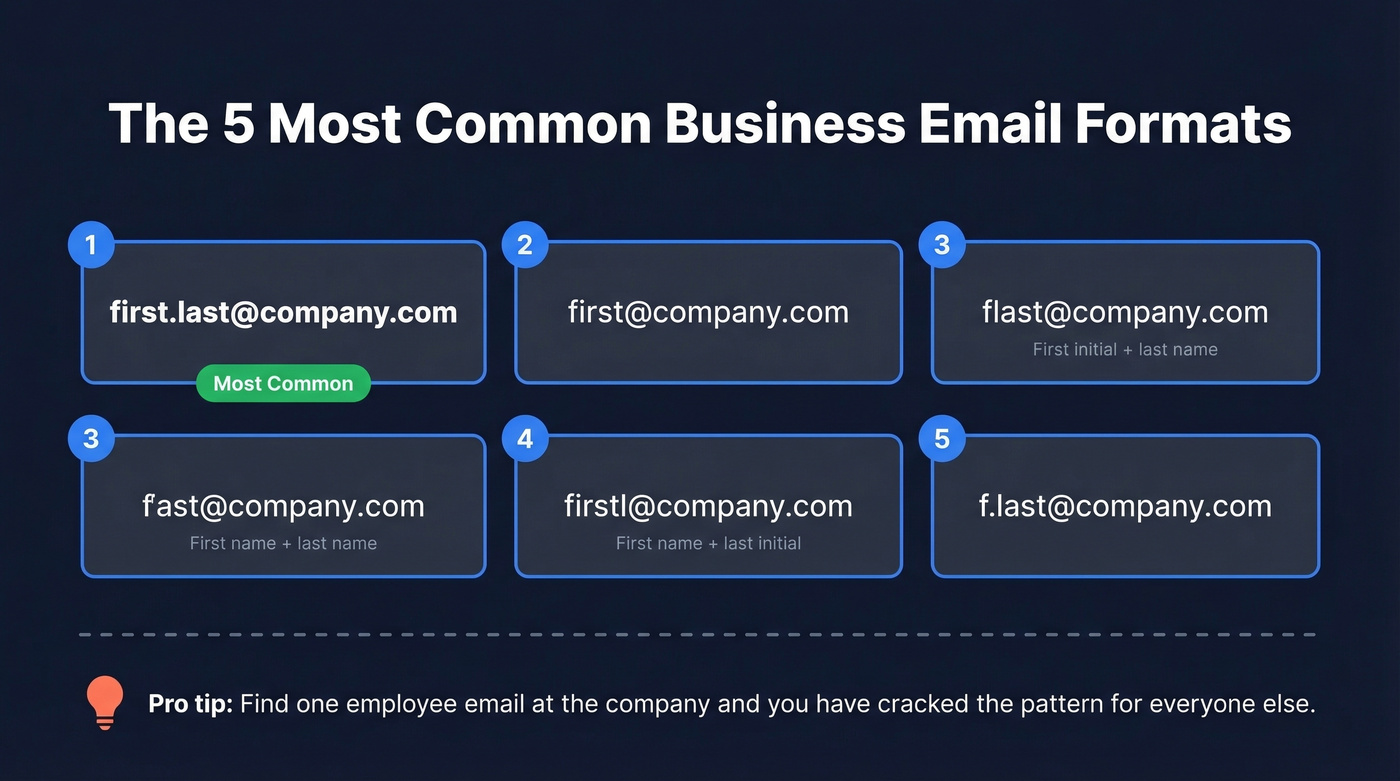
first.last@company.com- the most common by farfirst@company.comflast@company.com- first initial plus last namefirstl@company.com- first name plus last initialf.last@company.com
If you already know one employee's email at the company, you've cracked the pattern. Send a test to that known address to confirm the format works before reaching out to your target.
One technical note: per RFC 5322, the local part of an email - everything before the @ - maxes out at 64 characters. That rarely matters in practice, but it's why some companies with long-name employees use abbreviations.

Guessing email formats works until it doesn't. One wrong address burns your sender reputation. Prospeo's 5-step verification checks 143M+ emails against catch-all domains, spam traps, and honeypots - so every address you send to is real.
Skip the guesswork. Get 75 verified emails free every month.
Search a Website for Email Addresses Using Google
Google indexes more than you'd think - PDFs, slide decks, old press releases, cached pages. A few well-crafted queries can surface addresses that aren't visible on the main site. When you need to dig up contacts buried in archived pages, Google dorks are your best friend.
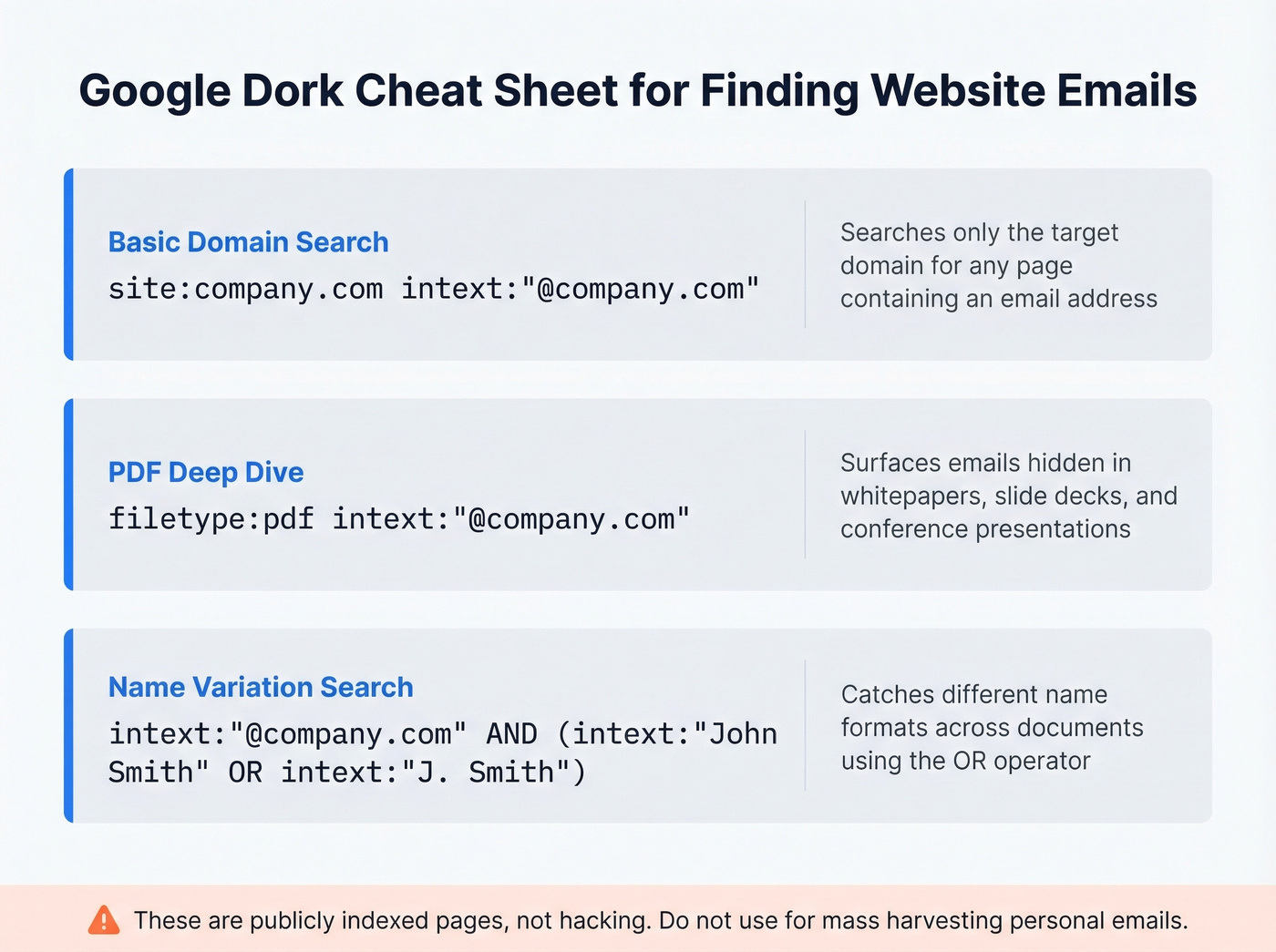
[site:company.com intext:"@company.com"](https://developers.google.com/search/docs/monitor-debug/search-operators)
This searches only the target domain for any page containing an email address.
filetype:pdf intext:"@company.com"
PDFs are goldmines. Conference presentations, whitepapers, and internal docs often include author emails.
intext:"@company.com" AND (intext:"John Smith" OR intext:"J. Smith")
Use the OR operator to catch name variations. People show up as "John," "J.," "John D.," and more across different documents.
These are publicly indexed pages - you're not hacking anything. Just don't use these techniques for mass harvesting personal emails, which risks domain blacklisting and GDPR/CAN-SPAM violations.
Use an Email Finder Tool
Manual methods work for a handful of lookups. Once you're prospecting at any real volume - even 20-30 contacts a week - a dedicated tool pays for itself in time savings alone. Here's the thing: most teams don't need the most expensive tool. They need the most accurate one. A $200/month platform with 80% accuracy wastes more money in bounced sends and burned domain reputation than a $39/month tool that actually delivers.
If you're building lists at scale, it also helps to standardize your sales prospecting techniques so you’re not reinventing the workflow every week.
Prospeo
Prospeo covers 143M+ verified emails with 98% accuracy, backed by a proprietary 5-step verification process that includes catch-all handling, spam-trap removal, and honeypot filtering. Paste a domain, get verified emails in seconds. Data refreshes every 7 days - stale data is the #1 reason "verified" emails bounce, and most competitors refresh every 4-6 weeks. The free tier gives you 75 emails per month, and paid plans work out to roughly $0.01 per email. The Chrome extension - used by 40,000+ people - lets you grab contacts from any website without leaving your browser.
Hunter - Best-Known With Built-In Verification
Hunter is the most recognized name in email finding. The free plan gives you 25 searches per month, and the Starter plan runs $34/mo for 500 searches. Hunter also works as a verification layer, but you can hit gaps when searching for contacts at mid-market or smaller companies. For occasional lookups, the free tier is genuinely useful.
If you’re comparing options, our breakdown of Hunter alternatives can help you shortlist by accuracy and pricing.
A word on Apollo: if you're already on Apollo and seeing bounces, you're not alone. Buyers regularly complain about stale contacts and US-heavy coverage. Apollo has one of the largest databases on paper, but size means nothing when the data is months old.
Snov.io - Go-To for International Leads
Prospecting outside the US? Snov.io is worth testing, especially in Europe or APAC. The Starter plan runs $39/mo, and it bundles email automation directly into the platform. That's convenient if you don't want to pay separately for a sequencing tool, though dedicated sequencers like Instantly or Smartlead are more powerful for high-volume sends.
If you’re pairing a finder with enrichment, consider how data enrichment services can fill missing fields beyond email.
RocketReach
One cold email practitioner on r/coldemail reported their bounce rate "dropped a lot" after switching to RocketReach. Plans start around $50/mo depending on volume. In our testing, RocketReach performs best for hard-to-find contacts at enterprise companies where other tools return nothing.
Anymail Finder - Budget Pick
Skip this one if you need speed or scale. The pricing model is the differentiator: you only pay for valid emails. Starts at $14/mo, which makes it the cheapest option for low-volume prospecting. The trade-off is a smaller database and slower lookups.
Tool Comparison
| Tool | Free Tier | Starting Price | Best For |
|---|---|---|---|
| Prospeo | 75 emails/mo | ~$0.01/email | Accuracy + free tier |
| Hunter | 25 searches/mo | $34/mo | Brand recognition + verification |
| Snov.io | Trial credits | $39/mo | International leads |
| RocketReach | Limited trial | ~$50/mo | Hard-to-find contacts |
| Anymail Finder | None | $14/mo | Budget prospecting |
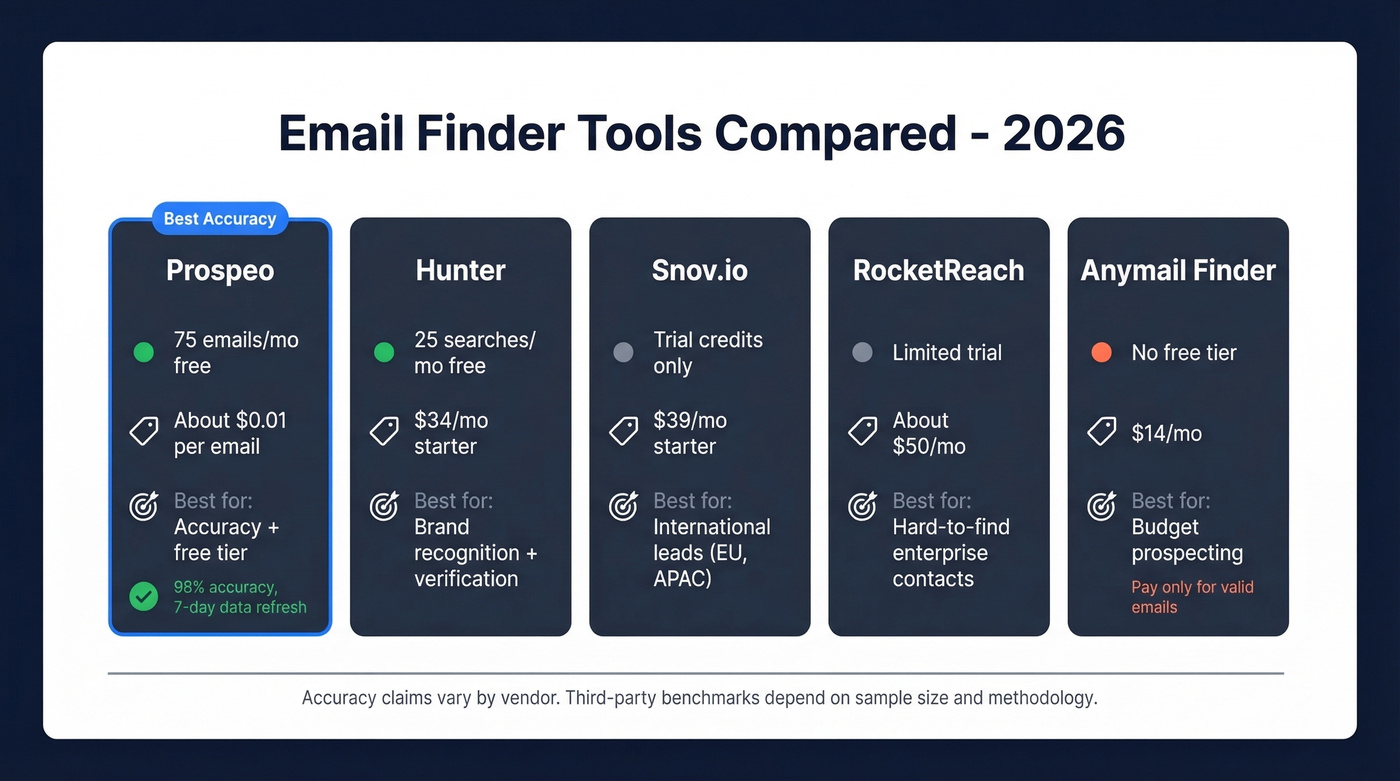
Let's be honest about accuracy claims: every vendor publishes flattering numbers. Third-party benchmarks vary wildly - one test might show a tool at 80%, another at 30%, depending on sample size and methodology. We removed specific accuracy percentages for tools we haven't independently verified. Prospeo's 98% is measured against its own proprietary 5-step verification infrastructure, which we can stand behind.
If bounces are your main issue, it’s worth reading up on email bounce rate benchmarks and what “risky” actually means.
You just learned 6 ways to find a website email address. Now imagine doing it in seconds instead of minutes. Paste any domain into Prospeo, get verified contacts back at 98% accuracy for ~$0.01 each - with data refreshed every 7 days, not 6 weeks.
Paste a domain. Get verified emails. No credit card required.
Always Verify Before Sending
Remember that 28% invalid/risky rate? Here's why it's getting worse.
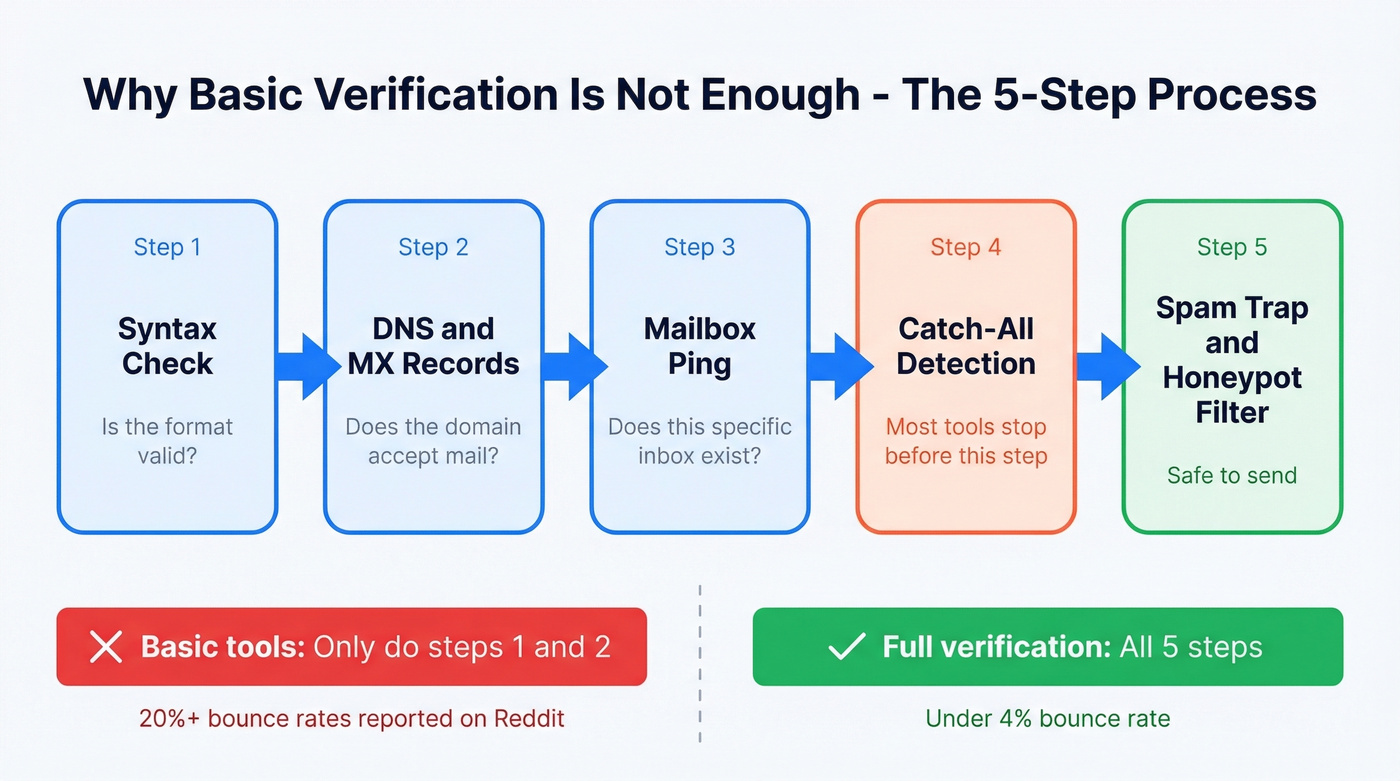
The biggest culprit is catch-all domains. These are mail servers configured to accept every email sent to any address at the domain - anything@company.com passes a basic verification check. But the server silently discards the message, or worse, flags your sending domain as spam. Reddit threads consistently flag this issue, with users reporting 20%+ bounce rates even with tools that label emails as "verified."
About 45% of all emails are spam, which means ISPs are aggressive about filtering. Even valid emails from flagged domains get buried.
In our testing, catch-all domains account for the majority of "verified" bounces - and most tools don't handle them at all. Many only check syntax and DNS records. That's step one of five. If you're using a tool without catch-all handling, run your list through a dedicated verifier before you hit send. Finding the right address is only half the battle; deliverability depends on verification.
If you’re trying to protect deliverability long-term, improving sender reputation and following an email deliverability guide will do more than any single tool.
FAQ
Can I find someone's email address for free?
Yes. Check the company website's contact page, about page, and blog author bios. Guess the pattern using the person's name and domain, or run Google dork queries. For tool-assisted lookups, Prospeo offers 75 free verified emails per month and Hunter provides 25 free searches - enough for light prospecting without spending anything.
Why do "verified" emails still bounce?
Catch-all domains are the main culprit - they accept all addresses during verification but silently discard messages later. Many tools only check syntax and DNS records, skipping mailbox-level validation. Look for multi-step verification that includes catch-all detection, spam-trap removal, and honeypot filtering to keep bounce rates under 4%.
What's the most common business email format?
first.last@company.com is the most widely used format across companies of all sizes. Other common patterns include first@, flast@, and firstl@. Confirm a company's format by finding one known employee's email, then apply the same pattern to your target contact.