

How to Get an Email Account: Choose, Create, and Secure It the Right Way
You've been using the same email for a decade, and last month someone in another country logged into it at 3 AM. You need a new email - and you need to set it up right this time.
Whether you're figuring out how to get email for the first time, upgrading to a professional address, or ditching Gmail for something more private, the process is the same: pick a provider, create the account, lock it down, and get a custom domain if you're running a business.
What You Need (Quick Version)
Most people should start with Gmail. It's got the biggest ecosystem, 15GB free, and over 1.8 billion users means everyone already knows how it works. If privacy matters more than convenience, go Proton Mail. If you need a professional @yourcompany.com address without paying Google Workspace prices, Zoho Mail is free for up to 5 users - or use the Cloudflare Email Routing trick for $0/month.
Whichever you pick, enable two-factor authentication immediately. It blocks 99.22% of account attacks. That single step matters more than which provider you choose.
Pick the Right Email Provider
Here's how they stack up:
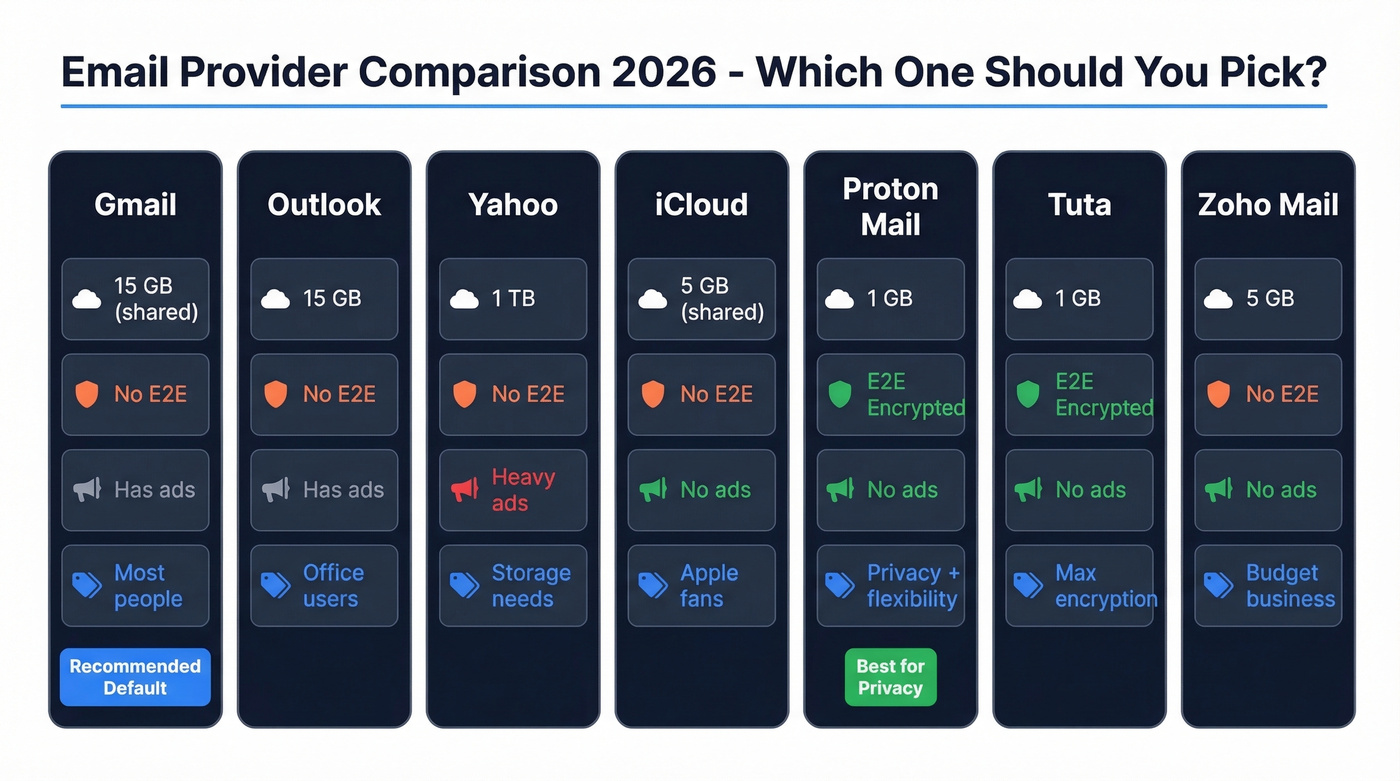
| Provider | Storage | Privacy | Attach Limit | Best For |
|---|---|---|---|---|
| Gmail | 15 GB (shared) | No E2E, ads | 25 MB | Most people |
| Outlook | 15 GB (mailbox) | No E2E, ads | 20 MB | Office users |
| Yahoo | 1 TB | No E2E, ads | 25 MB | Storage hoarders |
| iCloud | 5 GB (shared) | No E2E, no ads | 20 MB | Apple ecosystem |
| Proton Mail | 1 GB | E2E, no ads | 25 MB | Privacy seekers |
| Tuta | 1 GB | E2E, no ads | 25 MB | Max encryption |
| Zoho Mail | 5 GB | No E2E, no ads | - | Budget business |
Gmail is the right default for most people. Outlook makes sense if you already live in Microsoft's world. Yahoo's 1TB of free storage sounds incredible, but the ad experience is aggressive enough that you'll feel like you're paying with your attention instead of your wallet - and Yahoo has changed its storage policies before, so check your account settings for current limits rather than treating it as permanent cloud storage.
iCloud is fine if you're all-in on Apple, but 5GB shared across your entire iCloud account fills up fast. For a fun alternative, mail.com offers free accounts with themed domains like @engineer.com or @consultant.com - not professional enough for business, but a step up from coolguy2009@gmail.com.
One more thing: ISP-provided email addresses like @comcast.net or @att.net still exist. Avoid them. Switch internet providers and you lose your email. It's a trap.
Create an Email Account Step by Step
Gmail
- Go to accounts.google.com and click "Create account."
- Choose "For my personal use."
- Enter your first name, last name, and pick a username. This becomes your @gmail.com address - choose carefully, because changing it later means creating a whole new account.
- Set a strong password. At least 12 characters, mix of letters, numbers, and symbols.
- Add a phone number for verification if prompted.
- Review Google's privacy settings - you can turn off ad personalization and activity tracking. Most people skip this, but it's worth the 30 seconds.
Something most guides skip: Gmail's 15GB is shared across Gmail, Google Drive, and Google Photos. If you're storing vacation photos and project files, your email storage shrinks fast.
Outlook
The big difference from Gmail is philosophical: Outlook uses folders instead of labels. If you think in terms of filing cabinets rather than tags, you'll feel more at home here. Microsoft also keeps your email storage separate from OneDrive, so you won't run into Gmail's shared-storage problem.
Head to outlook.com and click "Create free account." Pick your address - you can choose @outlook.com or @hotmail.com - create a password, add your name, and verify with a phone number or CAPTCHA. Outlook's Focused Inbox automatically sorts important messages from noise, which is genuinely useful if you get a lot of newsletters.
Yahoo Mail
Yahoo is the simplest signup of the three. Go to login.yahoo.com, click "Create an account," fill in your details, verify your phone number, and you're done. The storage is genuinely generous. The tradeoff is that Yahoo's ad experience is the most aggressive of the big three - expect banner ads, sponsored emails in your inbox, and constant upsell prompts.
Privacy-Focused Email Options
If you're leaving Gmail because you don't want your emails scanned for ad targeting, you've got two serious options: Proton Mail and Tuta. Other privacy providers like Mailfence and Posteo exist, but Proton and Tuta are the two most popular free starting points.

Both publish open-source apps, both focus heavily on encryption, and both store your data in privacy-friendly jurisdictions. Both give you 1GB of free storage. But they're different in ways that matter.
Proton Mail is based in Switzerland and supports IMAP through its Proton Bridge app, meaning you can use it with desktop clients like Thunderbird or Apple Mail. We've tested Proton Bridge across several setups - it works smoothly with Thunderbird but can be finicky with Apple Mail's sync. Proton doesn't encrypt email subject lines, only the body and attachments.
Tuta is based in Germany and encrypts everything, including subject lines and calendar event reminders. That's a meaningful privacy advantage. The downside: Tuta doesn't support IMAP at all, so you're locked into their apps and web interface. For privacy-focused users, this is the single biggest frustration - it complicates workflows and makes migration harder.
Here's the thing: if you want maximum encryption and don't mind using Tuta's apps exclusively, Tuta wins on privacy. If you need the flexibility to use third-party email clients, Proton is the practical choice. Most people who care enough to switch from Gmail will be happier with Proton.

Setting up your own email is step one. Finding the right person's email to reach them? That's where outreach gets hard. Prospeo gives you 143M+ verified professional emails at 98% accuracy - for roughly $0.01 each. No bounced messages burning your new domain's reputation.
You just built your inbox. Now fill theirs with messages that land.
Secure Your New Account
Enable 2FA Right Now
This isn't optional. Microsoft's own research shows that multi-factor authentication blocks 99.22% of account attacks. Even when passwords have already been leaked, a second factor still prevents 98.6% of unauthorized logins.
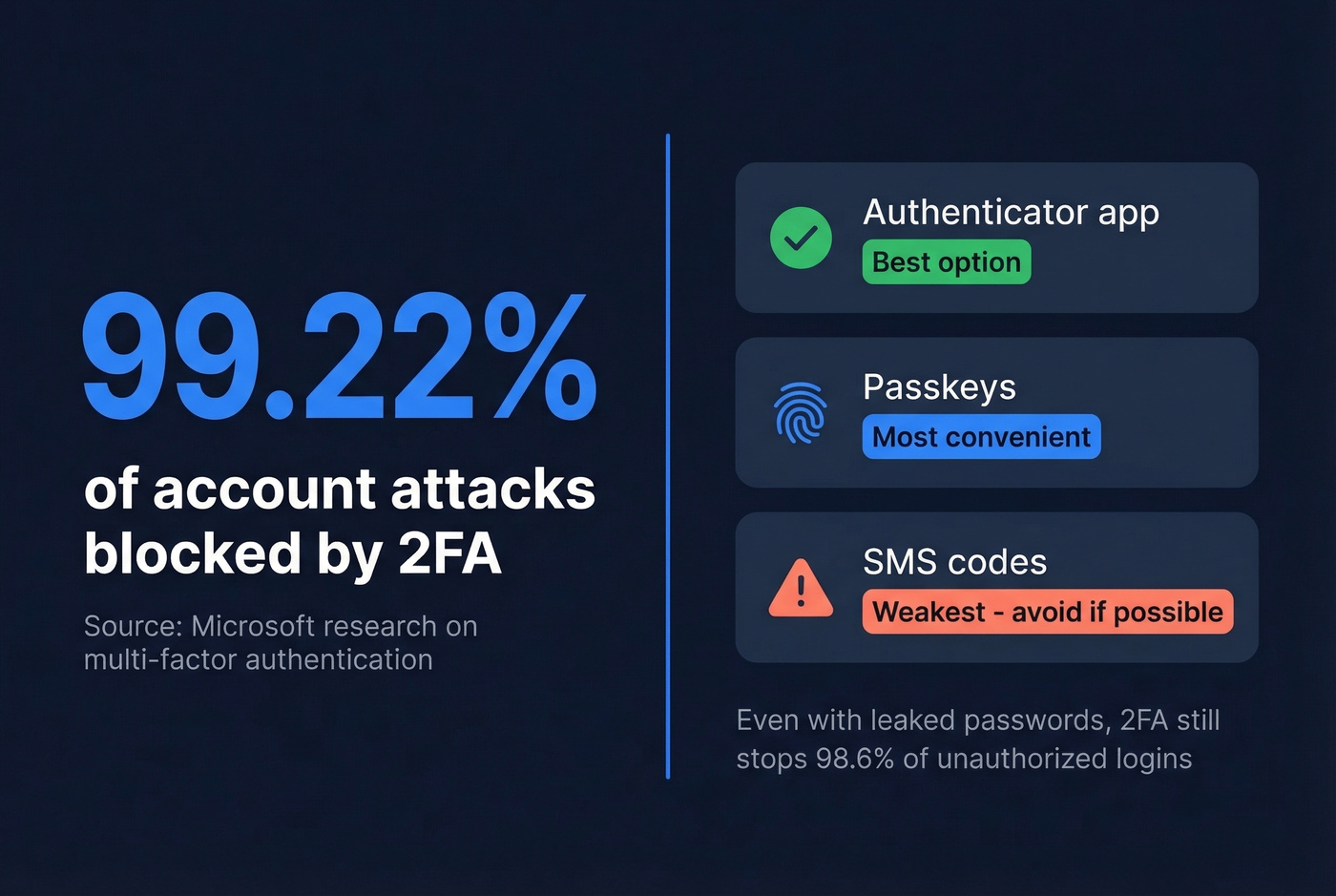
In Gmail, go to Settings > Security > 2-Step Verification. In Outlook, it's under Account > Security > Advanced security options. Proton has it under Settings > Security. All three support authenticator apps like Google Authenticator or Authy, and Gmail supports passkeys - which combine your device's biometric with a cryptographic key, merging two factors into one tap.
Use an authenticator app, not SMS. SIM-swapping attacks make text-message codes the weakest form of 2FA.
Don't Get Locked Out
The number one reason people lose access to their email isn't hackers - it's losing their own second factor and having no backup plan.
When you set up 2FA, your provider will offer backup codes. Save them somewhere secure - a password manager, a printed sheet in a safe, anything that isn't "a note on my phone that's also protected by the same account." Register multiple recovery methods: a backup email, a phone number, and backup codes at minimum. Most providers also enforce waiting periods before allowing sensitive recovery changes, which stops attackers from quickly locking you out.
Skip security questions entirely. NIST recommends against them - answers like your mother's maiden name or your first pet are trivially guessable from social media. If a service forces you to set one, treat it like a second password: use a random string and store it in your password manager.
Set Up a Professional Business Email
Sending invoices from coolguy2009@gmail.com tells your clients you're either just starting out or you don't care about details. Neither is the impression you want.
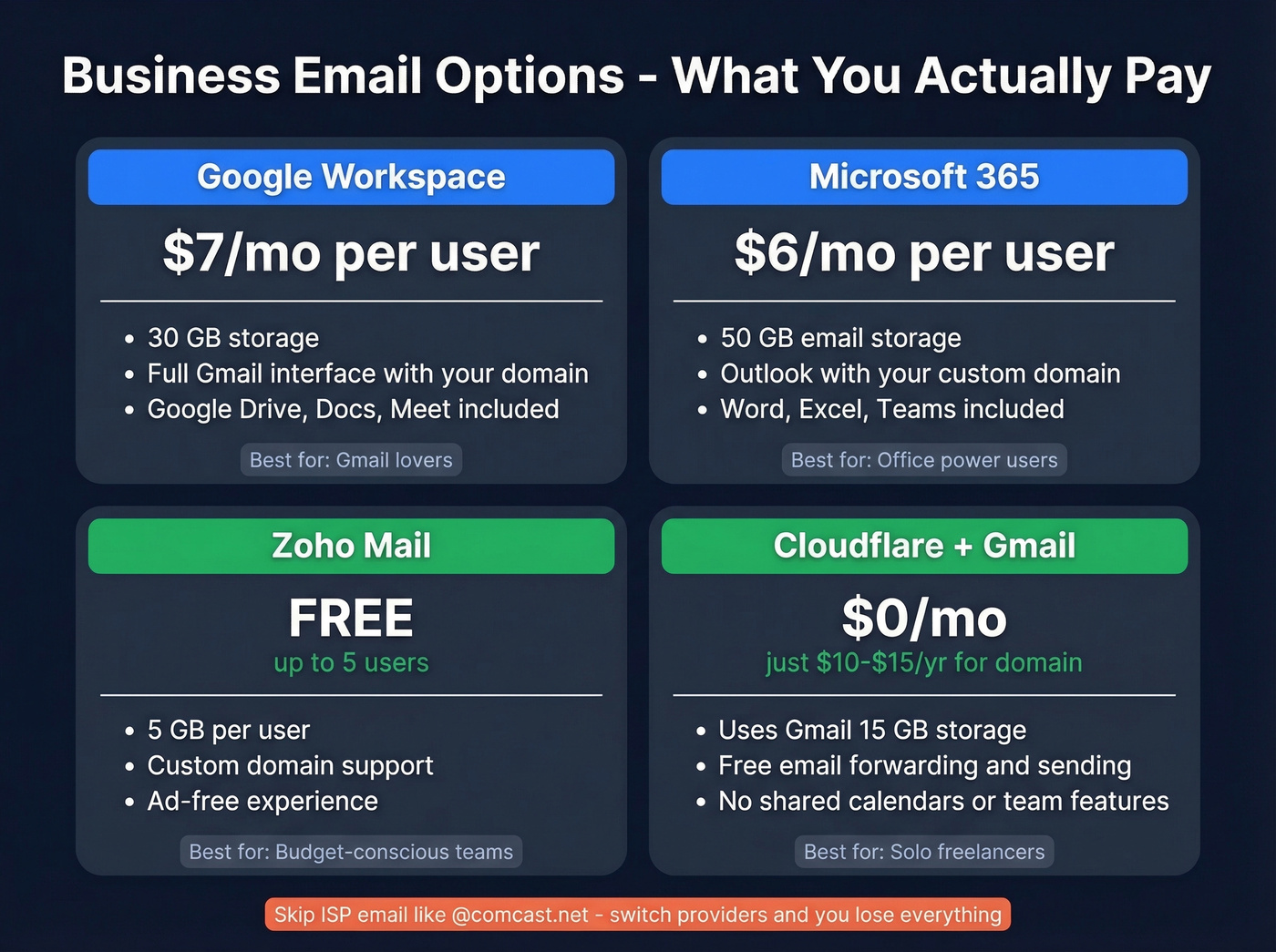
A custom domain email costs less than you think - and in one case, it's free.
If you're planning to send outreach from your new domain, it also helps to understand sender reputation before you scale volume.
Let's be honest: if you're a very small business or a solo freelancer, you don't need Google Workspace or Microsoft 365. The Cloudflare trick below gives you the same professional appearance for $0/month, saving roughly $84/user/year until you actually need shared calendars and team collaboration features.
| Provider | Price | Storage | Best For |
|---|---|---|---|
| Google Workspace | $7/mo/user | 30 GB | Gmail lovers |
| Microsoft 365 | $6/mo/user | 50 GB | Office users |
| Zoho Mail | Free (5 users) | 5 GB each | Budget teams |
| Cloudflare + Gmail | ~$10-$15/yr domain | Gmail's 15 GB | Solo freelancers |
Google Workspace
$7/month per user gets you the Gmail interface with your custom domain, 30GB of storage, and the full Google suite. If you already live in Google's ecosystem, this is the path of least resistance - it's literally Gmail, just with @yourcompany.com instead of @gmail.com.
Microsoft 365
$6/month per user for Business Basic, which includes Outlook with your domain plus 50GB of email storage. Best if your team already uses Word, Excel, and Teams daily. Buy directly from Microsoft - resellers like GoDaddy add markup and complicate support.
Zoho Mail
Free for up to 5 users with 5GB each, ad-free, and it supports custom domains. The interface isn't as polished as Gmail, but for zero dollars, it's the budget king for small teams who need business email addresses without a monthly fee.
The Free Custom Domain Trick
This workaround is popular on Reddit's r/smallbusiness, and we've set it up for three different domains ourselves:
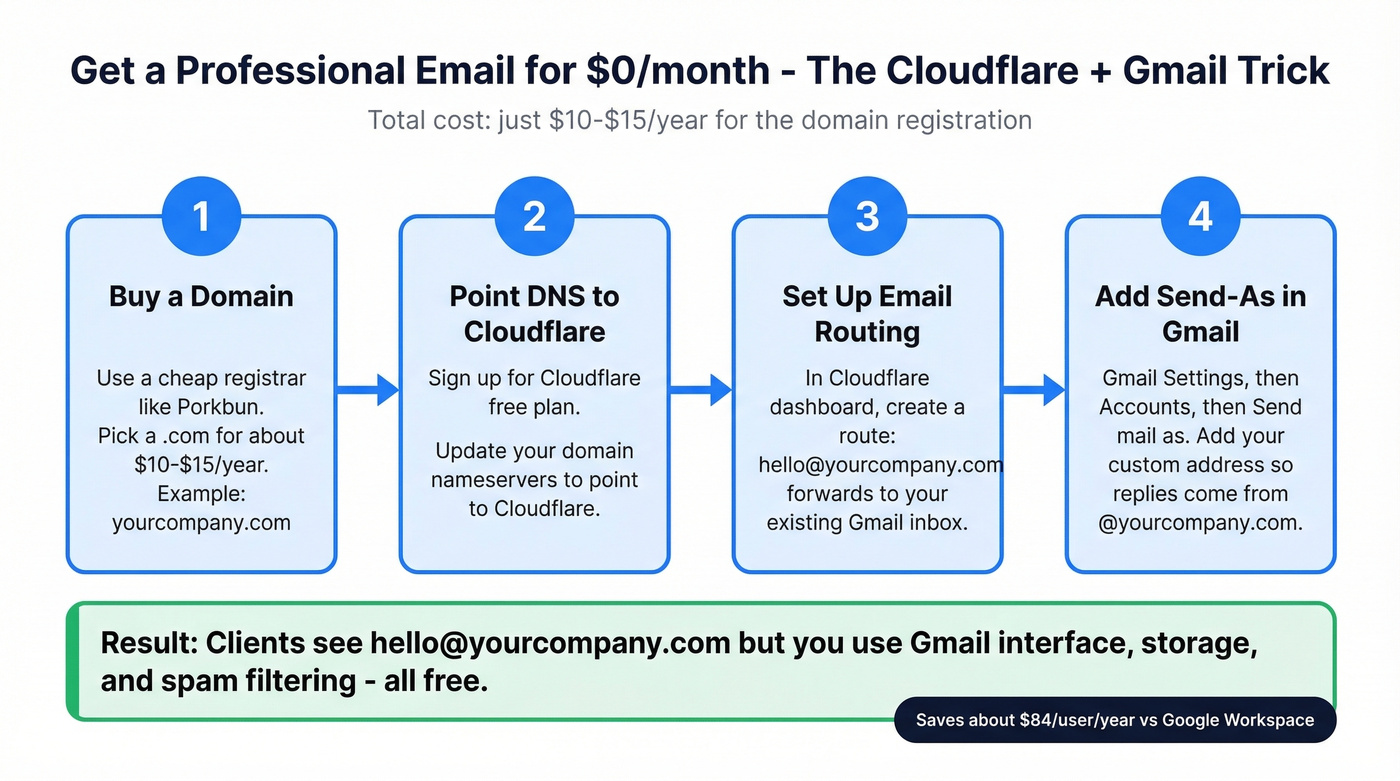
- Buy a domain from a cheap registrar like Porkbun - around $10-$15/year for a .com.
- Point your domain's DNS to Cloudflare (free plan).
- In Cloudflare's dashboard, set up Email Routing to forward your custom address to your existing Gmail.
- In Gmail, go to Settings > Accounts > "Send mail as" and add your custom address. This lets you reply from your custom domain.
Total monthly cost: $0. You're using Gmail's interface, Gmail's storage, and Gmail's spam filtering - but your clients see @yourcompany.com. The only cost is the annual domain registration.
Migrating From an Old Account
If you're switching from an old or compromised account, most providers offer import tools. Gmail's import wizard pulls in mail from any IMAP-compatible provider. The tedious part is updating your email address on every service you've signed up for - there's no shortcut for that, so start with your bank, your domain registrar, and anything with two-factor authentication tied to the old address.
Finding Someone's Email Address
You've got your own email set up. Now you need to reach people - a hiring manager, a potential client, a decision-maker at a company you're targeting.
Guessing formats like firstname.lastname@company.com works sometimes, but bounced emails damage your sender reputation fast. You need valid business emails before you hit send, not after a string of bounces tanks your deliverability. Tools like Prospeo let you search 300M+ professional profiles and verify addresses in real time with 98% accuracy - the free tier gives you 75 verified emails a month with no credit card required.
If you're doing this at scale, you'll want a workflow for sales prospecting and a reliable sales prospecting database (not just guesswork).
You're protecting your new email with 2FA and strong passwords. Smart. Now imagine sending outreach from it and hitting a 35% bounce rate because your data provider sold you stale addresses. Prospeo refreshes every record every 7 days - not the 6-week industry average - so your sender reputation stays clean from day one.
Protect the domain you just set up. Start with data that doesn't bounce.
Email Like a Professional
Having a great email address means nothing if your messages read like they were written in a rush.
Use a real greeting. "Hi Sarah" beats "Hey" or jumping straight into your ask. Write a clear, specific subject line - "Q3 invoice - payment by Oct 15" gets opened, while "Quick question" doesn't. This is especially true when emailing someone for the first time, where a vague subject line almost guarantees you'll be ignored or filtered.
If you want swipeable options, use these email subject line examples and subject lines that get opened as a starting point.
Stick to one ask per email. If you need three things, number them. Don't bury the important request in paragraph four. Sign off with "Best," "Thanks," or "Talk soon" - pick one and stick with it.
Never use ALL CAPS. It reads as shouting. Same goes for walls of text with no paragraph breaks, excessive exclamation marks, and passive-aggressive phrases like "per my last email." Short, clear, respectful. That's the whole formula.
If you're sending follow-ups, keep a few proven sales follow-up templates handy so you don't overthink it.
FAQ
Is Gmail really free?
Yes. Gmail is completely free with 15GB of storage shared across Gmail, Google Drive, and Google Photos. You only pay if you need more storage through Google One or want a custom domain via Google Workspace at $7/month per user.
Can I have multiple email addresses?
Yes. Most providers let you create multiple free accounts. Gmail also supports aliases - add "+anything" before the @ sign, like yourname+newsletters@gmail.com - to create unlimited variations that all deliver to your main inbox.
What's the most secure free email?
Proton Mail offers end-to-end encryption, operates under Swiss privacy laws, and includes 1GB of free storage. For maximum encryption including subject lines, Tuta is the alternative, though it lacks IMAP support for third-party clients.
How do I get a custom domain email for free?
Use Cloudflare Email Routing. Buy a domain for around $10-$15/year, point DNS to Cloudflare, set up forwarding to Gmail, and configure Gmail's "Send mail as" feature. Monthly cost: $0 beyond the annual domain fee.
How do I find someone's professional email?
Use an email finder tool that verifies addresses before you send. Prospeo, for example, searches 300M+ professional profiles and verifies in real time with 98% accuracy. The free tier gives you 75 verified emails per month - no credit card required.