

How to Search for Email Addresses: 7 Methods That Actually Work
You loaded 300 emails into your outreach sequence last Tuesday. By Friday, 45 had bounced, your domain reputation took a hit, and deliverability tanked for the rest of the month. The problem wasn't your copy or your targeting - it was the data. 23% of email addresses go invalid every year, and Google and Yahoo now enforce hard thresholds: bounces under 2%, spam complaints under 0.3%. Exceed either, and your emails land in spam for everyone on your list.
Finding emails is easy. Finding email addresses that actually land in an inbox? That's the hard part. Here are seven methods ranked by speed, accuracy, and when each one makes sense.
Pick Your Path
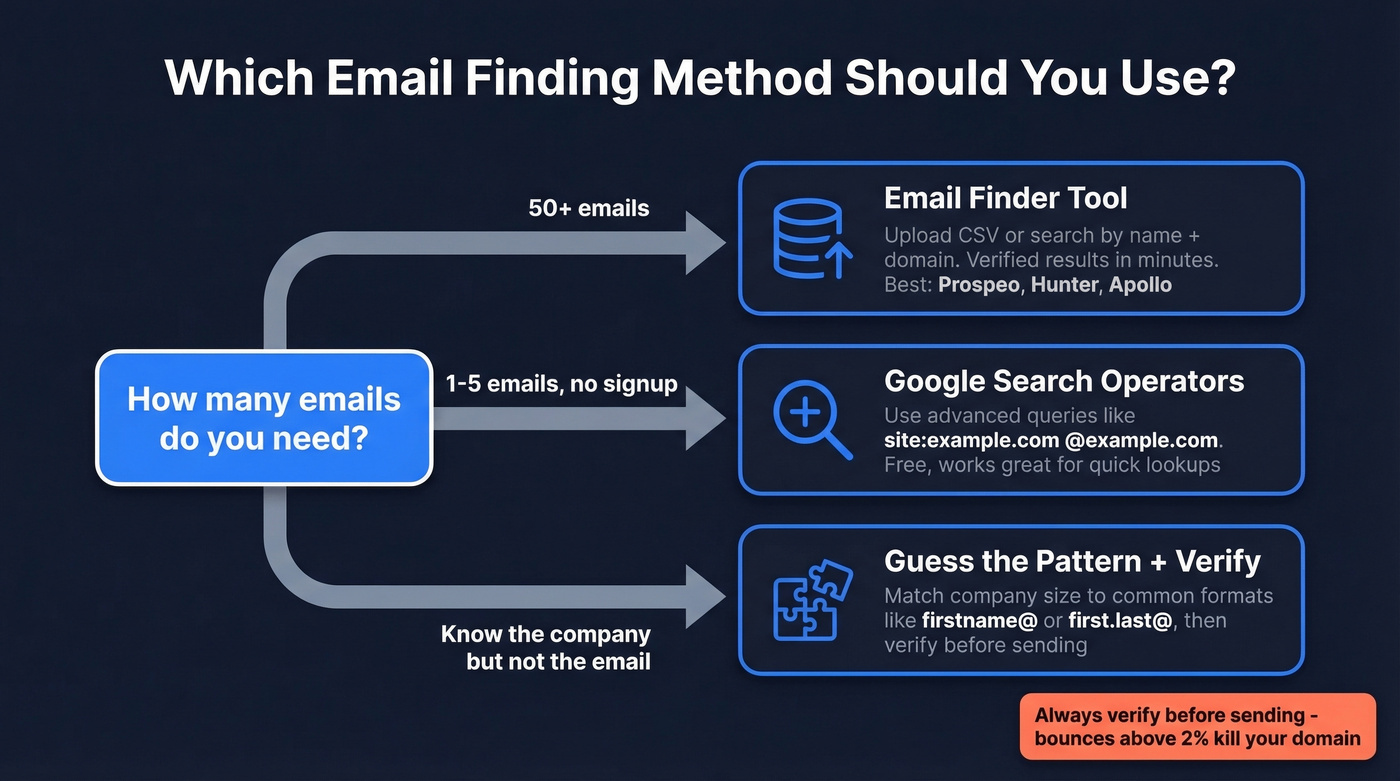
- Need 50+ emails fast. Use an email finder tool. Upload a CSV or search by name and domain - verified results in minutes.
- Need 1-5 emails right now, no signup. Google search operators work surprisingly well. Templates below.
- Need the email but only know the company. Guess the format pattern, then verify. There's a probability table further down.
Email Finder Tools
These tools run a simple loop: you provide a name and domain, the tool searches its database, matches against known patterns and web sources, verifies the result, and returns a deliverable address. Seconds, not hours.
Real-world accuracy across the category ranges from 40% to 80%, depending on the tool, input quality, and how niche the industry is. A Dropcontact benchmark of 15 tools found wide variance even among top performers. The metric that matters isn't "found rate" - it's cost per valid, deliverable email. We've watched teams burn through entire monthly plans on searches that come back empty, which is why the pricing model matters as much as the database size.
Prospeo
Prospeo draws from 300M+ professional profiles and runs every result through a 5-step verification pipeline: syntax check, DNS validation, MX record verification, SMTP handshake, and advanced filtering for catch-all domains, spam traps, and honeypots. The result is 98% email accuracy backed by proprietary infrastructure that doesn't rely on third-party providers.
Search by name and company domain, or upload a bulk CSV. Invalid addresses get filtered before you see them, and you only pay for valid results. Free tier: 75 emails/month. Paid plans start at ~$39/mo, putting the effective cost at roughly $0.01 per email.

Hunter
Hunter isn't your best bet for raw find rate - it lands around ~38% in benchmark tests. But its domain search does a different job well: plug in a company domain and it maps out every email pattern and address associated with it. For understanding a company's email structure before you start outreach, it's hard to beat. Free tier: up to 50 searches/month. Starter: $39/mo for 1,000 requests.
Apollo
If you need volume and don't want to pay upfront, Apollo is the play. With 275M+ contacts and a generous free tier, it doubles as a sequencing tool - find contact emails and launch outreach from the same interface. Paid plans start around $49-99/mo per user. In our testing, bounce rates from Apollo lists run higher than verification-first tools, so plan on running results through a separate verifier before sending anything.
Browser Extensions
The fastest way to grab an email for someone you're already looking at online is a browser extension. Visit a company page or professional profile, click the icon, get verified contact data. No context-switching, no toggling between tabs - you stay in your prospecting workflow. Most major finder tools offer extensions, and they're the single biggest time-saver for reps doing one-off lookups throughout the day.
Find Email Addresses Free With Google Operators
Google's advanced search operators are the best free method for finding published email addresses. They won't scale to hundreds of contacts, but for one-off lookups they're surprisingly effective. Copy these and swap in your target:
Company domain sweep:
site:example.com ("@example.com" OR "contact" OR "team" OR "email")
Role-based search:
site:example.com ("marketing" OR "PR" OR "sales") (contact OR email OR "@")
PR and press contacts:
site:example.com (press OR "media") ("contact" OR "email")
Find emails inside PDFs:
filetype:pdf "@example.com"
Industry-wide team pages:
intitle:"team" ("email" OR "contact") "fintech"
Swap "fintech" for whatever industry you're targeting. These queries surface team pages, staff directories, and press kits where emails are published openly.
One caveat worth knowing: several operators in older guides no longer work. The link: operator was dropped in 2017, info: is gone, and the ~ synonym operator was killed in 2013. If a tutorial tells you to use any of those, it's outdated.
The practical limit is volume. Google operators handle 5-10 lookups well. Past that, you'll hit rate limits and spend more time than the emails are worth.

Google operators cap out at 5-10 lookups. Prospeo searches 300M+ professional profiles and verifies every result through a 5-step pipeline - syntax, DNS, MX, SMTP, plus catch-all and spam-trap filtering. 98% accuracy at ~$0.01 per email.
Start with 75 free email searches - no credit card, no bounced contacts.
Manual Research Methods
Before reaching for any tool, check these sources. They're free and often overlooked.
Company Team Pages
The "About Us" or "Our Team" page is the most obvious place to look, and it works more often than you'd expect. Agencies, professional services firms, and nonprofits frequently list direct email addresses for key staff. Check the footer too - some sites bury contact info there. For decision-makers at smaller organizations, this is often the fastest path.
Professional Profiles
Some professionals make their email publicly visible in their profile's contact info section. Most keep it locked down, but there are workarounds. Download a profile as PDF - it sometimes reveals details not visible on the page itself. Check the profile URL too, which can contain the person's full name even when the display name is partially hidden. Respect platform terms of service when accessing contact data.
WHOIS Lookup
Running a WHOIS query on a company's domain can surface the registrant's email. The catch: most domains now use privacy protection, so you'll often get a proxy address. Even when it works, the domain owner might be the IT admin, not your target contact. Still, for solo founders and small businesses, this is a reliable way to find an email tied to the domain.
Just Ask
This one's underrated. A mutual connection, a company contact form, or a direct message asking "what's the best email to reach you?" works more often than people think. It's slower, but the response rate on an email someone gave you directly is dramatically higher than a cold lookup.
Guess the Pattern, Then Verify
| Company Size | Most Common | Second | Third |
|---|---|---|---|
| 1 person | firstname@ (61%) | flast@ (15%) | first.last@ (13%) |
| 1-10 | firstname@ (71%) | flast@ (13%) | first.last@ (10%) |
| 11-50 | firstname@ (42%) | flast@ (27%) | first.last@ (23%) |
| 51-200 | flast@ (42%) | first.last@ (30%) | firstname@ (17%) |
| 201-500 | flast@ (45%) | first.last@ (35%) | firstname@ (7%) |
| 501-1,000 | flast@ (42%) | first.last@ (41%) | firstname@ (5%) |
| 1,001-5,000 | first.last@ (48%) | flast@ (35%) | firstname@ (4%) |
| 5,001-10,000 | first.last@ (55%) | flast@ (26%) | firstname@ (3%) |
| 10,001+ | first.last@ (56%) | flast@ (22%) | firstname@ (7%) |
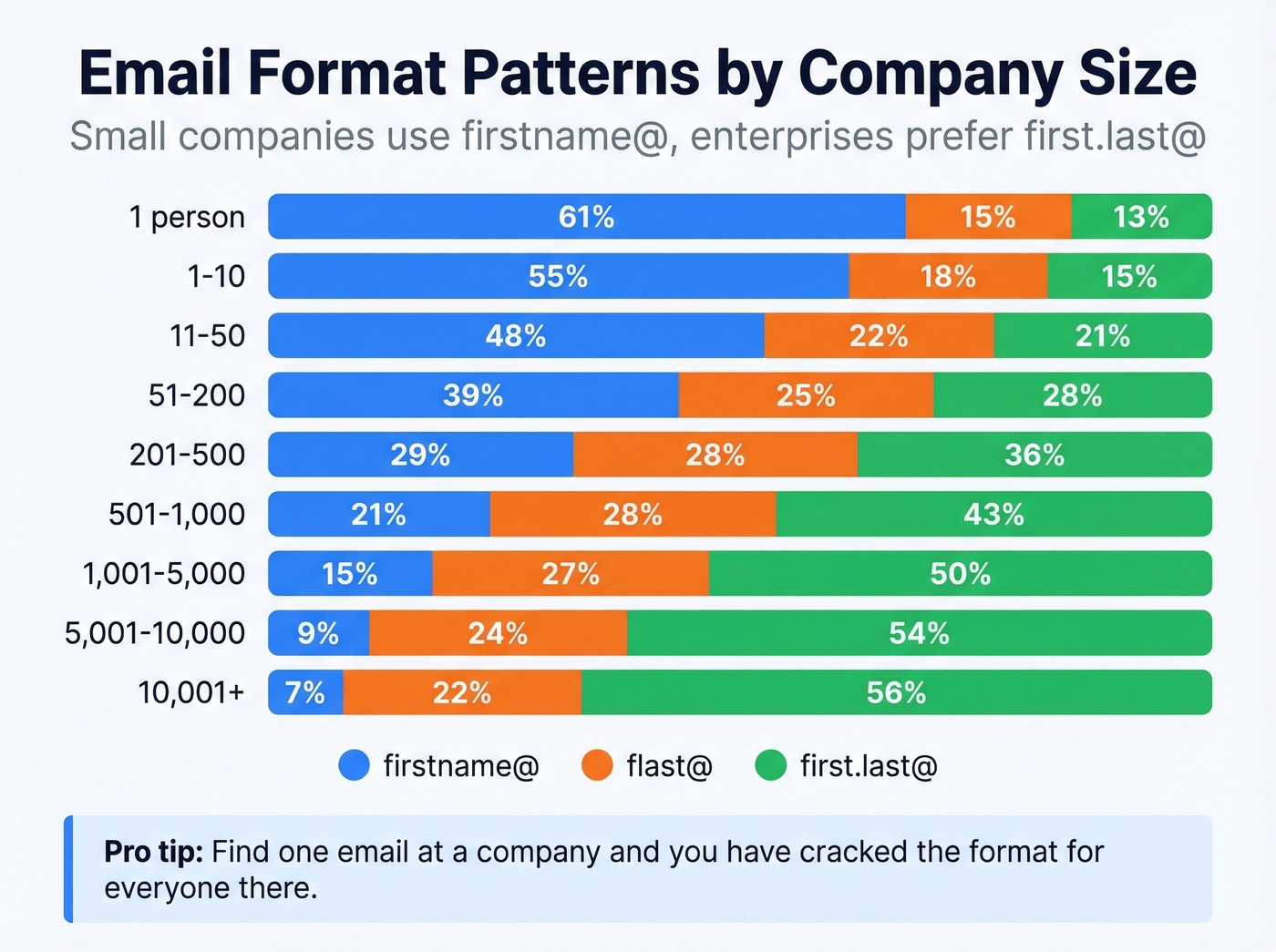
The pattern is clear: small companies favor simple firstname@ formats, while enterprises converge on first.last@ or flast@. Once you confirm one person's email at a company, you've cracked the format for everyone there. Find one, infer the rest.
The workflow: generate permutations using a tool like Metric Sparrow's permutator, verify each one against an email verification service, and use whichever comes back valid. This doesn't scale past a handful of lookups - for volume, a finder tool is faster.
AI Assistants (Verify Everything)
You can ask ChatGPT, Claude, or Perplexity to help find email addresses. A prompt like "What's the email format for [Company]?" will sometimes surface useful patterns from training data.
Here's the thing: AI models hallucinate contact information. They'll confidently generate a plausible-looking address that doesn't exist. We've tested this - the false positive rate is high enough that you should never send to an AI-suggested email without verifying it first. If you're wondering whether a result is real or fabricated, skip the guesswork and run it through a proper AI email checker tool.
Why Verification Isn't Optional
Finding an email is step one. Verifying it protects your domain. The deliverability thresholds are unforgiving - bounces above 2% or spam complaints above 0.3% push your emails into spam for your entire list. We've watched teams lose entire sending domains over a single unverified batch.
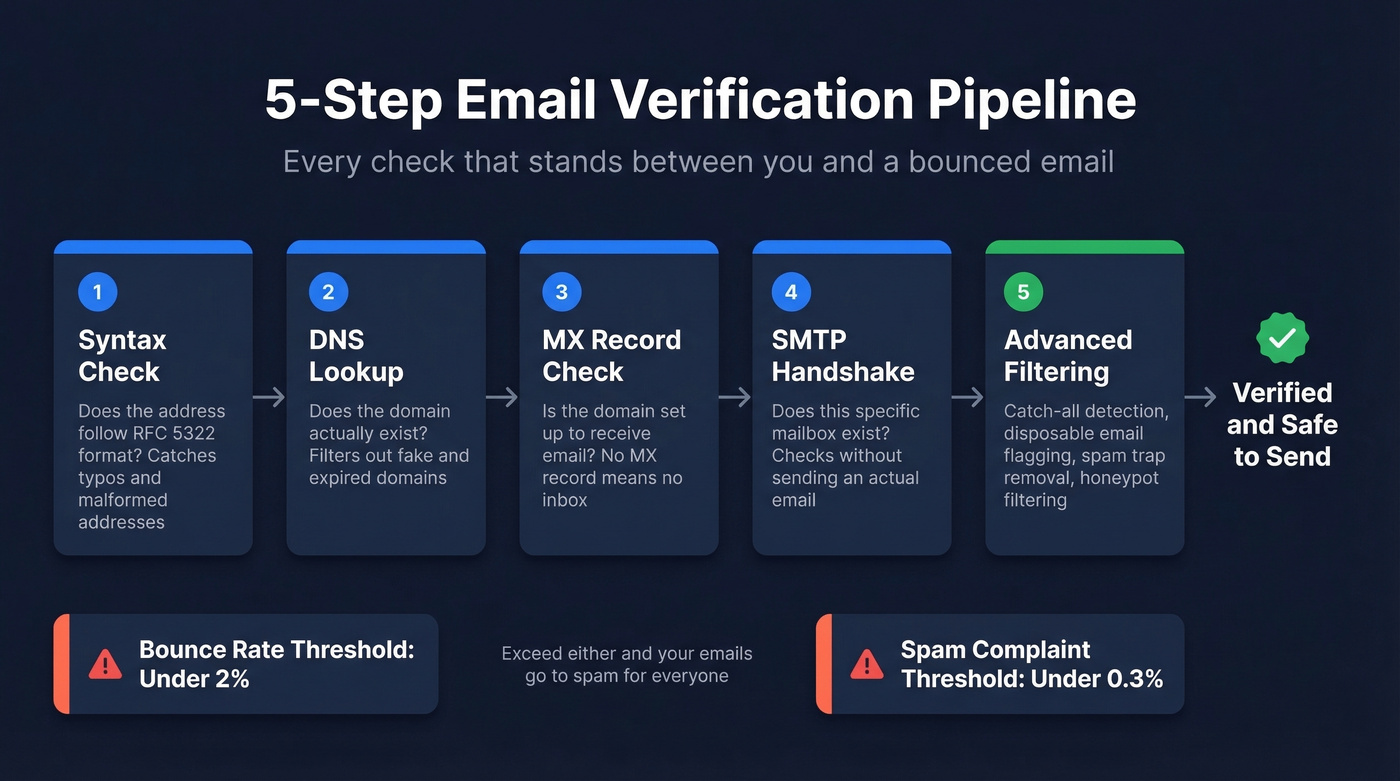
A proper verification pipeline runs five checks:
- Syntax validation - does the address follow RFC 5322 format?
- DNS lookup - does the domain exist?
- MX record check - is the domain configured to receive mail? You can check this yourself with
dig MX example.com. - SMTP handshake - does the specific mailbox exist, without actually sending an email?
- Advanced filtering - catch-all domain detection, disposable email flagging, role account identification like info@ and sales@, spam trap removal, and honeypot filtering.
Beyond verification, authentication is table stakes. SPF, DKIM, and DMARC records need to be configured before you send a single cold email. Warming up a new domain? Start at 5-10 emails per day and ramp gradually over 4-6 weeks. Jumping straight to volume is the fastest way to get flagged. (If you want a deeper checklist, see our email deliverability guide and how to improve sender reputation.)
Email Finder Pricing Compared
The real question isn't "which tool is cheapest?" It's "what am I paying per valid, deliverable email?" Some tools charge for every search whether they find anything or not. Others only charge when they return a verified result. That distinction changes the math dramatically.
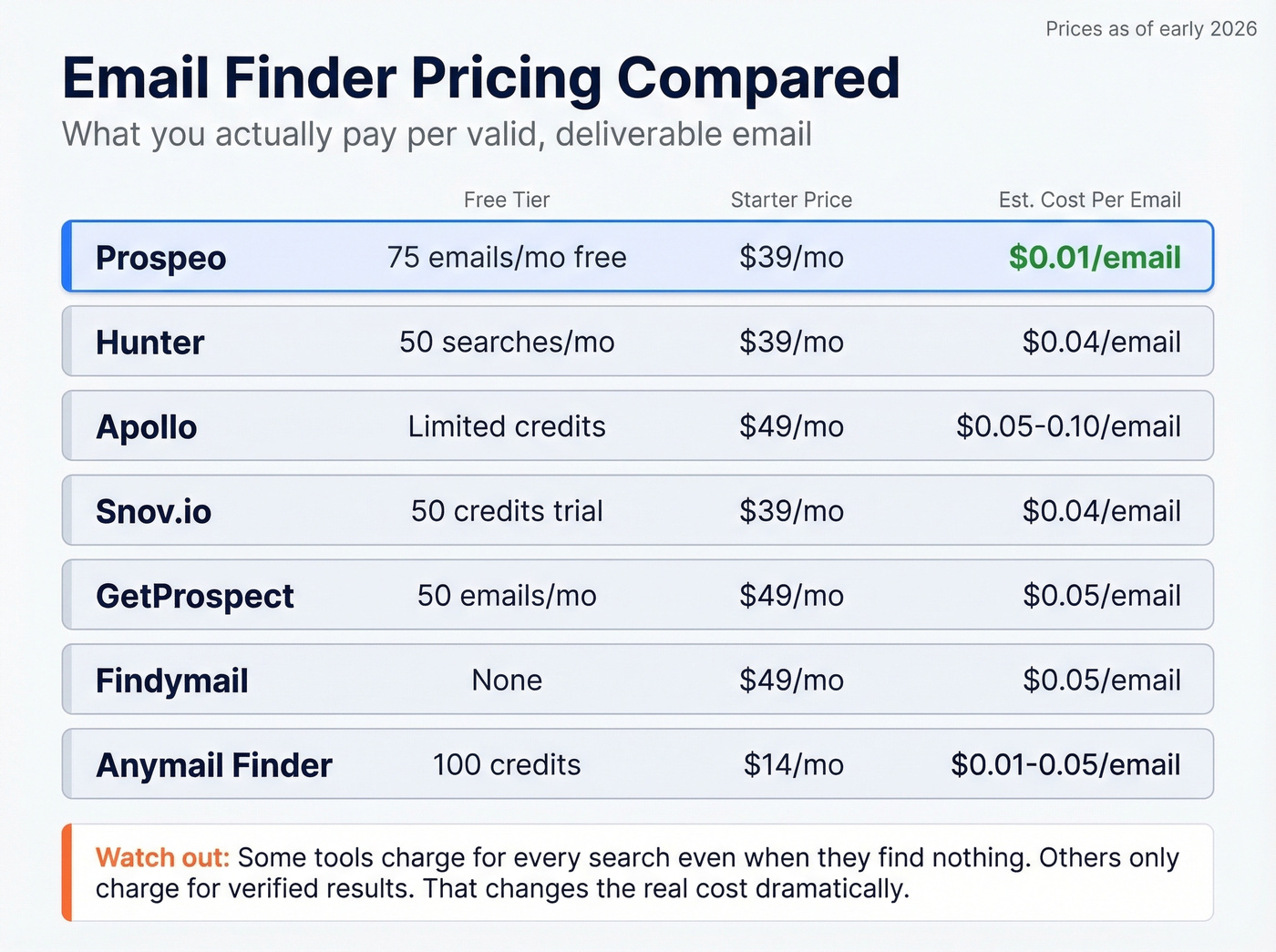
| Tool | Free Tier | Starter Price | Credits | Est. Cost/Email |
|---|---|---|---|---|
| Hunter | Up to 50 searches/mo | $39/mo | 1,000 requests | ~$0.04 |
| Apollo | Limited credits | ~$49/mo | Varies | ~$0.05-0.10 |
| Snov.io | Trial: 50 credits | $39/mo | 1,000 | ~$0.04 |
| GetProspect | 50 emails/mo | $49/mo | 1,000 | ~$0.05 |
| Findymail | - | $49/mo | 1,000 | ~$0.05 |
| Anymail Finder | 100 credits | $14/mo | Pay per valid result | ~$0.01-$0.05 |
| Kaspr | 5 emails/mo | $49/mo | 60 | ~$0.82/credit |
| Skrapp | 100 credits | $49/mo | 1,000 | ~$0.05 |
Cost-per-email estimates are based on starter tier pricing and don't account for not-found results. Prospeo and Anymail Finder only charge for valid results, making their effective cost lower than tools that burn credits on misses.

Winners by category: Best value at scale: Prospeo at ~$0.01/email. Best for domain research: Hunter. Best free tier for volume: Apollo. Best budget option: Anymail Finder starting at $14/mo. Skip Kaspr unless you need fewer than 10 lookups per month - at $0.82 per credit, the math just doesn't work for most teams.
Let's be honest about the #1 frustration in this category: paying for searches that come back empty. An agency owner doing 500-1,000 emails per day told us they prioritize sub-5% bounce rates, cold-email-platform compatibility, and avoiding per-seat pricing above everything else. The credit-burn problem is real, and it's why tools that only charge for verified results save you money even when their sticker price looks similar. (If you're building a full outbound stack, start with these sales prospecting techniques and a clean lead generation workflow.)
Pattern guessing works until it doesn't - and every wrong guess chips away at your domain reputation. Prospeo's proprietary infrastructure finds and verifies emails in seconds, filtering out invalid addresses before they ever reach your list. Teams using Prospeo keep bounce rates under 4%.
Replace guesswork with 98% verified emails from 300M+ profiles.
FAQ
How can I find someone's email address for free?
Google search operators, company team pages, and professional profile contact sections cost nothing. Most email finder tools also offer free tiers - Prospeo gives 75 verified emails per month, Hunter offers up to 50 searches. For fewer than 20 lookups per month, free methods handle the job.
Is it legal to search for someone's email?
Finding publicly available business emails is legal in most jurisdictions. Regulation kicks in when you send. GDPR requires legitimate interest for B2B outreach in the EU, and CAN-SPAM requires a functioning opt-out mechanism in the US. Authentication and unsubscribe compliance aren't optional.
How accurate are email finder tools?
Real-world accuracy ranges from 40% to 80% depending on the tool, input quality, and industry. Prospeo hits 98% by running a 5-step verification pipeline before returning results. Tools that verify before returning results consistently outperform simple database lookups in production.
How do you find email addresses in bulk?
Use an email finder with CSV upload or API access. Upload a list of names and domains, and the tool returns verified emails within minutes. For enrichment workflows at scale, API-based tools with high match rates are the most practical approach.
How do I look up emails for a specific company?
Use a domain search tool like Hunter to map every known email pattern and address associated with a company domain. Alternatively, search the company's website for team pages, press kits, or staff directories. Once you identify the format one person uses, apply that pattern to generate addresses for other employees.