

How to Search Someone's Email in 2026: 6 Methods That Actually Work
You've got a name and a company. What you don't have is the one thing you need to start a conversation: their email address. Whether you're trying to search someone's email for sales outreach, recruiting, or a partnership pitch, here are six methods to close that gap - ranked from most reliable to last resort.
What You Need (Quick Version)
For one-off lookups, Google search operators are free, require no signup, and hit roughly a 35-45% success rate for professionals at mid-to-large companies. For reliable, repeated lookups, use an email finder tool. And before you hit send on anything, verify every address. A bounce rate above 5% can wreck your domain reputation fast (see email reputation and email bounce rate benchmarks).
Use an Email Finder Tool
Email finders take a name and domain, query databases of professional profiles, and run verification checks - often at the SMTP level - to confirm deliverability. The whole process takes seconds. But accuracy varies wildly between vendors. If you're comparing options, start with a broader breakdown of email search tools and email ID finder tools.
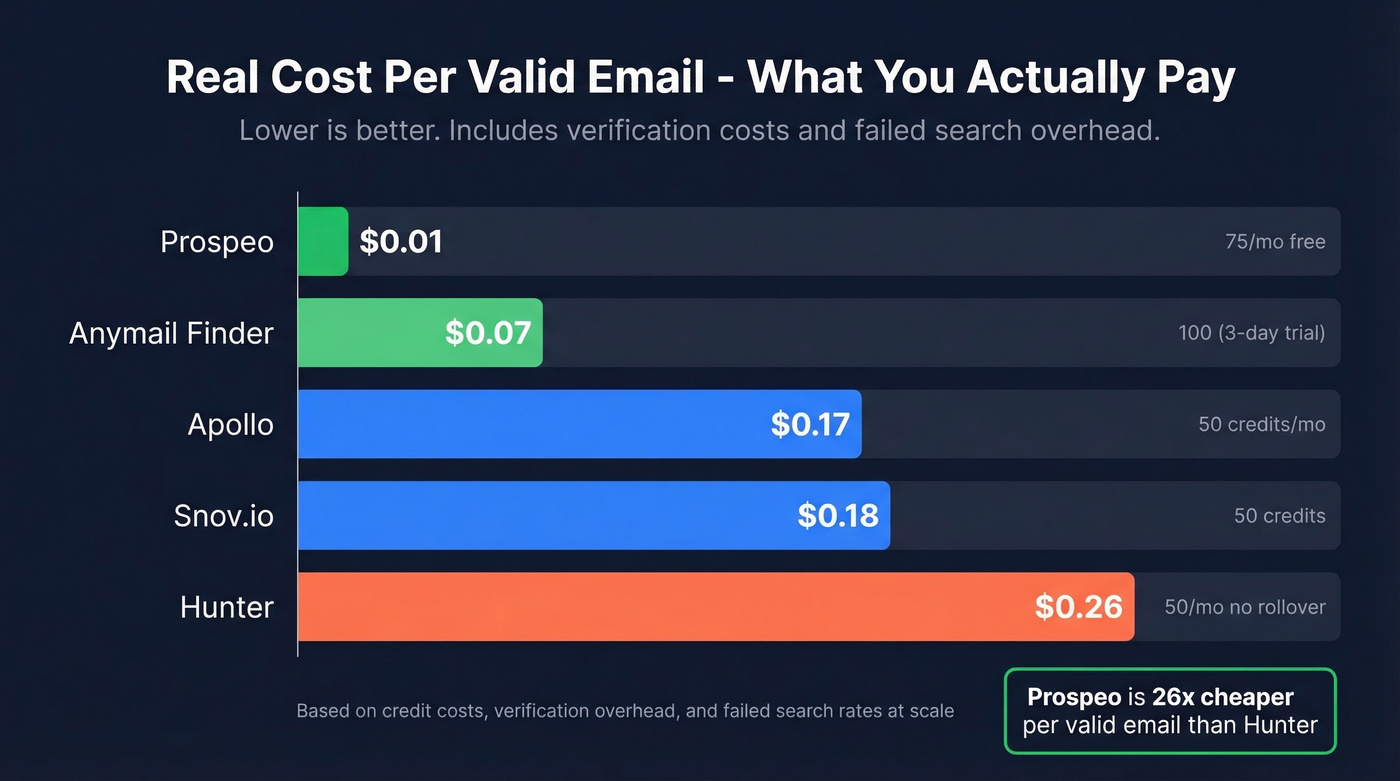
Everyone claims "95%+ accuracy." In our experience, the gap between those marketing numbers and real-world results is exactly where your bounce rate lives. That gap matters because you're not just paying for lookups - you're paying for valid lookups.
| Tool | Free Tier | Paid From | Verification Method | Cost per Valid Email |
|---|---|---|---|---|
| Prospeo | 75/mo, no card | ~$0.01/email (credit-based) | 5-step with catch-all handling | ~$0.01 |
| Hunter | 50/mo, no rollover | $49/mo | Verified before return + verifier credits | ~$0.26 |
| Apollo | 50 credits/mo | ~$49/mo/user | Basic verification | ~$0.15-0.20 |
| Snov.io | 50 credits | $39/mo | SMTP check | ~$0.18 |
| Anymail Finder | 100 (3-day trial) | ~$14/mo | Pay-only-for-valid | ~$0.07 |
The cost-per-valid-email column is what actually matters. If a tool burns credits on verification or charges you for failed searches, your real cost per usable email climbs fast. A tool with higher verification standards at a lower price point gets you dramatically more value from the same budget.

Prospeo is where we'd start. Its database covers 300M+ professional profiles with 98% verified email accuracy, and the free tier gives you 75 verified emails per month - no credit card required. Snyk's team of 50 AEs went from a 35-40% bounce rate to under 5% after switching, generating 200+ new opportunities per month. The 5-step verification process handles catch-all domains, spam traps, and honeypots before returning a result, which is why the cost per valid email stays so low.

Hunter is the most recognized name in the space, and its domain search feature is genuinely useful for mapping an org's email pattern. The free tier offers 50 searches per month with no rollover, and verification eats 0.5 credits per email on that free plan. It's a solid choice for occasional lookups, but the credit math gets expensive at scale. If you're evaluating alternatives, see our Hunter alternatives.
Skip Apollo if all you need is email finding. It's built for teams that want everything in one platform - 210M+ contacts, built-in sequencing, a lightweight CRM. The trade-off is that email accuracy takes a back seat to breadth, and deliverability controls aren't as tight as dedicated tools. Paid plans start at ~$49/month per user.
Snov.io is the quick-and-dirty option: 50 credits, a solid Chrome extension, decent results for small batches. Larger-scale tests show accuracy drops off, so treat it as a supplement. Paid plans start around $39/month.
Anymail Finder's pay-only-for-valid model sounds great until you read the fine print. The "free trial" is 100 credits over 3 days with a $1 authorization charge (refunded). Forget to cancel and you're on a paid plan. That said, when it finds an email, you can trust it. Plans start at ~$14/month.
Here's the thing most teams get wrong: they chase the biggest database. A tool with 300M profiles and 98% verification beats a tool with 500M profiles and 40% accuracy every single time. Volume is vanity. Deliverability is revenue. (If you're scaling outbound, pair this with sales prospecting techniques that don't torch your domain.)
Google Operators: Find Emails for Free
This is the free method that actually works. Google indexes huge numbers of pages where email addresses appear in plain text - conference bios, PDF whitepapers, GitHub commits, team pages. The trick is knowing how to ask.
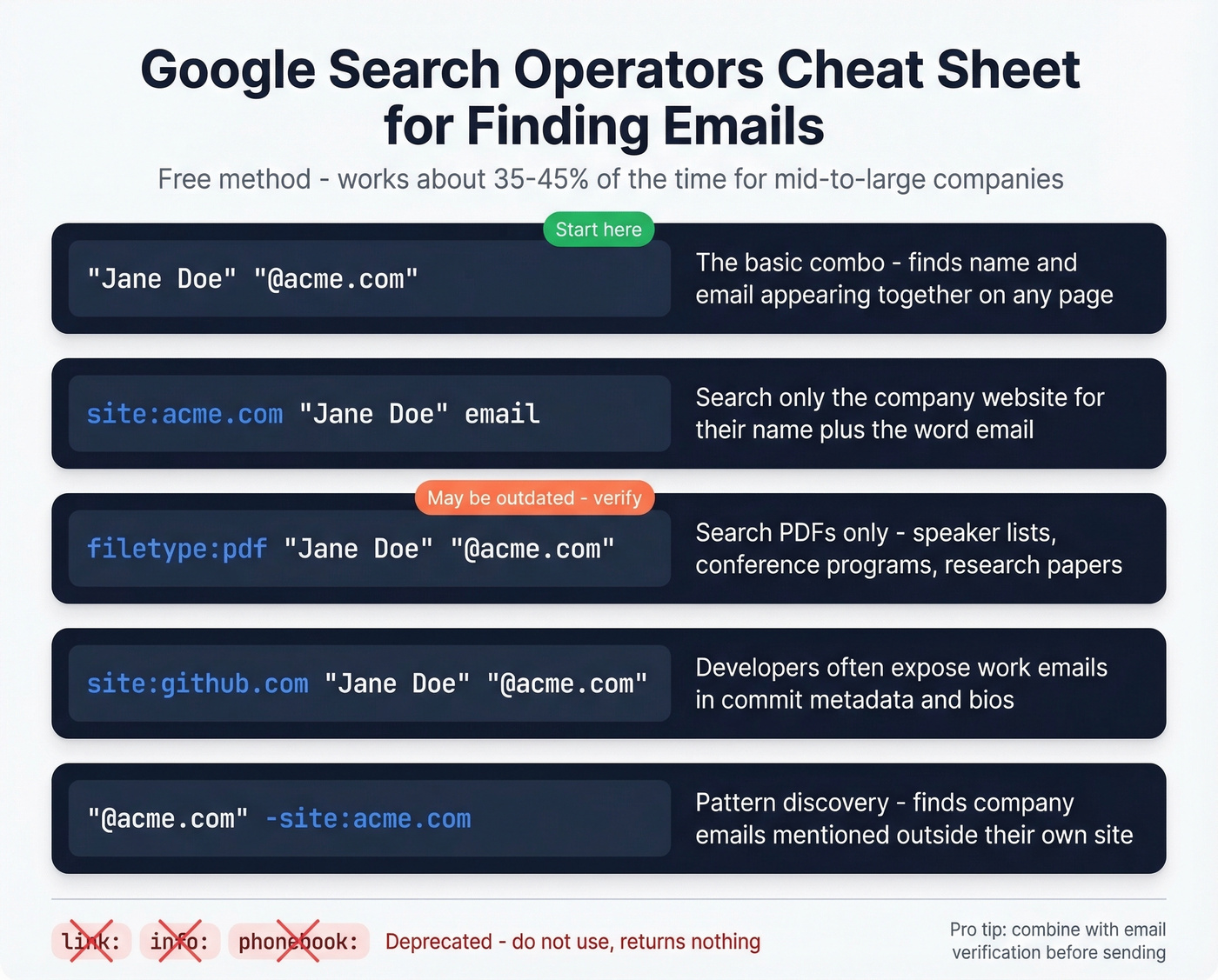
Replace the name and domain with your target:
"Jane Doe" "@acme.com"
The simplest approach. Searches for the name and any @acme.com address appearing together on a page.
site:acme.com "Jane Doe" email
Restricts results to the company's own website.
filetype:pdf "Jane Doe" "@acme.com"
PDFs are goldmines - speaker lists, conference programs, research papers. They're also sometimes outdated, so verify what you find.
site:github.com "Jane Doe" "@acme.com"
Developers often expose their work email in commit metadata.
"@acme.com" -site:acme.com
The pattern discovery query. Finds acme.com email addresses mentioned outside the company's own site - in directories, event listings, and press releases.
Don't bother with link:, info:, or phonebook:. All deprecated. They return nothing useful.
The success rate for the direct "name + @domain" approach runs about 35-45% for professionals at mid-to-large companies. It's free and fast, but it doesn't scale. If you regularly need to look up email addresses in bulk, you'll outgrow this method in a week.
Guess the Pattern + Verify
Common corporate email patterns: first.last@company.com, first@company.com, flast@company.com, f.last@company.com, first_last@company.com. If you can find one email from the target company through Google operators or a team page, you can reverse-engineer the pattern and apply it to your prospect's name. Email permutator tools automate this by generating every possible combination.
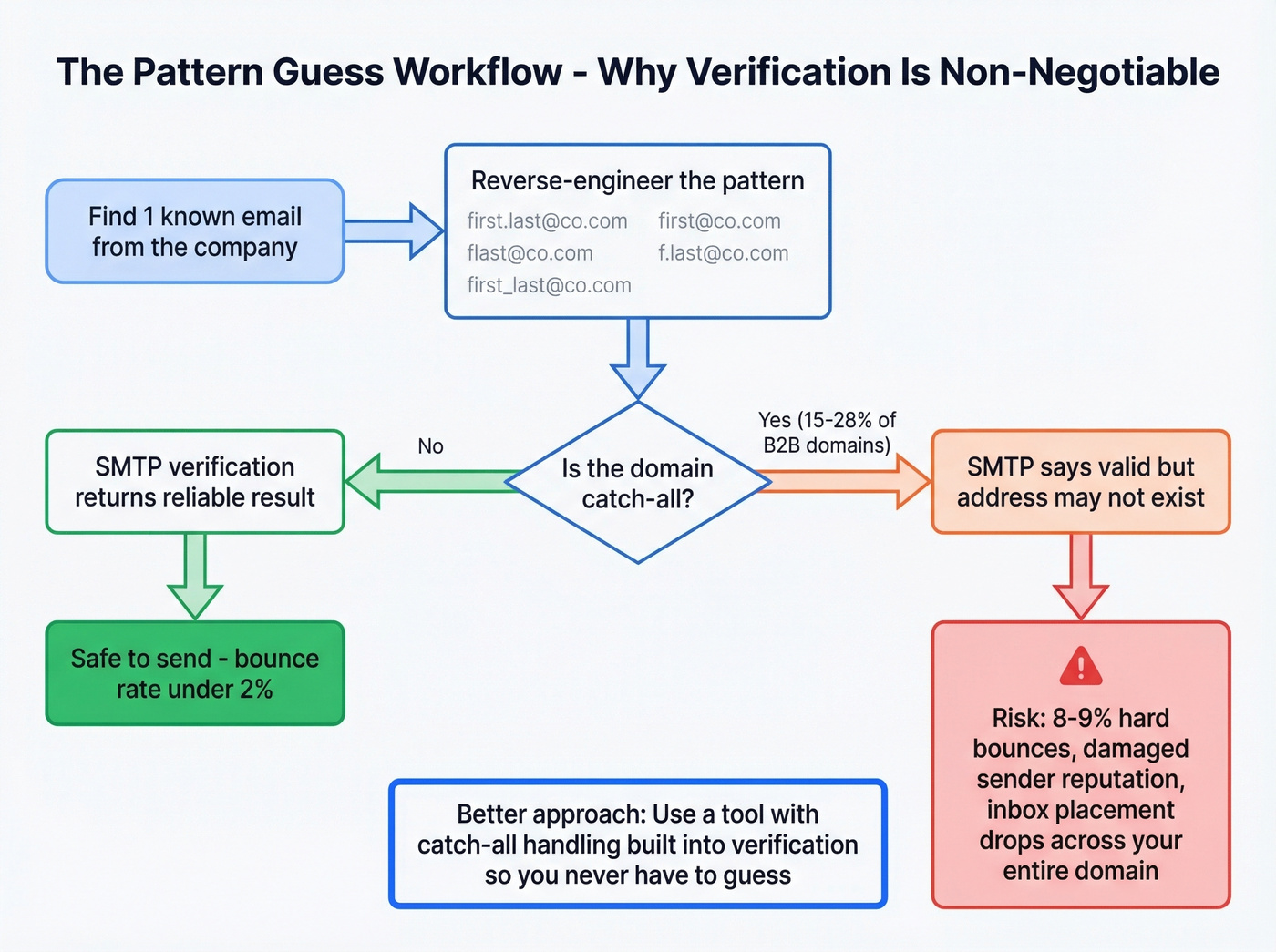
Guessing the pattern is the easy part. The dangerous part is sending to an unverified guess. If you need a step-by-step, use this guide on how to check if an email exists (and if you're doing it at scale, consider dedicated email verification tools).
Between 15-28% of B2B domains are catch-all, meaning they accept every email regardless of whether the specific address exists. Your SMTP check comes back "valid," you send your sequence, and the email either bounces later or lands in a dead inbox nobody monitors. One sales ops team on r/sales reported 8-9% hard bounces on new lists even with SPF/DKIM/DMARC configured - the issue was list quality, not infrastructure.
Keep your bounce rate under 2%. Above 5%, you're actively damaging your sender reputation and risking inbox placement across your entire domain.

You just read that guessing email patterns on catch-all domains leads to 8-9% hard bounces. Prospeo's 5-step verification handles catch-all domains, spam traps, and honeypots before returning a result - which is why teams like Snyk cut their bounce rate from 35-40% to under 5%. Search 300M+ profiles at 98% accuracy for ~$0.01 per verified email.
Get 75 verified emails free this month. No credit card, no bounces.
Check Websites and Social Profiles
Before reaching for any tool, spend 90 seconds on manual recon. This is one of the simplest ways to find someone's email without spending a dime.
Company "About" or "Team" pages at smaller companies often list emails directly. Personal blogs and portfolio sites work well for marketers, developers, and designers. GitHub profiles frequently contain work emails in commit history and bios. YouTube channel "About" tabs often list business inquiry emails. WHOIS records on personal domains sometimes expose registrant emails, and conference speaker bios get archived for years - we've pulled valid addresses from event pages that were three years old.
This works best for founders, solo consultants, and people who actively maintain a public presence. For a mid-level manager at a 5,000-person company, you'll usually need a tool.
Use AI Assistants
ChatGPT and Perplexity can help with supplementary research, but they can't reliably surface a real email address from a prompt alone. Try prompts like:
"What is the standard email format at [Company]? Show me examples from public sources."
"Find any publicly listed email addresses for [Name], [Title] at [Company]."
Perplexity is better for sourced results; ChatGPT is better for brainstorming email patterns. Both are useful for identifying the format a company uses or surfacing public mentions you might've missed.
They're terrible at generating actual addresses. They hallucinate plausible-looking emails that don't exist. Never send to an AI-suggested email without verifying it first. If you're using AI in outbound, keep it grounded with an AI email checker workflow.
Ask or Network In
When the first five methods fail, go human. A warm intro request through a mutual connection beats a cold email every time. A short, specific DM asking for their preferred email works surprisingly often. Company live chat can route you to the right person. And the newsletter trick - subscribe, then reply to the welcome email - often lands in a monitored inbox.
Save this for the prospects worth the effort. If you're doing this for more than a handful of targets per week, go back to method one.
The "50 Free Credits" Trap
Free tiers sound generous until you read the fine print. We've dug into the math so you don't have to.
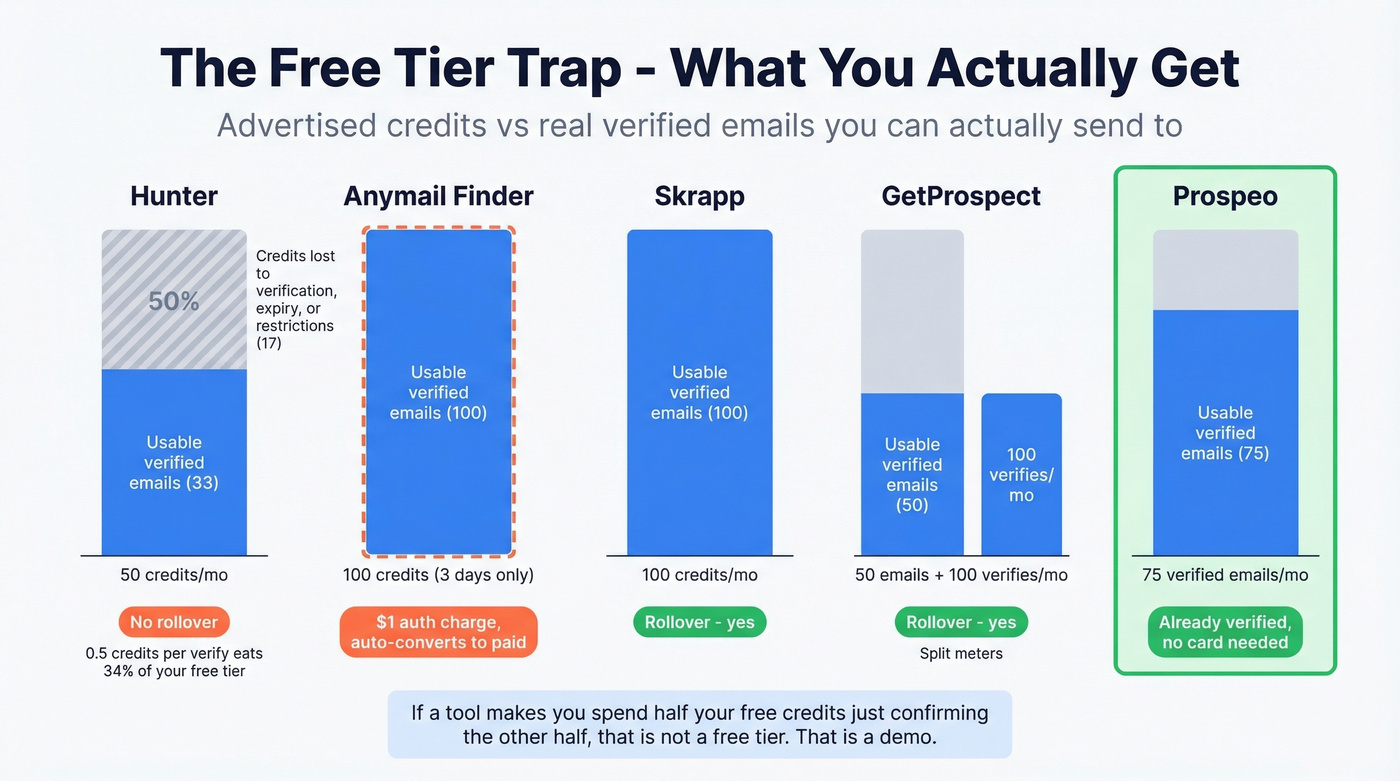
Hunter's free plan gives you 50 credits per month, but verification costs 0.5 credits per email. Find and verify 33 emails and you've burned all 50 credits. Unused credits don't roll over. Anymail Finder's "free trial" gives you 100 credits for 3 days with a $1 card authorization - forget to cancel and you're paying. Skrapp offers a strong free tier at 100 credits per month with rollover. GetProspect splits the meter: 50 valid emails plus 100 verifications per month, also with rollover.
| Tool | Free Credits | Rollover? | Hidden Cost |
|---|---|---|---|
| Hunter | 50/mo | No | 0.5 credit per verify |
| Anymail Finder | 100 (3 days) | N/A | $1 auth charge (refunded) |
| Skrapp | 100/mo | Yes | None |
| GetProspect | 50 + 100 verifies | Yes | Split meters |
| Prospeo | 75/mo | - | None - already verified |
The verification tax is the biggest hidden cost in email finding. Every credit that goes toward verification instead of discovery is a credit wasted. Let's be honest - if a tool makes you spend half your free credits just confirming the other half, that's not a free tier. That's a demo.
Google operators work for one-off lookups, but they don't scale past a handful of searches. Prospeo's email finder takes a name and domain and returns a verified email in seconds - across 300M+ professional profiles with 98% accuracy and a 7-day data refresh cycle. That's 90% cheaper than ZoomInfo with higher deliverability.
Find any professional email in seconds. Pay only for verified results.
Legal Rules Before You Send
Finding someone's email is legal. What you do with it has rules - and those rules have teeth.
CAN-SPAM (United States) applies to all commercial email, including B2B. There's no business exemption. Penalties run up to $53,088 per violating email. You need accurate headers, non-deceptive subject lines, a physical postal address, and an opt-out mechanism honored within 10 business days. The FTC's CAN-SPAM compliance guide breaks down every requirement.
GDPR (European Union) allows B2B cold email under the "legitimate interest" basis, but you need a defensible reason for contacting the person and must offer an easy opt-out. Penalties reach EUR 20M or 4% of global annual turnover. Document your legitimate interest rationale before you send.
CASL (Canada) is the strictest of the three. It requires either express consent or implied consent through an existing business relationship or a published email in a relevant context. Penalties go up to $10M CAD per violation. If you're targeting Canadian prospects, get legal advice.
| Requirement | US (CAN-SPAM) | EU (GDPR) | Canada (CASL) |
|---|---|---|---|
| Basis | Opt-out model | Legitimate interest | Express/implied consent |
| Opt-out window | 10 business days | Immediate | Immediate |
| Max penalty | $53,088/email | EUR 20M or 4% revenue | $10M CAD |
FAQ
Can I search for someone's email for free?
Yes. Google search operators find professional emails about 35-45% of the time at established companies. For a tool-based approach, Prospeo offers 75 free verified emails per month with no credit card required - the most generous free tier with built-in verification.
How accurate are email finder tools?
Marketing pages claim 95%+, but real-world accuracy ranges from 60-98% depending on verification depth. Tools relying on basic SMTP checks typically land between 70-85%. Always verify before sending.
Is it legal to find and email someone?
Yes, if you comply with the relevant regulations. CAN-SPAM requires opt-out links and a physical address. GDPR requires legitimate interest documentation. CASL requires express or implied consent. Penalties range from $53,088 per email (US) to EUR 20M (EU).
How do I find an email at a specific company?
Start with Google operators like "First Last" "@company.com" to check for publicly indexed results. If that doesn't work, use an email finder tool - enter the person's name and company domain, and the tool queries its database and verifies the result before returning it.
What's a catch-all domain and why does it matter?
A catch-all domain accepts every email sent to it, whether the specific address exists or not. About 15-28% of B2B domains are catch-all, which means basic SMTP verification returns "valid" for addresses that don't reach anyone. Tools with catch-all handling flag these before you waste a send.