

How to Send a Polite Reminder Email That Actually Gets a Reply
Your "Gentle Reminder" Isn't Gentle
There's a thread on r/auscorp where someone describes a boss who starts almost every email with "a gentle reminder." The poster doesn't find it gentle. They find it ominous - like a teacher tapping the desk before handing back a failed test. That reaction isn't unusual. The phrase "gentle reminder" has become so overused in corporate email that it now signals the opposite of what it intends. Workplace forums are full of people calling out this exact phrase, and one widely shared observation nails it: blanket "gentle reminder" emails sent to everyone - including people who already complied - feel particularly passive-aggressive.
Stop trying to be gentle. Be clear. That's the whole thesis of this guide, and here's the short version:
- Drop "gentle reminder" from your vocabulary. It reads as a warning, not kindness.
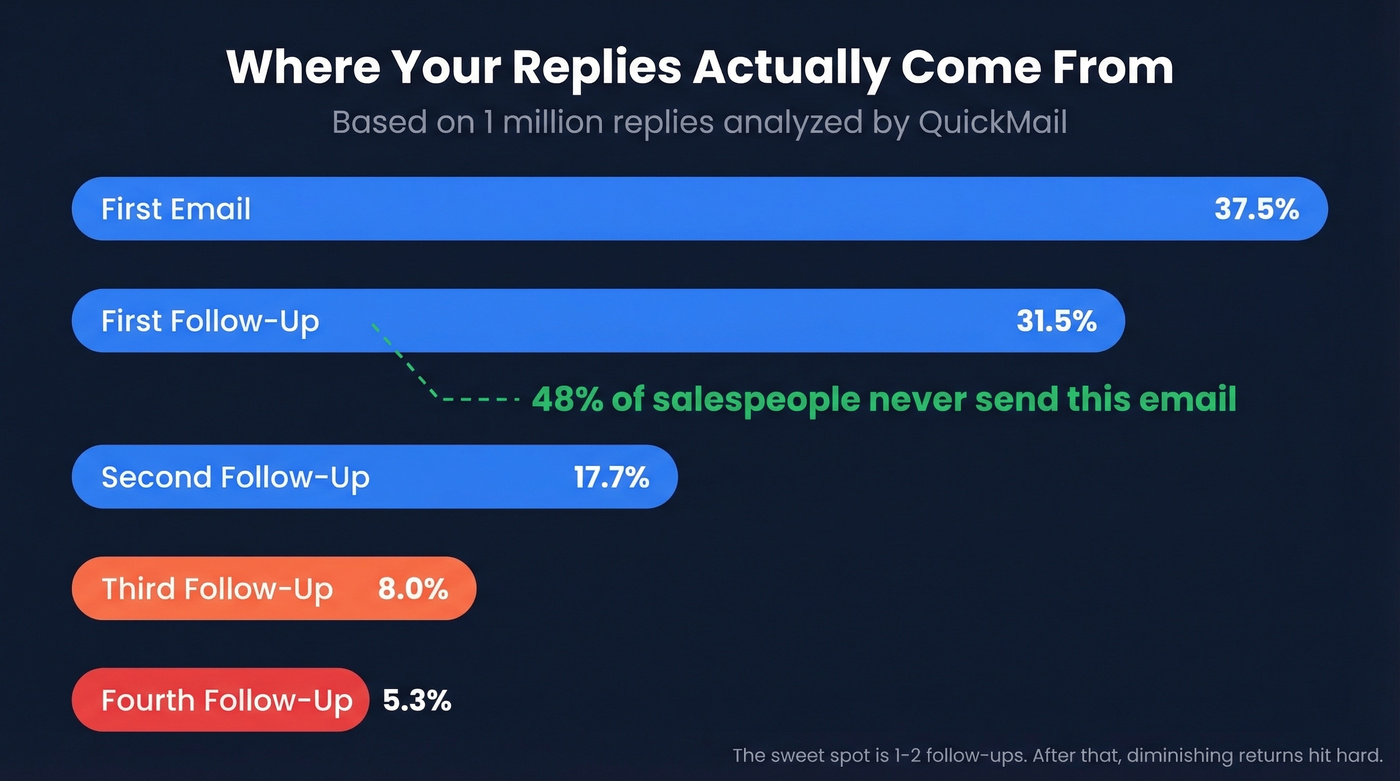
- Send your first follow-up after 2-3 days. The first follow-up accounts for 31.5% of replies in a large QuickMail reply dataset summarized by SalesBread.
- Keep it under 90 words with one clear ask and a deadline. No preamble, no apology.
The Data Behind Effective Reminders
Most people guess at follow-up timing. The data tells a different story.
Belkins analyzed 16.5 million cold emails sent across 93 business domains from Jan-Dec 2024. The first follow-up lifted reply rates up to 49% in high-performing campaigns. But by the fourth follow-up, spam complaints tripled (0.5% to 1.6%) and response rates dropped 55%. There's a clear window where persistence helps - and a cliff where it hurts.
QuickMail's dataset of the last 1 million replies paints a similar picture. The first email captures 37.5% of replies. The first follow-up grabs 31.5%. The second gets 17.7%. By the third, you're down to 8%. Your first reminder is almost as valuable as your original email. Your fourth one is basically spam.
In our experience, the first follow-up is where most people leave money on the table. 48% of salespeople never send a second message. Nearly half of all professionals abandon that 31.5% because they're afraid of being annoying. One well-timed reminder isn't annoying - it's expected.
If your company doesn't have a written follow-up policy, you're losing more deals to silence than to bad pricing.
Phrases That Sound Polite But Aren't
You know that coworker who says "no worries!" in a tone that clearly communicates worries? Corporate email is full of phrases like that.
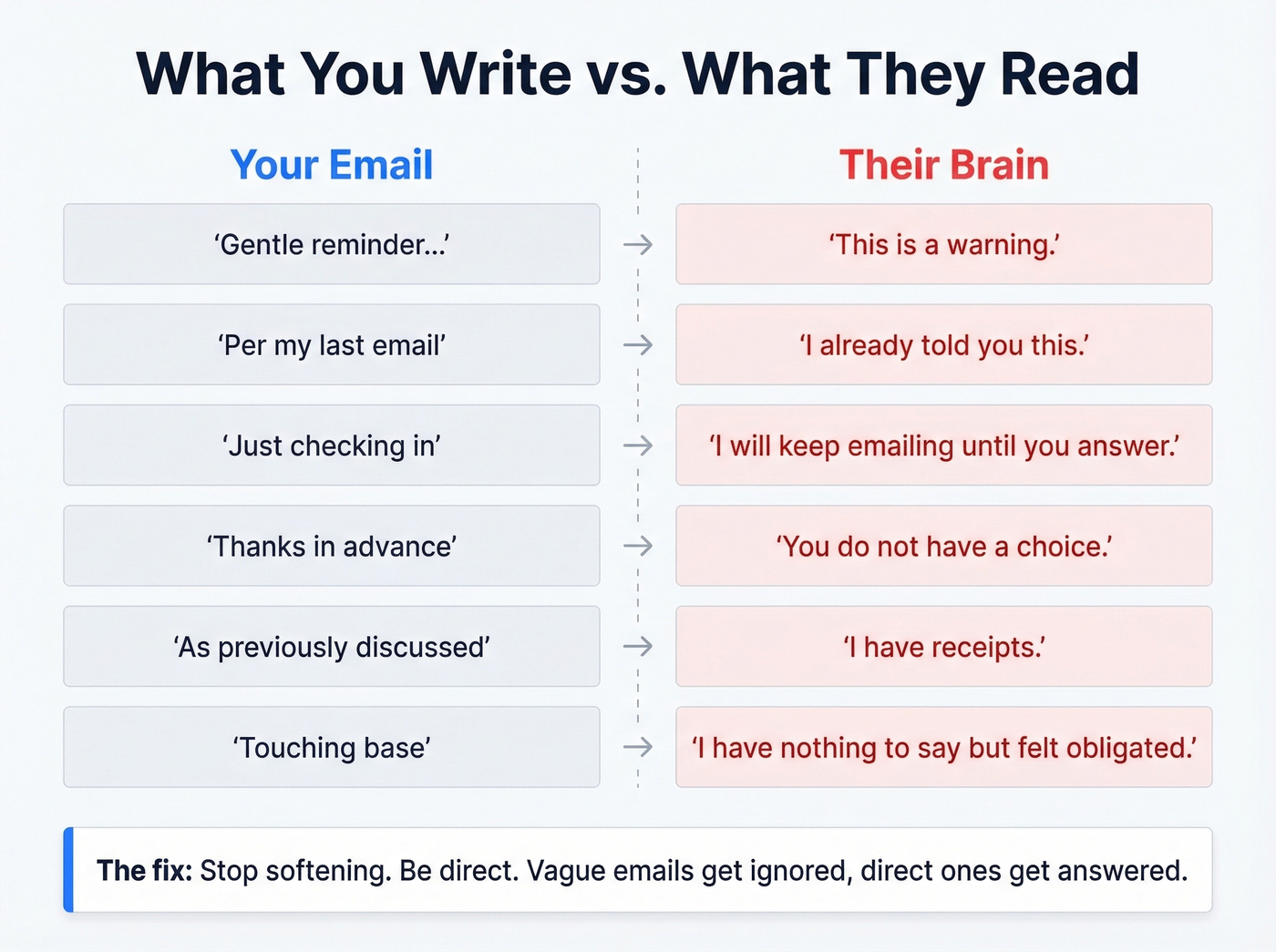
| What You Write | What They Read |
|---|---|
| "Gentle reminder" | "This is a warning." |
| "Per my last email" | "I already told you this." |
| "Just checking in" | "I'll keep emailing until you answer." |
| "Thanks in advance" | "You don't have a choice." |
| "As previously discussed" | "I have receipts." |
| "Touching base" | "I have no reason to email you." |
These aren't just our opinions - workplace subreddits and professional forums are littered with people venting about receiving these exact phrases. The problem isn't that they're rude. It's that they're hollow. "Just checking in" adds zero value. "Per my last email" is a passive-aggressive way of saying "read more carefully." And "touching base" is the corporate equivalent of a pocket dial - it signals you have nothing to say but felt obligated to reach out.
Here's the thing: every one of these phrases tries to soften a direct request. But softening a request doesn't make it politer - it makes it vaguer. Vague emails get ignored. Direct ones get answered.
If you want alternatives that still feel professional, see how to say just checking in professionally.
When to Send Your Reminder
Timing depends on context. A meeting reminder and a payment reminder operate on completely different clocks. Here's a practical framework based on TextMagic's scenario timing:
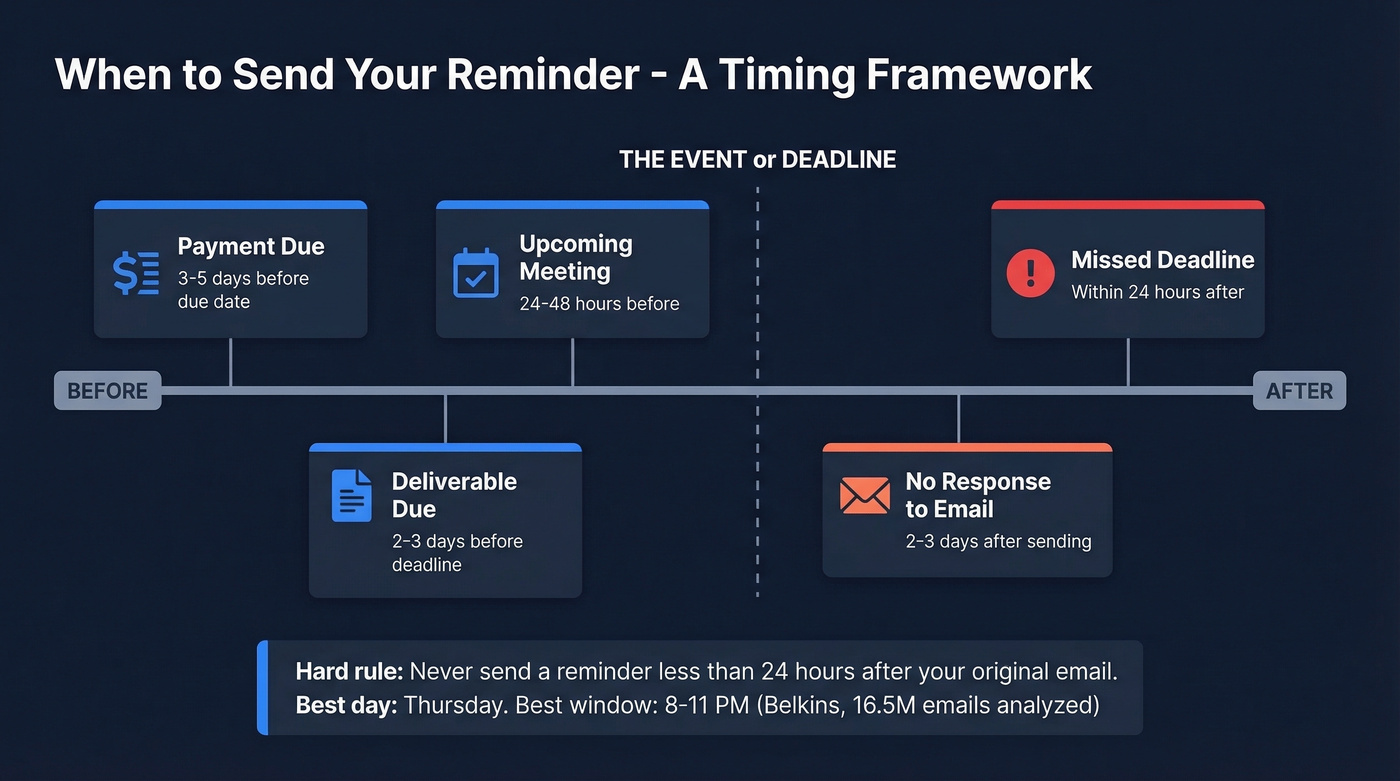
| Scenario | Send Reminder |
|---|---|
| Upcoming meeting | 24-48 hours before |
| Deliverable due | 2-3 days before deadline |
| Payment due | 3-5 days before due date |
| No response to email | 2-3 days after sending |
| Missed deadline | Within 24 hours after |
One hard rule from Grammarly's guide: don't send a reminder if it's been less than 24 hours since your original email. Anything sooner feels like impatience, not professionalism.
For cold outreach specifically, the Belkins dataset found Thursday had the highest reply rate at 6.87%, with the 8-11 PM window performing best. You're hitting inboxes when the day's noise has cleared, and the numbers back it up. (If you want a deeper breakdown, see our guide on the best time to send cold emails.)

A perfectly timed reminder email is worthless if it bounces. 48% of salespeople never follow up - and the ones who do often send to outdated addresses. Prospeo's 98% email accuracy and 7-day data refresh mean your follow-ups hit real inboxes, not dead ends.
Stop crafting perfect reminders for email addresses that don't exist.
Structure That Gets Replies
The best reminder emails share five elements. Miss any one and your reply rate drops.
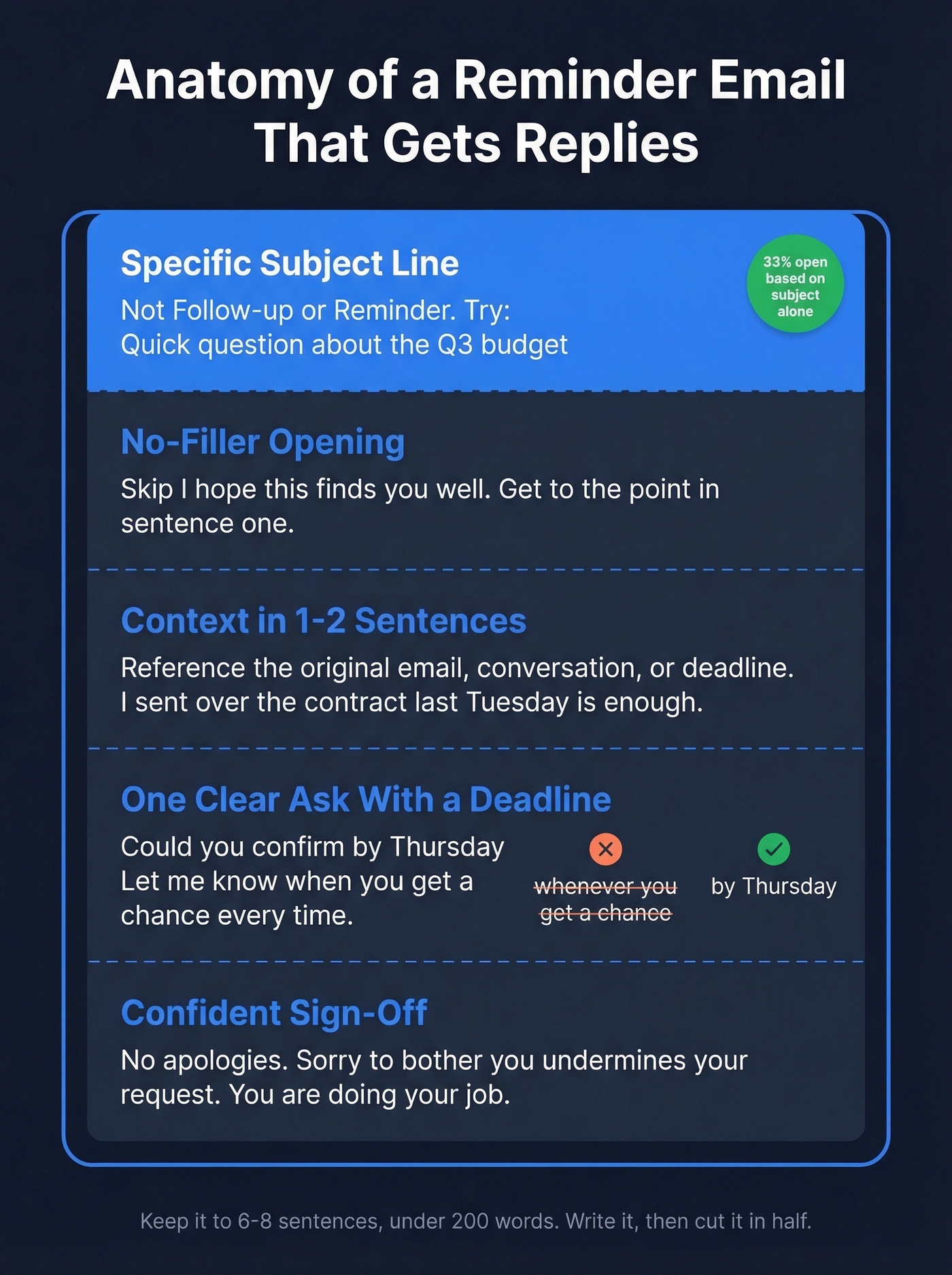
A specific subject line. "Follow-up" and "Reminder" are dead on arrival. Use something that tells the reader exactly what you need: "Quick question about the Q3 budget" or "Still need your input on the vendor shortlist." 33% of recipients decide to open based on the subject line alone - make those words count. (For more ideas, browse these email subject line examples.)
An opening line with no filler. Skip "I hope this finds you well." Skip "Hope you had a great weekend." Get to the point in the first sentence.
The middle of your email needs two things working together: context and a clear ask. Reference the original email, conversation, or deadline in one or two sentences - "I sent over the contract last Tuesday" is enough. Then state exactly what you need and by when. "Could you confirm by Thursday?" is infinitely better than "Let me know when you get a chance." Deadlines remove ambiguity about urgency. We've A/B tested apologetic versus confident sign-offs across dozens of outreach campaigns, and confident wins every time. Don't apologize for following up. "Sorry to bother you" undermines your own request. You're not bothering anyone - you're doing your job.
The Belkins data shows 6-8 sentences and under 200 words performs best. That's tight. Write your reminder, then cut it in half. Tools like Boomerang can schedule your follow-up to send at the optimal time so you write it once and forget it.
10 Polite Reminder Email Templates
1. No Response to Initial Email
Hi [Name], I sent over [specific item] on [date] and wanted to make sure it didn't get buried. Could you take a look and let me know your thoughts by [day]? Happy to hop on a quick call if that's easier.
This assumes good intent - the message got buried, not ignored - and offers an alternative channel.
2. Overdue Payment
Hi [Name], Invoice #[number] for [amount] was due on [date]. I've attached a copy. Could you confirm payment status by [date]? If there's an issue, let me know and we'll sort it out.
The tone acknowledges that issues happen without letting the deadline slide.
3. Missed Deadline
Hi [Name], the [deliverable] was due [date] and I haven't received it yet. What's a realistic timeline for getting this over? I need it to keep [project/next step] moving.
Asking "what's realistic" instead of "why is this late" shifts from blame to problem-solving.
4. Upcoming Meeting
Hi [Name], quick reminder that we're meeting [day] at [time] to discuss [topic]. Here's the agenda: [1-line summary]. Let me know if anything's changed on your end.
Short, functional, and gives them an easy out. Tools like Calendly can automate meeting reminders entirely, but when the meeting matters, a personal note is still worth sending.
5. Proposal Follow-Up
Hi [Name], wanted to follow up on the proposal I sent [date]. Are there any questions I can answer or numbers I can clarify to help move things along?
Adding value gives them a reason to reply beyond obligation.
6. Request to Your Boss (Before & After)
Bad version: "Hi, just wanted to gently remind you about the approval we discussed. No rush, whenever you get a chance!"
Good version: "Hi [Name], circling back on the [approval/decision] from [date]. I'd like to move forward with [next step] - do you have what you need to sign off, or should I pull anything else together?"
The bad version is vague, timid, and gives your boss zero reason to act now. The good version frames the reminder as "how can I help you help me."
7. Event RSVP
Hi [Name], we're finalizing headcount for [event] on [date]. Could you let me know by [date] whether you'll be joining? No pressure either way - just need a number for the venue.
"No pressure either way" gives them permission to say no, which paradoxically makes them more likely to respond.
8. Job Application Follow-Up
Hi [Name], I applied for the [role] on [date] and wanted to express my continued interest. I'd welcome the chance to discuss how my experience with [specific skill] aligns with what you're looking for. Is there a good time this week?
Specificity about your skills reminds them why you're worth a reply.
9. Renewal or Subscription
Hi [Name], your [product/service] renewal is coming up on [date]. Are you planning to continue, or would it help to walk through what's changed since last year?
Offering to review changes positions the reminder as helpful, not transactional.
10. Post-Demo Follow-Up
Hi [Name], thanks again for the time on [date]. You mentioned [specific pain point] - I put together a quick breakdown of how we'd address that. Worth 10 minutes this week?
Referencing something specific from the demo proves you were listening. That alone separates you from 90% of follow-ups.
Adjust Your Tone for the Audience
Internal vs. External
Reminding your boss requires a different approach than reminding a vendor. When you're emailing up the chain, frame reminders as "I need your input to unblock my work" rather than "you haven't done this." For direct reports, be more direct - they expect it, and softening the request creates confusion about urgency.
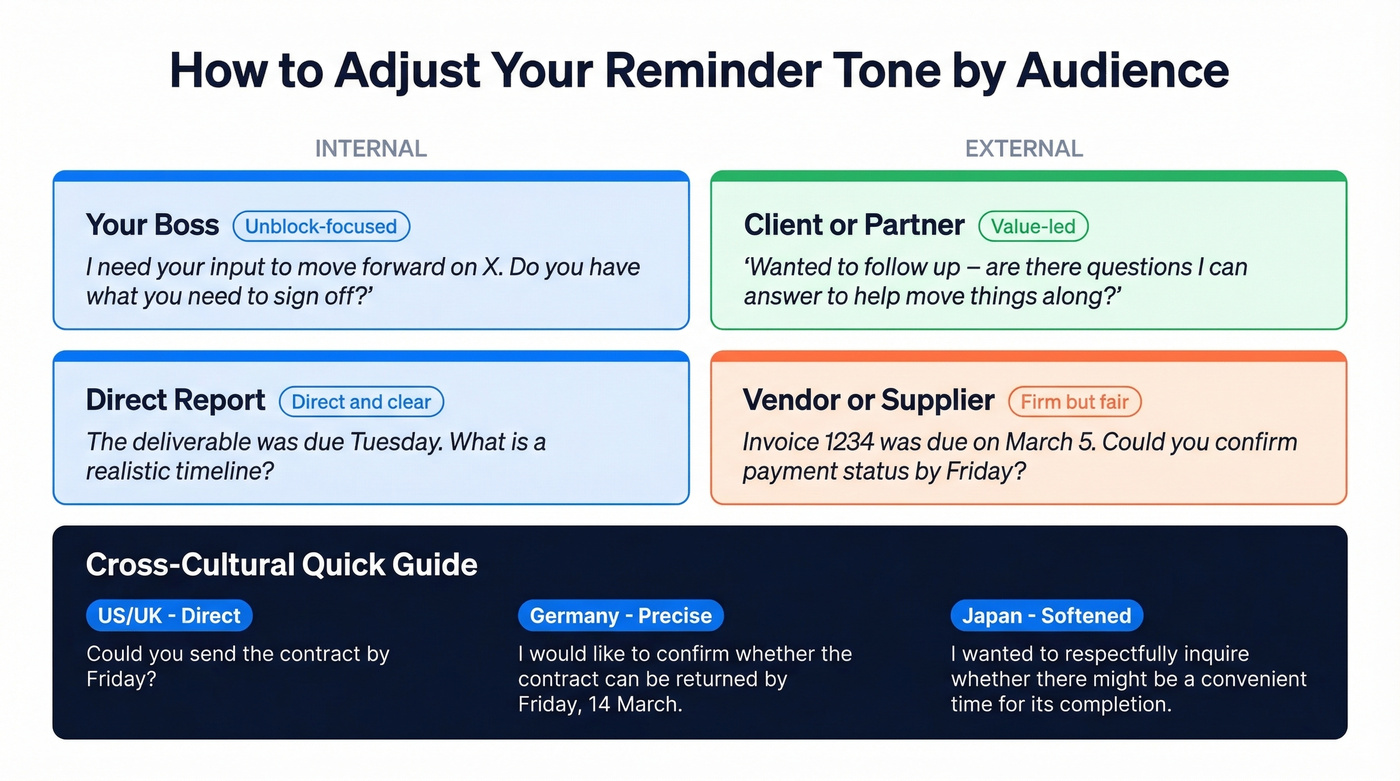
External reminders to clients or partners need the most care because you're balancing professionalism with less leverage. Lead with value, not obligation.
Cultural Considerations
If you're emailing across borders, tone adjustments aren't optional.
US/UK (direct): "Could you send the signed contract by Friday? I need it to kick off onboarding."
Germany (precise and formal): "Dear Mr. Schmidt, I would like to confirm whether the signed contract can be returned by Friday, 14 March, so that we may begin the onboarding process on schedule."
Japan (hierarchical, softened): "Dear Tanaka-san, I hope this message finds you well. Regarding the contract we discussed, I wanted to respectfully inquire whether there might be a convenient time for its completion. We are happy to adjust our timeline to accommodate your schedule."
Latin American and Middle Eastern business cultures tend to be warmer and more relationship-oriented. Skipping the personal opener in a Brazilian email can feel cold, while formal greetings and patience with response times are standard in Gulf-region correspondence. We've seen teams torpedo deals by applying American directness to Japanese prospects. When in doubt, err on the side of formality.
When Reminders Fail: Escalation That Works
There's a Reddit thread where someone describes sending a seventh reminder for a simple request. They've already CC'd two managers and a VP. They're asking for help writing something "more forceful but office politically correct."
If you've sent seven reminders, the problem isn't your phrasing. The channel has failed.
Your first reminder should be a standard follow-up, 2-3 days after the original. If that doesn't land, your second attempt needs to add new information or reframe the ask - don't just "bump" the thread. By the third attempt, switch channels entirely: pick up the phone, walk to their desk, or send a message on your team's chat platform. For teams tracking reminder sequences in a CRM like HubSpot, set task reminders for these channel switches so they don't slip through the cracks.
If you've exhausted all three channels and still hear nothing, CC a relevant stakeholder - not as a power move, but as a practical step to unblock the process. And if even that fails, accept it and move on. Some requests die. Redirect your energy.
Let's be honest: if you've sent five-plus reminders with no reply, email isn't your problem. The relationship is. No subject line trick fixes that.
Make Sure Your Email Actually Arrives
None of this matters if your email bounces or lands in spam. 17% of cold emails never reach the inbox - nearly one in five messages disappearing before anyone sees them.
The basics: make sure your domain has SPF, DKIM, and DMARC configured. Avoid spam-trigger words in your subject line. And verify the email address before you send. (If you need a full checklist, start with this email deliverability guide.)

Prospeo's 5-step verification catches invalid addresses, spam traps, and honeypots before they tank your sender reputation - 98% accuracy. The free tier gives you 75 email verifications per month, enough to clean a prospect list before any follow-up sequence. Your reminder can't work if it bounces. Verify first. (Related: email bounce rate benchmarks and fixes.)
The data is clear: your first follow-up captures 31.5% of replies. But that only works when you're emailing the right person at a verified address. Prospeo gives you 143M+ verified emails at $0.01 each - so every reminder you send actually has a chance to land.
Make every follow-up count with emails that don't bounce.
FAQ
How Long Should I Wait Before Sending a Reminder?
Wait at least 24 hours - anything sooner reads as impatience. For most professional contexts, 2-3 business days is the sweet spot. Meeting reminders go out 24-48 hours before; payment reminders work best 3-5 days before the due date.
How Many Follow-Ups Is Too Many?
Two follow-ups is the performance sweet spot. By the fourth email, spam complaints triple (0.5% to 1.6%) and response rates drop 55%. After three messages with no reply, switch to phone or chat.
Is "Gentle Reminder" Passive-Aggressive?
Yes, for most recipients in 2026. The phrase is so overused that people read it as a veiled warning - the email equivalent of "bless your heart." Replace it with a specific ask and a deadline, and your message will land better.
What's the Best Subject Line for a Reminder?
Specific and action-oriented beats generic every time. "Quick question about [project name]" or "Still need your input on [X] by Friday" outperform vague "Follow-up" or "Reminder" subjects. Name the topic, name the action, keep it under 10 words.
How Do I Make Sure My Reminder Doesn't Bounce?
Verify the recipient's email address before sending. Prospeo offers real-time verification with 98% accuracy and a free tier of 75 checks per month. Also confirm your domain's SPF, DKIM, and DMARC records are properly configured - 17% of cold emails never reach the inbox due to deliverability issues.