

How to Stop Emails Going to Junk in Gmail - Recipient & Sender Fixes for 2026
Gmail's bulk-sender enforcement is now fully active. For non-compliant mail, the outcome isn't just "it lands in junk." You'll see SMTP deferrals and outright rejections, meaning some messages never arrive at all.
A RevOps lead we work with spent three weeks troubleshooting a cold email campaign hitting 40%+ spam rates - emails going straight to junk, only on Gmail. SPF, DKIM, DMARC all passing. No blacklists. The problem? 2,200 stale email addresses torching sender reputation with bounces. Gmail didn't care that authentication was perfect. It cared that the list was dirty.
Whether you're a recipient watching legitimate emails vanish into your junk folder, or a sender whose messages never reach the inbox, the fixes are different. With 160 billion spam emails sent daily, Gmail's filters are aggressive by design. Let's break down both sides.
The Short Version
If you're receiving emails in junk: Create a Gmail filter with "Never send it to Spam." Adding the sender to Contacts helps but isn't bulletproof.
If you're sending emails that land in junk: Authentication (SPF/DKIM/DMARC) is table stakes, not a solution. Your real problems are sender reputation, bounce rate, and engagement - and Gmail's bulk-sender rules mean non-compliant mail gets deferred or rejected at the server level before it even reaches a spam folder.
Why Gmail Sends Emails to Junk
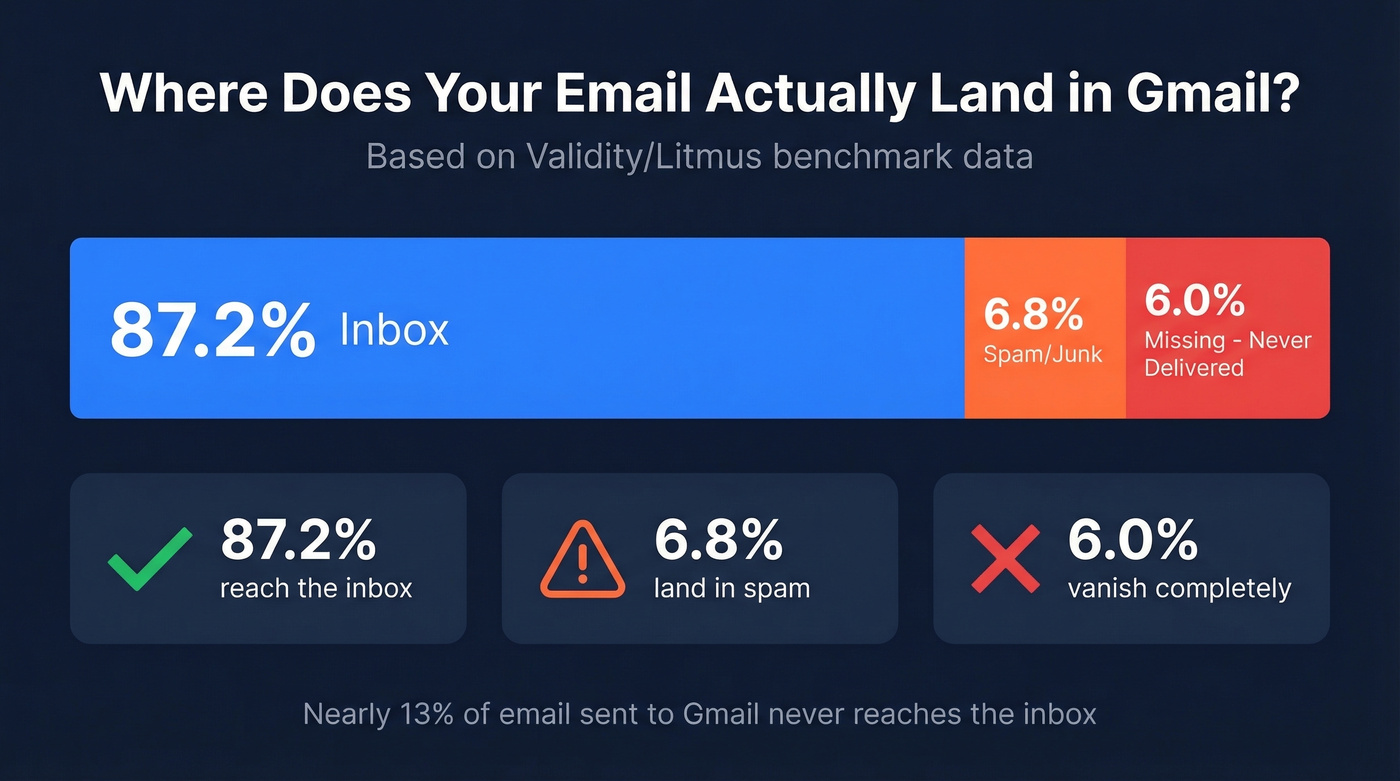
Validity/Litmus benchmarks put Gmail inbox placement at 87.2%, with 6.8% landing in spam and 6.0% going missing entirely. That's nearly 13% of mail that doesn't reach the inbox.
Gmail evaluates many signals simultaneously, but they cluster into four categories:
- Authentication - Does the sending domain have valid SPF, DKIM, and DMARC records? Are they aligned?
- Sender reputation - What's the domain's history? How do other Gmail users interact with its mail?
- Engagement - Do recipients open, click, reply, or immediately delete? Gmail tracks all of it.
- Content signals - Link density, image-to-text ratio, and certain word patterns, though these matter far less than most people think
Gmail heavily weights domain and IP reputation. One bad campaign can hurt deliverability for weeks.
What Changed With Gmail's 2026 Enforcement
Gmail's bulk-sender enforcement, which ramped up through late 2025, is now fully active. Non-compliant bulk traffic faces rejections at the SMTP level - including 4xx temporary deferrals and 5xx permanent rejections.
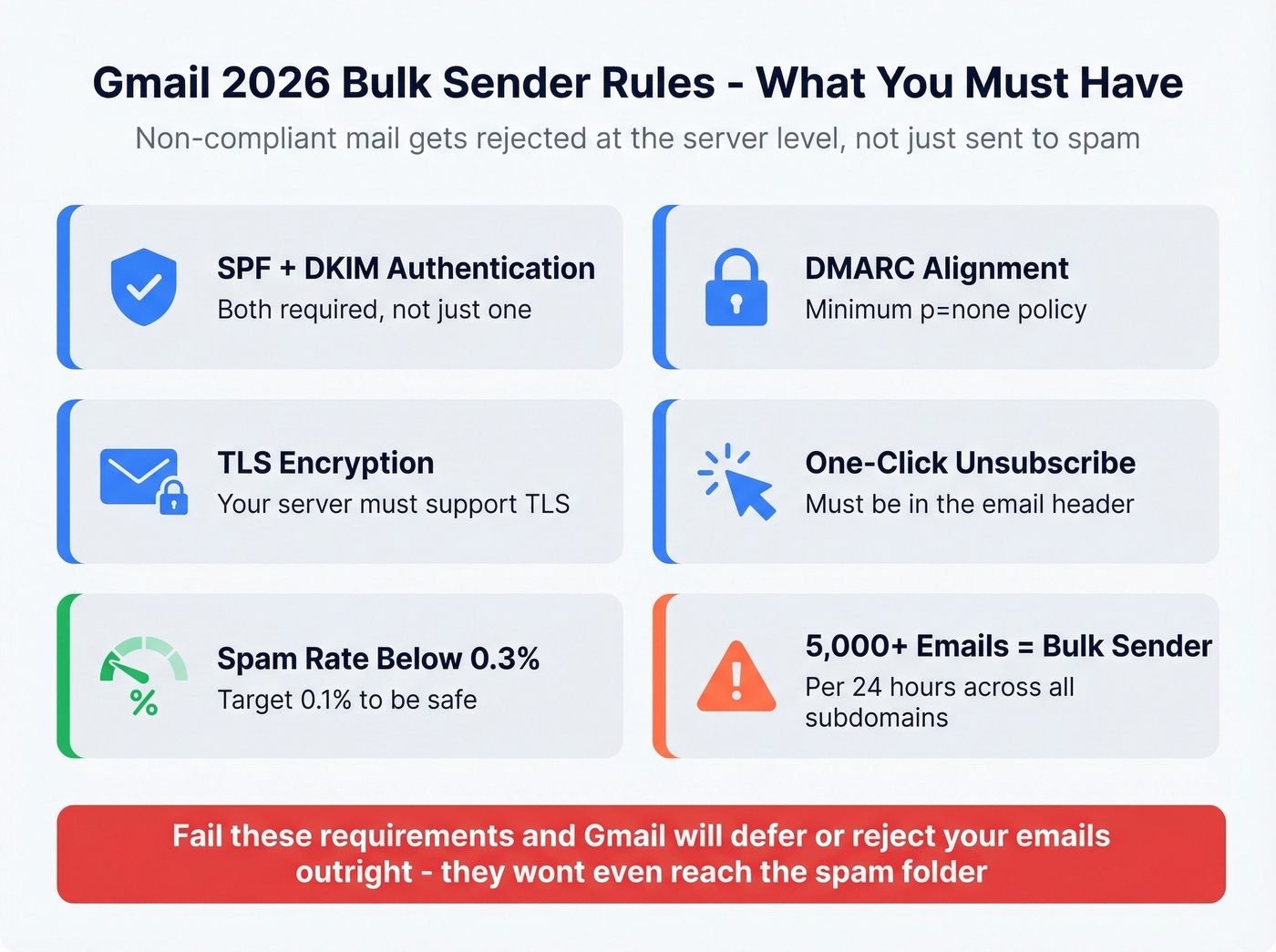
Here's what that means in practice:
- Non-compliant bulk senders face SMTP-level deferrals and rejection, not just spam-folder placement
- Bulk sender threshold: 5,000+ messages to Gmail addresses in a single 24-hour period, aggregated across all subdomains under the same primary domain
- Once you trip bulk-sender classification, Gmail can continue treating you as a bulk sender even if you later lower volume
- Required: SPF + DKIM, DMARC alignment at minimum p=none, TLS encryption, one-click unsubscribe
- Spam complaint rate must stay below 0.3% (0.1% is the safer target)
The old playbook of "send it and hope for the best" doesn't just underperform now. It breaks entirely.

That RevOps lead's problem wasn't authentication - it was 2,200 stale addresses destroying sender reputation. Prospeo's 5-step verification and 7-day data refresh cycle eliminate the bounces that trigger Gmail's spam filters. 98% email accuracy means your campaigns stay out of junk.
Stop feeding Gmail bad data. Start with verified emails at $0.01 each.
Fixes if You're Receiving Emails in Junk
Mark as "Not Spam" - Why It Often Fails
Open the spam folder, find the email, click "Not Spam." Gmail is supposed to learn from this. In practice, it often doesn't stick. One Reddit user reported marking the same sender as "Not Spam" repeatedly - starring messages, adding labels, removing third-party connections - and Gmail kept routing them back to junk.
Here's the thing: Gmail weighs sender reputation more heavily than your per-mailbox training. If a sender's domain has poor reputation globally, your individual clicks get overridden. "Not Spam" is a suggestion, not a command.
Add the Sender to Contacts
Open Google Contacts and add the sender's email address. This signals trust to Gmail and helps with borderline cases, but if the sender's domain reputation is bad enough, even contacts get filtered. Think of it as a tiebreaker, not a fix.
Create a "Never Send to Spam" Filter
This is the most reliable recipient-side fix:
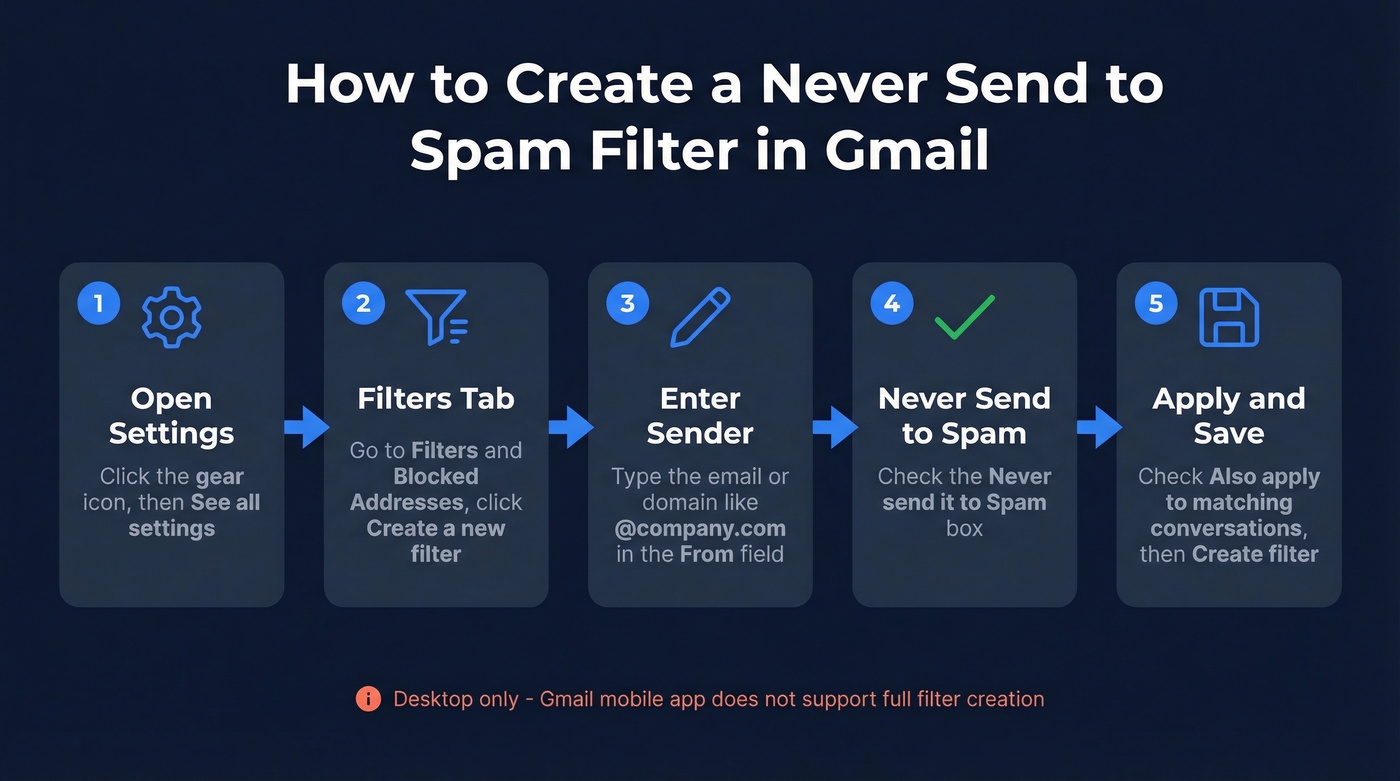
- Open Gmail, click the Settings gear, then See all settings
- Go to the Filters and Blocked Addresses tab and click Create a new filter
- In the From field, enter the sender's email address or entire domain like
@company.com - Click Create filter, then check Never send it to Spam
- Optionally check Also apply filter to matching conversations and click Create filter
You'll need to do this on a computer - Gmail's mobile app doesn't expose the full filter creation interface.
Quick note on the Promotions tab: If emails are landing in Promotions rather than spam, that's a different issue entirely. Drag the email to Primary and Gmail will learn the preference over time.
When Nothing Works
If filters still don't solve it, check three things. First, scroll through Settings and look for rogue filters that route mail to Trash or apply labels that bypass your inbox. Second, check for accidentally blocked senders under Filters and Blocked Addresses. Third - and this is the one people miss - if you're on Google Workspace, your organization's admin may have compliance rules, content restrictions, or routing policies that override your personal settings. Workspace admins can configure inbound gateway rules and content compliance policies that silently redirect mail, and you won't see any trace of it in your own settings. You'll need to escalate to IT.
If none of that works, the problem is on the sender's side.
Sender Fixes to Stop Landing in Junk
Set Up SPF, DKIM, and DMARC
This is the bare minimum. Without it, nothing else matters.
- SPF - Publish a DNS TXT record listing which servers can send on your domain's behalf (SPF record)
- DKIM - Enable cryptographic signing so Gmail can verify your emails weren't tampered with
- DMARC - Set at least
p=nonewith SPF or DKIM alignment (DMARC alignment) - TLS encryption - Your sending server must support TLS; most modern ESPs handle this automatically
All four are required for bulk senders under Gmail's current enforcement rules. Without them, bulk mail gets deferred or rejected outright.
Why Authentication Alone Isn't Enough
Authentication gets you to the door. It doesn't get you inside. We've seen this pattern repeatedly: senders who've done everything right on paper and still land in spam - only on Gmail. SPF passing, DKIM aligned, DMARC set, no blacklists. Other providers deliver fine. Gmail? Junk folder.
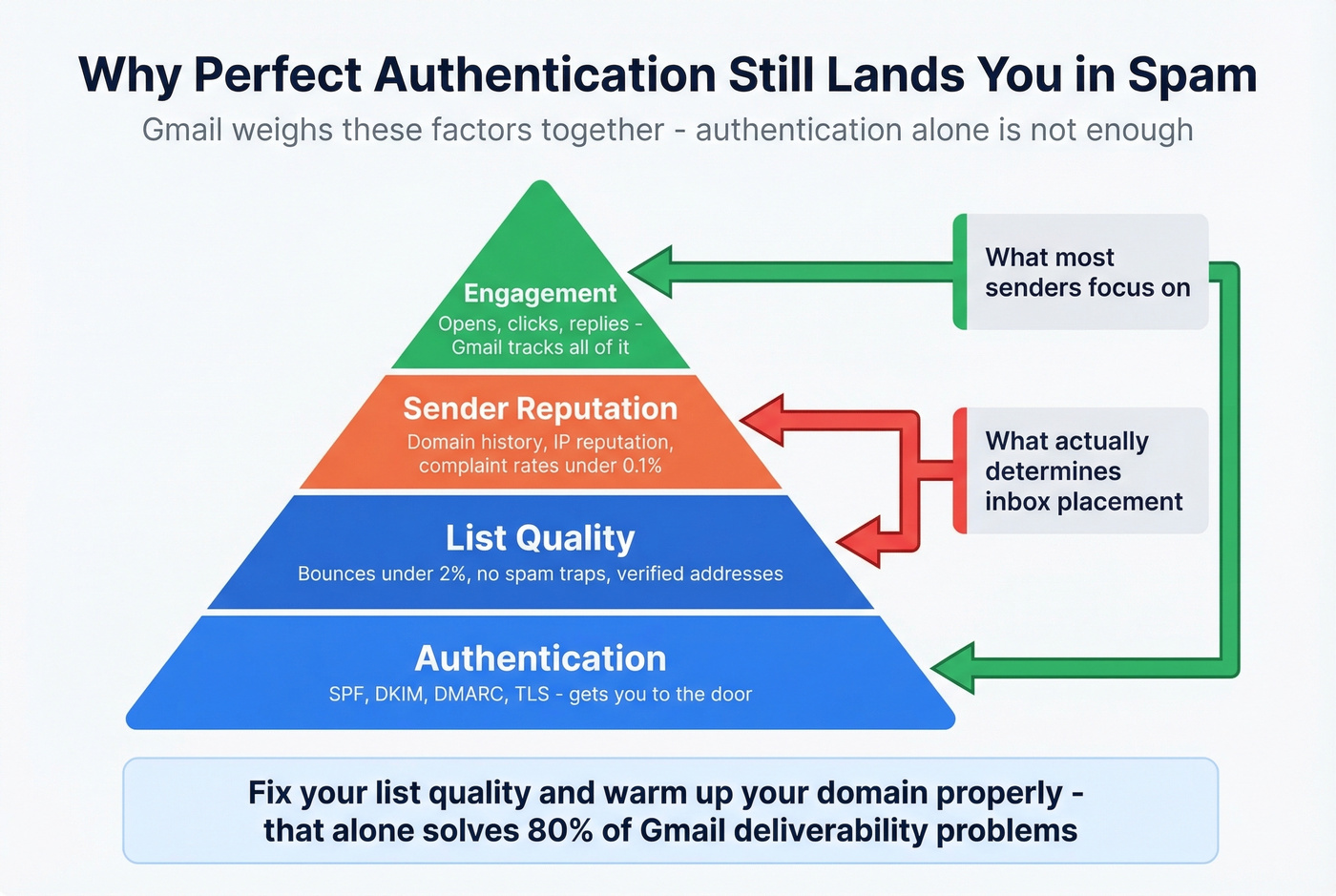
Another thread shows a sender with plain-text emails, no links, no attachments - perfect authentication - still going to spam until recipients manually rescued them. Authentication is necessary but not sufficient. Reputation and engagement are the hidden layer Gmail actually cares about.
If you're running outbound on deals under $15k, you probably don't need to obsess over content optimization or subject line A/B tests. Fix your list quality and warm up your domain properly. That alone solves 80% of Gmail deliverability problems.
Check Reputation With Postmaster Tools
Google Postmaster Tools is free, and roughly 70% of senders don't use it. That's a massive missed opportunity.
Setup takes five minutes: go to postmaster.google.com, sign in, click the + button and enter your sending domain, then verify ownership by adding a DNS TXT record. Once verified, you'll see dashboards for domain reputation, IP reputation, spam rate, encryption, and authentication pass rates. If your domain reputation shows "Low" or "Bad," that's your answer. No amount of content tweaking will fix it until the reputation recovers.
Clean Your Email List
In our experience, list hygiene is the single most underrated deliverability lever. Bad data wrecks sender reputation fast - stale addresses bounce, bounces damage reputation, and damaged reputation means the junk folder. Email data decays quickly as people change jobs, companies rebrand, and domains expire.
The threshold that matters: keep hard bounces below 2%. Above that, Gmail starts treating your domain as careless at best, spammy at worst.
Prospeo's 5-step verification catches the stuff that kills deliverability - spam traps, honeypots, catch-all domains, and invalid addresses - with 98% accuracy across 143M+ verified emails. The free tier gives you 75 verifications per month to spot-check a list segment before committing to a full send.

Fix Your Content
Look, spam trigger words matter far less than the internet wants you to believe. Modern Gmail filters evaluate context, reputation, and behavior together - individual words are weak signals on their own. The word "free" in a subject line won't tank your deliverability if your domain reputation is strong and your engagement is healthy.
What actually triggers content-based filtering: excessive links (shortened URLs are particularly risky), poor image-to-text ratio, and HTML-heavy emails with minimal text. Spam words become problems only when they stack on top of poor reputation or low engagement. Fix the fundamentals first.
If you want to go deeper on copy and structure, use a dedicated email spam checker before you scale volume.
Warm Up and Monitor
New domains and IPs need a gradual volume ramp. Start with 50-100 emails per day to your most engaged contacts, then increase by 20-30% weekly as engagement metrics stabilize. Jumping straight to 5,000 emails on a fresh domain is the fastest way to get flagged.
To avoid tripping limits while you ramp, track your email velocity and keep it consistent.
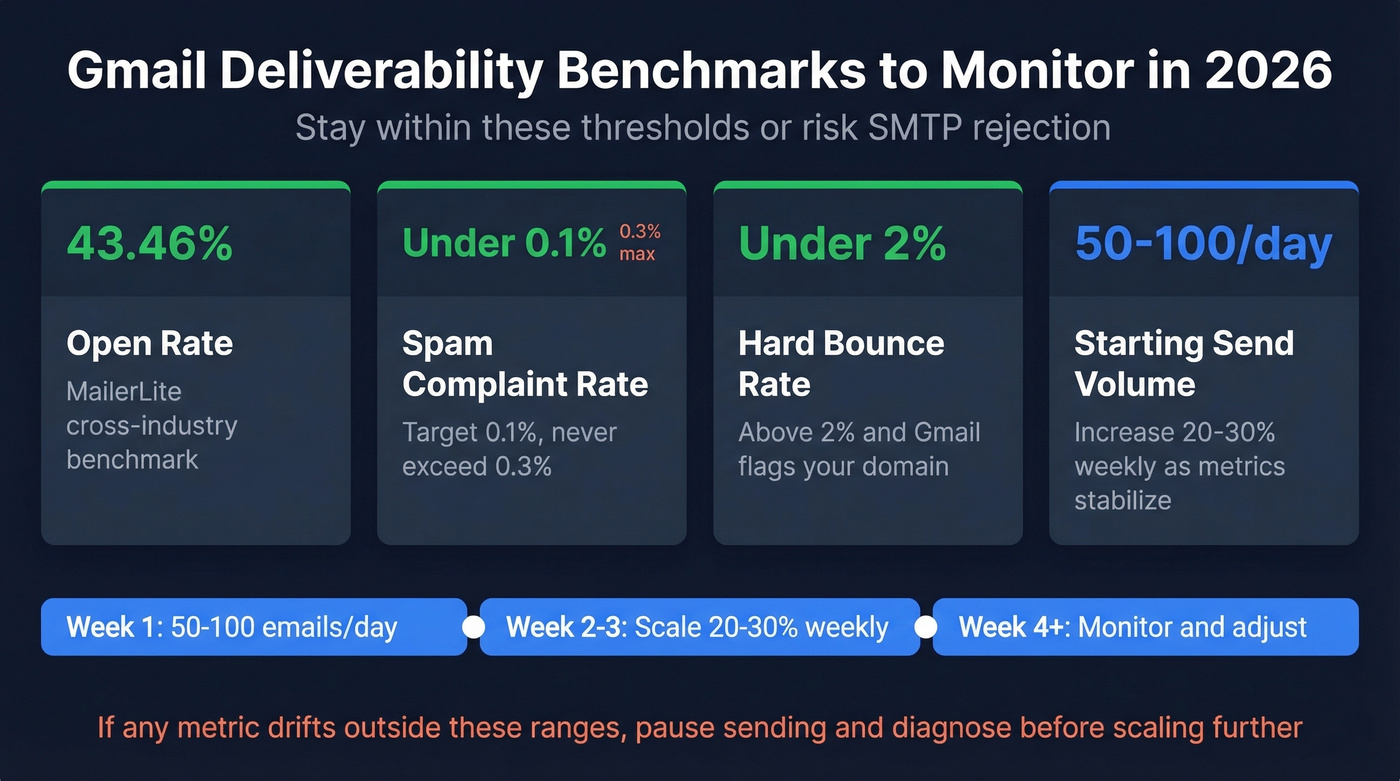
Monitor against current benchmarks: MailerLite's cross-industry benchmark open rate is 43.46%, complaint rates should stay below 0.3%, and bounces under 2%. If any metric drifts, pause and diagnose before scaling further.
Gmail's bulk-sender enforcement punishes high bounce rates with SMTP rejections - not warnings. Prospeo refreshes 300M+ profiles every 7 days (industry average: 6 weeks), so you're never sending to addresses that went stale last month. Bounce rates under 4% aren't aspirational - they're standard.
Your deliverability is only as good as your data. Prospeo keeps it fresh weekly.
Current Benchmarks - What "Good" Looks Like
| Metric | Benchmark | Source |
|---|---|---|
| Gmail inbox rate | 87.2% | Validity/Litmus |
| Global inbox rate | ~84% | Validity |
| Spam complaint rate | < 0.3% | Gmail policy |
| Hard bounce rate | < 2% | Industry standard |
| Open rate | 43.46% | MailerLite (3.6M campaigns) |
| Click rate | 2.09% | MailerLite |
| Unsubscribe rate | 0.22% | MailerLite |
These aren't aspirational targets - they're the floor. If your numbers fall significantly below these, Gmail is almost certainly penalizing your domain. The open rate figure is inflated by Apple Mail Privacy Protection, but since everyone's affected equally, it's still useful as a relative benchmark. Focus on complaint rate and bounce rate - those are the two metrics Gmail weighs most heavily in reputation scoring.
If you're trying to recover deliverability after a bad send, follow a structured plan to improve sender reputation.
FAQ
Why do emails keep going to junk even after I click "Not Spam"?
Gmail weighs sender reputation more heavily than per-mailbox training. If the sender's domain has poor global reputation, your "Not Spam" clicks get overridden. Create a filter with "Never send it to Spam" instead - that's a hard rule Gmail respects, unlike the suggestion-based training.
Why do my emails land in junk on Gmail but not Outlook?
Gmail's spam filter is more aggressive than most providers, weighting sender reputation and engagement history heavily. With bulk-sender enforcement fully active in 2026, passing SPF/DKIM/DMARC is necessary but not sufficient - you also need low complaint rates and clean lists.
Do spam trigger words actually matter?
Less than you think. Gmail evaluates context, reputation, and behavior together - individual words like "free" or "urgent" are weak signals on their own. They become problems only when combined with poor domain reputation or low engagement. Fix authentication, list hygiene, and engagement first.
What counts as a bulk sender in Gmail?
Any domain sending 5,000+ messages to Gmail addresses in a single 24-hour period, aggregated across all subdomains. Once you hit this threshold, Gmail can continue treating you as a bulk sender even if you later lower volume.
How can I check if my emails are landing in junk?
Set up Google Postmaster Tools (free) to monitor domain reputation, spam rate, and authentication pass rates for Gmail traffic. For list-level hygiene, verify contacts before sending - tools like Prospeo let you check emails against spam traps and invalid addresses before they bounce and damage your reputation.
Whether you're rescuing emails from your own junk folder or fighting to reach someone else's inbox, the fix is almost never a single setting. On the recipient side, start with filters. On the sender side, start with authentication and list hygiene - and recognize that Gmail's bulk-sender enforcement means the margin for error is gone. Get the fundamentals right, or your emails won't just land in junk. They won't arrive at all.