

How to Test If an Email Address Is Valid Before You Hit Send
You pasted an email into three different checkers and got three different answers. One says "valid," another says "risky," the third says "unknown." Now you're less confident than when you started.
Here's the thing: if you've ever tried to test whether an email address is valid and gotten contradictory results, the problem isn't you. It's that email verification is messier than any tool's marketing page admits. A popular SuperUser thread covers this exact frustration - people seeing the same address return "valid" on one service and "unknown" on another. Let's cut through the noise.
What "Valid Email" Actually Means
There's a useful distinction most people miss. Email validation checks whether an address is formatted correctly - does it have an @ symbol, a proper domain, no illegal characters? That's syntax. Email verification goes deeper, actually pinging the mail server to confirm the mailbox exists.
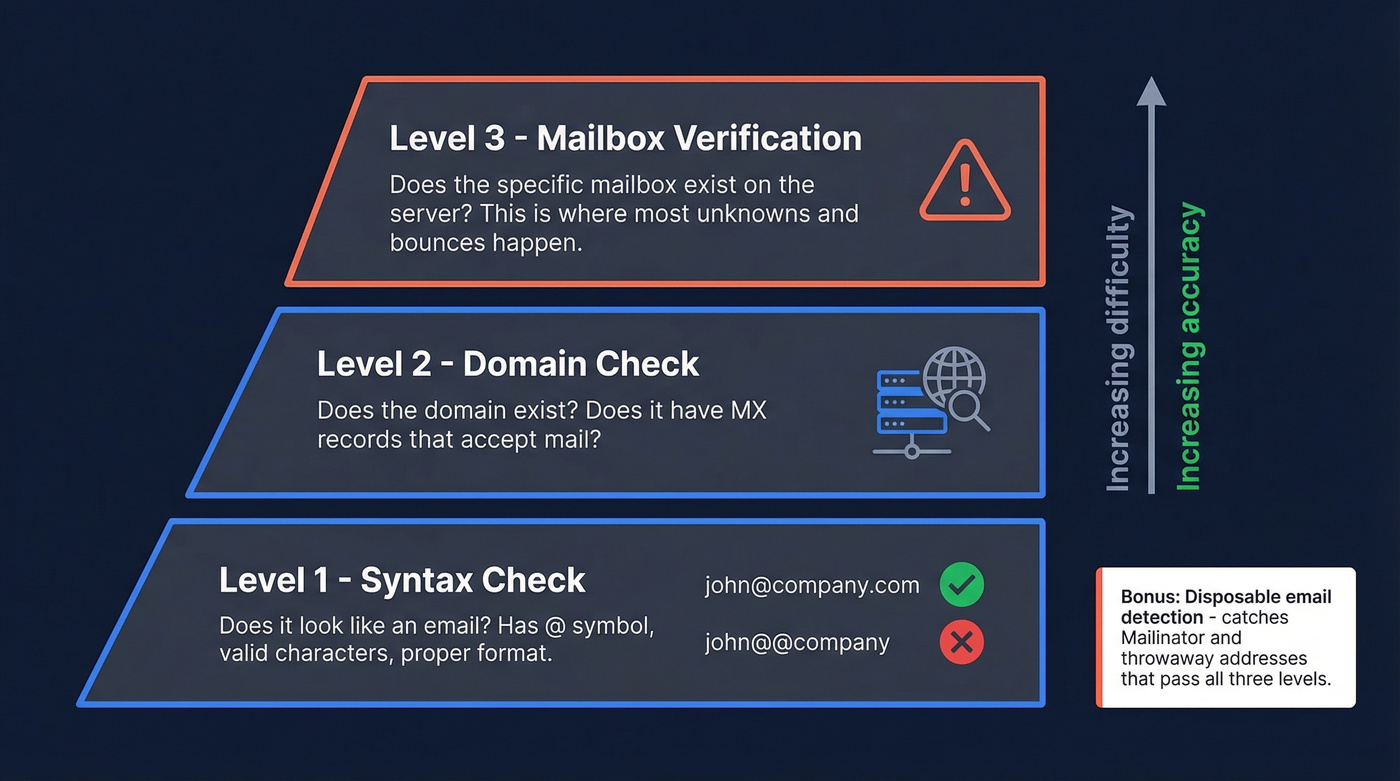
Think of it as three levels:
- Syntax:
john@company.compasses,john@@companydoesn't. - Domain: Does
company.comhave an MX record that accepts mail? - Mailbox: Does the server confirm that
johnis a real recipient?
Most free tools handle levels one and two well. Level three is where things get complicated - and where most "unknown" results come from. Most bounces happen there too, not at syntax or domain. There's also a fourth category worth knowing: disposable addresses from services like Mailinator pass syntax and domain checks but are worthless for ongoing communication. Most verification tools flag these automatically.
What You Need (Quick Version)
Your next step depends on what you're actually trying to do:
- Checking one email right now? Paste it into a free tool like Verifalia or Hunter. You'll get an answer in seconds.
- Cleaning a list of hundreds or thousands? Upload a CSV to a bulk verifier like NeverBounce. Budget around $8 per thousand emails.
- Running outbound prospecting? Skip verification entirely. Use a data source that pre-verifies emails before you ever see them - you shouldn't be cleaning data you just bought. (If you're building lists, see email list providers.)
Why Testing Matters
Email lists decay at roughly 22-28% per year. People change jobs, companies rebrand domains, mailboxes get deactivated. A list you built six months ago has already lost a meaningful chunk of valid addresses.
That matters because ISPs watch your bounce rate like a hawk. Anything above 2% is a red flag that damages your sender reputation, and once that reputation drops, even your emails to valid addresses start landing in spam. The target is a 97-99% delivery rate - you can't hit that number if you're sending to dead mailboxes. (More on this in our email deliverability guide.)
Bad emails don't just bounce. They poison the well for every other email you send. If you’re monitoring this closely, track your email bounce rate and use email reputation tools to catch issues early.


You shouldn't have to paste emails into three different checkers and hope for the best. Prospeo's 5-step verification - with catch-all handling, spam-trap removal, and honeypot filtering - delivers 98% email accuracy on 143M+ addresses. Every record refreshes every 7 days, not every 6 weeks.
Skip the cleanup. Start with emails that are already verified.
Four Methods to Verify an Email Address
1. Free Online Verification Tools
If you need to check a handful of addresses, free tools get the job done without any technical setup:
| Tool | Free Tier | Best For |
|---|---|---|
| Verifalia | Single checks, free | One-off lookups |
| Hunter | Free single checks (no signup); free plan up to 100/month | Quick spot checks |
| ZeroBounce | 100 free credits/month | Small batch testing |
| EmailListVerify | 3 free checks | Trying before buying |
Use these if you're verifying a few addresses before a manual outreach email or confirming a contact you found on a company website. Skip these if you're working with lists over a few hundred - free tiers run out fast, and the per-email cost on paid plans adds up when you're doing this regularly. If you’re comparing options, start with Bouncer alternatives or Hunter alternatives.
The main frustration with free tiers is exactly what you'd expect: they're designed to get you hooked, not to solve the problem at scale. Fifty verifications a month is nothing if you're doing real outbound.
2. Manual SMTP Verification (Telnet)
This is the "look under the hood" method. It's educational, useful for troubleshooting, and absolutely doesn't scale. But if you want to understand what verification tools actually do behind the scenes, it's worth walking through once.
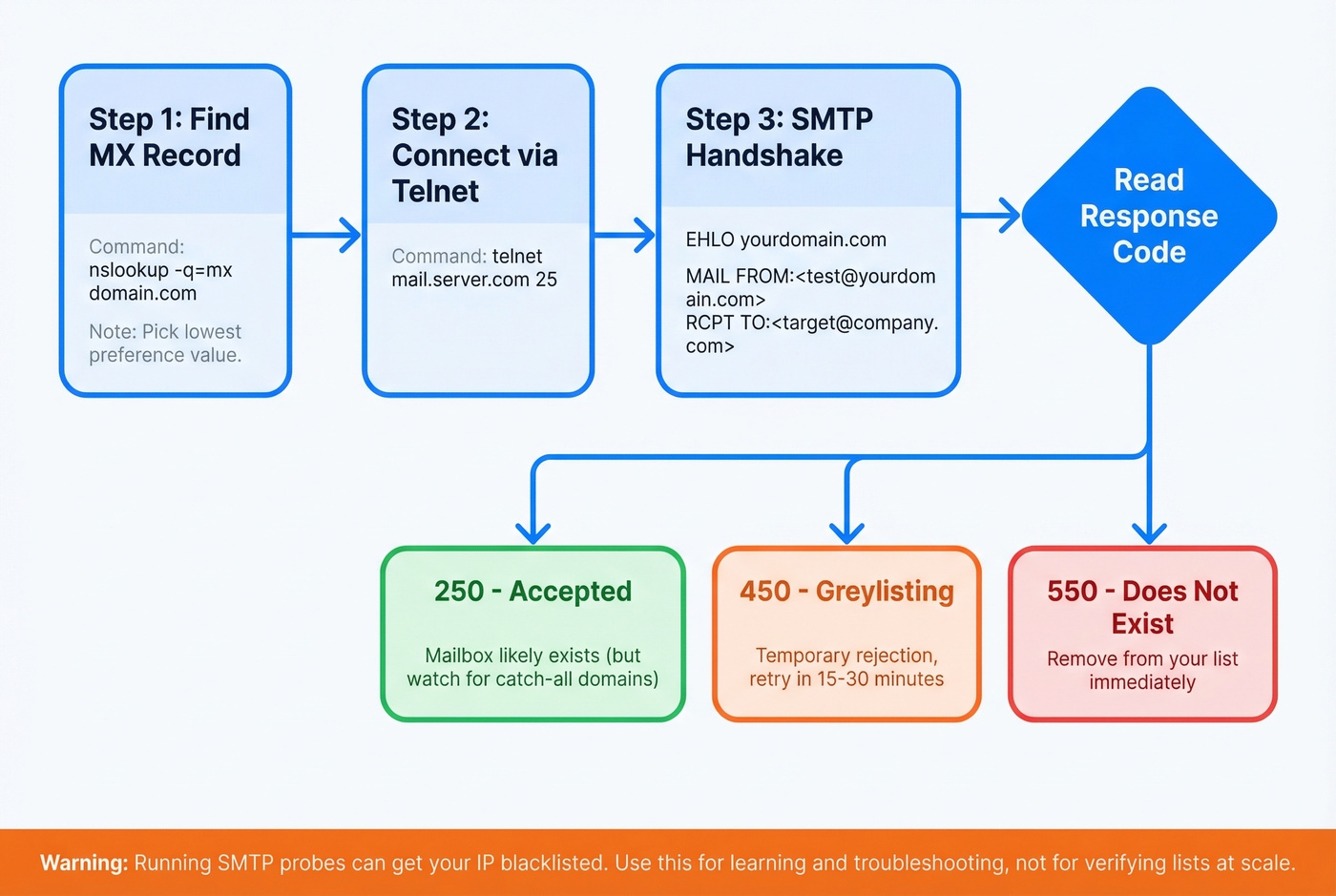
Step 1: Find the mail server. Open a terminal and look up the domain's MX record:
nslookup -q=mx company.com.
Note the trailing dot after the domain - it prevents your DNS client from appending local search suffixes, which can return wrong results. Pick the mail server with the lowest preference value.
Step 2: Connect via Telnet.
[telnet mail.company.com 25](https://www.iana.org/assignments/service-names-port-numbers)
Step 3: Run the SMTP handshake. Use EHLO (not HELO - EHLO supports modern ESMTP extensions like STARTTLS):
EHLO yourdomain.com
MAIL FROM:<test@yourdomain.com>
RCPT TO:<john@company.com>
QUIT
Step 4: Read the response code. A 250 response to RCPT TO means the server accepted the recipient. A 550 means the mailbox doesn't exist. A 450 usually means greylisting - the server is temporarily rejecting you to see if you retry like a legitimate mail server would.
A 250 response doesn't guarantee the address is real. On catch-all domains, the server returns 250 for every address - real or invented. We've seen this trip up even experienced ops teams who assume 250 equals confirmed.
There's also a real risk here. Some RBLs (real-time blackhole lists) will flag your IP for running SMTP verification probes. A Stack Overflow thread on this topic warns that it looks like address enumeration, and anti-abuse systems treat it accordingly. Use this method for diagnosing mail server behavior, not for verifying lists.
3. Bulk List Verification
This is the practical workflow for most teams: export your contact list as a CSV, upload it to a bulk verification service, wait for processing, review the results (valid, invalid, unknown/risky), then re-import only the clean addresses.
Pricing is usually pay-per-email:
- NeverBounce: ~$0.008-$0.01 per email at volume
- ZeroBounce: ~$0.008-$0.015 per email depending on volume
- EmailListVerify: Often the budget option at roughly $0.004-$0.008 per email
All of them will return a chunk of "unknown" results for catch-all domains - that's structural, not a bug.
We've run the same list through three different bulk verifiers and gotten valid counts that differed by 15%. The divergence almost always traces back to catch-all handling and greylisting retry logic. If accuracy matters to your workflow, test two services against the same sample before committing.
Look, if your deal sizes are modest - say under $15k - the cost of verifying a purchased list plus the time spent cleaning it often exceeds the cost of just starting with pre-verified data. The "buy cheap, clean later" model is a false economy for most SMB sales teams. (Related: data enrichment services.)
4. API-Based Verification (Developers)
If you're building a signup form or running real-time validation in a product, API-based verification is the right approach. Hunter and ZeroBounce both offer verification APIs that check syntax, domain, and mailbox existence on the fly, often returning results in under 500ms. Hunter's API also returns confidence scores alongside valid/invalid status, which is useful for edge cases.
For signup flows, double opt-in remains the gold standard. Send a confirmation email, require a click. It's slower than API verification but eliminates fake signups entirely. One caveat: double opt-in doesn't catch fraud or bot signups that use real but stolen email addresses - for that, you need additional signals like device fingerprinting or CAPTCHA.
For real-time lead capture where you can't wait for opt-in, an API check at the point of entry catches typos and disposable addresses before they hit your database. If you’re doing this for outbound, it’s also worth understanding email velocity so you don’t create deliverability problems.
SMTP Response Codes Cheat Sheet
| Code | Meaning | What to Do |
|---|---|---|
| 250 | Accepted | Valid unless catch-all domain |
| 421 | Service unavailable | Server is busy - retry later |
| 450 | Temp failure / greylisting | Retry after 15-30 min |
| 550 | Mailbox doesn't exist | Remove from list immediately |
A 500-level error with the message 5.3.3 Unrecognized command means you typed something wrong in your Telnet session. Backspace often doesn't work in Telnet - retype the whole command.
Why Verification Returns "Unknown"
This is the part that frustrates everyone. You run a list through a reputable verifier and 30% of the results come back as "unknown" or "accept-all."
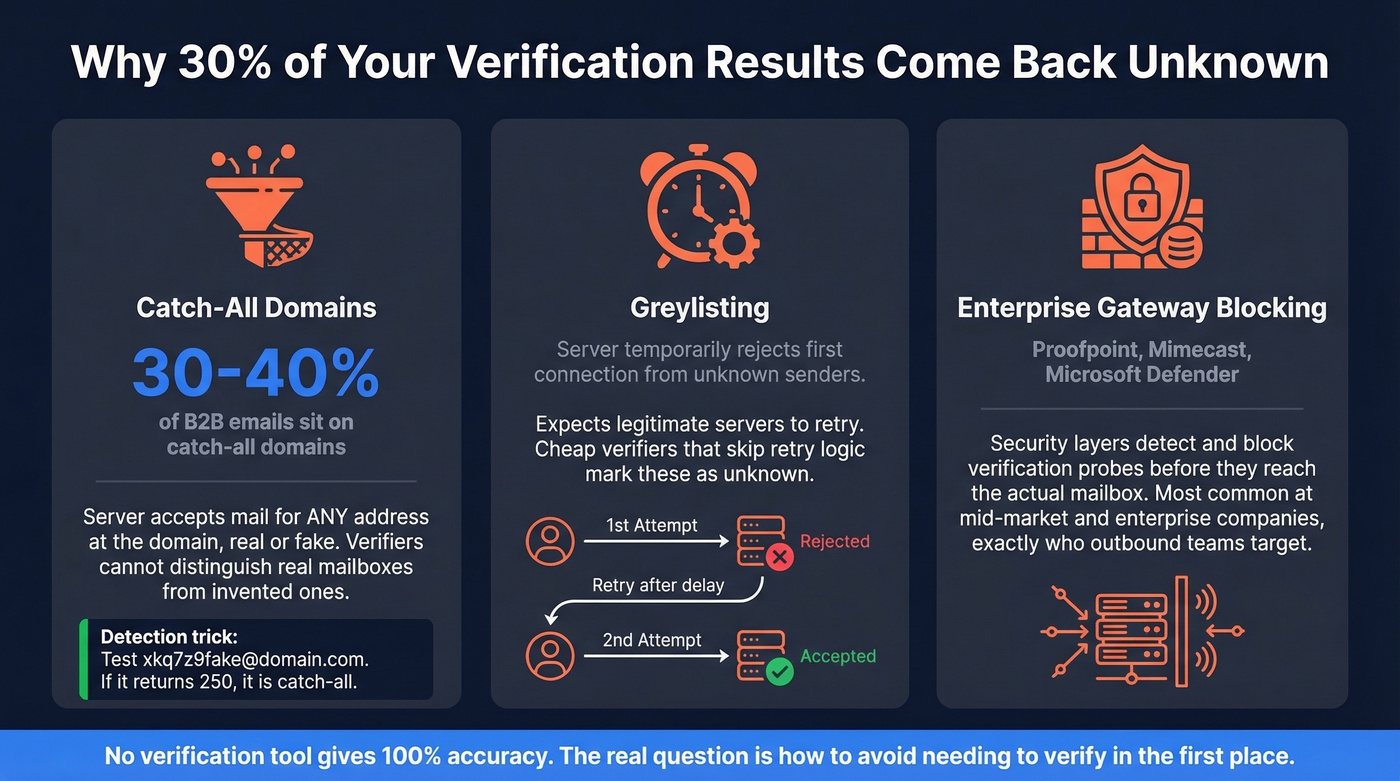
Catch-all domains. Between 30 and 40% of B2B email addresses sit on catch-all domains. These servers accept mail for any address at the domain - real or fake. When a verifier sends RCPT TO:<randomgarbage@company.com> and gets back 250 OK, it can't distinguish that from a real mailbox. The detection trick: test a clearly fake address at the domain. If the server accepts xkq7z9fake@company.com, you're dealing with a catch-all.
Greylisting. Some servers temporarily reject the first connection from an unknown sender, expecting legitimate mail servers to retry. Verification tools that don't implement retry logic mark these as unknown. Good verifiers use exponential backoff, but not all bother.
Enterprise gateway blocking. Companies running Proofpoint, Mimecast, or Microsoft Defender often have security layers that detect and block verification probes entirely. The gateway rate-limits or rejects your SMTP connection before it ever reaches the actual mailbox server. This is increasingly common at mid-market and enterprise companies - exactly the accounts most outbound teams are trying to reach.
No verification tool gives you 100% accuracy. It's structurally impossible when a third of B2B domains accept everything. The real question isn't "which verifier is most accurate" - it's "how do I avoid needing to verify in the first place?" (If you’re cleaning lists because you scraped them, see web scraping lead generation.)
Which Method Should You Use?
| Situation | Best Method |
|---|---|
| One-off email check | Free tool (Verifalia, Hunter) |
| SMTP troubleshooting | Manual Telnet |
| Cleaning a dirty list | Bulk verifier (NeverBounce, ZeroBounce) |
| Outbound prospecting | Pre-verified data source |
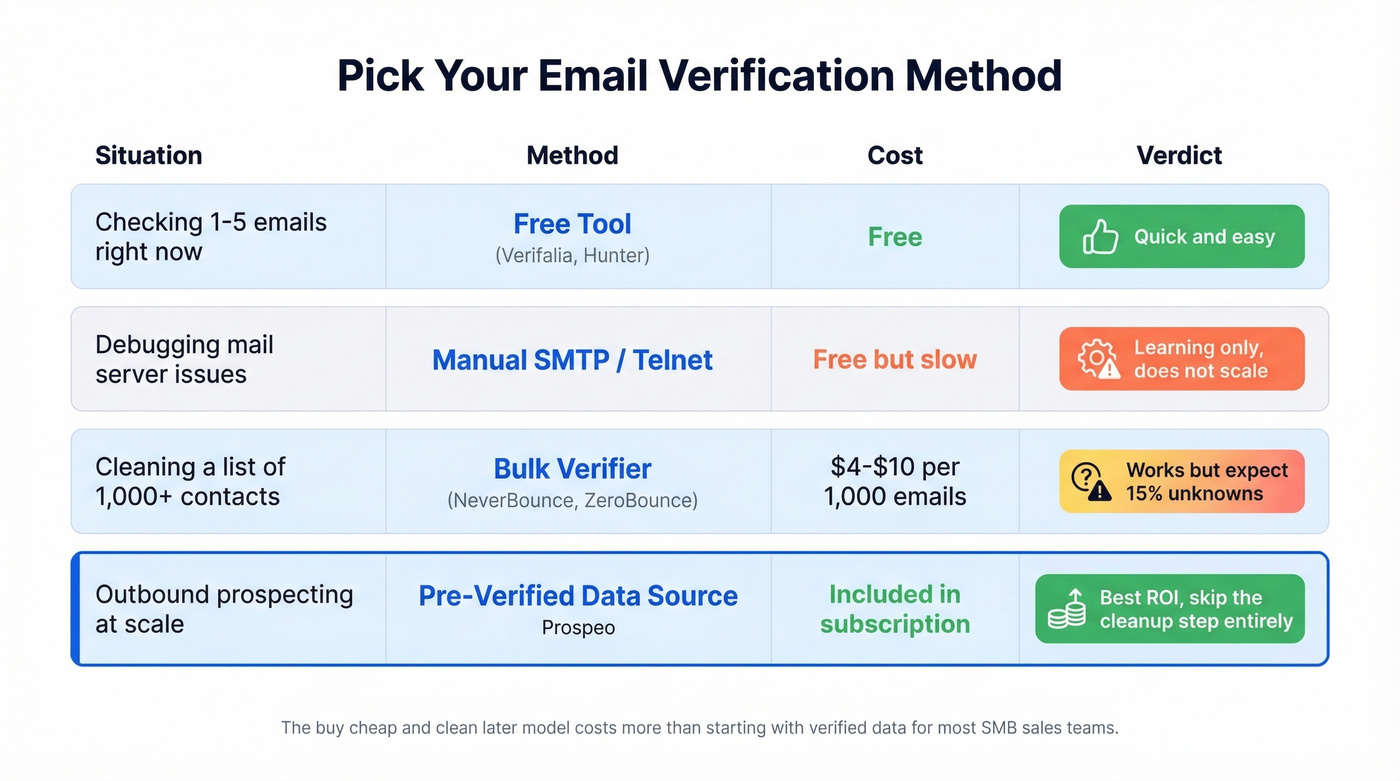
For outbound prospecting, the smartest move is to never need verification at all. Prospeo runs every email through a 5-step verification process - catch-all handling, spam-trap removal, honeypot filtering - before it ever appears in your search results. With 98% email accuracy and a database that refreshes every 7 days, you're starting with clean data instead of buying a list and then paying again to clean it. Free tier gives you 75 emails per month to test it. If you want to level up the rest of your outbound motion, use these sales prospecting techniques.
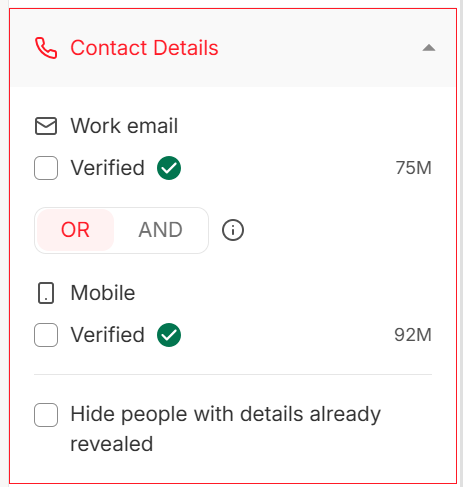
Buying a list and then paying $0.008/email to clean it is a false economy. Prospeo gives you pre-verified emails at ~$0.01 each - no bulk verifier needed, no unknown results to sort through, no bounced sends torching your sender reputation.
One cost, zero bounces. That's how outbound should work.
FAQ
Can you check if an email is valid without sending a message?
Yes. The SMTP RCPT TO method checks whether a mail server accepts a recipient without delivering anything. Verification tools automate this exact process. The limitation is catch-all domains - they accept any address, returning a false "valid" result for every query.
Why do different email checkers give different results?
Each tool handles catch-all domains, greylisting, and retry logic differently. One verifier might flag a greylisted address as "unknown" while another retries and confirms it. Timing matters too - check the same address an hour apart and greylisting behavior can change the result.
How often should I re-verify my email list?
At minimum, quarterly. Business email lists decay by roughly 22-28% annually, so even a list verified in January will have meaningful rot by April. If you're sourcing contacts from a platform with a weekly data refresh cycle, re-verification becomes unnecessary - every record stays current automatically.
Is there a reliable way to verify emails on catch-all domains?
Not with standard verification alone. Since catch-all servers return 250 OK for every address, no tool can definitively confirm a specific mailbox exists. Your best options: use a verification service with advanced catch-all scoring, cross-reference the address against known patterns at the company, or start with a data provider that handles catch-all resolution through multi-step verification before delivering results to you.