

How to Validate an Email Address in 2026 (5 Layers)
You collected 2,000 emails at a trade show - scribbled on napkins and badge scanners. You loaded them into your sequencer, hit send, and 9% bounced. Your domain reputation tanked before the first reply came in. That's the cost of skipping validation, and knowing how to validate an email address properly is the difference between a healthy sender reputation and weeks of damage control. Your ESP won't warn you until it's too late.
A bounce rate under ~2% is safe. Over 5%, you're in the danger zone where ESPs start throttling your sends. The gap between those two numbers is entirely a validation problem. Google and Microsoft have tightened sender authentication requirements, making domain reputation more fragile than ever. Tools like Google Postmaster and SenderScore will show you the damage after the fact, but by then you've already lost deliverability you'll spend weeks rebuilding.
We've watched teams nuke perfectly good domains with a single unvalidated list. This guide is the framework we'd hand them before they hit send.
Quick Overview
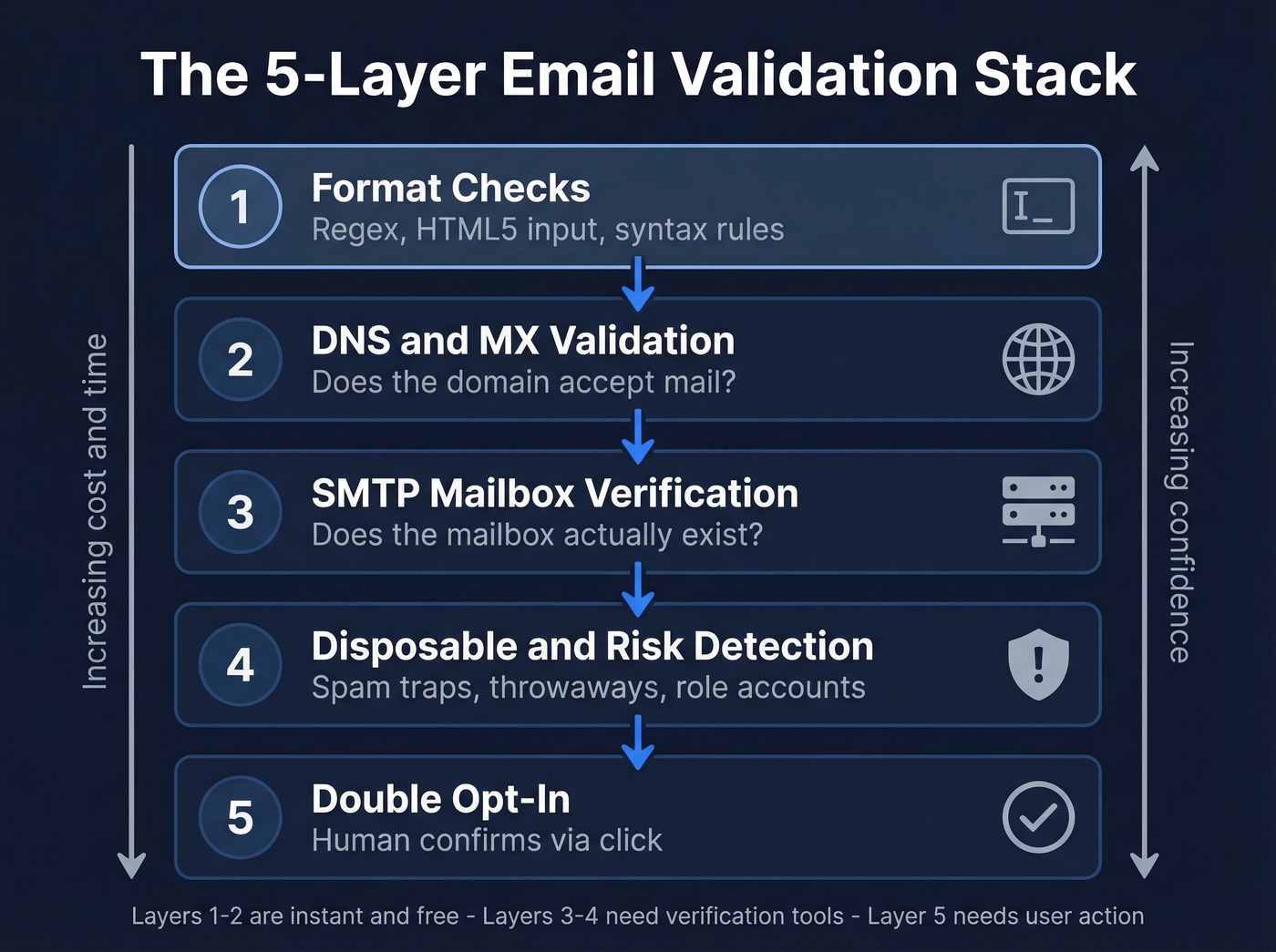
Most guides stop at regex. Real email validation has five layers:
- Syntax/format checks - client-side
- DNS and MX record validation - domain-level
- SMTP mailbox verification - server-level
- Disposable and risk detection - threat-level
- Double opt-in - human-level
If you're validating a bulk list, use a verification tool - there's a comparison table below. If you're building signup forms, implement layers 1-2 in code and layer 5 as a confirmation email.
Validation vs. Verification
These terms get used interchangeably, but they mean different things. Validation checks whether an email address is properly formatted and points to a real domain. It's structural - syntax, DNS, MX records. You can do it without ever touching a mail server.
Verification goes further. It probes the actual mailbox via SMTP to confirm someone's home. Think of validation as checking the address on a letter and verification as knocking on the door. Most tools blend both into one workflow, which is fine - just know that "validated" doesn't mean "verified," and the distinction matters when you're debugging bounces.
The 5-Layer Validation Stack
Layer 1 - Format Checks
Start with the cheapest check: does this string look like an email? HTML5's <input type="email"> handles basic format enforcement natively, and you can pair it with CSS :valid and :invalid pseudo-classes for instant visual feedback without writing a single line of JavaScript.
For server-side or more granular control, this practical regex catches ~99% of real-world addresses:
^[A-Z0-9._%+-]+@[A-Z0-9.-]+\.[A-Z]{2,}$
Run it case-insensitive. Two things to watch: set the TLD upper bound to {2,63} instead of the outdated {2,4}, because TLDs like .solutions and .technology are real. And enforce the SMTP spec limits per RFC 5321 - 254 characters max for the full address, 64 for the local part.
This layer is fast and free. It catches typos, missing @ symbols, and obvious garbage. But it tells you nothing about whether the domain or mailbox actually exists.
Layer 2 - DNS and MX Validation
Once the format passes, check whether the domain can actually receive mail. MX records tell you which servers handle email for a given domain. No MX record and no fallback A record means mail will hard bounce - guaranteed.
This layer catches typo domains like gmial.com, defunct company domains, and addresses pointing to parked pages. It's a quick DNS lookup, adds milliseconds of latency, and eliminates a surprising number of bad addresses that regex happily lets through.
If you're working with outbound lists, it also helps to understand broader email deliverability mechanics so you can prioritize fixes that actually move inbox placement.
Layer 3 - SMTP Mailbox Verification
Here's where things get interesting - and messy. An SMTP handshake probes the target mail server to ask "does this mailbox exist?" without actually sending an email. When it works, it's the closest you can get to confirming deliverability.
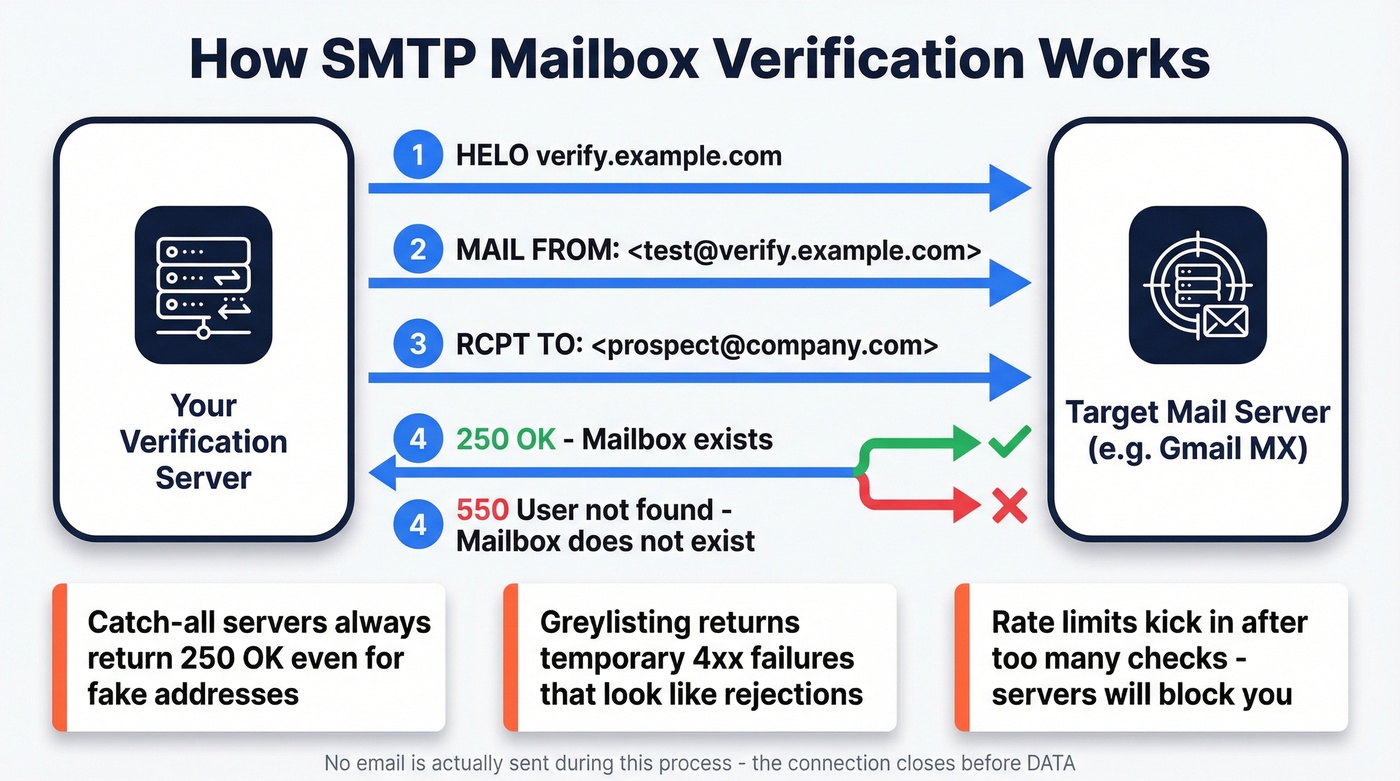
The limitations are real, though. Each check takes 1-3 seconds, which adds up fast on large lists. Servers rate-limit verification attempts, so you can't blast 50,000 checks in an hour without getting blocked. Around 5-15% of domains use greylisting behaviors - they return temporary failures to unknown senders that look like rejections during verification. And then there's the catch-all problem, which deserves its own section below.
SMTP verification is directional, not definitive. It catches dead mailboxes on cooperative servers, but protected enterprise domains and catch-all configurations return misleading results. In our experience, treating SMTP results as strong signals rather than guarantees keeps teams out of trouble.
If you're trying to debug bounces end-to-end, it helps to separate "does it exist?" from "will it bounce?" - this is where a dedicated workflow for check if email will bounce becomes useful.
Layer 4 - Disposable and Risk Detection
Binary valid/invalid isn't enough anymore. A mailbox might technically exist but still be a spam trap, a disposable address from Guerrilla Mail, or a role account like info@ that nobody monitors.
This layer flags disposable email providers - critical for signup flows where people use throwaway addresses to grab free trials. It also detects known spam traps, scores bounce risk based on domain behavior, and identifies catch-all configurations. Modern verification pipelines layer catch-all handling, spam-trap removal, and honeypot filtering into a single pass that goes well beyond the SMTP handshake.
The output isn't a yes/no. It's a risk score. That score should drive your decision about whether to send, suppress, or flag for manual review.
If you’re seeing deliverability issues after a bad import, you may need a remediation playbook like spam trap removal before you scale sends again.
Layer 5 - Double Opt-In
No technical check is 100% foolproof. The only way to truly confirm an email address is deliverable and owned by a real person is to send a confirmation email and wait for them to click.
Double opt-in is the gold standard for signup flows, newsletter subscriptions, and any context where you control the acquisition point. It eliminates typos, bots, and malicious signups in one step. The tradeoff is friction - you'll lose some percentage of signups who never confirm.
For outbound prospecting lists, double opt-in isn't practical. You can't ask a cold prospect to confirm their email before you email them. That's where layers 1-4 and a good data source do the heavy lifting.
If you’re doing cold outreach, pair validation with a safe sending strategy (cadence, throttling, and list hygiene) from a guide like best way to send bulk email without getting blacklisted.

You just read about 5 layers of email validation. Prospeo runs all of them for you - syntax, DNS, SMTP, catch-all handling, spam-trap removal, and honeypot filtering - through a proprietary 5-step verification pipeline. The result: 98% email accuracy at $0.01 per email. No bounced-list disasters. No domain reputation damage.
Skip the DIY validation stack. Get emails that are already verified.
The Catch-All Problem
About 20% of business domains are configured as catch-all - they accept every address during SMTP checks, returning "OK" even when the mailbox doesn't exist. This is the single biggest blind spot in email verification.

Let's say you verify a list and get 95% valid results. You send. 4% bounce. Your ESP flags you. What happened? A chunk of those "valid" addresses were catch-all domains where the server said "sure, I'll take it" and then silently dropped the message - or sent a late bounce notification hours later.
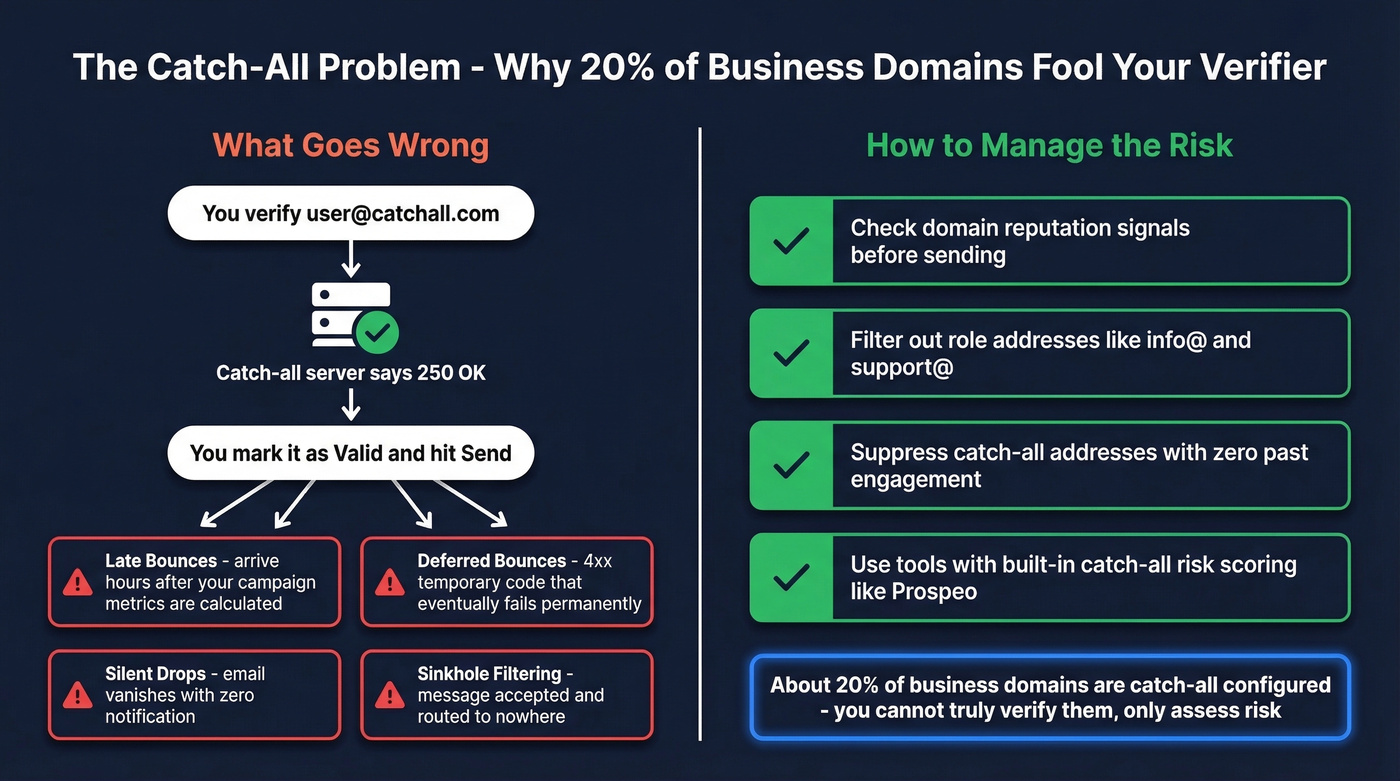
The failure modes are sneaky. Late bounces arrive after your campaign metrics are already calculated. Deferred bounces return a 4xx code initially, then fail permanently. Silent drops never generate any bounce notification at all - the email just vanishes. Sinkhole filtering accepts the message and routes it to nowhere.
You can't truly verify a catch-all address. You can only assess risk. The smart approach combines DNS/MX checks, disposable and role-address filtering, domain reputation signals, and historical engagement data. If a catch-all address has never opened or clicked in previous campaigns, suppress it. If it's a fresh address on a known catch-all domain with no engagement history, treat it as high-risk.
Mistakes That Reject Real Emails
Overly strict validation rejects legitimate customers. I've seen signup forms silently discard paying users because of these errors:
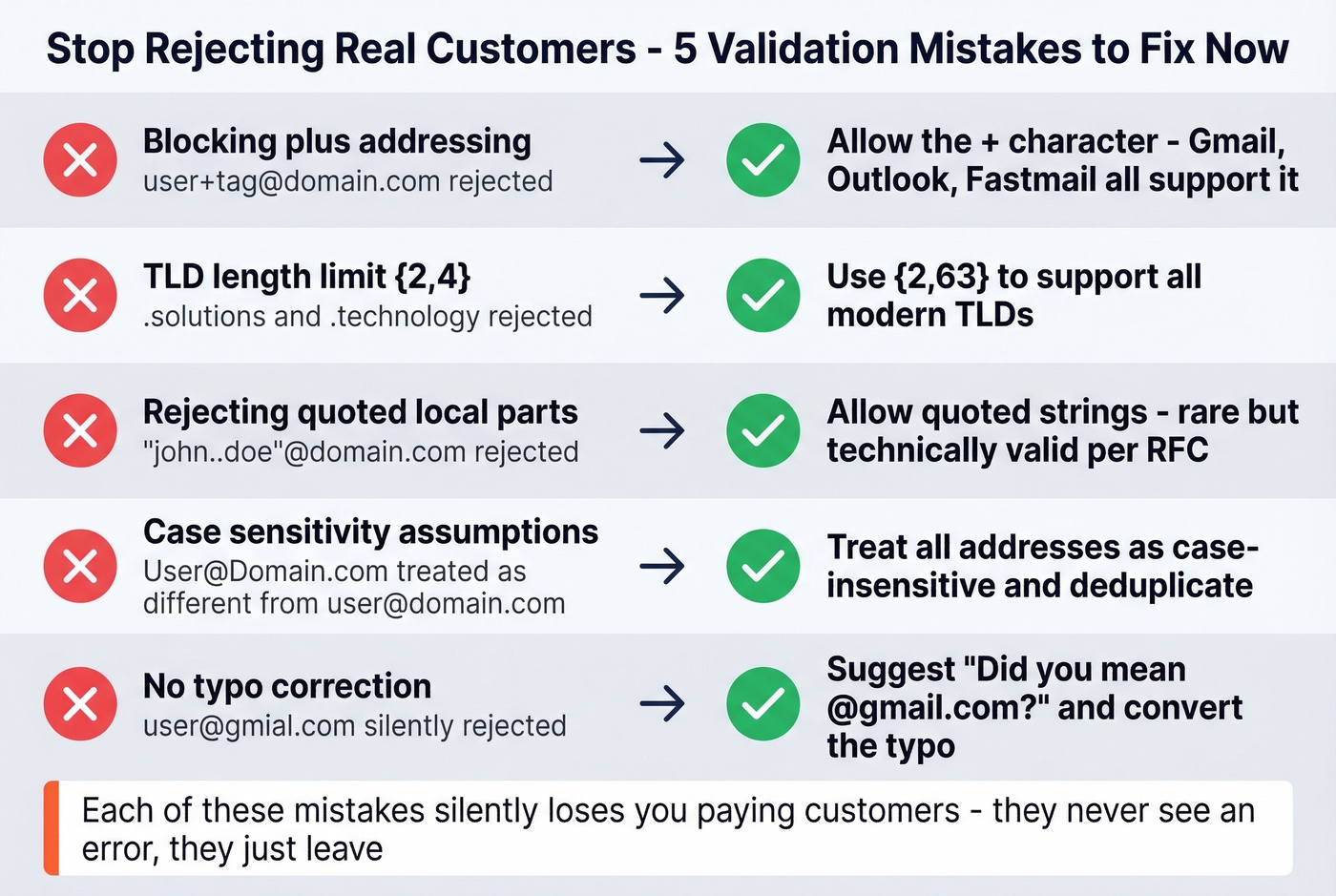
- Blocking plus addressing.
user+tag@domain.comis perfectly valid and widely used. Gmail, Outlook, and Fastmail all support it. Rejecting the+character is a data loss bug. - Outdated TLD length limits. Patterns using
{2,4}for the TLD break on.solutions,.technology,.photography, and hundreds of other modern TLDs. Use{2,63}. - Rejecting quoted local parts. Addresses like
"john..doe"@domain.comare technically valid. Rare, but rejecting them is unnecessary. - Case-sensitivity assumptions. The local part is technically case-sensitive per RFC, but virtually every provider treats it case-insensitively. Don't reject based on casing, and don't store duplicates that differ only by case.
- Missing typo correction. Instead of rejecting
user@gmial.com, suggest "Did you mean @gmail.com?" A simple domain typo taxonomy - wrong letter, extra letter, missing letter, swapped letters - catches the majority of honest mistakes and converts them into valid addresses.
If you’re validating addresses you found (not collected via opt-in), it’s worth tightening your upstream process too - see name to email for a cleaner way to generate likely addresses before verification.
Choosing a Verification Tool
Every tool claims 96-99% accuracy. In Hunter's benchmark of 15 verifiers against 3,000 real business emails, the top accuracy scores landed at 67-70%. The consensus on r/sales and r/coldemail is similar - vendor accuracy claims rarely hold up against real business email datasets. Take the marketing numbers with skepticism and test against your own list.

What actually matters is how the tool handles catch-all domains, what it does with "unknown" results, and whether it gives you risk scores or just binary pass/fail.
If you want a deeper verifier landscape (beyond the shortlist here), compare options in our Bouncer alternatives breakdown.
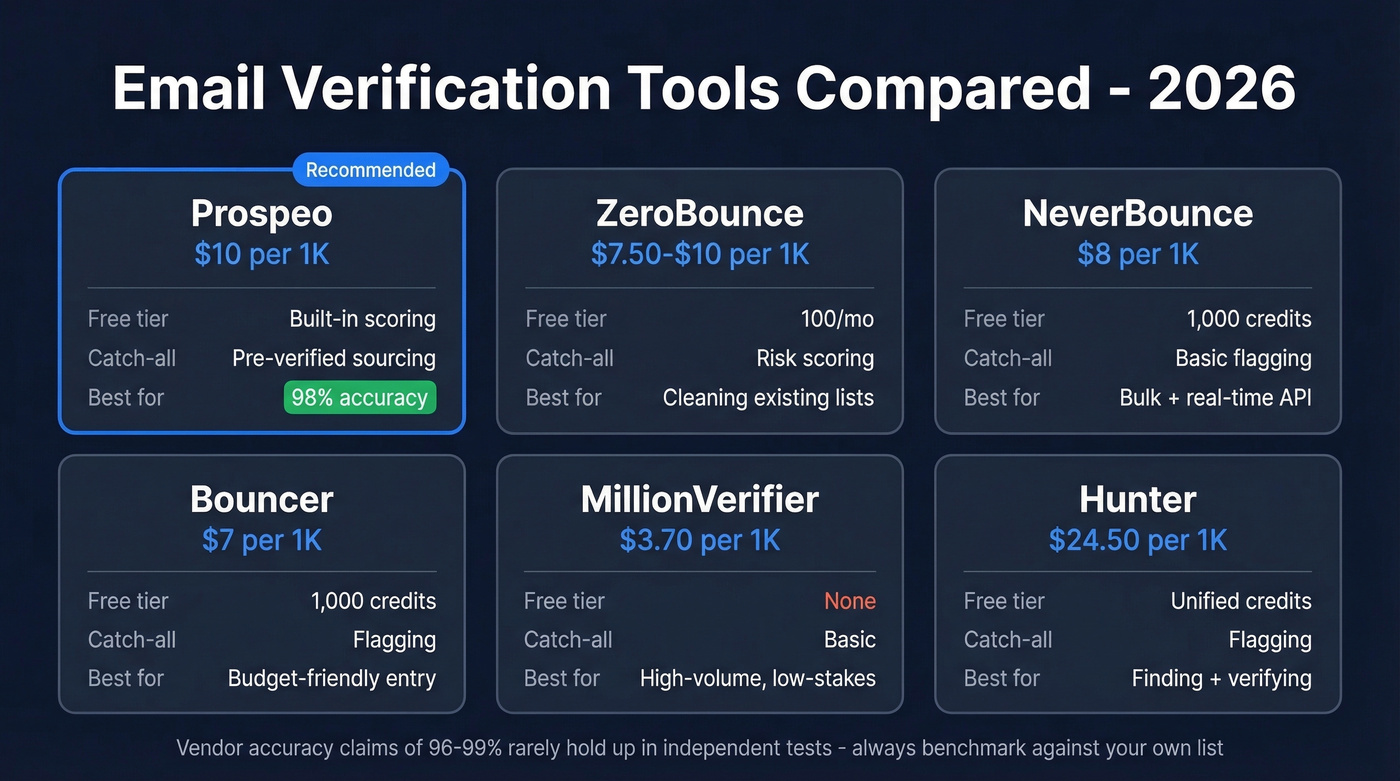
| Tool | Cost per 1K | Free Tier | Catch-All Handling | Best For |
|---|---|---|---|---|
| Prospeo | $10 at $0.01/ea | 75 emails/mo | Built-in scoring | Pre-verified sourcing |
| ZeroBounce | $7.50-$10 | 100/mo | Risk scoring | Cleaning existing lists |
| NeverBounce | $8 | 1,000 credits | Basic flagging | Bulk + real-time API |
| Bouncer | $7 | 1,000 credits | Flagging | Budget-friendly entry |
| MillionVerifier | ~$3.70 | None | Basic | High-volume, low-stakes |
| Hunter | ~$24.50 | Unified credits | Flagging | Finding + verifying |
Prospeo isn't a standalone verifier - it's the "solve the problem upstream" option. Instead of cleaning bad data after the fact, you pull from a pool of 143M+ pre-verified emails that run through a 5-step verification pipeline including catch-all handling, spam-trap removal, and honeypot filtering. At $0.01 per email with 75 free monthly, it eliminates the validation headache at the source. Meritt used Prospeo's pre-verified data to drop bounce rate from 35% to under 4% - that's the difference between a healthy domain and a blacklisted one.
If you already have lists and need to clean them, ZeroBounce is the strongest pure-play verifier. Risk scoring goes beyond valid/invalid to flag spam traps and abuse addresses. $7.50-$10 per 1K with 100 free monthly credits.
NeverBounce pairs solid bulk verification with a real-time API at $8 per 1K. The 1,000 free credits are generous for testing. Straightforward, no surprises.
At ~$3.70/1K, MillionVerifier is the cheapest option at scale. Fine for high-volume, lower-stakes lists where you're comfortable with less granular catch-all handling. Skip it if catch-all domains make up a big chunk of your target accounts. Bouncer at $7/1K with 1,000 free credits sits between MillionVerifier and ZeroBounce - decent accuracy without the premium price.
Hunter runs ~$24.50/1K using unified credits, which makes it expensive for pure verification. But if you also need email finding, the combined credit system starts to make more sense. Don't buy Hunter credits just to verify.
If you’re choosing tools for a full outbound stack (not just verification), start with a broader shortlist like our SDR tools guide.
How Often to Revalidate
Email addresses decay constantly. People change jobs, companies shut down domains, IT teams decommission mailboxes. A list that was 97% valid three months ago might be 89% valid today.
The minimum revalidation cadence is every 30 days. For high-volume outbound teams sending daily, every two weeks is better. The math is simple: if your data source refreshes infrequently, you carry the revalidation burden yourself. We've found that teams who skip revalidation for 60+ days almost always see their bounce rates creep past the 5% danger line - and by then, the ESP damage is already done.
If you’re actively trying to recover after a spike in bounces, use a step-by-step plan like how to improve sender reputation.
Catch-all domains fool most verification tools. Prospeo's proprietary infrastructure handles catch-all detection, spam-trap removal, and honeypot filtering in a single pass - refreshed every 7 days, not the 6-week industry average. Teams using Prospeo see bounce rates drop from 35%+ to under 4%.
Stop guessing on catch-all domains. Start with data that's already clean.
FAQ
Can regex fully validate an email address?
No. Regex confirms format only - it can't verify the domain accepts mail or the mailbox exists. Use regex as Layer 1, then add DNS/MX lookups and SMTP checks for real validation. Format checking catches about 5-10% of bad addresses; the other layers catch the rest.
What's the difference between a hard bounce and a soft bounce?
Hard bounces (5xx SMTP codes) are permanent - the address doesn't exist or the domain is dead. Soft bounces (4xx) are temporary - full inbox, server downtime, oversized message. Hard bounces damage sender reputation immediately; soft bounces become a problem only if they persist across multiple sends.
How accurate are email verification tools?
Vendor claims range from 96-99%, but independent benchmarks show top performers hitting 67-70% on real business datasets. Treat "unknown" results as risky, not invalid.
How do I validate email addresses without a third-party tool?
You can build format and DNS/MX checks with basic code. SMTP verification at scale is where DIY breaks down - greylisting, rate limiting, and catch-all domains create edge cases that take months to handle properly. Most teams outsource once their lists exceed a few hundred contacts.
How often should I clean my email list?
Every 30 days at minimum. Email addresses decay as people change roles and companies decommission domains. High-volume senders should revalidate every two weeks.