

How to Warm Up an Email in 2026 (Week-by-Week Plan)
Gmail places 87.2% of emails in the inbox. Microsoft? Just 75.6%. That gap means your warmup strategy needs to account for where your prospects actually live - and most guides ignore this completely.
If you're figuring out how to warm up an email the right way, the process comes down to three things: authentication, a disciplined volume ramp, and clean data. Get those right and everything else falls into place.
Here's the short version:
- Set up SPF, DKIM, and DMARC before sending a single warmup email.
- Follow the 4-week ramp: 5-25/day, then 50/day, then 100/day - pausing if opens drop below 40% or bounces rise above 2%.
- Verify your prospect list before transitioning to real sends. Bad data undoes warmup overnight.
Authentication First, Always
Gmail enforced SPF, DKIM, and DMARC for bulk senders in February 2024. Outlook followed with similar requirements in May 2025. Skip this step and your warmup emails land in spam or get blocked outright - no tool can override missing authentication.
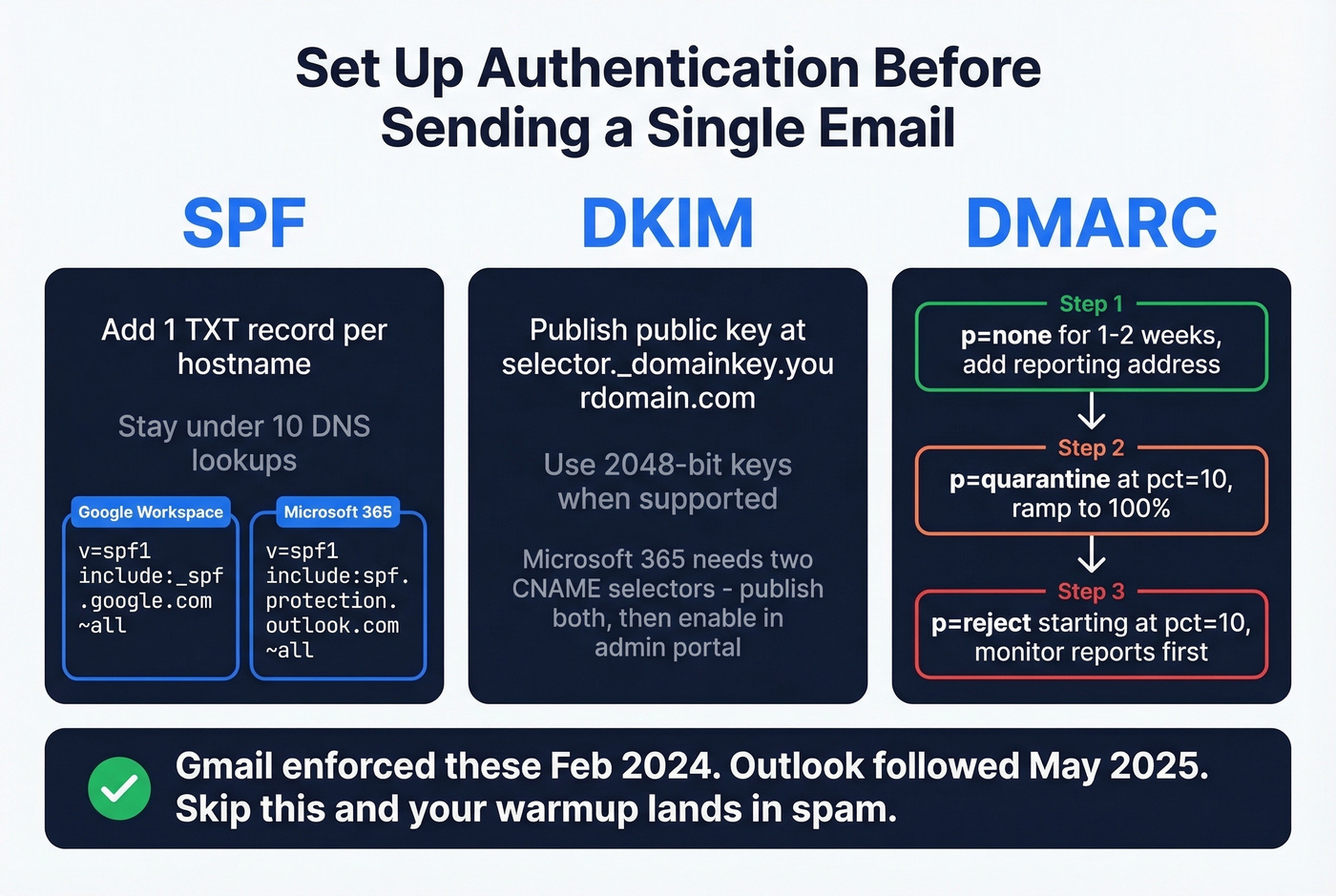
SPF - one TXT record per hostname, stay under 10 DNS lookups. Google Workspace uses v=spf1 include:_spf.google.com ~all. Microsoft 365 uses v=spf1 include:spf.protection.outlook.com ~all. If you need more examples, start with an SPF reference.
DKIM - publish your public key at selector._domainkey.yourdomain.com and prefer 2048-bit keys when supported. Microsoft 365 requires two DKIM selector CNAMEs; publish both, then enable signing in the admin portal. If you're unsure it's live, use this guide on verify DKIM is working.
DMARC - staged rollout works best. Start with p=none plus a reporting address for one to two weeks, move to p=quarantine at pct=10 and ramp to 100%, then shift to p=reject starting at pct=10. Monitor your DMARC reports before each escalation to confirm legitimate mail passes alignment. Rushing straight to p=reject is the fastest way to accidentally block your own transactional emails, and we've seen teams do exactly that. (If alignment is confusing, read DMARC alignment.)
Week-by-Week Email Warmup Schedule
There's no single "correct" schedule, but we've tested this ramp across dozens of domains and it consistently works for cold outreach. Age your domain 7-14 days with authentication live before you start.
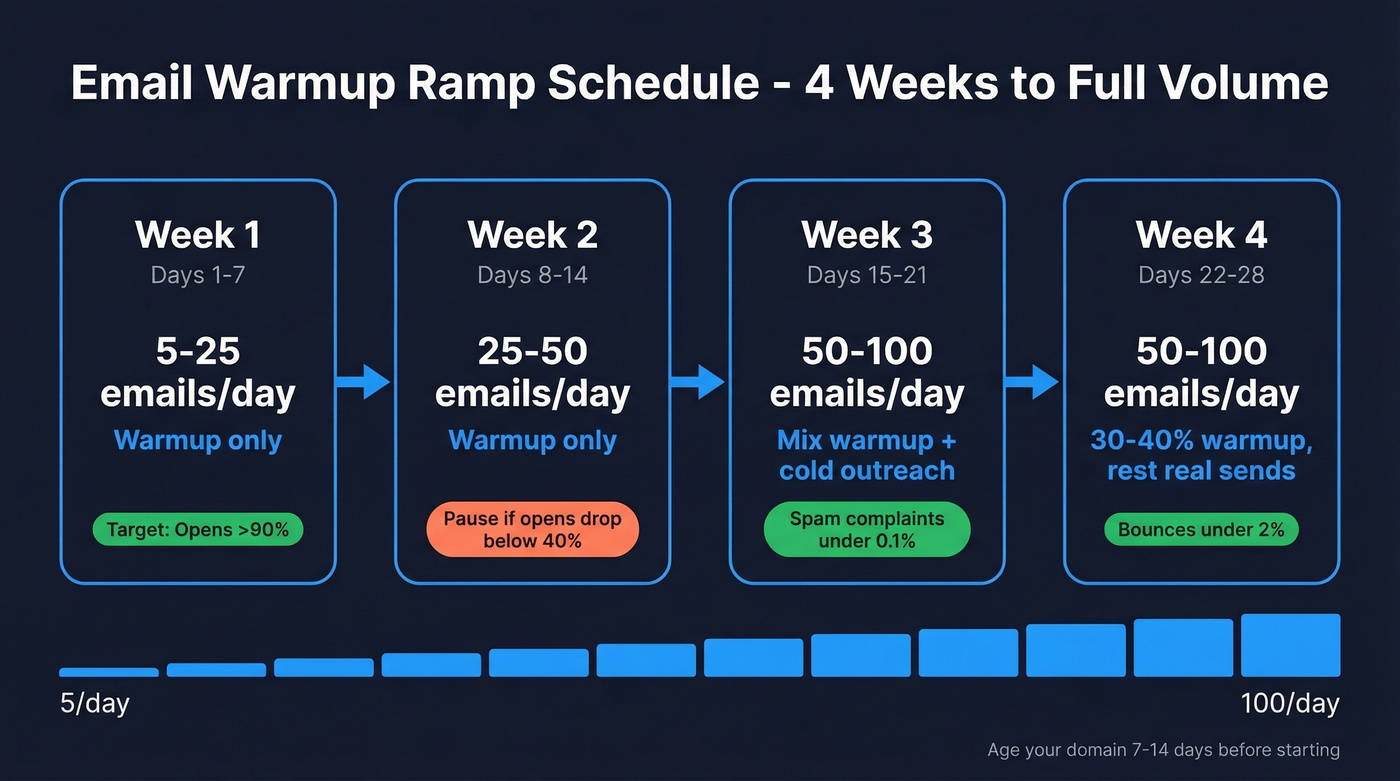
| Week | Daily Volume | What to Send | Key Metrics |
|---|---|---|---|
| 1 (Days 1-7) | 5-25 | Warmup only | Opens >90%, 0 complaints |
| 2 (Days 8-14) | 25-50 | Warmup only | Pause if opens <40% or any complaint |
| 3 (Days 15-21) | 50-100 | Mix warmup + cold | Spam complaints <0.1% |
| 4 (Days 22-28) | 50-100 | 30-40% warmup | Bounces <2% |
Spread sends across business hours with 2-3 minutes between each. On weekends, reduce volume 50-70%. Going dark for two days creates a pattern gap that mailbox providers notice.
Scaling math: Under 100/day, double volume between phases. At 100-500/day, slow to 1.5x increases. Above 500/day, cap at 1.25x. (If you're pushing limits, track email velocity.)
When to Pause
Hard thresholds - no negotiating:
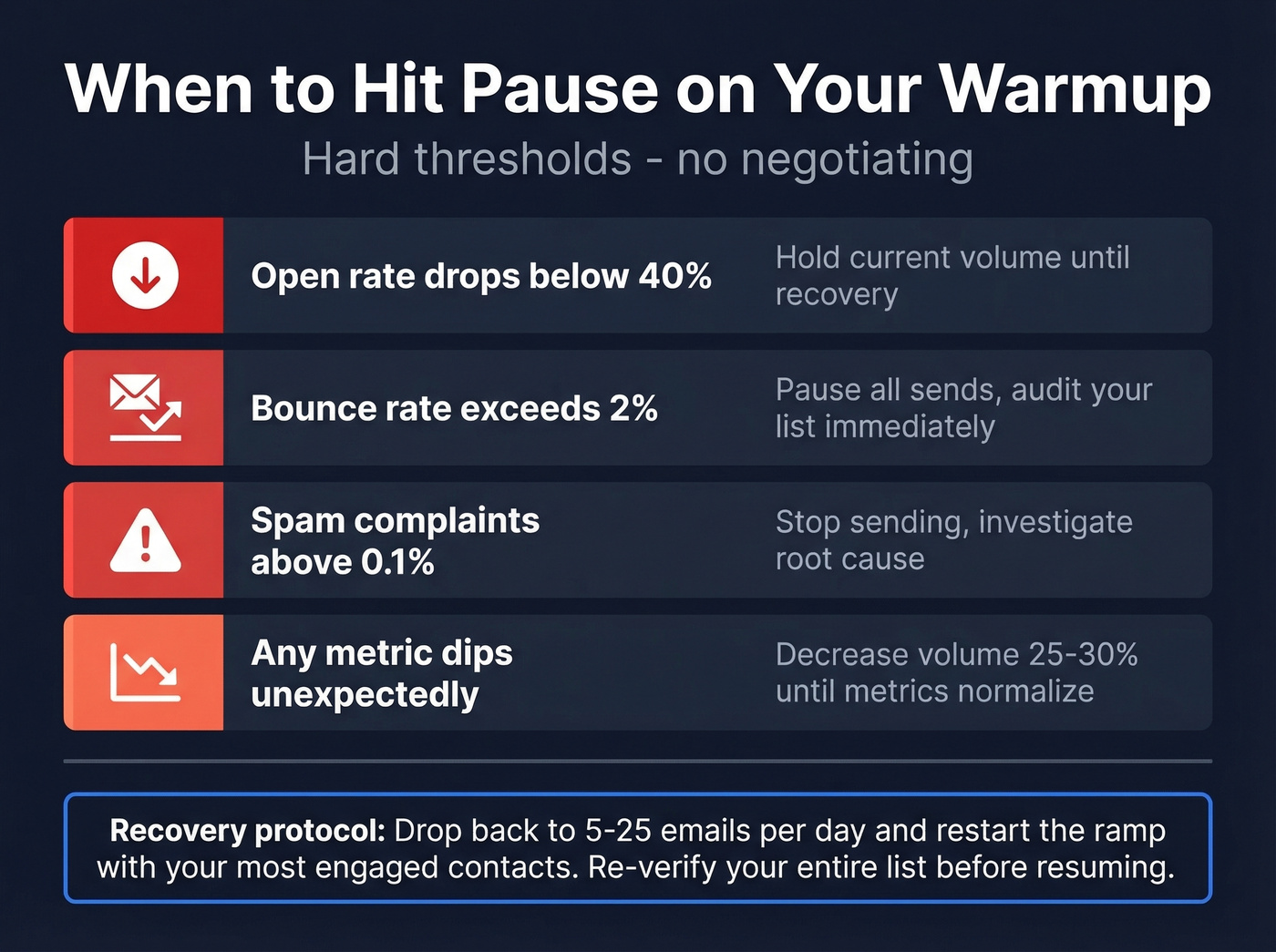
- Opens drop below 40% - hold current volume
- Bounce rate exceeds 2% - pause, check your list
- Spam complaints above 0.1% - stop sending, investigate
- Any metric dips - decrease volume 25-30% until metrics normalize
Scaling Past 100/Day
A single warmed mailbox sustains 150-400 real sends per day. Need 1,000/day? Plan to warm multiple accounts across 4-6 mailboxes at 250/day each.
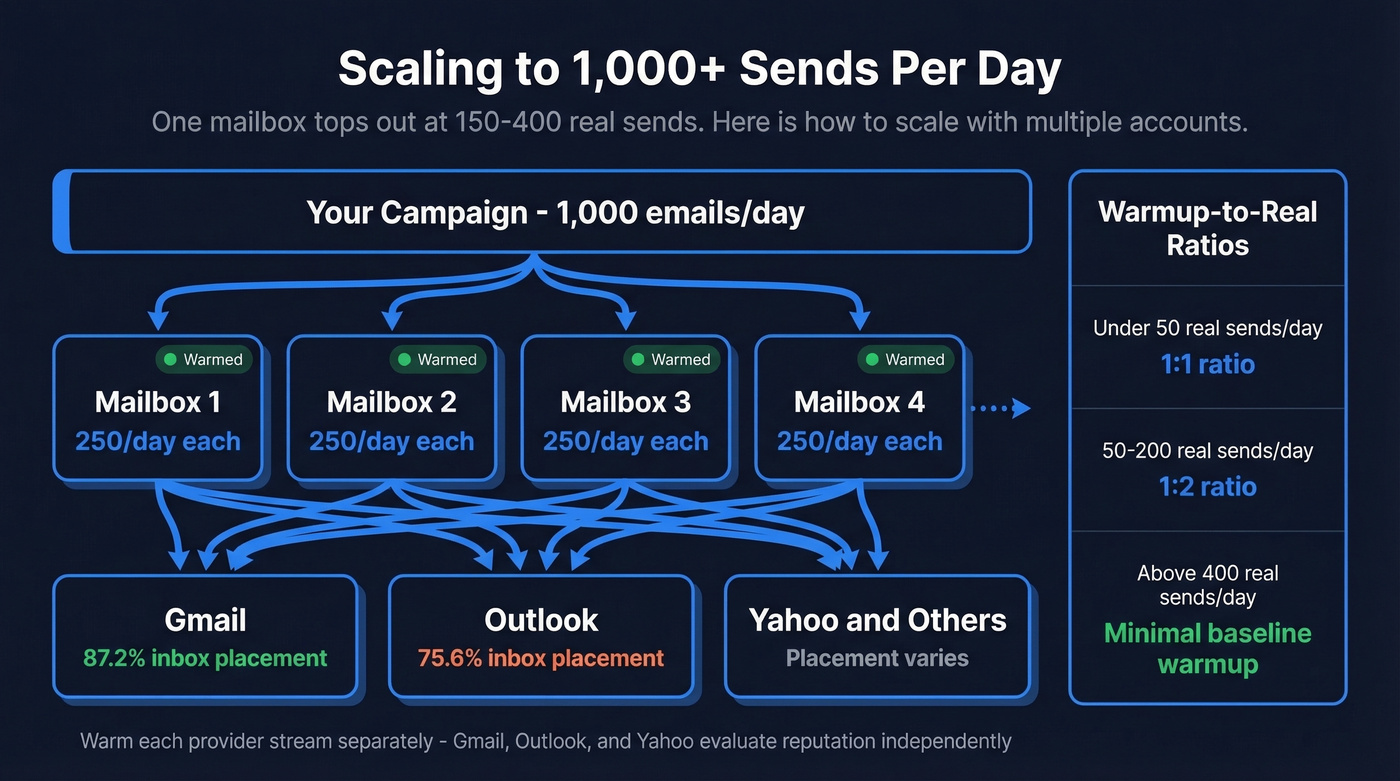
Gmail, Outlook, and Yahoo evaluate reputation independently - Gmail at 87.2% inbox placement, Microsoft at just 75.6% - so warm each provider stream separately. This is the part most teams skip, and it's the part that bites them hardest when half their prospect list sits on Outlook.
Warmup-to-real ratios as you scale: keep 1:1 under 50 real sends/day, shift to 1:2 at 50-200/day, and drop to minimal baseline warmup above 400/day.

Scaling past 100 sends/day means every bounce counts double. Prospeo's 5-step verification - with catch-all handling, spam-trap removal, and honeypot filtering - delivers 98% email accuracy at ~$0.01/email. Teams using Prospeo-verified lists hold bounce rates under 3% across thousands of daily sends.
Protect the domain you just spent a month warming.
Monitoring Deliverability Metrics
Google retired Postmaster Tools V1 on September 30, 2025 - you need V2. Add your domain, publish the TXT verification record, and verify. Data lags 24-48 hours and won't populate until you're sending roughly 100+ daily messages to Gmail recipients.
Your target spam rate is below 0.1%, never exceeding 0.3%. Authentication pass rates should be near 100%. For Outlook, Microsoft SNDS provides similar reputation data. We run both on every domain we manage. The five-minute setup is worth it. For a deeper baseline, see our email deliverability guide.
Warmup Tools Compared
| Tool | Price | Network | Best For |
|---|---|---|---|
| Instantly | $30/mo | 200K+ inboxes | All-in-one outreach users |
| Lemwarm | $29/inbox | Lemlist network | Existing Lemlist customers |
| Warmy.io | $49/inbox | Proprietary | Teams wanting premium support |
| Mailreach | $25/inbox | 30K+ real inboxes | Volume discounts at scale |
| Warmbox | $15-$99/mo | Varies | Budget-conscious teams |
| TrulyInbox | $29/mo | 30K+ inboxes | Unlimited mailbox plans |
| Warmup Inbox | $15-$19/inbox | 20K+ real inboxes | Lowest per-inbox cost |
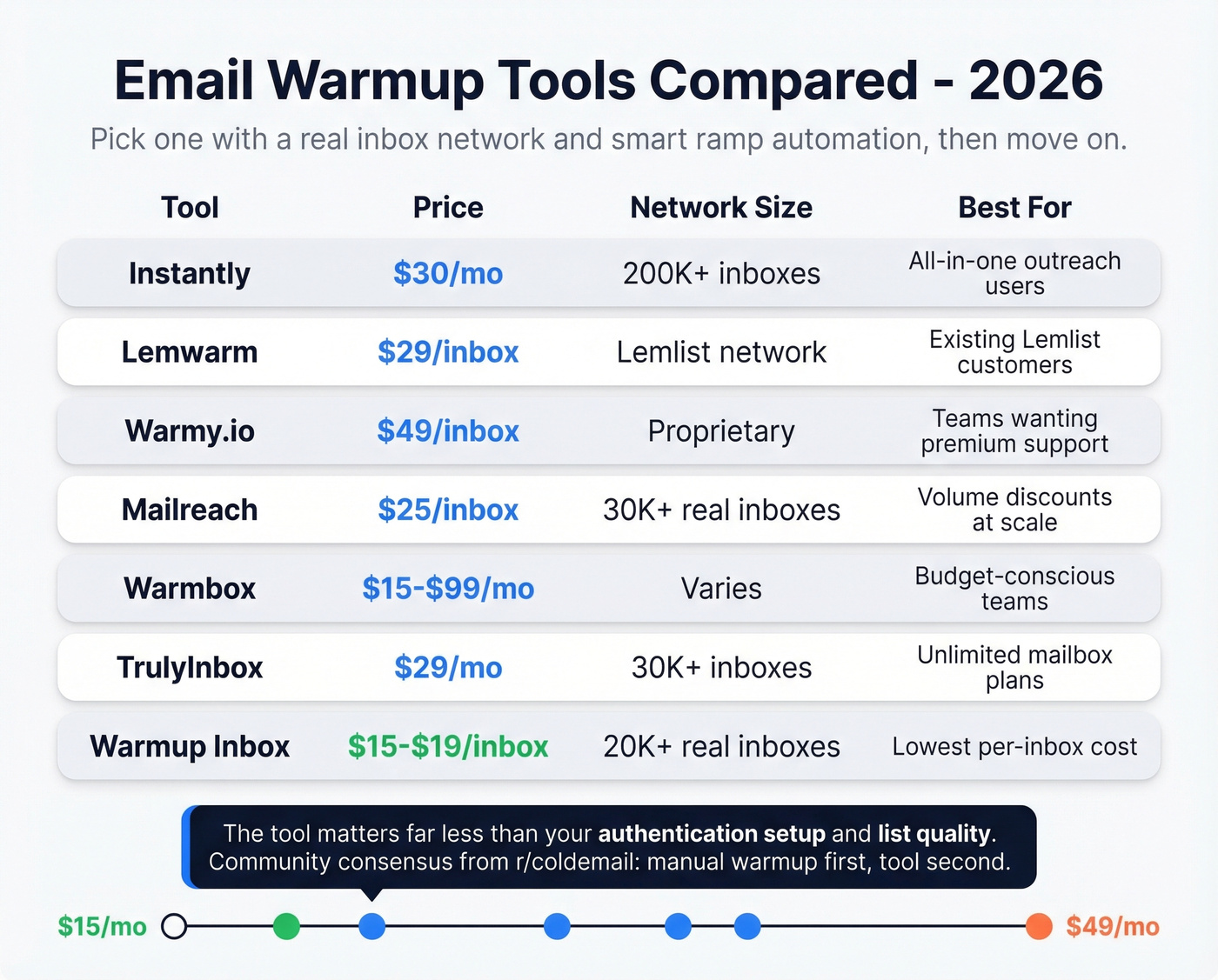
Here's the thing: most teams overthink tool selection. The tool matters far less than your authentication setup and list quality. Pick one with a real inbox network, smart ramp automation, and inbox placement testing - then move on. If you're evaluating options, compare against unlimited email warmup tools too.
One thing worth knowing: practitioners on r/coldemail often point out that very large warmup networks can include low-activity inboxes, which creates engagement patterns providers learn to discount. In late 2022-early 2023, Google cracked down on tools using unauthorized Gmail API access. Tools built on standard SMTP/IMAP survived. The community consensus is clear - manual warmup first, tool second.
List Quality Kills Warmup
This is the part that frustrates us most. You can run a perfect 4-week warming process and destroy your reputation in a single afternoon by sending to an unverified list. A bounce rate above 2% during warmup signals bad data and can undo weeks of careful work. If you want the benchmarks and fixes, start with email bounce rate.
Prospeo's 5-step email verification - with catch-all handling, spam-trap removal, and honeypot filtering - runs 98% accuracy at roughly $0.01 per email. Stack Optimize built from $0 to $1M ARR using it for client campaigns: 94%+ deliverability, under 3% bounce rate, zero domain flags across all clients. Verify every address before it touches your warmed domain. (If you're comparing vendors, see Bouncer alternatives.)

Let's be honest: if you've already burned a domain with bad data, you know exactly how painful the recovery process is. Don't repeat it. Skip verification at your own risk, but we've never seen a team regret spending $0.01 per lead to protect a domain they spent a month warming.
Your warmup schedule means nothing if Week 4 sends hit invalid addresses. Prospeo refreshes 300M+ profiles every 7 days - not the 6-week industry average - so the emails you verified last week are still accurate today. Stack Optimize ran zero domain flags across all clients using this data.
Clean data is the only warmup insurance that actually works.
FAQ
How long does it take to warm up an email account?
Two to four weeks for most domains. Brand-new domains with aggressive volume goals sometimes need six weeks. Don't skip to full volume until opens stay above 40% and bounces remain under 2% for at least five consecutive days.
Can I warm up a free Gmail or Outlook account?
Technically yes, but free accounts have much tighter daily sending limits than paid workspace mailboxes. For cold outreach at scale, use Google Workspace or Microsoft 365 with a custom domain - you need SPF, DKIM, and DMARC records that free accounts don't support.
How do I recover after a reputation drop?
Reduce volume to Week 1 levels (5-25/day) and restart the ramp using only highly engaged contacts who'll open and reply. Recovery typically takes four to six weeks. Re-verify your entire list before resuming - even a small test batch will tell you whether your data quality is the root cause or something else is going on.
What's the fastest way to ruin a warmup?
Sending to unverified lists. A bounce rate above 2-3% during warmup tanks your sender reputation immediately. Always verify every address before sending - one bad batch can set you back weeks.