

How to Warm Up Email Domains: The 2026 Playbook
Five new domains. A two-week warm-up plan pulled from a 2023 blog post. By day three, two domains are landing in spam and a third is getting silently throttled by Outlook. The old playbook doesn't just underperform - it actively burns infrastructure.
If you're figuring out how to warm up email domains in 2026, the rules have changed and most guides haven't caught up. Outlook and Hotmail inbox placement sits at 26.8% right now. Gmail inbox placement is barely above 53%. Domains that used to be campaign-ready in three weeks now need six to eight before you can trust them with real volume.
The Short Version
Before the full breakdown, here's the checklist:
- Age your domain 2+ weeks before sending a single warm-up email. Spam filters treat domains younger than a month as suspicious by default.
- Set up SPF, DKIM, and DMARC. Non-negotiable. Emails without authentication see 10-20% lower inbox placement.
- Follow a 4-6 week ramp schedule. The old two-week advice will get your domain flagged.
- Gate every volume increase on metrics. Opens above 40%, bounces below 3%, spam complaints at zero. Miss a gate, cut volume immediately.
- Verify every email before it touches your warmed domain. One bad import with a 6% bounce rate can undo six weeks of careful work.
What Is Domain Warm-Up?
Domain warm-up is the process of gradually increasing email volume from a new or dormant domain so inbox providers - Gmail, Outlook, Yahoo - learn to trust it. You're on probation. You start with small, high-quality sends and scale only after earning trust.
Here's the critical distinction most guides gloss over: domain reputation persists across IP changes, ESP changes, and tool changes. If you switch from Instantly to Smartlead, your domain reputation follows you. Your IP reputation doesn't. That's why domain warm-up matters more than IP warm-up for cold email.
What's less obvious is that inbox providers evaluate multiple domain signals per email - not just your visible From address. Your DKIM signing domain, Return-Path domain, and even the domains in your email body URLs all carry separate reputations. A clean From domain won't save you if your tracking links point to a flagged domain.
The practical decision tree is simple. If you're on a shared IP pool - most cold email tools use these - you only need to worry about domain warm-up. The ESP manages IP reputation across their sender base. If you're on a dedicated IP, you need to warm both. For 90% of outbound teams, it's domain warm-up only.
What Changed in 2024-2026
Google blocks nearly 15 billion undesired emails daily. That number keeps climbing.
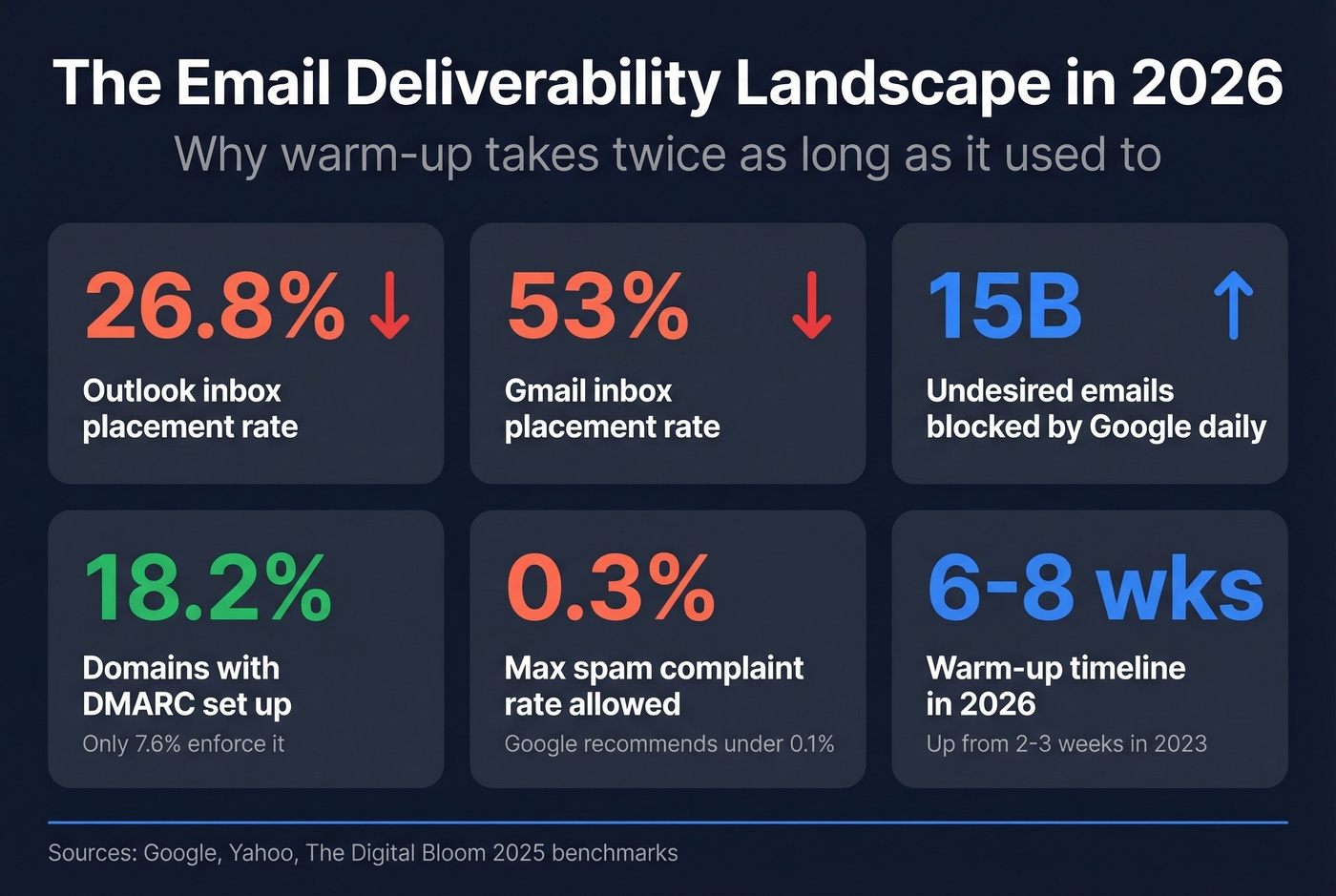
In February 2024, Google and Yahoo enforced new bulk sender requirements: SPF, DKIM, and DMARC became mandatory for anyone sending 5,000+ emails per day. Spam complaint rates must stay below 0.3% - Google recommends under 0.1%. One-click unsubscribe became required for bulk senders by June 2024, and Gmail tightened enforcement again by November 2025.
The monitoring landscape shifted too. On Sept 30, 2025, Google Postmaster Tools V2 replaced the old version, reducing direct visibility into domain and IP reputation dashboards. You're now working with compliance-oriented metrics instead of the granular reputation signals teams relied on for years. That's a real problem during warm-up, when you need the most visibility into what's happening.
Meanwhile, DMARC adoption sits at just 18.2% of the top 10 million domains. Only 7.6% enforce it with quarantine or reject policies. Inbox providers are cracking down harder on unauthenticated senders because so few domains bother to authenticate. If you do authenticate properly, you're already ahead of 80% of sending domains.
We've watched warm-up timelines roughly double over the past two years. The practitioner consensus on r/coldemail confirms it: what worked in three weeks in 2023 now takes six to eight. M365 filters are particularly aggressive.
Look - most teams don't have a warm-up problem. They have a patience problem. The infrastructure and the process are straightforward. What kills domains is the pressure to "just start sending" before the domain is ready.
Authentication Setup
Every warm-up guide says "set up SPF, DKIM, and DMARC." Almost none explain the failure modes that actually break warm-up.
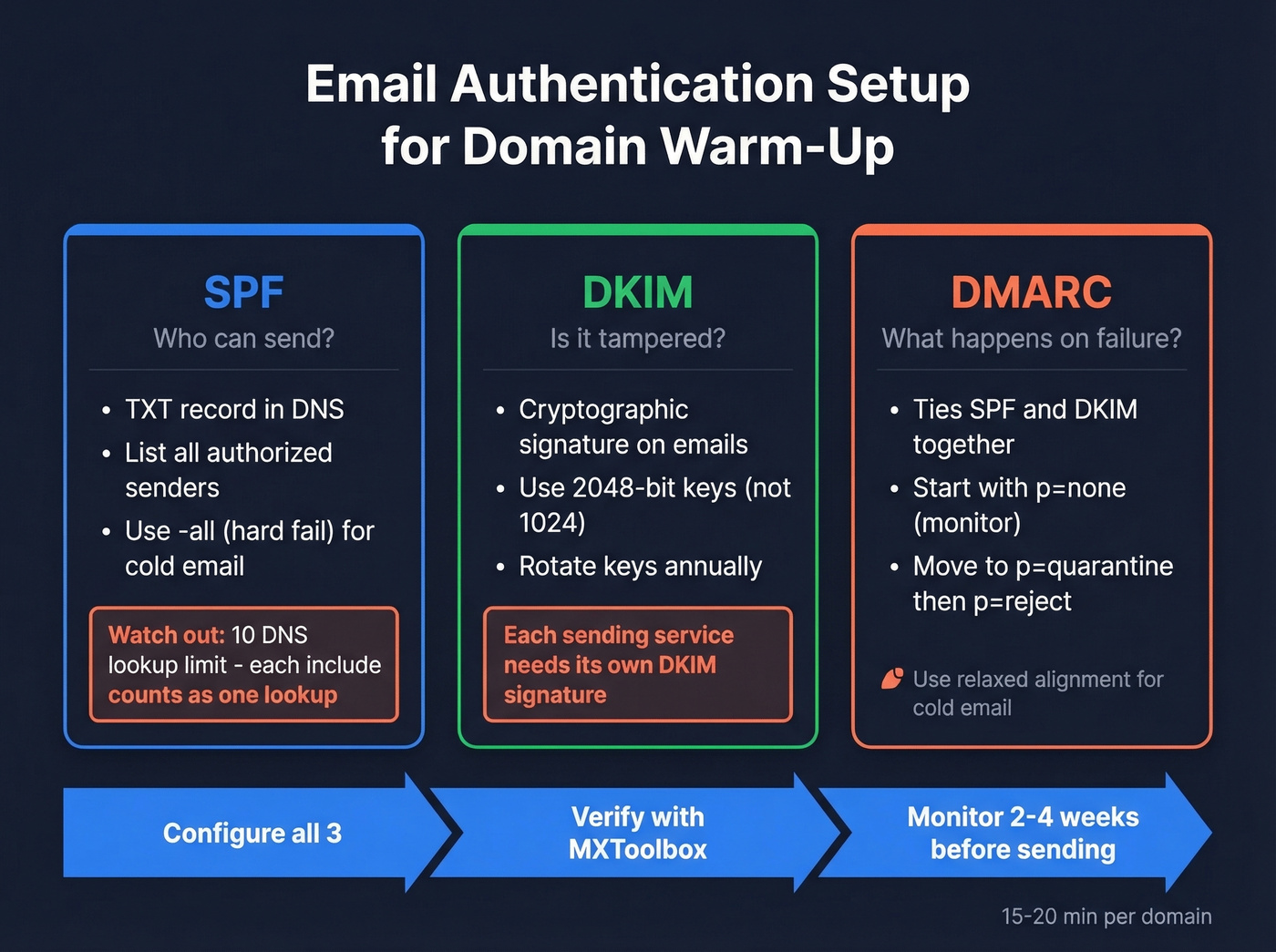
SPF tells inbox providers which servers are authorized to send email from your domain. Add a TXT record to your DNS with your sending services listed. Use the -all qualifier for cold email - this tells providers to treat anything not explicitly authorized as a hard fail.
The common mistake: exceeding the 10 DNS lookup limit. Every include: statement in your SPF record counts as a lookup. If you're using Google Workspace, your cold email tool, and a transactional email service, you can hit this limit fast. Exceeding it causes a permanent error that breaks your SPF - and you won't know until your emails start landing in spam.
DKIM adds a cryptographic signature to your emails proving they haven't been tampered with. Use 2048-bit keys, not 1024 - those are increasingly treated as weak. Rotate keys annually. The failure mode here: configuring DKIM for Google Workspace but forgetting to set it up for your cold email tool. Each sending service needs its own DKIM signature. One unsigned service can tank your authentication score.
DMARC ties SPF and DKIM together and tells providers what to do with emails that fail authentication. Start with p=none to monitor, watch your reports for two to four weeks, then move to p=quarantine, and eventually p=reject. Use relaxed alignment for cold email - strict alignment causes false failures when emails route through third-party tools.
Before proceeding, run your domain through MXToolbox and verify all three records pass. Plan 15-20 minutes per domain. Don't skip it.
Week-by-Week Ramp Schedule
Here's the ramp schedule that works in 2026. It's more conservative than what you'll find in most guides - and that's the point.
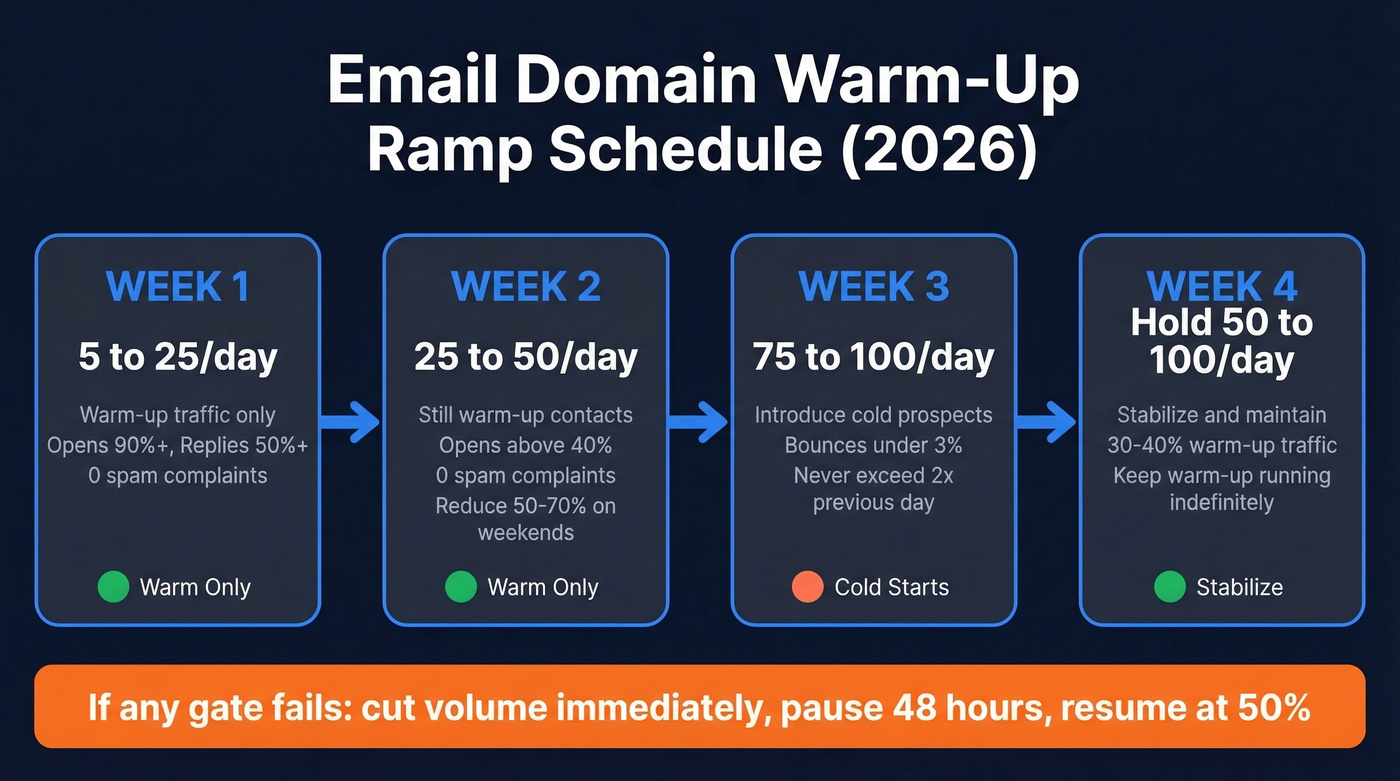
| Week | Daily Volume | Metric Gates | If Gates Fail |
|---|---|---|---|
| Week 1 | 5 → 25/day | Opens 90%+, replies 50%+, 0 spam | Cut to day-1 volume |
| Week 2 | 25 → 50/day | Opens >40%, 0 spam complaints | Pause 48hrs, resume at 50% |
| Week 3 | 75-100/day | Bounces <3%, complaints 0 | Drop to Week 2 levels |
| Week 4 | Stabilize 50-100/day | 30-40% warm-up traffic maintained | Hold, don't increase |
Week 1 is all warm-up traffic - you're sending to known contacts who'll open and reply. Space sends 2-3 minutes apart. Don't batch them. Start at 5 per day and work up to 25 by day seven.
Week 2 pushes to 50/day. If opens drop below 40% or you get a single spam complaint, pause for 48 hours and resume at half volume. Reduce volume 50-70% on weekends - don't stop completely, but don't maintain weekday pace either.
Week 3 is where you introduce cold prospects for the first time. On Google Workspace or Outlook, you can push to 75-100/day. Other providers, stay under 50. The critical rule: never exceed 2x your previous day's volume. A jump from 40 to 100 in one day is exactly the kind of spike that triggers throttling. Microsoft inboxes are the hardest to crack - some practitioners report needing 2x the warm-up time for Outlook/M365 compared to Gmail.
Week 4 is about stabilization. Hold at 50-100/day and keep 30-40% of your volume as warm-up traffic.
Here's what most people miss: warm-up doesn't end at day 30. Instantly recommends maintaining a 1:1 warm-up-to-campaign ratio after day 14, and keeping warm-up running indefinitely. Stopping entirely can cause reputation decay within weeks.
How Long Does Warm-Up Actually Take?
It depends on your starting point.
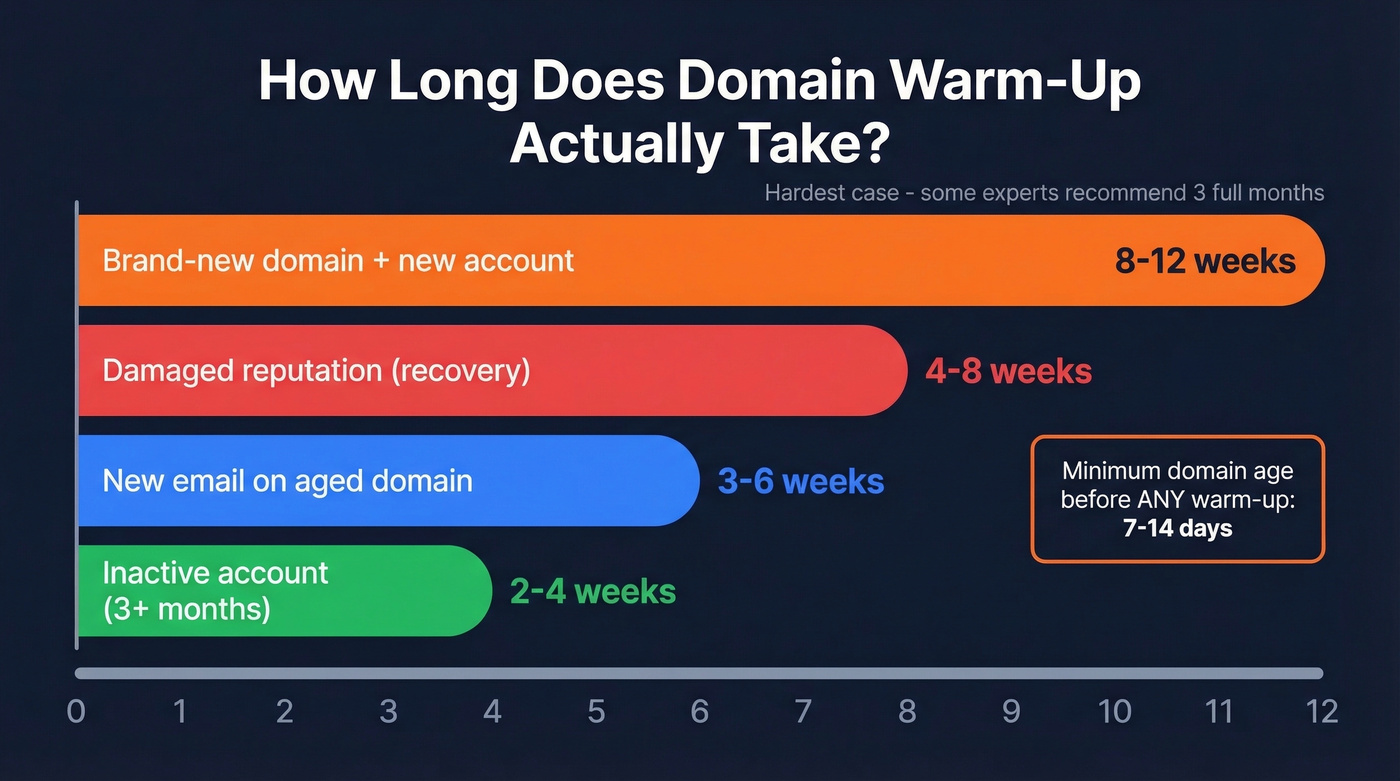
| Scenario | Timeline |
|---|---|
| Brand-new domain + new account | 8-12 weeks |
| New email on aged domain | 3-6 weeks |
| Inactive account (3+ months) | 2-4 weeks |
| Damaged reputation | 4-8 weeks |
Brand-new domains are the hardest case. Woodpecker recommends a full three months before trusting a brand-new domain with real outbound volume - and that's the safest bet if you're building infrastructure from scratch. The minimum domain age before starting any warm-up is 7-14 days. Buying a domain on Monday and sending warm-up emails on Tuesday is a fast track to the spam folder.

One bad import with a 6% bounce rate can undo six weeks of careful warm-up. Prospeo's 5-step email verification delivers 98% accuracy - with catch-all handling, spam-trap removal, and honeypot filtering built in. Every record refreshes every 7 days, not every 6 weeks.
Stop burning warmed domains on unverified contact lists.
Manual vs. Automated Warm-Up
Manual warm-up means sending real emails to contacts who engage. You know exactly who's receiving your emails and the engagement is genuine. The downside: it doesn't scale past two or three domains without eating your entire week.
For most teams managing multiple domains, automated tools are the practical choice. But even with automation, supplement with some manual sends during week one. Real replies from real contacts carry more weight than simulated engagement from a warm-up network.
Monitoring Your Warm-Up
Google removed direct reputation dashboards from Postmaster Tools on Sept 30, 2025. You're flying partially blind during the most critical phase of warm-up. Frustrating, but there are workarounds.
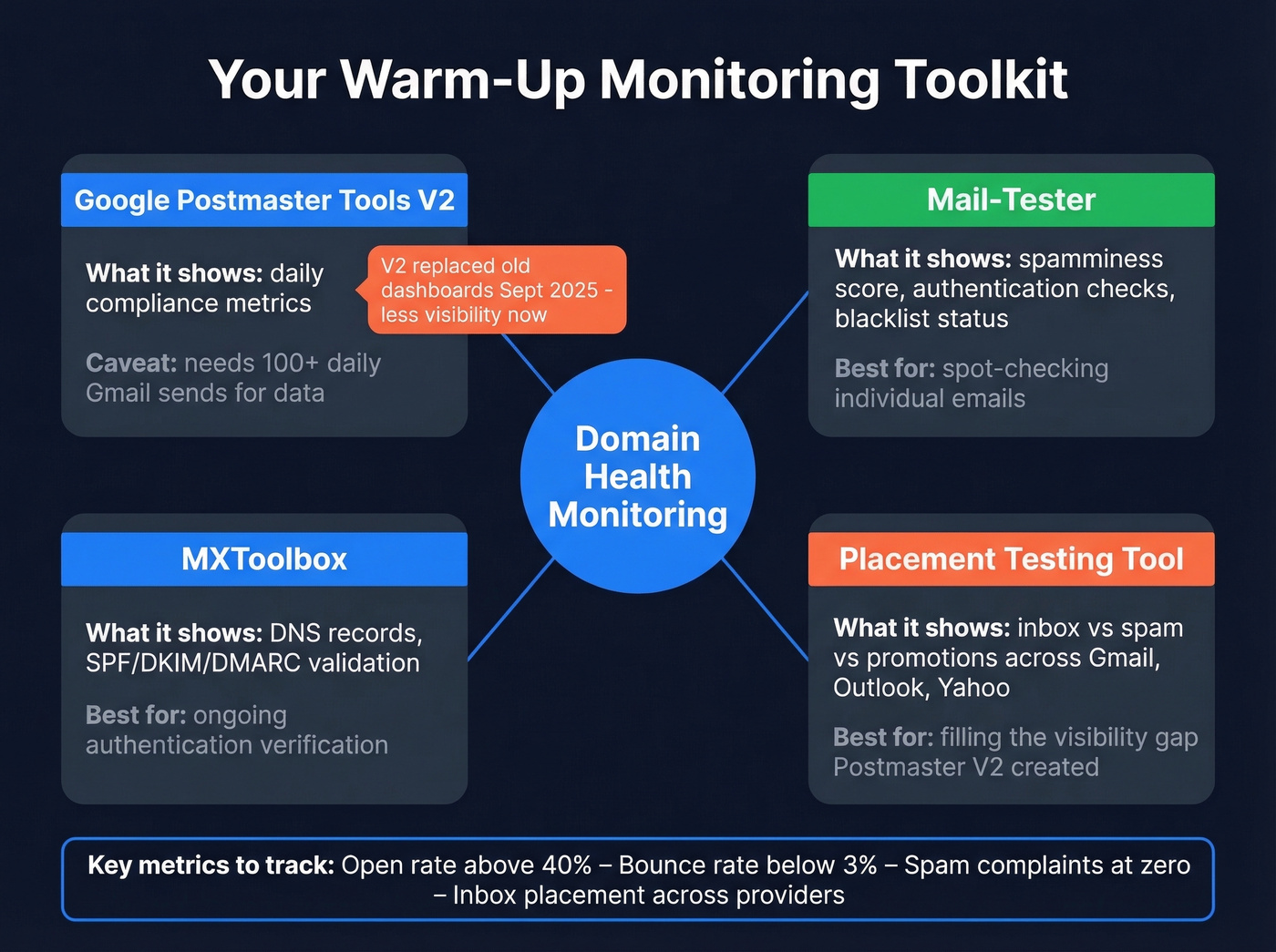
Start with Google Postmaster Tools V2. Add your domain, verify via DNS TXT record - propagation takes up to 48 hours - and you'll get daily updates with a 24-48 hour lag. The catch: you need roughly 100+ daily messages to unique Gmail recipients before data shows up consistently. During early warm-up, you'll likely see nothing at all.
Supplement with Mail-Tester for spamminess scoring across authentication, content, and blacklist checks. Use MXToolbox for ongoing DNS and authentication verification. And consider a placement testing tool to fill the visibility gap that Postmaster V2 created - you want to know whether your emails are hitting inbox, spam, or promotions across Gmail, Outlook, and Yahoo, not just whether your authentication passes.
Mistakes That Kill Your Domain
The single most common warm-up killer we see is unverified data. Only 23.6% of senders verify their lists before campaigns. The other 76.4% are gambling with their domain reputation every time they hit send. Here's what destroys domains repeatedly:
Sending to unverified lists. A bounce rate above 3% during warm-up is a warning. Above 5%, you've done real damage. One bad CSV import with outdated addresses can undo six weeks of careful ramp-up. Run every list through verification before it touches your warmed domain - Prospeo's 5-step verification catches catch-all domains, spam traps, and honeypots at roughly $0.01 per email. (If you need bounce benchmarks and what the codes mean, see bounce rate.)

Skipping authentication. No SPF, DKIM, or DMARC means you're invisible to inbox providers' trust systems. You can't warm up what they can't verify. (If you're troubleshooting, start with verify DKIM and DMARC alignment.)
Ramping too fast. Going from 10 to 100 emails in a day is the single fastest way to trigger throttling. Never exceed 2x your previous day's volume. (More on safe sending limits: email velocity.)
Using your primary domain. If your cold outreach domain gets flagged, your main business domain stays clean. Always use a secondary or lookalike domain. This isn't optional.
Stopping warm-up after day 30. Reputation decays. Keep 30-40% of daily volume as warm-up traffic indefinitely.
Inconsistent sending patterns. Blasting 100 emails on Monday, zero on Tuesday, 80 on Wednesday looks automated. Inbox providers notice. Send consistently every day, including weekends at 50-70% of weekday volume.
No personalization or conversational threads. Warm-up emails that look like templates get treated like templates. Create natural reply chains that mimic real conversations. (If you need a system, use personalized outreach.)
Ignoring bounce rate gates. If bounces cross 3%, don't hope it'll improve. Cut volume immediately and clean your list before resuming.
You just gated every volume increase on bounces under 3%. Now make sure your contact data holds that line. Prospeo's 143M+ verified emails keep bounce rates under control - teams like Snyk dropped from 35-40% to under 5%, and Stack Optimize runs 94%+ deliverability across every client.
Verify before you send. Your warm-up depends on it.
Scaling Your Infrastructure
Once your first domain is warmed, you'll want to scale. Here's the math that practitioners on r/coldemail use: 2-3 inboxes per domain, 10-15 emails per account per day. A domain with three accounts sends 30-45 emails daily. To send 400 emails per day, you need roughly 10-12 domains.
Start with one email account per domain. Add a second after one to two months of clean sending. Don't rush the multi-inbox setup.
For architecture, split your domains by function - use subdomains or separate domains for transactional email, marketing, and cold outreach. If your cold outreach domain gets flagged, your transactional emails like password resets and invoices keep flowing. Never use your main business domain for lead generation. We've seen teams spend months building infrastructure only to torch it with a single unverified import, which is why running every new prospect list through verification before importing isn't a nice-to-have - it's table stakes. (If you're building sequences at scale, pair this with a B2B cold email sequence playbook.)
Tips for Long-Term Success
Beyond the week-by-week schedule, these separate teams that scale smoothly from those that keep rebuilding:
- Stagger domain purchases. Buy domains one to two weeks apart so they don't all enter warm-up simultaneously - inbox providers notice clusters of new domains from the same registrant.
- Diversify your sending providers. Split domains across Google Workspace and Microsoft 365 to reduce single-provider risk.
- Track metrics per domain, not in aggregate. One underperforming domain can hide behind the averages of your healthy ones.
- Document your process. When you're managing ten or more domains, a repeatable playbook prevents mistakes during handoffs between team members.
Best Warm-Up Tools in 2026
We've run campaigns across most of these. The honest answer: the tool matters far less than the infrastructure underneath it. A $25/month tool on a well-architected multi-domain setup beats a $429/month tool running on a single domain every time.
| Tool | Starting Price | Best For |
|---|---|---|
| Instantly | $30/mo (warmup incl.) | All-in-one outreach + warmup |
| MailReach | $25/mo per inbox | Standalone warmup on a budget |
| Warmbox | $15/mo (1 inbox) | Agencies managing many domains |
| Lemwarm | $29/mo per account | Lemlist users |
| TrulyInbox | $29/mo unlimited | High inbox count, tight budget |
| Warmy.io | $49-$429/mo per mailbox | Enterprise analytics needs |
When evaluating tools, look for a real inbox network running on both Google Workspace and Office 365, human-like send automation rather than rigid schedules, inbox placement testing, and health monitoring with alerts. Instantly claims a network of 4.2M+ accounts. MailReach's network runs 30,000+ real inboxes across both providers. Bigger networks mean more diverse engagement signals, which is what inbox providers want to see.
Let's keep the recommendation simple: Instantly or MailReach for simplicity, Warmbox for agencies juggling dozens of domains, TrulyInbox if you need unlimited mailboxes without per-inbox pricing. Skip Warmy.io unless you genuinely need enterprise-grade analytics - the per-mailbox pricing adds up fast when you're managing 10+ domains.
FAQ
Can I skip warm-up if my domain is old?
No. Any domain that hasn't sent volume recently needs warm-up. Inactive accounts dormant for three or more months still require 2-4 weeks of gradual ramp-up before running real campaigns. Domain age gives you a head start on baseline trust, but it's not a free pass to blast full volume on day one.
How many emails per day during warm-up?
Start at 5 per day and increase gradually to 25-50 by week two. Never exceed 2x your previous day's volume - that's the rule that prevents throttling. Most cold email accounts stabilize at 50-100 per day after four to six weeks.
Should I warm up my primary business domain?
No. Always use a secondary or lookalike domain for cold outreach. If your sending domain gets flagged or blacklisted, your primary domain's reputation stays clean. Transactional emails, client communications, and marketing all keep flowing normally on your main domain.
Does warm-up ever end?
After the initial 4-8 week ramp, keep 30-40% of your daily volume as warm-up traffic indefinitely. Stopping entirely can cause reputation decay within weeks. Treat it as ongoing maintenance, not a one-time project.
How does bad data affect warm-up?
A bounce rate above 3% during warm-up is a warning signal; above 5% can undo weeks of progress. Verify every email address before sending. Catching invalid addresses, spam traps, and honeypots before they reach your warmed domain is the difference between scaling smoothly and starting over from scratch.