

HubSpot Lead Generation: What Actually Works (and What Breaks)
You've been on HubSpot for six months. The portal's set up, the team's trained, and the dashboard looks impressive - but pipeline hasn't moved. Leads trickle in, half of them are junk, and sales keeps asking why they're getting contacts with no phone numbers and Gmail addresses.
The problem isn't HubSpot lead generation itself. It's how most teams use it.
What follows: the tactical setup, scoring models, enrichment stack, and tier decisions that separate HubSpot portals generating pipeline from ones collecting form fills.
The Quick Version
- Fix the fundamentals first. Most HubSpot portals underuse basic lead capture - tracking code missing, forms disconnected, no pop-ups. Get these right before adding complexity.
- Know what you're paying for. Lead scoring and workflows require Marketing Hub Professional ($890/mo). Don't buy features you won't activate for six months.
- HubSpot manages leads; it doesn't create good data. Verify and enrich contacts before they enter your workflows. Bad emails and missing phone numbers will tank everything downstream.
The Setup Checklist Most Teams Skip
The #1 complaint on r/hubspot about generating leads? It's not missing features. It's that teams don't turn on the features they already have. Forms not connected. Pop-ups disabled. Tracking code missing on half the site.
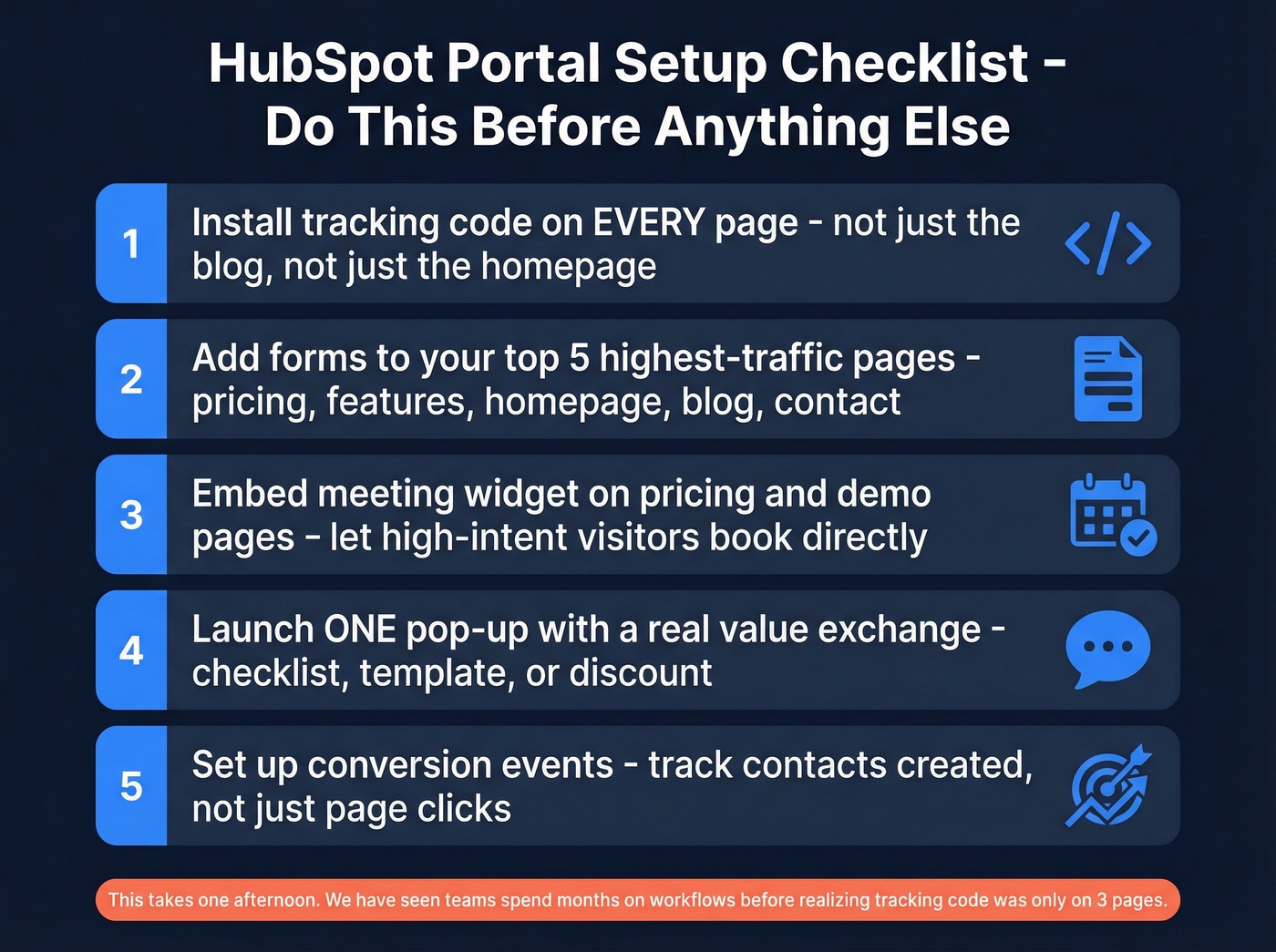
Here's the baseline every portal needs before anything else matters:
- Install the HubSpot tracking code on every page. Not just the blog. Not just the homepage. Every page. Without it, you're blind to visitor behavior and can't score engagement.
- Add a form to your highest-traffic pages. "Request pricing," "Talk to sales," "Get the guide" - whatever fits. If your top five pages don't have a conversion path, you're leaking leads.
- Test the meeting widget. Embed it on your pricing and demo pages. Let high-intent visitors skip the form-to-email-to-calendar dance.
- Launch one pop-up or slide-in with a clear offer. Not five. One. Test it on a high-traffic page with an actual value exchange - checklist, template, discount.
- Track conversions, not just clicks. Set up conversion events in HubSpot so you know which pages and CTAs actually produce contacts, not just traffic.
This takes an afternoon. We've seen teams spend months building workflows before realizing their tracking code was only on three pages.
Core Lead Capture Features
Forms
Navigate to Marketing > Forms > Create form. HubSpot gives you embedded forms and landing pages on the free tier, and you can expand into more advanced capture options as you move up plans.
The key decision is field count. Per HubSpot's own research, 30.7% of marketers say four fields is the ideal number on a landing page form, and the data backs that up - every field you add past four drops conversion rates measurably. Stick to first name, last name, work email, and company name for top-of-funnel. Add job title or phone number only on high-intent forms like demo requests and pricing pages.
Landing Pages
Navigate to Content > Landing Pages > Create. HubSpot's landing page builder is solid - drag-and-drop, mobile-responsive, and integrated with your forms and CRM out of the box.
The benchmarks worth knowing: average landing page conversion rate across industries is 5.89%. Hit 10% and you're doing well. Signup-style landing pages can reach 23%, which sounds wild until you realize those pages are usually targeting people who already want the thing. Use Smart Content (available on paid tiers) to personalize headlines by visitor segment, and run A/B tests on CTAs and hero copy. A 2% conversion rate lift on a page getting 5,000 visits/month means 100 extra leads - that math adds up fast.
Email Nurture Workflows
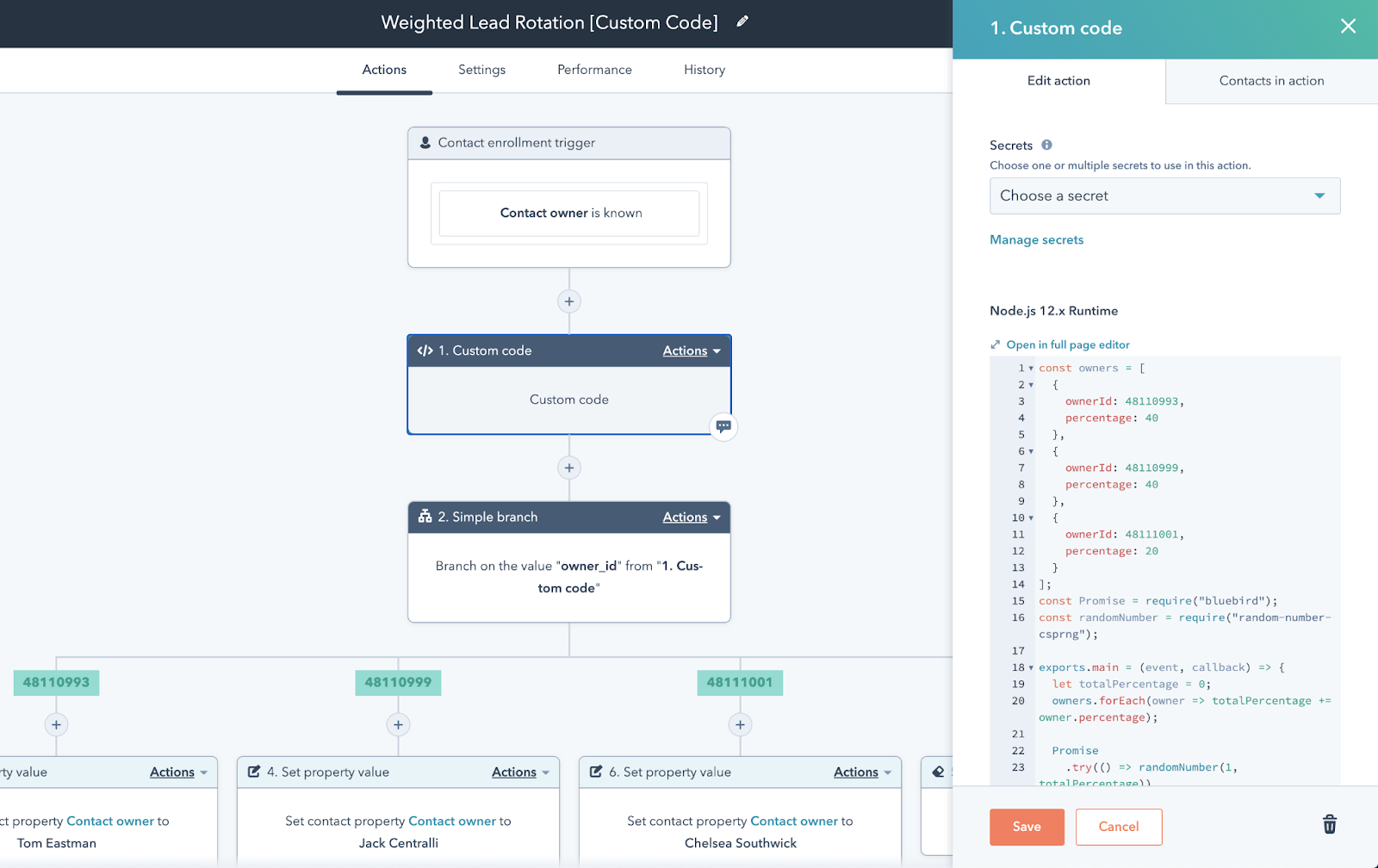
Navigate to Automation > Workflows > Create Workflow. Here's a concrete starter workflow: form submission, 2-minute delay, welcome email. If opened within 24 hours, assign to a sales rep as a task. If not opened, send a follow-up three days later.
Workflows require Marketing Hub Professional or higher.
Live Chat and Chatbots
One of the most underused features in HubSpot. Place a chatbot on your pricing page with two or three qualification questions - company size, use case, timeline - then route qualified visitors directly to a sales rep's calendar. High-intent pages like pricing and demo already have visitors ready to talk. Don't make them fill out a form and wait 24 hours for a reply.
Lead Scoring: Setup and Mistakes
Lead scoring is where HubSpot starts earning its keep - and where most teams get it wrong.
What's Available and What's Gated
Lead scoring requires Marketing Hub Professional or Enterprise (or Sales Hub Professional/Enterprise for company and deal scoring). There's no scoring on Free or Starter. AI-powered scoring models are Enterprise-only. You can build up to 25 different scoring models with up to 100 filter groups per model.
How to Structure Your Scores
HubSpot supports three score types: engagement scores (page visits, email opens, CTA clicks), fit scores (job title, company size, revenue), and combined scores that blend both.
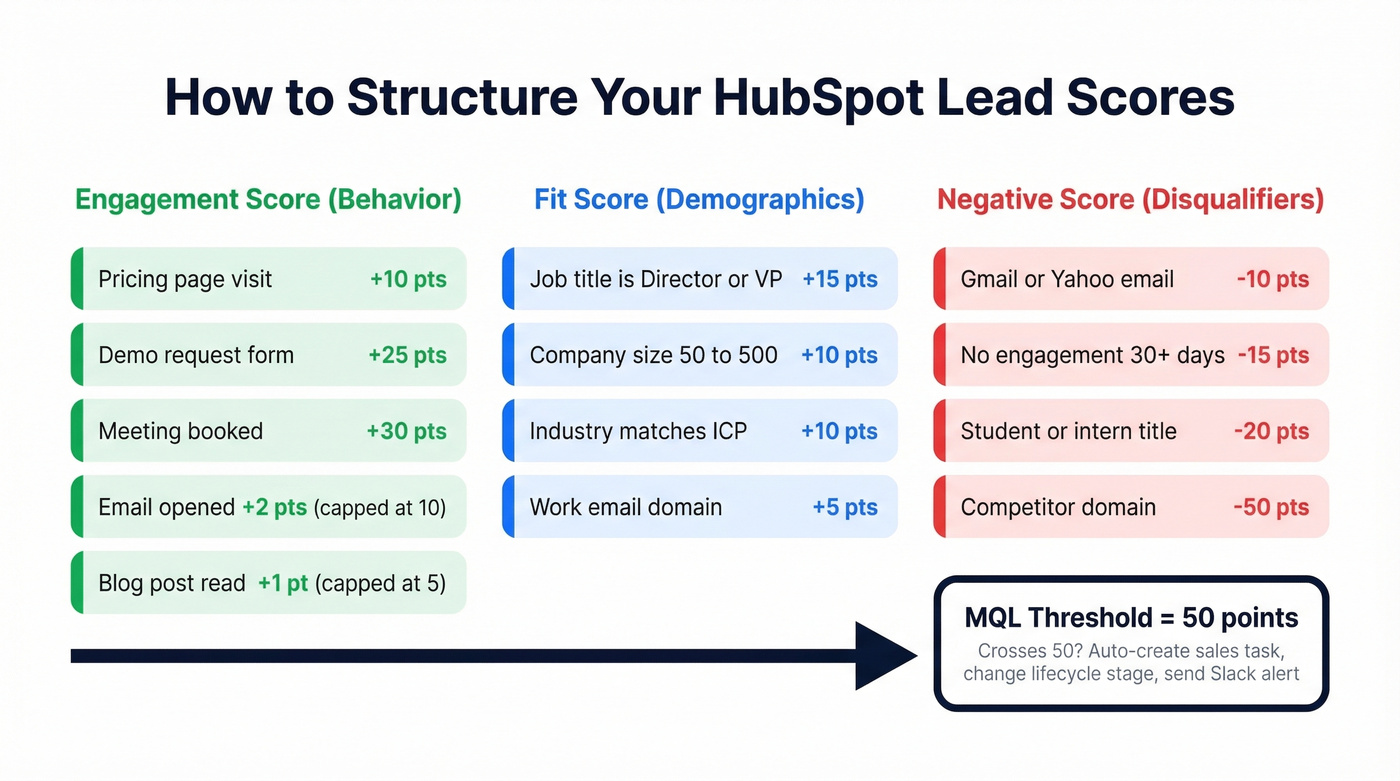
Use score groups with caps. Weight "conversion" events heavily - form submissions, meeting bookings, pricing page visits. Cap "awareness" events like blog views and email opens so a contact who reads 50 blog posts doesn't outscore someone who requested a demo once. We've seen this exact scenario play out at a mid-market SaaS company where their top-scored "lead" was actually a competitor's intern doing research.
The Negative Scoring Rule
Lead scoring without negative scoring is a vanity metric.
If you're only adding points, every contact eventually looks qualified. Subtract points for inactivity (no engagement in 30+ days), bad-fit signals (student email domains, wrong industry, no decision-making authority), and invalid contact details.
Set a clear MQL threshold with your sales team - say, 50 points - and define what happens when a contact crosses it. Automatic task creation for a rep, lifecycle stage change, Slack notification. The handoff has to be instant and unambiguous, or scoring is just a number nobody looks at.

HubSpot manages your leads - but it won't fix missing phone numbers or unverified emails. Prospeo's native HubSpot integration enriches every contact with 50+ data points, 98% email accuracy, and 125M+ verified mobile numbers. At $0.01 per email, it costs less than one bad bounce.
Stop sending workflows to dead emails. Enrich before you automate.
Enriching Your HubSpot Leads
HubSpot has two built-in enrichment tools, and neither one fully solves the data quality problem.
HubSpot Insights auto-pulls company-level data (industry, revenue range, headcount) based on domain. It's free and automatic, but it's primarily company-level - you won't get direct dials, verified emails, or contact-level details from it.
Breeze Intelligence is HubSpot's post-Clearbit acquisition play. It enriches both contacts and companies, offers buyer intent signals, and can shorten forms by auto-filling known fields. It runs on a credit-based model, so costs scale with volume. Coverage gaps remain, especially for mobile numbers.
Here's the thing: we've watched teams import 2,000 contacts into HubSpot, launch a nurture sequence, and bounce 400 emails in the first send. That's a 20% bounce rate, and the root cause is almost always unverified data entering the CRM. Prospeo's native HubSpot integration enriches contacts with 50+ data points per record - 98% email accuracy and 125M+ verified mobile numbers on a 7-day refresh cycle. For teams running outbound sequences out of HubSpot, verified data is the difference between pipeline and domain blacklists.
What Tier Do You Actually Need?
| Feature | Free | Starter (~$20/mo) | Professional ($890/mo) | Enterprise (~$3,600/mo) |
|---|---|---|---|---|
| Forms | ✓ | ✓ | ✓ (advanced) | ✓ (advanced) |
| Landing Pages | ✓ | ✓ | ✓ | ✓ |
| Smart Content | ✗ | ✗ | ✓ | ✓ |
| Email Sends | Limited | 5x contact tier | 10x contact tier | 10x contact tier |
| Workflows | ✗ | ✗ | ✓ | ✓ |
| Lead Scoring | ✗ | ✗ | ✓ | ✓ |
| AI Scoring | ✗ | ✗ | ✗ | ✓ |
| A/B Testing | ✗ | ✗ | ✓ | ✓ |
| Price | $0 | ~$20/mo | $890/mo + $3K onboarding | ~$3,600/mo |
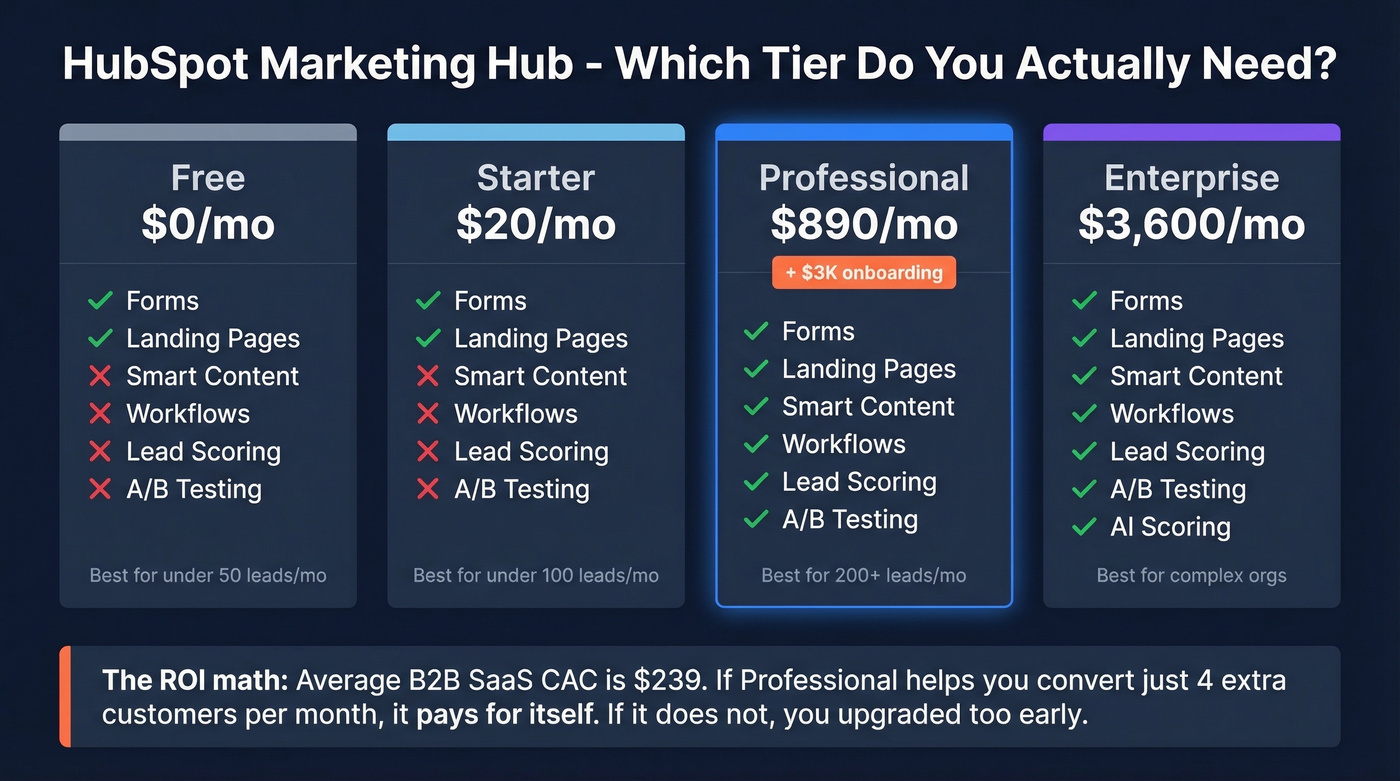
When Free or Starter is enough: You're a small team collecting inbound leads through forms, using live chat, and manually qualifying. You don't need workflows or scoring yet because your volume is under 100 leads/month and a human can review them.
When you need Professional: You're running multi-step nurture sequences, need lead scoring to prioritize handoffs, and want A/B testing on landing pages and emails. The $890/mo plus $3,000 onboarding fee is real money - but for teams generating 200+ leads/month, the automation ROI is clear.
Let's be honest about the jump from Starter to Professional. It's the most painful pricing cliff in SaaS. You go from ~$20/mo to $890/mo, plus a $3,000 onboarding fee. Don't upgrade until you've maxed out what Free/Starter can do.
Here's the ROI math that justifies the jump: B2B SaaS companies average a $239 CAC. If Professional's automation helps you convert just four extra customers per month, it pays for itself. If it doesn't, you upgraded too early.
Mistakes That Kill Your Pipeline
1. No shared lead definitions. Marketing calls everything with an email a "lead." Sales wants BANT-qualified opportunities. If you haven't agreed on what an MQL and SQL mean in your HubSpot portal - with specific property values and scoring thresholds - you're setting up a blame game, not a pipeline.
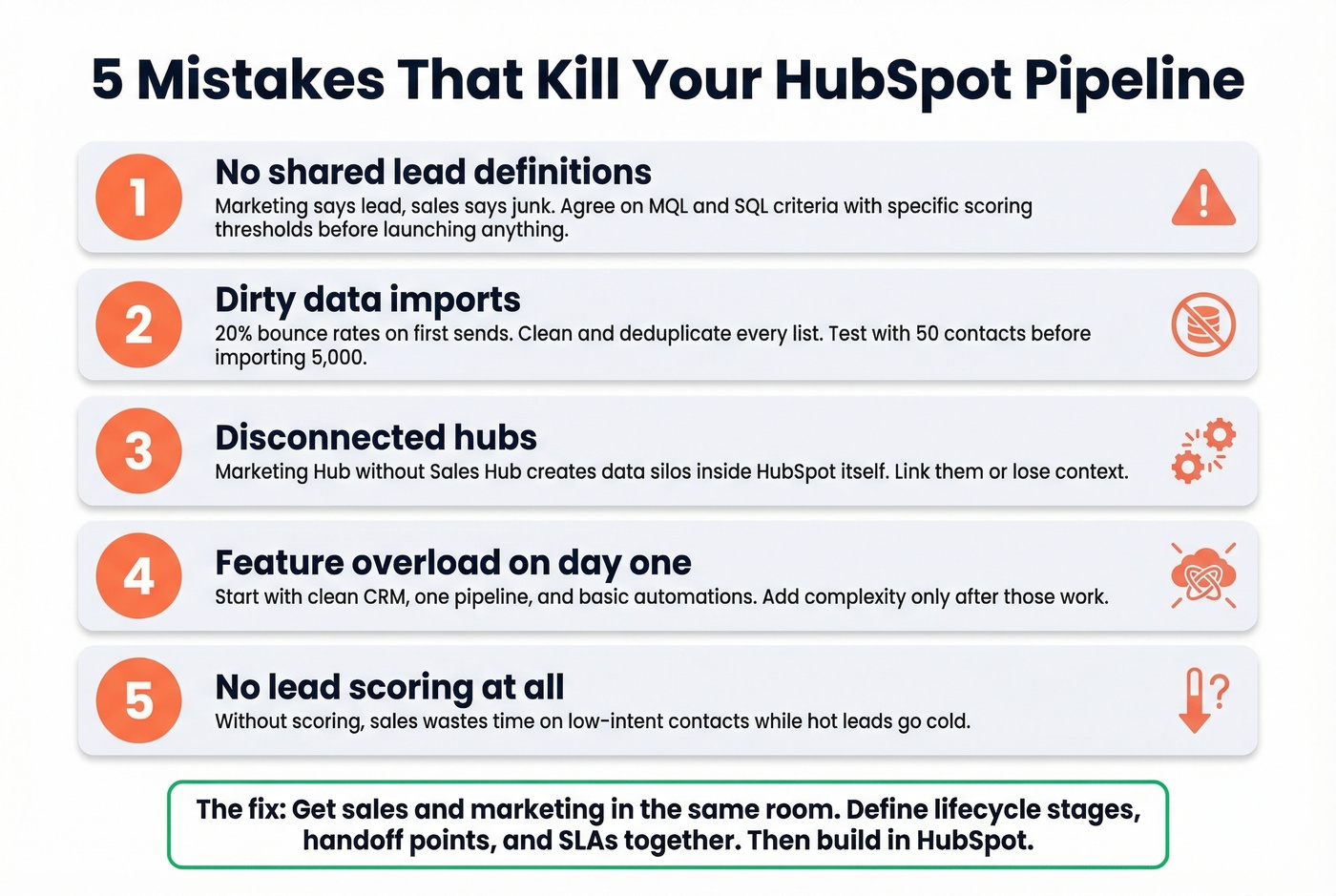
2. Dirty data imports. Every data migration and list import should be cleaned and deduplicated before it touches HubSpot. Test your field mapping with a 50-contact sample before importing 5,000 records with mismatched properties.
3. Disconnected hubs. Teams that buy Marketing Hub without linking it to Sales Hub create data silos within HubSpot itself. If marketing doesn't know when sales follows up, and sales doesn't know what marketing promised, the lead experience is broken regardless of your tech stack. Define lifecycle stages, handoff points, and SLAs together.
4. Feature overload. The biggest implementation mistake on r/hubspot is turning everything on at once. Start with three things: a clean CRM, one pipeline, and foundational automations. Add complexity only after those are working.
5. Ignoring lead scoring. Without scoring, sales wastes time on low-intent contacts while high-intent leads go cold. Even a basic model - pricing page visit = 10 points, demo request = 25 points, Gmail address = -5 points - is better than no model at all. (If you want a deeper framework, see our lead scoring guide.)
6. No attribution tracking. If you can't tell which channels and campaigns produce revenue (not just leads), you can't optimize spend. Set up conversion and source reporting before you scale, not after. (A clean lead generation workflow makes attribution easier to maintain.)
7. Expecting instant results. HubSpot accelerates what's already working - it doesn't create demand from nothing. If you don't have product-market fit, traffic, or a clear ICP, no amount of workflow automation will save you. Use an ideal customer profile to keep targeting honest.
Building Your Lead Gen Stack
HubSpot is the hub. It's not the whole stack.
Starting from zero (~$200/mo):
- HubSpot Free (CRM + forms + live chat)
- Prospeo free tier (75 verified emails/month) for verifying contacts before they enter workflows (more options: free lead generation tools)
- Smartlead or Instantly (~$30-50/mo) for outbound sending
- Zapier free tier for connecting tools
Scaling up (~$1,000-1,500/mo):
- HubSpot Professional ($890/mo) for workflows, scoring, and A/B testing
- Prospeo paid plan (starting ~$39/mo) for bulk enrichment and native CRM integration (compare vendors in data enrichment services)
- Lemlist or Instantly for multi-channel outbound (see more outbound lead generation tools)
- Make or Zapier paid tier for complex automations
Enrichment is the step most teams skip - then wonder why their 10-step nurture sequence bounces 20% of emails. Your workflows, scoring models, and nurture sequences are only as good as the contact data feeding them. Verify before you automate. (If bounces are a recurring issue, start with email bounce rate fundamentals.)
Skip HubSpot Professional entirely if your average deal size is under $5K. A well-configured Free tier with solid enrichment data and a simple outbound tool will outperform a $890/mo portal full of workflows nobody maintains.
Lead scoring breaks when half your contacts have missing job titles, generic emails, and no direct dials. Prospeo fills those gaps automatically - 92% match rate on CRM enrichment, 7-day data refresh, and verified mobiles with a 30% pickup rate. Your scoring model is only as smart as the data feeding it.
Give your HubSpot scores real data to work with.
FAQ
Can I generate leads with HubSpot's free plan?
Yes. HubSpot Free includes forms, landing pages, live chat, and meeting scheduling, which covers basic lead capture for most early-stage teams. You lose workflows, lead scoring, and A/B testing. For capturing leads, Free works; for nurturing and qualifying them automatically, you'll need Professional ($890/mo).
How do I improve lead quality in HubSpot?
Set up lead scoring with both positive and negative criteria, enrich contacts with verified data before they enter workflows, and define MQL/SQL thresholds with sales. Bad data is the #1 quality killer most teams overlook - in our experience, teams that verify emails before import cut bounce rates from 20%+ to under 5%.
Is HubSpot Professional worth $890/mo?
For teams generating 200+ leads/month, yes. With a $239 average B2B SaaS CAC, converting just four extra customers monthly covers the cost. Below 100 leads/month, maximize Free or Starter first - the jump is the steepest pricing cliff in SaaS.
What's the biggest HubSpot lead generation mistake?
Turning everything on at once. The consensus on r/hubspot is consistent: start with a clean CRM, one pipeline, and basic automations. Teams that launch 15 workflows in week one end up with a tangled mess nobody understands three months later.