

Inbox Checker: How to Test Where Your Emails Actually Land in 2026
You send a test email through Mail-Tester, get a 6.5 out of 10, and your stomach drops. You start rewriting subject lines, swapping domains, tweaking DNS records - all before asking the one question that actually matters: is 6.5 even bad? Most inbox checker results create panic without context. The score means nothing until you know what "normal" looks like and what the tool is actually measuring.
What You Need (Quick Version)
- Full inbox placement report across providers: Use GlockApps. Broadest ISP coverage, SpamAssassin score, blocklist checks, authentication verification.
- Quick spam score for a single email: Use Mail-Tester. Paste an address, send your email, get a score out of 10 in seconds.
- Before you test anything: Verify your email list. Bad addresses cause the deliverability problems inbox placement tools diagnose. Prospeo handles bulk verification with 98% email accuracy and catches spam traps automatically - there's a free tier to start.
What Is an Inbox Checker?
An inbox checker tells you where your email actually lands after a mail server accepts it. Not whether it was delivered - whether it hit the inbox, the spam folder, the Promotions tab, or vanished entirely.
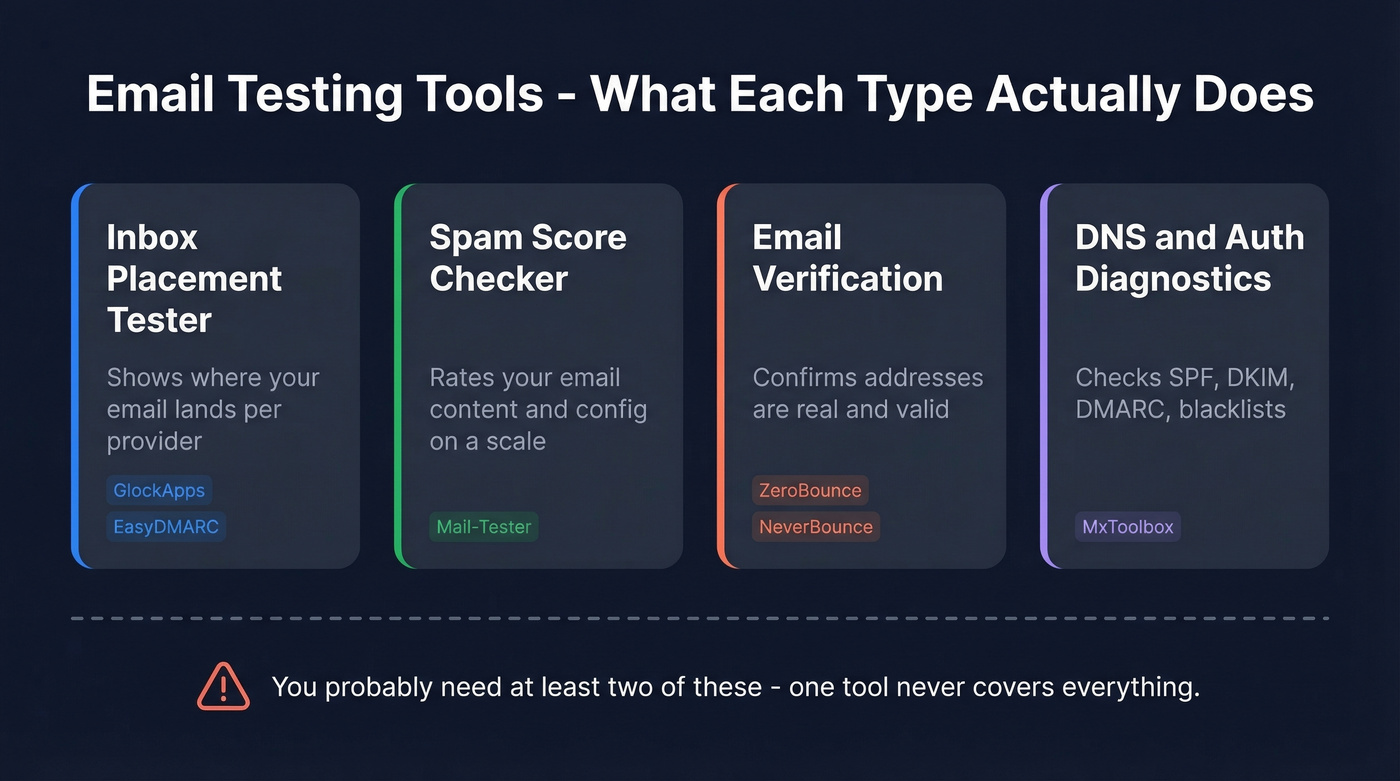
This distinction trips people up because several tools rank for this term while doing something completely different. ZeroBounce and InboxPro are email validation tools - they tell you if an address exists. That's useful, but it isn't inbox placement testing. MxToolbox runs diagnostics on your DNS and blacklist status. Also useful, also not the same thing.
Here's the quick taxonomy:
| Tool Type | What It Does | Example |
|---|---|---|
| Inbox placement tester | Shows where email lands per provider | GlockApps, EasyDMARC |
| Spam score checker | Rates email content/config on a scale | Mail-Tester |
| Email verification | Confirms addresses are valid | ZeroBounce, NeverBounce |
| DNS/auth diagnostics | Checks SPF, DKIM, blacklists | MxToolbox |
You probably need at least two of these. The mistake is thinking one tool covers everything.
How Inbox Placement Testing Works
Step 1: You get a seed list. The tool provides test email addresses spread across major providers - Gmail, Outlook, Yahoo, Office 365, and sometimes regional ISPs. Seed lists typically run around 100 mailboxes.
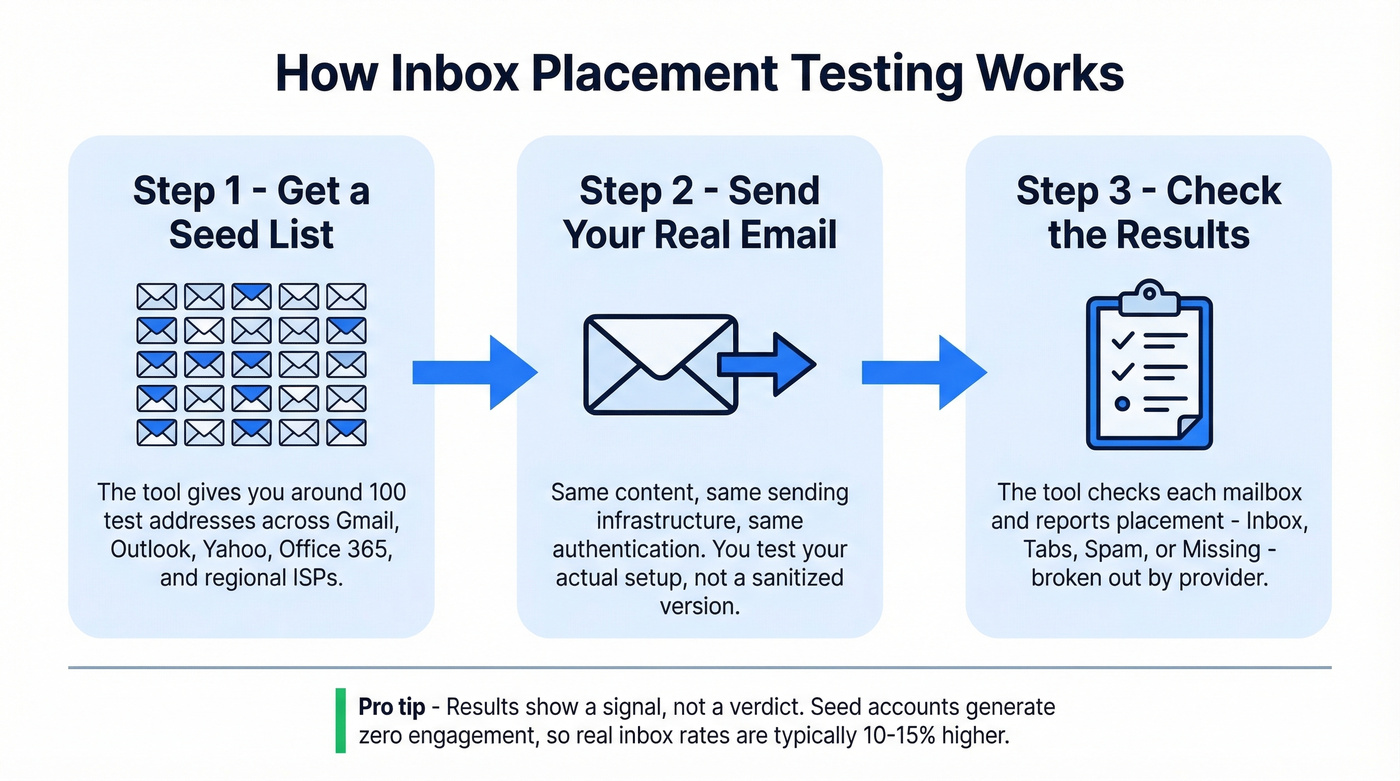
Step 2: You send your actual email to those addresses. Same content, same sending infrastructure, same authentication. You're testing your real setup, not a sanitized version of it.
Step 3: The tool checks each mailbox and reports back. GlockApps reports placement as Inbox, Tabs (Promotions, Updates), Spam, or Missing - broken out by provider. It layers on a SpamAssassin score, checks your sender IP against 50+ blocklists, verifies SPF/DKIM/DMARC, and runs content analysis on your HTML, images, and links.
EasyDMARC takes a different approach. You copy their provided recipient addresses, paste a generated code into your email body, send, then run the test. Their report shows inbox placement rate, provider breakdown, time-to-receive, sender IP, and Gmail folder categorization - Primary vs. Promotions vs. Updates vs. Spam. It's lighter than GlockApps because it focuses purely on placement without analyzing authentication, domain reputation, or content.
Why Results Can Be Misleading
Here's the thing: every inbox placement tool has a fundamental blind spot, and most don't tell you about it.
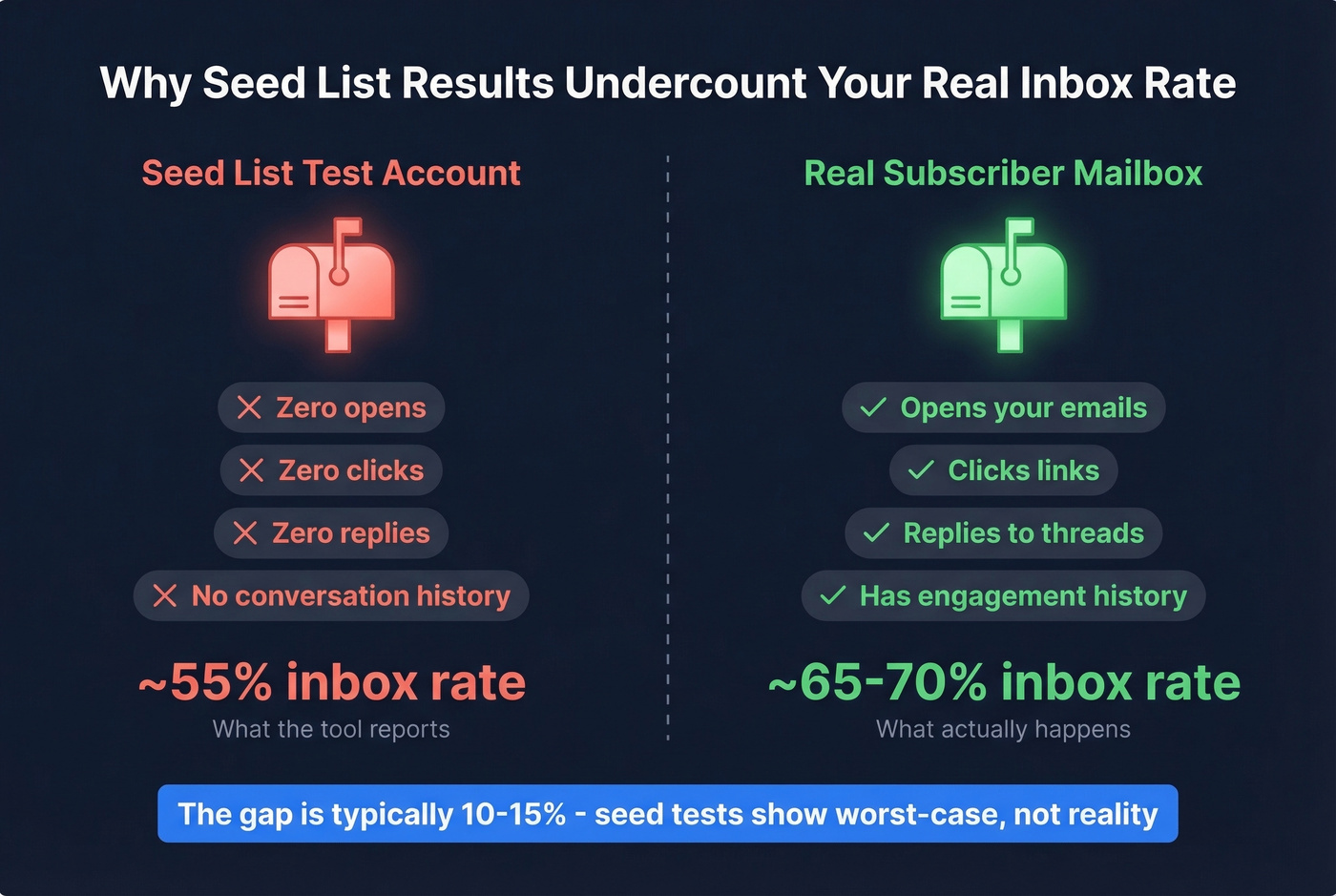
Seed-list accounts are inactive. They don't open emails, don't click links, don't reply, don't mark anything as important. But Gmail, Outlook, and Yahoo increasingly weight engagement signals - time-to-read, reply depth, conversation history - when deciding placement. Your test email generates zero engagement by definition, so it's essentially a cold email hitting a mailbox that's never interacted with you.
As Certified Senders research puts it, seed accounts don't reflect how real recipients behave. In our experience, actual deliverability runs 10-15% higher than what seed-list tools show, precisely because your real subscribers open, click, and reply - signals the test can never generate. A practitioner on r/smallbusiness made the same observation: Gmail weights engagement quality so heavily that a test email with no opens will almost always underperform real campaigns.
Sample size matters too. Around 100 seed mailboxes is standard - enough to spot major problems but not a statistically rigorous sample. Treat results as a signal, not a verdict. Some practitioners on r/coldemail argue these tools feel vague and push upgrades, which is fair criticism of the free tiers. And billing surprises are real - one Mailgun user reported a $30,000 invoice after unexpected validation overages on their account.

Inbox placement tools show you where emails land. But the #1 reason emails hit spam is bad data - invalid addresses, spam traps, and honeypots. Prospeo's 5-step verification with automatic spam-trap removal and catch-all handling eliminates those triggers before you ever hit send. 98% email accuracy, starting free.
Fix deliverability at the source - not after the damage is done.
Best Inbox Checker Tools Compared
GlockApps
GlockApps is the inbox placement tool we reach for when we need a full picture. It covers the broadest set of ISPs - major global providers plus country-specific ones - and layers inbox placement data with SpamAssassin scoring, 50+ blocklist checks, SPF/DKIM/DMARC verification, and content analysis. The Gmail Primary vs. Promotions breakdown alone is worth the price if you're running marketing campaigns.
Pricing is transparent: Free at $0 for 2 tests/month, Essential at $59/mo for 360 tests, Growth at $99/mo for 1,080 tests, Enterprise at $129/mo for 1,800 tests. The free plan is barely usable - two tests tells you nothing about trends. Essential at $59/mo is the floor for anyone sending campaigns regularly. Growth makes sense for agencies managing multiple sending accounts.
Skip this if you only need a quick content check before a single send. GlockApps is overkill for that - Mail-Tester is faster and cheaper.
Mail-Tester
Mail-Tester is the tool everyone discovers first, and for good reason. Paste a unique address, send your email to it, click "check your score," and get a number out of 10. It checks SPF/DKIM/DMARC, runs SpamAssassin, flags content issues, and tells you if you're on any blacklists.
You get a few free tests per day. Paid credits scale from $0.10/test in a 500 pack down to $0.02/test at 1M - and credits never expire. There's also a JSON API and white-label option if you're building deliverability into your own product.
The limitation is clear: Mail-Tester gives you a spam score, not inbox placement data. It can't tell you whether Gmail put your email in Primary or Promotions, or whether Outlook routed it to Junk. For actual provider-by-provider placement, pair it with GlockApps or EasyDMARC.
Use this for a 30-second sanity check before launching a campaign. Skip this if you need provider-by-provider placement data.
EasyDMARC
Great for Gmail tab testing. EasyDMARC's deliverability test shows inbox placement rate, provider breakdown, time-to-receive, sender IP, and - critically - which Gmail folder your email lands in. The workflow is more manual than GlockApps, but the report is clean.
Free with a daily test limit. Paid plans are available with custom pricing.
The tradeoff: EasyDMARC doesn't analyze authentication, domain reputation, or content. It only tells you where the email landed, not why. Pair it with MxToolbox or Mail-Tester for the full diagnostic picture.
MxToolbox
MxToolbox isn't an inbox placement tester - it's a diagnostic and monitoring tool. Header analysis, blacklist lookups, SPF/DKIM record validation, SMTP diagnostics. Think of it as the mechanic's toolkit rather than the test drive.
The free deliverability test is useful for one-off checks. Paid monitoring makes sense for ops teams managing multiple sending domains, with pricing that varies by plan.
GMass & EmailToolHub
GMass is a 100% free seed-list tester built into Gmail. It sends to a group of 15 addresses and watches results in real time, including some inboxes protected by spam filters like Barracuda, Mimecast, and Sophos. Dead simple if you're already in Gmail.
EmailToolHub is 100% free with no signup. They publish 17 test addresses directly on the page so you can start immediately. Results are minimal in detail, but when you need a quick answer without creating an account, nothing is faster.
Comparison Table
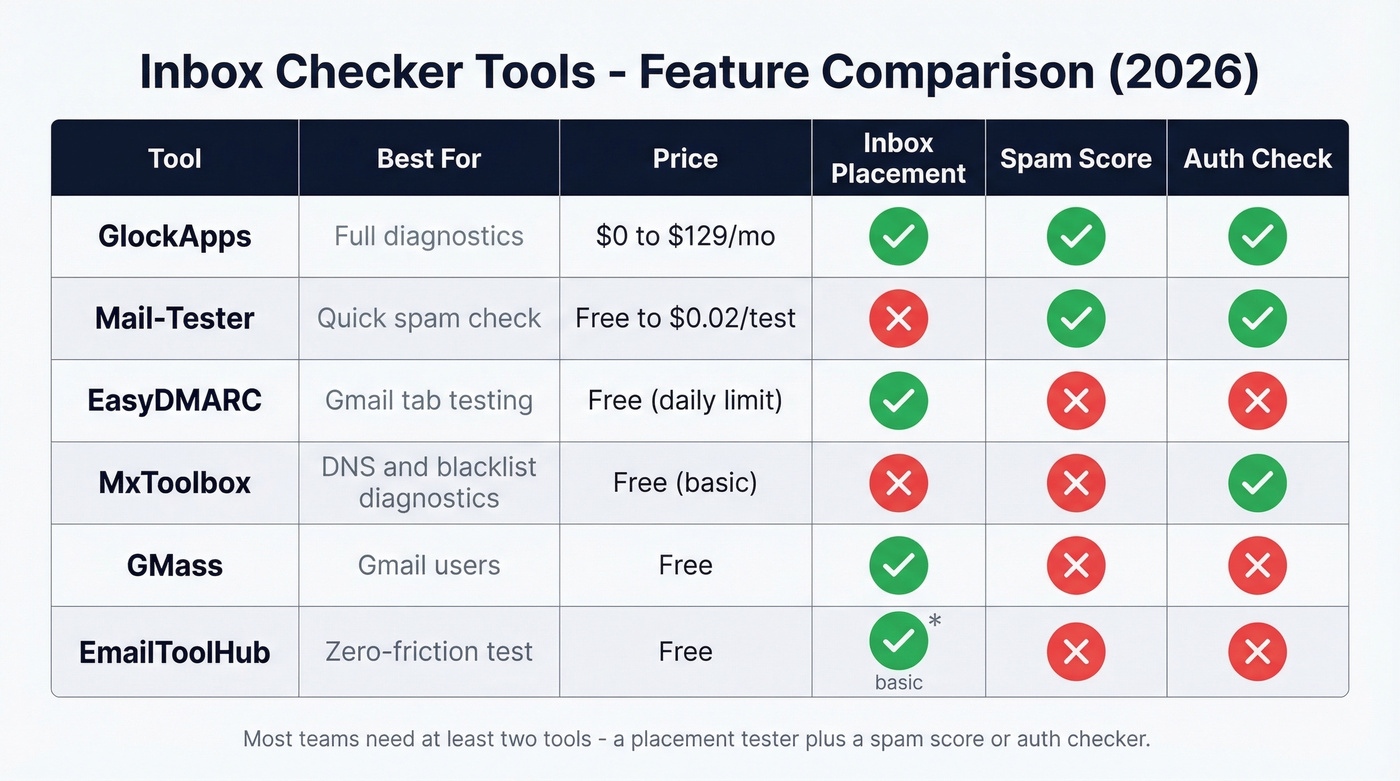
| Tool | Best For | Starting Price | Inbox Placement? | Spam Score? | Auth Check? |
|---|---|---|---|---|---|
| GlockApps | Full diagnostics | $0 (2 tests/mo) | Yes | Yes | Yes |
| Mail-Tester | Quick spam check | Free (limited/day) | No | Yes | Yes |
| EasyDMARC | Gmail tab testing | Free (daily limit) | Yes | No | No |
| MxToolbox | DNS/blacklist diag | Free (basic) | No | No | Yes |
| GMass | Gmail users | Free | Yes | No | No |
| EmailToolHub | Zero-friction test | Free | Yes (basic) | No | No |
Inbox Rate Benchmarks (2026)
Before you panic about your results, here's what "normal" actually looks like. These are Q4 2025 averages from GlockApps - the most recent published data - across their user base:
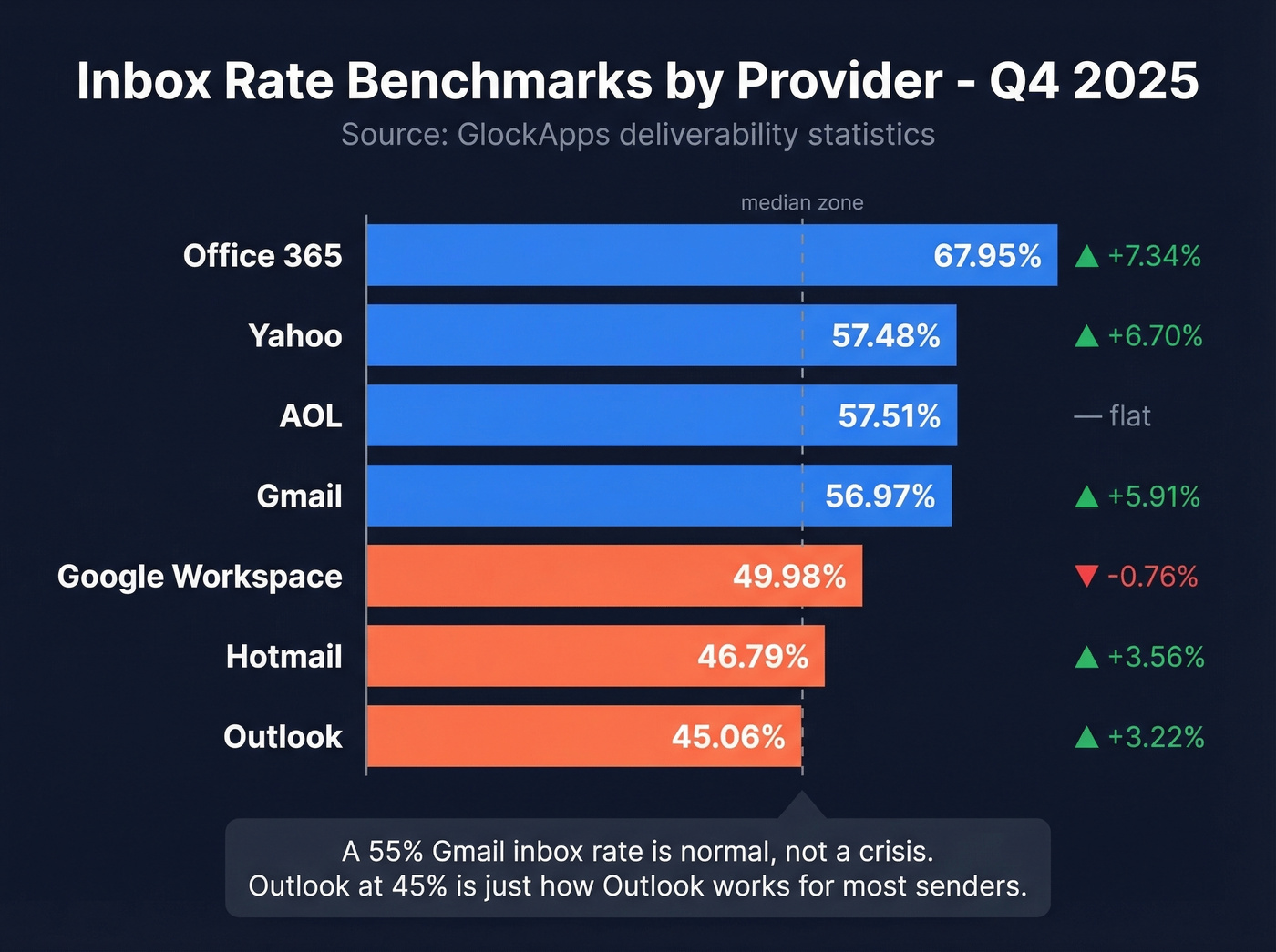
| Provider | Inbox Rate | Change vs Q3 |
|---|---|---|
| Office 365 | 67.95% | +7.34% |
| Yahoo | 57.48% | +6.70% |
| Gmail | 56.97% | +5.91% |
| AOL | 57.51% | - |
| Google Workspace | 49.98% | -0.76% |
| Hotmail | 46.79% | +3.56% |
| Outlook | 45.06% | +3.22% |
A 55% inbox rate on Gmail is normal, not a crisis. Outlook sitting at 45% is just how Outlook works for most senders.
Let's be honest: if your average deal size is under five figures and you're sending fewer than 10,000 emails a month, you probably don't need a paid inbox placement tool at all. Fix your authentication, clean your list, and run Mail-Tester once a quarter.
Volume matters more than most people realize. The GlockApps data shows dramatic swings by sending volume. Gmail inbox rates for senders in the 1-10K/month range dropped from 71.63% in Q3 to 56.13% in Q4 - a 15.5 percentage point collapse. Meanwhile, senders pushing 200K+ emails per month saw inbox rates climb. The takeaway: low-volume senders are more vulnerable to algorithmic shifts, and a single bad quarter can look catastrophic even if nothing changed on your end.
If your results fall in the benchmark ranges, your deliverability isn't broken - it's average. The real question is whether you can push above average, and that comes down to authentication, list hygiene, and engagement patterns.
How to Interpret Your Results
In the benchmark range? You're fine. Focus on incremental improvements - better subject lines, cleaner lists, warmer sending patterns - rather than infrastructure overhauls. (If you want a deeper playbook, start with our email deliverability guide.)
Seeing "Missing" results? Gmail started rejecting non-compliant emails at the SMTP level in late 2025. "Missing" doesn't mean spam - it means the email was bounced before it ever reached a folder. Check your SPF, DKIM, and DMARC records immediately. (If you’re troubleshooting DKIM specifically, see how to verify DKIM is working.)
High spam rate across providers? Work the checklist in order. Authentication first - broken SPF or DKIM is one of the most common causes. Then content, since SpamAssassin flags higher scores as riskier. Then sender reputation via blocklist checks in MxToolbox. (For a dedicated workflow, use our email spam checker guide.)
One provider bad, others fine? That's normal. Each provider has its own filtering logic. Gmail and Outlook can give you wildly different results from the same email. Don't redesign your entire setup because Hotmail doesn't like you - focus on the providers where your audience actually lives.
Before You Run an Inbox Test
Running an inbox checker before cleaning your list is like checking your car's paint job before changing the oil. The root cause of most deliverability problems isn't content or authentication - it's bad data. Bounces destroy sender reputation, and reputation damage causes spam placement.
Step 1: Verify your email list. Meritt cut bounce rate from 35% to under 4% just by cleaning their lists with Prospeo's 5-step verification before testing anything else. The free tier covers 75 emails/month - enough to test the workflow before committing. (If you’re tracking this metric, here’s our breakdown of email bounce rate benchmarks and fixes.)

Step 2: Check your authentication. Run your domain through MxToolbox or Mail-Tester to confirm SPF, DKIM, and DMARC are properly configured. Five minutes, and you eliminate the most common technical cause of spam placement. (Need examples? Use these SPF record patterns.)
Step 3: Now run your inbox test. With a clean list and valid authentication, your placement results will actually mean something. You'll be testing content and reputation - not noise from bad addresses. (If you’re also managing sending limits, review email velocity to avoid throttling.)
One Mailgun user got a $30K bill from unexpected validation overages. Prospeo runs at ~$0.01 per email with transparent credit-based pricing, no contracts, and a free tier of 75 emails/month. Bulk verify your lists, catch spam traps automatically, and stop diagnosing deliverability problems you could have prevented.
Stop testing where bad emails land. Start sending only verified ones.
FAQ
Is a 55% inbox rate bad?
No. Recent benchmarks show Gmail averages 56.97% and Outlook sits at 45.06%. If your results fall in that range, your deliverability is normal. Focus on authentication and list hygiene rather than chasing 100% - seed-list tests structurally undercount real placement because they generate zero engagement signals.
What's the difference between inbox placement and email verification?
An inbox checker tests where a sent email lands - inbox, spam, Promotions, or missing. Email verification confirms whether an address exists and is safe to send to before you hit send. You need verification first, then placement testing to diagnose where messages end up.
Are free inbox checkers accurate?
Directionally, yes. Free tools use small seed lists with no engagement signals, so results are approximate. They reliably catch major problems - broken authentication, blocklist hits, content flags - but shouldn't be treated as precise measurements. For ongoing monitoring, paid tools like GlockApps at $59/mo provide more consistent, actionable data.