


Inbox Monster Pricing, Reviews, and Pros and Cons: Is It Worth $15K/Year?
$15,000 a year - minimum - for a deliverability monitoring tool. That's the reality of Inbox Monster pricing, and it climbs fast once you add domains, creative previews, and professional services hours. Reviews are overwhelmingly positive, but the pros and cons tell a more nuanced story. The real question isn't whether Inbox Monster is good. It is. The question is whether your sending volume and budget justify the spend.
30-Second Verdict
Inbox Monster holds a 4.9/5 on G2 from 47 reviews - 95% of them five stars - and the support team is genuinely excellent. Buy it if you send 1M+ emails per month and need weighted inbox placement data, spamtrap monitoring, and reputation analysis beyond your ESP dashboard. Skip it if your volume is under 500K or your budget can't absorb $15K/year. GlockApps covers the core inbox placement testing at a fraction of the cost.
Here's the thing, though: if your deliverability problems stem from bad contact data, no monitoring tool fixes that. Clean your list first, then decide if you still need monitoring.
What Is Inbox Monster?
Inbox Monster is an email testing and deliverability platform built around seed list inbox placement testing. You send to their proprietary seed addresses across global ISPs, and the platform reports where your emails land - inbox, promotions, or spam.
It also pulls reputation signals from sources like SpamHaus, Google Postmaster Tools, and Microsoft SNDS. On the ESP side, it integrates with SendGrid and Salesforce Marketing Cloud for automated testing workflows. The Creative suite adds device renderings, live previews including dark mode, and accessibility analysis - useful if your design team needs QA beyond "does it render."
If you’re evaluating this for outbound, it’s worth pairing monitoring with a solid baseline on cold email deliverability fundamentals first.
Pricing Breakdown
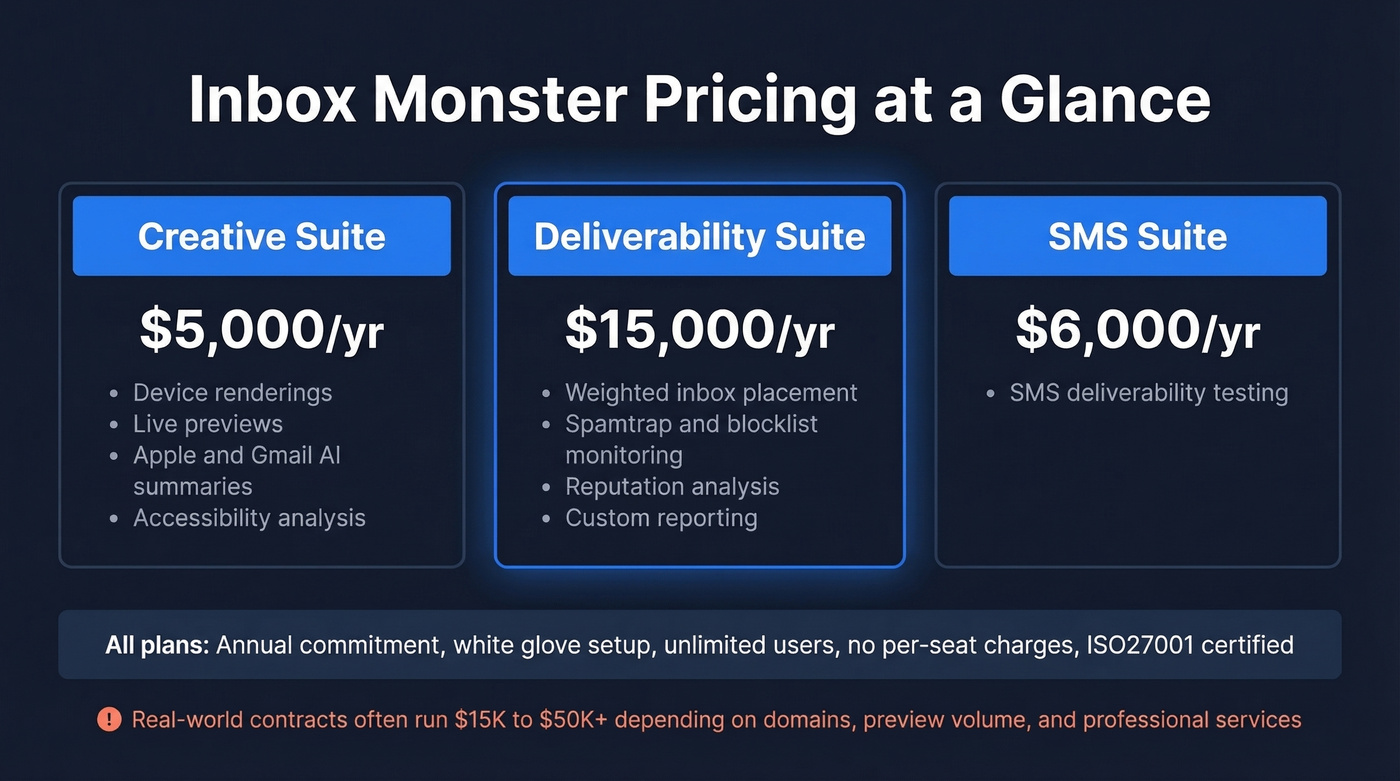
Every suite requires an annual commitment. Here's the floor pricing:
| Suite | Starting Price | Key Features |
|---|---|---|
| Creative | $5,000/yr | Device renderings, live previews, Apple & Gmail AI summaries, accessibility |
| Deliverability | $15,000/yr | Weighted inbox placement, spamtrap & blocklist monitoring, reputation analysis, custom reporting |
| SMS | $6,000/yr | SMS deliverability testing |
All suites include white glove setup and unlimited users - no per-seat charges. Inbox Monster is ISO27001 certified, which matters if your security team gates vendor approvals.
What "Starting At" Doesn't Tell You
Those numbers are floors. We've seen real-world contracts run $15K-$50K+/year depending on domain count, creative preview volume, and professional services hours. Inbox Monster runs quarterly audits to help customers stay within committed volumes, but additional usage can require add-ons like extra professional hours, domains, or previews.
There's no free trial. Expect a demo before you commit.
If you’re trying to reduce cost before signing an annual contract, start with how to test email deliverability using lighter-weight checks.

Inbox Monster costs $15K/year to tell you where emails land. But if bounces and spam traps are your real problem, monitoring won't fix it. Prospeo's 5-step verification delivers 98% email accuracy with spam trap removal and catch-all handling - at $0.01 per email.
Fix the root cause for 1% of what monitoring costs.
Real Pros and Cons from G2
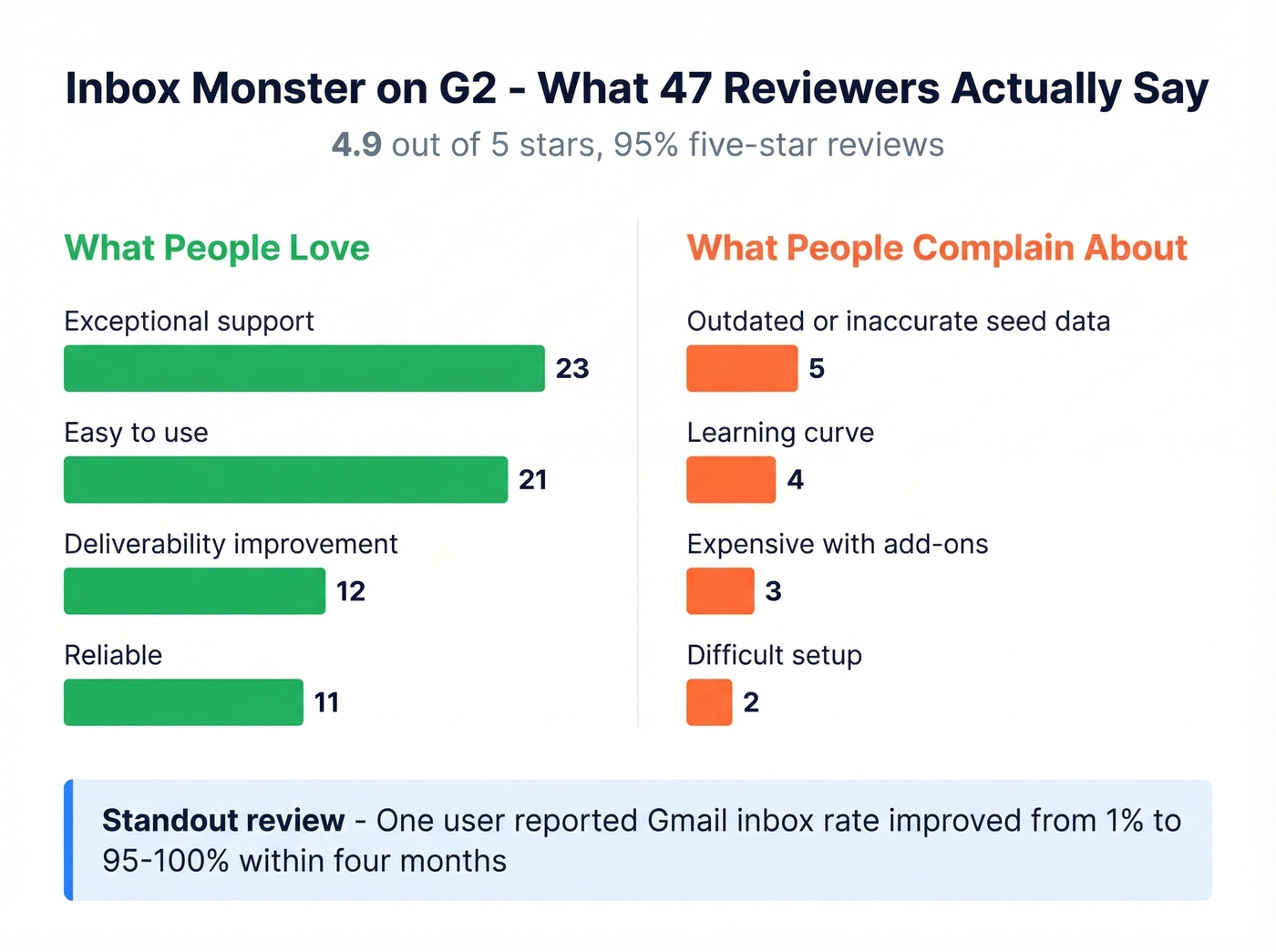
Based on G2 review data across 47 reviews (24 mid-market, 17 enterprise, 6 small business):
| Pros (G2 mentions) | Cons (G2 mentions) |
|---|---|
| Exceptional support (23) | Outdated/inaccurate seed data (5) |
| Easy to use (21) | Learning curve (4) |
| Deliverability improvement (12) | Expensive with add-ons (3) |
| Reliable (11) | Difficult setup (2) |
The support praise is consistent and specific - reviewers name individual team members, cite fast response times, and describe proactive guidance that goes beyond "here's a knowledge base article." One reviewer reported their Gmail inbox rate improved from 1% to 95-100% within four months. That kind of outcome is why teams pay enterprise money.
At this price point, though, the seed list complaints deserve attention. Five combined mentions of outdated or inaccurate data is a meaningful signal in a 47-review pool. One reviewer noted seed list data outages were a regular occurrence, with each instance resolved in less than a week. DMARC reporting granularity is another area reviewers want improved, and a recent review flagged a desire for more proactive alerts - the platform is strong on dashboards but doesn't push enough insights to you automatically.
If DMARC is a sticking point, it helps to understand what a stricter policy actually does (and when it backfires), especially around DMARC reject.
How Pricing Compares to Alternatives
| Tool | Starting Price | Category | Best For |
|---|---|---|---|
| GlockApps | $0-$129/mo | Inbox placement testing | Budget-conscious teams |
| InboxAlly | $149-$1,190/mo | Engagement-based warmup | Domain/IP warming |
| Inbox Monster | $15,000+/yr | Full deliverability suite | Enterprise senders (1M+/mo) |
| Validity Everest | ~$20K-$100K+/yr | Enterprise monitoring | Large-scale programs |
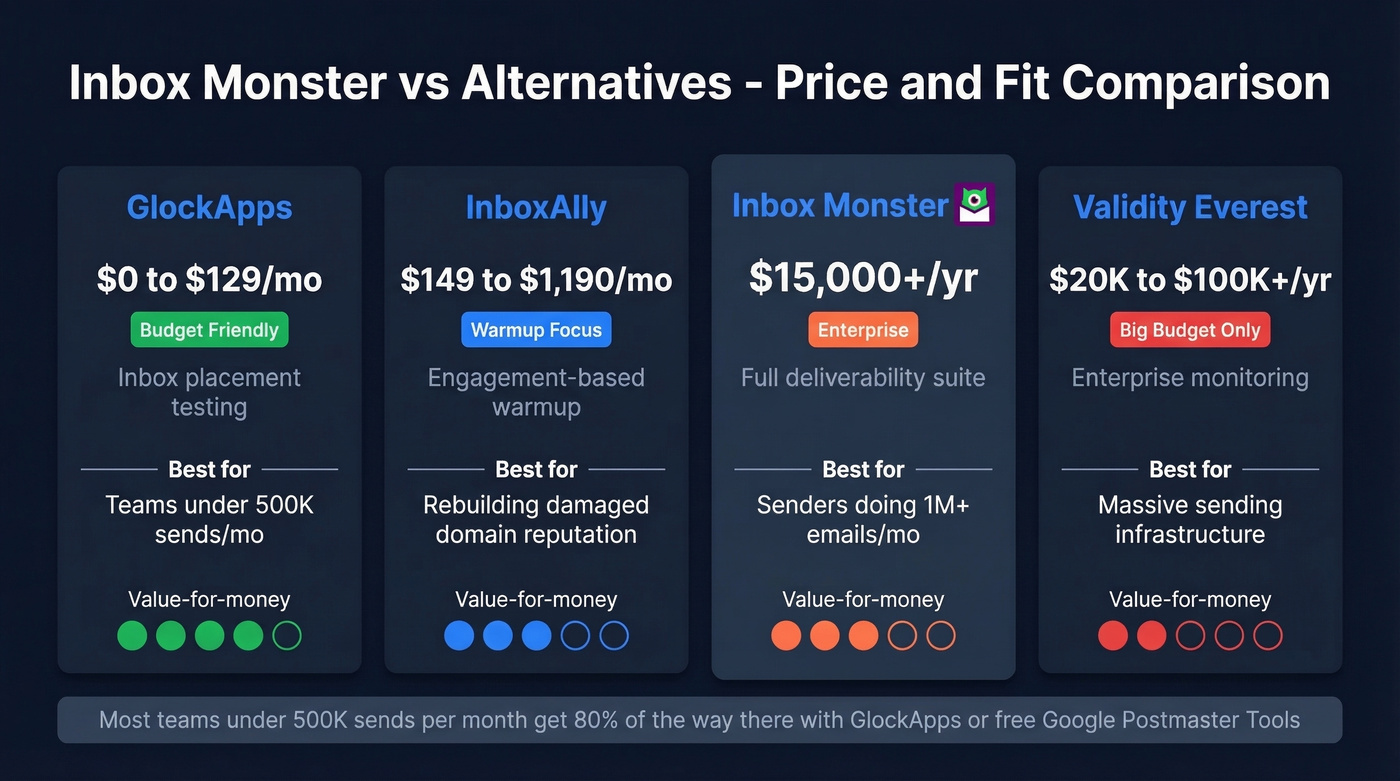
GlockApps is the obvious comparison. Its Essential plan at $59/month gives you 360 spam test credits and DMARC monitoring. It lacks Inbox Monster's depth in reputation analysis and creative QA, but for teams that just need "did my email hit inbox or spam?" - it handles the job.
InboxAlly solves a different problem entirely. It's an engagement-based warmup tool; its Starter plan at $149/mo is designed for roughly 2,000 emails/day. Useful for rebuilding damaged domain reputation, but it doesn't replace inbox placement testing. If you’re comparing warmup approaches, see manual vs automated email warm-up.
Validity Everest is the other enterprise option, typically $20K-$100K+/year, positioned for teams with massive sending infrastructure. The consensus on r/sales and r/emailmarketing threads is that most teams under 500K sends/month don't need either Everest or Inbox Monster - GlockApps or even free Google Postmaster Tools data gets them 80% of the way there.
Who Should (and Shouldn't) Buy
Use Inbox Monster if:
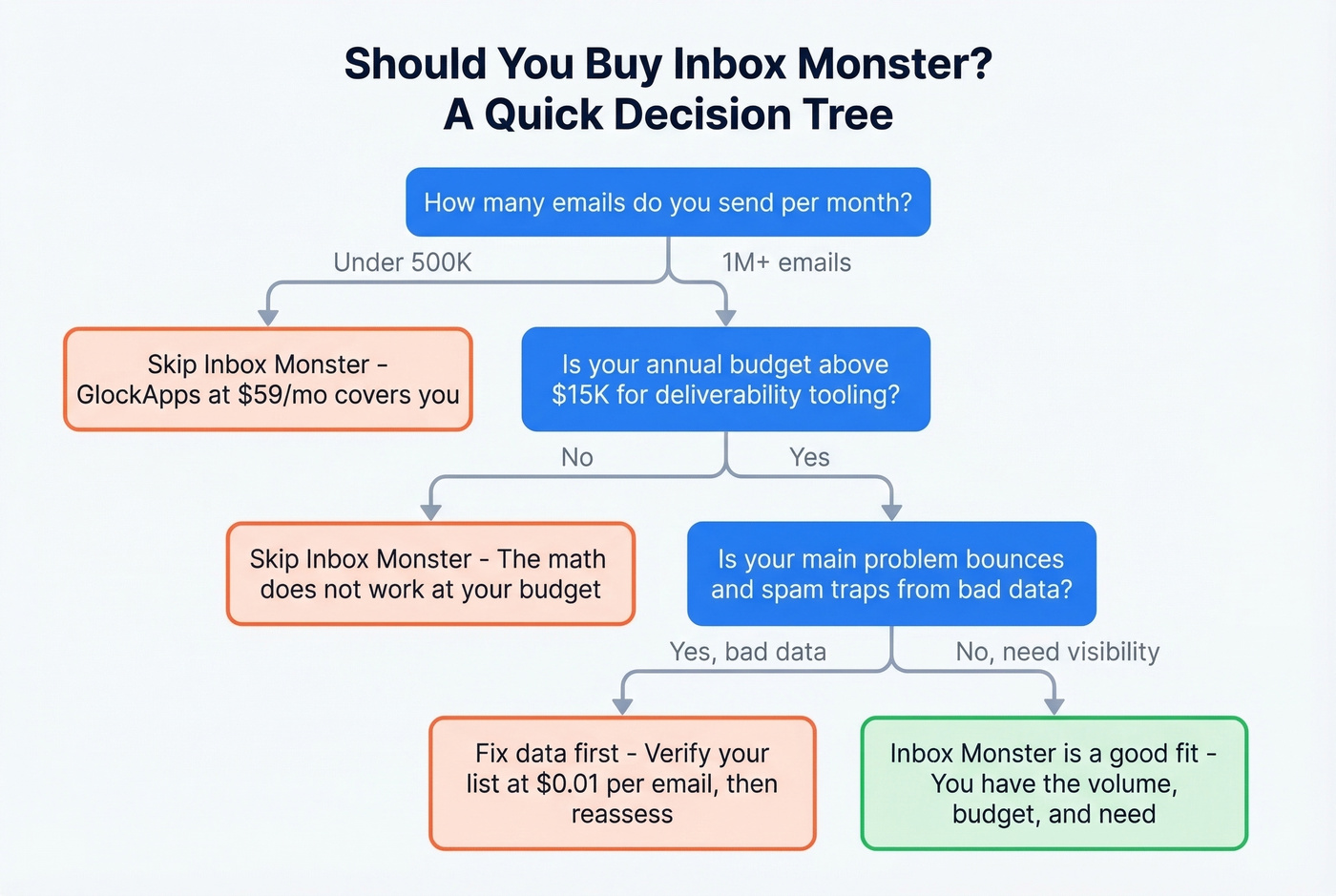
- You send 1M+ emails per month across multiple domains
- Your budget supports $15K+/year for deliverability tooling
- You need visibility beyond what ESP dashboards provide
- Your team includes a dedicated deliverability analyst who'll actually use the data
Skip Inbox Monster if:
- You send under 500K emails per month - GlockApps covers you
- Your budget is under $15K/year - the math just doesn't work
- Your real problem is bounces and spam traps from bad contact data, not inbox placement visibility
If you’re in the “skip” bucket, you’ll usually get more ROI from list hygiene and a repeatable outbound system (see cold emailing best practices) than from enterprise monitoring.
Fix the Data Before You Monitor It
Let's be honest about a pattern we see constantly: teams invest in deliverability monitoring, then discover the root cause is upstream. Stale lists full of invalid addresses and spam traps. Monitoring tells you where emails land. It doesn't fix why they're landing in spam.
In our experience, teams that clean their lists first often find they don't need enterprise-grade monitoring at all. One of our customers, Stack Optimize, maintains 94%+ deliverability and under 3% bounce rates across all their clients - without a $15K monitoring tool. The difference is verified data going in.
Prospeo's 5-step verification runs at 98% accuracy on a 7-day refresh cycle, with built-in spam trap removal and catch-all handling. At roughly $0.01 per verification, it's the highest-ROI first step before committing $15K+/year to monitoring. If you want a quick benchmark of options, start with a free bulk email checker list before you buy anything.
If you’re troubleshooting bounce spikes specifically, this guide on email bounce back is a useful companion.

Stack Optimize built a $1M agency on 94%+ deliverability and under 3% bounce rates - no $15K monitoring tool required. The difference? Verified data from Prospeo, refreshed every 7 days with built-in honeypot and spam trap filtering.
Clean data in, clean inbox placement out. No enterprise contract needed.
FAQ
Does Inbox Monster offer a free trial?
No. Inbox Monster requires a demo and an annual commitment starting at $5,000/year for Creative or $15,000/year for Deliverability. There's no self-serve signup - you're committing before you see your own data in the platform.
Is GlockApps a good alternative?
For inbox placement testing on a budget, yes. GlockApps covers core testing from $59/month with DMARC monitoring included. It lacks the reputation analysis depth, but for most teams under 500K sends/month, it's plenty.
Can email verification replace deliverability monitoring?
They solve different problems, but verification comes first. Removing invalid emails and spam traps before they damage sender reputation often eliminates the need for expensive monitoring entirely. Running verification at ~$0.01/email is worth doing before any $15K/year commitment.