

How to Test Email Deliverability: The Complete Framework for 2026
You ran mail-tester.com and scored a 7 out of 10. Then you ran GlockApps and discovered 40% of your emails hit spam at Outlook. One tool says you're fine. The other says you're on fire.
If you're trying to test email deliverability, you've already stumbled into the core problem: different tools measure different things, and most people don't know what they're actually looking at.
The average deliverability rate across major ESPs is 83.1%. Roughly one in six emails never reaches the inbox. That's not a rounding error - that's pipeline disappearing. The fix isn't running more tests. It's running the right tests, in the right order, and knowing what to do when the numbers look bad.
What You Need (Quick Version)
If you don't want to read 3,000 words, here's the stack:
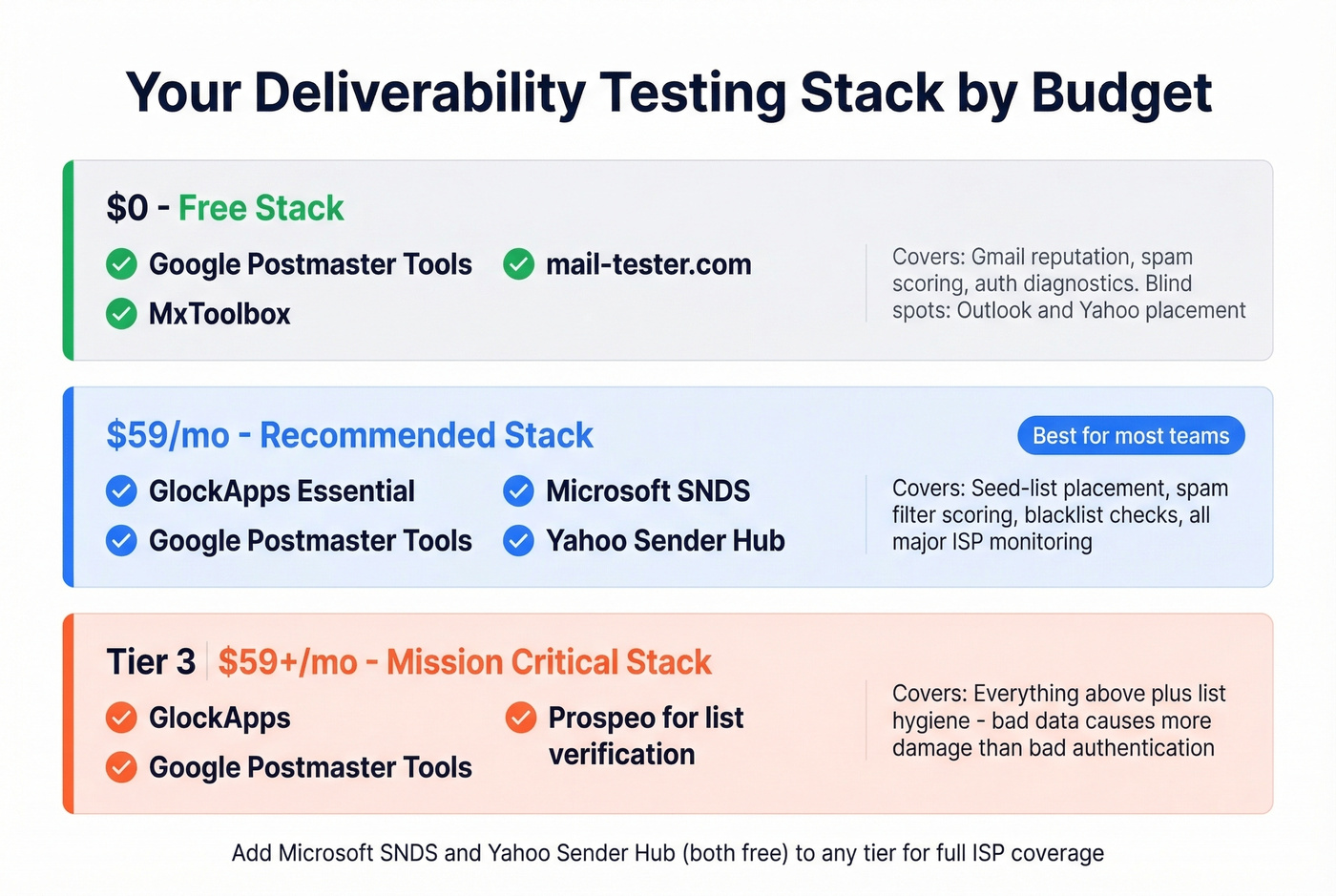
- $0 budget: Google Postmaster Tools + mail-tester.com + MxToolbox. Covers Gmail reputation monitoring, spam scoring, and basic sending/authentication diagnostics. You'll have blind spots on Outlook and Yahoo, but it's a solid start.
- One paid tool: GlockApps Essential at $59/mo gives you 360 spam test credits, ISP-level inbox placement, 50+ blacklist checks, and spam filter scoring across Google, Barracuda, and SpamAssassin.
- Mission-critical deliverability: GlockApps + Google Postmaster Tools + Prospeo for list verification. Bad contact data causes more deliverability damage than bad authentication - bounces from invalid addresses destroy sender reputation fast.
Now let's break down why this stack matters and how to use it.
Why Deliverability Testing Matters More Now

Gmail and Yahoo's 2024 bulk sender requirements turned deliverability into a compliance issue, not just a best practice. SPF, DKIM, and DMARC authentication are mandatory. The spam complaint threshold dropped to 0.3%, and one-click unsubscribe headers became non-negotiable. If you're not compliant, your emails don't get throttled - they get refused.
Behind the scenes, Gmail's RETVec classifier and Microsoft's SmartScreen behavior analysis have made content-based filtering significantly harder to game. Community-reported data from r/coldemail suggests deliverability rates dropped 22-27% across major platforms in early 2025, with Mailgun users seeing the steepest declines. DMARC adoption jumped from 42.6% in 2023 to 53.8% in 2024 - senders are scrambling to comply, and ISPs are getting stricter about enforcement.
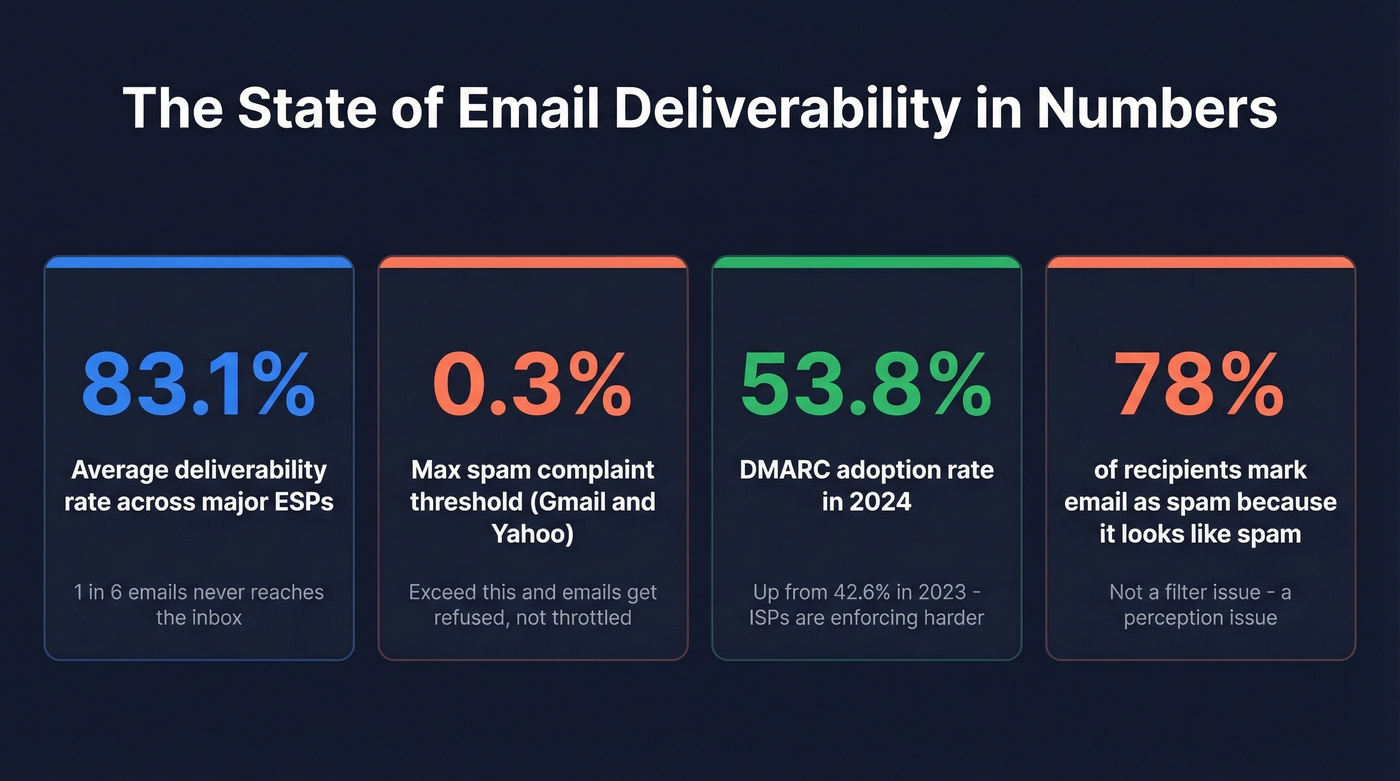
The practitioner rule of thumb now: under 30 emails per day per account is the safe zone for cold outreach. Many teams start at 15-20. And here's the stat that should scare you: 78% of recipients mark an email as spam simply because it "looks like spam" - not because it triggered a filter, but because the human decided it didn't belong. Deliverability isn't just a technical problem anymore. It's a perception problem.
Four Types of Deliverability Tests
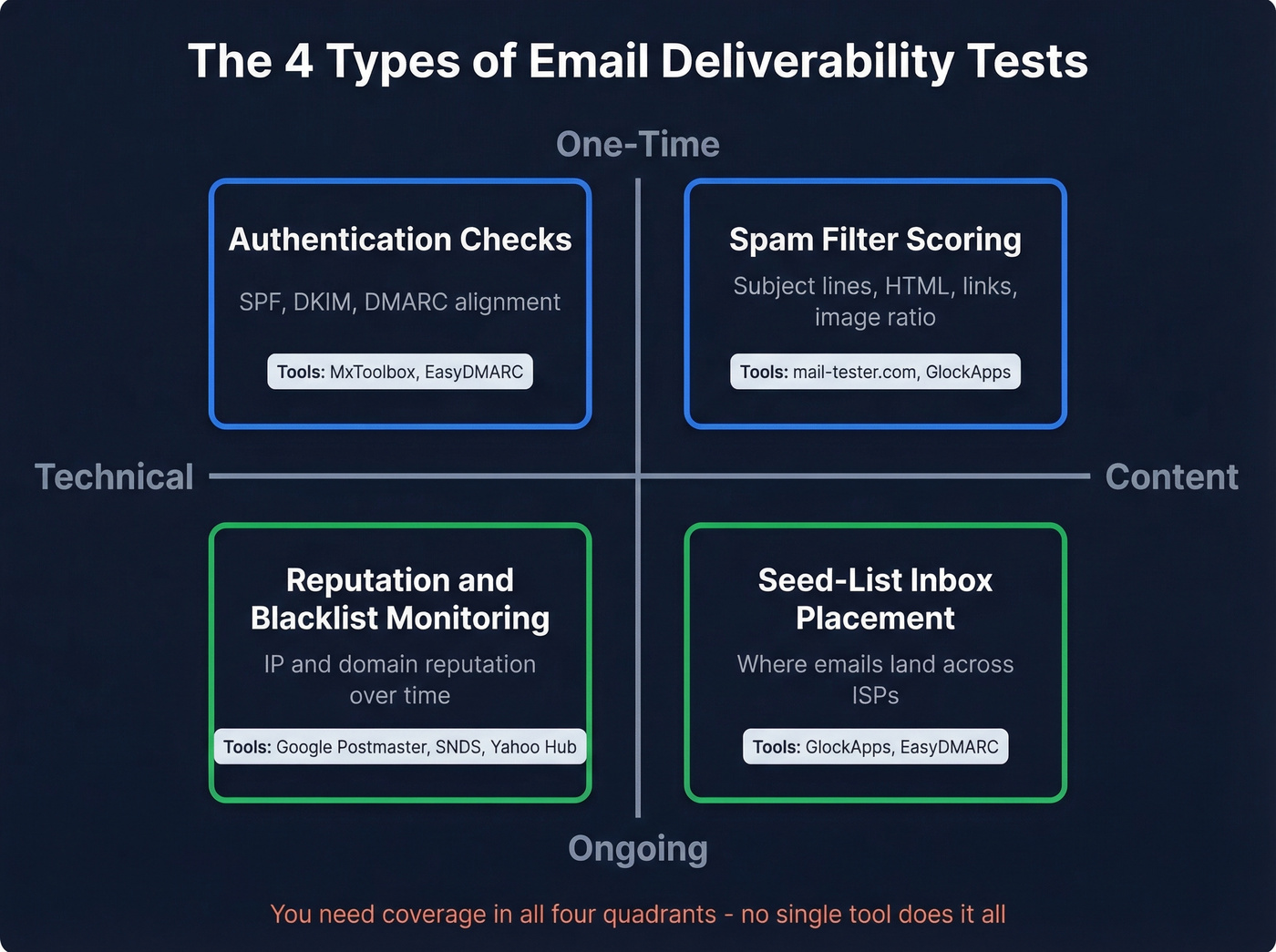
No single tool covers everything. That's why your results conflict - different tools measure different things. Think of it as a 2x2 matrix: one-time vs. ongoing checks, crossed with technical vs. content analysis. Authentication and spam scoring are one-time diagnostics you run before a campaign. Reputation dashboards and seed-list placement are ongoing monitors you check weekly. You need coverage in all four quadrants.
Authentication Checks
The most common mistake here isn't missing SPF or DKIM - it's having both set up but misaligned. SPF and DKIM both need to align with your "From" domain for DMARC to pass, and a surprising number of senders have SPF configured on a subdomain that doesn't match.
Tools like MxToolbox and EasyDMARC catch misalignment quickly. Setup takes 30-60 minutes if you're starting from scratch. No excuse not to have it done.
Seed-List Inbox Placement
This is what most people mean when they say "email deliverability test." You send an email to roughly 100 seed mailboxes spread across Gmail, Outlook, Yahoo, and Apple Mail, and the tool checks whether each copy landed in the inbox, spam folder, or went missing entirely. GlockApps is a strong option here, testing across major ISPs and reporting placement by provider.
The limitation worth understanding: seed mailboxes have no engagement history with your domain. Real-world placement for your actual recipients will typically be higher.
Spam Filter Scoring
Separate from inbox placement, spam filter scoring runs your email content through filters like SpamAssassin. These tools analyze your subject line, body copy, HTML structure, links, and image-to-text ratio. A high spam score doesn't guarantee spam placement, but it flags content issues that increase your risk. Mail-tester.com handles this well for free. GlockApps bundles it into paid plans.
Reputation and Blacklist Monitoring
Your IP and domain reputation are the long-term signals ISPs use to decide where your emails land. Google Postmaster Tools is your Gmail monitoring layer. Microsoft SNDS covers Outlook and Hotmail. Yahoo Sender Hub handles Yahoo and AOL. These are free, ongoing dashboards - not one-time tests - and every sender should have all three configured.
If you only set up one, make it Google Postmaster Tools.
Why Tools Give Conflicting Results
The #1 complaint about deliverability tools on Reddit? They give conflicting results and then try to upsell you on warmup services. One thread on r/coldemail called them "mostly marketing fluff." That frustration is understandable, but the explanation is straightforward.
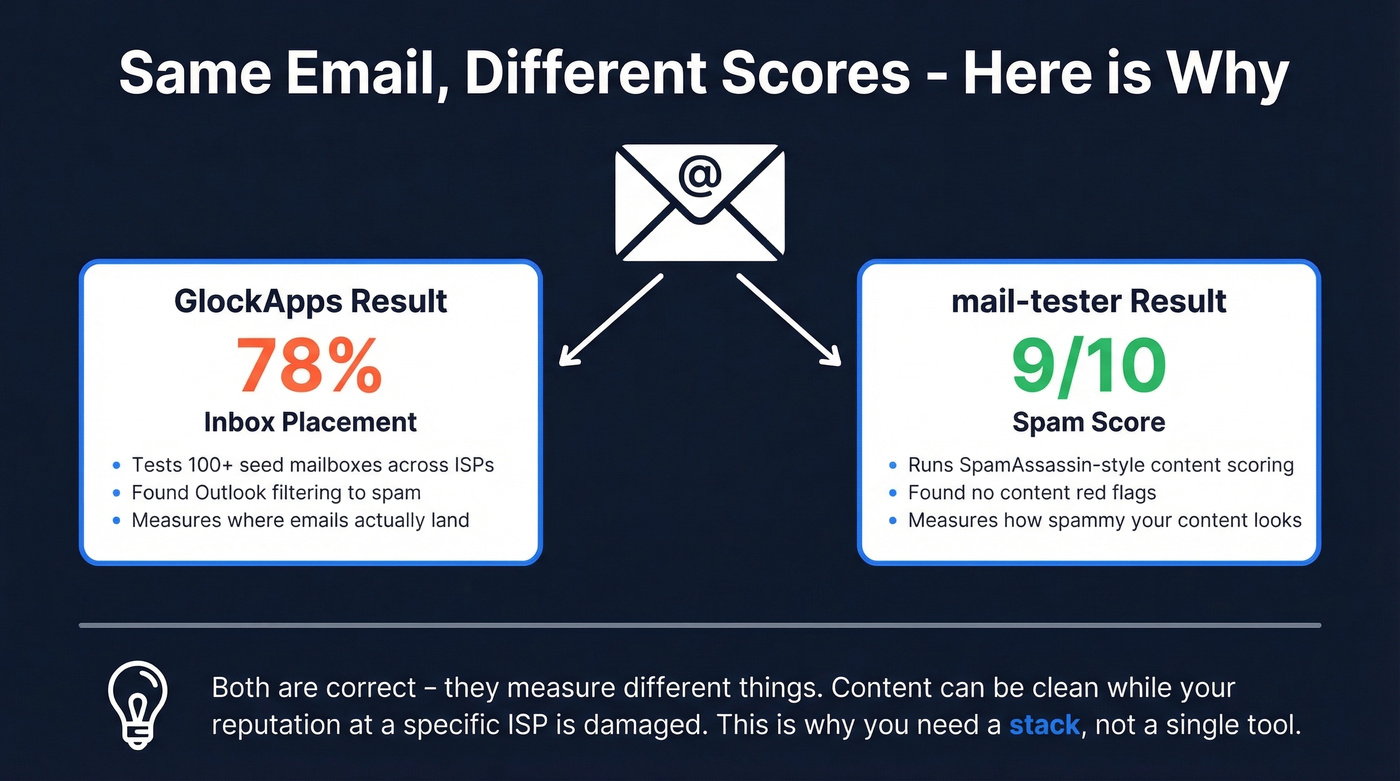
Imagine sending the same email through GlockApps and mail-tester. GlockApps shows 78% inbox placement. Mail-tester scores you 9 out of 10. Both are "correct" - they're just measuring different things. GlockApps tested placement across seed mailboxes at multiple ISPs and found Outlook was filtering you. Mail-tester ran SpamAssassin-style scoring on your content and found nothing obviously wrong. The content is fine. The reputation at Microsoft isn't.
Seed lists are small - around 100 mailboxes per test. Different tools maintain different seed lists with different ISP mixes, so a tool weighted toward Gmail will show different results than one weighted toward Outlook. Scoring methodologies vary too: GlockApps checks against major spam filters including Google, Barracuda, and SpamAssassin. Mail-tester focuses on spam scoring and basic diagnostics but doesn't do ISP-level placement. Google Postmaster Tools only shows Gmail data.
Here's the insight most articles miss. Seed-list tests are directional, not definitive. Your actual recipients have engagement history with your domain - they've opened previous emails, clicked links, maybe even replied. Seed mailboxes have none of that. So a seed test showing 75% inbox placement doesn't mean 25% of your real emails are hitting spam. It means you have issues worth investigating, and the ISP-level breakdown tells you where to look.
This is exactly why you need a stack, not a single tool. Authentication checks catch configuration problems. Seed-list tests catch content and reputation issues. Postmaster dashboards show real-world trends over time. Use all three layers and the picture gets clear.

Every bounce from an invalid email chips away at your sender reputation - the exact metric ISPs use to decide if you hit inbox or spam. Prospeo's 5-step verification with catch-all handling, spam-trap removal, and honeypot filtering delivers 98% email accuracy. That's how teams like Snyk cut bounce rates from 35% to under 5%.
Fix your deliverability at the source - start with cleaner data.
Best Deliverability Testing Tools Compared
Our pick for most teams: GlockApps Essential ($59/mo) + Google Postmaster Tools (free). That combination covers seed-list placement, spam filter scoring, blacklist monitoring, and real-world Gmail monitoring. Add Microsoft SNDS and Yahoo Sender Hub - both free - and you have ISP-level visibility across every major provider.
| Tool | Tests | Free | Paid | Best For |
|---|---|---|---|---|
| GlockApps | Placement + filters + blacklists | 2 tests/mo | $59-$129/mo | Best overall |
| Google Postmaster | Gmail monitoring | Free | Free | Best free monitoring |
| mail-tester.com | Spam score + basic diagnostics | Limited daily | Free | Quick one-off checks |
| MxToolbox | Deliverability report + blacklist + SPF/header checks | Basic free | $129-$399/mo | Auth/DNS diagnostics |
| Microsoft SNDS | Outlook/Hotmail reputation | Free | Free | Microsoft ecosystem |
| Yahoo Sender Hub | Yahoo/AOL reputation | Free | Free | Yahoo ecosystem |
| EasyDMARC | Inbox placement test | Daily limit free | ~$30+/mo | Placement visibility |
| MailReach | Warmup + placement | None | $19.5/mailbox/mo | Warmup-first |
| Warmy | Warmup + testing | 7-day trial | ~$49+/mo | Warmup bundled |
| MailGenius | Spam score | Free test | Free tier | Quick checks |
GlockApps
GlockApps is the closest thing to a one-stop shop for deliverability testing. The Essential plan at $59/mo gives you 360 spam test credits, ISP-level inbox placement across major providers, checks against 50+ blacklists, and spam filter scoring from SpamAssassin, Barracuda, and Google spam filters. Growth at $99/mo bumps you to 1,080 credits and 10 sending accounts. Enterprise at $129/mo gets you 1,800 credits and 20 accounts - the right tier for agencies managing multiple client domains.
The free plan exists: 2 tests per month. Enough to kick the tires, not enough to monitor anything. Where GlockApps earns its keep is the combination of placement testing, content analysis, and DMARC monitoring in one dashboard. We've seen teams try to cobble together the same coverage from three free tools and spend more time switching tabs than fixing problems.
The limitation: GlockApps can't tell you whether the email addresses you're sending to are valid. It tests everything about your sending infrastructure and content - but nothing about your list quality.
Google Postmaster Tools
The most underused free resource in email. Google Postmaster Tools gives you Gmail-specific visibility into reputation and spam rate - data straight from the source, no seed lists, no sampling, no approximation.
Every sender should have this configured. It takes five minutes to verify your domain and start collecting data. The dashboard won't show results until you're sending enough volume for Google to report on, but once it does, it's the single most reliable signal for Gmail deliverability. If your domain reputation drops from "High" to "Medium" or "Low," you know something's wrong before your open rates tell you.
The obvious limitation: Gmail only. You need Microsoft SNDS and Yahoo Sender Hub for the other major providers.
mail-tester.com
Best for anyone who needs a quick email delivery test before hitting send. Fire off an email to a generated address, wait 30 seconds, get a score out of 10. It runs spam scoring, checks key sending signals, flags content issues, and checks common blacklists. Perfect for spotting obvious problems - a broken SPF record, a flagged link, an image-heavy template that scores poorly.
What it won't do is ISP-level inbox placement. You won't know if Outlook is specifically filtering you. Use it as a first pass, not your only test.
MxToolbox
MxToolbox lets you run an email delivery test by sending an email to ping@tools.mxtoolbox.com. After you send the message, MxToolbox replies with a link to a full Deliverability Report that analyzes email headers, the blacklist reputation of your outbound IP, and SPF records.
For confirming basic sending signals and reputation checks, the free tools are usually enough. The paid Delivery Center tier is useful for ongoing monitoring and alerting.
MailReach
The value proposition here is bundling: $19.5 per mailbox per month gets you email warmup (up to 100 emails/day per mailbox), reputation tracking, and at least 20 spam test credits. The spam tester checks inbox placement by provider and includes blacklist and authentication checks.
Use this if you're spinning up new domains and need warmup AND testing in one subscription. Skip it if your domains are established and you just need diagnostic testing - the credit allocation is thin compared to GlockApps, and the testing methodology is secondary to the warmup engine.
EasyDMARC is useful for inbox placement visibility, with a free test and paid tiers starting around $30/mo. Warmy bundles warmup with testing and offers a 7-day trial; pricing starts around $49/mo. MailGenius offers a free spam test - useful for a quick content check, nothing more. Microsoft SNDS and Yahoo Sender Hub are free, essential, and take minutes to set up. Do it today.
Step-by-Step: How to Test Email Deliverability
Don't run one test and call it done. The full stack takes 30-45 minutes and gives you a complete picture.
Step 1: Check authentication. Run your domain through MxToolbox or an authentication checker. Verify SPF, DKIM, and DMARC are all passing and aligned. If DMARC is set to "none," you're monitoring but not protecting - plan your path to "quarantine" or "reject." This takes five minutes. (If you want a deeper walkthrough, see DMARC alignment and how to verify DKIM is working.)
Step 2: Run a seed-list placement test. Send a test email through GlockApps or EasyDMARC. Check inbox vs. spam vs. missing by ISP. Pay attention to which providers are dragging your numbers down - the fix is different for Gmail vs. Outlook.
Step 3: Check blacklists. GlockApps checks 50+ lists automatically. If you're using free tools, MxToolbox covers the major lists. If you're listed anywhere, request delisting immediately - some lists auto-expire, others require manual removal. (If you’re dealing with Spamhaus specifically, use this Spamhaus blacklist removal guide.)
Step 4: Review postmaster dashboards. Check Google Postmaster Tools for Gmail. Check Microsoft SNDS for Outlook. Check Yahoo Sender Hub for Yahoo/AOL. These show real-world trends, not test results - they're your ongoing monitoring layer.
Step 5: Analyze content. Review your spam score from mail-tester or GlockApps. Check for excessive links, URL shorteners, image-heavy HTML, and spammy language patterns. Simplify anything that scores poorly. Fewer links and cleaner HTML consistently improve placement. (For subject testing, use these subject line testers and email subject line examples.)
Do all five. Not just one.
How to Read Your Results
EmailToolTester's benchmarks give you the clearest grading scale: above 89% inbox placement is excellent, 83-88% is acceptable, below 83% is poor. But the global average matters less than your ISP-level breakdown.
| Provider | Inbox | Spam | Missing |
|---|---|---|---|
| Gmail | 87.2% | 6.8% | 6.0% |
| Microsoft | 75.6% | 14.6% | 9.8% |
| Yahoo/AOL | 86.0% | 4.8% | 9.2% |
| Apple Mail | 76.3% | 14.3% | 9.4% |
Source: Validity benchmark data, 2025 provider breakdown as summarized by MailReach
Microsoft is the hardest ISP. If your tool shows 85% overall but Microsoft is at 60%, that's where your problem lives. Apple Mail filtering changes drove much of the global inbox placement decline to 83.5% over the last year - so if Apple Mail is dragging your numbers down, you're not alone.
One important distinction: Gmail's Promotions tab isn't spam. Emails landing in Promotions are still delivered - they're categorized, not filtered. If your tool reports Gmail inbox at 87% and you're panicking, check whether the remaining percentage is Promotions or actual spam. The fix for each is completely different.
If your overall placement is above 85%, you're in solid shape. Focus on the ISPs that are underperforming. Below 80%? Something structural needs fixing.
What to Fix When Results Are Bad
Prioritize in this order. Each step builds on the one before it.
1. Fix authentication. SPF, DKIM, and DMARC alignment is non-negotiable. Set up custom tracking domains for your email platform. This takes 30-60 minutes and eliminates the most common technical cause of spam placement. If you want the extra credibility signal, BIMI with a Verified Mark Certificate runs $1,500/year - nice to have, not essential.
2. Check and clear blacklists. If you're on any of the major blocklists, request delisting. Spamhaus, for example, requires you to demonstrate the problem is fixed before they'll remove you. Don't ignore this step - a single blacklist hit can tank placement at specific ISPs.
3. Verify your contact data. If your bounce rate is above 2%, your list is the problem. Verify emails and remove spam traps before they hit your sending list. This is the step most teams skip, and it's often the one that matters most. (If you need a remediation playbook, start with spam trap removal and then review email bounce rate benchmarks.)
4. Reduce volume and consider shared IPs. For cold email, stay under 30 per day per account. If you're in crisis mode with marketing sends, cut volume by 50% and rebuild gradually. Dedicated IPs aren't worth it unless you're sending millions per month - they require careful management and give most senders worse results than a well-managed shared IP.
5. Warm up only if needed. Only for new domains under 30-60 days old or domains with genuinely damaged reputation. The warmup process takes 60-90 days of gradually increasing volume with high-engagement sends. Don't waste money on warmup tools if your domain is established and your authentication is correct - warmup won't fix a list quality problem.
6. Segment and simplify. Prioritize recipients who've opened or clicked in the last 30-90 days. Sunset unengaged contacts aggressively. A smaller, engaged list will always outperform a large, stale one. Strip your templates down at the same time: fewer links, fewer images, no URL shorteners, minimal HTML. Text-forward emails consistently score better across spam filters. If you're using heavy marketing templates for cold outreach, that's likely part of the problem.
7. Monitor ongoing. Set up all three postmaster dashboards. Run a GlockApps placement test monthly. Deliverability isn't a one-time fix - it's an ongoing discipline. (If you want a dedicated playbook, see how to improve sender reputation and this broader email deliverability guide.)
Let's be honest about one thing: a Mailgun user on r/Emailmarketing reported a $30,000+ overage invoice after unexpected validation spikes. If you're using a platform with usage-based pricing, set hard caps and monitor your billing dashboard weekly. Overage-based pricing models can turn a deliverability tool into a financial liability overnight.
The Data Problem Tools Don't Catch
Here's a scenario we've seen play out repeatedly. An SDR team's reply rates drop. They run the full diagnostic - authentication is clean, GlockApps shows 85% inbox placement, no blacklist hits. Everything looks fine on paper. But open rates tell a different story.
The disconnect was simple: 15% of their list was invalid addresses. Every bounce was a reputation hit. Every spam trap was a red flag to ISPs. And no deliverability testing tool checks whether the addresses you're sending to are real. These tools test your infrastructure, your content, your reputation - but not your data.
A 5% bounce rate will destroy your sender reputation faster than a missing DKIM record. This is where list verification fits into the stack. Prospeo's 5-step verification process handles catch-all domains, removes spam traps and honeypots, and catches bad addresses before they ever reach your sending infrastructure. Fix the data upstream, and your inbox placement results start improving downstream.
Look - most teams obsess over spam scores and authentication records when their real problem is data quality. If you're running sub-$15k deals with high-volume outbound, you probably don't need GlockApps Enterprise. You need a clean list. The teams with the best deliverability aren't the ones running the most tests. They're the ones who never send to a bad address in the first place.
You just learned that stale data is a deliverability killer. Most providers refresh records every 6 weeks. Prospeo refreshes every 7 days across 300M+ profiles, so the emails you pull today are still valid when your campaign sends tomorrow. At $0.01 per verified email, protecting your domain reputation costs less than a single bounced lead.
Stop sending to dead addresses. Get emails verified this week, not last month.
FAQ
How often should I run placement tests?
Run a full seed-list placement test monthly for active campaigns, and before and after any major change to your list, domain, or sending infrastructure. Between formal tests, Google Postmaster Tools provides continuous Gmail monitoring - set it up once and check it weekly.
Is email warmup worth the money?
Only for new domains under 60 days old or domains with genuinely damaged reputation. If your authentication is correct and your contact data is clean, warmup alone won't fix the underlying problem. Many tools use alarming free-test results to upsell warmup subscriptions you don't actually need.
What's a good inbox placement rate?
Above 89% is excellent per EmailToolTester's benchmarks. Between 83-88% is acceptable. Below 83% means something needs fixing. Always check ISP-level results - Microsoft and Apple Mail run significantly lower than Gmail, and they'll drag your average down even when Gmail placement is strong.
Can bad contact data hurt deliverability?
It's one of the fastest ways to destroy sender reputation. Bounces from invalid addresses signal to ISPs that you're not maintaining your list. Verifying addresses before sending - including spam-trap removal and catch-all domain handling - catches bad data before it causes damage. In our experience, teams that verify before every campaign consistently maintain bounce rates under 3% and avoid the reputation spirals that force expensive warmup cycles later.