Manual vs Automated Email Warm-Up: The Practitioner's Guide
Everything in your warm-up dashboard is green. Inbox placement looks solid. You launch your first real campaign - and half your emails land in spam.
That disconnect is more common than you'd think, and it's why the manual vs automated email warm-up debate misses the point. Warm-up is the last 20% of deliverability, not the first 80%. The real work - authentication and data quality - happens before you send a single warm-up message. Get those wrong, and no amount of simulated opens will save your sender reputation.
The Short Answer
Most teams should use automated warm-up. It's cheaper than your time and more consistent than your discipline. But don't start there.
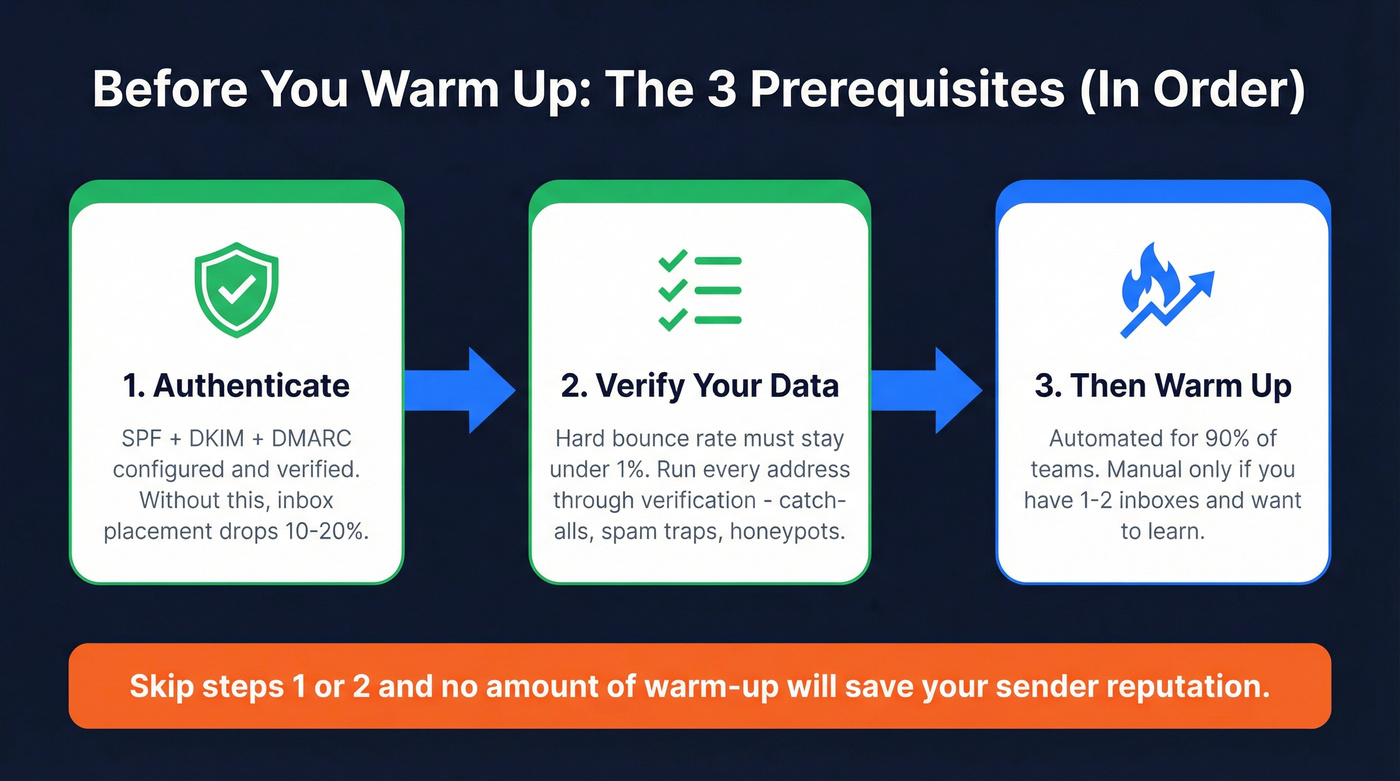
Authenticate first. SPF, DKIM, and DMARC must be configured correctly before Day 1. Emails without proper auth see 10-20% lower inbox placement. If you need a step-by-step, follow our deliverability checklist.
Verify your data. A hard bounce rate above 1% is a red flag. One bad list can undo a month of warm-up. Use an email checker tool or a dedicated email ID validator before you send.
Then warm up. Automated for 90% of teams. Manual is a learning exercise, not a scalable strategy. If you want the mechanics, see our guide to automated email warmup.
Before You Warm Up: The Prerequisites
Domain vs Mailbox Warm-Up
These are different timelines, and confusing them is one of the most common mistakes we see. A brand-new domain needs roughly 3 months to build enough reputation for full-volume outreach. A new mailbox on an already-warmed domain takes about 1 month. An old domain with no outbound history behaves like a new one - age alone doesn't help. Know which situation you're in before you plan your ramp.
Authentication Checklist
SPF, DKIM, and DMARC aren't optional - they're table stakes. Miss one, and ISPs treat your emails like a stranger knocking on the door at 2 AM. (If you're building from scratch, start with SMTP authentication.)
SPF: Publish one SPF record only. Multiple SPF TXT records invalidate the whole thing. Stay under the 10 DNS lookup limit - check with MXToolbox. Use -all for cold email; ~all is fine during testing, but switch before you go live.
DKIM: Use 2048-bit keys minimum. Rotate annually. Set up a separate DKIM signature for each sending service you use.
DMARC: Start p=none for 2-4 weeks, then quarantine, then reject. Don't skip steps - jumping to reject on a new domain breaks legitimate mail. Always warm up on a separate sending domain so your primary company domain stays protected.
Data Quality - The Step Everyone Skips
Bad emails create bounces. Bounces destroy sender reputation. Destroyed reputation means warm-up fails. The chain reaction starts with your contact list.
A hard bounce rate above 1% during warm-up is a red flag, and if you're not keeping bounces under 2%, you're going to have deliverability problems fast. Prospeo runs every address through a 5-step verification process that includes catch-all handling, spam-trap removal, and honeypot filtering - 98% accuracy across 143M+ verified emails. Stack Optimize built their agency to $1M ARR using that data layer, maintaining 94%+ deliverability, bounce rates under 3%, and zero domain flags across all clients. That's the kind of data quality gate you need before warm-up even begins. (More on data quality and why it decays over time in B2B contact data decay.)

Manual Warm-Up: The 30-Day Schedule
Manual warm-up works. It's just slow, tedious, and hard to maintain consistently.
Here's a practical 30-day ramp:
| Phase | Days | Emails/Day | Notes |
|---|---|---|---|
| Start | 1 | 2 | Plain text only |
| Early ramp | 2-5 | 3-10 | Keep it conversational; prioritize replies |
| Ramp | 6-10 | 15-25 | Add thread replies |
| Build | 11-14 | 30-50 | Monitor bounces closely |
| Scale | 15-21 | 75-100 | Workspace/Outlook only |
| Maintain | 21+ | Hold steady | Stay under 50 if not Workspace/Outlook |
Content rules during warm-up are strict. Plain text only - no HTML, no images, no logos, no tracking pixels, no shortened URLs, no attachments, and keep your email signature minimal with no photos or links. (If you're rewriting copy, use these outreach email templates as a baseline.)
One detail most guides miss: warm up across multiple email providers, not just Gmail-to-Gmail. Your recipients should include Gmail, Outlook, Yahoo, and Apple Mail addresses. ISPs build your reputation independently, so a perfect Gmail reputation doesn't automatically translate to strong placement in Outlook.
On the engagement side, you need recipients who'll actually interact - replies, continued threads, marking "not spam," starring messages, and moving emails to Primary. This is where manual warm-up gets painful. You're essentially asking friends or colleagues to perform these actions daily for a month.
Time cost: 10-30 minutes per inbox per day. Over 30 days, that's 5-15 hours per inbox. For one inbox, manageable. For three or more, it's a part-time job.
How Automated Warm-Up Tools Work
Automated warm-up tools connect your inbox to a network of real email accounts. They send messages on your behalf, generate replies, mark emails as "not spam" and "important," and gradually increase volume - all without you touching anything.
The better tools randomize send times, vary message content, and adjust volume based on your inbox's reputation signals. Network size matters here. Instantly runs a private network of 4.2M+ accounts, which means your warm-up emails interact with a diverse set of inboxes rather than the same small pool. Mailivery caps at 250 warm-up emails per mailbox - a limit worth knowing if you're running high-volume accounts. If you're comparing options, start with our roundup of email warm up tools for B2B campaigns.
Detection risk is real but manageable. It's highest when patterns are repetitive - same templates, unnatural reply timing, constant volumes - and when warm-up runs alongside aggressive cold outreach. Warm up first, campaigns after. Once campaigns start, maintain a 1:1 ratio of warm-up emails to campaign emails after Day 14 to keep your reputation stable. (For scaling safely, follow cold email volume best practices.)
Here's the thing: if your deal sizes are under $10k, you probably don't need a dedicated warm-up tool at all. A $5/mo Woodpecker add-on or the warm-up bundled in your outreach platform will do the job. The standalone warm-up market exists because people overthink this.

Your warm-up is only as good as the data behind it. One bad list undoes a month of careful ramping. Prospeo's 5-step verification - with catch-all handling, spam-trap removal, and honeypot filtering - delivers 98% email accuracy across 143M+ verified addresses. Stack Optimize built a $1M agency on it with bounce rates under 3% and zero domain flags.
Fix your data before you fix your warm-up. Start free with 75 verified emails.
Side-by-Side Comparison
| Factor | Manual | Automated | Winner |
|---|---|---|---|
| Time cost | 10-30 min/inbox/day | ~5 min setup | Automated |
| Monthly cost | $0 (your time) | $5-69/mo per inbox | Manual (if time is free) |
| Consistency | Depends on you | Runs daily, no gaps | Automated |
| Scalability | 1-2 inboxes max | Unlimited inboxes | Automated |
| Control | Full | Moderate | Manual |
| Learning value | High | Low | Manual |
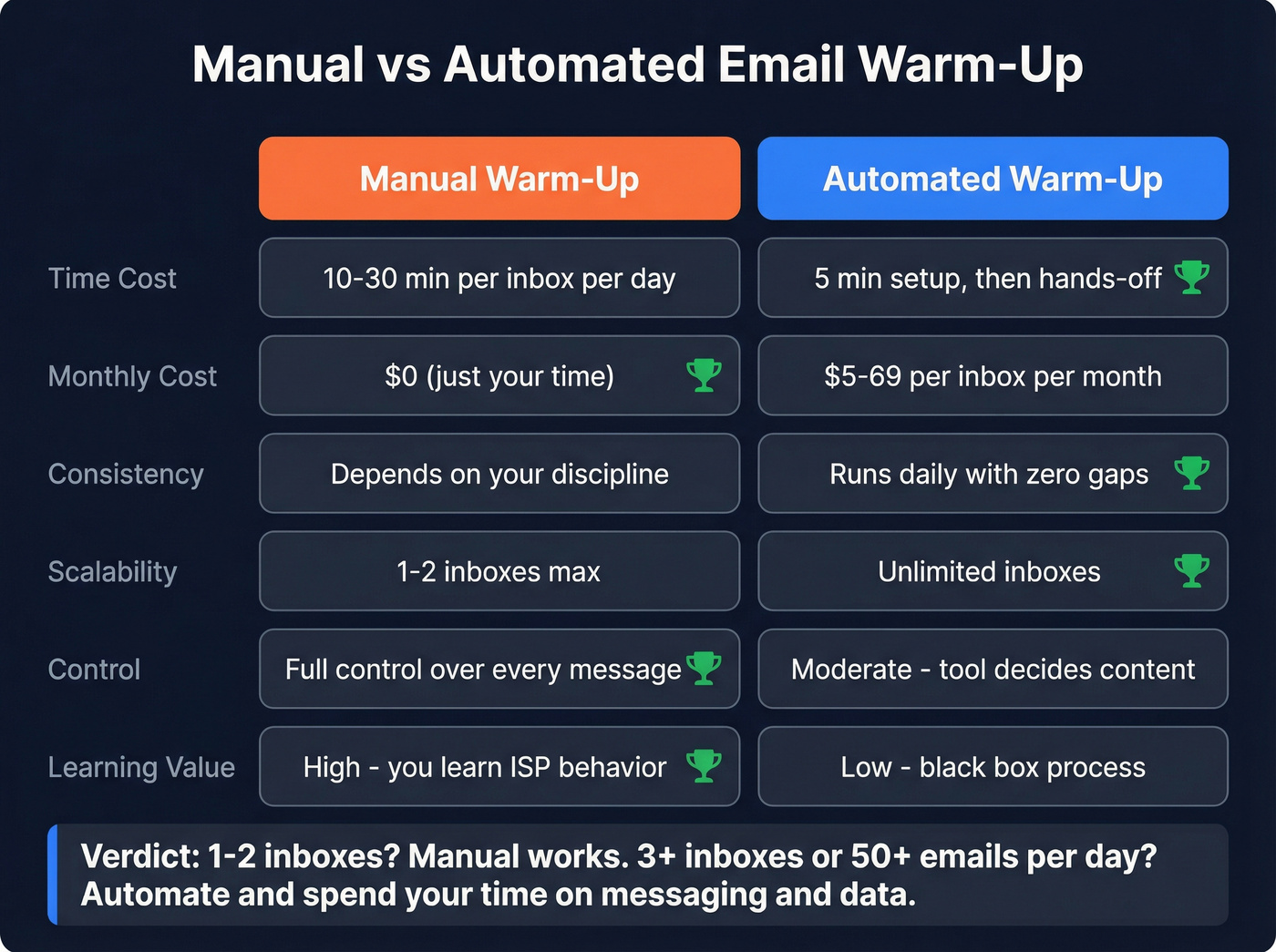
Let's make the thresholds simple.
1-2 inboxes, under 50 emails/day? Manual works. You'll learn how ISPs respond to your sending patterns, and the time investment is reasonable.
3+ inboxes or 50-100+ emails/day? Automate. The math doesn't work otherwise. At 3 inboxes and 20 minutes each, you're spending an hour a day on warm-up alone. At agency scale with 10 inboxes, manual warm-up costs 50+ hours per month in labor. A $37/mo tool replaces that entirely.
The hybrid path. Some teams start manual for the first week to learn ISP behavior, then switch to automated for consistency. Reasonable for your first inbox - but don't repeat it for every new account. The learning value diminishes fast.
Skip manual entirely if you're running 3+ inboxes. We've watched teams burn hours on manual warm-up across multiple accounts when a $19/mo tool would've freed them to focus on what actually moves pipeline: better messaging and cleaner data.
Warm-Up Tool Pricing (2026)
| Tool | Starting Price | Model | Bundled? | Notable |
|---|---|---|---|---|
| Woodpecker | Included for premium; extra slots $5/mo | Per mailbox | Yes | Cheapest add-on |
| Warmbox | $19/mo ($15 annual) | Per mailbox | No | Solid standalone |
| Mailreach | $25/mo | Per mailbox | No | 20 spam test credits |
| Mailivery | $29/mo | Unlimited mailboxes (shared volume) | No | 250/mailbox cap |
| Lemwarm | $29/mo Essential | Per mailbox | Lemlist ecosystem | Smart tier at $49 |
| Instantly | $97/mo | Unlimited | Yes | Warm-up bundled with outreach |
| Warmy.io | $49/mo | Per mailbox | No | 100/day at base |
| Mailwarm | $69/mo Starter | Per mailbox | No | Premium pricing |
Our take: warm-up tools are commoditized. The core mechanics - send, open, reply, mark not spam - are similar across most tools. Differences show up in network quality, controls, and reporting, but they're rarely dramatic enough to justify a 3x price premium. (If you're building a full stack, see our picks for cold email marketing tools.)
If your outreach tool already includes warm-up (Instantly, Woodpecker, Lemlist), use it. Don't pay twice. For standalone warm-up, Warmbox at $15-19/mo does the job without the premium pricing.
Benchmarks: How to Know It's Working
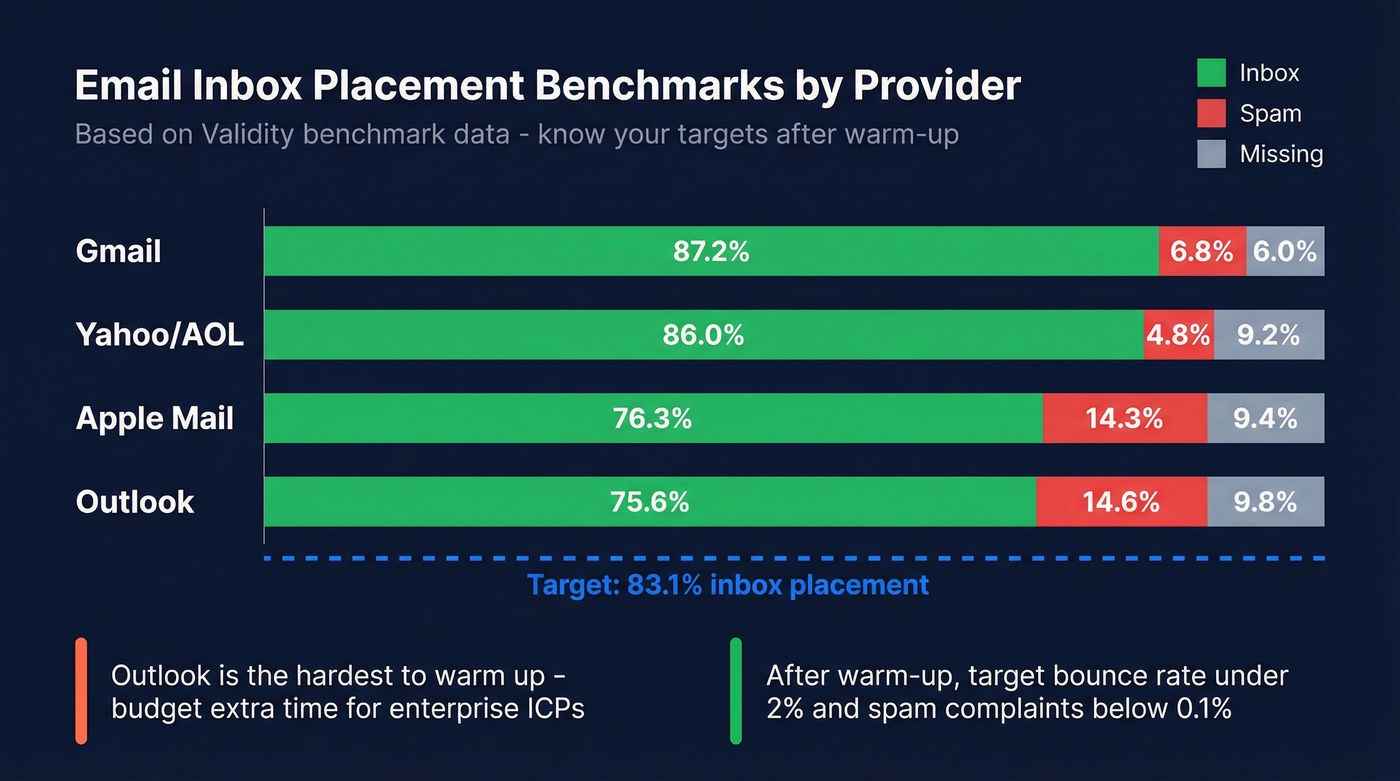
You need numbers, not vibes. Here's what ISP-level inbox placement looks like based on Validity benchmark data:
| Provider | Inbox | Spam | Missing |
|---|---|---|---|
| Gmail | 87.2% | 6.8% | 6.0% |
| Yahoo/AOL | 86.0% | 4.8% | 9.2% |
| Apple Mail | 76.3% | 14.3% | 9.4% |
| Outlook | 75.6% | 14.6% | 9.8% |
| Global avg | ~84% | - | - |
Outlook is significantly harder to warm up than Gmail. If your ICP lives in Outlook-heavy industries - enterprise, finance, government - budget extra warm-up time and make sure your automated tool's network includes plenty of Outlook addresses.
After warm-up, target a bounce rate under 2%, spam complaints below 0.1%, and inbox placement above 83.1%. Gmail specifically penalizes senders with spam complaint rates above 0.3%. Cross that line and inbox placement drops fast. If you're troubleshooting, start with email deliverability tracking.
Warm-up plus correct authentication typically moves inbox placement into the 80-90% range for healthy lists. If you're below 80% after 30 days, the problem isn't warm-up - it's authentication, data quality, or your email content.
Mistakes That Kill Warm-Up
Skipping authentication. SPF, DKIM, and DMARC must be set before Day 1. Warm-up without auth is like painting a house with a crumbling foundation - the surface looks fine until everything collapses.
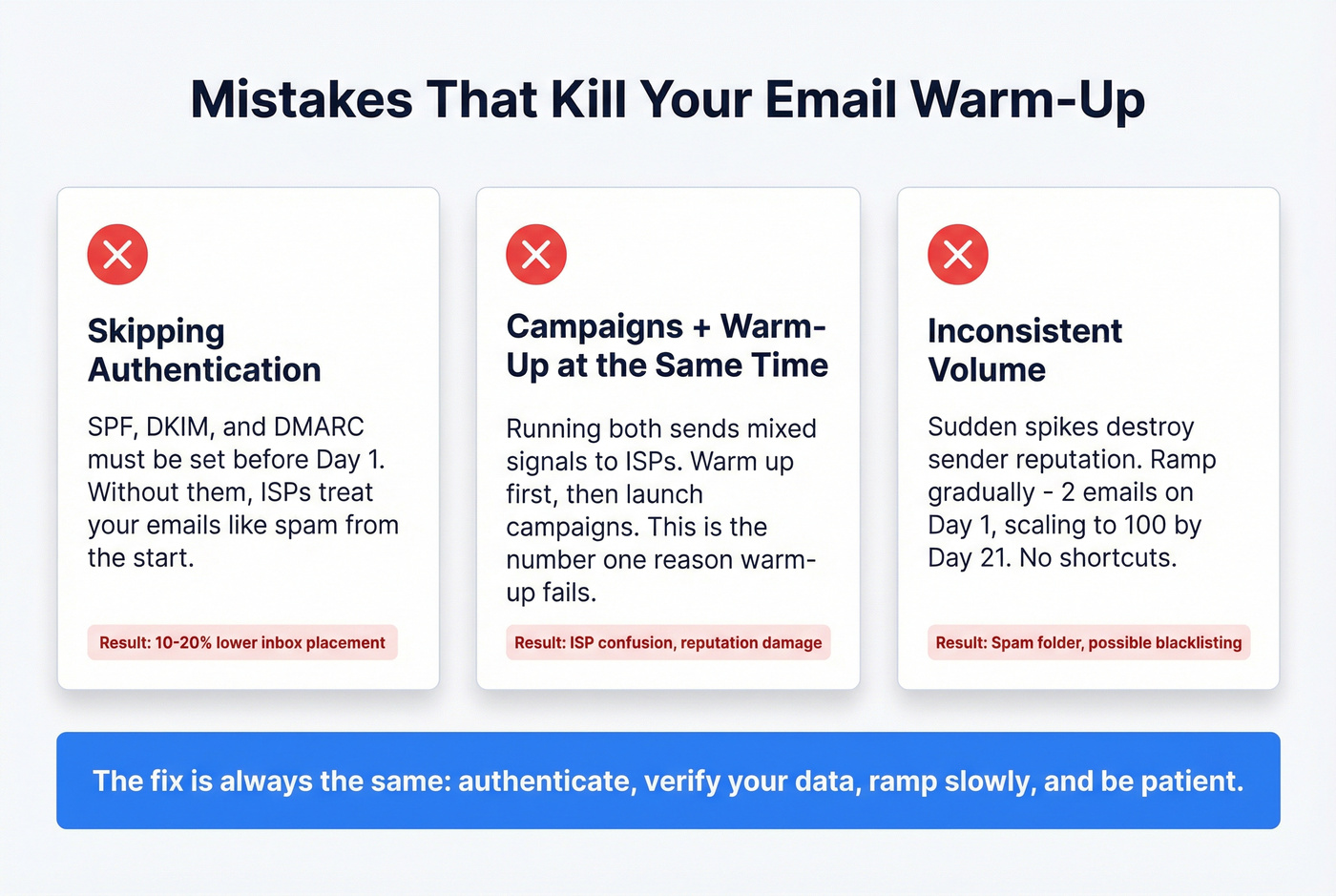
Running campaigns and warm-up simultaneously. Warm up first, campaigns after. Running both at once sends mixed signals to ISPs and is the #1 reason warm-up "doesn't work."
Inconsistent volume. Sudden spikes destroy reputation. If you're sending 20 emails a day and jump to 200, ISPs notice immediately. The ramp exists for a reason.
Sending to unverified lists after warm-up. Your dashboard says green. You blast 500 emails. 40 bounce. Reputation tanks. Verify every address before it enters your sequence - Prospeo's free tier covers 75 emails/month, enough to test your workflow before you scale. (If you want the mechanics, see email verification for outreach.)
Using your primary domain. Always warm up on a separate sending domain. If cold outreach damages that domain's reputation, your company's transactional email stays protected.
Stopping warm-up after Day 30. Sender reputation isn't a destination - it's a treadmill. Stop running and it decays. Maintain continuous low-volume warm-up alongside active campaigns.
You just spent 30 days warming up your inboxes. Don't waste it on contacts that bounce. At $0.01 per email, Prospeo gives you the data quality gate that keeps hard bounces under 1% - the threshold that separates successful campaigns from spam folders.
Protect your sender reputation with data refreshed every 7 days, not every 6 weeks.
FAQ
How long does email warm-up take?
A new domain needs roughly 3 months before it's ready for full-volume outreach. A new mailbox on an already-warmed domain takes about 1 month. Never stop warm-up entirely - maintain continuous low-volume sending alongside active campaigns to prevent reputation decay.
Can I warm up a free Gmail account?
Free Gmail caps at 100 emails/day via SMTP and 500 via browser. Google Workspace allows 2,000/day at ~$7/mo per user. For serious cold outreach, Workspace on a separate sending domain is the minimum viable setup.
Do I need a warm-up tool if I only have one inbox?
One inbox sending under 50 emails/day can be warmed manually in 3-4 weeks. That said, a $19/mo tool like Warmbox is cheaper than 10-30 minutes of daily effort for a month - and far more consistent than your willpower on Day 17.
How does data quality affect warm-up results?
A hard bounce rate above 1% during warm-up signals ISPs that you're an unreliable sender, undoing your ramp progress. Verify every contact before sending. The consensus on r/coldemail is that bad data is the single fastest way to torch a freshly warmed domain, and in our experience, that's exactly right.