How to Validate Email Address Format (Without Rejecting Real Users)
Your signup form has validation. Your bounce rate is still high. Meanwhile, a developer on your team just discovered that your regex rejects user+tag@gmail.com - an address Gmail has supported for years.
There are two ways to validate email address format wrong: too loose (garbage gets through) or too strict (real users get locked out). Let's fix both.
What You Need (Quick Version)
- For most apps, use the Zod "reasonable regex" for client-side checks - it catches real errors without rejecting power users.
- For server-side, use your language's built-in email parser (Python
email.utils, .NETMailAddress, etc.). - Format validation alone doesn't prevent bounces. Pair it with a verification service to confirm mailboxes actually exist.
Validation vs. Verification
These terms get used interchangeably, and that's where problems start. Validation checks whether an email address could exist based on its format and syntax. Verification checks whether the mailbox actually exists and can receive mail.
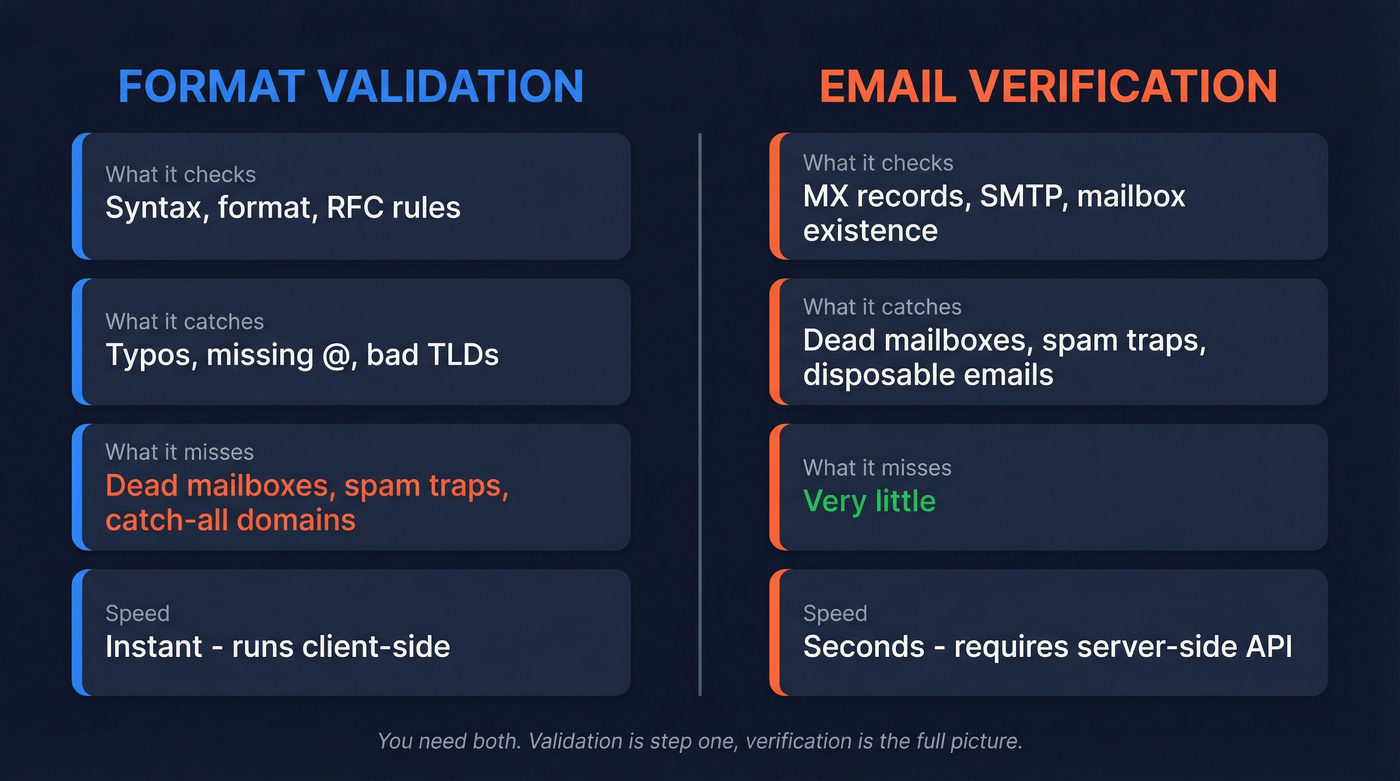
| Validation | Verification | |
|---|---|---|
| What it checks | Syntax, format, RFC rules | MX records, SMTP, mailbox |
| What it catches | Typos, missing @, bad TLDs |
Dead mailboxes, spam traps |
| What it misses | Everything else | Very little |
| Speed | Instant (client-side) | Seconds (server-side API) |
There's a popular argument that you should skip format validation entirely and just send a confirmation email. The conclusion is right - confirmation is the gold standard. But a basic format check catches obvious errors before you waste an API call or a transactional email send. It's step one, not the whole pipeline.
Anatomy of a Valid Email
An email address is local-part@domain. Simple enough on the surface, but the RFC 5322 spec allows more than most developers expect.
Length Limits
| Component | Max Length |
|---|---|
| Local-part | 64 characters |
| Domain label | 63 characters |
| Domain total | 255 characters |
| Overall address | 254 characters |
USWDS guidelines say to accommodate up to 256 characters. In practice, most systems cap email length around 254-256. Build for 254+ and you won't have issues.
Allowed Characters
The local-part in dot-atom form allows alphanumerics plus these specials:
| Category | Characters |
|---|---|
| Specials | ! # $ % & ' * + - / = ? ^ _ { \| } ~ |
| Separator | . (not first, last, or consecutive) |
| Quoted-string extras | Spaces, tabs, escaped characters inside "..." |
The + character is valid. Full stop. Rejecting it is a bug, not a feature. Gmail and many major providers support plus-addressing for filtering and tagging, and developers who use it will abandon your form before they'll remove the tag.
Mistakes That Reject Real Users
Here's the thing: if your validation does any of these, you're turning away real people. Stack Overflow threads about + rejection have been active for years - this isn't an edge case, it's a perennial frustration across the developer community.
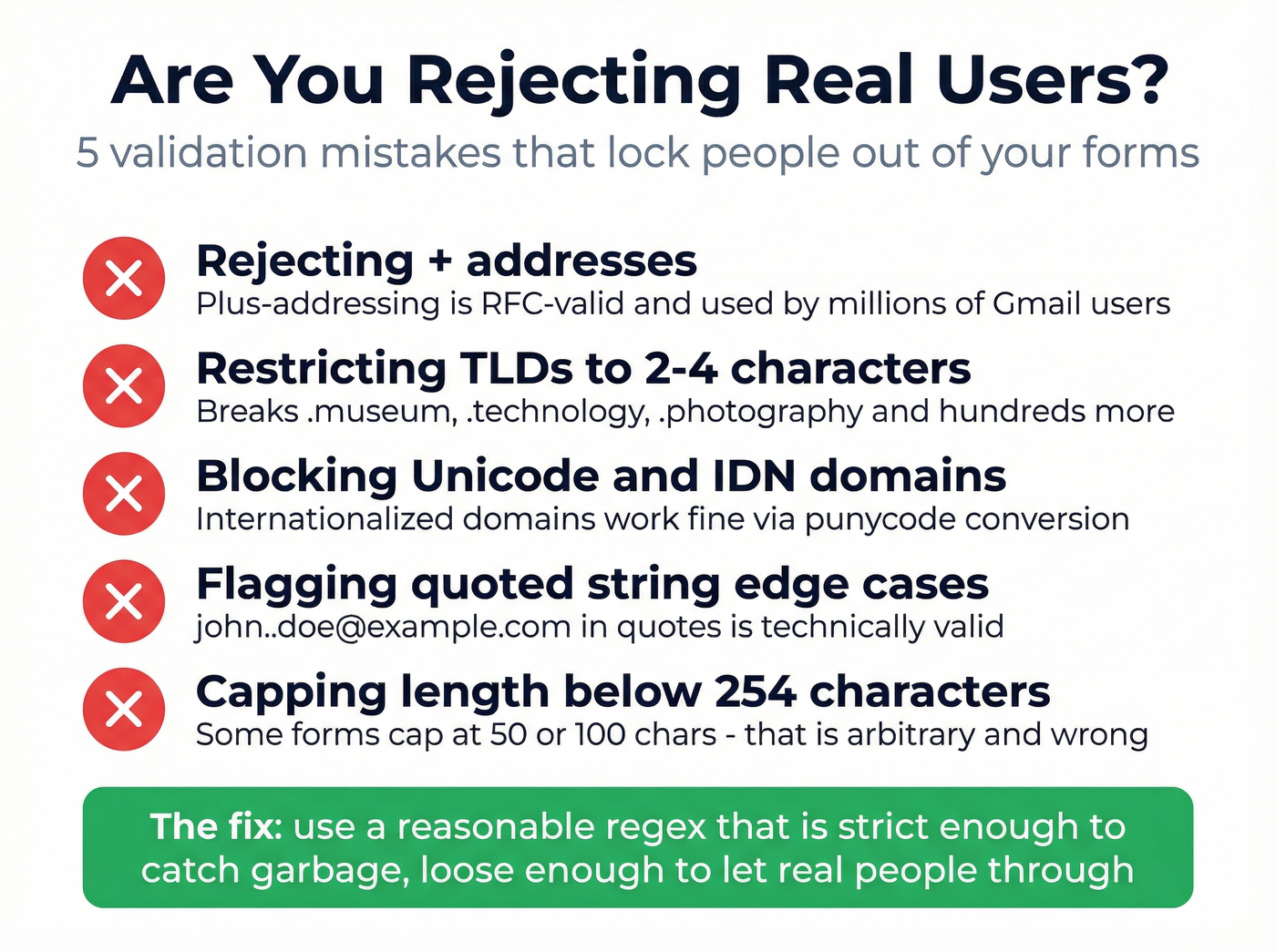
- Rejecting
+addresses. Plus-addressing is RFC-valid and widely used. This is the single most common validation bug on the web. - Restricting TLDs to 2-4 characters. Breaks
.museum,.technology,.photography, and hundreds of other valid TLDs that have existed for over a decade now. - Blocking Unicode/IDN domains. Internationalized domain names are broadly supported via punycode. Your regex shouldn't reject them.
- Flagging consecutive dots in quoted strings.
"john..doe"@example.comis technically valid inside quotes. If you don't support quoted strings, just ignore them - don't false-positive on them. - Capping length below 254 characters. Some forms cap at 50 or 100 characters. That's arbitrary and will eventually reject a legitimate address.

Format validation is step one. But as this article shows, even perfect regex can't tell you if a mailbox exists. Prospeo's 5-step verification - with catch-all handling, spam-trap removal, and honeypot filtering - delivers 98% email accuracy across 143M+ verified addresses.
Stop guessing which emails are real. Verify them at $0.01 each.
Regex Patterns for Email Format Checks
Not all regex is created equal. The right choice depends on what you're building.
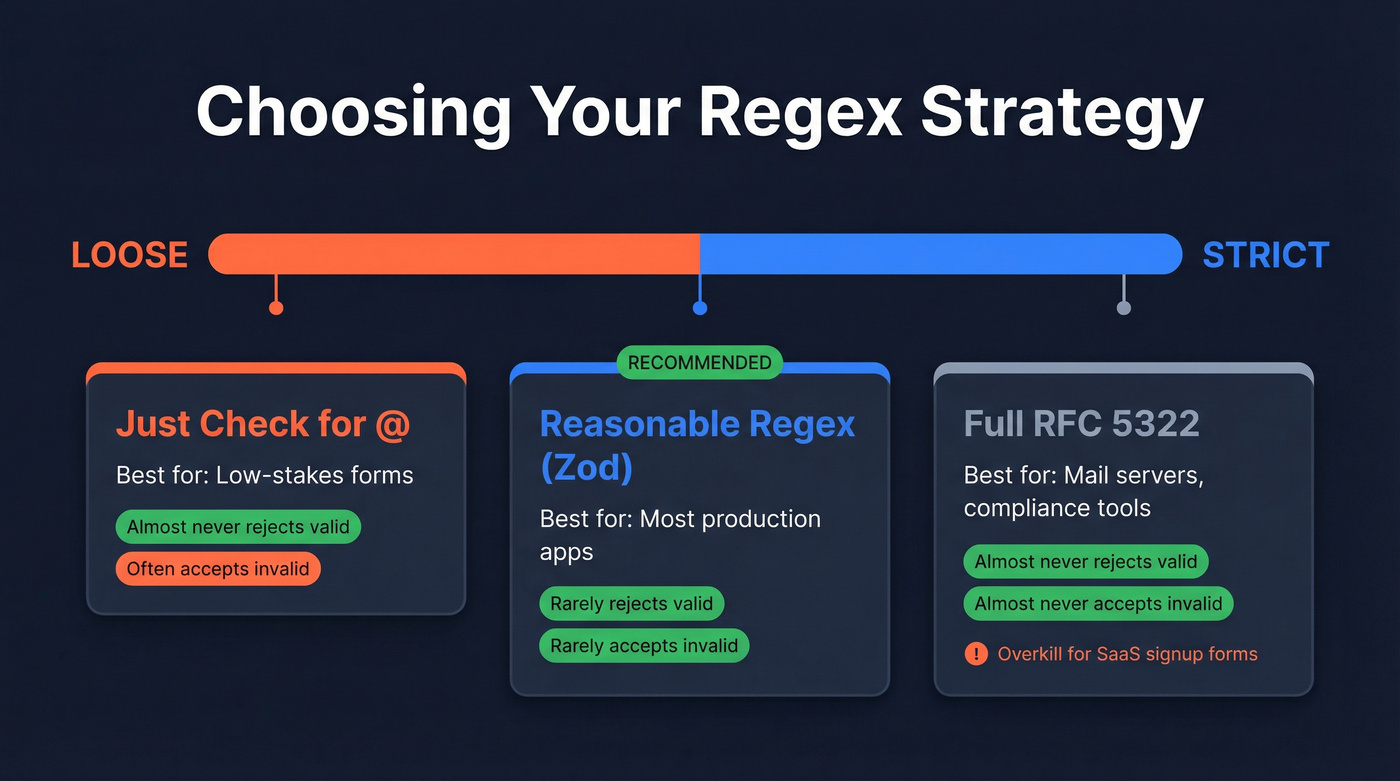
| Approach | Best for | Rejects valid? | Accepts invalid? |
|---|---|---|---|
| "Just check for @" | Low-stakes forms | Almost never | Often |
| Reasonable regex | Most apps | Rarely | Rarely |
| Full RFC 5322 | Mail servers, compliance | Almost never | Almost never |
The "Just Check for @" Approach
The USWDS recommendation: check for an @ preceded and followed by one or more non-space characters. That's it. This works when a confirmation email follows immediately and you don't care about catching typos upfront.
The Reasonable Regex (Recommended)
This is the one to use for most production apps. The Zod maintainer's regex intentionally rejects quoted local parts, IP literals, and comments - even though they're RFC-valid - because it "validates normal-ass email addresses."
^(?!\.)(?!.*\.\.)([a-z0-9_'+\-\.]*)[a-z0-9_'+\-]@([a-z0-9][a-z0-9\-]*\.)+[a-z]{2,}$
It's case-insensitive and handles the vast majority of real-world addresses. The philosophy is pragmatic: RFC-valid doesn't mean deliverable, and supporting every edge case creates more regressions than it prevents. We've seen teams chase full RFC compliance only to break subdomain validation in the process - the Zod maintainer documented exactly this problem.
The Full RFC 5322 Regex
The Stack Overflow community wiki maintains a massive RFC 5322-compliant regex. It handles nearly every edge case, but one commonly copied version has a known bug: the IP address subpattern allows 00 as an IPv4 octet. A corrected version exists in the thread. Use this only if you're building a mail server or a compliance tool.
Skip this if you're building a SaaS signup form or a marketing landing page. If you're selling deals under $15k and agonizing over RFC 5322 compliance, you're solving the wrong problem. The reasonable regex handles every real address we've thrown at it. Ship that and move on.
Use Libraries, Not Hand-Rolled Regex
Even well-tested regex patterns disagree on edge cases. A 2026 benchmark by Jonas Neubert tested multiple libraries against a shared set of edge cases - comments, quoted local parts, IPv6 literals, internationalized addresses - and found significant variation in results, which honestly surprised us given how "solved" this problem is supposed to be.
Use validator or Zod for JavaScript. For Python, use email.utils.parseaddr to parse addresses, then apply your own "reasonable" rules on top for length, dot placement, and domain checks. Apache Commons Validator works for Java, MailAddress for .NET, and filter_var with FILTER_VALIDATE_EMAIL for PHP. HTML5's <input type="email"> is deliberately more restrictive than the RFCs - a reasonable client-side gate but not your only check.
On internationalized email: IDN domains (Unicode in the domain part) convert to punycode and are broadly safe. Unicode in the local-part requires SMTPUTF8 support, which remains fragile across web forms. If you're issuing internationalized local-part addresses, offer an ASCII alias as a fallback.
UX and Accessibility
Good validation logic means nothing if the form itself is hostile.
Allow paste. Blocking paste on email fields is a dark pattern that helps no one. Enable autocomplete with autocomplete="email" - it saves mobile users real time. Don't require re-entry. Asking users to type their email twice doesn't reduce errors; it increases frustration. And accommodate 254 characters - don't cap the field at an arbitrary length.
Use <label for>, not placeholder text. 59.6% of homepages lack proper form labels per WebAIM's Million analysis, which is staggering for something so basic. Trigger validation checks on-blur, not on every keystroke. Mark invalid fields with aria-invalid and connect error messages via aria-describedby. For real-time validation, delay screen reader announcements by ~500ms so users aren't interrupted mid-keystroke.
Beyond Format: The Verification Pipeline
Checking email address format is the bouncer checking IDs at the door. Verification is the background check. Here's the full pipeline for production-grade email handling:
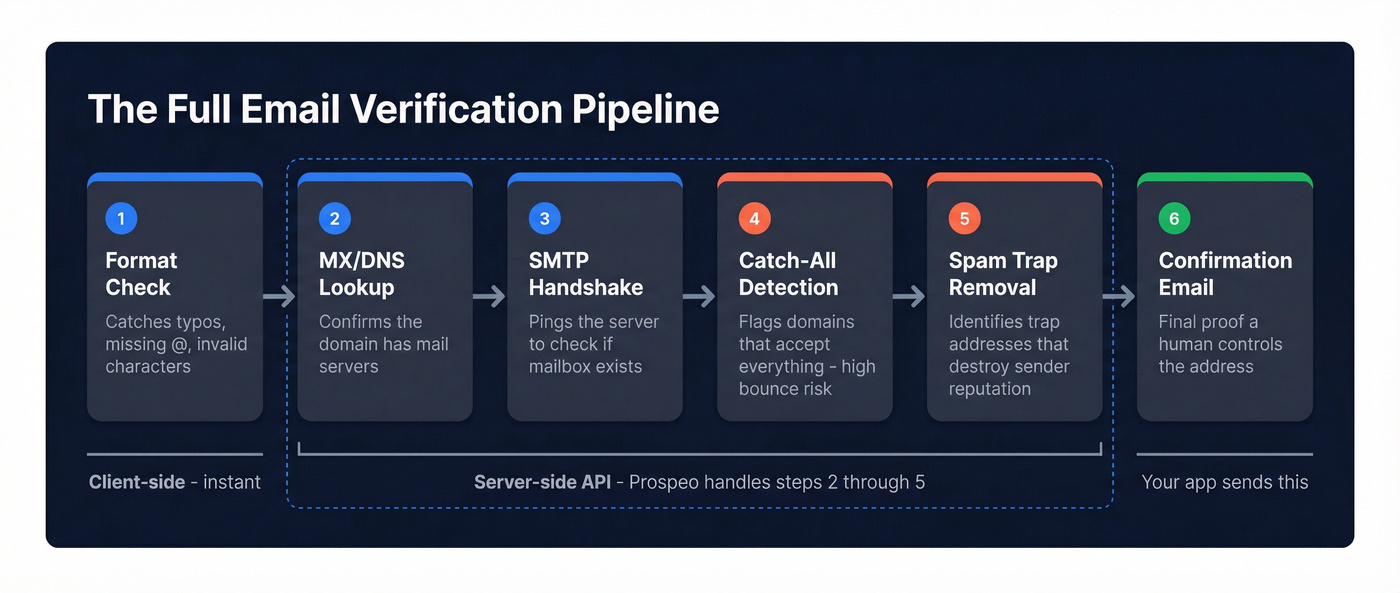
- Format check - catches typos, missing
@, invalid characters - MX/DNS lookup - confirms the domain has mail servers
- SMTP handshake - pings the mail server to check if the mailbox exists
- Catch-all detection - flags domains that accept everything (high bounce risk)
- Spam-trap removal - identifies known trap addresses that destroy sender reputation
- Confirmation email - the final proof that a human controls the address
Format validation alone can't detect dead mailboxes, spam traps, or catch-all domains. Every one of those passes a regex check with flying colors - and then bounces hard when you actually send. For steps 2 through 5, tools like Prospeo run MX lookup, SMTP verification, catch-all detection, and spam-trap removal through a 5-step process, delivering 98% email accuracy on a 7-day refresh cycle.
If you're trying to reduce bounces in outbound, pair this with an email validity check and a hard bounce prevention workflow, plus a disposable email domains list to block obvious throwaways.

You just built the validation pipeline. Now you need emails worth validating. Prospeo's database of 300M+ profiles is refreshed every 7 days - not every 6 weeks - so you're never prospecting with stale data that tanks your bounce rate.
Get verified emails that pass every check - yours and ours.
FAQ
What's the maximum length of an email address?
254 characters total per RFC 5321. The local-part caps at 64 characters, and each domain label caps at 63. Build your input fields for at least 254 characters to avoid rejecting legitimate addresses.
Should I use regex or a library to validate email address format?
Use a library server-side and a reasonable regex client-side. Libraries handle edge cases - quoted strings, IDN domains, IPv6 literals - that even well-tested regex patterns get wrong. The 2026 Neubert benchmark showed significant disagreement across regex-only approaches.
Is format validation enough to prevent bounces?
No. Format checks catch typos but can't detect dead mailboxes, spam traps, or catch-all domains. Pair format validation with a verification service for real deliverability protection.
Are email addresses with a + sign valid?
Yes. The + character is explicitly valid per RFC 5322 and supported by Gmail, Outlook, and many major providers for inbox filtering. Rejecting plus-addressed emails is one of the most common validation bugs on the web - fix it or lose power users.