Email Bounce Back: Diagnosing, Fixing, and Preventing Bounced Emails
You just sent a 3,000-contact campaign and 280 emails bounced back. Your ESP is flagging your account, open rates are cratering, and you're staring at a non-delivery report that reads like machine code. With 392.5 billion emails sent daily in 2026, mailbox providers have zero patience for senders who can't keep their lists clean.
Most bounces aren't random. They follow predictable patterns, and nearly all of them trace back to two root causes - bad data and missing authentication.
What Email Bounce Back Actually Means
An email bounce back - also called a non-delivery report (NDR) or delivery status notification (DSN) - is an automated message from a mail server telling you your email couldn't be delivered. Every bounce contains a structured set of information: a message ID, a timestamp, the delivery stage where the failure occurred, an SMTP status code, and a human-readable error description. That bounceback message isn't just noise. It's a diagnostic report, and once you learn to read it, you can fix almost any deliverability problem.
The bounce notification gets generated based on what the receiving server returns, then routed back to the return-path address in your email headers. If you're using an ESP like Mailchimp, Klaviyo, or HubSpot, the platform intercepts these and translates them into dashboard metrics. Running your own SMTP infrastructure? You'll see the raw NDR in your inbox.
The Short Version
- Hard bounces are permanent. The address doesn't exist. Remove it immediately.
- Soft bounces are temporary. Retry later, but if the same address keeps failing, suppress it.
- The biggest bounce drivers in 2026 are still bad list data and authentication failures. Google, Yahoo, and Microsoft now enforce modern sender requirements and will reject non-compliant traffic outright.
- The fastest fix: verify your list before sending, then set up email authentication. That combination kills the majority of bounce problems.
Jump to bounce types, SMTP codes, 2026 auth enforcement, or the prevention checklist.
Hard vs. Soft vs. Transient Bounces
Not all bounces are equal. The SMTP code's first digit tells you whether the failure is permanent or temporary - and that distinction determines your next move.
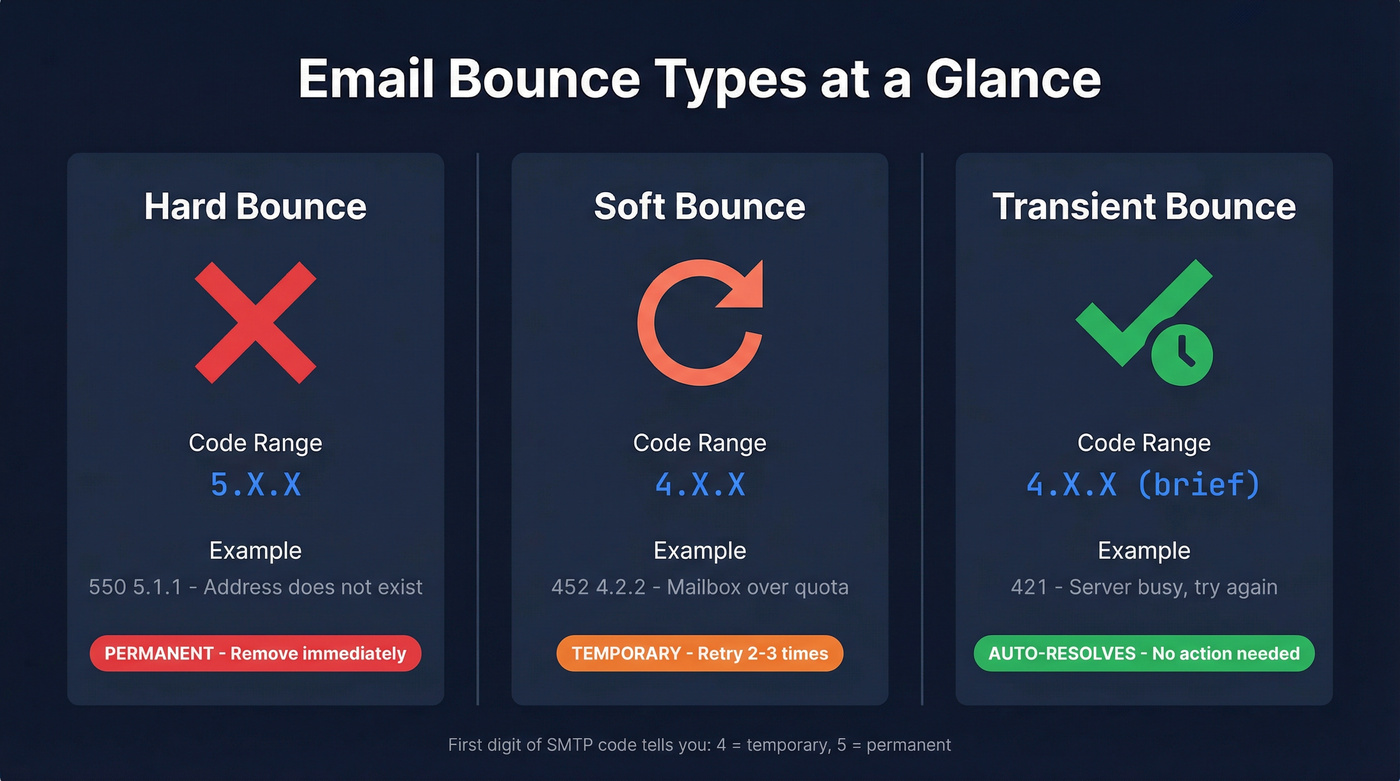
| Type | Code Range | Example | Action |
|---|---|---|---|
| Hard | 5.X.X | 550 5.1.1 - address doesn't exist |
Remove immediately |
| Soft | 4.X.X | 452 4.2.2 - mailbox over quota |
Retry 2-3 times |
| Transient | 4.X.X | 421 - server busy |
Auto-retry |
Hard bounces are permanent failures. The mailbox doesn't exist, the domain is dead, or the server has explicitly rejected your message. There's nothing to retry. Every hard bounce you leave on your list damages your sender reputation and increases the odds that future emails - even to valid addresses - land in spam.
Soft bounces are temporary. The mailbox is full, the server is overloaded, or a policy rule temporarily blocked delivery. Most ESPs auto-retry soft bounces for you, but if the same address soft-bounces repeatedly, it's effectively dead. Klaviyo auto-suppresses addresses after 7 consecutive soft bounces - a reasonable threshold. If your ESP doesn't do this automatically, set your own rule.
Transient bounces are a subset of soft bounces - brief server hiccups that resolve on their own. You usually don't even see these because your sending infrastructure retries automatically within minutes.
How to Read an Undeliverable Message
Bounce-back messages look intimidating, but they follow a consistent structure. Three real examples will make this click.
Hard Bounce - Address Doesn't Exist
smtp;550 5.1.1 The email account that you tried to reach does not exist.
Please try double-checking the recipient's email address for typos or
unnecessary spaces.
The 550 5.1.1 tells you everything. 5 = permanent failure. 1.1 = bad destination mailbox. This address is dead - remove it, no retries.
Soft Bounce - Mailbox Full
smtp;452 4.2.2 The email account that you tried to reach is over quota.
Please direct the recipient to clear their mailbox.
452 4.2.2 means the mailbox exists but can't accept new messages right now. 4 = temporary. Retry in 24-48 hours, but if it keeps failing, the account is likely abandoned.
Transient - Server Temporarily Unavailable
smtp;451 4.7.1 Service unavailable - try again later
451 4.7.1 is Apple's way of saying "we're busy, come back later." Your ESP should auto-retry this. If you see it repeatedly for the same domain, check whether the receiving domain's MX records are configured correctly.
The pattern is always the same: look at the first digit (4 or 5), then read the enhanced status code for specifics. Once you internalize this, undeliverable messages stop being cryptic.

Most bounces trace back to bad data. Prospeo's 5-step verification with catch-all handling, spam-trap removal, and honeypot filtering delivers 98% email accuracy - dropping bounce rates from 35%+ to under 4% for teams like Snyk and Meritt.
Fix your bounce problem at the source - before you hit send.
SMTP Bounce Codes Reference
Bookmark this table. You'll come back to it.
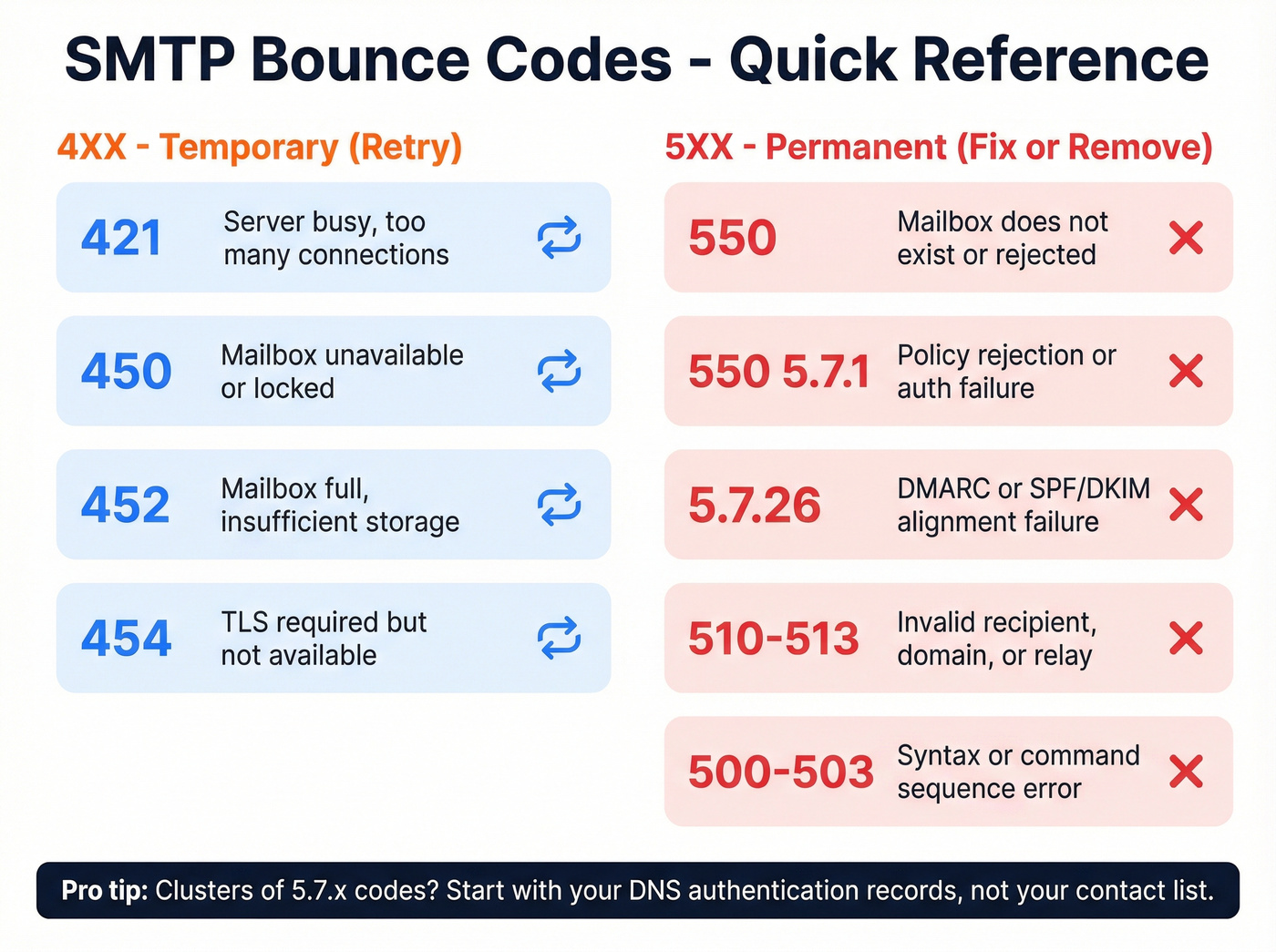
| Code | What It Means | What to Do |
|---|---|---|
| 421 | Server busy, too many connections | Auto-retry; reduce send rate |
| 450 | Mailbox unavailable (locked/not routable) | Retry later; verify address |
| 451 | Server processing error / temporary failure | Retry; contact admin if persistent |
| 452 | Insufficient storage (4.2.2) | Retry in 24-48 hrs |
| 454 | TLS required but unavailable | Check TLS config; retry |
| 471 | Blocked by anti-spam/firewall rule | Check IP reputation, content |
| 500 | Syntax error in command | Fix SMTP command formatting |
| 501 | Syntax error in parameters | Fix command parameters |
| 502 | Command not implemented | Check server compatibility |
| 503 | Bad command sequence | Fix SMTP handshake order |
| 510-513 | Invalid recipient/domain/relaying issues | Verify address and domain DNS; fix relaying permissions |
| 550 | Mailbox unavailable / rejected | Remove address; check reputation |
| 550 5.7.1 | Policy rejection / auth failure | Check SPF/DKIM; review content |
| 5.7.26 | Authentication/policy rejection (often DMARC-related) | Fix SPF/DKIM/DMARC alignment |
A few codes deserve extra attention. 5.7.x codes indicate policy or authentication failures - these are the codes you'll see when SPF, DKIM, or DMARC checks fail. Since Google and Yahoo started enforcing modern sender requirements in 2024, 5.7.x rejections have become dramatically more common. If you're seeing clusters of these, start with your DNS/authentication records, not your contact list.
The general rule: any 4xx code means "try again." Any 5xx code means "fix something or remove the address." Mailgun's SMTP reference is a solid deep-dive if you need more granularity.
Common Reasons Emails Bounce
Here's the thing: stop blaming your ESP. In 90% of cases, the problem is your data. We see this pattern constantly in email marketing communities and on r/coldemail - someone sends their first campaign to a purchased list, gets a 15% bounce rate, and their ESP suspends their account within 24 hours. Don't be that person.
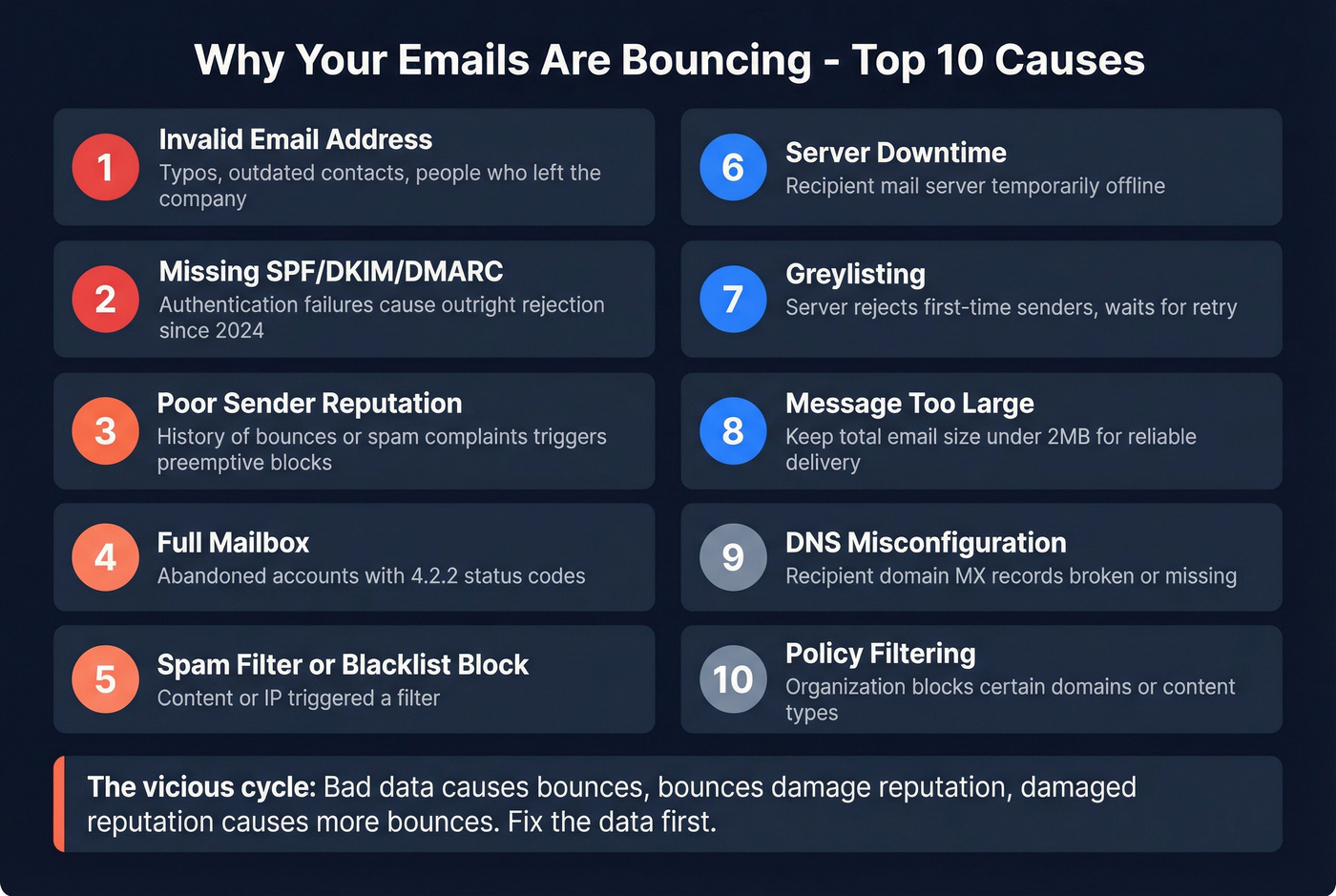
The ten most common causes, ranked roughly by frequency:
Invalid email address. Typos, outdated addresses, or contacts who've left the company. This is the #1 source of hard bounces and the easiest to prevent with pre-send verification. If you want a deeper breakdown, start with invalid addresses and how they show up in bounce logs.
Missing SPF/DKIM/DMARC authentication. Since 2024, major mailbox providers enforce modern sender requirements. If you're not compliant, you'll see policy/authentication rejections - not spam-foldering, outright rejection. Use this SPF, DKIM, DMARC setup guide to get aligned fast.
Poor sender reputation. If your domain or IP has a history of bounces, spam complaints, or blacklist hits, receiving servers preemptively reject your messages - even to valid addresses. If you're seeing blocks, follow a blacklist triage process before you send again.
Full mailbox. The recipient's inbox is over quota. Common with abandoned accounts and smaller mail servers. You'll get an undeliverable notification with a 4.2.2 status code.
Spam filter or blacklist block. Your content, sending patterns, or IP triggered a filter. Check your IP against major blacklists (MxToolbox has free tools for this).
Server downtime. The recipient's mail server is temporarily offline. Resolves on auto-retry.
Greylisting. Some servers deliberately reject first-time senders and wait for a retry - a spam-prevention technique. Legitimate sending infrastructure retries automatically; spammers usually don't bother.
Message too large. Gmail enforces a 25MB attachment limit. Keep total email size under 2MB including images and HTML for reliable delivery.
DNS misconfiguration. The recipient domain's MX records are broken or missing. Nothing you can do except remove the address.
Policy filtering. The receiving organization blocks emails from certain domains, geographies, or content types. Common in government and healthcare.
Bad data causes bounced emails. Bounced emails damage sender reputation. Damaged reputation causes more bounces to valid addresses. The whole thing spirals. The only way to break the cycle is to fix the data first.

Why Emails Started Bouncing After 2024
If your bounce rates spiked sometime after February 2024, you're not alone. Google, Yahoo, Apple, and Microsoft rolled out the biggest shift in email deliverability in a decade - modern sender requirements with real enforcement teeth. For the full playbook, see our email deliverability guide.
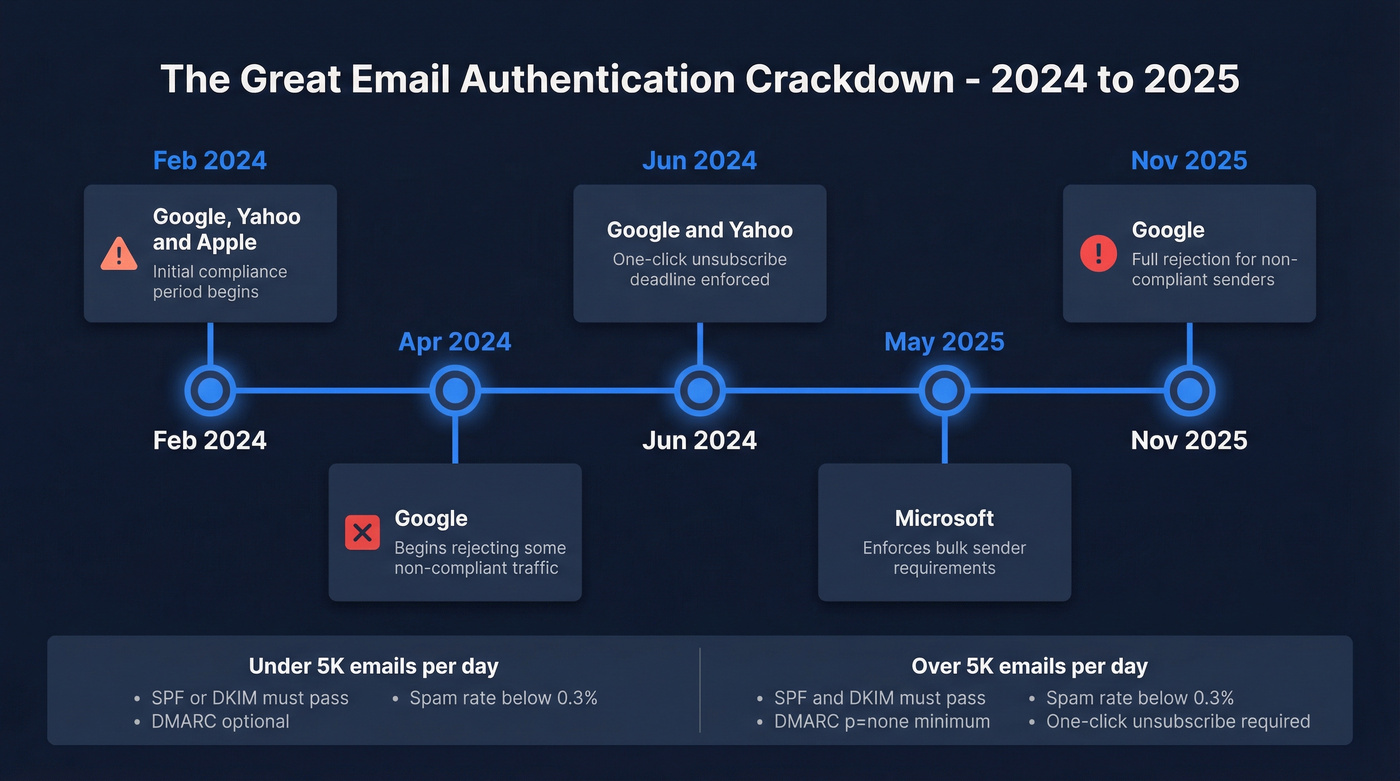
| Date | Provider | Action |
|---|---|---|
| Feb 2024 | Google, Yahoo & Apple | Initial compliance period begins |
| Apr 2024 | Begins rejecting some non-compliant traffic | |
| Jun 2024 | Google & Yahoo | One-click unsubscribe deadline |
| May 2025 | Microsoft | Enforces bulk sender requirements |
| Nov 2025 | Stricter enforcement with full rejection for non-compliant senders |
Requirements differ based on your sending volume:
| Requirement | <5K emails/day | 5K+ emails/day |
|---|---|---|
| SPF | Must pass (SPF or DKIM minimum) | Must pass |
| DKIM | Must pass (SPF or DKIM minimum) | Must pass |
| DMARC | Optional | p=none minimum |
| Spam rate | Below 0.3% | Below 0.3% (ideally <0.1%) |
| Unsubscribe | Visible link | One-click (RFC 8058) |
The practical impact: if you're sending more than 5,000 emails per day without SPF, DKIM, and DMARC properly configured, Google and Yahoo will reject your messages. Not spam-folder them - reject them. You'll see 5.7.x authentication/policy failure codes in your bounce reports.
Google added a Compliance status dashboard to Postmaster Tools in mid-2024. If you aren't checking it regularly, start now.
What's a Normal Bounce Rate?
The universal rule of thumb: keep your bounce rate below 2%. Anything above 5% signals a serious data quality problem.
Bounce rate = (bounced emails / sent emails) x 100.
Industry benchmarks, updated January 2026:
| Industry | Avg. Bounce Rate |
|---|---|
| Advertising & Marketing | 8.99% |
| Ecommerce | 6.67% |
| Business & Finance | 4.64% |
| IT & Software | 4.26% |
| Energy & Utilities | 3.60% |
| Entertainment & Events | 3.16% |
| Nonprofit | 2.83% |
| Art & Museums | 2.70% |
Look at those numbers. Advertising and ecommerce - the two industries most likely to buy or scrape lists - have the highest bounce rates. That isn't a coincidence.
Let's be honest: if your bounce rate is above 5%, you don't need a better ESP or a fancier deliverability tool. You need to stop sending to garbage data. Every dollar spent on "deliverability consulting" before cleaning your list is wasted.
How to Fix and Prevent Bounces
The prevention checklist, in priority order. Do the first three and you'll eliminate the vast majority of email bounce back issues.
1. Verify your list before sending. This is the single highest-impact action you can take. Pre-send verification catches invalid addresses, spam traps, catch-all domains, and honeypot addresses before they ever hit your sending infrastructure. We've seen teams cut bounce rates from 35-40% down to under 5% after switching to verified data - Snyk's 50-person AE team is a good example, going from 35-40% bounces to under 5% and generating 200+ new opportunities per month as a result. If you're comparing vendors, start with these email validators and email checker tools.
Most verification tools run $7-$15 per 1,000 emails on credit-based plans. The ROI is immediate - one ESP suspension costs you far more than a year of verification. Prospeo's 5-step verification process handles catch-all domains and spam-trap removal at 98% accuracy for roughly $0.01 per email.
2. Set up SPF, DKIM, and DMARC. Non-negotiable in 2026. If you're sending more than 5,000 emails per day, you need all three configured and passing. Start with DMARC at p=none to monitor, then move to p=quarantine or p=reject once you're confident in your setup. If you need the cold-outreach-specific version, follow this SPF DKIM DMARC setup for cold email.
3. Monitor sender reputation. Google Postmaster Tools is free and shows your domain reputation, spam rate, and authentication status. Check it weekly. If your spam complaint rate creeps above 0.1%, investigate immediately - 0.3% is the hard ceiling before providers start rejecting. Pair this with a proper email deliverability checklist so nothing slips.
4. Use double opt-in. Yes, it reduces signup volume. It also eliminates typos, bots, and fake addresses at the source. For any list over 5,000 contacts, the tradeoff is worth it.
5. Clean your list regularly. Even verified addresses decay. People leave companies, abandon inboxes, change roles. Run verification quarterly at minimum - monthly if you're sending high volume. An undelivered message today often becomes a hard bounce tomorrow if the address isn't removed in time. This is the same logic behind B2B contact data decay.
6. Warm up new domains and IPs. Start with low volume and ramp gradually over a few weeks. Sending 10,000 emails from a brand-new domain is the fastest way to get blacklisted. Use an automated email warmup plan if you're scaling.
7. Keep email size under 2MB. Including images and HTML. Oversized messages are a contributing factor to poor deliverability that's trivially easy to avoid.
You're reading SMTP codes because your data provider failed you. Prospeo refreshes 300M+ profiles every 7 days - not every 6 weeks - so you never send to dead addresses. At $0.01 per verified email, clean data costs less than one bounced campaign.
Stop decoding bounce-back messages. Send to verified emails instead.
FAQ
What's the difference between a bounce back and a blocked email?
A bounce back returns a non-delivery report with an SMTP error code, giving you a clear diagnostic. A blocked email is silently rejected or spam-foldered without a clean NDR - making it harder to detect and troubleshoot from your ESP dashboard.
Can I resend to a hard-bounced address?
No. Hard bounces (5.X.X codes) are permanent - the address is invalid. Remove it immediately. Every retry damages your sender reputation and increases the risk of blacklisting.
Why does my email keep bouncing to the same recipient?
Check the SMTP code first. A 5.1.1 means the address no longer exists. A 5.7.x means your authentication is failing. If multiple recipients are affected, the issue is likely your SPF, DKIM, or DMARC configuration rather than individual addresses.
Do verification tools actually reduce bounce rates?
Yes, dramatically. Teams using pre-send verification routinely cut bounce rates from 30-40% to under 5%. The cost is roughly $0.01 per email on most platforms - a fraction of what an ESP suspension or domain reputation hit costs you.
Will SPF and DKIM setup stop all bounces?
No. Authentication prevents policy-based rejections (5.7.x codes), but bounces from invalid addresses or full mailboxes require list verification and hygiene. You need both authentication and clean data working together.