Salesforce Deduplication: Root Causes to a Bulletproof Prevention Strategy
Your VP of Sales pulls a pipeline report and the same deal shows up three times. Marketing's campaign attribution is a mess because half the contacts exist as both Leads and Contacts. Your ops team spends Friday afternoons merging records instead of building pipeline. Duplicates aren't just annoying - they're expensive, and they compound faster than most teams realize.
Poor-quality data costs businesses around $700B a year, and more than 25% of the average contact database consists of duplicates. Fixing Salesforce deduplication means understanding what's actually causing the problem and picking the right layer of defense.
Quick Version
For smaller orgs, configure native Matching Rules and Duplicate Rules - it's free and takes an afternoon. For orgs that've outgrown native tools, trial DataGroomr (fast ML-powered onboarding) or Plauti (the most configurable rule engine). For prevention, verify contact data before it enters Salesforce so duplicates never form in the first place.
Why Duplicates Happen in Salesforce
Duplicates don't appear randomly. They follow predictable patterns, and most orgs have at least three of these running simultaneously.
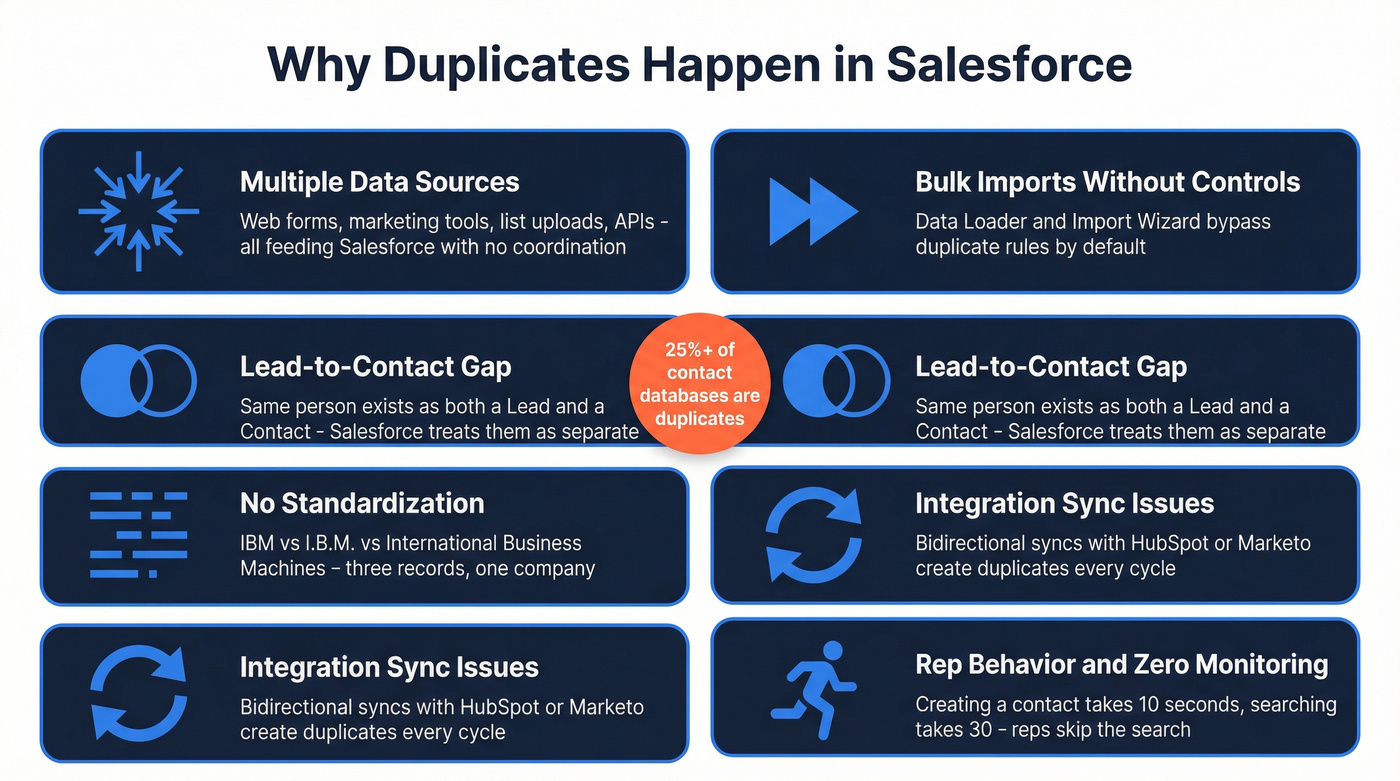
Multiple data sources. Web-to-lead forms, marketing automation, list uploads, CPQ systems, and support tools all feed Salesforce. Each source has its own formatting conventions and none of them talk to each other about what already exists. The result is duplicate leads and duplicate contacts piling up across every object.
Bulk imports that bypass controls. Data Loader, Import Wizard, and API-based loads can create thousands of duplicates in a single upload if you don't dedupe and standardize before import. We've seen teams rush a list import before a campaign launch and suddenly create 2,000 new records that overlap with existing ones. The fix is verifying emails and enriching records before uploading - tools like OpenRefine handle basic spreadsheet deduplication, while Prospeo's CSV upload catches bad emails and fills missing fields before they become a duplicate problem.
Cross-object gaps. The Lead-to-Contact divide is Salesforce's original sin for duplicate management. The same person can exist as a Lead and a Contact simultaneously, and cross-object matching typically requires custom automation or a dedicated tool. Without a clear process for handling these cross-object records, they multiply unchecked.
No standardization. "IBM," "I.B.M.," and "International Business Machines" are the same company. Or "Salesforce" vs. "salesforce.com" vs. "SFDC" - same company, three records. Without validation rules and picklists enforcing consistency, every variation becomes a new record.
Integration sync issues. When HubSpot, Marketo, or an ERP syncs bidirectionally with Salesforce, you need a clear system-of-record per field and distinct identifiers. Without them, syncs create duplicates on every cycle.
User behavior and zero monitoring. Reps in a hurry create new records instead of searching - it takes 10 seconds to create a contact and 30 seconds to search for one. Multiply that across 50 reps and you've got a duplicate factory. If nobody's watching duplicate volume over time, nobody knows the problem is growing until it's a five-figure cleanup project.

Native Duplicate Management - What's Free
Salesforce ships with built-in duplicate management that handles basic scenarios well. The problem is knowing where "basic" ends.
Matching Rules vs. Duplicate Rules
These are two separate things that work together. Matching Rules define how Salesforce identifies potential duplicates - which fields to compare, whether to use exact or fuzzy matching. Duplicate Rules define what happens when a match is found: block the record, allow it with an alert, or log it for review.
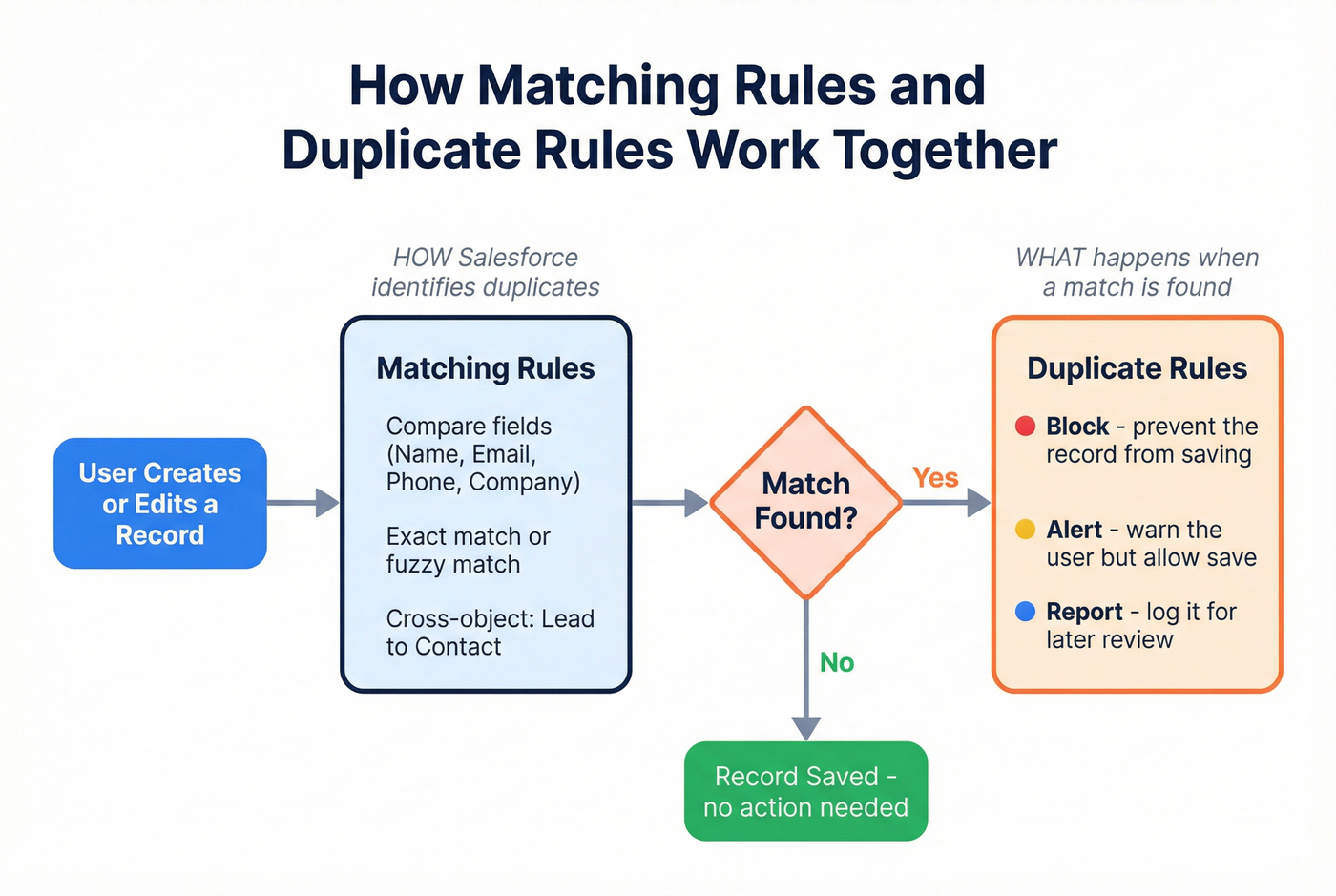
Salesforce provides out-of-the-box matching rules for standard objects like Accounts, Contacts, and Leads. You can configure additional matching - including cross-object Lead-to-Contact scenarios - when you need it. For most small orgs, enabling matching plus setting Duplicate Rules to "Alert" on create and edit is enough to catch the obvious stuff. Turn on the "Report" option too; it generates duplicate record set data you can use for dashboards and scheduled cleanup.
For fields like external IDs or email addresses, marking them as unique in Salesforce prevents exact-match duplicates at the database level. No rules needed.
Duplicate Jobs (and the Edition Lock)
Here's where it gets frustrating. Duplicate Jobs - the automated bulk scanning feature that finds existing duplicates across your database - are limited to Performance and Unlimited editions. If you're on Professional or Enterprise, you don't get this. You're stuck with manual searches or third-party tools for retroactive dedup.
Manual Merge: The 3-Record Ceiling
Salesforce's native merge UI handles Accounts, Contacts, and Leads, but only three records at a time. Got 15 duplicate records for the same company? That's five separate merge operations, each requiring manual field-by-field survivorship decisions. It works for one-off fixes. It doesn't work for systematic cleanup.
Advanced Automation - Flow and Apex
When native rules aren't flexible enough, you've got two paths before reaching for a third-party tool: Flow Builder and Apex triggers.
Flow Builder: No-Code Dedup
Record-triggered Flows can query for matching records using Get Records, then route through Decision elements to block, alert, or update. This is the go-to for admins who need cross-object logic - like checking whether an incoming Lead already exists as a Contact - without writing code.
New in Summer '24: Salesforce introduced a "Check for Matching Records" option directly in Flow's Create Records element. You configure match criteria and choose whether to skip or update matching records. We haven't seen many guides cover this feature, which is a shame - it's genuinely useful for import-triggered Flows and eliminates a ton of custom logic.
A practical tip: combine Flow-based checks with Duplicate Rules so you can allow bypasses for trusted integrations like your marketing automation sync while still protecting manual entry.
Apex Triggers: Full Custom Control
For developers, Apex triggers using addError() in before-insert and before-update contexts give you complete control over matching logic. You can match across custom objects, apply conditional rules based on record type or source, and handle edge cases that no declarative tool can reach. The bulk-insert caveat matters here - your trigger needs to handle collections properly, or a 200-record batch will fail unpredictably.
Which Approach to Use
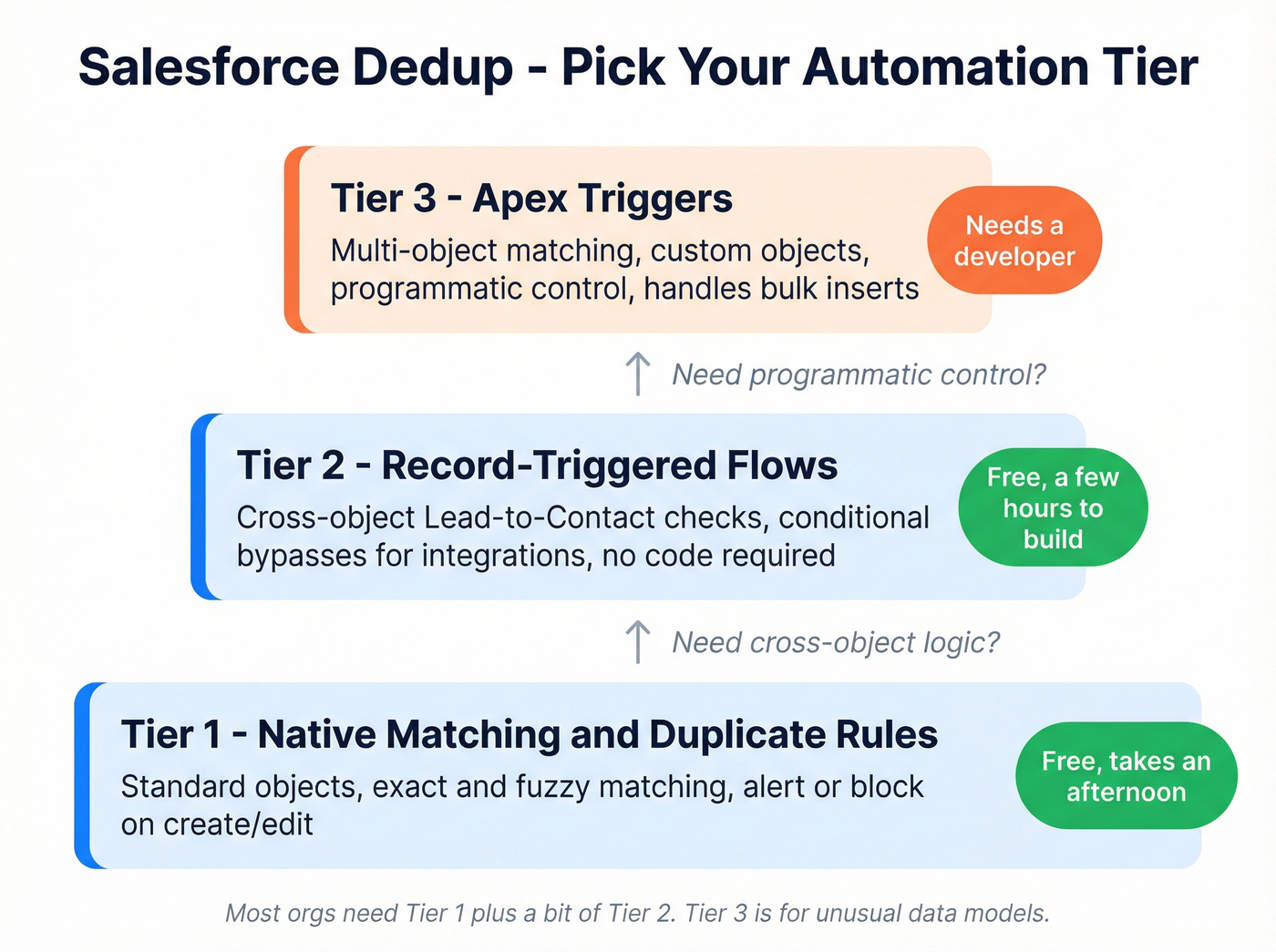
Think of it as a three-tier hierarchy. Native Matching and Duplicate Rules handle standard scenarios on standard objects. Record-triggered Flows add no-code custom logic for cross-object matching and conditional bypasses. Apex triggers are for complex, multi-object matching that requires programmatic control. Most orgs need tier one plus a bit of tier two. Tier three is for orgs with genuinely unusual data models.

Most Salesforce duplicates start with dirty data entering your CRM. Prospeo's CSV enrichment verifies emails at 98% accuracy and returns 50+ data points per contact - before you import a single record. No duplicates to merge later because bad data never gets in.
Kill duplicates at the source - verify and enrich before you import.
When Native Tools Aren't Enough
Native tools crack under specific conditions: higher record volumes, multiple business units with different matching requirements, cross-object duplicates that span Leads, Contacts, and custom objects, or any need for undo/rollback after a merge goes wrong.
The enterprise evaluation framework from Plauti lays out five pillars worth checking against: Salesforce-native architecture, granular rule-based matching beyond simple email comparison, flexibility for complex setups like country-by-country rules and BU-specific logic, continuous large-scale processing, and AI as an optional layer on top of deterministic rules. The most important one for most teams is flexibility. If your North America team and EMEA team need different matching logic, native rules can't handle that without ugly workarounds.
If you need three or more of those pillars, you've outgrown native.
Best Dedup Tools for Salesforce
Let's be honest: most teams don't need any of these tools on day one. Native rules plus a well-built Flow will get you 80% of the way there. But once you hit real scale - or once you need undo capability - the ROI on a dedicated tool is immediate.
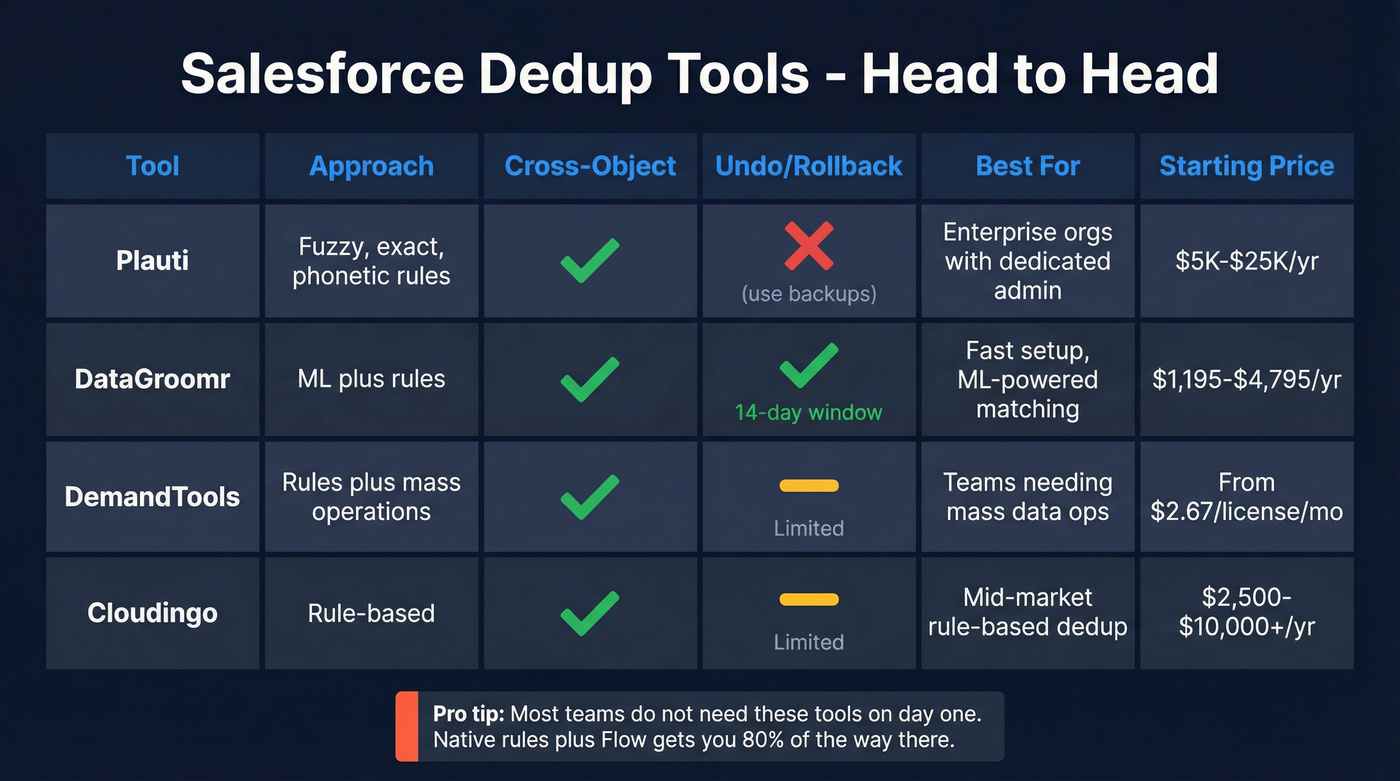
| Tool | Approach | Cross-Object | Undo | Pricing |
|---|---|---|---|---|
| Plauti | Fuzzy/exact/phonetic rules | Yes | No (use backups) | ~$5K-$25K/yr |
| DataGroomr | ML + rules | Yes | Yes (14-day) | $1,195-$4,795/yr |
| DemandTools | Rules + mass ops | Yes | Limited | From $2.67/license/mo |
| Cloudingo | Rule-based | Yes | Limited | $2,500-$10,000+/yr |
| OneMerge | Basic merge | Limited | No | Free edition available |
| No Duplicates | Fuzzy matching | Limited | No | Free trial |
Plauti Deduplicate
Plauti is the enterprise standard. Unlimited user access, an audit log, real-time prevention, and the ability to process millions of records using Salesforce-native architecture - it checks every box for large, complex orgs. The rule engine supports exact, fuzzy, and phonetic matching with configurable weights per field, plus cross-object dedup across standard and custom objects.
The tradeoff: Plauti requires real admin configuration. You're building matching rules from scratch, defining weights, testing scenarios. G2 reviewers (4.5/5, 113 reviews) consistently flag the learning curve - and that's the price of flexibility. Pricing is a black box: tiers exist (Advanced, Premium, Enterprise) but you won't find numbers on their site. Expect ~$5K-$25K/year depending on record volume and tier.
Use this if you're an enterprise org with a dedicated Salesforce admin and complex matching requirements. Skip this if you need something running in an afternoon.
DataGroomr
DataGroomr takes the opposite approach. Its pre-trained ML model scans your data immediately - no rule configuration required. Upload your dataset, and it starts finding duplicates within minutes. The side-by-side merge UI is clean, tag-based mass merging handles bulk operations efficiently, and the 14-day undo window is a genuine differentiator. If a merge goes wrong, you can restore the original records, including relationships, from the recycle bin.
In our experience, teams get DataGroomr producing results in under an hour, compared to a multi-day setup for Plauti. The cost is predictable too: $1,195-$4,795/year depending on tier, plus $500 per extra seat. The weakness is a smaller review footprint - fewer G2 reviews mean less social proof - and per-record costs can climb at scale.
DemandTools (Validity)
DemandTools earns its 4.6/5 G2 rating (284 reviews) through strong mass-operation capabilities. It's particularly good for import and migration dedup - scenarios where you're processing large batches and need powerful matching plus reporting.
Here's the thing: the product fragmentation is confusing. Elements edition starts at $2.67 per Salesforce license per month. The Enterprise edition runs $11 per Salesforce license per month. There's also an Excel plug-in that overlaps with the core product. Figuring out which tier you actually need takes more effort than it should, and G2 snippets flag "limited functionality" in certain areas compared to other suites.
Cloudingo
Cloudingo offers a clear rule-based engine with transparent pricing tiers: $2,500/year (Standard), $6,000/year (Professional), and Enterprise starting at $10,000/year. It's a solid middle-ground option with more automation depth than native tools and less complexity than Plauti. The 10-day trial is shorter than competitors, which is tight for a proper evaluation. Perfectly adequate for mid-market orgs with straightforward matching needs.
OneMerge & No Duplicates
OneMerge is the free option worth knowing about. It handles basic merge operations and works fine for small orgs doing occasional cleanup. No Duplicates is a newer entrant offering fuzzy matching with a free trial - early signs are promising for teams that want to evaluate before committing budget, but we'd want to see more G2 reviews before recommending it for production use.
Building a Duplicate Prevention Strategy
The cheapest duplicate to fix is the one you never create.
Every tool above cleans up messes that already exist. The smarter play is stopping bad data before it enters Salesforce. Here's a scenario that matching rules won't catch: the same person enters your CRM as "john@ibm.com" from a webinar list and "j.smith@ibm.com" from a sales import. Both are real addresses for the same person. Neither email matches the other, so Salesforce's Matching Rules see two distinct records. Now you've got a duplicate that only a human - or an upstream verification step - would catch.
Prospeo handles this by verifying and enriching contacts before they hit Salesforce. With a 92% API match rate and 98% email accuracy, it catches invalid addresses, fills in missing fields across 50+ data points per contact, and standardizes records so your matching rules actually have something consistent to work with. The native Salesforce integration means enriched data flows directly into your org. For bulk imports, run your CSV through Prospeo first - verify emails, fill gaps, and deduplicate the file before it ever touches Data Loader.

Pre-import hygiene also means using external IDs to match against existing records so you update instead of insert, and enforcing validation rules on key fields. But the single highest-impact step is making sure every email address is verified and every record is as complete as possible before import. That's where most duplicate chains start - and where they're easiest to break.
The Maintenance Playbook
Deduplication isn't a project. It's a practice. Here's the cadence that keeps orgs clean after the initial cleanup.
Weekly: Review your duplicate dashboard. Check which sources created the most new duplicates. If a specific integration or import process is consistently polluting your data, fix the source - don't just keep merging the output.
Monthly: Run mass merge/delete cycles using your tool of choice. Tune matching rules based on false positives and missed duplicates from the previous month. Document what you changed and why.
Quarterly: Audit every data source feeding Salesforce. Review survivorship logic - for each field, which value wins when records merge? For the Phone field, you'd choose "most recently modified" as the winner. For Account Name, "system-of-record from your ERP" makes more sense. This decision framework matters more than most teams realize, because a bad survivorship rule can overwrite good data with bad data on every single merge, and you won't notice until someone pulls a report full of garbage phone numbers three months later.
Track improvement over time using Duplicate Record Sets, which are reportable in Salesforce. Build a dashboard showing duplicate volume by week and source. If the trend line isn't going down, your prevention layer needs work.
Your ops team shouldn't spend Fridays merging records created by unverified list uploads. Prospeo catches invalid emails at $0.01 each, fills missing fields with verified data, and integrates natively with Salesforce - so every record enters clean, complete, and deduplicated.
Stop fixing CRM messes. Start preventing them for a penny per email.
FAQ
Can Salesforce find duplicates automatically?
Yes - Matching Rules identify duplicates and Duplicate Rules block or alert users in real time. Bulk Duplicate Jobs, though, require Performance or Unlimited editions. Orgs on lower editions need Flow automation or a third-party tool like DataGroomr or Plauti for automated detection at scale.
How do I merge more than 3 duplicates at once?
Salesforce's native merge UI caps at three records per operation. For bulk merging, use Plauti, DataGroomr, or DemandTools - all support mass merge with configurable survivorship rules. DataGroomr's tag-based approach is particularly efficient for large batches, and its 14-day undo window provides a safety net.
How do I prevent duplicates before importing data?
Verify and enrich your data before uploading. Use external IDs to match against existing records so you update rather than insert, enforce unique field constraints on email addresses, and run email verification to catch invalid and duplicate-prone addresses. A clean import file eliminates the majority of duplicates that matching rules would otherwise miss.
Do I need a paid dedup tool?
Not necessarily. Native Matching Rules plus Duplicate Rules handle basic scenarios on standard objects, and Flow Builder adds cross-object logic without code. Paid tools become essential when you need undo capability, advanced fuzzy matching at scale, or multiple business units with different matching requirements. For orgs under 50K records with simple data models, native tools are usually sufficient.